vulnerabilities
19 TopicsAgentless code scanning for GitHub and Azure DevOps (preview)
🚀 Start free preview ▶️ Watch a video on agentless code scanning Most security teams want to shift left. But for many developers, "shift left" sounds like "shift pain". Coordination. YAML edits with extra pipeline steps. Build slowdowns. More friction while they're trying to go fast. 🪛 Pipeline friction YAML edits with extra steps ⏱️ Build slowdowns More friction, less speed 🧩 Complex coordination Too many moving parts That's the tension we wanted to solve. With agentless code scanning in Defender for Cloud, you get broad visibility into code and infrastructure risks across GitHub and Azure DevOps - without touching your CI/CD pipelines or installing anything. ✨ Just connect your environment. We handle the rest. Already in preview, here's what's new Agentless code scanning was released in November 2024, and we're expanding the preview with capabilities to make it more actionable, customizable, and scalable: ✅ GitHub & Azure DevOps Connect your GitHub org and scan every repository automatically 🎯 Scoping controls Choose exactly which orgs, projects, and repos to scan 🔍 Scanner selection Enable code scanning, IaC scanning, or both 🧰 UI and REST API Manage at scale, programmatically or in-portal or Cloud portal 🎁 Available for free during the preview under Defender CSPM How agentless code scanning works Agentless code scanning runs entirely outside your pipelines. Once a connector has been created, Defender for Cloud automatically discovers your repositories, pulls the latest code, scans for security issues, and publishes findings as security recommendations - every day. Here's the flow: 1 Discover Repositories in GitHub or Azure DevOps are discovered using a built-in connector. 2 Retrieve The latest commit from the default branch is pulled immediately, then re-scanned daily. 3 Analyze Built-in scanners run in our environment: Code Scanning – looks for insecure patterns, bad crypto, and unsafe functions (e.g., `pickle.loads`, `eval()`) using Bandit and ESLint. Infrastructure as Code (IaC) – detects misconfigurations in Terraform, Bicep, ARM templates, CloudFormation, Kubernetes manifests, Dockerfiles, and more using Checkov and Template Analyzer. 4 Publish Findings appear as Security recommendations in Defender for Cloud, with full context: file path, line number, rule ID, and guidance to fix. Get started in under a minute 1 In Defender for Cloud, go to Environment settings → DevOps Security 2 Add a connector: Azure DevOps – requires Azure Security Admin and ADO Project Collection Admin GitHub – requires Azure Security Admin and GitHub Org Owner to install the Microsoft Security DevOps app 3 Choose your scanning scope and scanners 4 Click Save – and we'll run the first scan immediately s than a minute No pipeline configuration. No agent installed. No developer effort. Do I still need in-pipeline scanning? Short answer: yes - if you want depth and speed in the development workflow. Agentless scanning gives you fast, wide coverage. But Defender for Cloud also supports in-pipeline scanning using Microsoft Security DevOps (MSDO) command line application for Azure DevOps or GitHub Action. Each method has its own strengths. Here's how to think about when to use which - and why many teams choose both: When to use... ☁️ Agentless Scanning 🏗️ In-Pipeline Scanning Visibility Quickly assess all repos at org-level Scans and enforce every PR and commit Setup Requires only a connector Requires pipeline (YAML) edits Dev experience No impact on build time Inline feedback inside PRs and builds Granularity Repo-level control with code and IaC scanners Fine-tuned control per tool or branch Depth Default branch scans, no build context Full build artifact, container, and dependency scanning 💡 Best practice: start broad with agentless. Go deeper with in-pipeline scans where "break the build" makes sense. Already using GitHub Advanced Security (GHAS)? GitHub Advanced Security (GHAS) includes built-in scanning for secrets, CodeQL, and open-source dependencies - directly in GitHub and Azure DevOps. You don't need to choose. Defender for Cloud complements GHAS by: Surfaces GHAS findings inside Defender for Cloud's Security recommendations Adds broader context across code, infrastructure, and identity Requires no extra setup - findings flow in through the connector You get centralized visibility, even if your teams are split across tools. One console. Full picture. Core scenarios you can tackle today 🛡️ Catch IaC misconfigurations early Scan for critical misconfigurations in Terraform, ARM, Bicep, Dockerfiles, and Kubernetes manifests. Flag issues like public storage access or open network rules before they're deployed. 🎯 Bring code risk into context All findings appear in the same portal you use for VM and container security. No more jumping between tools - triage issues by risk, drill into the affected repository and file, and route them to the right owner. 🔍 Focus on what matters Customize which scanners run and where. Continuously scan production repositories. Skip forks. Run scoped PoCs. Keep pace as repositories grow - new ones are auto-discovered. What you'll see - and where All detected security issues show up as security recommendations in the recommendations and DevOps Security blades in Defender for Cloud. Every recommendation includes: ✅ Affected repository, branch, file path, and line number 🛠️ The scanner that found it 💡 Clear guidance to fix What's next We're not stopping here. These are already in development: 🔐 Secret scanning Identify leaked credentials alongside code and IaC findings 📦 Dependency scanning Open-source dependency scanning (SCA) 🌿 Multi-branch support Scan protected and non-default branches Follow updates in our Tech Community and release notes. Try it now - and help us shape what comes next Connect GitHub or Azure DevOps to Defender for Cloud (free during preview) and enable agentless code scanning View your discovered DevOps resources in the Inventory or DevOps Security blades Enable scanning and review recommendations Microsoft Defender for Cloud → Recommendations Shift left without slowing down. Start scanning smarter with agentless code scanning today. Helpful resources to learn more Learn more in the Defender for Cloud in the Field episode on agentless code scanning Overview of Microsoft Defender for Cloud DevOps security Agentless code scanning - configuration, capabilities, and limitations Set up in-pipeline scanning in: Azure DevOps GitHub action Other CI/CD pipeline tools (Jenkins, BitBucket Pipelines, Google Cloud Build, Bamboo, CircleCI, and more)
Sensitivity Data Flag will not be deleted after Settings are changed
We have a lot of storage accounts which are flaged with risk factor "Sensitive Data" which also means all storage Accounts which have this label have risklevel critical. We deactivated Sensitive Data Scan but nothing happens As I got it correct once a resource is flagged with "Sensitive Data" the flag will not delete anymore What we did so far: turn off/on/off… the data scanning turn off/on/off Data sensitivity deselect all of different data sensitivity categories like Finance, PII, and Credentials turn off/on/off threshold for sensitive data labels turn off/on complete Defender There is also a support ticket where the support can the recommendation was to open a discussion here to have the product team look at this error (#2502031420002278)110Views0likes0Comments
Enable Bring Your Own License (BYOL)
A customer uses Bring your own license (BYOL) capability, which is being deprecated, to deploy Qualys extension in their VMs. They are questioning about the deprecation, this deprecation implicates the deploy won't be more available, but what happen with the machines already has deployed the Qualys extension? Will the extension be removed from machines, since it was deployed via BYOL? Or after deprecated the extension continues working for the already deployed machines?Update OpenSSL : Machines should have vulnerability findings resolved
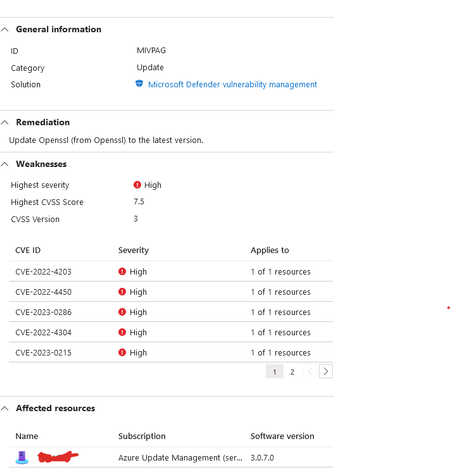
Hi, I am new to this Defender Cloud. We are getting this message about out of date OpenSSL version: I have updated the .NetCore to the latest version : However it still doesnt seems to have resolved the error from Defender Cloud. I dont have any OpenSSL client installed on this machine from .net core. when I searched I only found these files : any assistance will be greatly appreciated on how do I resolve this issue? as far as I can see everything is up to date.3.2KViews0likes1Comment
Qualys scanner vs Microsoft Defender Vulnerability Management
Hi, Does anyone knows what the benefit is to move from Qualys scanner to Microsoft Defender Vulnerability Management? Or pros and cons about them? And does Microsoft Defender Vulnerability Management can: Generate reports? Can it tell if the vulnerability is exploitable? Can it tell me the publish date of the vulnerability? Can it tell me the release date of the patch? Can I use filters or querys to find which vulnerabilities are greater than 90 days? Can patching be from third parties and from Windows? Does it give you the risk of the vulnerbaility and/or type of severity? I only find this: https://learn.microsoft.com/en-us/azure/defender-for-cloud/deploy-vulnerability-assessment-vm?source=recommendations https://learn.microsoft.com/en-us/azure/defender-for-cloud/deploy-vulnerability-assessment-defender-vulnerability-management?source=recommendations Thank you!2.5KViews1like0CommentsDefender for SQL Vuln Assessment for Arc Enabled servers
Can anyone confirm that the Vulnerability Assessment in Defender for Databases works for Arc enabled servers? This Scan your Azure SQL databases for vulnerabilities - Microsoft Defender for Cloud | Microsoft Learn does not include those type of machines, but I think its just an oversight in the documentation375Views0likes0CommentsNew Blog | Securing your GitLab Environment with Microsoft Defender for Cloud
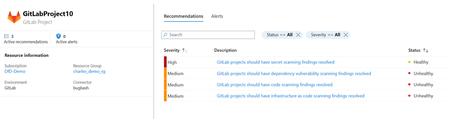
At Microsoft Ignite 2023, Microsoft Defender for Cloud unveiled a new integration, extending its DevOps security coverage outside of the Microsoft ecosystem and integrating with the all-in-one DevOps platform GitLab. With this integration, security practitioners can monitor the security posture of their GitLab environments and kick off developer remediation workflows. Additionally, customers with Defender CSPM will receive advanced contextualization and prioritization capabilities for their GitLab environments. Read the full blog here: Securing your GitLab Environment with Microsoft Defender for Cloud693Views0likes0CommentsNew Blog | High severity curl vulnerability: prepare with Microsoft Defender for Cloud
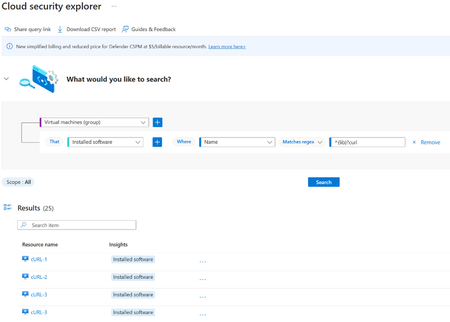
On October 2nd, high severity vulnerabilities in curl were preannounced. The curl project has announced that curl8.4.0 will be released on October 11th, earlier than expected. While the vulnerabilities have yet to be disclosed, it is expected that two vulnerabilities will be released: high-severity CVE-2023-38545 and low-severity CVE-2023-38546. curl is a popular command-line tool and library (libcurl) used to transfer data across network protocols using URL syntax. The library is one of the most widely used open-source projects across most operating systems, including Windows and Linux, and is one of the most popular OSS packages present in clients, embedded systems, and cloud-native applications/containers. Explicit details on the vulnerabilities, such as vectors and impacted versions, have not been disclosed at this time. We will update this blog post once the details are available after October 11th with further guidance. However, we encourage customers to prepare ahead of time by understanding where and how in their environments they are using curl. Read the full blog here: High severity curl vulnerability: prepare with Microsoft Defender for Cloud - Microsoft Community Hub2.4KViews0likes0CommentsSecurity alerts in Microsoft defender for Cloud
Hello All, we have received below security alert in Microsoft defender for cloud for our App service. 1) NMap scanning detected (for this we got the carrier and organization as Microsoft) 2) Vulnerability scanner detected 3) Suspicious User Agent detected Our website is Internet facing (Public facing). so, we cannot put much restriction on our app service (ex IP restriction, SSL certificate). We are unable to investigate the below alerts. we checked the log analytics workspace logs but and extracted the logs from the caller IP. but could not find much information form it we also checked there was no impact found on our webapp. 1) NMap scanning detected (for this we got the carrier and organization as Microsoft) 2) Vulnerability scanner detected 3) Suspicious User Agent detected Is there any way by which we can investigate why these alerts got generated. and what next action can be taken on this ?2.9KViews0likes1CommentBlog | Malware Scanning for cloud storage GA pre-announcement|prevent malicious content distribution
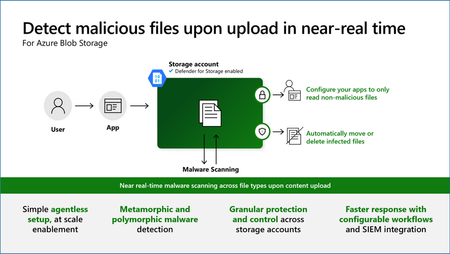
Malware Scanning in Defender for Storage will be generally available (GA) for Azure Blob Storage on September 1, 2023. This add-on to Defender for Storage will be priced at $0.15 (USD) per GB of data scanned. Malware Scanning in Defender for Storage helps protect your Blob storage accounts from malicious content by performing a full, built-in, agentless malware scan on uploaded content in near real time, using Microsoft Defender Antivirus capabilities. It scans all file types and allows you to detect and prevent malware distribution events. Read the full blog post: Malware Scanning for cloud storage GA pre-announcement | prevent malicious content distribution at scale (microsoft.com)1.5KViews0likes0Comments