vpn gateway
27 Topics
My First TechCommunity Post: Azure VPN Gateway BGP Timer Mismatches
This is my first post on the Microsoft TechCommunity. Today is my seven-year anniversary at Microsoft. In my current role as a Senior Cloud Solution Architect supporting Infrastructure in Cloud & AI Platforms, I want to start by sharing a real-world lesson learned from customer engagements rather than a purely theoretical walkthrough. This work and the update of the official documentation on Microsoft Learn is the culmination of nearly two years of support for a very large global SD-WAN deployment with hundreds of site-to-site VPN connections into Azure VPN Gateway. The topic is deceptively simple—BGP timers—but mismatched expectations can cause significant instability when connecting on‑premises environments to Azure. If you’ve ever seen seemingly random BGP session resets, intermittent route loss, or confusing failover behavior, there’s a good chance that a timer mismatch between Azure and your customer premises equipment (CPE) was a contributing factor. Customer Expectation: BGP Timer Negotiation Many enterprise routers and firewalls support aggressive BGP timers and expect them to be negotiated during session establishment. A common configuration I see in customer environments looks like: Keepalive: 10 seconds Hold time: 30 seconds This configuration is not inherently wrong. In fact, it is often used intentionally to speed up failure detection and convergence in conventional network environments. My past experience with short timers was in a national cellular network carrier between core switching routers in adjacent racks, but all other connections used the default timer values. The challenge appears when that expectation is carried into Azure VPN Gateway. Azure VPN Gateway Reality: Fixed BGP Timers Azure VPN Gateway supports BGP but uses fixed timers (60/180) and won’t negotiate down. The timers are documented: The BGP keepalive timer is 60 seconds, and the hold timer is 180 seconds. Azure VPN Gateways use fixed timer values and do not support configurable keepalive or hold timers. This behavior is consistent across supported VPN Gateway SKUs that offer BGP support. Unlike some on‑premises devices, Azure will not adapt its timers downward during session establishment. What Happens During a Timer Mismatch When a CPE is configured with a 30‑second hold timer, it expects to receive BGP keepalives well within that window. Azure, however, sends BGP keepalives every 60 seconds. From the CPE’s point of view: No keepalive is received within 30 seconds The BGP hold timer expires The session is declared dead and torn down Azure may not declare the peer down on the same timeline as the CPE. This mismatch leads to repeated session flaps. The Hidden Side Effect: BGP State and Stability Controls During these rapid teardown and re‑establishment cycles, many CPE platforms rebuild their BGP tables and may increment internal routing metadata. When this occurs repeatedly: Azure observes unexpected and rapid route updates The BGP finite state machine is forced to continually reset and re‑converge BGP session stability is compromised CPE equipment logging may trigger alerts and internal support tickets. The resulting behavior is often described by customers as “Azure randomly drops routes” or “BGP is unstable”, when the instability originates from mismatched BGP timer expectations between the CPE and Azure VPN Gateway. Why This Is More Noticeable on VPN (Not ExpressRoute) This issue is far more common with VPN Gateway than with ExpressRoute. ExpressRoute supports BFD and allows faster failure detection without relying solely on aggressive BGP timers. VPN Gateway does not support BFD, so customers sometimes compensate by lowering BGP timers on the CPE—unintentionally creating this mismatch. The VPN path is Internet/WAN-like where delay/loss/jitter is normal, so conservative timer choices are stability-focused. Updated Azure Documentation The good news is that the official Azure documentation has been updated to clearly state the fixed BGP timer values for VPN Gateway: Keepalive: 60 seconds Hold time: 180 seconds Timer negotiation: Azure uses fixed timers Azure VPN Gateway FAQ | Microsoft Learn This clarification helps set the right expectations and prevents customers from assuming Azure behaves like conventional CPE routers. Practical Guidance If you are connecting a CPE to Azure VPN Gateway using BGP: Do not configure BGP timers lower than Azure’s defaults Align CPE timers to 60 / 180 or higher Avoid using aggressive timers as a substitute for BFD For further resilience: Consider Active‑Active VPN Gateways for better resiliency Use 4 Tunnels commonly implemented in a bowtie configuration for even better resiliency and traffic stability Closing Thoughts This is a great example of how cloud networking often behaves correctly, but differently than conventional on‑premises networking environments. Understanding those differences—and documenting them clearly—can save hours of troubleshooting and frustration. If this post helps even one engineer avoid a late‑night or multi-month BGP debugging session, then it has done its job. I did use AI (M365 Copilot) to aid in formatting and to validate technical accuracy. Otherwise, these are my thoughts. Thanks for reading my first TechCommunity post.712Views4likes0Comments
Traffic processing BGP Azure VPN gateway A/A
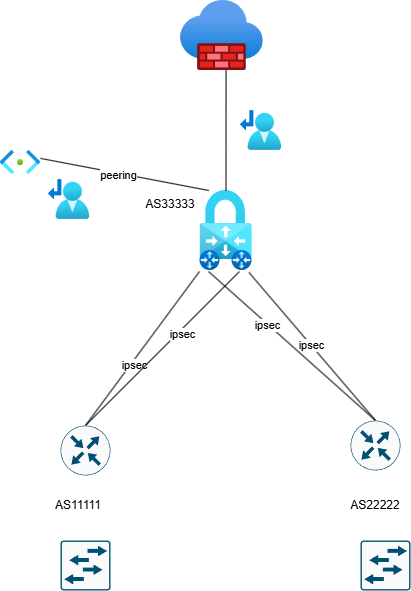
Hello, Can someone explain how Azure processes the traffic with implemented a VPN gateway in Active Active mode?. Azure firewall premium is also configured. BGP is without preferences. The user route definition is set up to the next hop Azure firewall . Is it possible in this scenario occurs the asymmetric routing with traffic drop by azure firewall ? In my understand is that, if we need to configure User route definition on Gateway subnet to inspect traffic to peering subnet, so the firewall don't see traffic passing through VPN gateway. Traffic going through ipsec tunnels can go different paths and firewall do not interfere because everything is routed to it by user route definition.482Views0likes5Comments
Help! - How is VNet traffic reaching vWAN/on‑prem when the VNet isn’t connected to the vWAN hub
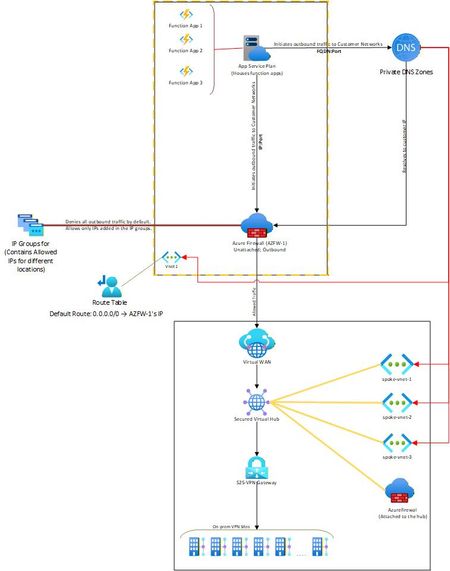
Hello, I needed some clarity on how the following is working: Attached is a network diagram of our current setup. The function apps (in VNet-1) initiate a connection(s) to a specific IP:Port or FQDN:Port in the on-premises network(s). A Private DNS zone ensures that any FQDN is resolved to the correct internal IP address of the on-prem endpoint. In our setup, both the function app and the external firewall reside in the same VNet. This firewall is described as “Unattached” because it is not the built-in firewall of a secured vWAN hub, but rather an independent Azure Firewall deployed in that VNet. The VNet has a user-defined default route (0.0.0.0/0) directing all outbound traffic to the firewall’s IP. The firewall then filters the traffic, allowing only traffic destined to whitelisted on-premises IP: Port or FQDN: Port combinations (using IP Groups), and blocking everything else. The critical question and the part that I am unable to figure out is: Once the firewall permits a packet, how does Azure know to route it to the vWAN hub and on to the site-to-site VPN? Because VNet-1 truly has no connection at all to the vWAN hub (no direct attachment, no peering, no VPN from the NVA). But the traffic is still reaching the on-prem sites. Unable to figure out how this is happening. Am I missing something obvious? Any help on this would be appreciated. Thank you!535Views0likes4Comments
Spoke-Hub-Hub Traffic with VPN Gateway BGP and Firewall Issue
Hello, I’m facing a situation where I’m trying to have Azure Firewall Inspection on the VPN Gateway VNET-VNET Connectivity. It seems to work if I go from SpokeA-HubAFirewall-HubAVPN—HubBVPN-SpokeB but if I try to go from SpokeA-HubAFirewall-HubAVPN-HubBVM or Inbound Resolver it fails to route correctly according to Connectivity Troubleshooter it stops at HubAVPN with Local Error: RouteMissing but then reaches destination health so makes me believe it’s getting there but not following the route I want it to take which might be causing routing issues. What Am I missing here? This connectivity was working before introducing the Azure Firewall for Inspection with the UDR. Is what I’m trying to accomplish not possible? I’ve tried different types of UDR rules on the Gateway Subnet, and this is my most recent configuration. The reason I’m trying to accomplish this is because I’m seeing a similar error in our Hub-Spoke Hybrid environment and I’m trying to replicate the issue. Current Configuration 2x Hubs with Spoke networks attached so example Hub-Spoke-A Configuration: Hub-A Contains following subnets and Resources VPN Gateway - GateWaySubnet Azure Firewall - AzureFirewallSubnet Inbound Private Resolver - PrivateResolverSubnet Virtual Machine – VM Subnet Gateway Subnet has an attached UDR with the following routes Propagation - True Prefix Destination – Hub-B Next Hop Type – Virtual Appliance Next Hope IP – Hub-A Firewall Prefix Destination – Spoke-B Next Hop Type – Virtual Appliance Next Hope IP – Hub-A Firewall Hub-Spoke-B Configuration: Hub-B Contains following subnets and Resources VPN Gateway - GateWaySubnet Azure Firewall - AzureFirewallSubnet Inbound Private Resolver - PrivateResolverSubnet Virtual Machine – VM Subnet Gateway Subnet has an attached UDR with the following Routes Propagation - True Prefix Destination – Hub-A Next Hop Type – Virtual Appliance Next Hope IP – Hub-B Firewall Prefix Destination – Spoke-A Next Hop Type – Virtual Appliance Next Hope IP – Hub-B Firewall Spoke Subnets has an attached UDR with the following Routes Propagation - True Prefix Destination – 0.0.0.0/0 Next Hop Type – Virtual Appliance Next Hope IP – HubA/HubB Firewall (Depending on what hub its peered to) VPN Gateways HA VNET-VNET with BGP Enabled. I can see that it knows the routes and like I said this was working prior introducing the UDRs for force traffic through the azure firewall.599Views0likes2Comments
BGP Routing from and to VPN Gateway
Hello All, I am setting up a lab concerning vWAN connection to onprem via SDWAN and I have some issues getting the routing to work properly. I have a hub which symbolizes the on-premises hub with a VPN gateway (gw-onprem) and a VM (on-prem-hubvm) deployed. Attached to the onprem-hub is a) on-prem spoke with a VM (on-prem VM). b) two vnets that symbolize the sdwan. Both of which have a VPN gateway as well as one VM each deployed (gw-sd-1/2) The SDWan Gateways are connected via s2s to two different vWAN hubs in two different locations. The vWAN has a third Hub which is not directly connected to on-prem What I am trying to lab is what direction the traffic is tacking from the vWAN Hubs to the last on-premise VM. The traffic currently goes all the way through the s2s vpn connection, but it gets dropped afterwards. I am struggling to set-up the routing from the sd-gw's to the on-premises machine. The routing needs to work through BGP The goal of the Lab is to see which path to on-premises is preferred if the hub preference is AS Path (shortest BGP Path). BGP is enabled on all VPN Gateways The SD GWs are peered to the onprem Hub GW but no vnet peering. The on-premises Vnets are peered. Somehow the VPN Gateways are not learning the routes to on-premises. I tried pointing the way with UDRs but somehow it also isnt working I've tried setting up UDRs so that the traffic would be the following vWAN Hub -> sd GW > sd VM > GW-onprem (> on-prem-hubvm) > on-prem VM954Views0likes2CommentsInternal API : Virtual Network support for Power Platform
Hello Everyone, We are using Custom Connectors from Power Automate Flows to initiate a call to the Internal API that is hosted in Azure through the MuleSoft Data Gateway. Since we are unable to activate the private endpoint for this internal API, we are seeking guidance on how to securely connect to the API via V-Net integration. Please advise. As per the Microsoft Documentation : Use custom connectors (preview) to securely connect to your services that are protected by private endpoints in Azure or services that are hosted within your private network. https://learn.microsoft.com/en-us/power-platform/admin/vnet-support-overview Thanks, -Sri726Views0likes1Comment
Deploy Dynamic Routing (BGP) between Azure VPN and Third-Party Firewall (Palo Alto)
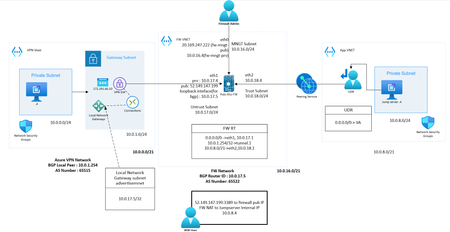
Overview This blog explains how to deploy dynamic routing (BGP) between Azure VPN and a third-party firewall. You can refer to this topology and deployment guide in scenarios where you need VPN connectivity between an on-premises third-party VPN device and Azure VPN, or any cloud environment. What is BGP? Border Gateway Protocol (BGP) is a standardized exterior gateway protocol used to exchange routing information across the internet and between different autonomous systems (AS). It is the protocol that makes the internet work by enabling data routing between different networks. Here are some key points about BGP: Routing Between Autonomous Systems: BGP is used for routing between large networks that are under different administrative control, known as autonomous systems (AS). Each AS is assigned a unique number. Path Vector Protocol: BGP is a path vector protocol, meaning it maintains the path information that gets updated dynamically as routes are added or removed. This helps in making routing decisions based on path attributes. Scalability: BGP is designed to handle a large number of routes, making it highly scalable for use on the internet. Policy-Based Routing: BGP allows network administrators to set policies that can influence routing decisions. For example, administrators can prefer certain routes over others based on specific criteria such as path length or AS path. Peering: BGP peers are routers that establish a connection to exchange routing information. Peering can be either internal (within the same AS) or external (between different AS). Route Advertisement: BGP advertises routes along with various attributes such as AS path, next hop, and network prefix. This helps in making informed decisions on the best route to take. Convergence: BGP can take some time to converge, meaning to stabilize its routing tables after a network change. However, it is designed to be very stable once converged. Use in Azure: In Azure, BGP is used to facilitate dynamic routing in scenarios like connecting Azure VNets to on-premises networks via VPN gateways. This dynamic routing allows for more resilient and flexible network designs. Switching from static routing to BGP for your Azure VPN gateway will enable dynamic routing, allowing the Azure network and your on-premises network to exchange routing information automatically, leading to potentially better failover and redundancy. Why BGP? BGP is the standard routing protocol commonly used in the Internet to exchange routing and reachability information between two or more networks. When used in the context of Azure Virtual Networks, BGP enables the Azure VPN gateways and your on-premises VPN devices, called BGP peers or neighbors, to exchange "routes" that will inform both gateways on the availability and reachability for those prefixes to go through the gateways or routers involved. BGP can also enable transit routing among multiple networks by propagating routes a BGP gateway learns from one BGP peer to all other BGP peers. Diagram Pre-Requisite Firewall Network: Firewall with three interfaces (Public, Private, Management). Here, the LAB has configured with VM-series Palo Alto firewall. Azure VPN Network: Test VM, Gateway Subnet Test Network Connected to Firewall Network: Azure VM with UDR pointing to Firewall's Internal Interface. The test network should be peered with firewall network. Configuration Part 1: Configure Azure VPN with BGP enabled Create Virtual Network Gateway from marketplace Provide Name, Gateway type (VPN), VPN SKU, VNet (with dedicated Gateway Subnet), Public IP Enable BGP and provide AS number Create Note: Azure will auto provision a local BGP peer with an IP address from Gateway Subnet. After deployment the configuration will look similar to below. Make a note of Public IP and BGP Peer IP generated, we need this while configuring VPN at remote end. Create Local Network Gateway Local Network Gateway represents the firewall VPN network Configuration where you should provide remote configuration parameters. Provide Name, Remote peer Public IP In the Address space specify remote BGP peer IP (/32) (Router ID in case of Palo Alto). Please note that if you are configuring static route instead of dynamic you should advertise entire remote network ranges which you want to communicate through VPN. Here BGP making this process much simpler. In Advanced tab enable BGP and provide remote ASN Number and BGP peer IP create Create Connections with default crypto profile Once the VPN Gateway and Local Network Gateway has provisioned you can build connection which represents IPsec and IKE configurations. Go to VPN GW and under Settings, Add Connection Provide Name, VPN Gateway, Local Network Gateway, Pre-Shared Key Enable BGP If Required, Modify IPsec and IKE Crypto setting, else leave it as default Create Completed the Azure end configuration, now we can move to firewall side. Part 2: Configure Palo Alto Firewall VPN with BGP enabled Create IKE Gateway with default IKE Crypto profile Provide IKE Version, Local VPN Interface, Peer IP, Pre-shared key Create IPSec Tunnel with default IPsec Crypto profile Create Tunnel Interface Create IPsec Tunnel: Provide tunnel Interface, IPsec Crypto profile, IKE Gateway Since we are configuring route-based VPN, tunnel interface is very necessary to route traffic which needed to be encrypted. By this configuration your tunnel should be UP Now finish the remaining BGP Configurations Configure a Loopback interface to represent BGP virtual router, we have provided 10.0.17.5 IP for the interface, which is a free IP from public subnet. Configure virtual router Redistribution Profile Configure Redistribution Profile as below, this configuration ensures what kind of routers needed to be redistributed to BGP peer routers Enable BGP and configure local BGP and peer BGP parameters Provide Router ID, AS number Make sure to enable Install Route Option Configure EBGP Peer Group and Peer with Local BGP Peer IP, Remote (Azure)BGP Peer IP and Remote (Azure) BGP ASN Number. Also Specify Redistribution profile, make sure to enable Allow Redistribute Default Route, if you need to propagate default route to BGP peer router Create Static route for Azure BGP peer, 10.0.1.254/32 Commit changes Test Results Now we can test the connectivity, we have already configured necessary NAT and default route in Firewall. You can see the propagated route in both azure VPN gateway and Palo Alto firewall. FW NAT Name Src Zone Dst Zone Destination Interface Destination Address Service NAT Action nattovm1 any Untrust any untrust_inteface_pub_ip 3389 DNAT to VM1 IP nattovm2 any Untrust any untrust_interface_pub_ip 3000 DNAT to VM2 IP natto internet any Untrust ethernet1/1 default 0.0.0.0/0 SNAT to Eth1/1 Stattic Route configured: Azure VPN GW Connection Status and Propagated routes Azure Test VM1 (10.0.0.4) Effective routes Palo Alto BGP Summary Palo Alto BGP connection status Palo Alto BGP Received Route Palo Alto BGP Propagated Route Final Forwarding table Ping and trace result from Test VM1 to test VM2 Conclusion: BGP simplifies the route advertisement process. There are many more configuration options that we can try in BGP to achieve smooth functioning of routing. BGP also enables automatic redundancy and high availability. Hence, it is always recommended to configure BGP when it comes to production-grade complex networking.7.1KViews2likes0CommentsIssue with Azure VM Conditional Access for Office 365 and Dynamic Public IP Detection
Hi all, I have a VM in Azure where I need to allow an account with MFA to bypass the requirement on this specific server when using Office 365. I've tried to achieve this using Conditional Access by excluding locations, specifically the IP range of my Azure environment. Although I’ve disconnected any public IPs from this server, the Conditional Access policy still isn’t working as intended. The issue seems to be that it continues to detect a public IP, which changes frequently, making it impossible to exclude. What am I doing wrong?2KViews0likes5CommentsAzure Coexistence ExpressRoute and VPN Gateway
Good Day Team, Got a rookie question I'm not getting. Does the coexistence between the expressroute and VPN gateway mean: 1. one of each gateway type can be provisioned within a VNET or 2. both VPN and ExpressRoute connections can be terminated on a single gateway within a Virtual Network? Thanks to all those who are to help. Aegis1.7KViews0likes4Comments
Azure VPN Connection
Greetings - I don't know if this is possible in Azure, but I figured I would try as all the classes I have taken don't have an answer. I am new to Azure networking so what I want to do may not be possible. I have created an Azure VPN to our client. We have a SQL server there we pull data from there for reporting. I am trying to create an endpoint in Azure Data Factory to connect automatically over that VPN to run the reports. I have tried private links and PL Service but it looks like it can only be done in internal networks and not the gateway that the VPN is on. Any help would be appreciated. Thank you.3.4KViews0likes4Comments