vpn gateway
27 Topics
My First TechCommunity Post: Azure VPN Gateway BGP Timer Mismatches
This is my first post on the Microsoft TechCommunity. Today is my seven-year anniversary at Microsoft. In my current role as a Senior Cloud Solution Architect supporting Infrastructure in Cloud & AI Platforms, I want to start by sharing a real-world lesson learned from customer engagements rather than a purely theoretical walkthrough. This work and the update of the official documentation on Microsoft Learn is the culmination of nearly two years of support for a very large global SD-WAN deployment with hundreds of site-to-site VPN connections into Azure VPN Gateway. The topic is deceptively simple—BGP timers—but mismatched expectations can cause significant instability when connecting on‑premises environments to Azure. If you’ve ever seen seemingly random BGP session resets, intermittent route loss, or confusing failover behavior, there’s a good chance that a timer mismatch between Azure and your customer premises equipment (CPE) was a contributing factor. Customer Expectation: BGP Timer Negotiation Many enterprise routers and firewalls support aggressive BGP timers and expect them to be negotiated during session establishment. A common configuration I see in customer environments looks like: Keepalive: 10 seconds Hold time: 30 seconds This configuration is not inherently wrong. In fact, it is often used intentionally to speed up failure detection and convergence in conventional network environments. My past experience with short timers was in a national cellular network carrier between core switching routers in adjacent racks, but all other connections used the default timer values. The challenge appears when that expectation is carried into Azure VPN Gateway. Azure VPN Gateway Reality: Fixed BGP Timers Azure VPN Gateway supports BGP but uses fixed timers (60/180) and won’t negotiate down. The timers are documented: The BGP keepalive timer is 60 seconds, and the hold timer is 180 seconds. Azure VPN Gateways use fixed timer values and do not support configurable keepalive or hold timers. This behavior is consistent across supported VPN Gateway SKUs that offer BGP support. Unlike some on‑premises devices, Azure will not adapt its timers downward during session establishment. What Happens During a Timer Mismatch When a CPE is configured with a 30‑second hold timer, it expects to receive BGP keepalives well within that window. Azure, however, sends BGP keepalives every 60 seconds. From the CPE’s point of view: No keepalive is received within 30 seconds The BGP hold timer expires The session is declared dead and torn down Azure may not declare the peer down on the same timeline as the CPE. This mismatch leads to repeated session flaps. The Hidden Side Effect: BGP State and Stability Controls During these rapid teardown and re‑establishment cycles, many CPE platforms rebuild their BGP tables and may increment internal routing metadata. When this occurs repeatedly: Azure observes unexpected and rapid route updates The BGP finite state machine is forced to continually reset and re‑converge BGP session stability is compromised CPE equipment logging may trigger alerts and internal support tickets. The resulting behavior is often described by customers as “Azure randomly drops routes” or “BGP is unstable”, when the instability originates from mismatched BGP timer expectations between the CPE and Azure VPN Gateway. Why This Is More Noticeable on VPN (Not ExpressRoute) This issue is far more common with VPN Gateway than with ExpressRoute. ExpressRoute supports BFD and allows faster failure detection without relying solely on aggressive BGP timers. VPN Gateway does not support BFD, so customers sometimes compensate by lowering BGP timers on the CPE—unintentionally creating this mismatch. The VPN path is Internet/WAN-like where delay/loss/jitter is normal, so conservative timer choices are stability-focused. Updated Azure Documentation The good news is that the official Azure documentation has been updated to clearly state the fixed BGP timer values for VPN Gateway: Keepalive: 60 seconds Hold time: 180 seconds Timer negotiation: Azure uses fixed timers Azure VPN Gateway FAQ | Microsoft Learn This clarification helps set the right expectations and prevents customers from assuming Azure behaves like conventional CPE routers. Practical Guidance If you are connecting a CPE to Azure VPN Gateway using BGP: Do not configure BGP timers lower than Azure’s defaults Align CPE timers to 60 / 180 or higher Avoid using aggressive timers as a substitute for BFD For further resilience: Consider Active‑Active VPN Gateways for better resiliency Use 4 Tunnels commonly implemented in a bowtie configuration for even better resiliency and traffic stability Closing Thoughts This is a great example of how cloud networking often behaves correctly, but differently than conventional on‑premises networking environments. Understanding those differences—and documenting them clearly—can save hours of troubleshooting and frustration. If this post helps even one engineer avoid a late‑night or multi-month BGP debugging session, then it has done its job. I did use AI (M365 Copilot) to aid in formatting and to validate technical accuracy. Otherwise, these are my thoughts. Thanks for reading my first TechCommunity post.712Views4likes0Comments
Deploy Dynamic Routing (BGP) between Azure VPN and Third-Party Firewall (Palo Alto)
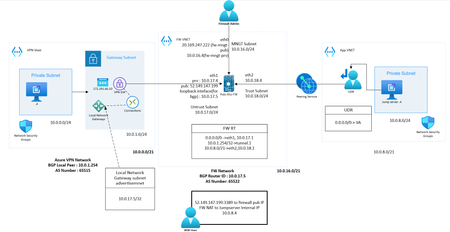
Overview This blog explains how to deploy dynamic routing (BGP) between Azure VPN and a third-party firewall. You can refer to this topology and deployment guide in scenarios where you need VPN connectivity between an on-premises third-party VPN device and Azure VPN, or any cloud environment. What is BGP? Border Gateway Protocol (BGP) is a standardized exterior gateway protocol used to exchange routing information across the internet and between different autonomous systems (AS). It is the protocol that makes the internet work by enabling data routing between different networks. Here are some key points about BGP: Routing Between Autonomous Systems: BGP is used for routing between large networks that are under different administrative control, known as autonomous systems (AS). Each AS is assigned a unique number. Path Vector Protocol: BGP is a path vector protocol, meaning it maintains the path information that gets updated dynamically as routes are added or removed. This helps in making routing decisions based on path attributes. Scalability: BGP is designed to handle a large number of routes, making it highly scalable for use on the internet. Policy-Based Routing: BGP allows network administrators to set policies that can influence routing decisions. For example, administrators can prefer certain routes over others based on specific criteria such as path length or AS path. Peering: BGP peers are routers that establish a connection to exchange routing information. Peering can be either internal (within the same AS) or external (between different AS). Route Advertisement: BGP advertises routes along with various attributes such as AS path, next hop, and network prefix. This helps in making informed decisions on the best route to take. Convergence: BGP can take some time to converge, meaning to stabilize its routing tables after a network change. However, it is designed to be very stable once converged. Use in Azure: In Azure, BGP is used to facilitate dynamic routing in scenarios like connecting Azure VNets to on-premises networks via VPN gateways. This dynamic routing allows for more resilient and flexible network designs. Switching from static routing to BGP for your Azure VPN gateway will enable dynamic routing, allowing the Azure network and your on-premises network to exchange routing information automatically, leading to potentially better failover and redundancy. Why BGP? BGP is the standard routing protocol commonly used in the Internet to exchange routing and reachability information between two or more networks. When used in the context of Azure Virtual Networks, BGP enables the Azure VPN gateways and your on-premises VPN devices, called BGP peers or neighbors, to exchange "routes" that will inform both gateways on the availability and reachability for those prefixes to go through the gateways or routers involved. BGP can also enable transit routing among multiple networks by propagating routes a BGP gateway learns from one BGP peer to all other BGP peers. Diagram Pre-Requisite Firewall Network: Firewall with three interfaces (Public, Private, Management). Here, the LAB has configured with VM-series Palo Alto firewall. Azure VPN Network: Test VM, Gateway Subnet Test Network Connected to Firewall Network: Azure VM with UDR pointing to Firewall's Internal Interface. The test network should be peered with firewall network. Configuration Part 1: Configure Azure VPN with BGP enabled Create Virtual Network Gateway from marketplace Provide Name, Gateway type (VPN), VPN SKU, VNet (with dedicated Gateway Subnet), Public IP Enable BGP and provide AS number Create Note: Azure will auto provision a local BGP peer with an IP address from Gateway Subnet. After deployment the configuration will look similar to below. Make a note of Public IP and BGP Peer IP generated, we need this while configuring VPN at remote end. Create Local Network Gateway Local Network Gateway represents the firewall VPN network Configuration where you should provide remote configuration parameters. Provide Name, Remote peer Public IP In the Address space specify remote BGP peer IP (/32) (Router ID in case of Palo Alto). Please note that if you are configuring static route instead of dynamic you should advertise entire remote network ranges which you want to communicate through VPN. Here BGP making this process much simpler. In Advanced tab enable BGP and provide remote ASN Number and BGP peer IP create Create Connections with default crypto profile Once the VPN Gateway and Local Network Gateway has provisioned you can build connection which represents IPsec and IKE configurations. Go to VPN GW and under Settings, Add Connection Provide Name, VPN Gateway, Local Network Gateway, Pre-Shared Key Enable BGP If Required, Modify IPsec and IKE Crypto setting, else leave it as default Create Completed the Azure end configuration, now we can move to firewall side. Part 2: Configure Palo Alto Firewall VPN with BGP enabled Create IKE Gateway with default IKE Crypto profile Provide IKE Version, Local VPN Interface, Peer IP, Pre-shared key Create IPSec Tunnel with default IPsec Crypto profile Create Tunnel Interface Create IPsec Tunnel: Provide tunnel Interface, IPsec Crypto profile, IKE Gateway Since we are configuring route-based VPN, tunnel interface is very necessary to route traffic which needed to be encrypted. By this configuration your tunnel should be UP Now finish the remaining BGP Configurations Configure a Loopback interface to represent BGP virtual router, we have provided 10.0.17.5 IP for the interface, which is a free IP from public subnet. Configure virtual router Redistribution Profile Configure Redistribution Profile as below, this configuration ensures what kind of routers needed to be redistributed to BGP peer routers Enable BGP and configure local BGP and peer BGP parameters Provide Router ID, AS number Make sure to enable Install Route Option Configure EBGP Peer Group and Peer with Local BGP Peer IP, Remote (Azure)BGP Peer IP and Remote (Azure) BGP ASN Number. Also Specify Redistribution profile, make sure to enable Allow Redistribute Default Route, if you need to propagate default route to BGP peer router Create Static route for Azure BGP peer, 10.0.1.254/32 Commit changes Test Results Now we can test the connectivity, we have already configured necessary NAT and default route in Firewall. You can see the propagated route in both azure VPN gateway and Palo Alto firewall. FW NAT Name Src Zone Dst Zone Destination Interface Destination Address Service NAT Action nattovm1 any Untrust any untrust_inteface_pub_ip 3389 DNAT to VM1 IP nattovm2 any Untrust any untrust_interface_pub_ip 3000 DNAT to VM2 IP natto internet any Untrust ethernet1/1 default 0.0.0.0/0 SNAT to Eth1/1 Stattic Route configured: Azure VPN GW Connection Status and Propagated routes Azure Test VM1 (10.0.0.4) Effective routes Palo Alto BGP Summary Palo Alto BGP connection status Palo Alto BGP Received Route Palo Alto BGP Propagated Route Final Forwarding table Ping and trace result from Test VM1 to test VM2 Conclusion: BGP simplifies the route advertisement process. There are many more configuration options that we can try in BGP to achieve smooth functioning of routing. BGP also enables automatic redundancy and high availability. Hence, it is always recommended to configure BGP when it comes to production-grade complex networking.7.1KViews2likes0Comments