visual basic
19 Topics
Specify locale/language for exception messages to user during runtime.
I am using VB 2022 with .NET 8 & 9. I develop applications that allow the user to specify which language they want the GUI elements to be displayed in while the application is running - regardless of what language the users' MS Windows profile is set to. The reason I do this is because some companies (mine included) require all systems to be set to the U.S. English (EN-US) regional/locale settings. This is very easy for me to achieve, even for expected user errors which I can head off. However, unexpected system error messages are always displayed in the English language because the system is set to the English language. Is there any known way to force unexpected error/exception messages to be displayed in a language other than the system's current language? If I knew every single possible error that could be thrown up, as well as its corresponding error code/number, I could create translations myself. But, unfortunately, I have no way of listing every possible system error that could be thrown up during runtime. It would be nice if Microsoft had a COMPLETE list of these somewhere. But every list I've seen is fragmented and incomplete, and sometimes doesn't include a corresponding error code with the message. Try 'Attempt the following block of code. '/////////////////////////////////////////////// ' E X E C U T E S O M E C O D E H E R E ! '\\\\\\\\\\\\\\\\\\\\\\\\\\\\\\\\\\\\\\\\\\\\\\\ Catch e As System.Exception 'Trap any unexpected system error. MessageBox.Show(e.HResult.ToString & NewLine & e.Message, MyCaption, MessageBoxButtons.OK, MessageBoxIcon.Error) 'Display the error message to the user. End Try Even though the user's system is set to the English language, I want to be able to display the message passed in the 'e.Message' member from the codes sample in whatever language the user has specified their GUI to display in during that application's runtime. Any ideas how to achieve this? BTW... the ability to do this would be an AWESOME feature for Microsoft to add to future .NET releases.356Views0likes0Comments
Burke Learns Blazor - Let's build the API!
This summer, Burke and Jon are porting theurlist.com to Blazor - a real world JavaScript application written in Vue.js. Join them each week as they use Visual Studio, Visual Studio Code and GitHub Copilot to rebuild this app and try to tackle every frontend issue you might encounter along the way. Now that we've got a working Blazor Static Web App with GitHub CI / CD and Azure deployment figured out, it's time to get that API going. Plus, Burke reveals how he conquered his fear of clowns. Community Links: https://www.theurlist.com/burke-learns-blazor Featuring: Jon Galloway (@jongalloway), Burke Holland (@burkeholland) #Beginner #Blazor #Web527Views1like0Comments
Extract images from excel stored as Place in cell
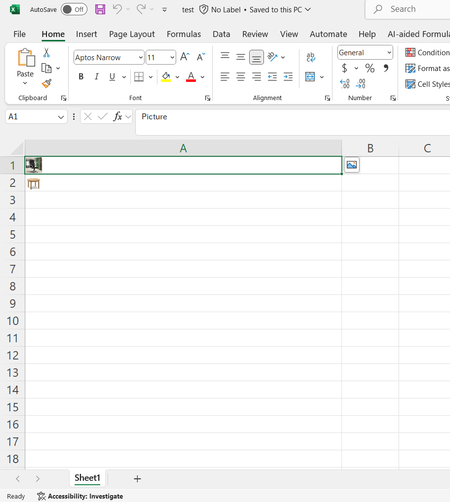
Hello experts, I am trying to extract images from an Excel file using a C# program. My code successfully retrieves images that are placed over cells in the worksheet. Now, I need to adapt this functionality so that it can retrieve images which are stored as Place in cell in the excel .I want use this Azure Function for Business Central integration here is the code using Openize.Cells; using System.IO; using DocumentFormat.OpenXml; class Program { static void Main(string[] args) { string filePath = "C:\\Users\\Raj.Kamal\\Downloads\\test.xlsx"; // The path to your workbook string outputDirectory = "C:\\Users\\Raj.Kamal\\Downloads"; // Load the workbook from the specified file path Workbook wb = new Workbook(filePath); // Select the first worksheet from the workbook var worksheet = wb.Worksheets[0]; // Extract images from the worksheet var images = worksheet.ExtractImages(); // Check if the output directory exists; if not, create it if (!Directory.Exists(outputDirectory)) { Directory.CreateDirectory(outputDirectory); } // Loop through each extracted image foreach (var image in images) { // Construct a unique file path for the image using a GUID var outputFilePath = Path.Combine(outputDirectory, $"Image_{Guid.NewGuid()}.{image.Extension}"); // Save the image data to the constructed file path using (var fileStream = File.Create(outputFilePath)) { image.Data.CopyTo(fileStream); } } } } Any code snippets, documentation links, or best practices would be greatly appreciated. Excel file:671Views1like0Comments
cannot plot vertical aligned column range in chart.net
Hi I need to plot 10 column range vertical aligned. With this code I have compensate disalignment BUT after 4 plot it become again disaligned: Me.Invoke(Sub() Chart.Series("FOOT").Points.AddXY(Indice_Corrente, Dato_Base_FOOT, Dato_Plot_FOOT) Chart.Series("SX_UP").Points.AddXY(Indice_Corrente - 0.65, Dato_Base_SX_UP, Dato_Plot_SX_UP) Chart.Series("SX_DOWN").Points.AddXY(Indice_Corrente - 1.3, Dato_Base_SX_DOWN, Dato_Plot_SX_DOWN) End Sub) Why????????280Views0likes0Comments
Visual Basic .Net - Consume webservice soap with certificate
Hello: I have created a windows forms project. I have added the service that I have to consume. I need to create code in order to consume it using certificate. Partial code that I have from a documentation is follwowing (web service reference is called "ClientServeiDeutesProves"): Try Dim servei As New ClientServeiDeutesProves.DeutesServiceClient Dim deutes As ClientServeiDeutesProves.Deutes = New ClientServeiDeutesProves.Deutes() deutes.Codi = txtIN.Text deutes.DNINIFContribuent = txtDNI.Text deutes.Idioma = txtIdioma.Text System.Net.ServicePointManager.SecurityProtocol = Net.SecurityProtocolType.Tls12 Dim result As ClientServeiDeutesProves.DocumentResult Try result = servei.GenerarDocument (deutes) Catch ex As System.ServiceModel.FaultException(Of ClientServeiDeutesProves.DeutesFault) MessageBox.Show(ex.Detail.Codi + " - " + ex.Detail.Descripcio) Return End Try 'Resposta If result Is Nothing Then MessageBox.Show("No s'ha obtingut resposta") Return End If If result.TeDeutes Then MessageBox.Show("Té deutes") Else MessageBox.Show("No té deutes") End If If result.Document Is Nothing Then MessageBox.Show("No s'ha pogut obtenir el document") Else MessageBox.Show("Document guardat a c:\temp\docudeutes.pdf") IO.File.WriteAllBytes("c:\temp\docudeutes.pdf", result.Document) End If Catch ex As Exception MessageBox.Show(ex.Message + vbCrLf + ex.InnerException.Message) Return End Try Anybody knows how to build it? Thank you very much. Francesc437Views0likes0Comments
Subject: Help & Support Case for System.GUID value & case sensitivity (Capital letter & Low letter)
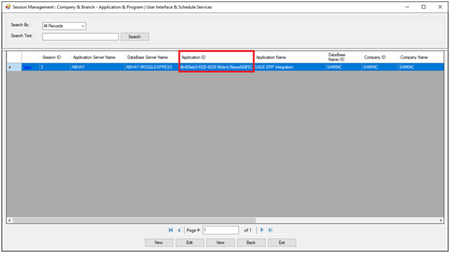
Help & Support Case From, Abhay Sakunde, Cognizant India Pvt. Ltd. Pune Project Team: MWS CWS Apps Team E-mail ID: email address removed for privacy reasons email address removed for privacy reasons Mobile No.: (phone number removed for privacy) To, The Manager, Human Resources Or Development Team, Microsoft India Pvt. Ltd. Pune Subject: Help & Support Case for System.GUID value & case sensitivity (Capital letter & Low letter) Hi Team, In case of Microsoft SQL Server Database GUID value gets stored with case sensitivity. But if same value retrieved from database into .NET data grid view then that value is not case sensitive. So, can it be made case sensitive? Waiting for reply. Please let me know if any detail information required for mentioned feature. Screens: [1] Application ID Field with GUID Value Thanks & Regards, Abhay Sakunde693Views0likes1CommentSubject: Help & Support Case for data grid view values along with row number.
Help & Support Case From, Abhay Sakunde, Cognizant India Pvt. Ltd. Pune Project Team: MWS CWS Apps Team E-mail ID: mailto:email address removed for privacy reasons mailto:email address removed for privacy reasons Mobile No.: (phone number removed for privacy reasons) To, The Manager, Human Resources Or Development Team, Microsoft India Pvt. Ltd. Pune Subject: Help & Support Case for data grid view values along with row number. Hi Team, In case of Microsoft SQL Server Database Query Editor if select query is run or executed then result gets displayed with row number. But if same result value retrieved from database into .NET data grid view then that row number value doesn’t come. Also, in case of debug mode for data table, row number value doesn’t come. So, can such result be made available with row number? Waiting for reply. Please let me know if any detail information required for mentioned feature. Thanks & Regards, Abhay Sakunde622Views0likes1CommentSubject: Help & Support Case for MS EXCEL File Schema - Issue.
Help & Support Case From, Abhay Sakunde, Cognizant India Pvt. Ltd. Pune Project Team: MWS CWS Apps Team E-mail ID: mailto:email address removed for privacy reasons mailto:email address removed for privacy reasons Mobile No.: (phone number removed for privacy reasons) To, The Manager, Human Resources Or Development Team, Microsoft India Pvt. Ltd. Pune Subject: Help & Support Case for MS EXCEL File Schema - Issue. Hi Team, In case of Microsoft SQL Server Database Query Editor if select query is run or executed then result gets displayed with row number. But if same result value retrieved from database into .NET data grid view then that row number value doesn’t come. Also, in case of debug mode for data table, row number value doesn’t come. So, can such result be made available with row number? Waiting for reply. Please let me know if any detail information required for mentioned feature. Thanks & Regards, Abhay Sakunde879Views0likes1Comment