update
43 TopicsSimplify Azure Arc agent updates with Automatic Agent Upgrade, now generally available
Keeping the Azure Connected Machine agent up to date across a large server estate requires persistent coordination and manual work. When enabled, Automatic Agent Upgrade simplifies this process by allowing Microsoft to manage agent upgrades for you. What is Automatic Agent Upgrade? Automatic Agent Upgrade helps keep the Azure Connected Machine agent up to date. When enabled, machines are scheduled to upgrade to the latest agent version without requiring you to manually deploy each new agent version. Upgrades are rolled out in batches across regions and initiated during off-peak hours to help maintain stability and minimize disruption. This helps: Reduce operational overhead associated with manually managing agent upgrades. Stay current with the latest available security, reliability, quality, and platform improvements. Manage upgrades at scale across Azure Arc-enabled server environments. Enable Automatic Agent Upgrade at scale Since the initial public preview, we’ve added additional ways to make Automatic Agent Upgrade easier to adopt and manage across your environment. Azure Policy Use the built-in Configure Azure Arc-enabled Servers to enable automatic upgrades policy to turn on Automatic Agent Upgrade across an assigned scope and remediate machines that are not yet configured. For setup guidance, see the Azure Policy walkthrough. Enable during onboarding Automatic Agent Upgrade can also be used when connecting a new server to Azure Arc by adding --enable-automatic-upgrade to the azcmagent connect command. This makes it easier to include Automatic Agent Upgrade as part of existing at-scale onboarding processes. For setup guidance, see the onboarding walkthrough. Azure portal onboarding When generating an onboarding script through the Azure portal, you can select Automatic Agent Upgrade so that the generated script includes the required configuration. For setup guidance, see the Portal onboarding walkthrough. Frequently asked questions What is Automatic Agent Upgrade for Azure Arc-enabled servers? Automatic Agent Upgrade is a feature that helps keep the Azure Connected Machine agent up to date. After you turn it on, Microsoft manages agent upgrades for your Azure Arc-enabled servers. How does Automatic Agent Upgrade work? Machines are scheduled to receive the latest agent version. Upgrades roll out in batches across regions and occur during off-peak hours to help maintain stability and minimize disruption. What are the benefits of Automatic Agent Upgrade? Automatic Agent Upgrade reduces the operational work of managing upgrades manually, helps servers stay current with security, reliability, quality, and platform improvements, and supports upgrade management at scale. How can I turn on Automatic Agent Upgrade at scale? You can use the built-in Configure Azure Arc-enabled Servers to enable automatic upgrades policy across an assigned scope. The policy can also remediate machines that are not yet configured. Can I configure Automatic Agent Upgrade while onboarding a server? Yes. Add --enable-automatic-upgrade to the azcmagent connect command, or select Automatic Agent Upgrade when generating an onboarding script in the Azure portal. Get started Automatic Agent Upgrade is now generally available for Azure Arc-enabled servers. To get started, review the Automatic Agent Upgrade documentation for prerequisites and the available options for enabling and managing automatic upgrades across your environment.216Views4likes1Comment
Workload Orchestration in the Azure portal is now available: Deploy in minutes, scale with ease
Edge deployments rarely stay simple for long. What begins as an application running on a single Kubernetes cluster can quickly expand across stores, factories, branches, or other distributed locations, each having different configuration needs. That is exactly where workload orchestration for Azure Arc comes in. Workload orchestration helps teams manage that complexity by providing a centralized approach to consistently define, configure, and deploy applications across distributed cloud, on-premises, and edge environments, all while catering to custom configuration needs of individual sites and deployment targets. See the experience in action Evaluating a new deployment approach often starts slowly: study the documentation, package an application, complete the setup, and only then decide whether it fits. The Azure portal reverses that order with its jumpstart onboarding experience. Bring your Azure Arc-enabled Kubernetes cluster and deploy a pre-packaged application in minutes. Whether you are validating a proof of concept or introducing the product to your broader team, the new portal onboarding experience turns the end-to-end workflow into something you can quickly try on your own cluster. Scale from first deployment to production Once you have validated the first deployment, you can evolve the same approach for production. Onboard your infrastructure into workload orchestration, organize your deployment sites into hierarchies, and define shared configurations for all deployments – all without leaving the portal. This lets you expand from one cluster to a distributed fleet while retaining centralized governance, repeatability, and site-level flexibility. Ready to try it? Try now by deploying your first application with workload orchestration in the Azure portal. Explore the product documentation for the complete set of capabilities.500Views0likes0CommentsPlan for Upcoming Changes to Extended Security Updates on Azure Local
Beginning April 1 2026, Microsoft introduced a consistent pricing model for Extended Security Updates (ESU) for SQL Server and Windows products, including SQL Server 2016, Windows 10 Enterprise LTSB 2016 and Windows Server 2016. This update aims to simplify the Extended Security Update pricing so that customers pay the same list price for ESUs regardless of deployment location (Azure, on-premises, or other public clouds) or purchasing channel (Microsoft Customer Agreement, Enterprise agreements, Cloud Solution Provider program, or other licensing programs). ESUs on Azure Local This pricing change affects any new Extended Security Update offerings starting on or after April 1, 2026, including Windows 10 Enterprise LTSB 2016 (reaching end of support October 13, 2026) and Windows Server 2016 (reaching end of support January 12, 2027). Existing ESU offerings, including Windows Server 2012 or Windows 10 version 22H2, are not affected by this pricing change. This means that customers who already leverage ESUs will continue to have them available on Azure Local at no cost through Azure Verification for VMs. Next Steps As products reach end of support, it is recommended to upgrade your servers to the latest release available. For customers needing to remain on older versions after the end of support date has passed, further guidance on pricing and availability of ESUs will be shared in the coming months. Keep an eye on Extended Security Updates on Azure Local for more details. For More Information Microsoft Services: Pricing Consistency Update | Microsoft Licensing Resources Plan for Windows Server 2016 and Windows 10 2016 LTSB end of support - Windows IT Pro Blog1.1KViews0likes0CommentsUnlock On-Prem Productivity with Agentic Retrieval in Foundry Local
In today’s connected world, customers expect instant, context-rich interactions, even in environments where cloud connectivity isn’t guaranteed. That’s where Retrieval-Augmented Generation at the edge comes in. Since we launched into public preview, we’ve watched teams across regulated, disconnected, and mission-critical environments push this technology into places cloud GenAI simply couldn’t reach. What we heard back shaped everything in this release: customers don’t just want retrieval. They want reasoning, they want agency, and they want an end-user experience that feels as natural as the one they already use in the cloud. Today at Build 2026, we're excited to introduce Agentic Retrieval, the next evolution of our on-prem RAG platform, enabled by Azure Arc and powered by Foundry language models. Agentic Retrieval is part of Microsoft's Adaptive Cloud approach, which extends Azure capabilities to wherever customer data and workloads actually live, with Edge AI focused on bringing reasoning and grounding to on-prem, distributed, and disconnected environments. Together with Foundry Local, Agentic Retrieval continues to shape Microsoft's Foundry Anywhere commitment: flexibility, resilience, and intelligence wherever customers operate. What’s new at Build 2026 This release introduces three major pillars that work independently or together: Agentic Retrieval engine: a first-party orchestration runtime for planning, reasoning, conversation state, and tool calls over your local data Knowledge: a dedicated layer for organizing, curating, and governing your grounding data, exposed via MCP and connectable to any agentic retrieval layer Chat UI: a production-ready, polished conversational experience that ships as the default UX for Agentic Retrieval and can also be deployed standalone Alongside, we’re delivering the platform upgrades customers asked for: flexible deployment modes (Agentic-only, Knowledge-only, or Combined), BYOM with pluggable backends, Foundry Local model catalog integration, Entra ID support, disconnected-ready, and hybrid search combined with agentic retrieval. Agentic Retrieval: From Answering to Reasoning Classic RAG retrieves, then generates. Agentic Retrieval plans, reasons, and acts, running multi-step retrieval and tool invocation under a first-party orchestration runtime, entirely on your infrastructure. Under the hood it manages query planning, iterative multi-hop retrieval, tool calls via MCP, conversation state, and mandatory grounding with citations and audit logging built in. What customers can achieve: Compliance, policy, and permit workflows for public sector, regulators, and defense operations, with data never leaving sovereign infrastructure Multi-document synthesis across standards, technical manuals, contracts, and field procedures for industrial operators An agentic chat experience for regulated and operational teams (engineers, inspectors, analysts) that reasons like a subject-matter expert Auditable AI for sovereign and mission-critical environments, with every answer traceable to its source Knowledge: A First-Class, Governed Data Layer Great answers start with great knowledge. Knowledge is now a standalone component customers can deploy on its own or alongside Agentic Retrieval, exposed through an MCP wrapper so it can connect to any agentic retrieval layer, ours or yours. This release brings Collections (segmented groups of indexed knowledge with granular access permissions), multi-source ingestion across documents, tables, images, and SharePoint (indexed source moving to public preview), high-fidelity parsing for complex enterprise content, Bring Your Own MCP to connect customer-owned data sources directly into Agentic Retrieval and the chat experience, and governance enforced at the data layer itself. ent view - collections, sources, and permission scopes What customers can achieve: Scope knowledge access to different slices of the same corpus, by plant, site, classification, or jurisdiction Enforce data sovereignty, residency, and regulatory compliance at the knowledge layer itself Ground both first-party Agentic Retrieval and BYO orchestration through a single governed source of truth across distributed sites Keep classified, proprietary, and operational data fully on-prem while delivering premium chat experiences Chat UI: Production-Ready Conversational Experience Agentic Retrieval now ships with a polished, production-ready Chat UI as its default experience, and the same component can be deployed standalone for customers building their own stack on Foundry Local. Highlights include Entra ID authentication (MSAL login, Bearer tokens, user identity display), pluggable backends across AI Foundry, BYOM, or mock mode with zero code changes, Chain-of-Thought visibility and inline citations that make grounding transparent to end users, standalone frontend deployment via Helm chart and container image, and disconnected-ready operation for air-gapped environments. What customers can achieve: Deliver a polished end-user experience to operators, inspectors, and analysts without building UI from scratch Build trust in regulated and industrial workflows through transparent, inspectable reasoning and grounding Run the same UI across air-gapped facilities, sovereign clouds, and connected industrial sites Accelerate rollout across public sector, defense, manufacturing, and other mission-critical environments Why This Release Matters Every update to our on-prem RAG platform has moved us toward a simple conviction: GenAI should be useful wherever customers operate, whether regulated or open, connected or disconnected, centralized or distributed. With Agentic Retrieval, Knowledge, and Chat UI coming together, backed by Foundry on Arc, BYOM, and fully disconnected support, this is no longer “cloud RAG, but local.” It’s an agentic knowledge platform purpose-built for the realities of enterprise data: on-prem, governed, and increasingly autonomous. Learn More Explore Agentic retrieval documentation Read Foundry Local on Azure Local model inferencing blog post For more information reach out to the team at FoundryLocalOnAzure@microsoft.com811Views0likes0CommentsAzure Arc Server April 2026 Forum
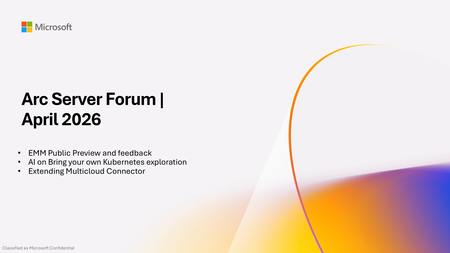
Please find the recording for the monthly Azure Arc Server Forum on YouTube! During the April 2026 Azure Arc Server Forum, we discussed: Public Preview of Essential Machine Management, learn more at aka.ms/EMM-blog and sign up at aka.ms/EMM-feedback Engage with product group on exploration of AI on bring your own Kubernetes by signing up at aka.ms/arc-ai-survey Product group is investing in extending the Multi-cloud Connector provide customers the ability to connect their MECM environments to Azure for inventory, monitoring, and management To sign up for the Azure Arc Server Forum and newsletter, please register with contact details at https://aka.ms/arcserverforumsignup/. For the latest agent release notes, check out What's new with Azure Connected Machine agent - Azure Arc | Microsoft Learn. Our May 2026 forum will be held on Thursday, May 21 at 9:30 AM PST / 12:30 PM EST. We look forward to you joining us, thank you!402Views1like0Comments
Simplified access to Hotpatching enabled by Azure Arc for Windows Server 2025
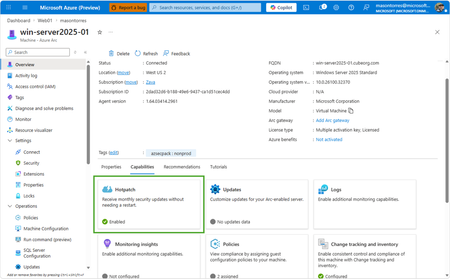
With Windows Server 2025, we introduced hotpatch enabled by Azure Arc, delivering security updates to Windows Server across hybrid and multicloud environments – minimizing downtime (no reboot), accelerating protection, and unifying patch management. We know that keeping your servers updated with the latest patches is one of the critical tasks that IT teams perform day-to-day. We want to make it simpler to install the latest operating system (OS) updates without rebooting machines after every installation. The resounding feedback we have received from you underscored the criticality of this feature in the lifecycle management and security of your infrastructure. We are now taking it one step further to reduce the friction to deploying these critical updates: hotpatch enabled by Azure Arc is now available at no additional cost for Windows Server 2025. Which machines are eligible for this offer? To use hotpatch for Windows Servers running on-premises or in multicloud environments, you must be using Windows Server 2025 Standard or Datacenter, and your server must be connected to Azure Arc. With this announcement, enabling and usage of the hotpatching service is available at no additional charge. Please take note that there are no charges for customers running on Azure IaaS, or Azure Local, wherein hotpatching is available as part of the functionality of Windows Server Datacenter: Azure Edition. This feature is already included both with Windows Server 2022 Datacenter: Azure Edition and Windows Server 2025 Datacenter: Azure Edition. How do I manage hotpatches enabled by Azure Arc for Windows Server 2025? If your Windows Server 2025 machines aren't already connected to Azure Arc, install the Azure Connected Machine agent — it takes just a few minutes per server and supports at-scale rollout via Group Policy, service principal, or Terraform. Once connected, enable Hotpatch from the Azure portal, Azure PowerShell, Azure CLI, or the REST API — just confirm Virtualization-based security (VBS is enabled) first. From there, use Azure Update Manager to schedule and monitor rollouts at scale. For instructions on how to enable hotpatch for Azure Arc-enabled machines using group policy or scripts, learn more here: https://aka.ms/ws-hotpatch For patch orchestration at scale, you can use Azure Update Manager to deliver hotpatches enabled by Azure Arc for Windows server 2025 machines. This enables greater uptime with fewer reboots and faster deployment of updates with easy patch orchestration. Alternatively, you can use APIs or other management tools to manage hotpatches. Centralized management of hotpatch updates across hybrid and multicloud environments enabled by Azure Arc Once your machines are connected to Azure Arc, you can also use the cloud-native services from Azure to manage your windows machines running on-prem. Azure Arc enables you to standardize security and governance across a wide range of resources so you can easily organize, govern and secure Windows, Linux, SQL servers, and Kubernetes clusters running across data centers, edge, and multi-cloud environments – using Azure services such as Azure Policy, Azure Monitor, Microsoft Defender and more. At no additional cost for machines attached to Azure Arc Basic inventory across on-prem and multi-cloud Tag your resources, organize them into resource groups, subscriptions, and management groups, and query at scale with Azure Resource Graph to unify your environments. Infra as Code (Bicep, Terraform) Infra as code for provisioning and management of resources. VM Self Service Perform lifecycle management such as (create, resize, update and delete) and power cycle operations such as (start, stop, and restart on VMware vCenter and System Center Virtual Machine Manager Virtual Machines. Hotpatch for Windows Server 2025 NEW Windows Server hot patching enables you to apply security updates without rebooting, keeping systems secure while maintaining continuous uptime. VM Management Administrate your servers anywhere using SSH for Azure Arc, Run Command, and Custom Script Extension. Mgmt. Services included for no additional costs with Windows Server Software Assurance or Extended Security Updates Azure Update Manager Provides a unified, centralized service to monitor, orchestrate, and automate patching across Azure, on‑prem, and multi‑cloud environments ensuring security, compliance, and minimal downtime at scale. Azure Machine Configuration (Policy) Policy‑driven auditing and enforcement of OS and application settings as code across Azure and hybrid machines—ensuring consistent, compliant state at scale. Including compliance policies like CIS Benchmark and WinRE Change Tracking & Inventory Real‑time visibility into configuration changes and system state across your fleet enabling faster troubleshooting, improved security, and continuous compliance at scale. VM insights from Azure Monitor Delivers a unified, pre‑built observability experience that provides real‑time performance, health, and dependency visibility across VMs—enabling faster troubleshooting, optimization, and capacity planning at scale. Windows Admin Center Unified, browser‑based management plane to securely manage Windows servers, VMs, and hybrid infrastructure from anywhere—simplifying operations and improving efficiency at scale. Best Practices Assessment Continuously evaluation your server configurations against Microsoft-recommended standards to proactively identify risks and provide actionable remediation guidance—improving security, performance, and operational health at scale. Frequently Asked Questions What are hotpatch updates? Hotpatch updates are monthly security updates that take effect without requiring you to restart the device. They contain a full set of security updates equivalent to the standard updates released the same day. What is the hotpatch update cycle? All eligible Windows Server 2025 machines enrolled in hotpatch are offered up to 8 monthly hotpatch updates in a calendar year in a quarterly cycle: Baseline month: In January, April, July, and October, devices install the monthly cumulative security update and must restart for the update to take effect. This update includes the latest security fixes, cumulative new features, and enhancements since the last baseline. Subsequent two months: Devices receive hotpatch updates, which only include security updates and don't require a restart for the update to take effect. These devices will catch up on features and enhancements with the next cumulative baseline month (quarterly). Will billing be stopped for existing enrolled machines? Yes, as of 15 th May 2026 all billing for hotpatch has been stopped for all existing machines enrolled in hotpatch. What action do we need to take if we have machines enrolled in hotpatch already? There is no additional action needed for machines that are currently enrolled in hotpatch. These machines will remain enrolled in hotpatch and receive hotpatch updates when available. I want all my Windows Server 2025 machines to get hotpatches. How do I do it? If you have Windows Server 2025 machines on-premises or on cloud (other than Azure) then you can enable hotpatch on them. To do so, ensure these machines have Virtualization Based Security enabled and are connected to Azure Arc and then you can use Azure Arc portal, Azure Update manager or APIs to enable hotpatch. Learn more: https://aka.ms/ws-hotpatch Is anything changing for Hotpatching on Azure? Hotpatch continues to be available on Azure for your Windows Server 2022 and Windows Server 2025 VMs when using Azure Edition. There is no fee associated with Hotpatching on Azure. Learn more here. Is there a community forum for Arc? Yes, you can join the Azure Arc Monthly Forum here: aka.ms/ArcServerForumSignup6.8KViews10likes5CommentsRun the latest Azure Arc agent with Automatic Agent Upgrade (Public Preview)
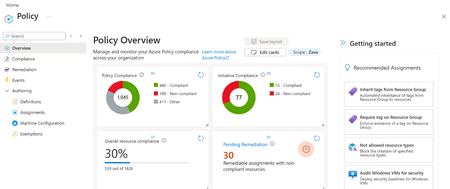
Customers managing large fleets of Azure Arc servers need a scalable way to ensure the Azure Arc agent stays up to date without manual intervention. Per server configuration does not scale, and gaps in upgrade coverage can lead to operational drift, missed features, and delayed security updates. To address this, we’re introducing two new options to help customers enable Automatic Agent Upgrade at scale: applied as a built-in Azure Policy and a new onboarding CLI flag. The built-in policy makes it easy to check whether Automatic Agent Upgrade is enabled across a given scope and automatically remediates servers that are not compliant. For servers being newly onboarded, customers can enable the feature at onboarding by adding the --enable-automatic-upgrade flag to the azcmagent connect command, ensuring the agent is configured correctly from the start. What is Automatic Agent Upgrade? Automatic Agent Upgrade is a feature, in public preview, that automatically keeps the Azure Connected Machine agent (Arc agent) up to date. Updates are managed by Microsoft, so once enabled, customers no longer need to manually manage agent upgrades. By always running the latest agent version, customers receive all the newest capabilities, security updates, and bug fixes as soon as they’re released. Learn more: What's new with Azure Connected Machine agent - Azure Arc | Microsoft Learn. Getting Started Apply automatic agent upgrade policy Navigate to the ‘Policy’ blade in the Azure Portal Navigate to the ‘Compliance’ section and click ‘Assign Policy’ Fill out the required sections Scope: Subscription and resource group (optional) that policy will apply to Policy definition: Configure Azure Arc-enabled Servers to enable automatic upgrades Navigate to the ‘Remediation’ tab and check the box next to ‘Create a remediation task’ Navigate to the ‘Review + create’ tab and press ‘Create’. The Policy has been successfully applied to the scope. For more information on this process, please visit this article Quickstart: Create policy assignment using Azure portal - Azure Policy | Microsoft Learn. Apply automatic agent upgrade CLI Flag Adding the following flag enables automatic agent upgrade during onboarding --enable-automatic-upgrade While this flag can be used on a single server, it can also be applied at scale using one of the existing Azure Arc at scale onboarding methods and adding the flag Connect hybrid machines to Azure at scale - Azure Arc | Microsoft Learn. Here is an at scale onboarding sample using a basic script. azcmagent connect --resource-group {rg} --location {location} --subscription-id {subid} --service-principal-id {service principal id} --service-principal-secret {service principal secret} --tenant-id {tenant id} --enable-automatic-upgrade To get started with this feature or learn more, please refer to this article Manage and maintain the Azure Connected Machine agent - Azure Arc | Microsoft Learn.2.5KViews1like2CommentsAzure Arc Server Feb 2026 Forum Recap
Please find the recording for the monthly Azure Arc Server Forum at YouTube! During the February 2026 Azure Arc Server Forum, we discussed: Arc Server Reporting & Dashboard (Jeff Pigot, Sr. Solution Engineer): Check out this awesome visual reporting bringing together different management services and experiences across Azure Arc-enabled servers on GitHub at Arc Software Assurance Benefits Dashboard. VM Applications (Yunis Hussein, Product Manager): Shared private preview experience and capabilities for 3P Application Deployment and Patching on Azure Arc-enabled servers. Please fill out this form to participate in Private Preview. Windows Server 2016 ESUs enabled by Azure Arc: Portal Experience Feedback (George Enninful): Please sign up on the feedback form. To sign up for the Azure Arc Server Forum and newsletter, please register with contact details at https://aka.ms/arcserverforumsignup/. For the latest agent release notes, check out What's new with Azure Connected Machine agent - Azure Arc | Microsoft Learn. Our March 2026 forum will be held on Thursday, March 26 at 9:30 AM PST / 12:30 PM EST. We look forward to you joining us, thank you!685Views0likes0CommentsAzure Arc Server Jan 2026 Forum Recap
During the January 2026 Azure Arc Server Forum, the Azure Arc product group showcased: Essential Machine Management capabilities in Azure Compute Hub Windows Server Hot Patch: Roadmap and Update on billing commencement Preview of new TPM based Onboarding to Azure Arc Recap of SQL Server Major Announcements from 2025 What can you do to stay in touch? Connect with the Azure Arc product group provide feedback on the expired and stale Arc Server Experience Stay on the latest Azure Arc agent version to get the latest security and quality fixes Register for SQL Con 2026 at sqlcon.us for insight into the future of SQL Check out the YouTube recording for the session at Arc Server Forum January 2026. To sign up for the Azure Arc Server Forum and newsletter, please register with contact details at https://aka.ms/arcserverforumsignup/. Our next session will be on Thursday, February 19 at 9:30 AM PST. We look forward to you joining us, thank you!1.7KViews3likes0CommentsAzure Arc Server Forum: 2026 Updates
We are excited to announce the fourth calendar year of the Azure Arc Server Forum. We are incredibly thankful to all the customers and community members, who have joined our forum and newsletter from our start back in the Fall of 2023. From January 2026, the monthly Azure Arc Server Forum will be hosted on the third Thursday of each month from 9:30 – 10:15 AM PST. Each Arc Server Forum includes live demos of new capabilities, question and answer sessions with the product group, and feedback opportunities covering Windows, Linux, and SQL Server management, licensing, and connectivity across hybrid, multicloud, and edge environments. Sessions are skipped in July and December for summer and winter holidays respectively. Forum participants also receive a monthly newsletter summarizing updates including: Announcements of General Availability, Public Preview, and Private Previews capabilities including key details and documentation Updates on agent improvements and updates on experience changes Opportunities to provide feedback to and influence the product group’s roadmap or engage in ongoing customer research studies Updates on the invitation and timing of the Arc Server Forum Recordings from the Arc Server Forum are periodically uploaded to the Azure Arc Server Forum YouTube channel: Azure Arc Server Forum - YouTube typically within 2-3 weeks of the Forum. To sign up for the Azure Arc Server Forum and newsletter, please register with contact details at https://aka.ms/arcserverforumsignup/. Thank you!1.8KViews3likes2Comments