unified endpoint management
65 TopicsUpdate 2403 for Microsoft Configuration Manager current branch is now available.
Update 2403 for Configuration Manager current branch is available as an in-console update. Apply this update on sites that run version 2211 or later. When installing a new site, it will also be available as a baseline version soon after general availability. This article summarizes the changes and new features in Configuration Manager, version 2403. Site infrastructure Microsoft Azure Active Directory rebranded to Microsoft Entra ID Starting Configuration Manager version 2403, Microsoft Azure Active Directory is renamed to Microsoft Entra ID within Configuration Manager. Automated diagnostic Dashboard for Software Update Issues A new dashboard is added to the console under monitoring workspace, which shows the diagnosis of the software update issues in your environment this feature can easily identify any issues related to software updates. You can fix software update issues based on troubleshooting documentations. Special credit to Shankar Subramanian and Smita Jadhav for their details and troubleshooting notes. For more information, see Software update health dashboard. Introducing centralized search box: Effortlessly find what you need in the console! Users can now use the global search box in CM console, which streamlines the search experience and centralizes access to information. This feature enhances the overall usability, productivity and effectiveness of CM. Users no longer need to navigate through multiple nodes or sections/ folders to find information they require, saving valuable time and effort. For more information, see Improvements to console search. Added Folder support for Scripts node in Software Library You can now organize scripts by using folders. This change allows for better categorization and management of scripts. Full Administrator and Operations Administrator roles can manage the folders. For more information, see Folder support for scripts. HTTPS or Enhanced HTTP should be enabled for client communication from this version of Configuration Manager HTTP-only communication is deprecated, and support is removed from this version of Configuration Manager. Enable HTTPS or Enhanced HTTP for client communication. For more information, see Enable site system roles for HTTPS or Enhanced HTTP. and Deprecated features Windows Server 2012/2012 R2 operating system site system roles are not supported from this version of Configuration Manager Starting 2403, Windows Server 2012/2012 R2 operating system site system roles aren't supported in any CB releases. Clients with extended support (ESU) will continue to support. For more information, see Supported-operating-systems-for-site-system-servers. Resource access profiles and deployments will block Configuration manager upgrade Any configured Resource access profiles and deployments block Configuration manager upgrade. Consider deleting them and moving the co-management workload for Resource Access (if co-managed) to Intune. For more information, see FAQ and Resource access policies are no longer supported. Software updates New parameter SoftwareUpdateO365Language is added to Save-CMSoftwareUpdate cmdlet A new parameter SoftwareUpdateO365Language is now added to PowerShell Save-CMSoftwareUpdate cmdlet. Customers now don't have to check a specific language in the SUP Properties (causing a metadata download for that language for all updates). PowerShell Commandlet: Save-CMSoftwareUpdate – SoftwareUpdateO365Language <language name> (<region name>)" Note Languages need to be in O365 format to be consistent with Admin Console UI. E.g. "Hungarian (Hungary)". OS deployment Support for ARM 64 Operating System Deployment Configuration Manager operating system deployment support is now added on Windows 11 ARM 64 devices. Currently Importing and customizing Arm 64 boot images, Wipe and load TS, Media creation TS, WDS PXE for Arm 64 and CMPivot is supported. Enhancement in Deploying Software Packages with Dynamic Variables Administrators while deploying the "Install Software Package" via Dynamic variable with "Continue on error" unchecked to clients, will not be notified with task sequence failures even if package versions on the distribution point are updated. For more information, see Options for Install Application. Cloud-attached management Upgrade to CM 2403 is blocked if CMG V1 is running as a cloud service (classic) The option to upgrade Configuration Manager 2403 is blocked if you're running cloud management gateway V1 (CMG) as a cloud service (classic). All CMG deployments should use a virtual machine scale set. For more information, see Check for a cloud management gateway (CMG) as a cloud service (classic). Deprecated features Learn about support changes before they're implemented in removed and deprecated items. System Center Update Publisher (SCUP) and integration with ConfigMgr planned end of support Jan 2024. For more information, see Removed and deprecated features for Configuration Manager. Other updates Improvements to BitLocker This release includes the following improvements to BitLocker: Starting in this release, this feature ensures proper verification of key escrow and prevents message drops. We now validate whether the key is successfully escrowed to the database, and only on successful escrow we add the key protector. This feature now prevents a potential data loss scenario where BitLocker is protecting the volumes with keys that are never backed up to the database, in any failures to escrow happens. For more information on BitLocker management, see Deploy BitLocker management. and Plan for BitLocker management.. From this version of Configuration Manager, the Windows 11 readiness dashboard shows charts for Windows 23H2. Defender Exploit Guards policy for controlled folder now accepts regex in the file path for apps. For example, [C:\Folder\Subfolder\app?.exe] [C:\Folder1\Sub*Name] Next steps At this time, version 2403 is released for slow ring (all in console update), Baseline will be updated in portal soon. Thank you, The Configuration Manager team Additional resources: What’s New in Configuration Manager Documentation for Configuration Manager Microsoft Configuration Manager announcement Microsoft Configuration Manager vision statement Evaluate Configuration Manager in a lab Upgrade to Configuration Manager Configuration Manager Forums Configuration Manager Support Report an issue Provide suggestions31KViews7likes31Comments
Recommendations and insights to enrich the Configuration Manager site health and device management
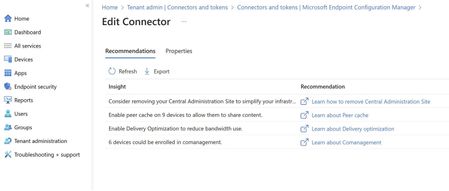
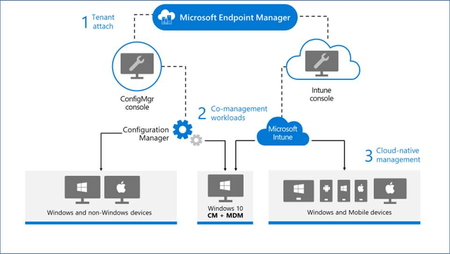
You can now use the Microsoft Intune admin center to view recommendations and insights for your Configuration Manager sites. These recommendations can help you improve the site health and infrastructure along with enriching the device management experience. With so many features and updates available, implementing the right available resources for your infrastructure management is essential. You might be new to the management world, or even if you have been managing your company’s infrastructure for a long time, this feature will provide you with insights that can help you to level up. We are currently providing recommendations that can help in following ways: Help you to simplify your infrastructure by reviewing your hierarchy. Assist you to enhance device management through co-management enablement. Refine gathering of device insights via endpoint analytics enablement. Improve the health of the site by reviewing current peer cache and delivery optimization settings. These recommendations will be based on your current site infrastructure and settings. Applying the recommendations is solely the admin’s discretion. We have created recommendation for TA customer solely based on their Site Configuration without interfering customer's privacy. Each recommendation points out how customer is leveraging features provided in site configuration. Recommendations are derived from database. Each recommendation is evaluated and updated in the next cycle. Recommendation will not be visible in the next cycle if fully applied or recommendation insight will be changed if partially applied. Every cycle we inspect the customer DB through static query and then flow this insight to cloud to show the recommendation. How can you view the recommendations? A user with global admin rights will be able to view recommendations for configuration manager sites that are version 2211 or higher and tenant attached. To view recommendations, open the Microsoft Endpoint Manager admin center, and go to Tenant administration > Connectors and tokens > Microsoft Endpoint Configuration Manager, and select a site to view recommendations for that site. Once selected, you’ll find the Recommendations tab that displays each insight along with a Learn more link that opens details on how to apply that recommendation. We are open to adding more recommendations in future and would love to hear from you!9.7KViews2likes4CommentsUpdate 2107 for Microsoft Endpoint Configuration Manager current branch is now available
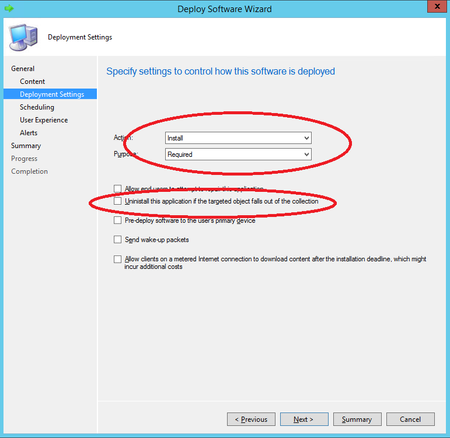
Update 2107 for Microsoft Endpoint Configuration Manager current branch is now available. Starting in this release, you can enable an application deployment to support implicit uninstall. If a device is in a collection, the application installs. Then when you remove the device from the collection, the application uninstalls.33KViews4likes7CommentsUpdate 2103 for Microsoft Endpoint Configuration Manager current branch is now available
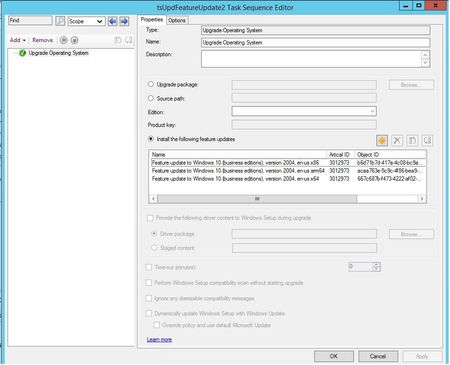
Update 2103 for Microsoft Endpoint Configuration Manager current branch is now available. You can now upgrade a client's Windows OS by using a feature update deployed with a task sequence. This integration combines the simplicity of Windows servicing with the flexibility of task sequences.32KViews1like0CommentsView updated Windows 10 Servicing dashboard in Configuration Manager Technical Preview 2012
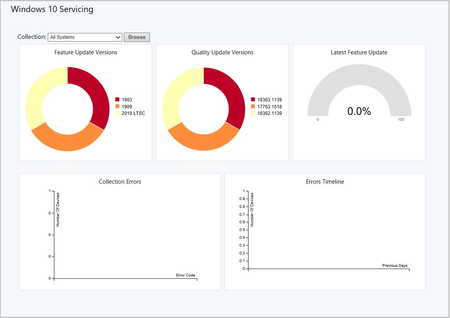
Update 2012 for the Technical Preview Branch of Microsoft Endpoint Configuration Manager has been released. We’ve simplified the Windows 10 Servicing dashboard to make it more relevant.13KViews2likes1CommentUpdate 2010 for Microsoft Endpoint Configuration Manager current branch is now available
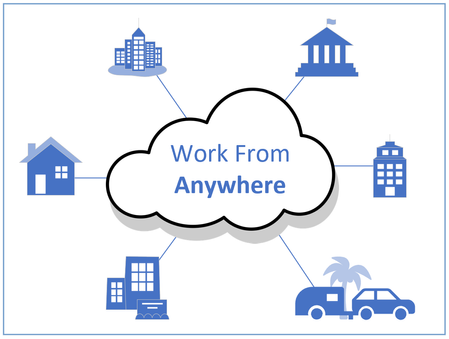
Update 2010 for Microsoft Endpoint Configuration Manager current branch is now available. In this release we continue to build on the tenant attach and work from anywhere themes from earlier releases, making cloud attach and management from the cloud easier and applicable for all.21KViews7likes4CommentsUpdate 2006 for Microsoft Endpoint Configuration Manager current branch is now available
Update 2006 for Microsoft Endpoint Configuration Manager current branch is now available. For this release we have focused on improving the management of remote work with new features available over Cloud Management Gateway and improvements for VPN connected clients.29KViews14likes6CommentsView Hardware Inventory in MEM admin center with Configuration Manager Technical Preview 2007
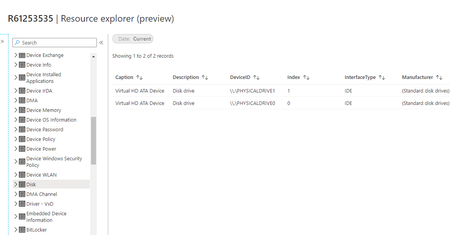
Update 2007 for the Technical Preview Branch of Microsoft Endpoint Configuration Manager has been released. Hardware inventory can now be viewed for a tenant attached Configuration Manager device in the admin center.9.6KViews2likes0CommentsImpact of Changes to Update Channels for Microsoft 365 Apps
As previously announced, Microsoft recently made changes to the update channels for Microsoft 365 Apps. For Microsoft Endpoint Configuration Manager admins that manage Microsoft 365 Apps updates, actions may be required depending on your environment.7KViews1like3CommentsView ConfigMgr apps in Company Portal using Configuration Manager Technical Preview 2006
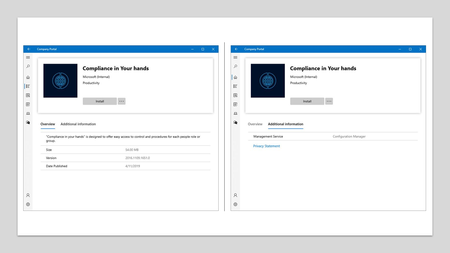
Update 2006 for the Technical Preview Branch of Microsoft Endpoint Configuration Manager has been released. Now the Company Portal can be your cross-platform experience in Microsoft Endpoint Manager. You can now use a preview version of the Company Portal on co-managed devices. By configuring co-managed devices to also use the Company Portal, you can provide a consistent user experience on all devices.23KViews3likes2Comments