ui testing
8 Topics
Test Automation at Scale: Lessons Learned from Enterprise projects
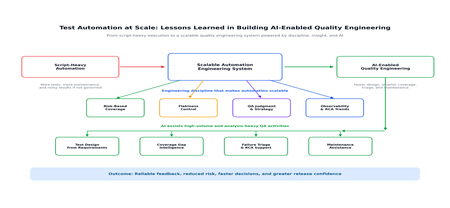
In large enterprise programs, test automation succeeds not by writing more scripts, but by engineering automation as a scalable quality system. In this blog, I have shared practical lessons from automation at scale, covering risk-based coverage, flakiness, observability, QA judgment, and how AI is now helping teams improve test design, coverage intelligence, failure triage, and maintenance. As applications grow across teams, environments, integrations, and release cycles, automation must evolve from a script-based activity into a disciplined engineering capability with clear architecture, ownership, governance, maintainability, observability, and continuous improvement. Based on my experience, the real value of automation at scale lies in building a reliable feedback system that adapts with the product and supports faster, smarter, and more confident delivery. What “Automation at Scale” Really Means In an enterprise context, automation at scale typically involves: Hundreds or thousands of automated tests Multiple teams contributing to the same framework CI/CD pipelines running continuously Shared environments with fluctuating stability Long-lived products with evolving architecture Frequent releases and changing business priorities Scaling automation is therefore both a technical and organizational challenge. It requires the right framework design, but it also requires team discipline, shared standards, and a clear understanding of what automation is expected to achieve. Lesson 1: Meaningful Coverage Matters More Than Test Count One of the most common mistakes in enterprise automation is assuming that a larger test suite automatically means better quality. In reality, more tests can also mean slower pipelines, more maintenance, duplicated validations, and noisier results. In large projects, test count alone is not a useful measure of success. What matters more is whether the automation is covering the right risks, the right journeys, and the right integration points. What Did Not Work Well: Automating every possible UI path Repeating the same validations across multiple layers Expanding regression suites without regular review Measuring progress only by the number of automated test cases Adding tests without considering execution time and maintenance cost What Worked Better: Prioritizing critical user journeys Using risk-based coverage Separating automation responsibilities across layers: Unit tests for code-level correctness API tests for integration and contract validation UI tests for business-critical end-to-end flows Reviewing regression suites regularly to remove outdated or low-value tests Aligning automation coverage with release risk and business impact A practical example of this came from one of our projects where the P1 automation suite was already stable and effective, but the P2 suite had grown significantly over time and was starting to impact regression efficiency. We reassessed the suite through a risk-based coverage lens, removed low-value scenarios, and retained only the tests that contributed meaningful confidence. As a result, the regression phase in each sprint became leaner, faster, and far easier to manage. Impact: The automation suite became smaller, faster, easier to maintain, and more meaningful in terms of release confidence. Lesson 2: Flakiness Is Not a Testing Inconvenience - It Is a Scalability Blocker Flaky tests may seem manageable in a small project, but at enterprise scale they quickly become a trust issue. When teams cannot rely on automation results, they either start ignoring failures or spend too much time investigating false alarms. This is where automation starts to lose credibility. If every failure needs manual judgment to decide whether it is real or random, the value of automated feedback starts reducing. Common Causes of Flakiness: Shared or unstable environments Test data collisions Asynchronous UI behavior Network or dependency latency Weak synchronization logic Environment-specific configuration issues Dependency failures outside the application under test Key Learnings: Treat flaky tests with the same seriousness as product defects Track flakiness as a visible quality metric Separate deterministic failures from environment or test instability Quarantine unstable tests until they are fixed Avoid allowing known flaky tests to repeatedly pollute pipeline results Review recurring flaky patterns during sprint or release retrospectives In one of our projects, the regression suite had become increasingly flaky during parallel execution. We addressed this by stabilizing the affected scenarios, isolating test data to prevent collisions between concurrent tests, and analyzing failure trends through root cause analysis rather than relying solely on pass/fail counts. This shift helped reduce pipeline noise and gradually improved trust in automation over successive sprints. Impact: Automation results became more reliable, and failures received the right level of attention instead of being dismissed as random noise. Lesson 3: Automation Does Not Replace Thinking-QA Judgment Scales Quality A common misconception is that more automation reduces the need for QA expertise. In reality, automation amplifies QA decisions. Automation can execute checks faster, but it cannot independently decide what matters most to the business. That judgment still comes from QA experience, domain understanding, and risk awareness. At scale, QA adds value by: Identifying high-risk scenarios Deciding what should and should not be automated Reviewing automation results beyond pass/fail status Connecting production learnings back to test strategy Understanding where manual exploration is still valuable Challenging whether automated coverage is meaningful, not just increasing This becomes especially important in enterprise programs where multiple teams may be contributing to the same automation ecosystem. Without strong QA judgment, automation can easily become a large collection of scripts that run frequently but do not necessarily provide meaningful confidence. Impact: Automation stayed aligned with business risk, not just technical coverage. Lesson 4: Quality Needs Observability, Not Just Execution Enterprise automation generates a large amount of execution data. However, data alone does not improve quality. The real value comes from turning that data into insights that teams can act on. A pass/fail report is useful, but it is not enough for scaled automation. Teams need to understand what is failing, why it is failing, how often it is failing, and whether the same patterns are repeating across sprints or releases. Instead of looking only at pass/fail counts, teams need visibility into: Recurring failure patterns Sprint-over-sprint RCA trends Unstable areas of the application Defect-prone modules Environment-related failures Automation maintenance hotspots Test cases that frequently fail due to data or dependency issues This shift is important because it changes automation from a reactive validation activity into a source of engineering feedback. When teams understand why failures are happening and where instability is increasing, they can improve design, development, testing, and release decisions earlier in the lifecycle. At that point, automation is no longer just validating quality. It is actively helping shape it. Impact: Automation became a feedback system that helped improve upstream engineering quality, not just a checkpoint before release. These lessons become even more powerful when combined with AI, which is now helping teams scale quality engineering with greater speed and precision. How AI Has Enhanced Test Automation at Scale AI enhances test automation at scale by reducing repetitive effort and turning large volumes of testing data into actionable insight. It helps teams accelerate test design from requirements, identify coverage gaps, triage failures faster, support automation maintenance, and free QA engineers to focus on higher-value work such as risk analysis, exploratory testing, and release confidence. Used with QA review and engineering discipline, AI becomes an enabler for smarter, faster, and more reliable quality engineering. Key Takeaways From large-scale automation initiatives, a few lessons become clear: Automation at scale needs engineering discipline, not just scripting effort. Test count is less important than meaningful, risk-based coverage. Flaky tests must be treated seriously because they directly impact trust. QA judgment remains essential even when automation maturity increases. Observability is critical for turning execution results into actionable insight. AI can accelerate test design, coverage analysis, triage, and maintenance. AI-generated outputs should always be reviewed with domain and QA context. The most successful automation programs combine strong frameworks, reliable pipelines, stable data, clear ownership, and continuous improvement. Conclusion The future of enterprise test automation is not simply about building larger suites. It is about creating smarter, more reliable, and more maintainable quality engineering systems. Programs that succeed at scale are the ones that combine strong framework design, CI/CD integration, stable test data, disciplined coverage strategy, actionable observability, and thoughtful use of AI. When these elements come together, automation becomes more than a regression safety net — it becomes a continuous feedback mechanism that helps teams deliver better software with greater confidence. AI is adding a new dimension to this journey. It can speed up test design, improve coverage visibility, simplify result analysis, and support maintenance. But its value depends on how well it is guided by QA expertise and engineering discipline. In the end, automation at scale is not about replacing people or simply adding more scripts. It is about building a quality engineering system where automation, AI, and human judgment work together to deliver faster, more reliable, and more confident releases.477Views1like0Comments
How AI Is Transforming Performance Testing
Performance testing has always been a cornerstone of software quality engineering. Yet, in today’s world of distributed microservices, unpredictable user behaviour, and global-scale cloud environments, traditional performance testing methods are struggling to keep up. Enter Artificial Intelligence (AI) — not as another industry buzzword, but as a real enabler of smarter, faster, and more predictive performance testing. Why Traditional Performance Testing Is No Longer Enough Modern systems are complex, elastic, and constantly evolving. Key challenges include: Microservices-based architectures Cloud-native and containerized deployments Dynamic scaling and highly event-driven systems Rapidly shifting user patterns This complexity introduces variability in metrics and results: Bursty traffic and nonlinear workloads Frequent resource pattern shifts Hidden performance bottlenecks deep within distributed components Traditional tools depend on fixed test scripts and manual bottleneck identification, which are slower, reactive, and often incomplete. When systems behave in unscripted ways, AI-driven performance testing offers adaptability and foresight. How AI Elevates Performance Testing AI enhances performance testing in five major dimensions: 1.AI-Driven Workload Modelling Instead of guessing load patterns, AI learns real-world user behaviours from production data: Detects actual peak-hour usage patterns Classifies user journeys dynamically Generates synthetic workloads that mirror true behaviour Results: More realistic test coverage Better scalability predictions Improved reliability for production scenarios Example: Instead of a generic “add 100 users per minute” approach, AI can simulate lunch-hour bursts or regional traffic spikes with precision. Intelligent Anomaly Detection AI systems can automatically detect performance deviations by learning what "normal" looks like. Key techniques: Unsupervised learning (Isolation Forest, DBSCAN) Deep learning models (LSTMs, Autoencoders) Real-time correlation with upstream metrics prioritized, actionable recommendations and code-fix suggestions aligned with best practices Example: An AI model can flag a microservice’s 5% latency spike — even when it recurs every 18 minutes — long before a human would notice. Predictive Performance Modelling AI enables you to anticipate performance issues before load tests reveal them. Capabilities: Forecasting resource saturation points Estimating optimal concurrency limits Running “what-if” simulations with ML or reinforcement learning Example: AI predicts system failure thresholds (e.g., CPU maxing out at 22K concurrent users) before that load is ever applied. AI-Powered Root-Cause Analysis When performance degrades, finding the “why” can be challenging. AI shortens this phase by: Mapping cross-service dependencies Correlating metrics and logs automatically Highlighting the most probable root causes Example: AI uncovers that a spike in Service D was due to cache misses in Service B — a connection buried across multiple log streams. Automated Insights and Reporting With the help of Large Language Models (LLMs) like ChatGPT or open-source equivalents: Summarize long performance reports Suggest optimization strategies Highlight anomalies automatically within dashboards This enables faster, data-driven decision-making across engineering and management teams. The Difference Between AIOps and AI-Driven Performance Testing Aspect AIOps AI-Enhanced Performance Testing Primary Focus IT operations automation Performance engineering Objective Detect and resolve incidents Predict and optimize system behaviour Data Sources Logs, infrastructure metrics Testing results, workload data Outcome Self-healing IT systems Pre-validated, performance-optimized code before release Key takeaway: AIOps acts in production; AI-driven testing acts pre-production. Real Tools Adopting AI in Performance Testing Category Tools Capabilities Performance Testing Tools JMeter, LoadRunner, Neoload, Locust (ML Plugins), k6 (AI extensions) Intelligent test design, smart correlation, anomaly detection AIOps & Observability Platforms Dynatrace (Davis AI), New Relic AI, Datadog Watchdog, Elastic ML Metric correlation, predictive analytics, auto-baselining These tools improve log analysis, metric correlation, predictive forecasting, and test script generation. Key Benefits of AI Integration ✅ Faster test design — Intelligent load generation automates script creation ✅ Proactive analytics — Predict failures before release ✅ Higher test accuracy — Real-world traffic reconstruction ✅ Reduced triage effort — Automated root-cause identification ✅ Great scalability — Run leaner, smarter tests Challenges and Key Considerations ⚠ Data quality — Poor or biased input leads to faulty AI insights ⚠ Overfitting — AI assumes repetitive patterns without variability ⚠ Opaque models — Black-box decisions can hinder trust ⚠ Skill gaps — Teams require ML understanding ⚠ Compute costs — ML training adds overhead A balanced adoption strategy mitigates these risks. Practical Roadmap: Implementing AI in Performance Testing Step 1: Capture High-Quality Data Logs, traces, metrics, and user journeys from real environments. Step 2: Select a Use Case Start small — e.g., anomaly detection or predictive capacity modelling. Step 3: Integrate AI-Ready Tools Adopt AI-enabled load testing and observability platforms. Step 4: Create Foundational Models Use Python ML, built-in analytics, or open-source tools to generate forecasts or regressions. Step 5: Automate in CI/CD Integrate AI-triggered insights into continuous testing pipelines. Step 6: Validate Continuously Always align AI predictions with real-world performance measurements. Future Outlook: The Next 5–10 Years AI will redefine performance testing as we know it: Fully autonomous test orchestration Self-healing systems that tune themselves dynamically Real-time feedback loops across CI/CD pipelines AI-powered capacity planning for cloud scalability Performance engineers will evolve from test executors to system intelligence strategists — interpreting, validating, and steering AI-driven insights. Final Thoughts AI is not replacing performance testing — it’s revolutionizing it. From smarter workload generation to advanced anomaly detection and predictive modelling, AI shifts testing from reactive validation to proactive optimization. Organizations that embrace AI-driven performance testing today will lead in speed, stability, and scalability tomorrow.1.7KViews1like0CommentsTest Automation and EasyRepro: 01 - Overview and Getting Started
Learn in detail how to use the EasyRepro framework to do automated UI tests of Dynamics 365. You can use it to automate testing such as Smoke, Regression, Load, etc. The framework is built from the Open Source Selenium web drivers used by the industry across a wide range of projects and applications. This article is to walk through the setup of the EasyRepro framework and works with Unit Tests in Visual Studio and GitHub repositories.45KViews3likes10CommentsAdvanced Logger for UI Tests - now on NuGet Package!
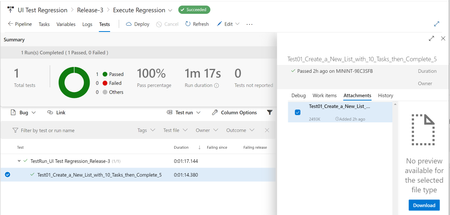
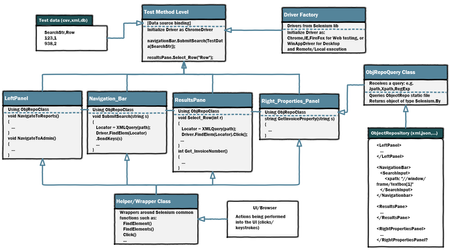
Need a way to create reports for your Selenium, WinAppDriver or Xamarin UI TESTS? Use this NuGet package to create HTML reports with embedded screenshots and step descriptions for your tests flows. Inside is code and git repo example.8.3KViews2likes3Comments