transaction log full
4 TopicsAzure SQL Scaling Stuck? Investigating CDC and Transaction Log Pressure
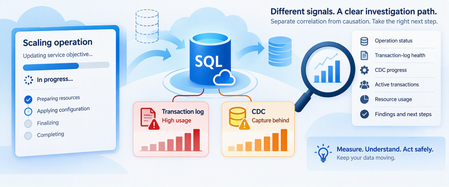
Azure SQL Database makes scaling compute straightforward. But troubleshooting becomes more complicated when several things happen simultaneously: A scale operation remains IN_PROGRESS. A cancellation remains CANCEL_IN_PROGRESS. Transaction-log usage is growing. Change Data Capture (CDC) is enabled. Log truncation reports REPLICATION. Long-running transactions are present. The temptation is to connect all these observations immediately: "CDC is preventing Azure SQL from scaling." That's a hypothesis, not yet a diagnosis. CDC reads changes from the transaction log, and CDC capture latency can delay log truncation under certain conditions. Microsoft specifically documents scenarios where CDC combined with long-running transactions can contribute to continued transaction-log growth. However, that doesn't establish a universal rule that: CDC causes scale operations to become stuck. REPLICATION as a log reuse wait means scaling is blocked. Disabling CDC will resolve a scale operation. A CDC problem and a long-running scale operation necessarily share the same root cause. The safest investigation separates the evidence into layers. 1. Start With the Scale Operation A scale operation changes the resources available to Azure SQL Database. Depending on the type of scaling operation, Azure SQL might need to: Create a compute instance with the requested configuration. Move or copy data when necessary. Redirect connections to the new environment. Terminate existing connections during the final switch. Microsoft documents that Azure SQL Database normally remains online during much of this process, although the final connection switch can cause a short interruption. Long-running transactions can increase the time required for recovery when connections are terminated. So, begin with the operation itself. 2. Check the Operation State Azure SQL Database exposes database-operation status using: sys.dm_operation_status This DMV reports operations such as ALTER and their state. Run the query from the logical server's master database: SELECT session_activity_id, major_resource_id AS database_name, operation, state_desc, percent_complete, start_time, last_modify_time, error_code, error_desc FROM sys.dm_operation_status ORDER BY start_time DESC; Possible states include: PENDING IN_PROGRESS COMPLETED FAILED CANCEL_IN_PROGRESS CANCELLED An important detail is that percent_complete shouldn't automatically be interpreted like a traditional progress bar. For many active operations: 50 = operation in progress and: 100 = operation complete Restore operations have more granular progress values. So: An ALTER operation remaining at 50% doesn't necessarily mean exactly half of the work is complete. 3. Build an Operation Timeline Capture: Scale request time. Requested service objective. Operation start time. Current state. last_modify_time. Cancellation request time, when applicable. Subsequent scale requests. Application impact. Database availability. Workload running during the operation. For example: Time Observation T0 Scale requested T1 Operation enters IN_PROGRESS T2 Transaction-log utilization rises T3 log_reuse_wait_desc reports REPLICATION T4 Cancellation requested T5 Operation still CANCEL_IN_PROGRESS This timeline establishes correlation. It doesn't yet establish causation. 4. Don't Keep Submitting Scale Requests When a scale or cancellation appears slow, avoid repeatedly submitting new modifications without understanding the state of the existing operation. Instead: Preserve the current operation ID. Record the operation state. Record timestamps. Capture current database workload. Investigate the transaction log. Investigate CDC independently. Escalate if the operation remains persistently unable to reach a terminal state. The goal is to reduce variables rather than introduce new ones. 5. Measure Transaction-Log Utilization Now move to the database being investigated. sys.dm_db_log_space_usage is supported in Azure SQL Database and reports how much transaction-log space is currently occupied. SELECT total_log_size_in_bytes / 1024.0 / 1024.0 AS total_log_size_mb, used_log_space_in_bytes / 1024.0 / 1024.0 AS used_log_space_mb, used_log_space_in_percent FROM sys.dm_db_log_space_usage; Capture this repeatedly. You're looking for a trend such as: T1 25% T2 41% T3 58% T4 73% T5 88% versus: T1 60% T2 63% T3 56% T4 61% T5 58% The first pattern suggests sustained net log growth. The second shows that log space is being reused. One snapshot can't tell you which behavior is occurring. 6. Ask Why the Log Can't Be Reused One of the most useful checks is: SELECT name, log_reuse_wait_desc FROM sys.databases WHERE database_id = DB_ID(); The value describes the current condition preventing transaction-log reuse. Microsoft also exposes the same concept through sys.dm_db_log_stats() as log_truncation_holdup_reason. A more complete diagnostic query is: SELECT database_id, total_log_size_mb, active_log_size_mb, total_vlf_count, active_vlf_count, log_truncation_holdup_reason, log_since_last_checkpoint_mb FROM sys.dm_db_log_stats(DB_ID()); sys.dm_db_log_stats() is documented as applicable to Azure SQL Database and returns summary-level information for diagnosing transaction-log health. 7. What Does REPLICATION Mean When CDC Is Enabled? This point requires careful interpretation. CDC uses the transaction log as the source for captured changes. Inserts, updates, and deletes are recorded in the transaction log before CDC processes those changes. Microsoft documents an important interaction: CDC is enabled. Transactions produce log records. CDC must capture relevant log information. Capture latency can hold back log truncation. log_reuse_wait_desc can consequently report REPLICATION. Therefore, if you see: REPLICATION in a CDC-enabled Azure SQL Database, CDC-related log processing is a legitimate investigation path. But don't jump from: "log_reuse_wait_desc = REPLICATION" to: "CDC caused the scaling operation to become stuck." That's a different claim requiring separate evidence. 8. Confirm Whether CDC Is Enabled Azure SQL Database exposes CDC status through sys.databases. SELECT name, is_cdc_enabled FROM sys.databases WHERE database_id = DB_ID(); If: is_cdc_enabled = 1 CDC is enabled for the database. Microsoft documents CDC support in Azure SQL Database and notes that the database must first be CDC-enabled before individual source tables can be tracked. 9. Inventory CDC Capture Instances Rather than using SQL Server Agent job queries, inspect Azure SQL Database CDC metadata. SELECT ct.capture_instance, OBJECT_SCHEMA_NAME(ct.source_object_id) AS source_schema, OBJECT_NAME(ct.source_object_id) AS source_table, ct.start_lsn, ct.create_date FROM cdc.change_tables AS ct ORDER BY source_schema, source_table; This helps answer: Which tables are tracked? How many capture instances exist? When were they created? Has the CDC scope changed recently? An important Azure SQL-specific detail is: Azure SQL Database doesn't depend on SQL Server Agent CDC capture and cleanup jobs. Instead, Azure SQL Database uses a built-in CDC scheduler that automatically runs capture and cleanup within the database. That distinction is critical when adapting SQL Server CDC troubleshooting procedures to Azure SQL Database. 10. Check Whether CDC Is Advancing A simple high-level check is: SELECT sys.fn_cdc_get_min_lsn( ct.capture_instance ) AS minimum_lsn, sys.fn_cdc_get_max_lsn() AS maximum_lsn, ct.capture_instance, OBJECT_SCHEMA_NAME(ct.source_object_id) AS source_schema, OBJECT_NAME(ct.source_object_id) AS source_table FROM cdc.change_tables AS ct; Take repeated samples. The objective isn't to derive a universal threshold. The objective is to determine whether the observable CDC boundary is: Advancing. Intermittently advancing. Apparently static over a meaningful period. Again: Trend matters more than a single snapshot. 11. Investigate Long-Running Transactions This is particularly important when CDC and log growth appear together. Microsoft specifically documents transaction-log growth scenarios involving CDC and long-running transactions. Start by examining database transactions: SELECT dt.transaction_id, dt.database_transaction_begin_time, dt.database_transaction_type, dt.database_transaction_state, dt.database_transaction_log_record_count, CAST ( dt.database_transaction_log_bytes_used / 1024.0 / 1024.0 AS decimal(18,2) ) AS log_mb_used, CAST ( dt.database_transaction_log_bytes_reserved / 1024.0 / 1024.0 AS decimal(18,2) ) AS log_mb_reserved FROM sys.dm_tran_database_transactions AS dt WHERE dt.database_id = DB_ID() ORDER BY dt.database_transaction_log_bytes_used DESC; sys.dm_tran_database_transactions is supported in Azure SQL Database and provides transaction-level database information, including transaction start time and log bytes consumed. 12. Connect Transactions Back to Sessions A transaction ID is useful, but identifying the application session makes it actionable. SELECT st.session_id, at.transaction_id, at.transaction_begin_time, at.transaction_type, at.transaction_state, dt.database_transaction_begin_time, CAST ( dt.database_transaction_log_bytes_used / 1024.0 / 1024.0 AS decimal(18,2) ) AS log_mb_used, s.login_name, s.host_name, s.program_name, r.status, r.command, r.wait_type, r.blocking_session_id FROM sys.dm_tran_session_transactions AS st JOIN sys.dm_tran_active_transactions AS at ON st.transaction_id = at.transaction_id JOIN sys.dm_tran_database_transactions AS dt ON st.transaction_id = dt.transaction_id LEFT JOIN sys.dm_exec_sessions AS s ON st.session_id = s.session_id LEFT JOIN sys.dm_exec_requests AS r ON st.session_id = r.session_id WHERE dt.database_id = DB_ID() ORDER BY at.transaction_begin_time; sys.dm_tran_active_transactions and sys.dm_tran_database_transactions are documented for Azure SQL Database. Look for: Very old transactions. Transactions consuming large amounts of log. Sleeping sessions with open transactions. Blocking. Large write activity. Don't terminate transactions merely because they're old. First determine: Which application owns them. Whether rollback would cause more impact. Whether they're expected. Whether they're actually contributing to the observed log condition. 13. Correlate With Log-Write Pressure Azure SQL Database also exposes recent transaction-log write utilization through: sys.dm_db_resource_stats It provides roughly one hour of resource history with approximately 15-second samples. SELECT TOP (240) end_time, avg_cpu_percent, avg_data_io_percent, avg_log_write_percent, avg_memory_usage_percent FROM sys.dm_db_resource_stats ORDER BY end_time DESC; Now correlate: Scale-operation start time. Log-space growth. log_reuse_wait_desc. CDC progression. Long-running transactions. avg_log_write_percent. This can reveal two very different scenarios. Scenario A Log is large. Log-write rate is currently modest. CDC continues advancing. No unusually long transaction is present. This weakens the hypothesis that current transaction-log pressure is the primary explanation for the ongoing scale behavior. Scenario B Log usage continually rises. REPLICATION remains the reuse wait. CDC progression appears delayed. Large transactions remain active. Log-write pressure is high. This strengthens the case for investigating the log/CDC workload further. It still doesn't prove CDC is blocking scaling. 14. Test Correlation Without Inventing Causation Build a timeline like this: Time Scale state Log used Reuse wait CDC progress Long transaction T1 IN_PROGRESS 45% NOTHING Advancing No T2 IN_PROGRESS 62% REPLICATION Slower Yes T3 IN_PROGRESS 78% REPLICATION Limited Yes T4 IN_PROGRESS 66% NOTHING Advancing No Then ask: Evidence supporting a relationship Problem begins at the same time. Log pressure remains sustained. CDC progression is materially delayed. Long transactions contribute substantial log activity. Reducing unnecessary write pressure produces measurable improvement. Evidence weakening the relationship CDC progresses normally. Log space is actively reused. Scale remains IN_PROGRESS despite normal log behavior. Scale problems occur independently of CDC pressure. Log pressure clears but operation state doesn't change. This distinction protects the investigation from a common mistake: Correlation is an investigation path, not proof of root cause. 15. Don't Disable CDC as a First Step Disabling CDC is a substantial configuration change. It can affect: ETL pipelines. Integration platforms. Analytics workloads. Incremental processing. Downstream synchronization. CDC history. Azure SQL Database provides documented procedures for enabling and disabling CDC, but those procedures should be used because changing CDC is an intentional design decision, not simply because a scale operation is taking longer than expected. Even if disabling CDC changes the symptom, that fact alone doesn't prove: CDC was the root cause. Other conditions may have changed simultaneously. 16. Use a Safe Mitigation Order When a scale operation, CDC, and transaction-log pressure overlap, consider this sequence. Step 1: Stop introducing new variables Avoid repeatedly submitting duplicate or conflicting scale operations. Step 2: Preserve operation evidence Capture: Operation ID. Start time. State. Last modification time. Errors. Step 3: Measure log health Capture: Log size. Used log percentage. Truncation holdup reason. Trend over time. Step 4: Validate CDC Confirm: CDC enabled. Tracked tables. CDC progression. Recent CDC configuration changes. Step 5: Investigate long-running transactions Determine: Age. Session. Application owner. Log consumption. Business impact of intervention. Step 6: Reduce avoidable write pressure When operationally safe, reduce nonessential: Bulk updates. Large batches. ETL writes. Maintenance jobs. Excessive write concurrency. Step 7: Treat CDC changes as controlled interventions Only disable CDC when: Downstream impact is understood. The change is justified. The recovery/reinitialization path is understood. Evidence supports testing it. 17. Validate Recovery Don't stop when the scale operation finally completes. Confirm all layers. Scale operation Verify that the operation reached: COMPLETED FAILED CANCELLED rather than remaining indefinitely in an intermediate state. Transaction log Verify: Log usage stabilizes. Log reuse resumes. log_truncation_holdup_reason changes appropriately. CDC Verify: Change capture continues. Expected tracked tables remain enabled. Downstream consumers remain healthy. Application Verify: Connections recover. Workload resumes normally. No unexpected backlog remains. 18. Know When to Escalate Escalation becomes appropriate when you've established that: The scale or cancellation operation remains persistently nonterminal. No meaningful state changes are occurring. Database workload evidence has been captured. Log health is understood. CDC status is documented. Long transactions have been investigated. Business impact continues. Microsoft provides sys.dm_operation_status specifically for monitoring operations performed on Azure SQL databases, including pending, in-progress, failed, cancellation-in-progress, and canceled states. A useful escalation package includes: Sanitized operation history. Service objective before and after the requested scale. sys.dm_operation_status evidence. Log-space trend. log_truncation_holdup_reason. CDC state. CDC progress observations. Long-running transaction evidence. Resource metrics. Mitigations attempted and their results. Remaining application/business impact. 19. Practical Decision Tree When an Azure SQL scale operation appears stuck: Is the operation still nonterminal? No Validate workload, CDC, and log health. Continue monitoring. Yes Record its state and timeline. Is the transaction log under sustained pressure? No Don't make CDC the primary hypothesis solely because it's enabled. Yes Continue. What is preventing log reuse? ACTIVE_TRANSACTION Investigate long-running transactions. REPLICATION with CDC enabled Investigate CDC progress and transaction activity. Another value Investigate that truncation holdup independently. Is CDC demonstrating progress? Yes A completely stalled CDC process becomes a weaker hypothesis. Continue investigating log generation and the scale operation separately. No, or inconclusive Gather repeated samples. Check transactions and workload pressure. Did log pressure resolve while scaling remained stuck? Yes The evidence weakens the hypothesis that log/CDC pressure alone explains the operation. No Continue correlation and consider escalation. Final Takeaway When Azure SQL scaling, CDC, and transaction-log pressure happen together, don't begin with: "CDC blocked the scale operation." Begin with four independent questions: What is the actual state of the scale operation? Is the transaction log genuinely under sustained pressure? Why is log reuse being delayed? Is CDC demonstrating forward progress? Azure SQL Database provides documented tools for each layer: sys.dm_operation_status for operation state. sys.dm_db_log_space_usage for log-space utilization. sys.dm_db_log_stats() for transaction-log health and truncation holdup. sys.dm_tran_database_transactions for transaction/log consumption. sys.dm_db_resource_stats for recent CPU, I/O, and log-write pressure. Azure SQL Database's built-in CDC scheduler and CDC metadata for capture investigation. Most importantly: Don't disable CDC just because two symptoms occurred together. Preserve evidence, reduce unnecessary workload pressure, address demonstrated transaction problems, and escalate persistent nonterminal scaling operations with a clear timeline. Because: The safest diagnosis separates correlation from causation before changing the workload. Further reading Change Data Capture (CDC) with Azure SQL Database Scale single database resources in Azure SQL Database sys.dm_operation_status sys.dm_db_log_space_usage sys.dm_db_log_stats Transaction log growth with long-running transactions and CDC
Cannot truncate logs full when transaction cannot rollback
Hello, I recently experienced the problem when my database has a full transaction log but I can't truncate it via SSMS. I had to pass commands manually in T-SQL, but since the log was full, a query in progress was killed and proceeded to a rollback. However, the rollback was blocked at 0% because the logs were full, and the log files were locked because a transaction was in progress… Is there any other way of getting out of this situation without restarting the instance? (I've tried a backup + log shrink, adding log files, changing the recovery model to Simple, etc. But nothing works)206Views0likes2Comments
Full Transaction Log disk
Hello all, I have two databases and problems with the transaction disk growing up too much and getting don't less. Using the query: select name, recovery_model_desc, log_reuse_wait_desc from sys.databases I can see both databases have the Recovery Model set to FULL. The files .ldf get values too high. How can I change the default configuration to NEVER have problems with the full disk? Because once the disk is full the web application can't do more transactions/requests queries. Thank you.269Views0likes0CommentsLesson Learned #356: Transaction log full in Azure SQL due to CDC job.
Today, we faced a service request where our customer got the following issue Msg 9002, Level 17, State 2, Line 8 The transaction log for database '2d7c3f5a-XXXX-XZY-ZZZ-XXX' is full due to 'REPLICATION' and the holdup lsn is (194XXX:24X:1). Following I would like to share with you what was the lesson learned here.3.2KViews0likes0Comments