tls
1 TopicTLS Certificate Pinning and Best Practices in Azure Database for MySQL
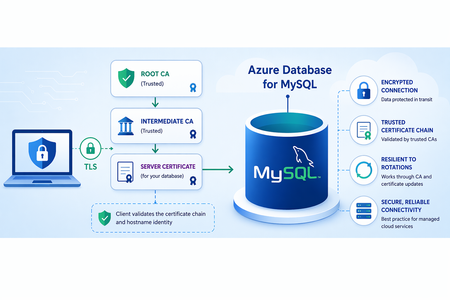
Transport Layer Security (TLS) encrypts data in transit between client applications and the server and authenticates the service endpoint in client-server authentication. Azure Database for MySQL server certificates are issued by well-known trusted public Certificate Authorities (CAs), including Microsoft-issued certificates, and are validated by clients during the TLS handshake. Customers do not manage certificates on the server side. Certificate pinning is a client-side security technique where an application restricts trust to a specific certificate, for example by thumbprint, public key, or CA, rather than relying solely on the default OS or platform trust store. The trust store contains pre-installed root CAs and may also include additional certificates configured by the client. During standard TLS validation, the client will trust any server certificate that chains to one of those root CAs. Why detecting TLS certificate pinning is not possible by design Certificate pinning is entirely client-side logic. The server has no visibility into whether pinning is configured on the client. From the server’s perspective, the client either completes the TLS handshake or aborts it. The server never sees: Which certificate(s) the client trusts Whether the client is comparing root CA, intermediate CA, leaf certificate or SPKI hash Whether the trust decision was static or dynamic What the server can see is TLS handshake failure patterns, TLS protocol, and cipher negotiation. Why certificate pinning is risky While certificate pinning was historically used to reduce the risk of man-in-the-middle attacks, it introduces significant operational fragility in cloud environments, particularly during certificate rotations. Server certificates and certificate authorities (CAs) must be rotated periodically to maintain security and compliance. In Azure Database for MySQL, when certificate pinning is used, clients bind trust to a specific certificate or CA. As a result, any change to the server certificate chain — including CA updates — can cause connection failures, even when the new certificates are fully valid and secure. One of the most common complications during certificate rotations is certificate pinning. Recommended TLS certificate trust model for Azure Database for MySQL Instead of pinning, adopt a CA‑based trust model that allows certificates to change safely. Trust root CAs, not individual certificates. Configure clients to use standard TLS validation against Azure-documented root CAs, rather than restricting trust to specific certificates or a narrowly scoped set of certificate authorities. Avoid configurations that effectively implement certificate pinning—such as trusting only a single certificate, public key, or limited CA set—unless explicitly required. Maintain a flexible and up-to-date trust store Clients rely on a trust store, key store, or equivalent certificate bundle to validate server certificates during TLS negotiation. Include the appropriate root and intermediate certificate authorities (CAs) required to validate the server certificate chain Ensure that trust stores are periodically reviewed and updated in line with provider guidance and announced certificate authority changes. For the current TLS certificates visit the Azure Database for MySQL documentation. Use certificate validation modes that rely on standard CA-based trust rather than pinning For MySQL client configurations, prefer: ssl-mode=VERIFY_CA Validates the server certificate chain against trusted CAs ssl-mode=VERIFY_IDENTITY Validates CA and hostname (like PostgreSQL verify-full) These modes ensure that clients validate the server certificate chain against trusted CAs, and in stricter modes, verify hostname identity. They do not imply certificate pinning by themselves. They rely on standard CA-based trust. Configurations only become rigid when trust is narrowly restricted, such as to a single certificate or limited CA set, often through custom or overly constrained trust stores. This effectively introduces certificate pinning. When properly configured, these modes authenticate the service endpoint and protect against spoofing, while remaining resilient to certificate rotations. Maintain a combined CA during certificate rotations Azure may rotate root or intermediate CAs over time. When Azure announces a CA rotation: Add the new root and intermediate CAs to the client trust store before the rotation begins Retain existing root or intermediate CAs until the transition is fully complete Avoid removing older certificates prematurely This combined CA approach, using both the current and upcoming certificate authorities during the transition window, allows clients to continue validating the server certificate chain without interruption. As you review your current client configurations, ensure your applications rely on CA-based trust, avoid overly restrictive certificate configurations such as certificate pinning, and are prepared to handle routine certificate rotations without disruption. For a deeper dive, see the full article: TLS Certificate Pinning in PostgreSQL and MySQL: Risks, Rotations, and Best Practices. Stay Connected We welcome your feedback and invite you to share your experiences or suggestions at AskAzureDBforMySQL@service.microsoft.com Thank you for choosing Azure Database for MySQL!147Views0likes0Comments