text analytics
35 TopicsModel router updates: new regions, a refreshed model pool, and understanding the hill climb
Across Microsoft, "hill climbing" has become shorthand for how real AI progress happens: not in one dramatic leap, but through a disciplined loop. Microsoft AI defines the hill climb as an organization that continuously improves, cycle after cycle, through more compute, better data, and sharper evaluation. Reinforcement fine-tuning in Foundry defines it as improving the deployable model package one measured step at a time across quality, latency, and cost. Different altitudes, same premise: progress is not a one-shot decision. It's a loop. For most teams, the decision of what model to use when is made manually or with custom routing tools. A developer picks a model based on benchmarks, familiarity, or the last launch that made headlines, ships it, and revisits the choice only when something breaks. In an ecosystem where the frontier moves monthly, that decision goes stale fast. Model router in Foundry Models brings the hill climb to the selection layer. What's new: a bigger pool, in more places This release expands where teams can deploy model router, broaden the supported model pool, and delivers updates through a stable endpoint. Together, these changes help teams run production workloads in more locations, match a wider range of tasks to suitable models, and adopt supported updates without changing the application integration. A refreshed model pool. The supported model list now includes Anthropic Claude Opus 4.8 — a high-capability model built for complex reasoning and long-form generation, for scenarios that demand depth, structure, and quality — and the GPT-5.6 family. Just as importantly, the pool is pruned: gpt-5-chat, gpt-5.2-chat, gpt-5.3-chat, Deepseek-V3.1 have been removed from the model router as models reach the end of their lifecycle and are deprecated in Foundry. New region availability. The model router is now available in 28 regions for global standard and 21 data zone regions. For many organizations, inference requests must stay within specific geographic boundaries for regulatory, governance, or customer-trust reasons — and intelligent routing shouldn't force a compromise on that. Find the full list of regions here. The most important detail is what you don't have to do: these updates occur automatically*. The endpoint remains stable as the supported model pool is refreshed, so teams do not need to redeploy the model router to receive the update. Applications can continue using the same integration while the model router evaluates requests against the current supported pool. Teams should continue monitoring routing traces and application outcomes to confirm that quality, cost, latency, and governance requirements are met. *Models from Anthropic still need to be deployed separately before they can be routed to through the model router. Interested in hearing more about what's new to the model router? Tune in for the next episode of Model Mondays with Sanjeev Jagtap and Lee Stott, where they talk all things model router from evaluations to hill climbing. Sign up here to watch live or view the replay: Model Mondays - Spotlight On Model router in Microsoft Foundry | Microsoft Reactor The selection-layer hill climb At the selection layer, a step is a routing decision. Each one is a micro-optimization against your objective, and each one is instrumented: every response from the model router includes a model field showing which underlying model was selected, so the climb leaves a complete, auditable trail. Model router supports three parts of the optimization loop: A/B testing to compare two router configurations to understand quality, cost, and latency tradeoffs; model decomposition to use routing results to decompose a single-model application into a multi-model or multi-agent design, and continuous routing to keep the router in production for continuous per-request selection. Each pattern turns model choice into a measured, repeatable process rather than a fixed decision. 1. A/B Testing Question: Which model or routing strategy should I use in production? A/B testing helps teams compare candidate models, model families, or router configurations against the same workload. Representative traffic is sent to competing deployments, and teams compare quality, cost, latency, and governance outcomes. The goal is to understand tradeoffs and identify the model or routing strategy that best meets workload requirements before promoting it to production. 2. Model Decomposition Question: What work is my application actually doing? Model decomposition uses model router as a diagnostic tool. By deploying the model router against a representative workload and examining routing telemetry, teams can see how requests naturally separate into different task classes. Simple retrieval, classification, and summarization requests may route to smaller models, while reasoning, planning, and agentic workflows may require more capable models. The goal is not to choose a winner, but to understand the structure of the workload and uncover opportunities for optimization, specialization, or architectural improvements. 3. Route continuously Question: Why choose a single model at all? Route continuously is the pattern model router was designed for but is not limited to. Rather than treating model selection as a one-time decision, teams leave the model router in production and allow the best-fit model to be selected for each request. As the supported model pool, regional availability, and platform capabilities evolve, teams can continue using the same endpoint while evaluating whether updates improve workload outcomes. Model selection becomes an ongoing optimization process rather than a project that must be repeated every time the model landscape changes. Together, these patterns illustrate a broader shift: the model router is more than a model. It is a tool for the optimization loop itself, helping teams evaluate tradeoffs, understand workload behavior, test hypotheses, and continuously refine model selection as requirements evolve. Whether used to compare candidate models, decompose applications into specialized tasks, or automate per-request routing in production, model router turns model selection into an observable, measurable, and repeatable process. As the model landscape continues to change, that optimization loop becomes a durable advantage. Getting Started Ready to start your own hill climb? Whether you're exploring the model router for the first time, evaluating routing strategies against your workload, or building a long-term optimization practice, these resources can help you move from experimentation to production with Microsoft Foundry. What's new in model router? Sign up for the next Model Mondays episode for a deep dive into new features, optimization patterns, and the latest model router updates. How do I build agents with model router? Check out the Model Router Agents Lab and build agent experiences with routing, retrieval, web search, tool calling, and multi-agent patterns. How do I evaluate model router? Compare model router against baseline models using your own prompts, then review quality, cost, latency, and routing decisions with the Auto Evaluation Toolkit. How do I optimize model router for my workload? Start your hill-climbing journey with the Model Mastery workshop, where you'll test one optimization lever at a time and measure how each change impacts workload outcomes. How do I build a model router optimization playbook? Explore the Model Releases repository to track new capabilities, understand the optimization question behind each release, and try focused notebooks that demonstrate one optimization lever at a time.2.7KViews2likes0Comments
Now in Foundry: Cohere Transcribe, Nanbeige 4.1-3B, and Octen Embedding
This week's Model Mondays edition spans three distinct layers of the AI application stack: Cohere's cohere-transcribe, a 2B Automatic Speech Recognition (ASR) model that ranks first on the Open ASR Leaderboard across 14 languages; Nanbeige's Nanbeige4.1-3B, a compact 3B reasoning model that outperforms models ten times its size on coding, math, and deep-search benchmarks; and Octen's Octen-Embedding-0.6B, a lightweight text embedding model that achieves strong retrieval scores across 100+ languages and industry-specific domains. Together, these three models illustrate how developers can build full AI pipelines—from audio ingestion to language reasoning to semantic retrieval—entirely with open-source models deployed through Microsoft Foundry. Each operates in a different modality and fills a distinct architectural role, making this week's selection especially well-suited for teams assembling production-grade systems across speech, text, and search. Models of the week Cohere's cohere-transcribe-03-2026 Model Specs Parameters / size: 2B Primary task: Automatic Speech Recognition (audio-to-text) Why it's interesting Top-ranked on the Open ASR Leaderboard: cohere-transcribe-03-2026 achieves a 5.42% average Word Error Rate (WER) across 8 English benchmark datasets as of March 26, 2026—placing it first among open models. It reaches 1.25% WER on LibriSpeech Clean and 8.15% on AMI (meeting transcription), demonstrating consistent accuracy across both clean speech and real-world, multi-speaker environments. Benchmarks: Open ASR Leaderboard. 14 languages with a dedicated encoder-decoder architecture: The model uses a large Conformer encoder for acoustic representation extraction paired with a lightweight Transformer decoder for token generation, trained from scratch on 14 languages covering European, East Asian (Chinese Mandarin, Japanese, Korean, Vietnamese), and Arabic. Unlike general-purpose models adapted for ASR, this dedicated architecture makes it efficient without sacrificing accuracy. Long-form audio with automatic chunking: Audio longer than 35 seconds is automatically split into overlapping chunks and reassembled into a coherent transcript—no manual preprocessing required. Batched inference, punctuation control, and per-language configuration are all supported through the standard API. Try it Click on the window above, upload an audio file, and watch how quickly the model transcribes it for you. Or click the link to experiment with the Cohere Transcribe Space and record audio directly from your device. Use Case Prompt Pattern Meeting transcription Submit recorded audio with language tag; retrieve timestamped transcript per speaker turn Call center quality review Batch-process customer call recordings, extract transcript, pass to classification model Medical documentation Transcribe clinical encounters; feed transcript into summarization or structured note pipeline Multilingual content indexing Process podcasts or video audio in any of 14 supported languages; store as searchable text Sample prompt for a legal services deployment: You are building a contract negotiation assistant. A client submits a recorded audio of a 45-minute supplier negotiation call. Using the cohere-transcribe-03-2026 endpoint deployed in Microsoft Foundry, transcribe the call with punctuation enabled for the English audio. Once the transcript is available, pass it to a downstream language model with the following instruction: "Identify all pricing commitments, delivery deadlines, and liability clauses mentioned in this negotiation transcript. For each, note the speaker's position (client or supplier) and flag any terms that appear ambiguous or require legal review." Nanbeige's Nanbeige4.1-3B Model Specs Parameters / size: 3B Context length: 131,072 tokens Primary task: Text generation (reasoning, coding, tool use, deep search) Why it's interesting Reasoning performance that exceeds its size class: Nanbeige4.1-3B scores 76.9 on LiveCodeBench-V6, these results suggest that targeted post-training using Supervised Fine-Tuning (SFT) and Reinforcement Learning (RL) on a focused dataset can yield improvements that scale-based approaches cannot replicate at equivalent parameter counts. Read the technical report: https://huggingface.co/papers/2602.13367. Strong preference alignment at the 3B scale: On Arena-Hard-v2, Nanbeige4.1-3B scores 73.2, compared to 56.0 for Qwen3-32B and 60.2 for Qwen3-30B-A3B—both significantly larger models. This indicates that the model's outputs consistently match human preference for response quality and helpfulness, not just accuracy on structured tasks. Deep-search capability previously absent from small general models: On xBench-DeepSearch-2505, Nanbeige4.1-3B scores 75—matching search-specialized small agents. The model can sustain complex agentic tasks involving more than 500 sequential tool invocations, a capability gap that previously required either specialized search agents or significantly larger models. Native tool-use support: The model's chat template and generation pipeline natively support tool call formatting, making it straightforward to connect to external APIs and build multi-step agentic workflows without additional scaffolding. Try it Use Case Prompt Pattern Code review and fix Provide failing test + stack trace; ask model to diagnose root cause and write corrected implementation Competition-style math Submit problem as structured prompt; use temperature 0.6, top-p 0.95 for consistent reasoning steps Agentic task execution Provide tool definitions as JSON + goal; let model plan and execute tool calls sequentially Long-document Q&A Pass full document (up to 131K tokens) with targeted factual questions; extract structured answers Sample prompt for a software engineering deployment: You are automating pull request review for a backend engineering team. Using the Nanbeige4.1-3B endpoint deployed in Microsoft Foundry, provide the model with a unified diff of a proposed code change and the following system instruction: "You are a senior software engineer reviewing a pull request. For each modified function: (1) summarize what the change does, (2) identify any edge cases that are not handled, (3) flag any security or performance regressions relative to the original, and (4) suggest a specific improvement if one is warranted. Format your output as a structured list per function." Octen's Octen-Embedding-0.6B Model Specs Parameters / size: 0.6B Context length: 32,768 tokens Primary task: Text embeddings (semantic search, retrieval, similarity) Why it's interesting Retrieval performance above larger proprietary models at 0.6B: On the RTEB (Retrieval Text Embedding Benchmark) public leaderboard, Octen-Embedding-0.6B achieves a mean task score of 0.7241—above voyage-3.5 (0.7139), Cohere-embed-v4.0 (0.6534), and text-embedding-3-large (0.6110), despite being a fraction of their parameter count. The model is fine-tuned from Qwen3-Embedding-0.6B via Low-Rank Adaptation (LoRA), demonstrating that targeted fine-tuning on retrieval-specific data can close the gap with larger embedding models. Vertical domain coverage across legal, finance, healthcare, and code: Octen-Embedding-0.6B was trained with explicit coverage of domain-specific retrieval scenarios—legal document matching, financial report Q&A, clinical dialogue retrieval, and code search including SQL. This makes it suitable for regulated-industry applications where generic embedding models tend to underperform on specialized terminology. 32,768-token context for long-document retrieval: The extended context window supports encoding entire legal contracts, earnings reports, or clinical case notes as single embeddings—removing the need to chunk long documents and re-aggregate scores at query time, which can introduce ranking errors. 100+ language support with cross-lingual retrieval: The model handles multilingual and cross-lingual retrieval natively, with strong coverage across languages including English, Chinese, and other major languages via its Qwen3-based architecture—practical for global enterprise applications that span multiple languages. Use Case Prompt Pattern Semantic search Encode user query and document corpus; rank documents by cosine similarity to query embedding Legal precedent retrieval Embed case briefs and query with legal question; retrieve most semantically relevant precedents Cross-lingual document search Encode multilingual document set; submit query in any supported language for cross-lingual retrieval Financial Q&A pipeline Embed earnings reports or filings; retrieve relevant passages to ground downstream language model responses Sample prompt for a global enterprise knowledge base deployment: You are building a clinical decision support tool. Using the Octen-Embedding-0.6B endpoint deployed in Microsoft Foundry, embed a corpus of 10,000 clinical case notes at ingestion time and store the resulting 1024-dimensional vectors in a vector database. At query time, encode an incoming patient presentation summary and retrieve the 5 most semantically similar historical cases. Pass the retrieved cases and the current presentation to a language model with the following instruction: "Based on these five similar cases and their documented outcomes, summarize the most common treatment approaches and flag any cases where the outcome differed significantly from the initial prognosis." Getting started You can deploy open-source Hugging Face models directly in Microsoft Foundry by browsing the Hugging Face collection in the Foundry model catalog and deploying to managed endpoints in just a few clicks. You can also start from the Hugging Face Hub. First, select any supported model and then choose "Deploy on Microsoft Foundry", which brings you straight into Azure with secure, scalable inference already configured. Learn how to discover models and deploy them using Microsoft Foundry documentation: Follow along the Model Mondays series and access the GitHub to stay up to date on the latest Read Hugging Face on Azure docs Learn about one-click deployments from the Hugging Face Hub on Microsoft Foundry Explore models in Microsoft Foundry823Views1like0CommentsNow in Foundry: Qwen3-Coder-Next, Qwen3-ASR-1.7B, Z-Image
This week's spotlight features three models from that demonstrate enterprise-grade AI across the full scope of modalities. From low latency coding agents to state-of-the-art multilingual speech recognition and foundation-quality image generation, these models showcase the breadth of innovation happening in open-source AI. Each model balances performance with practical deployment considerations, making them viable for production systems while pushing the boundaries of what's possible in their respective domains. This week's Model Mondays edition highlights Qwen3-Coder-Next, an 80B MoE model that activates only 3B parameters while delivering coding agent capabilities with 256k context; Qwen3-ASR-1.7B, which achieves state-of-the-art accuracy across 52 languages and dialects; and Z-Image from Tongyi-MAI, an undistilled text-to-image foundation model with full Classifier-Free Guidance support for professional creative workflows. Models of the week Qwen: Qwen3-Coder-Next Model Specs Parameters / size: 80B total (3B activated) Context length: 262,144 tokens Primary task: Text generation (coding agents, tool use) Why it's interesting Extreme efficiency: Activates only 3B of 80B parameters while delivering performance comparable to models with 10-20x more active parameters, making advanced coding agents viable for local deployment on consumer hardware Built for agentic workflows: Excels at long-horizon reasoning, complex tool usage, and recovering from execution failures, a critical capability for autonomous development that go beyond simple code completion Benchmarks: Competitive performance with significantly larger models on SWE-bench and coding benchmarks (Technical Report) Try it Use Case Prompt Pattern Code generation with tool use Provide task context, available tools, and execution environment details Long-context refactoring Include full codebase context within 256k window with specific refactoring goals Autonomous debugging Present error logs, stack traces, and relevant code with failure recovery instructions Multi-file code synthesis Describe architecture requirements and file structure expectations Financial services sample prompt: You are a coding agent for a fintech platform. Implement a transaction reconciliation service that processes batches of transactions, detects discrepancies between internal records and bank statements, and generates audit reports. Use the provided database connection tool, logging utility, and alert system. Handle edge cases including partial matches, timing differences, and duplicate transactions. Include unit tests with 90%+ coverage. Qwen: Qwen3-ASR-1.7B Model Specs Parameters / size: 1.7B Context length: 256 tokens (default), configurable up to 4096 Primary task: Automatic speech recognition (multilingual) Why it's interesting All-in-one multilingual capability: Single 1.7B model handles language identification plus speech recognition for 30 languages, 22 Chinese dialects, and English accents from multiple regions—eliminating the need to manage separate models per language Specialized audio versatility: Transcribes not just clean speech but singing voice, songs with background music, and extended audio files, expanding use cases beyond traditional ASR to entertainment and media workflows State-of-the-art accuracy: Outperforms GPT-4o, Gemini-2.5, and Whisper-large-v3 across multiple benchmarks. English: Tedlium 4.50 WER vs 7.69/6.15/6.84; Chinese: WenetSpeech 4.97/5.88 WER vs 15.30/14.43/9.86 (Technical Paper) Language ID included: 97.9% average accuracy across benchmark datasets for automatic language identification, eliminating the need for separate language detection pipelines Try it Use Case Prompt Pattern Multilingual transcription Send audio files via API with automatic language detection Call center analytics Process customer service recordings to extract transcripts and identify languages Content moderation Transcribe user-generated audio content across multiple languages Meeting transcription Convert multilingual meeting recordings to text for documentation Customer support sample prompt: Deploy Qwen3-ASR-1.7B to a Microsoft Foundry endpoint and transcribe multilingual customer service calls. Send audio files via API to automatically detect the language (from 52 supported options including 30 languages and 22 Chinese dialects) and generate accurate transcripts. Process calls from customers speaking English, Spanish, Mandarin, Cantonese, Arabic, French, and other languages without managing separate models per language. Use transcripts for quality assurance, compliance monitoring, and customer sentiment analysis. Tongyi-MAI: Z-Image Model Specs Parameters / size: 6B Context length: N/A (text-to-image) Primary task: Text-to-image generation Why it's interesting Undistilled foundation model: Full-capacity base without distillation preserves complete training signal with Classifier-Free Guidance support (a technique that improves prompt adherence and output quality), enabling complex prompt engineering and negative prompting that distilled models cannot achieve High output diversity: Generates distinct character identities in multi-person scenes with varied compositions, facial features, and lighting, critical for creative applications requiring visual variety rather than consistency Aesthetic versatility: Handles diverse visual styles from hyper-realistic photography to anime and stylized illustrations within a single model, supporting resolutions from 512×512 to 2048×2048 at any aspect ratio with 28-50 inference steps (Technical Paper) Try it Use Case Prompt Pattern Multilingual transcription Send audio files via API with automatic language detection Call center analytics Process customer service recordings to extract transcripts and identify languages Content moderation Transcribe user-generated audio content across multiple languages Meeting transcription Convert multilingual meeting recordings to text for documentation E-commerce sample prompt: Professional product photography of a modern ergonomic office chair in a bright Scandinavian-style home office. Natural window lighting from left, clean white desk with laptop and succulent plant, light oak hardwood floor. Chair positioned at 45-degree angle showing design details. Photorealistic, commercial photography, sharp focus, 85mm lens, f/2.8, soft shadows. Getting started You can deploy open‑source Hugging Face models directly in Microsoft Foundry by browsing the Hugging Face collection in the Foundry model catalog and deploying to managed endpoints in just a few clicks. You can also start from the Hugging Face Hub. First, select any supported model and then choose "Deploy on Microsoft Foundry", which brings you straight into Azure with secure, scalable inference already configured. Learn how to discover models and deploy them using Microsoft Foundry documentation. Follow along the Model Mondays series and access the GitHub to stay up to date on the latest Read Hugging Face on Azure docs Learn about one-click deployments from the Hugging Face Hub on Microsoft Foundry Explore models in Microsoft Foundry1.4KViews0likes0CommentsWhat is trending in Hugging Face on Microsoft Foundry? Feb, 2, 2026
Open‑source AI is moving fast, with important breakthroughs in reasoning, agentic systems, multimodality, and efficiency emerging every day. Hugging Face has been a leading platform where researchers, startups, and developers share and discover new models. Microsoft Foundry brings these trending Hugging Face models into a production‑ready experience, where developers can explore, evaluate, and deploy them within their Azure environment. Our weekly Model Monday’s series highlights Hugging Face models available in Foundry, focusing on what matters most to developers: why a model is interesting, where it fits, and how to put it to work quickly. This week’s Model Mondays edition highlights three Hugging Face models, including a powerful Mixture-of-Experts model from Z. AI designed for lightweight deployment, Meta’s unified foundation model for image and video segmentation, and MiniMax’s latest open-source agentic model optimized for complex workflows. Models of the week Z.AI’s GLM-4.7-flash Model Basics Model name: zai-org/GLM-4.7-Flash Parameters / size: 30B total -3B active Default settings: 131,072 max new tokens Primary task: Agentic, Reasoning and Coding Why this model matters Why it’s interesting: It utilizes a Mixture-of-Experts (MoE) architecture (30B total parameters and 3B active parameters) to offer a new option for lightweight deployment. It demonstrates strong performance on logic and reasoning benchmarks, outperforming similar sized models like gpt-oss-20b on AIME 25 and GPQA benchmarks. It supports advanced inference features like "Preserved Thinking" mode for multi-turn agentic tasks. Best‑fit use cases: Lightweight local deployment, multi-turn agentic tasks, and logical reasoning applications. What’s notable: From the Foundry catalog, users can deploy on a A100 instance or unsloth/GLM-4.7-Flash-GGUF on a CPU. ource SOTA scores among models of comparable size. Additionally, compared to similarly sized models, GLM-4.7-Flash demonstrates superior frontend and backend development capabilities. Click to see more: https://docs.z.ai Try it Use case Best‑practice prompt pattern Agentic coding (multi‑step repo work, debugging, refactoring) Treat the model as an autonomous coding agent, not a snippet generator. Explicitly require task decomposition and step‑by‑step execution, then a single consolidated result. Long‑context agent workflows (local or low‑cost autonomous agents) Call out long‑horizon consistency and context preservation. Instruct the model to retain earlier assumptions and decisions across turns. Now that you know GLM‑4.7‑Flash works best when you give it a clear goal and let it reason through a bounded task, here’s an example prompt that a product or engineering team might use to identify risks and propose mitigations: You are a software reliability analyst for a mid‑scale SaaS platform. Review recent incident reports, production logs, and customer issues to uncover edge‑case failures outside normal usage (e.g., rare inputs, boundary conditions, timing/concurrency issues, config drift, or unexpected feature interactions). Prioritize low‑frequency, high‑impact risks that standard testing misses. Recommend minimal, low‑cost fixes (validation, guardrails, fallback logic, or documentation). Deliver a concise executive summary with sections: Observed Edge Cases, Root Causes, User Impact, Recommended Lightweight Fixes, and Validation Steps. Meta's Segment Anything 3 (SAM3) Model Basics Model name: facebook/sam3 Parameters / size: 0.9B Primary task: Mask Generation, Promptable Concept Segmentation (PCS) Why this model matters Why it’s interesting: It handles a vastly larger set of open-vocabulary prompts than SAM 2, and unifies image and video segmentation capabilities. It includes a "SAM 3 Tracker" mode that acts as a drop-in replacement for SAM 2 workflows with improved performance. Best‑fit use cases: Open-vocabulary object detection, video object tracking, and automatic mask generation What’s notable: Introduces Promptable Concept Segmentation (PCS), allowing users to find all matching objects (e.g., "dial") via text prompt rather than just single instances. Try it This model enables users to identify specific objects within video footage and isolate them over extended periods. With just one line of code, it is possible to detect multiple similar objects simultaneously. The accompanying GIF demonstrates how SAM3 efficiently highlights players wearing white on the field as they appear and disappear from view. Additional examples are available at the following repository: https://github.com/facebookresearch/sam3/blob/main/assets/player.gif Use case Best‑practice prompt pattern Agentic coding (multi‑step repo work, debugging, refactoring) Treat SAM 3 as a concept detector, not an interactive click tool. Use short, concrete noun‑phrase concept prompts instead of describing the scene or asking questions. Example prompt: “yellow school bus” or “shipping containers”. Avoid verbs or full sentences. Video segmentation + object tracking Specify the same concept prompt once, then apply it across the video sequence. Do not restate the prompt per frame. Let the model maintain identity continuity. Example: “person wearing a red jersey”. Hard‑to‑name or visually subtle objects Use exemplar‑based prompts (image region or box) when text alone is ambiguous. Optionally combine positive and negative exemplars to refine the concept. Avoid over‑constraining with long descriptions. Using the GIF above as a leading example, here is a prompt that shows how SAM 3 turns raw sports footage into structured, reusable data. By identifying and tracking players based on visual concepts like jersey color so that sports leagues can turn tracked data into interactive experiences where automated player identification can relay stats, fun facts, etc when built into a larger application. Here is a prompt that will allow you to start identifying specific players across video: Act as a sports analytics operator analyzing football match footage. Segment and track all football players wearing blue jerseys across the video. Generate pixel‑accurate segmentation masks for each player and assign persistent instance IDs that remain stable during camera movement, zoom, and player occlusion. Exclude referees, opposing team jerseys, sidelines, and crowd. Output frame‑level masks and tracking metadata suitable for overlays, player statistics, and downstream analytics pipelines. MiniMax AI's MiniMax-M2.1 Model Basics Model name: MiniMaxAI/MiniMax-M2.1 Parameters / size: 229B-10B Active Default settings: 200,000 max new tokens Primary task: Agentic and Coding Why this model matters Why it’s interesting: It is optimized for robustness in coding, tool use, and long-horizon planning, outperforming Claude Sonnet 4.5 in multilingual scenarios. It excels in full-stack application development, capable of architecting apps "from zero to one”. Previous coding models focused on Python optimization, M2.1 brings enhanced capabilities in Rust, Java, Golang, C++, Kotlin, Objective-C, TypeScript, JavaScript, and other languages. The model delivers exceptional stability across various coding agent frameworks. Best‑fit use cases: Lightweight local deployment, multi-turn agentic tasks, and logical reasoning applications. What’s notable: The release of open-source weights for M2.1 delivers a massive leap over M2 on software engineering leaderboards. https://www.minimax.io/ Try it Use case Best‑practice prompt pattern End‑to‑end agentic coding (multi‑file edits, run‑fix loops) Treat the model as an autonomous coding agent, not a snippet generator. Explicitly require task decomposition and step‑by‑step execution, then a single consolidated result. Long‑horizon tool‑using agents (shell, browser, Python) Explicitly request stepwise planning and sequential tool use. M2.1’s interleaved thinking and improved instruction‑constraint handling are designed for complex, multi‑step analytical tasks that require evidence tracking and coherent synthesis, not conversational back‑and‑forth. Long‑context reasoning & analysis (large documents / logs) Declare the scope and desired output structure up front. MiniMax‑M2.1 performs best when the objective and final artifact are clear, allowing it to manage long context and maintain coherence. Because MiniMax‑M2.1 is designed to act as a long‑horizon analytical agent, it shines when you give it a clear end goal and let it work through large volumes of information—here’s a prompt a risk or compliance team could use in practice: You are a financial risk analysis agent. Analyze the following transaction logs and compliance policy documents to identify potential regulatory violations and systemic risk patterns. Plan your approach before executing. Work through the data step by step, referencing evidence where relevant. Deliver a final report with the following sections: Key Risk Patterns Identified, Supporting Evidence, Potential Regulatory Impact, Recommended Mitigations. Your response should be a complete, executive-ready report, not a conversational draft. Getting started You can deploy open‑source Hugging Face models directly in Microsoft Foundry by browsing the Hugging Face collection in the Foundry model catalog and deploying to managed endpoints in just a few clicks. You can also start from the Hugging Face Hub. First, select any supported model and then choose "Deploy on Microsoft Foundry", which brings you straight into Azure with secure, scalable inference already configured. Learn how to discover models and deploy them using Microsoft Foundry documentation. Follow along the Model Mondays series and access the GitHub to stay up to date on the latest Read Hugging Face on Azure docs Learn about one-click deployments from the Hugging Face Hub on Microsoft Foundry Explore models in Microsoft Foundry1.9KViews0likes0Comments
OptiMind: A small language model with optimization expertise
Turning a real world decision problem into a solver ready optimization model can take days—sometimes weeks—even for experienced teams. The hardest part is often not solving the problem; it’s translating business intent into precise mathematical objectives, constraints, and variables. OptiMind is designed to try and remove that bottleneck. This optimization‑aware language model translates natural‑language problem descriptions into solver‑ready mathematical formulations, can help organizations move from ideas to decisions faster. Now available through public preview as an experimental model through Microsoft Foundry, OptiMind targets one of the more expertise‑intensive steps in modern optimization workflows. Addressing the Optimization Bottleneck Mathematical optimization underpins many enterprise‑critical decisions—from designing supply chains and scheduling workforces to structuring financial portfolios and deploying networks. While today’s solvers can handle enormous and complex problem instances, formulating those problems remains a major obstacle. Defining objectives, constraints, and decision variables is an expertise‑driven process that often takes days or weeks, even when the underlying business problem is well understood. OptiMind tries to address this gap by automating and accelerating formulation. Developed by Microsoft Research, OptiMind transforms what was once a slow, error‑prone modeling task into a streamlined, repeatable step—freeing teams to focus on decision quality rather than syntax. What makes OptiMind different? OptiMind is not just as a language model, but as a specialized system built for real-world optimization tasks. Unlike general-purpose large language models adapted for optimization through prompting, OptiMind is purpose-built for mixed integer linear programming (MILP), and its design reflects this singular focus. At inference time, OptiMind follows a multi‑stage process: Problem classification (e.g., scheduling, routing, network design) Hint retrieval tailored to the identified problem class Solution generation in solver‑compatible formats such as GurobiPy Optional self‑correction, where multiple candidate formulations are generated and validated This design can improve reliability without relying on agentic orchestration or multiple large models. In internal evaluations on cleaned public benchmarks—including IndustryOR, Mamo‑Complex, and OptMATH—OptiMind demonstrated higher formulation accuracy than similarly sized open models and competitive performance relative to significantly larger systems. OptiMind improved accuracy by approximately 10 percent over the base model. In comparison to open-source models under 32 billion parameters, OptiMind was also found to match or exceed performance benchmarks. For more information on the model, please read the official research blog or the technical paper for OptiMind. Practical use cases: Unlocking efficiency across domains OptiMind is especially valuable where modeling effort—not solver capability—is the primary bottleneck. Typical use cases include: Supply Chain Network Design: Faster formulation of multi‑period network models and logistics flows Manufacturing and Workforce Scheduling: Easier capacity planning under complex operational constraints Logistics and Routing Optimization: Rapid modeling that captures real‑world constraints and variability Financial Portfolio Optimization: More efficient exploration of portfolios under regulatory and market constraints By reducing the time and expertise required to move from problem description to validated model, OptiMind helps teams reach actionable decisions faster and with greater confidence. Getting started OptiMind is available today as an experimental model, and Microsoft Research welcomes feedback from practitioners and enterprise teams. Next steps: Explore the research details: Read more about the model on Foundry Labs and the technical paper on arXiv Try the model: Access OptiMind through Microsoft Foundry Test sample code: Available in the OptiMind GitHub repository Take the next step in optimization innovation with OptiMind—empowering faster, more accurate, and cost-effective problem solving for the future of decision intelligence.1.9KViews0likes0CommentsThe Future of AI: From Noise to Insight - An AI Agent for Customer Feedback
This post explores how Microsoft’s AI Futures team built a multi-agent system to transform scattered customer feedback into actionable insights. The solution aggregates feedback from multiple channels, uses advanced language models to cluster themes, summarize content, and identify sentiment, and delivers prioritized insights directly in Microsoft Teams. With human-in-the-loop safeguards, the system accelerates triage, prioritization, and follow-ups while maintaining compliance and traceability. Future enhancements include richer automation, trend visualization, and expanded feedback sources.676Views0likes0CommentsThe Future of AI: Structured Vibe Coding - An Improved Approach to AI Software Development
In this post from The Future of AI series, the author introduces structured vibe coding, a method for managing AI agents like a software team using specs, GitHub issues, and pull requests. By applying this approach with GitHub Copilot, they automated a repetitive task—answering Microsoft Excel-based questionnaires—while demonstrating how AI can enhance developer workflows without replacing human oversight. The result is a scalable, collaborative model for AI-assisted software development.5KViews0likes0CommentsThe Future of AI: Harnessing AI agents for Customer Engagements
Discover how AI-powered agents are revolutionizing customer engagement—enhancing real-time support, automating workflows, and empowering human professionals with intelligent orchestration. Explore the future of AI-driven service, including Customer Assist created with Azure AI Foundry.1.2KViews2likes0Comments
Announcing the Text PII August preview model release in Azure AI language
Azure AI Language is excited to announce a new preview model release for the PII (Personally Identifiable Information) redaction service, which includes support for more entities and languages, addressing customer-sourced scenarios and international use cases. What’s New | Updated Model 2025-08-01-preview Tier 1 language support for DateOfBirth entity: expanding upon the original English-only support earlier this year, we’ve added support for all Tier 1 languages: French, German, Italian, Spanish, Portuguese, Brazilian Portuguese, and Dutch New entity support: SortCode - a financial code used in the UK and Ireland to identify the specific bank and branch where an account is held. Currently we support this in only English. LicensePlateNumber - the standard alphanumeric code for vehicle identification. Note that our current scope does not support a license plate that contains only letters. Currently we support this in only English. AI quality improvements for financial entities, reducing false positives/negatives These updates respond directly to customer feedback and address gaps in entity coverage and language support. The broader language support enables global deployments and the new entity types allow for more comprehensive data extraction for our customers. This ensures an improved service quality for financial, criminal justice, and many other regulatory use cases, enabling more accurate and reliable service for our customers. Get started A more detailed tutorial and overview of the service feature can be found in our public docs. Learn more about these releases and several others enhancing our Azure AI Language offerings on our What’s new page. Explore Azure AI Language and its various capabilities Access full pricing details on the Language Pricing page Find the list of sensitive PII entities supported Try out Azure AI Foundry for a code-free experience We are looking forward to continuously improving our product offerings and features to meet customer needs and are keen to hear any comments and feedback.525Views1like0Comments
Orchestrate multimodal AI insights within your healthcare data estate (Public Preview)
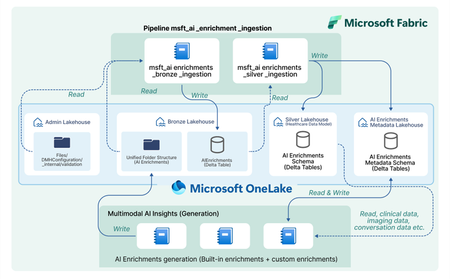
In today’s healthcare landscape, there is an increasing emphasis on leveraging artificial intelligence (AI) to extract meaningful insights from diverse datasets to improve patient care and drive clinical research. However, incorporating AI into your healthcare data estate often brings significant costs and challenges, especially when dealing with siloed and unstructured data. Healthcare organizations produce and consume data that is not only vast but also varied in format—ranging from structured EHR entries to unstructured clinical notes and imaging data. Traditional methods require manual effort to prepare and harmonize this data for AI, specify the AI output format, set up API calls, store the AI outputs, integrate the AI outputs, and analyze the AI outputs for each AI model or service you decide to use. Orchestrate multimodal AI insights is designed to streamline and scale healthcare AI within your data estate by building off of the data transformations in healthcare data solutions in Microsoft Fabric. This capability provides a framework to generate AI insights by connecting your multimodal healthcare data to an ecosystem of AI services and models and integrating structured AI-generated insights back into your data estate. When you combine these AI-generated insights with the existing healthcare data in your data estate, you can power advanced analytics scenarios for your organization and patient population. Key features: Metadata store lakehouse acts as a central repository for the metadata for AI orchestration to effectively capture and manage enrichment definitions, view definitions, and contextual information for traceability purposes. Execution notebooks define the enrichment view and enrichment definition based on the model configuration and input mappings. They also specify the model processor and transformer. The model processor calls the model API, and the transformer produces the standardized output while saving the output in the bronze lakehouse in the Ingest folder. Transformation pipeline to ingest AI-generated insights through the healthcare data solutions medallion lakehouse layers and persist the insights in an enrichment store within the silver layer. Conceptual architecture: The data transformations in healthcare data solutions in Microsoft Fabric allow you ingest, store, and analyze multimodal data. With the orchestrate multimodal AI insights capability, this standardized data serves as the input for healthcare AI models. The model results are stored in a standardized format and provide new insights from your data. The diagram below shows the flow of integrating AI generated insights into the data estate, starting as raw data in the bronze lakehouse and being transformed to delta tables in the silver lakehouse. This capability simplifies AI integration across modalities for data-driven research and care, currently supporting: Text Analytics for health in Azure AI Language to extract medical entities such as conditions and medications from unstructured clinical notes. This utilizes the data in the DocumentReference FHIR resource. MedImageInsight healthcare AI model in Azure AI Foundry to generate medical image embeddings from imaging data. This model leverages the data in the ImagingStudy FHIR resource. MedImageParse healthcare AI model in Azure AI Foundry to enable segmentation, detection, and recognition from imaging data across numerous object types and imaging modalities. This model uses the data in the ImagingStudy FHIR resource. By using orchestrate multimodal AI insights to leverage the data in healthcare data solutions for these models and integrate the results into the data estate, you can analyze your existing data alongside AI enrichments. This allows you to explore use cases such as creating image segmentations and combining with your existing imaging metadata and clinical data to enable quick insights and disease progression trends for clinical research at the patient level. Get started today! This capability is now available in public preview, and you can use the in-product sample data to test this feature with any of the three models listed above. For more information and to learn how to deploy the capability, please refer to the product documentation. We will dive deeper into more detailed aspects of the capability, such as the enrichment store and custom AI use cases, in upcoming blogs. Medical device disclaimer: Microsoft products and services (1) are not designed, intended or made available as a medical device, and (2) are not designed or intended to be a substitute for professional medical advice, diagnosis, treatment, or judgment and should not be used to replace or as a substitute for professional medical advice, diagnosis, treatment, or judgment. Customers/partners are responsible for ensuring solutions comply with applicable laws and regulations. FHIR® is the registered trademark of HL7 and is used with permission of HL7.1.4KViews2likes0Comments