testing
42 Topics
Test Automation at Scale: Lessons Learned from Enterprise projects
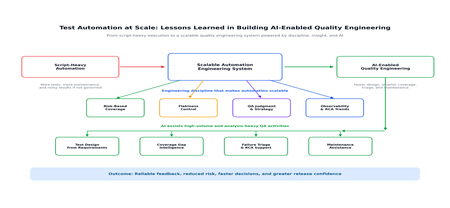
In large enterprise programs, test automation succeeds not by writing more scripts, but by engineering automation as a scalable quality system. In this blog, I have shared practical lessons from automation at scale, covering risk-based coverage, flakiness, observability, QA judgment, and how AI is now helping teams improve test design, coverage intelligence, failure triage, and maintenance. As applications grow across teams, environments, integrations, and release cycles, automation must evolve from a script-based activity into a disciplined engineering capability with clear architecture, ownership, governance, maintainability, observability, and continuous improvement. Based on my experience, the real value of automation at scale lies in building a reliable feedback system that adapts with the product and supports faster, smarter, and more confident delivery. What “Automation at Scale” Really Means In an enterprise context, automation at scale typically involves: Hundreds or thousands of automated tests Multiple teams contributing to the same framework CI/CD pipelines running continuously Shared environments with fluctuating stability Long-lived products with evolving architecture Frequent releases and changing business priorities Scaling automation is therefore both a technical and organizational challenge. It requires the right framework design, but it also requires team discipline, shared standards, and a clear understanding of what automation is expected to achieve. Lesson 1: Meaningful Coverage Matters More Than Test Count One of the most common mistakes in enterprise automation is assuming that a larger test suite automatically means better quality. In reality, more tests can also mean slower pipelines, more maintenance, duplicated validations, and noisier results. In large projects, test count alone is not a useful measure of success. What matters more is whether the automation is covering the right risks, the right journeys, and the right integration points. What Did Not Work Well: Automating every possible UI path Repeating the same validations across multiple layers Expanding regression suites without regular review Measuring progress only by the number of automated test cases Adding tests without considering execution time and maintenance cost What Worked Better: Prioritizing critical user journeys Using risk-based coverage Separating automation responsibilities across layers: Unit tests for code-level correctness API tests for integration and contract validation UI tests for business-critical end-to-end flows Reviewing regression suites regularly to remove outdated or low-value tests Aligning automation coverage with release risk and business impact A practical example of this came from one of our projects where the P1 automation suite was already stable and effective, but the P2 suite had grown significantly over time and was starting to impact regression efficiency. We reassessed the suite through a risk-based coverage lens, removed low-value scenarios, and retained only the tests that contributed meaningful confidence. As a result, the regression phase in each sprint became leaner, faster, and far easier to manage. Impact: The automation suite became smaller, faster, easier to maintain, and more meaningful in terms of release confidence. Lesson 2: Flakiness Is Not a Testing Inconvenience - It Is a Scalability Blocker Flaky tests may seem manageable in a small project, but at enterprise scale they quickly become a trust issue. When teams cannot rely on automation results, they either start ignoring failures or spend too much time investigating false alarms. This is where automation starts to lose credibility. If every failure needs manual judgment to decide whether it is real or random, the value of automated feedback starts reducing. Common Causes of Flakiness: Shared or unstable environments Test data collisions Asynchronous UI behavior Network or dependency latency Weak synchronization logic Environment-specific configuration issues Dependency failures outside the application under test Key Learnings: Treat flaky tests with the same seriousness as product defects Track flakiness as a visible quality metric Separate deterministic failures from environment or test instability Quarantine unstable tests until they are fixed Avoid allowing known flaky tests to repeatedly pollute pipeline results Review recurring flaky patterns during sprint or release retrospectives In one of our projects, the regression suite had become increasingly flaky during parallel execution. We addressed this by stabilizing the affected scenarios, isolating test data to prevent collisions between concurrent tests, and analyzing failure trends through root cause analysis rather than relying solely on pass/fail counts. This shift helped reduce pipeline noise and gradually improved trust in automation over successive sprints. Impact: Automation results became more reliable, and failures received the right level of attention instead of being dismissed as random noise. Lesson 3: Automation Does Not Replace Thinking-QA Judgment Scales Quality A common misconception is that more automation reduces the need for QA expertise. In reality, automation amplifies QA decisions. Automation can execute checks faster, but it cannot independently decide what matters most to the business. That judgment still comes from QA experience, domain understanding, and risk awareness. At scale, QA adds value by: Identifying high-risk scenarios Deciding what should and should not be automated Reviewing automation results beyond pass/fail status Connecting production learnings back to test strategy Understanding where manual exploration is still valuable Challenging whether automated coverage is meaningful, not just increasing This becomes especially important in enterprise programs where multiple teams may be contributing to the same automation ecosystem. Without strong QA judgment, automation can easily become a large collection of scripts that run frequently but do not necessarily provide meaningful confidence. Impact: Automation stayed aligned with business risk, not just technical coverage. Lesson 4: Quality Needs Observability, Not Just Execution Enterprise automation generates a large amount of execution data. However, data alone does not improve quality. The real value comes from turning that data into insights that teams can act on. A pass/fail report is useful, but it is not enough for scaled automation. Teams need to understand what is failing, why it is failing, how often it is failing, and whether the same patterns are repeating across sprints or releases. Instead of looking only at pass/fail counts, teams need visibility into: Recurring failure patterns Sprint-over-sprint RCA trends Unstable areas of the application Defect-prone modules Environment-related failures Automation maintenance hotspots Test cases that frequently fail due to data or dependency issues This shift is important because it changes automation from a reactive validation activity into a source of engineering feedback. When teams understand why failures are happening and where instability is increasing, they can improve design, development, testing, and release decisions earlier in the lifecycle. At that point, automation is no longer just validating quality. It is actively helping shape it. Impact: Automation became a feedback system that helped improve upstream engineering quality, not just a checkpoint before release. These lessons become even more powerful when combined with AI, which is now helping teams scale quality engineering with greater speed and precision. How AI Has Enhanced Test Automation at Scale AI enhances test automation at scale by reducing repetitive effort and turning large volumes of testing data into actionable insight. It helps teams accelerate test design from requirements, identify coverage gaps, triage failures faster, support automation maintenance, and free QA engineers to focus on higher-value work such as risk analysis, exploratory testing, and release confidence. Used with QA review and engineering discipline, AI becomes an enabler for smarter, faster, and more reliable quality engineering. Key Takeaways From large-scale automation initiatives, a few lessons become clear: Automation at scale needs engineering discipline, not just scripting effort. Test count is less important than meaningful, risk-based coverage. Flaky tests must be treated seriously because they directly impact trust. QA judgment remains essential even when automation maturity increases. Observability is critical for turning execution results into actionable insight. AI can accelerate test design, coverage analysis, triage, and maintenance. AI-generated outputs should always be reviewed with domain and QA context. The most successful automation programs combine strong frameworks, reliable pipelines, stable data, clear ownership, and continuous improvement. Conclusion The future of enterprise test automation is not simply about building larger suites. It is about creating smarter, more reliable, and more maintainable quality engineering systems. Programs that succeed at scale are the ones that combine strong framework design, CI/CD integration, stable test data, disciplined coverage strategy, actionable observability, and thoughtful use of AI. When these elements come together, automation becomes more than a regression safety net — it becomes a continuous feedback mechanism that helps teams deliver better software with greater confidence. AI is adding a new dimension to this journey. It can speed up test design, improve coverage visibility, simplify result analysis, and support maintenance. But its value depends on how well it is guided by QA expertise and engineering discipline. In the end, automation at scale is not about replacing people or simply adding more scripts. It is about building a quality engineering system where automation, AI, and human judgment work together to deliver faster, more reliable, and more confident releases.453Views1like0CommentsHigh Availability Testing
What is High Availability Testing? High Availability Testing ensures that your application remains accessible and functional even when components fail. It validates: Redundancy mechanisms (e.g., Availability Zones, Load Balancers) Failover processes (automatic/manual) Recovery time objectives (RTO) and recovery point objectives (RPO) System behavior under partial outages In Azure, HA testing often involves services like: Availability Sets & Zones Azure Load Balancer / Application Gateway Azure Traffic Manager Geo-redundant storage Why is High Availability Testing Important? Even well-architected systems fail in unexpected ways. HA testing helps you: Prevent downtime by validating failover readiness Build confidence in disaster recovery strategies Identify hidden weaknesses in distributed systems Reduce business risk and financial loss Align with frameworks like the Microsoft Azure Well-Architected Framework Without testing, your “highly available” system is just a theory. When Should You Perform HA Testing? HA testing shouldn’t be a one-time event. It should happen: Before production release (baseline validation) After major deployments or architecture changes During regular resilience drills (quarterly recommended) After incidents or outages As part of CI/CD pipelines (progressive resilience testing) Who is Responsible for HA Testing? High availability testing is a shared responsibility: Cloud Architects → Design resilient systems DevOps Engineers → Implement automation & pipelines Site Reliability Engineers (SREs) → Define SLAs, SLOs, and run experiments QA Teams → Validate failover scenarios Business Stakeholders → Define acceptable downtime and impact This aligns with modern DevOps and SRE practices, popularized by organizations like Google. Where Do You Perform HA Testing in Azure? You can test HA at multiple layers: Infrastructure Layer Virtual Machines in Availability Zones Scale Sets Networking components Platform Services Layer Azure App Services Azure SQL Database (failover groups) Cosmos DB multi-region setups Application Layer Microservices resilience Retry logic, circuit breakers Stateful vs stateless components How to Perform High Availability Testing on Azure HA-Test Entry Criteria Set-up HA configuration on Test environment for HA Testing:(Preferred environment: PPE/UAT) Test environment should replicate the production environment as closely as possible. Determine Azure services and components in scope for HA testing. This could include virtual machines, load balancers, databases, and other services. HA Test scenarios are defined, agreed and signed off by customer. Application should be stable and functionally certified by Test Team. HA scenarios should be functionally working with out any failures/errors. HA Test Execution Trigger requests on respective Azure services for a specific iterations/duration. Use Postman/JMeter/Automated script to trigger the load. During the load, simulate failure of Azure Service or component by Stop or Delete Azure service. Best recommend approach is to Use Azure Chaos Studio : Azure Chaos Studio documentation - tutorials, API reference - Azure Chaos Studio | Microsoft Learn Verify if load is successfully distributed to active/available nodes with out any failures. Capture load distribution among the services as proof/test evidence. HA-Exit Criteria RTO (Recovery Time Objective) and (RPO – Recovery Point Objective) are achieved: Failover meets defined recovery time and data loss limits Failover Works Seamlessly: Automatic failover and failback complete without errors Acceptable Error Rates: Errors stay within SLA (e.g., <1–2%) during failures Controlled Performance Impact: Latency and throughput remain within acceptable limits No Single Point of Failure: All critical components are redundant. Best Practices for HA Testing on Azure Design for zone and region redundancy Use health probes and load balancing effectively Implement retry and fallback mechanisms Monitor using Azure-native tools Document and rehearse failover procedures Combine HA testing + Chaos Engineering for full coverage Conclusion High availability in Azure is not just about architecture—it’s about continuous validation. By combining structured HA testing with chaos engineering using Azure Chaos Studio, organizations can build truly resilient systems that withstand real-world failures.550Views1like0Comments
AI‑Powered Performance Test Analysis using GHCP
Problem Statement Performance testing teams often face significant challenges in comparing JMeter test results across environments or test runs. Manual comparison and analysis of multiple result files is time-consuming, error-prone, and lacks actionable insights. Solution An AI-powered solution leveraging GHCP has been developed to address the identified challenge. This solution is designed to deliver Seamlessly compare JMeter performance results across environments (e.g., On-Prem vs. Azure) or test runs. Provide AI-driven insights to highlight endpoints with significant performance changes. Deliver clear, prioritized recommendations for faster issue resolution. Reduce analysis time by up to 80%, minimizing resource utilization and enabling cost savings. Business Outcomes Automated Performance Comparison: Seamlessly compare JMeter performance test results across two environments (e.g., On-Prem vs. Azure) or between different test runs, reducing manual effort and accelerating analysis. AI-Driven Insights for Decision Making: Leverage AI to identify endpoints with the most significant performance improvements or degradations. Actionable Observations and Recommendations: Generate clear, prioritized recommendations based on key performance trends, ensuring faster resolution of bottlenecks and improved application reliability. Enhanced Efficiency and Cost Savings: Minimize analysis time and resource utilization through automation, contributing to measurable effort savings and improved operational efficiency. manual comparison of multiple JMeter result files is time-consuming and automation can reduce analysis time by up to 80% Pre-Requisites Visual Studio code with GHCP Enabled. Usage Guidelines Start GitHub Copilot Chat from within Visual Studio Code. Attach follow files in GHCP Chat Azure_PerfTestResults.json OnPrem_PerfTestResults.json PerfResultsAnalysis_Instructions.md Note: *.json files are statistics.json files generated as part of JMeter Html Reports. Execute below UserPrompt UserPrompt: “Follow the steps in #file:PerfResultsAnalysis_Instructions.md and compare the two JMeter result files uploaded.” File Structure Validation is performed to ensure both files conform to the expected test results format. Upon successful validation, select the performance metric for comparison. Ex: AverageResponseTime Test results are analyzed, and Response Time Comparison between Baseline (On-Prem) and Azure is presented, including deviation and performance status. Results are also exported to a CSV file for easy reference. AI-Driven Performance Insights are generated to provide actionable recommendations. Use the prompts below to perform a more detailed analysis of your test results. UserPrompt: “Get me the Average Response time of GetProducts API between Azure and On-Prem” User Prompt: “Expected SLA on Azure is 150 ms, Get me the APIs whos Average Response Time is > 150 ms on Azure” GitHub Repository for project is available at https://github.com/AnilKumarGolla/PerfAnalysisUsingGHCP811Views4likes2Comments
How AI Is Transforming Performance Testing
Performance testing has always been a cornerstone of software quality engineering. Yet, in today’s world of distributed microservices, unpredictable user behaviour, and global-scale cloud environments, traditional performance testing methods are struggling to keep up. Enter Artificial Intelligence (AI) — not as another industry buzzword, but as a real enabler of smarter, faster, and more predictive performance testing. Why Traditional Performance Testing Is No Longer Enough Modern systems are complex, elastic, and constantly evolving. Key challenges include: Microservices-based architectures Cloud-native and containerized deployments Dynamic scaling and highly event-driven systems Rapidly shifting user patterns This complexity introduces variability in metrics and results: Bursty traffic and nonlinear workloads Frequent resource pattern shifts Hidden performance bottlenecks deep within distributed components Traditional tools depend on fixed test scripts and manual bottleneck identification, which are slower, reactive, and often incomplete. When systems behave in unscripted ways, AI-driven performance testing offers adaptability and foresight. How AI Elevates Performance Testing AI enhances performance testing in five major dimensions: 1.AI-Driven Workload Modelling Instead of guessing load patterns, AI learns real-world user behaviours from production data: Detects actual peak-hour usage patterns Classifies user journeys dynamically Generates synthetic workloads that mirror true behaviour Results: More realistic test coverage Better scalability predictions Improved reliability for production scenarios Example: Instead of a generic “add 100 users per minute” approach, AI can simulate lunch-hour bursts or regional traffic spikes with precision. Intelligent Anomaly Detection AI systems can automatically detect performance deviations by learning what "normal" looks like. Key techniques: Unsupervised learning (Isolation Forest, DBSCAN) Deep learning models (LSTMs, Autoencoders) Real-time correlation with upstream metrics prioritized, actionable recommendations and code-fix suggestions aligned with best practices Example: An AI model can flag a microservice’s 5% latency spike — even when it recurs every 18 minutes — long before a human would notice. Predictive Performance Modelling AI enables you to anticipate performance issues before load tests reveal them. Capabilities: Forecasting resource saturation points Estimating optimal concurrency limits Running “what-if” simulations with ML or reinforcement learning Example: AI predicts system failure thresholds (e.g., CPU maxing out at 22K concurrent users) before that load is ever applied. AI-Powered Root-Cause Analysis When performance degrades, finding the “why” can be challenging. AI shortens this phase by: Mapping cross-service dependencies Correlating metrics and logs automatically Highlighting the most probable root causes Example: AI uncovers that a spike in Service D was due to cache misses in Service B — a connection buried across multiple log streams. Automated Insights and Reporting With the help of Large Language Models (LLMs) like ChatGPT or open-source equivalents: Summarize long performance reports Suggest optimization strategies Highlight anomalies automatically within dashboards This enables faster, data-driven decision-making across engineering and management teams. The Difference Between AIOps and AI-Driven Performance Testing Aspect AIOps AI-Enhanced Performance Testing Primary Focus IT operations automation Performance engineering Objective Detect and resolve incidents Predict and optimize system behaviour Data Sources Logs, infrastructure metrics Testing results, workload data Outcome Self-healing IT systems Pre-validated, performance-optimized code before release Key takeaway: AIOps acts in production; AI-driven testing acts pre-production. Real Tools Adopting AI in Performance Testing Category Tools Capabilities Performance Testing Tools JMeter, LoadRunner, Neoload, Locust (ML Plugins), k6 (AI extensions) Intelligent test design, smart correlation, anomaly detection AIOps & Observability Platforms Dynatrace (Davis AI), New Relic AI, Datadog Watchdog, Elastic ML Metric correlation, predictive analytics, auto-baselining These tools improve log analysis, metric correlation, predictive forecasting, and test script generation. Key Benefits of AI Integration ✅ Faster test design — Intelligent load generation automates script creation ✅ Proactive analytics — Predict failures before release ✅ Higher test accuracy — Real-world traffic reconstruction ✅ Reduced triage effort — Automated root-cause identification ✅ Great scalability — Run leaner, smarter tests Challenges and Key Considerations ⚠ Data quality — Poor or biased input leads to faulty AI insights ⚠ Overfitting — AI assumes repetitive patterns without variability ⚠ Opaque models — Black-box decisions can hinder trust ⚠ Skill gaps — Teams require ML understanding ⚠ Compute costs — ML training adds overhead A balanced adoption strategy mitigates these risks. Practical Roadmap: Implementing AI in Performance Testing Step 1: Capture High-Quality Data Logs, traces, metrics, and user journeys from real environments. Step 2: Select a Use Case Start small — e.g., anomaly detection or predictive capacity modelling. Step 3: Integrate AI-Ready Tools Adopt AI-enabled load testing and observability platforms. Step 4: Create Foundational Models Use Python ML, built-in analytics, or open-source tools to generate forecasts or regressions. Step 5: Automate in CI/CD Integrate AI-triggered insights into continuous testing pipelines. Step 6: Validate Continuously Always align AI predictions with real-world performance measurements. Future Outlook: The Next 5–10 Years AI will redefine performance testing as we know it: Fully autonomous test orchestration Self-healing systems that tune themselves dynamically Real-time feedback loops across CI/CD pipelines AI-powered capacity planning for cloud scalability Performance engineers will evolve from test executors to system intelligence strategists — interpreting, validating, and steering AI-driven insights. Final Thoughts AI is not replacing performance testing — it’s revolutionizing it. From smarter workload generation to advanced anomaly detection and predictive modelling, AI shifts testing from reactive validation to proactive optimization. Organizations that embrace AI-driven performance testing today will lead in speed, stability, and scalability tomorrow.1.6KViews1like0CommentsPart 1 - Develop a VS Code Extension for Your Capstone Project
API Guardian - My Capstone Project As software and APIs evolve, developers encounter significant difficulties in maintaining and updating API endpoints. Breaking changes can lead to system instability, while outdated or unclear documentation makes maintenance less efficient. These challenges are further compounded by the time-consuming nature of updating dependencies and the tendency to prioritize new features over maintenance tasks. The absence of effective tools and processes to tackle these issues reduces overall productivity and developer efficiency. To address this, API Guardian was created as a Visual Studio Code extension that identifies API endpoints in a project and checks their functionality before deployment. This solution was developed to help developers save time spent fixing issues caused by breaking or non-breaking changes and to alleviate the difficulties in performing maintenance due to unclear or outdated documentation. Features and Capabilities This extension has 3 main features: Feature 1. Developers can decide if the extension will scan or skip specified files in the project. Press “Enter” to scan/skip all files. Type the file name (e.g., main.py) and press “Enter” to scan/skip a single file. Type file names with a delimiter (e.g., main.py | pythonFile.py) and press “Enter” to scan/skip multiple files. Feature 2. Custom hover messages when developers mouse over identified APIs This hover message will vary based on the status of the APIs. If the API returns a success status, the hover message will only show the completed API and its status. However, if an error occurs, the hover message will include this additional information: (1) API Name, (2) Official API Link, (3) Error Message, (4) Title of Recommended Fix and (5) Link to the Recommended Fix. Feature 3. Excel Report with Details of Identified APIs After all the identified APIs have been tested, an excel report will exported with the following information to allow developers to easily identify the APIs in the project. What Technology and Products does it involved? Building a Visual Studio Code extension and publishing it to the Visual Studio Marketplace involves a mix of technologies and tools. The project was initiated using the NPM package, generator-code, to set up a JavaScript project for developing the extension. All the extension's logic will be developed and managed within the "extension.js" file generated during the setup process. Once ready for deployment, we will package the extension using "vsce" to generate a ".vsix" file, which will then be used for deployment to the Visual Studio Code Marketplace. The deployment process involves requiring the user to create a publishing account and using tools like vsce to upload and manage the extension's version, updates, and metadata. As part of this process, you would need to create a Personal Access Token (PAT) from Azure DevOps. This token is used to verify your identity and authenticate the publishing tool, allowing you to securely upload your extension to the Visual Studio Marketplace. The PAT provides the necessary permissions for tasks such as version management, publishing new releases, and updating the extension metadata. What did I learn? Throughout this journey, I learned not just about the technical stack but also about the value of detailed project setup and secure publishing processes. While the technical steps can be challenging, they’re incredibly rewarding, and I’m excited to dive deeper into it moving forward. I’m looking forward to exploring how the extension can be further improved and enhanced. If you're interested in learning more about how my API guidance was built, keep an eye out for my next post! API Guardian https://marketplace.visualstudio.com/items?itemName=APIGuardian-vsc.api About the Authors Main Author - Ms Joy Cheng Yee Shing, BSc (Hon) Computing Science Academic Supervisor - Dr Peter Yau, Microsoft MVP858Views0likes0Comments
Deadlocks on High Frequency Updates
Using SQL Server 2022, I'm stress testing an UPDATE statement. I'm using a python script to send parallel requests to the database. The problem is that, as soon as the number of parallel requests exceed max_workers_count, 576 in my case, I get multiple errors of the form: ('40001', '[40001] [Microsoft][ODBC Driver 17 for SQL Server][SQL Server]Transaction (Process ID 448) was deadlocked on lock | thread resources with another process and has been chosen as the deadlock victim. Rerun the transaction. (1205) (SQLExecDirectW)') I wasn't able to reproduce the error with less requests than max_workers_count. The UPDATE request is the following: UPDATE dbo.UsersAnswer SET UsersSelectionType = ? WHERE For_Question = ? AND For_Quiz = ? AND FK_Answer = ?; Note that, I've tried with and without (UPDLOCK, ROWLOCK) and (UPDLOCK), but it doesn't change the outcome. Also, the updates are done for the same primary key. Finally, the UsersAnswer table is created as follows: CREATE TABLE [dbo].[UsersAnswer]( [For_Question] [smallint] NOT NULL, [For_Quiz] [uniqueidentifier] NOT NULL, [FK_Answer] [int] NOT NULL, [UsersSelectionType] [tinyint] NOT NULL, CONSTRAINT [PK_UsersAnswer] PRIMARY KEY CLUSTERED ( [For_Question] ASC, [For_Quiz] ASC, [FK_Answer] ASC )WITH (PAD_INDEX = OFF, STATISTICS_NORECOMPUTE = OFF, IGNORE_DUP_KEY = OFF, ALLOW_ROW_LOCKS = ON, ALLOW_PAGE_LOCKS = ON, OPTIMIZE_FOR_SEQUENTIAL_KEY = OFF) ON [PRIMARY] ) ON [PRIMARY] GO ALTER TABLE [dbo].[UsersAnswer] WITH CHECK ADD CONSTRAINT [FK_UsersAnswer_Answer_FK_Answer] FOREIGN KEY([FK_Answer]) REFERENCES [dbo].[Answer] ([PK_Answer]) GO ALTER TABLE [dbo].[UsersAnswer] CHECK CONSTRAINT [FK_UsersAnswer_Answer_FK_Answer] GO ALTER TABLE [dbo].[UsersAnswer] WITH CHECK ADD CONSTRAINT [FK_UsersAnswer_QQ_For_Question_For_Quiz] FOREIGN KEY([For_Question], [For_Quiz]) REFERENCES [dbo].[QQ] ([FK_Question], [FK_Quiz]) ON DELETE CASCADE GO ALTER TABLE [dbo].[UsersAnswer] CHECK CONSTRAINT [FK_UsersAnswer_QQ_For_Question_For_Quiz] GO Do you have any idea on what could cause the deadlock? The deadlock graph is huge, you can find it https://drive.google.com/file/d/1cs_-QULtF0yBsqOIzab56l9oYxKypbUV/view?usp=sharing. Thanks for your insights on this.Solved851Views0likes8CommentsTest Automation and EasyRepro: 01 - Overview and Getting Started
Learn in detail how to use the EasyRepro framework to do automated UI tests of Dynamics 365. You can use it to automate testing such as Smoke, Regression, Load, etc. The framework is built from the Open Source Selenium web drivers used by the industry across a wide range of projects and applications. This article is to walk through the setup of the EasyRepro framework and works with Unit Tests in Visual Studio and GitHub repositories.45KViews3likes10Comments