t-sql
15 TopicsAzure SQL Performance Troubleshooting: When High Latency Is Not High CPU
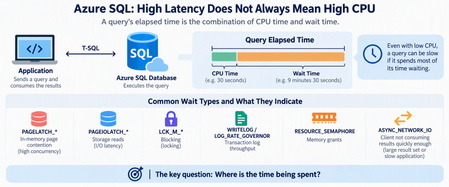
When an application connected to Azure SQL Database becomes slow or starts timing out, one of the first questions is usually: Is the database running out of CPU? It's a reasonable starting point, but CPU is only one part of the performance story. Some Azure SQL performance problems occur while CPU, Data IO, and worker utilization appear healthy. The database may have plenty of compute capacity while queries spend most of their time waiting rather than executing. The key troubleshooting question is therefore not simply: "How much CPU is Azure SQL using?" Instead, ask: "Where is the elapsed time being spent?" Start With Resources, But Don't Stop There Resource utilization should still be the first checkpoint. A simple query using sys.dm_db_resource_stats can help identify whether Azure SQL is approaching CPU, Data IO, Log IO, memory, or worker limits: SELECT DB_NAME() AS database_name, AVG(avg_cpu_percent) AS avg_cpu_percent, MAX(avg_cpu_percent) AS max_cpu_percent, MAX(avg_data_io_percent) AS max_data_io_percent, MAX(avg_log_write_percent) AS max_log_write_percent, MAX(avg_memory_usage_percent) AS max_memory_percent, MAX(max_worker_percent) AS max_worker_percent FROM sys.dm_db_resource_stats; If CPU is consistently near 100%, investigate CPU consumption. If Log IO reaches its limit, investigate transaction-log generation. If workers are exhausted, investigate concurrency. But if none of these resources is saturated, don't conclude that Azure SQL is healthy. Move to wait analysis. Follow the Waits A useful simplified model is: Query elapsed time = CPU execution If a query runs for 10 minutes but uses only 30 seconds of CPU, most of its elapsed time occurred somewhere else. Common wait patterns can point the investigation in different directions: Wait Area to investigate PAGELATCH_* In-memory page contention PAGEIOLATCH_* Storage reads LCK_M_* Blocking WRITELOG Transaction log LOG_RATE_GOVERNOR Log throughput RESOURCE_SEMAPHORE Memory grants ASYNC_NETWORK_IO Client/result consumption The wait type is not automatically the root cause. Think of it as a sign telling you: Look in this direction next. PAGELATCH Does Not Mean Slow Storage One important distinction is: PAGELATCH versus: PAGEIOLATCH Despite their similar names, they represent different problems. PAGEIOLATCH is associated with waiting for data pages involved in physical I/O. PAGELATCH, however, is synchronization around pages that are already in memory. Consider a highly concurrent workload: Hundreds of sessions ↓ Same memory page ↓ Latch contention ↓ Sessions wait ↓ Application CPU may still have available capacity. This is why increasing vCores doesn't necessarily eliminate latch contention. Additional compute provides more workload headroom, but it doesn't automatically remove a serialization point around a hot page. Microsoft's I/O troubleshooting guidance also distinguishes PAGEIOLATCH and other I/O-related waits when diagnosing storage-performance problems. Microsoft Learn: Troubleshoot SQL Server I/O performance Query Frequency Matters Too Another common mistake is focusing only on individually expensive queries. Imagine a query that takes only 20 milliseconds but executes hundreds of thousands of times, often concurrently. Its impact is better thought of as: Workload Impact = Cost per execution × Execution frequency × A small metadata lookup or initialization query can become significant when hundreds of application instances execute it simultaneously. This is where Query Store becomes particularly useful. Query Store preserves query, execution-plan, and runtime history, allowing you to compare executions, duration, CPU, plans, and other performance characteristics over time. Microsoft Learn: Monitor performance using Query Store Instead of asking only: "What's my most expensive query?" also ask: "What changed in the workload?" When Nine Hours of Duration Is Only One Minute of CPU Now consider the opposite problem. Suppose Query Store shows something like: Elapsed time 9 hours SQL CPU time 1 minute Returned rows 750,000+ Dominant wait ASYNC_NETWORK_IO Would adding CPU solve this? Probably not. CPU represents only a tiny fraction of the elapsed time. ASYNC_NETWORK_IO commonly occurs when SQL Server has results available but the client application is not consuming them quickly enough. Microsoft documents several possible causes, including: large result sets; slow application processing; applications fetching rows slowly; network-related delays. Microsoft Learn: Troubleshoot ASYNC_NETWORK_IO Importantly: ASYNC_NETWORK_IO does not automatically mean the network is slow. The bottleneck might actually be the application. Measure Time to First Row A useful troubleshooting technique is to separate database response time from result-consumption time. Instead of measuring only: Query start → Application finished measure: T0 = Query submitted T1 = First row received T2 = Last row received T3 = Application processing completed You can then separate: Database response = T1 - T0 Result consumption = T2 - T1 Application For example: First row received: 2 seconds Last row received: 2 hours Processing completed: 2.5 hours Calling this a "2.5-hour SQL query" would be misleading. SQL started returning results after two seconds. Most of the time was spent transferring or processing them. Don't Forget Blocking Low CPU can also be caused by blocking. If many sessions are waiting behind a transaction, increasing CPU isn't going to solve the problem. During an active incident, check requests and their waits: SELECT r.session_id, r.blocking_session_id, r.status, r.wait_type, r.wait_time, r.wait_resource, r.cpu_time, r.total_elapsed_time, st.text FROM sys.dm_exec_requests AS r CROSS APPLY sys.dm_exec_sql_text(r.sql_handle) AS st WHERE r.blocking_session_id <> 0 ORDER BY r.wait_time DESC; This helps determine whether the application is experiencing a resource problem or simply waiting behind another transaction. Why Scaling Can Be Misleading Imagine this sequence: Application slow ↓ Scale database ↓ Performance improves It's tempting to conclude: "We needed more CPU." But scaling can change more than CPU availability. Depending on the operation and environment, it can alter resource availability or execution conditions. Therefore: A successful mitigation does not automatically prove the root cause. Always distinguish between: What made the symptoms disappear? and: What originally caused the symptoms? A Practical Troubleshooting Workflow When investigating Azure SQL performance, I use the following approach: 1. Define the exact incident window Preferably using UTC timestamps. 2. Check core resources Look at: CPU Data IO Log IO memory workers 3. Compare CPU time with elapsed time If: Elapsed ≈ CPU investigate computational workload. If: Elapsed >>> CPU investigate waits. 4. Identify dominant waits Ask what prevented SQL from continuing execution. 5. Check blocking Determine whether requests are waiting behind other transactions. 6. Use Query Store Compare healthy and problematic periods for: execution count; CPU; duration; logical reads; plans; wait behavior. Microsoft provides Query Store examples specifically for workload and performance investigation. Microsoft Learn: Tune performance with Query Store 7. Inspect the execution plan Look for inefficient access patterns, cardinality problems, excessive reads, repeated lookups, spills, scans, or plan changes. 8. Investigate the application Especially when SQL CPU is low but result-transfer waits are high. Look at: rows returned; fetch size; batch size; application processing; concurrency; downstream dependencies. 9. Compare healthy vs unhealthy periods Don't analyze an incident in isolation. Ask: What changed? Common Misdiagnoses "CPU isn't 100%, so SQL is healthy." Not necessarily. Queries might simply be waiting. "ASYNC_NETWORK_IO means we have a network problem." Not necessarily. The client may be consuming results slowly. "PAGELATCH means storage is slow." No. Don't confuse PAGELATCH with PAGEIOLATCH. "Scaling fixed the problem, so CPU was the root cause." Not necessarily. Mitigation and root cause are different concepts. "The slowest query must be the problem." Not always. A small query executed extremely frequently can generate larger cumulative impact. Final Thought: Follow the Time When Azure SQL becomes slow, avoid jumping directly from: Slow database → Add more vCores Instead, work through: High latency ↓ Resource utilization ↓ CPU vs elapsed time ↓ Wait statistics ↓ Query Store ↓ Execution plan ↓ Application behavior ↓ Root cause ↓ Targeted optimization Performance troubleshooting becomes much easier once you stop asking only: "How busy is Azure SQL?" and start asking: "Where did the time go?" Because sometimes the database isn't busy at all. It's waiting. References Monitor Performance by Using the Query Store Tune performance with the Query Store Troubleshoot slow queries resulting from ASYNC_NETWORK_IO Troubleshoot slow SQL Server performance caused by I/O issues188Views0likes0Comments
Ollama on HTTPS for SQL Server
Here is a quick procedure to deploy an Ubuntu container with Ollama and expose its API over HTTPS. The goal is to allow a fast deployment, even for those unfamiliar with Docker or Language Models, making it easy to set up an offline platform for generating embeddings and using Small Language Models This is particularly useful when testing SQL Server 2025 for fully on-premises environment use cases, since SQL Server only allows access to HTTPS endpoints. However, HTTP remains open for testing purposes. Please note that this example is CPU-based, as deploying with (integrated) GPU support involves additional, less straightforward steps. This example is provided solely to illustrate the concept, is not intended for production use, and comes without any guarantee of performance or security. Prerequisites To continue, you need to have Docker Desktop, WSL and SQL Server 2025 (currently Release Candidate 1) Docker Desktop Install WSL | Microsoft Learn SQL Server 2025 Preview | Microsoft Evaluation Center Create a Dockerfile First, create a working directory. In this example, C:\Docker\Ollama will be used. Simply create a file named Dockerfile (without an extension) and paste the following content into it. FROM ubuntu:25.10 RUN apt update && apt install -y curl gnupg2 ca-certificates lsb-release apt-transport-https software-properties-common unzip nano openssl net-tools RUN curl -fsSL https://ollama.com/install.sh | bash RUN curl -1sLf 'https://dl.cloudsmith.io/public/caddy/stable/gpg.key' | gpg --dearmor -o /usr/share/keyrings/caddy-stable-archive-keyring.gpg RUN curl -1sLf 'https://dl.cloudsmith.io/public/caddy/stable/debian.deb.txt' | tee /etc/apt/sources.list.d/caddy-stable.list RUN apt update && apt install -y caddy RUN mkdir -p /etc/caddy/certs RUN cat > /etc/caddy/certs/san.cnf <<EOF [req] default_bits = 2048 prompt = no default_md = sha256 req_extensions = req_ext distinguished_name = dn [dn] CN = 127.0.0.1 [req_ext] subjectAltName = @alt_names [alt_names] IP.1 = 127.0.0.1 DNS.1 = localhost EOF RUN openssl req -x509 -nodes -days 365 -newkey rsa:2048 -keyout /etc/caddy/certs/localhost.key -out /etc/caddy/certs/localhost.crt -config /etc/caddy/certs/san.cnf -extensions req_ext RUN echo "https://:443 {\n tls /etc/caddy/certs/localhost.crt /etc/caddy/certs/localhost.key\n reverse_proxy localhost:11434\n}" >> /etc/caddy/Caddyfile RUN echo "#!/bin/bash" > /usr/local/bin/entrypoint.sh && \ echo "set -e" >> /usr/local/bin/entrypoint.sh && \ echo "OLLAMA_HOST=0.0.0.0 ollama serve >> /var/log/ollama.log 2>&1 &" >> /usr/local/bin/entrypoint.sh && \ echo "caddy run --config /etc/caddy/Caddyfile --adapter caddyfile >> /var/log/caddy.log 2>&1 &" >> /usr/local/bin/entrypoint.sh && \ echo "tail -f /var/log/ollama.log /var/log/caddy.log" >> /usr/local/bin/entrypoint.sh && \ chmod 755 /usr/local/bin/entrypoint.sh ENTRYPOINT ["/usr/local/bin/entrypoint.sh"] For your information, this file allows the creation of an image based on Ubuntu 25.10 and includes: Ollama, for running the models Caddy, for the reverse proxy Creation of a certificate for the HTTPS endpoint on localhost Create the container After opening a Powershell terminal, execute the following commands: cd C:\Docker\Ollama #Build the image from the Dockerfile. docker build -t ollama-https . #Create a container based on the image ollama-https docker run --name ollama-https -d -it -p 443:443 -p 11434:11434 ollama-https #Copy the certificate created into the current Windows directory docker cp ollama-https:/etc/caddy/certs/localhost.crt . # Install the certificate in Trusted Root Certification Authorities Import-Certificate -FilePath "localhost.crt" -CertStoreLocation "Cert:\LocalMachine\Root" #Check Https (wget https://localhost).Content #Check Http (wget http://localhost:11434).Content Ollama is now running With a browser, connect to https://localhost Retrieve Models No model is retrieved when the image is created, as this depends on each use case, and for some models, the size can be substantial. Here’s a quick example for pulling an embedding model, Nomic, and a small language model, Phi3. Ollama Search docker exec ollama-https ollama pull nomic-embed-text docker exec ollama-https ollama pull phi3:mini A quick example with SQL Server 2025 A quick demonstration using the WideWorldImporters database (Wide World Importers sample database) use [master] GO ALTER DATABASE WideWorldImporters SET COMPATIBILITY_LEVEL = 170 WITH ROLLBACK IMMEDIATE GO DBCC TRACEON(466, 474, 13981, -1) GO Note: With RC1, you can use the PREVIEW_FEATURES database-scoped configuration T-SQL Declare an external model for embeddings. use [WideWorldImporters] GO CREATE EXTERNAL MODEL NomicLocal AUTHORIZATION dbo WITH ( LOCATION = 'https://localhost/api/embed', API_FORMAT = 'ollama', MODEL_TYPE = EMBEDDINGS, MODEL = 'nomic-embed-text' ) to enable semantic search capabilities on StockItems, we will create a dedicated table to store embeddings (no chunking in this example) along with a vector index optimized for cosine similarity use [WideWorldImporters] GO CREATE TABLE [Warehouse].[StockItemsEmbedding](StockItemEmbeddingID int identity (1,1) PRIMARY KEY, StockItemId int, SearchDetails nvarchar(max), Embedding vector(768)) GO INSERT INTO [Warehouse].[StockItemsEmbedding] SELECT si.StockItemID, si.SearchDetails, AI_GENERATE_EMBEDDINGS(si.SearchDetails USE MODEL NomicLocal) /* Generate embeddings from declared external model */ FROM [Warehouse].[StockItems] si GO /* Check */ SELECT * FROM [Warehouse].[StockItemsEmbedding] GO CREATE VECTOR INDEX IXV_1 ON [Warehouse].[StockItemsEmbedding] (Embedding) WITH (METRIC = 'cosine', TYPE = 'DiskANN') GO /* User Input */ DECLARE @UserInput varchar(max) = 'Which product is best suited for shipping small items?' /* and Generate embeddings for user input */ DECLARE @UserInputV vector(768) = AI_GENERATE_EMBEDDINGS(@UserInput USE MODEL NomicLocal) DECLARE @ModelInput nvarchar(max) DECLARE Payload nvarchar(max) DECLARE Response nvarchar(max) /* Similarity Search on StockItems and Model Input creation*/ SELECT @ModelInput = STRING_AGG('ProductDetails: ' + sie.SearchDetails + 'UnitPrice: ' + CAST(si.UnitPrice AS nvarchar(max)), ' \n\n') FROM VECTOR_SEARCH( TABLE = [Warehouse].[StockItemsEmbedding] as sie, COLUMN = Embedding, SIMILAR_TO = @UserInputV, METRIC = 'cosine', TOP_N = 10 ) JOIN [Warehouse].[StockItems] si ON si.StockItemId = sie.StockItemId /* Generate payload for response generation */ SELECT = '{"model": "phi3:mini", "stream": false, "prompt":"You are acting as a customer advisor responsible for recommending the most suitable products based on customer needs, providing clear and personalized suggestions. Question : ' + @UserInput + '\n\nList of Items : ' + @ModelInput + '"}'; EXECUTE sp_invoke_external_rest_endpoint @url = 'https://localhost/api/generate', @method = 'POST', = , @timeout = 230, = OUTPUT; PRINT JSON_VALUE(@response, '$.result.response') LangChain You can also have a try with LangChain. Same demo with a small difference, there is no vector index created on the vector store table. The table has been modified, but only for demonstration purposes. Reference: SQLServer | 🦜️🔗 LangChain # PREREQ #sudo apt-get update && sudo apt-get install -y unixodbc # sudo apt-get update # sudo apt-get install -y curl gnupg2 # curl https://packages.microsoft.com/keys/microsoft.asc | sudo apt-key add - # curl https://packages.microsoft.com/config/debian/11/prod.list | sudo tee /etc/apt/sources.list.d/mssql-release.list # sudo apt-get update # sudo ACCEPT_EULA=Y apt-get install -y msodbcsql18 # pip3 install langchain langchain-sqlserver langchain-ollama langchain-community import pyodbc from langchain_sqlserver import SQLServer_VectorStore from langchain_ollama import OllamaEmbeddings from langchain_ollama import ChatOllama from langchain.schema import Document from langchain_community.vectorstores.utils import DistanceStrategy #Prompt for testing _USER_INPUT = 'Which product is best suited for shipping small items?' ############### Params ########################################## print("\033[93mSetting up variables...\033[0m") _SQL_DRIVER = "ODBC Driver 18 for SQL Server" _SQL_SERVER = "localhost\\SQL2K25" _SQL_DATABASE = "WideWorldImporters" _SQL_USERNAME = "lc" _SQL_PASSWORD = "lc" _SQL_TRUST_CERT = "yes" _SQL_VECTOR_STORE_TABLE = "StockItem_VectorStore" # Table name for vector storage _MODIFY_TABLE_TO_USE_SQL_VECTOR_INDEX = True #As vector index not considered currently in langchain and structure does not match vector index requirements _CONNECTION_STRING = f"Driver={{{_SQL_DRIVER}}};Server={_SQL_SERVER};Database={_SQL_DATABASE};UID={_SQL_USERNAME};PWD={_SQL_PASSWORD};TrustServerCertificate={_SQL_TRUST_CERT}" _OLLAMA_API_URL = "https://localhost" _OLLAMA_EMBEDDING_MODEL = "nomic-embed-text:latest" _OLLAMA_EMBEDDING_VECTOR_SIZE = 768 _OLLAMA_SLM_MODEL = "phi3:mini" # Model for SLM queries ################################################################### #Define Ollama embeddings embeddings = OllamaEmbeddings( model=_OLLAMA_EMBEDDING_MODEL, base_url=_OLLAMA_API_URL ) conn = pyodbc.connect(_CONNECTION_STRING) cursor = conn.cursor() #Drop embeddings table if it exists print("\033[93mDropping existing vector store table if it exists...\033[0m") cursor.execute(f"DROP TABLE IF EXISTS Warehouse.{_SQL_VECTOR_STORE_TABLE};") print("\033[93mConnecting to SQL Server and fetching data...\033[0m") cursor.execute("SELECT StockItemId, SearchDetails, UnitPrice FROM Warehouse.StockItems;") rows = cursor.fetchall() print(f"\033[93mFound {len(rows)} records to process\033[0m") # Create documents from the fetched data documents = [ Document( page_content=row.SearchDetails, metadata={ "StockItemId": row.StockItemId, "UnitPrice": float(row.UnitPrice) # Convert Decimal to float } ) for row in rows ] conn.commit() #Creating vector store print("\033[93mCreating vector store...\033[0m") vector_store = SQLServer_VectorStore( connection_string=_CONNECTION_STRING, distance_strategy=DistanceStrategy.COSINE, # If not provided, defaults to COSINE embedding_function=embeddings, embedding_length=_OLLAMA_EMBEDDING_VECTOR_SIZE, db_schema = "Warehouse", table_name=_SQL_VECTOR_STORE_TABLE ) print("\033[93mAdding to vector store...\033[0m") try: vector_store.add_documents(documents) print("\033[93mSuccessfully added to vector store!\033[0m") except Exception as e: print(f"\033[91mError adding documents: {e}\033[0m") #Vector index not yet integrated in SQL Server VectorStore (drop auto-created nonclustered PK and generating int clustered PK if (_MODIFY_TABLE_TO_USE_SQL_VECTOR_INDEX): print("\033[93mModifying structure to create vector index...\033[0m") cursor.execute("DECLARE @AutoCreatedPK sysname, @SQL nvarchar(max);" f"SELECT @AutoCreatedPK = name FROM sys.key_constraints WHERE type = 'PK' AND parent_object_id = object_id('Warehouse.{_SQL_VECTOR_STORE_TABLE}');" f"SELECT @SQL = 'ALTER TABLE Warehouse.{_SQL_VECTOR_STORE_TABLE} DROP CONSTRAINT ' + @AutoCreatedPK + ';'" "EXEC sp_executesql @SQL;" f"ALTER TABLE Warehouse.{_SQL_VECTOR_STORE_TABLE} ADD Alt_Id int identity(1,1);" f"ALTER TABLE Warehouse.{_SQL_VECTOR_STORE_TABLE} ADD CONSTRAINT PK_{_SQL_VECTOR_STORE_TABLE} PRIMARY KEY (Alt_Id);") conn.commit() print("\033[93mCreating vector index...\033[0m") cursor.execute(f"CREATE VECTOR INDEX IV_{_SQL_VECTOR_STORE_TABLE} ON [Warehouse].[{_SQL_VECTOR_STORE_TABLE}] (embeddings) WITH (METRIC = 'cosine', TYPE = 'DiskANN');") conn.commit() #Generate prompt then answer print(f"\033[92mUser Input: {_USER_INPUT}\033[0m") context = [ { "Item": doc.page_content, "UnitPrice": doc.metadata.get("UnitPrice", None) } for doc in vector_store.similarity_search(_USER_INPUT, k=3) ] llm = ChatOllama(model=_OLLAMA_SLM_MODEL,base_url=_OLLAMA_API_URL) prompt = ( f"You are acting as a customer advisor responsible for recommending the most suitable products based on customer needs, providing clear and personalized suggestions" f"Context: {context}\n\nQuestion: {_USER_INPUT}\n\n") response = llm.invoke(prompt) print(f"\033[36m{response.content}\033[0m") Note : If using devcontainer with VSCode add "runArgs": [ "--network=host" ] to devcontainer.json to allow connections to “localhost”. Import and install the previously created certificat docker cp C:\Docker\Ollama\localhost.crt <devcontainer name>:/usr/local/share/ca-certificates/localhost.crt docker exec <devcontainer name> "update-ca-certificates" Disclaimer The sample scripts are not supported under any Microsoft standard support program or service. The sample scripts are provided AS IS without warranty of any kind. Microsoft further disclaims all implied warranties including, without limitation, any implied warranties of merchantability or of fitness for a particular purpose. The entire risk arising out of the use or performance of the sample scripts and documentation remains with you. In no event shall Microsoft, its authors, or anyone else involved in the creation, production, or delivery of the scripts be liable for any damages whatsoever (including, without limitation, damages for loss of business profits, business interruption, loss of business information, or other pecuniary loss) arising out of the use of or inability to use the sample scripts or documentation, even if Microsoft has been advised of the possibility of such damages.
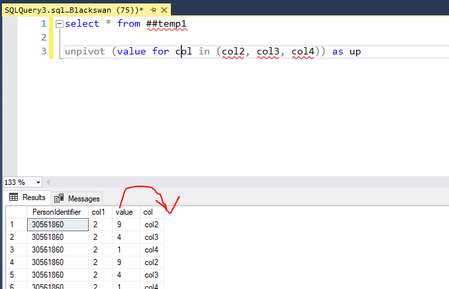
How do I unpivot so that the value column comes at the end?
hello all, I have learning the unpivot function, according to https://learn.microsoft.com/en-us/sql/t-sql/queries/from-using-pivot-and-unpivot?view=sql-server-ver16, the clause before the FOR keyword comes at the end. But when I do it, the column before the FOR keyboard comes before the column after the FOR keyboard. please see this example I did How can I make the value column to be the final column like the documentation? Thanks you.133Views0likes1Comment
Help in processing calculation with hhmmss
I need help to provide the following Expected finished time in hhmmss (Expected_finished_in_hhmmss) and Expected finished datetime (Expected_date). Request: If 8% records have been processed in 4:8:40 hh:mm:ss on 2025-01-028 15:55:17 then when 100% records will be processed. I needs result in hhmmss and finishing time after calculation. We'll have to add hhmmss in datetime etc. Expected result: Processed_% processed_on processed_in_hhmmss Expected_finished_in_hhmmss Expected_Date 8 2025-01-28 15:15:17 4:8:40167Views0likes2CommentsUsing a Sequence
Consider this table: CREATE TABLE [Events]( [EventID] [int] NULL, << Other columns >> and this Sequence: CREATE SEQUENCE [NewEventID] AS [int] START WITH 1 INCREMENT BY 1 MINVALUE 1 MAXVALUE 2147483647 NO CACHE and this Stored Procedure; CREATE PROCEDURE [Insert_Event] << Parameters >> AS BEGIN INSERT INTO [Events] ( EventID, << Other fields >> ) VALUES ( NEXT VALUE FOR NewEventID, << Other fields >> ) END GO When I run this procedure, I get this error message: NEXT VALUE FOR function cannot be used if ROWCOUNT option has been set, or the query contains TOP or OFFSET. None of those conditions are true so why am I getting this error message?1.2KViews0likes12Comments
How to Create a Case Statement to Classify / Segment Data
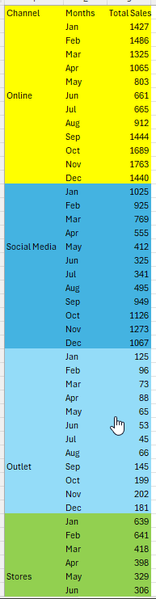
Can someone show me how to create a case statement that will classify the sample data below to appear as follows: At the moment the table in SQL looks like the following: Sample data is as follows: CREATE TABLE #tmpTable ( Channel nvarchar(50), Months nvarchar(50), Total Sales int) INSERT #tmpTable VALUES (N'Online',N'Jan',1427), (N'Online',N'Feb',1486), (N'Online',N'Mar',1325), (N'Online',N'Apr',1065), (N'Online',N'May',803), (N'Online',N'Jun',661), (N'Online',N'Jul',665), (N'Online',N'Aug',912), (N'Online',N'Sep',1444), (N'Online',N'Oct',1689), (N'Online',N'Nov',1763), (N'Online',N'Dec',1440), (N'Social Media',N'Jan',1025), (N'Social Media',N'Feb',925), (N'Social Media',N'Mar',769), (N'Social Media',N'Apr',555), (N'Social Media',N'May',412), (N'Social Media',N'Jun',325), (N'Social Media',N'Jul',341), (N'Social Media',N'Aug',495), (N'Social Media',N'Sep',949), (N'Social Media',N'Oct',1126), (N'Social Media',N'Nov',1273), (N'Social Media',N'Dec',1067), (N'Outlet',N'Jan',125), (N'Outlet',N'Feb',96), (N'Outlet',N'Mar',73), (N'Outlet',N'Apr',88), (N'Outlet',N'May',65), (N'Outlet',N'Jun',53), (N'Outlet',N'Jul',45), (N'Outlet',N'Aug',66), (N'Outlet',N'Sep',145), (N'Outlet',N'Oct',199), (N'Outlet',N'Nov',202), (N'Outlet',N'Dec',181), (N'Stores',N'Jan',639), (N'Stores',N'Feb',641), (N'Stores',N'Mar',418), (N'Stores',N'Apr',398), (N'Stores',N'May',329), (N'Stores',N'Jun',306), (N'Stores',N'Jul',258), (N'Stores',N'Aug',398), (N'Stores',N'Sep',701), (N'Stores',N'Oct',879), (N'Stores',N'Nov',961), (N'Stores',N'Dec',818) SELECT * FROM #tmpTable Thank you567Views0likes1Comment
Stored Procedure Input Parameter Needed Power Automate
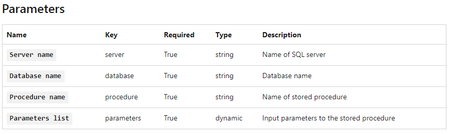
Hi, I currently have a Stored Procedure that does not have any Input Parameters, it basically updates a Calendar Table, setting columns like CurrentDay, PreviousDay, CurrentMonth etc... to 1 or 0 if the conditions matches. I wanted to use Power Automate to run this stored procedure at 12:00 everyday but it failed because Power Automate only executes Stored Procedures with an Input Parameter https://docs.microsoft.com/en-us/connectors/sql/#execute-stored-procedure-(v2) What is the most efficient way to add an Input Parameter to my current stored procedure but basically does nothing but still does the update is meant to do. Thanks5.2KViews0likes2Comments
Counting workdays using date dimension
I have a query. Trying to count workdays between two dates in fact table. in dimDate workdayFlag = 1 for true and 0 for false. select PO_Item, Receipt_date, Promissed_date, (select sum(workdayFlag) from dimDate where Cal_date between receipt_date and Promissed_date) as 'dayVariance' from factPO this seems to work but am wondering if this could be written by joining factPO and dimDate. An inline query seems expensive if my result set is in the millions of records. select from factPO join dimDate onSolved1.5KViews0likes1CommentAzure Database creation using T-SQL or SSMS currently allows Unsupported characters in it's name.
If a Database created using SSMS or T-SQL has unsupported characters in it's name, then any Powershell/Azure CLI/Portal operation on it can fail. You may experience a few other kinds of unexpected behavior as well, with this specific database.3.2KViews1like0CommentsHow to collapse consecutive periods of dates that have the same value [Number] in one in T-SQL?
Hello. I have this data: USE [TEST] GO SET ANSI_NULLS ON GO SET QUOTED_IDENTIFIER ON GO CREATE TABLE [dbo].[MyData]( [RES_UID] [uniqueidentifier] NULL, [Number] [numeric](5, 2) NULL, [StartDate] [date] NULL, [EndDate] [date] NULL, [Num] [bigint] NULL ) ON [PRIMARY] GO INSERT [dbo].[MyData] ([RES_UID], [Number], [StartDate], [EndDate], [Num]) VALUES (N'00000000-0000-0000-0000-000000000000', CAST(1.00 AS Numeric(5, 2)), CAST(N'2014-09-12' AS Date), CAST(N'2017-02-28' AS Date), 1) GO INSERT [dbo].[MyData] ([RES_UID], [Number], [StartDate], [EndDate], [Num]) VALUES (N'00000000-0000-0000-0000-000000000000', CAST(1.00 AS Numeric(5, 2)), CAST(N'2017-03-01' AS Date), CAST(N'2017-10-31' AS Date), 2) GO INSERT [dbo].[MyData] ([RES_UID], [Number], [StartDate], [EndDate], [Num]) VALUES (N'00000000-0000-0000-0000-000000000000', CAST(1.00 AS Numeric(5, 2)), CAST(N'2017-11-01' AS Date), CAST(N'2018-10-31' AS Date), 3) GO INSERT [dbo].[MyData] ([RES_UID], [Number], [StartDate], [EndDate], [Num]) VALUES (N'00000000-0000-0000-0000-000000000000', CAST(1.00 AS Numeric(5, 2)), CAST(N'2018-11-01' AS Date), CAST(N'2020-08-31' AS Date), 4) GO INSERT [dbo].[MyData] ([RES_UID], [Number], [StartDate], [EndDate], [Num]) VALUES (N'00000000-0000-0000-0000-000000000000', CAST(1.00 AS Numeric(5, 2)), CAST(N'2020-09-01' AS Date), CAST(N'2021-09-30' AS Date), 5) GO INSERT [dbo].[MyData] ([RES_UID], [Number], [StartDate], [EndDate], [Num]) VALUES (N'00000000-0000-0000-0000-000000000000', CAST(1.00 AS Numeric(5, 2)), CAST(N'2021-10-01' AS Date), CAST(N'2049-12-31' AS Date), 6) GO INSERT [dbo].[MyData] ([RES_UID], [Number], [StartDate], [EndDate], [Num]) VALUES (N'00000000-0000-0000-0000-000000000001', CAST(1.00 AS Numeric(5, 2)), CAST(N'2019-10-14' AS Date), CAST(N'2021-09-30' AS Date), 1) GO INSERT [dbo].[MyData] ([RES_UID], [Number], [StartDate], [EndDate], [Num]) VALUES (N'00000000-0000-0000-0000-000000000001', CAST(1.00 AS Numeric(5, 2)), CAST(N'2021-10-01' AS Date), CAST(N'2049-12-31' AS Date), 2) GO INSERT [dbo].[MyData] ([RES_UID], [Number], [StartDate], [EndDate], [Num]) VALUES (N'00000000-0000-0000-0000-000000000002', CAST(1.00 AS Numeric(5, 2)), CAST(N'2016-03-15' AS Date), CAST(N'2018-10-31' AS Date), 1) GO INSERT [dbo].[MyData] ([RES_UID], [Number], [StartDate], [EndDate], [Num]) VALUES (N'00000000-0000-0000-0000-000000000002', CAST(1.00 AS Numeric(5, 2)), CAST(N'2018-11-01' AS Date), CAST(N'2020-01-19' AS Date), 2) GO INSERT [dbo].[MyData] ([RES_UID], [Number], [StartDate], [EndDate], [Num]) VALUES (N'00000000-0000-0000-0000-000000000002', CAST(1.00 AS Numeric(5, 2)), CAST(N'2020-01-20' AS Date), CAST(N'2020-03-01' AS Date), 3) GO INSERT [dbo].[MyData] ([RES_UID], [Number], [StartDate], [EndDate], [Num]) VALUES (N'00000000-0000-0000-0000-000000000002', CAST(1.00 AS Numeric(5, 2)), CAST(N'2020-03-02' AS Date), CAST(N'2020-08-02' AS Date), 4) GO INSERT [dbo].[MyData] ([RES_UID], [Number], [StartDate], [EndDate], [Num]) VALUES (N'00000000-0000-0000-0000-000000000002', CAST(1.00 AS Numeric(5, 2)), CAST(N'2020-08-03' AS Date), CAST(N'2049-12-31' AS Date), 5) GO INSERT [dbo].[MyData] ([RES_UID], [Number], [StartDate], [EndDate], [Num]) VALUES (N'00000000-0000-0000-0000-000000000003', CAST(1.00 AS Numeric(5, 2)), CAST(N'2017-09-20' AS Date), CAST(N'2019-07-31' AS Date), 1) GO INSERT [dbo].[MyData] ([RES_UID], [Number], [StartDate], [EndDate], [Num]) VALUES (N'00000000-0000-0000-0000-000000000003', CAST(1.00 AS Numeric(5, 2)), CAST(N'2019-08-01' AS Date), CAST(N'2020-08-02' AS Date), 2) GO INSERT [dbo].[MyData] ([RES_UID], [Number], [StartDate], [EndDate], [Num]) VALUES (N'00000000-0000-0000-0000-000000000003', CAST(1.00 AS Numeric(5, 2)), CAST(N'2020-08-03' AS Date), CAST(N'2021-06-30' AS Date), 3) GO INSERT [dbo].[MyData] ([RES_UID], [Number], [StartDate], [EndDate], [Num]) VALUES (N'00000000-0000-0000-0000-000000000003', CAST(1.00 AS Numeric(5, 2)), CAST(N'2021-07-01' AS Date), CAST(N'2021-08-20' AS Date), 4) GO INSERT [dbo].[MyData] ([RES_UID], [Number], [StartDate], [EndDate], [Num]) VALUES (N'00000000-0000-0000-0000-000000000003', CAST(0.00 AS Numeric(5, 2)), CAST(N'2021-08-21' AS Date), CAST(N'2049-12-31' AS Date), 5) GO INSERT [dbo].[MyData] ([RES_UID], [Number], [StartDate], [EndDate], [Num]) VALUES (N'00000000-0000-0000-0000-000000000004', CAST(1.00 AS Numeric(5, 2)), CAST(N'2019-11-11' AS Date), CAST(N'2020-07-01' AS Date), 1) GO INSERT [dbo].[MyData] ([RES_UID], [Number], [StartDate], [EndDate], [Num]) VALUES (N'00000000-0000-0000-0000-000000000004', CAST(1.00 AS Numeric(5, 2)), CAST(N'2020-07-02' AS Date), CAST(N'2020-08-02' AS Date), 2) GO INSERT [dbo].[MyData] ([RES_UID], [Number], [StartDate], [EndDate], [Num]) VALUES (N'00000000-0000-0000-0000-000000000004', CAST(1.00 AS Numeric(5, 2)), CAST(N'2020-08-03' AS Date), CAST(N'2049-12-31' AS Date), 3) GO How to collapse consecutive periods of dates that have the same value [Number] in one in T-SQL? The result table is: USE [TEST] GO SET ANSI_NULLS ON GO SET QUOTED_IDENTIFIER ON GO CREATE TABLE [dbo].[MyData2]( [RES_UID] [uniqueidentifier] NULL, [Number] [numeric](5, 2) NULL, [StartDate] [date] NULL, [EndDate] [date] NULL ) ON [PRIMARY] GO INSERT [dbo].[MyData2] ([RES_UID], [Number], [StartDate], [EndDate]) VALUES (N'00000000-0000-0000-0000-000000000000', CAST(1.00 AS Numeric(5, 2)), CAST(N'2014-09-12' AS Date), CAST(N'2049-12-31' AS Date)) GO INSERT [dbo].[MyData2] ([RES_UID], [Number], [StartDate], [EndDate]) VALUES (N'00000000-0000-0000-0000-000000000001', CAST(1.00 AS Numeric(5, 2)), CAST(N'2019-10-14' AS Date), CAST(N'2049-12-31' AS Date)) GO INSERT [dbo].[MyData2] ([RES_UID], [Number], [StartDate], [EndDate]) VALUES (N'00000000-0000-0000-0000-000000000002', CAST(1.00 AS Numeric(5, 2)), CAST(N'2016-03-15' AS Date), CAST(N'2049-12-31' AS Date)) GO INSERT [dbo].[MyData2] ([RES_UID], [Number], [StartDate], [EndDate]) VALUES (N'00000000-0000-0000-0000-000000000003', CAST(1.00 AS Numeric(5, 2)), CAST(N'2017-09-20' AS Date), CAST(N'2021-08-20' AS Date)) GO INSERT [dbo].[MyData2] ([RES_UID], [Number], [StartDate], [EndDate]) VALUES (N'00000000-0000-0000-0000-000000000003', CAST(0.00 AS Numeric(5, 2)), CAST(N'2021-08-21' AS Date), CAST(N'2049-12-31' AS Date)) GO INSERT [dbo].[MyData2] ([RES_UID], [Number], [StartDate], [EndDate]) VALUES (N'00000000-0000-0000-0000-000000000004', CAST(1.00 AS Numeric(5, 2)), CAST(N'2019-11-11' AS Date), CAST(N'2049-12-31' AS Date)) GO With best regards, Vasily662Views0likes0Comments