sustainability
14 Topics
Flexible Cooling for AI Growth: How Zonal Architecture Supports Diverse Hardware Needs
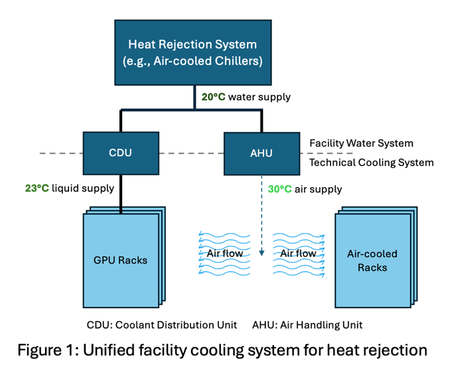
By: Ricardo Bianchini, Steve Solomon, Brijesh Warrier, Martin Herbert, Jay Jochim, Husam Alissa, Pulkit Misra, Eric Peterson and Cam Turner Context - Microsoft is pioneering zonal cooling in its next-generation AI datacenters, enabling flexible, performant, efficient, and sustainable thermal management for diverse workloads. The unprecedented growth of artificial intelligence (AI) is transforming datacenter infrastructure. Modern facilities must now support a diverse array of IT equipment, each with distinct cooling requirements. For example, modern GPUs and other AI accelerators require liquid cooling as air cooling is impractical at power draws exceeding 1 kW per accelerator due to the limited heat capacity of air to remove the resulting thermal load. Meanwhile, non-AI-accelerator (i.e., general-purpose) hardware deployments such as CPU-based compute, storage, and networking are expected to mostly remain air-cooled for the foreseeable future. Furthermore, liquid cooling offers a significant efficiency advantage: its superior heat dissipation allows coolant supply temperatures at the chip as high as 45°C without sacrificing peak performance. In contrast, air-cooled equipment requires much lower supply temperatures—around 30 °C—for optimal efficiency. The divergence in hardware cooling requirements creates a complex landscape that demands a strategy that is both flexible and adaptive. As shown in Figure 1, relying on a unified facility water system (FWS) introduces major inefficiencies. For example, liquid-cooled GPU racks may receive coolant below their required operating temperature when served by a single-temperature loop. This inefficiency becomes even more pronounced as the proportion of liquid- to air-cooled equipment increases (e.g., 90:10 liquid-to-air ratio for NVIDIA GB300 servers) since a larger share of the equipment is unnecessarily overcooled. Beyond operational efficiency, sustainability is a key priority for Microsoft even as we grow our AI infrastructure. Among our sustainability commitments, Microsoft has set goals to become carbon negative and eliminate water evaporation as a cooling method in its next-generation datacenters. A key lever for reducing carbon emissions is improving PUE (Power Usage Effectiveness, i.e., total power divided by IT power), a standard measure of datacenter power and energy efficiency. Achieving this requires dynamically matching cooling delivery to the specific needs of each equipment type, ensuring optimal performance, reduced energy consumption, and enhanced sustainability. Zonal Cooling: Flexible by Design Zonal cooling is a facility design that introduces multiple independent water loops, each supplying coolant at different temperatures. Figure 2 illustrates a specific implementation of the zonal concept with two facility-level zones: one loop serves air-cooled equipment, maintaining lower temperatures for human comfort and general-purpose hardware, and the other loop caters to liquid-cooled IT AI accelerators, which can operate efficiently at higher supply temperatures. This separation enables datacenter operators to precisely match cooling supply to the requirements of each zone, avoiding the inefficiency of over-cooling all equipment to the lowest common denominator. A key strength of zonal cooling is its flexibility. As new generations of IT hardware emerge, with varying thermal profiles, zonal cooling allows datacenters to adapt without major infrastructure overhauls. For example, future AI accelerators may need different liquid temperature ranges (see 30℃ Coolant - A Durable Roadmap for the Future) or technological improvements, such as microfluidics, may enable operating at even higher coolant temperatures, while general-purpose equipment requirements may remain unchanged. Zonal cooling’s architecture supports these changes by enabling operators to adjust loop temperatures and reconfigure cooling assignments as needed. Forms of Zonal Cooling Liquid cooling expands the allowable coolant supply temperature range and enables temperature-specific zones. This zonal approach can be applied at multiple layers: Facility-level: Two distinct temperature zones within a datacenter—one for air-cooled equipment and another for liquid-cooled equipment. Row-level: Tailor coolant temperature for each row based on deployed hardware (e.g., general-purpose vs GPU servers). Rack-level: Enable multiple temperature zones within a single rack for fine-grained optimization across servers. Chip-level: Apply zonal cooling inside the server. For example, use colder coolant for a GPU’s high-bandwidth memory (HBM) while supplying warmer coolant for the SoC and CPUs. This fine-grained approach can enable higher HBM stacking for improved performance, while avoiding unnecessary cooling overhead. Microsoft is building facility-level zonal cooling in the next generation of its AI datacenters going live in 2028 and beyond, while exploring the other three approaches in the lab. Facility-level zonal cooling is expected to reduce PUEs by up to 10%. Benefits from Zonal Cooling Zonal cooling is a strategic enabler for performance and efficiency. It can deliver: Improved energy efficiency and sustainability: By reducing the load on datacenter cooling infrastructure, zonal cooling improves energy efficiency as captured by annualized PUE, which measures average efficiency across all operating conditions. Lower annualized PUE means energy savings and lower carbon emissions. Increased server density: Tailored zonal cooling reduces peak cooling power demand during the hottest days, which in turn lowers peak PUE. Designers can leverage this reduction to reserve power for lower water temperatures (anticipating future accelerator needs), add more servers within the same utility power envelope, or contract less utility power per datacenter. Higher performance: Strategic control of coolant temperatures unlocks higher chip performance without sacrificing efficiency. For example, colder loops allow GPUs and CPUs to sustain elevated clock speeds via safe overclocking, while optimized memory cooling supports greater stacking density and increased bandwidth. Improved flexibility: With independent zones, operators can easily adjust coolant supply temperatures or reconfigure zones as new generations of hardware with varied cooling requirements emerge. This flexibility ensures compatibility with future innovations while maintaining optimal performance. Looking Ahead Zonal cooling represents a paradigm shift in datacenter thermal management. Its flexible, zone-specific approach to cooling air- and liquid-cooled IT equipment positions datacenters to efficiently adapt to future hardware innovations and workload diversity. As the industry continues to push boundaries in performance and sustainability, zonal cooling will be a foundational strategy for building performance and efficient infrastructure that meets tomorrow’s challenges.2.2KViews3likes0CommentsDesigning Reliable Health Check Endpoints for IIS Behind Azure Application Gateway
Why Health Probes Matter in Azure Application Gateway Azure Application Gateway relies entirely on health probes to determine whether backend instances should receive traffic. If a probe: Receives a non‑200 response Times out Gets redirected Requires authentication …the backend is marked Unhealthy, and traffic is stopped—resulting in user-facing errors. A healthy IIS application does not automatically mean a healthy Application Gateway backend. Failure Flow: How a Misconfigured Health Probe Leads to 502 Errors One of the most confusing scenarios teams encounter is when the IIS application is running correctly, yet users intermittently receive 502 Bad Gateway errors. This typically happens when health probes fail, causing Azure Application Gateway to mark backend instances as Unhealthy and stop routing traffic to them. The following diagram illustrates this failure flow. Failure Flow Diagram (Probe Fails → Backend Unhealthy → 502) Key takeaway: Most 502 errors behind Azure Application Gateway are not application failures—they are health probe failures. What’s Happening Here? Azure Application Gateway periodically sends health probes to backend IIS instances. If the probe endpoint: o Redirects to /login o Requires authentication o Returns 401 / 403 / 302 o Times out the probe is considered failed. After consecutive failures, the backend instance is marked Unhealthy. Application Gateway stops forwarding traffic to unhealthy backends. If all backend instances are unhealthy, every client request results in a 502 Bad Gateway—even though IIS itself may still be running. This is why a dedicated, lightweight, unauthenticated health endpoint is critical for production stability. Common Health Probe Pitfalls with IIS Before designing a solution, let’s look at what commonly goes wrong. 1. Probing the Root Path (/) Many IIS applications: Redirect / → /login Require authentication Return 401 / 302 / 403 Application Gateway expects a clean 200 OK, not redirects or auth challenges. 2. Authentication-Enabled Endpoints Health probes do not support authentication headers. If your app enforces: Windows Authentication OAuth / JWT Client certificates …the probe will fail. 3. Slow or Heavy Endpoints Probing a controller that: Calls a database Performs startup checks Loads configuration can cause intermittent failures, especially under load. 4. Certificate and Host Header Mismatch TLS-enabled backends may fail probes due to: Missing Host header Incorrect SNI configuration Certificate CN mismatch Design Principles for a Reliable IIS Health Endpoint A good health check endpoint should be: Lightweight Anonymous Fast (< 100 ms) Always return HTTP 200 Independent of business logic Client Browser | | HTTPS (Public DNS) v +-------------------------------------------------+ | Azure Application Gateway (v2) | | - HTTPS Listener | | - SSL Certificate | | - Custom Health Probe (/health) | +-------------------------------------------------+ | | HTTPS (SNI + Host Header) v +-------------------------------------------------------------------+ | IIS Backend VM | | | | Site Bindings: | | - HTTPS : app.domain.com | | | | Endpoints: | | - /health (Anonymous, Static, 200 OK) | | - /login (Authenticated) | | | +-------------------------------------------------------------------+ Azure Application Gateway health probe architecture for IIS backends using a dedicated /health endpoint. Azure Application Gateway continuously probes a dedicated /health endpoint on each IIS backend instance. The health endpoint is designed to return a fast, unauthenticated 200 OK response, allowing Application Gateway to reliably determine backend health while keeping application endpoints secure. Step 1: Create a Dedicated Health Endpoint Recommended Path 1 /health This endpoint should: Bypass authentication Avoid redirects Avoid database calls Example: Simple IIS Health Page Create a static file: 1 C:\inetpub\wwwroot\website\health\index.html Static Fast Zero dependencies Step 2: Exclude the Health Endpoint from Authentication If your IIS site uses authentication, explicitly allow anonymous access to /health. web.config Example 1 <location path="health"> 2 <system.webServer> 3 <security> 4 <authentication> 5 <anonymousAuthentication enabled="true" /> 6 <windowsAuthentication enabled="false" /> 7 </authentication> 8 </security> 9 </system.webServer> 10 </location> ⚠️ This ensures probes succeed even if the rest of the site is secured. Step 3: Configure Azure Application Gateway Health Probe Recommended Probe Settings Setting Value Protocol HTTPS Path /health Interval 30 seconds Timeout 30 seconds Unhealthy threshold 3 Pick host name from backend Enabled Why “Pick host name from backend” matters This ensures: Correct Host header Proper certificate validation Avoids TLS handshake failures Step 4: Validate Health Probe Behavior From Application Gateway Navigate to Backend health Ensure status shows Healthy Confirm response code = 200 From the IIS VM 1 Invoke-WebRequest https://your-app-domain/health Expected: 1 StatusCode : 200 Troubleshooting Common Failures Probe shows Unhealthy but app works ✔ Check authentication rules ✔ Verify /health does not redirect ✔ Confirm HTTP 200 response TLS or certificate errors ✔ Ensure certificate CN matches backend domain ✔ Enable “Pick host name from backend” ✔ Validate certificate is bound in IIS Intermittent failures ✔ Reduce probe complexity ✔ Avoid DB or service calls ✔ Use static content Production Best Practices Use separate health endpoints per application Never reuse business endpoints for probes Monitor probe failures as early warning signs Test probes after every deployment Keep health endpoints simple and boring Final Thoughts A reliable health check endpoint is not optional when running IIS behind Azure Application Gateway—it is a core part of application availability. By designing a dedicated, authentication‑free, lightweight health endpoint, you can eliminate a large class of false outages and significantly improve platform stability. If you’re migrating IIS applications to Azure or troubleshooting unexplained Application Gateway failures, start with your health probe—it’s often the silent culprit.395Views0likes0Comments
0.011W Power Floor on i7-1255U: A Step Toward Microsoft’s Sustainability Vision
It is inspiring to see Microsoft leading the tech industry toward a greener future. Initiatives such as the Carbon Negative 2030 goal and the Energy Saver features in Windows 11 are important steps in environmental stewardship. These efforts show that software and hardware can work in harmony to preserve our planet. As a researcher, I have spent 18 months exploring how to further support this vision by identifying the absolute efficiency “floors” of the Intel Core i7-1255U (Alder Lake). My study focuses on a configuration that enhances Microsoft’s energy-saving protocols to achieve maximum hardware longevity. Key Technical Findings (18-Month Case Study): Dynamic Power Floors: Through precise optimization, I observed CPU power draw dropping to a floor of 0.011W at 1.8MHz during deep idle/sleep states, with the GPU reaching a 0W floor. Efficiency in Motion: During active productivity tasks, the system can reach 0.4W – 0.5W at a voltage range of 0.6V – 0.8V, demonstrating impressive scaling flexibility. Thermal Performance: The system consistently operates between 25°C – 35°C. In cooler ambient environments (15°C – 25°C), hardware can maintain 16°C – 20°C, virtually eliminating thermal stress. Battery Endurance: Using a standard 3-cell battery with 5% wear (originally marketed for 6 hours), these optimizations enabled up to 10 hours of continuous video playback. Uncompromised Stability: Over 18 months of daily usage, the system has encountered zero Blue Screen of Death (BSOD) events. This confirms that pushing efficiency boundaries can be done while maintaining the rock-solid reliability expected of the Windows platform. This study is a tribute to the versatility of Windows 11 and the engineering behind modern silicon. By maximizing the life of the devices we already own, we contribute directly to reducing global e-waste. Detailed technical logs (HWiNFO) and configuration data are available for verification here: 👉 [[Intel 12th] 0.011W Package Power Floor via Custom Optimization | Microsoft Community Hub] I look forward to discussing these efficiency milestones with the community and Microsoft engineers.90Views0likes0CommentsTechSpark Fireside Chat: Sustainable Funding
Nonprofit sustainability is looking at today, tomorrow, and years down the road. At this fireside chat, the Microsoft TechSpark team will explore approaches and funding strategies toward the viability of organizations. You will hear from experts in research, practice, and on the public and private side. Gain perspectives and insights on how the advancement of sustainability advances overall impact. This event will be presented by Linda Nguyen from Microsoft TechSpark, Mark Muro, Senior Fellow at Brookings Metro, Edwina Manyeh, Tech Hubs Deputy Director, U.S. Economic Development Administration (EDA), U.S. Department of Commerce and Myung J. Lee, Chief Strategy Officer for Living Cities. Register for the event here1.6KViews0likes0CommentsThis is AI for Sustainability
Join us on February 13 to see how Microsoft data and AI solutions can support your sustainability journey. Hear how customers are using these solutions to advance their sustainability progress, prepare for evolving regulations, and drive business transformation. Register for this digital event to see in-depth demos and learn how to: Improve ESG (environmental, social, and governance) data management to help meet reporting needs and commitments. Deliver clear insights and empower employees to drive action on sustainability initiatives. Discover new opportunities for agility, resilience, and business growth. Plus, get guidance about how to confidently navigate sustainability challenges with market-leading data and AI solutions from Microsoft. This is AI … for Sustainability Tuesday, February 13, 2024 8:00 AM–9:15 AM Pacific Time (UTC-8) Register now >Microsoft's AI & Sustainability Playbook
How can AI be used to help accelerate sustainability? Microsoft's Vice Chair and President, Brad Smith, shared a new playbook that outlines five enabling conditions for using AI to accelerate sustainability solutions. Learn more and access the playbook here: Brad Smith LinkedIn - Accelerating Sustainability with AI: A Playbook384Views4likes0CommentsMicrosoft fortalece su compromiso eco en tareas sostenibles
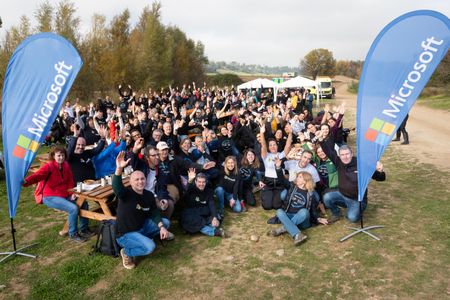
En Microsoft España seguimos al pie del cañón con nuestro compromiso con el medioambiente y hemos reunido junto a Fundación FDI a más de 300 personas, entre nuestros partners, Fundación AMAS y Fundació Privada Rosella para la reforestación de más de 600 árboles en las localidades de Sitges y Algete. ¿Nuestro objetivo? Revitalizar ambas áreas, reducir las emisiones de carbono y potenciar la biodiversidad. Esta actividad forma parte de la iniciativa Microsoft Community Empowerment, que pertenece al programa Datacenter Community Development de Microsoft y busca un impacto positivo en las comunidades donde se ubicarán los centros de datos de Microsoft. Lee más aquí.208Views0likes0Comments
Microsoft Surface Partner Day
Välkomna till höstens Microsoft Surface Partner Day! Vi har planerat en magisk heldag för dig som Surface partner som vi hoppas ska ge energi, insikter och många nya kontakter. Djupdyk med våra experter inom en mängd intressanta ämnen, så som att optimera effektiviteten, banbrytande innovativ teknik eller säkerställa orubblig säkerhet. Missa inte chansen att lära, umgås och diskutera hur Surface kan stödja dina kunders mål inom hållbarhet, säkerhet och AI. Datum: 15 november Tid: 09:00 - 19:00 Plats: Microsofts kontor, Stockholm Anmäl dig här364Views0likes0Comments