surface management portal
7 TopicsReimagining Surface Tools for Business
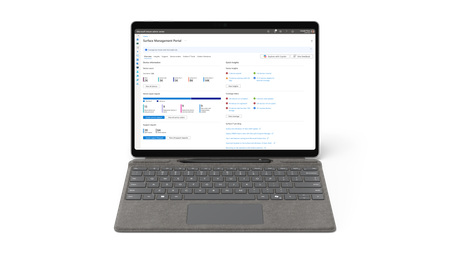
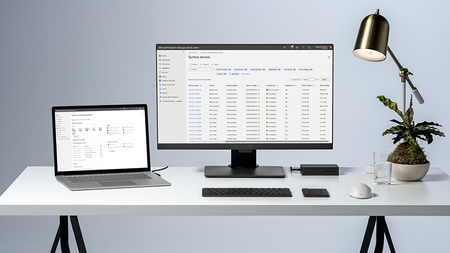
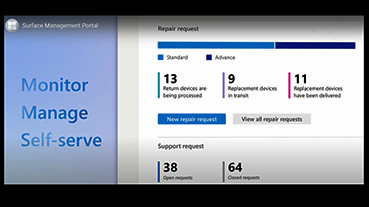
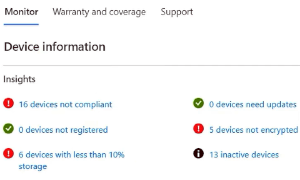
We recently announced new Surface Pro for Business and Surface Laptop for Business devices powered by Intel ® Core™ Ultra Series 3 processors and Snapdragon ® X2 processors. Across the lineup, these devices include Secured-core PC protections and on-device AI processing, with an optional integrated privacy screen on 13.8-inch models, and an advanced haptic experience. With 13-inch, 13.8-inch, and 15-inch options available, organizations can choose devices that align with different roles, performance needs, and workstyles. Hardware is only part of the story. Once devices enter an environment, IT teams need to identify, manage, protect, and recover them. That is where Surface Tools for Business come into focus. Recent updates to Surface Management Portal, Surface Support Portal, Surface IT Toolkit, and Surface Repair Tool add support for the latest Surface for Business devices powered by Intel and Snapdragon and enhance key management and support workflows. Scorecard and Protection Plans in Surface Management Portal Managing devices goes beyond deployment. IT teams also need visibility into fleet health and access to support resources that help keep devices protected throughout their lifecycle. In the United States, Surface Management Portal now includes Scorecard and Protection Plan capabilities designed to help admins monitor key fleet health indicators and review available protection plan options for eligible devices. Note: The Scorecard experience and Protection Plan purchasing capabilities in Surface Management Portal are currently available to customers in the United States only. The Scorecard: Fleet Health, Not Just Fleet Data Current insight dashboards present a wide range of metrics, including device counts, compliance percentages, and warranty status. While useful, those data points on their own don’t always make it easy to determine what needs attention or what the next steps are. The new Scorecard in Surface Management Portal is designed to organize fleet health information across four dimensions: security, coverage, reliability, and performance. Together, these categories provide another way to view fleet status within the portal. Rather than presenting only a static set of numbers, the Scorecard is intended to provide additional context alongside those metrics. From Insight to Action: Protection Plans in Surface Management Portal Knowing that a device may need attention is one step. Taking action is another. The Surface Scorecard can display devices that may be eligible for a protection plan purchase. IT admins can review the device, select an available plan, and submit a request within the portal. Resume and Pause BMR Downloads in Surface IT Toolkit Bare Metal Recovery images are large, and network interruptions can happen during download. Surface IT Toolkit now includes pause and resume functionality for BMR downloads. Admins can pause a download before disconnecting from the network and resume it later, so the download can continue from the previous point in supported scenarios. For IT teams working with large recovery files, pause and resume functionalities can make interrupted downloads easier to manage. Support repair workflows with Surface Repair Tool When hardware issues arise, IT teams and technicians need a clear path to diagnose, repair, and validate supported devices. Surface Repair Tool runs subsystem diagnostic tests and guides repair or replacement for supported components, including battery, motherboard, TDM, and touchpad. After a repair or replacement is completed, the same subsystem tests can be run again as a post-repair validation step to help confirm that the affected subsystem is operating as expected before the device returns to service. These capabilities support diagnostics, repair guidance, and post-repair checks within the Surface IT ecosystem. Everything Connected Surface Management Portal and Surface IT Toolkit include links to Surface Repair Tool, device support resources, and the Microsoft policy for integrated privacy screen settings on supported devices. These updates reflect ongoing work to make relevant tools, resources, and policies easier to access across the Surface management experience. What's next? If you're a Surface customer using Intune, check out the latest updates in Surface Management Portal and see how these new capabilities can help simplify device management. You can learn more in the resources below: Surface Management Portal overview Surface Scorecard in Surface Management Portal Surface IT Toolkit overview Purchase a Microsoft Protection Plan in Surface Management Portal882Views0likes0CommentsImproved address management in service orders on Surface Portals
We’ve introduced an important usability improvement to the address selection experience in the service order workflow on both Surface Management Portal and Surface Support Portal. When raising a service order, users can add both the billing and shipping addresses and save them for future use. Previously, all saved addresses were stored together and appeared in both dropdown menus. This caused confusion and made it difficult for users to select the correct one. To improve this experience, we’ve separated saved addresses by type. Shipping addresses now appear only in the Shipping Address dropdown, and billing addresses appear only in the Billing Address dropdown. As part of this update, all previously saved addresses have been moved to the Shipping Address section. Users can now save billing addresses separately as they create new orders. This change makes the selection process simpler, clearer, and more intuitive, allowing users to easily select the right address. To learn more about the Surface Management Portal and Surface Support Portal, see the following Microsoft Learn articles: Surface portals overview Surface Support Portal overview Surface Management Portal overview Assign admin roles for Surface Portals444Views0likes2CommentsEndpoints and AI strategy: Lessons of the Microsoft Work Trend Index 2025
AI adoption is accelerating, and PCs are now key to delivering fast, secure, and seamless AI experiences. Surface Copilot+ PCs combine local AI processing, cloud connectivity, and enterprise-grade security—making endpoints central to every AI strategy.1.3KViews1like0Comments