subform
2 TopicsAccess bug fixes — Versions 2511 through 2601
Version 2511 (Build 19426) Bug Name Issue Fixed Query Design view showed incorrect joins after selecting SQL text When using the Monaco SQL editor with a query containing multiple joins, selecting text in SQL view with Ctrl+A and then switching back to Design View could trigger a spurious alert and cause one of the joins to appear removed in the design grid. The underlying SQL wasn't actually affected, but the Design view displayed incorrect join information. This is corrected so that switching between SQL view and Design view preserves all joins accurately. Version 2512 (Build 19530) Bug Name Issue Fixed Datasheet forms with nested subforms showing errors after system changes When using datasheet forms containing nested subforms on systems where a system change occurs — such as disconnecting and reconnecting a Remote Desktop session — Access could display a GDI error. This happened because collapsed sublists held references to system brushes that were destroyed during the system change. This is fixed so that all sublists properly handle system resource changes. F4 key did not open the Properties pane in the Query SQL editor When the Monaco SQL editor was enabled, pressing F4 in the Query editor's SQL view didn't properly open the Properties pane. Instead, the pane would either flash briefly or appear incorrectly positioned in the top-left corner of the screen. The F4 shortcut now correctly opens the Properties pane in SQL view. Pressing F5 in the Query SQL editor cleared all SQL text When using the Monaco SQL editor in the Query designer, pressing F5 (Run) could clear all the SQL text from the editor. This is fixed so that running a query with F5 no longer affects the SQL text in the editor. Text not visible when renaming items in the Navigation Pane in dark themes When using the Black (or other dark) Office theme, renaming an object in the Navigation pane resulted in text that was nearly invisible due to insufficient contrast. The rename text box now uses appropriate colors that provide sufficient contrast in all themes. Advanced Filter/Sort opened a standalone query window instead of a filter window When opening a table in Datasheet view and selecting Sort & Filter > Advanced > Advanced Filter/Sort from the ribbon, Access incorrectly opened a full standalone query design window instead of the expected limited filter query window. The filter query window includes a Toggle Filter button to apply the query as a filter. This is corrected, so the command opens the proper filter window. Refreshing an Access ODBC connection in Excel returned an error When refreshing an ODBC connection to an Access database from Excel, users could receive the error "Operation is not supported for this type of object." This is resolved so that Access ODBC connections refresh successfully. Please continue to let us know if this is helpful and share any feedback you have.490Views4likes0Comments
ACCESS Form does not show all records when Subform is present
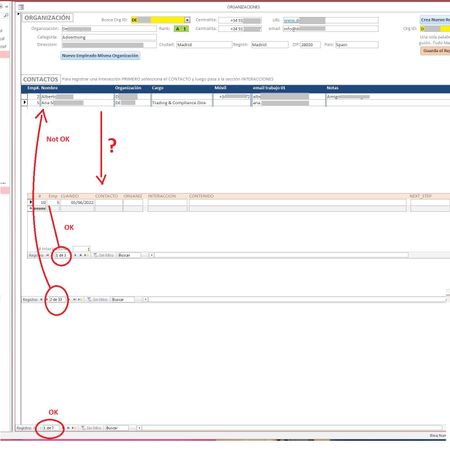
Hi All! I'm suffering a strange quirk with my Access forms/subforms. Whenever I set up a form / subform combo the form does not show all the records it should be showing. I have 3 tables. Table_1 holds the company data. When I select one ORGANIZATION (I have 7 right now) from the yellow dropdown ACCESS should populate the CONTACTS I have in said ORG and show them as a continuous subform (CONTACTOS). I get the list should nor be longer than whatever fits above the next subform (maybe 20+ at the moment?). But it's only showing 2 (out of a possible 33). The lower subform shows all Interactions (call, visit, email, etc.) I had with that person (presently 1) that I selected in the CONTACTOS subform.. Notice there are 33 records in CONCTACTOS, but ACCESS is only showing 2. If I scroll down I can see all 33 just not at the same time. If I remove the last subform or push the window up or down or pull the first form's background up or down the number of records shown grows or shrinks. Any ideas as to why it happens and how I can fix it? I'm sure I'm missing some parameter somewhere in properties but I haven't found it yet. Can I force ACCESS to show a certain number of records? Please help! Miguel2.9KViews0likes1Comment