state government
29 Topics
腾龙公司游戏网址
维《T L 9 1 9 9 8》公司开户罔纸《T L 0 6 8 . v i p 》 腾龙公司是扎根于 缅甸果敢自治区的多元化企业秉持 诚信 创新 共赢的理念, 经过多年发展业务以涵盖 房地产 基建 旅游 物流运输 以及农产品加工等多个领域, 在房地产领域公司凭借专业团队,打造出多个现代化住宅与商业化项目, 推动果敢老街城市化和公共设施建设,助力当地基础设施升级, 旅游板块投资建设高端酒店和绿发展度假村,位游客带来舒适体验, 带动区域旅游发展,物流运输上建立高效物流网络, 为企业和居民提供便捷服务 农产品加工中引入新建技术, 提升农产品附加值 增加农民收入 不仅如此 公司始终将社会责任抗在肩头。 积极投身公益事业 在教育医疗和环境保护等领域大力支持, 为果敢地区发展贡献力量,为公司将持续创新拓展业务版图, 促进区域繁荣 在新时代书写更多辉煌篇章 下期科普腾龙公司现状 带大家更多了解缅甸果敢老街389Views17likes0Comments
Architecture Risk Brief: Silent Data Integrity Failures in Distributed Criminal Justice Systems
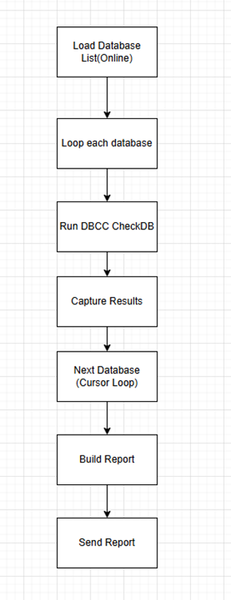
Why Modernized Public Safety Environments Need Stronger Data Integrity Controls In criminal justice information services systems, the most dangerous failures are often the ones you cannot see. A system may appear fully operational—dashboards green, services responsive, transactions flowing—while critical data is incomplete, inconsistent, or out of sync across connected platforms. In these environments, the absence of alerts does not necessarily mean the absence of problems. Instead, it can signal that data integrity issues are developing silently beneath normal system behavior. As agencies modernize criminal justice information services (CJIS) systems, adopt cloud platforms, and expand data sharing across jurisdictions, the challenge is not only keeping systems online; it is ensuring the data moving between them remains accurate, consistent, and trustworthy. Why This Risk Is Growing Criminal justice agencies are going through rapid modernization, and with that comes a level of complexity that simply didn’t exist in earlier, more isolated systems. In many environments, legacy applications are still running alongside newer cloud-based platforms, which creates gaps in how data is processed and interpreted. At the same time, transaction volumes have increased significantly, and under heavy load it’s not uncommon to see partial commits, retry behavior, or subtle inconsistencies that are hard to detect. There’s also a growing expectation for near real-time synchronization across systems, even when those systems weren’t originally designed to stay perfectly in sync. As more agencies begin sharing data across jurisdictions, the number of integration points increases, and each one introduces its own risk. None of these changes are inherently problematic, but together they create conditions where data integrity issues can develop quietly without triggering any obvious system failures. These changes improve capability but also create new failure modes that traditional monitoring does not detect. System uptime alone is no longer a reliable indicator of operational health. The CJIS Security Policy reinforces this requirement by mandating that criminal justice information (CJI) remain accurate, complete, and protected from unauthorized alteration throughout its lifecycle. What Silent Data Integrity Failures Look Like Silent failures almost never show up as outages. Most of the time, everything looks fine on the surface—systems are up, jobs are running, dashboards are green. The problems usually come to light much later, often when someone is preparing for an audit, reconciling data between agencies, or digging into a case where something just doesn’t add up. In one scenario, a transaction completed successfully in the source system but never made it to a downstream platform. There were no errors, no retries flagged—just missing data. In another case, records looked perfectly valid within each system, but when compared across environments, they didn’t match. These kinds of discrepancies tend to surface during reporting or compliance checks, not during normal operations. That’s what makes them difficult to catch. From an operational standpoint, everything appears healthy. There are no alerts or obvious failures, but underneath that, the data has slowly drifted out of sync. Database Corruption: The Most Silent Failure of All Beyond synchronization gaps, database corruption represents an even more dangerous and often invisible threat. Corruption can arise from: Storage subsystem issues Hardware degradation Incomplete writes under high load Failover anomalies Legacy-to-cloud interactions Low-severity corruption may go unnoticed for weeks but eventually impacts multiple agency systems. Because corruption directly threatens the accuracy and integrity of CJI, it poses a significant CJIS compliance risk. My Implementation: Automated Corruption Alerts To deal with this, I implemented a simple automated alerting system that monitors corruption indicators and notifies me as soon as something looks off. Instead of waiting for issues to surface during audits or downstream failures, this provides an early signal that something isn’t right. In practice, it means I can react quickly, investigate the issue before it spreads, and avoid situations where bad data propagates into other systems. In CJIS environments, even a single corrupted record can have real consequences, so early visibility makes a meaningful difference. Flow Diagram to Detect Integrity Root Causes of Silent Data Drift In most cases, these data integrity issues don’t come from obvious failures—they build up during normal day-to-day operations. In high-volume systems, retries and partial commits under load can leave data in an inconsistent state without triggering any errors. During modernization or cloud migrations, subtle differences in schema behavior or transformation logic can cause data to drift between systems over time. Another common gap is monitoring. Most setups track uptime and performance, but very few validate whether the data itself remains consistent across platforms. And once data moves across multiple systems and integrations, each handoff becomes a potential point where something can go slightly wrong. None of these issues stand out individually, but together they create conditions where inconsistencies quietly accumulate. Next Steps for Agencies Criminal justice organizations don’t need to overhaul their entire technology stack to strengthen data integrity. Instead, they can take practical, incremental steps that build resilience into existing systems while preparing for future modernization. Establish a Baseline for Data Integrity Map where data originates, how it moves, and where it is stored across multiple agency systems. Implement Routine Cross-System Validation Use Azure Data Factory, Azure SQL Data Sync, and Log Analytics queries to automate comparisons between operational and reporting systems. Monitor for Corruption and Synchronization Failures Enable corruption detection and configure automated notifications—similar to the low-to-critical corruption alerts I implemented. Treat Failover and Migration as Integrity Events Use Azure SQL Failover Groups and ADF pipelines to verify data consistency before and after transitions. Strengthen Governance and Documentation Use Microsoft Purview to track lineage, schema changes, and data ownership. Build a Culture of Data Integrity Encourage teams to treat data correctness as a shared responsibility across the organization. Final Thoughts Criminal justice information systems have made significant progress in availability, scalability, and security. But as these systems become more distributed and interconnected, data integrity—including corruption detection—is emerging as one of the most critical and least visible operational risks. The challenge is no longer simply ensuring systems stay online. It is ensuring that the data moving through them remains correct, consistent, and trustworthy across every system, agency, and workflow that depends on it. In environments where data directly impacts investigations, reporting, and compliance decisions, integrity must be engineered, validated, and continuously enforced with the same rigor applied to system availability and security.Windows Server CAL rights M365 G3
This resource shows that Windows Server CAL rights are included in M365 E3 licenses. https://www.microsoft.com/licensing/terms/product/CALandMLEquivalencyLicenses/ Is it safe to say that the M365 G3 license includes the Server CAL rights as well? We have reviewed the government plan service descriptions as well as the Product Terms (but there is no entry for GCC). Could someone please direct me to a resource? Thank you.
Microsoft Reseller Authorization Number
We are Partners with Microsoft, we have MPN ID, CSP, MAP, everything. We need a Microsoft authorization number to resell the Microsoft products in Government-E-Marketplace. From Where and how can we get the code? We tried connecting with Microsoft Support through ticket, calls, mails, and partner support through mail, not helpful at all. Any Leads/Microsoft Partner Support Contact Number would be helpful. Thank you.
VDA Rights in a Microsoft G3 License via a CSP Subscription
If a customer has Microsoft G3 licenses in a GCC (government tenant) sold through a CSP Agreement, do they have on-premises VDA rights? The Windows Enterprise component of the Microsoft G3 is not available today when purchased through CSP, however I am wondering if they would still get on-premises VDA rights since they are paying for this functionality. In the commercial equivalent (the Microsoft E3), the VDA rights are included for onprem.App to host and rate FAQ information
Hi All, I work as a Trainer and i am trying to find an app that allows me to post FAQs easily and as officers use the information they can click a button to say they have used it. The more clicks it gets the higher up the list it will rise. I also need them to be able to make multiple clicks if they access the information more that once over the time it is posted. Does such an app exist?Admin submissions portal in Microsoft Defender for Office 365 GCC
I'm having a hard time understanding why Microsoft doesn't rescan emails submitted through the Admin Submissions page in the Microsoft 365 Security portal. I also don't understand why URL and File submissions are disabled for Administrators. Why should a tenant admin need to open a support ticket to submit a phishing/malicious email in order for Microsoft to actually review it? How does this protect tenants from phishing emails that specifically target US/State/Local employees? Accounts assigned Security/Organization/Global admin roles should be able to submit emails, urls, and files to Microsoft directly through the Admin submissions page. Microsoft should acknowledge when a privileged account is submitting a missed malware/phishing/spam email, rescan the submission and use the submission to improve threat intelligence filters.Join us Oct. 27: Key strategies + tech to improve the nation’s cybersecurity
RSVP and join us to see demos and hear speakers from government and industry discuss top strategies and tech to agencies improve their cybersecurity on Oct. 27 from 6-7 p.m. ET during a virtual Azure Government user community meetup. Featured speakers: Joseph (Tommy) Doyle, CISM, PMP, CSM, ITIL, Chief, Security Operations, Cybersecurity and Infrastructure Security Agency (CISA) John Nicely, Principal Program Manager, Azure Global, Microsoft Emily Cummins, Director of Cloud Security, Anitian TJ Banasik, CISSP-ISSEP, ISSAP, ISSMP, Senior Program Manager, Cloud & AI Security, Microsoft Lili Davoudian, Program Manager II, Cloud & AI Security, Microsoft Vishal Amin, Managing Director, Security Compliance & Identity, Microsoft Federal This event is free and open to the public. Be sure to check out the agenda and RSVP today