sqllite
1 TopicBuild a Fully Offline RAG App with Foundry Local: No Cloud Required
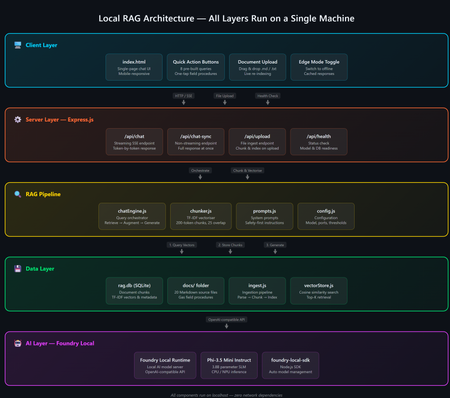
A practical guide to building an on-device AI support agent using Retrieval-Augmented Generation, JavaScript, and Microsoft Foundry Local. The Problem: AI That Can't Go Offline Most AI-powered applications today are firmly tethered to the cloud. They assume stable internet, low-latency API calls, and the comfort of a managed endpoint. But what happens when your users are in an environment with zero connectivity a gas pipeline in a remote field, a factory floor, an underground facility? That's exactly the scenario that motivated this project: a fully offline RAG-powered support agent that runs entirely on a laptop. No cloud. No API keys. No outbound network calls. Just a local model, a local vector store, and domain-specific documents all accessible from a browser on any device. The Gas Field Support Agent - running entirely on-device What is RAG and Why Should You Care? Retrieval-Augmented Generation (RAG) is a pattern that makes language models genuinely useful for domain-specific tasks. Instead of hoping the model "knows" the answer from pre-training, you: Retrieve relevant chunks from your own documents Augment the model's prompt with those chunks as context Generate a response grounded in your actual data The result: fewer hallucinations, traceable answers, and an AI that works with your content. If you're building internal tools, customer support bots, field manuals, or knowledge bases, RAG is the pattern you want. Why fully offline? Data sovereignty, air-gapped environments, field operations, latency-sensitive workflows, and regulatory constraints all demand AI that doesn't phone home. Running everything locally gives you complete control over your data and eliminates any external dependency. The Tech Stack This project is deliberately simple — no frameworks, no build steps, no Docker: Layer Technology Why AI Model Foundry Local + Phi-3.5 Mini Runs locally, OpenAI-compatible API, no GPU needed Backend Node.js + Express Lightweight, fast, universally known Vector Store SQLite via better-sqlite3 Zero infrastructure, single file on disk Retrieval TF-IDF + cosine similarity No embedding model required, fully offline Frontend Single HTML file with inline CSS No build step, mobile-responsive, field-ready The total dependency footprint is just four npm packages: express , openai , foundry-local-sdk , and better-sqlite3 . Architecture Overview The system has five layers — all running on a single machine: Five-layer architecture: Client → Server → RAG Pipeline → Data → AI Model Client Layer — A single HTML file served by Express, with quick-action buttons and responsive chat Server Layer — Express.js handles API routes for chat (streaming + non-streaming), document upload, and health checks RAG Pipeline — The chat engine orchestrates retrieval and generation; the chunker handles TF-IDF vectorization Data Layer — SQLite stores document chunks and their TF-IDF vectors; source docs live as .md files AI Layer — Foundry Local runs Phi-3.5 Mini Instruct on CPU/NPU, exposing an OpenAI-compatible API Getting Started in 5 Minutes You need two prerequisites: Node.js 20+ — nodejs.org Foundry Local — Microsoft's on-device AI runtime: Terminal winget install Microsoft.FoundryLocal Then clone, install, ingest, and run: git clone https://github.com/leestott/local-rag.git cd local-rag npm install npm run ingest # Index the 20 gas engineering documents npm start # Start the server + Foundry Local Open http://127.0.0.1:3000 and start chatting. Foundry Local auto-downloads Phi-3.5 Mini (~2 GB) on first run. How the RAG Pipeline Works Let's trace what happens when a user asks: "How do I detect a gas leak?" RAG query flow: Browser → Server → Vector Store → Model → Streaming response Step 1: Document Ingestion Before any queries happen, npm run ingest reads every .md file from the docs/ folder, splits each into overlapping chunks (~200 tokens, 25-token overlap), computes a TF-IDF vector for each chunk, and stores everything in SQLite. Chunking example docs/01-gas-leak-detection.md → Chunk 1: "Gas Leak Detection – Safety Warnings: Ensure all ignition..." → Chunk 2: "...sources are eliminated. Step-by-step: 1. Perform visual..." → Chunk 3: "...inspection of all joints. 2. Check calibration date..." The overlap ensures no information falls between chunk boundaries — a critical detail in any RAG system. Step 2: Query → Retrieval When the user sends a question, the server converts it into a TF-IDF vector, compares it against every stored chunk using cosine similarity, and returns the top-K most relevant results. For 20 documents (~200 chunks), this executes in under 10ms. src/vectorStore.js /** Retrieve top-K most relevant chunks for a query. */ search(query, topK = 5) { const queryTf = termFrequency(query); const rows = this.db.prepare("SELECT * FROM chunks").all(); const scored = rows.map((row) => { const chunkTf = new Map(JSON.parse(row.tf_json)); const score = cosineSimilarity(queryTf, chunkTf); return { ...row, score }; }); scored.sort((a, b) => b.score - a.score); return scored.slice(0, topK).filter((r) => r.score > 0); } Step 3: Prompt Construction The retrieved chunks are injected into the prompt alongside system instructions: Prompt structure System: You are an offline gas field support agent. Safety-first... Context: [Chunk 1: Gas Leak Detection – Safety Warnings...] [Chunk 2: Gas Leak Detection – Step-by-step...] [Chunk 3: Purging Procedures – Related safety...] User: How do I detect a gas leak? Step 4: Generation + Streaming The prompt is sent to Foundry Local via the OpenAI-compatible API. The response streams back token-by-token through Server-Sent Events (SSE) to the browser: Safety-first response with structured guidance Expandable sources with relevance scores Foundry Local: Your Local AI Runtime Foundry Local is what makes the "offline" part possible. It's a runtime from Microsoft that runs small language models (SLMs) on CPU or NPU — no GPU required. It exposes an OpenAI-compatible API and manages model downloads, caching, and lifecycle automatically. The integration code is minimal if you've used the OpenAI SDK before, this will feel instantly familiar: src/chatEngine.js import { FoundryLocalManager } from "foundry-local-sdk"; import { OpenAI } from "openai"; // Start Foundry Local and load the model const manager = new FoundryLocalManager(); const modelInfo = await manager.init("phi-3.5-mini"); // Use the standard OpenAI client — pointed at the local endpoint const client = new OpenAI({ baseURL: manager.endpoint, apiKey: manager.apiKey, }); // Chat completions work exactly like the cloud API const stream = await client.chat.completions.create({ model: modelInfo.id, messages: [ { role: "system", content: "You are a helpful assistant." }, { role: "user", content: "How do I detect a gas leak?" } ], stream: true, }); Portability matters Because Foundry Local uses the OpenAI API format, any code you write here can be ported to Azure OpenAI or OpenAI's cloud API with a single config change. You're not locked in. Why TF-IDF Instead of Embeddings? Most RAG tutorials use embedding models for retrieval. We chose TF-IDF for this project because: Fully offline — no embedding model to download or run Zero latency — vectorization is instantaneous (just math on word frequencies) Good enough — for a curated collection of 20 domain-specific documents, TF-IDF retrieves the right chunks reliably Transparent — you can inspect the vocabulary and weights, unlike neural embeddings For larger collections (thousands of documents) or when semantic similarity matters more than keyword overlap, you'd swap in an embedding model. But for this use case, TF-IDF keeps the stack simple and dependency-free. Mobile-Responsive Field UI Field engineers use this app on phones and tablets often wearing gloves. The UI is designed for harsh conditions with a dark, high-contrast theme, large touch targets (minimum 48px), and horizontally scrollable quick-action buttons. Desktop view Mobile view The entire frontend is a single index.html file — no React, no build step, no bundler. This keeps the project accessible and easy to deploy anywhere. Runtime Document Upload Users can upload new documents without restarting the server. The upload endpoint receives markdown content, chunks it, computes TF-IDF vectors, and inserts the chunks into SQLite — all in memory, immediately available for retrieval. Drag-and-drop document upload with instant indexing Adapt This for Your Own Domain This project is a scenario sample designed to be forked and customized. Here's the three-step process: 1. Replace the Documents Delete the gas engineering docs in docs/ and add your own .md files with optional YAML front-matter: docs/my-procedure.md --- title: Troubleshooting Widget Errors category: Support id: KB-001 --- # Troubleshooting Widget Errors ...your content here... 2. Edit the System Prompt Open src/prompts.js and rewrite the instructions for your domain: src/prompts.js export const SYSTEM_PROMPT = `You are an offline support agent for [YOUR DOMAIN]. Rules: - Only answer using the retrieved context - If the answer isn't in the context, say so - Use structured responses: Summary → Details → Reference `; 3. Tune the Retrieval Adjust chunking and retrieval parameters in src/config.js : src/config.js export const config = { model: "phi-3.5-mini", chunkSize: 200, // smaller = more precise, less context per chunk chunkOverlap: 25, // prevents info from falling between chunks topK: 3, // chunks per query (more = richer context, slower) }; Extending to Multi-Agent Architectures Once you have a working RAG agent, the natural next step is multi-agent orchestration where specialized agents collaborate to handle complex workflows. With Foundry Local's OpenAI-compatible API, you can compose multiple agent roles on the same machine: Multi-agent concept // Each agent is just a different system prompt + RAG scope const agents = { safety: { prompt: safetyPrompt, docs: "safety/*.md" }, diagnosis: { prompt: diagnosisPrompt, docs: "faults/*.md" }, procedure: { prompt: procedurePrompt, docs: "procedures/*.md" }, }; // Router determines which agent handles the query function route(query) { if (query.match(/safety|warning|hazard/i)) return agents.safety; if (query.match(/fault|error|code/i)) return agents.diagnosis; return agents.procedure; } // Each agent uses the same Foundry Local model endpoint const response = await client.chat.completions.create({ model: modelInfo.id, messages: [ { role: "system", content: selectedAgent.prompt }, { role: "system", content: `Context:\n${retrievedChunks}` }, { role: "user", content: userQuery } ], stream: true, }); This pattern lets you build specialized agent pipelines a triage agent routes to the right specialist, each with its own document scope and system prompt, all running on the same local Foundry instance. For production multi-agent systems, explore Microsoft Foundry for cloud-scale orchestration when connectivity is available. Local-first, cloud-ready Start with Foundry Local for development and offline scenarios. When your agents need cloud scale, swap to Azure AI Foundry with the same OpenAI-compatible API your agent code stays the same. Key Takeaways 1 RAG = Retrieve + Augment + Generate Ground your AI in real documents — dramatically reducing hallucination and making answers traceable. 2 Foundry Local makes local AI accessible OpenAI-compatible API running on CPU/NPU. No GPU required. No cloud dependency. 3 TF-IDF + SQLite is viable For small-to-medium document collections, you don't need a dedicated vector database. 4 Same API, local or cloud Build locally with Foundry Local, deploy with Azure OpenAI — zero code changes. What's Next? Embedding-based retrieval — swap TF-IDF for a local embedding model for better semantic matching Conversation memory — persist chat history across sessions Multi-agent routing — specialized agents for safety, diagnostics, and procedures PWA packaging — make it installable as a standalone app on mobile devices Hybrid retrieval — combine keyword search with semantic embeddings for best results Get the code Clone the repo, swap in your own documents, and start building: git clone https://github.com/leestott/local-rag.git github.com/leestott/local-rag — MIT licensed, contributions welcome. Open source under the MIT License. Built with Foundry Local and Node.js.1.8KViews1like0Comments