sqldb
4 Topics
How to verify of all the records are populated on a snapshot volume when snapshot is captured.
am seeing a consistent 1-record count discrepancy when recovering a MS-SQL database from a volume snapshot onto a secondary server. The target database recovers and attaches cleanly, but the total record count on the recovered instance is off by exactly one record compared to the snapshot checkpoint on the source. Step-by-Step Procedure Used: Started a continuous write workload inserting data into the source database. Suspended I/O on the source database. Flushed the underlying storage volumes hosting the data and log files. Recorded the baseline row count on the source database while frozen. Resumed / unfroze I/O on the source database. Scanned and mounted the snapshot volumes on the recovery host. Attached the data and log files (.mdf and .ldf) to SQL Server on the recovery host. Queried table row counts on the recovered database (observed a 1-record mismatch). Executed DBCC CHECKDB on the recovered database (completed with 0 allocation errors and 0 consistency errors). Verification Queries Executed: Initially, row counts were gathered using partition metadata: SQL SELECT t.name AS TableName, SUM(s.row_count) AS RecordCount FROM sys.tables t JOIN sys.dm_db_partition_stats s ON t.object_id = s.object_id WHERE s.index_id IN (0, 1) AND t.name IN ('timestamp', 'emp_id', 'emp_name') GROUP BY t.name ORDER BY t.name; To eliminate the possibility of stale cached metadata in sys.dm_db_partition_stats, I verified directly using a full table scan: SQL SELECT COUNT(*) FROM dbo.<TableName>; The exact same 1-record mismatch persisted between the source check and the recovered instance.47Views0likes1CommentSql Query
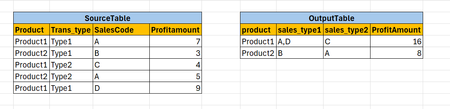
Hi All, I have a requirement. want output data like below screen print CREATE TABLE [dbo].[Source_Table]( [Product] [varchar](10) NULL, [Trans_type] [varchar](10) NULL, [SalesCode] [varchar](10) NULL, [Profitamount] [int] NULL ) GO INSERT [dbo].[Source_Table] ([Product], [Trans_type], [SalesCode], [Profitamount]) VALUES (N'Product1', N'Type1', N'A', 7) GO INSERT [dbo].[Source_Table] ([Product], [Trans_type], [SalesCode], [Profitamount]) VALUES (N'Product2', N'Type1', N'B', 3) GO INSERT [dbo].[Source_Table] ([Product], [Trans_type], [SalesCode], [Profitamount]) VALUES (N'Product1', N'Type2', N'C', 4) GO INSERT [dbo].[Source_Table] ([Product], [Trans_type], [SalesCode], [Profitamount]) VALUES (N'Product2', N'Type2', N'A', 5) GO INSERT [dbo].[Source_Table] ([Product], [Trans_type], [SalesCode], [Profitamount]) VALUES (N'Product1', N'Type1', N'D', 9) GO Thanks in Advance...490Views0likes2CommentsHow to Change collation for production Azure SQL databases
Azure SQL Database only supports changing collation by modifying the model.xml file for .bacpac files. Schedule a maintenance window for your application during the process and stop the workload to prevent loosing updates on your database. Do the export/import to/from databases with a high service tier to boost the operation. Use a VM in the same region to save latency time. If your database is/was used for Data Sync Service, consider removing DSS object before exporting the database. Check: https://techcommunity.microsoft.com/t5/azure-database-support-blog/exporting-a-database-that-is-was-used-as-sql-data-sync-metadata/ba-p/369062 If your database is a part of Geo-DR replication, consider removing the Geo link and delete secondary database before starting the operation in order to create a new Geo replication and sync the new database with the new collation to the secondary server.13KViews2likes0Comments