sql
51 Topics
How to increase SQL query performance of a view?
Hi everyone, I am new to Microsoft community, so please let me know if this post is not in the right forum and if so which one would be the right one. issue: - Update & query (using Power BI) of my Sales Weekly View takes forever (>30min) and I would like to understand how I could improve this Current setup: - Sales Daily View: View containing aggregation and joins of two main sales tables and a date table - Sales Weekly View: View joining the "Sales Daily View", a sales table and two dimension tables and containing extensive logics (mainly aggregations) Please let me know if you have any idea how to streamline this and improve the performance of the view.56KViews0likes4Comments
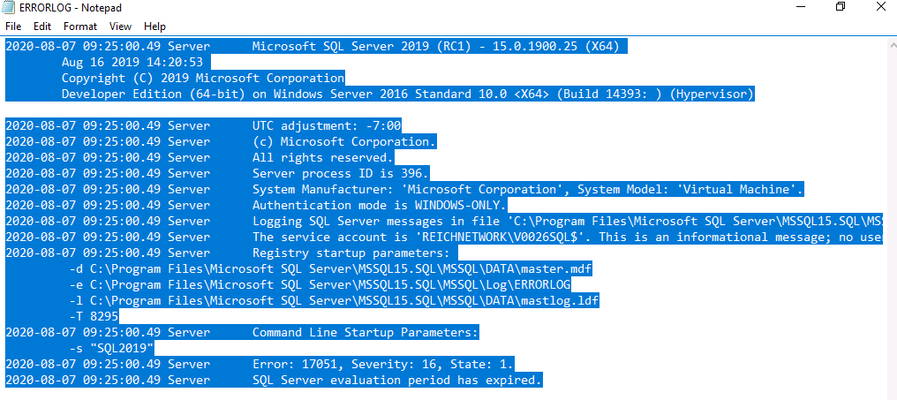
SQL 2019 Fails to Start - Error 17051
I have a fairly significant set of issues that I cannot figure out how to resolve that has brought down a bunch of systems. A windows update occurred and the SQL 2019 RC1 server rebooted itself (do not believe that this error is related just coincidental). This error indicates that the SQL Server evaluation period has expired. Upon reviewing the startup logs this concurs with my belief: I am confused about why I am running into this issue as I am running a developer version of SQL and not the evaluation version but none the less it currently appears to be a problem. To attempt to resolve this issue I have done the following: Attempted to do an edition upgrade and set everything back to developer and the process ran and completed successfully but the service will still not start. Attempted to upgrade editions to a licensed version of SQL (which I do also own) and I cannot complete the upgrade because the SQL server is not running. I attempted to follow instructions to turn back the computer time and set common files registry entry to "3" in an attempt to trick it into being active so that I could upgrade. My system automatically reverts the time back to the standard time almost immediately. Attempted to turn off network connection to disable time sync Defaulted the time settings for windows Unjoined the server from the domain thinking GPO might be interfering This system MUST be restored. Any ideas you have on how to get it back up and running again would be seriously appreciated!45KViews0likes1Comment
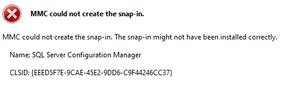
SQL Server Config Manager Error "MMC could not create the snap-in"
Hi, I have seen this error elsewhere online. I have gone to mmc to enable the snap in and I still have had no fix. My computer is running Windows Server 2022, SQL Server Express 2022, and SSMS. I have reinstalled, repaired, and all of the other tricks. Help!Solved4.3KViews0likes4CommentsWindows 10 VPN and SQL with Meraki VPN
Hi, when our users connect to VPN (Windows 10 VPN on Meraki) they used to be able to access a client application on a SQL server host (also a Windows 10 Pro box)....but something recently happened on the host (uninstalled Norton security and it likely reset a bunch of stuff) and now client VPN users are no longer able to access that application....we can ping the SQL host from the client device after connecting to VPN but no longer access the application, so my guess its some Windows firewall port or protocol on the SQL server blocking the traffic when it sees the traffic coming in via VPN because it works fine within the network, and its not as permission issue as I put the same client device on the network and it can access the application without any issues. Any thoughts or ideas?2.8KViews0likes1CommentWhat is the best practices to implement business logic in SQL database?
Hi Everyone, I am currently struggling to understand where and how to implement business logic & aggregations in SQL database in an optimal way Currently I am using the following ETL process which takes forever and is quite costly. Therefore I would appreciate to get some tips on how to optimize it ETL process: A. SQL Azure database: 1- Temporary tables: Store recent data (last 6 weeks) 2- Incremental load of data from the Temporary tables into the dbo tables 3- dbo tables (Fact tables): Store historical sales data (Last 3 years) 4- Daily View: Built on top of dbo tables. It implements business logic on daily data (aggregates data & Join data with the dimension tables) 5- Weekly View: Built on top of Daily View and another dbo table. It calculate weekly rolling average and other heavy calculations B. Power BI: 6- Query the Daily View & Weekly View into one single PBIX. file2.7KViews0likes0CommentsCounting Days
I have an SQL table that stores company incidents, so I have a Microsoft Flow that will send out an email with the count of days since the last incident. So basically, I want to know how many days it has been since the last row was entered into the SQL table. Is there a simple way to do that or is this a complex request? Thank you very much!Solved2.1KViews0likes2Comments
Restoring SQL Database
Hi All, Can anyone help me regarding the SQL Database Restoring Process. Case: Server Crashed on 10th June 2020 and all files are encrypted. Nothing is accessible on the server. Luckily we have restored the Server Image which we have taken on 5th May 2020 but we need to restore the latest database of our ERP. We are using the SQL backup tool for the backups and we restored the Full Backup which we have taken on 5th June 2020. Backup Plan: We are taking Differential Backups on daily basis and Full backup on weekly basis. After restoring the Full backup as of 5th June 2020 we have Differential backups for 6th June , 7th June , 8th June and 9th June. We tried to restore the differential backup of 6th June but we are getting the below Error Error: This differential backup cannot be restored because the database has not been restored to the correct earlier state. We tried to to restore the Full backup in Non Recovery Mode and then restore the differential of 6th June and it got successful but still we are facing issue when trying to restore the 7th , 8th and 9th June. Kindly tell me the correct procedure for the restoration. Thanks in advance.1.9KViews0likes1Comment
SQL Server 2016 crashes
Hey Guys, I am facing really weird issue with MS SQL 2016 crashes. Every so often there is a crash dump generated: SqlDumpExceptionHandler: Process 105 generated fatal exception c0000005 EXCEPTION_ACCESS_VIOLATION. SQL Server is terminating this process. This information is very vague so you cannot really determine what is the cause of it. I was playing with the dump file a bit An I got into the module that is causing the crash: ntdll!NtWaitForSingleObject+0x14: 00007ffb`d5255ac4 c3 ret SQL is working the cluster with 4 nodes. Two nodes are in one site and two other nodes are in the second site. Network is working fine. There are no error logs inside the system event viewer or Failover Cluster operational logs. I have noticed that we are running on older version of ODBC drivers which is 17.3.1.1 and the newest one is 17.4.2.1. Do you think this might be related? Regards, Wojciech1.6KViews0likes0CommentsI want to explore the possibilities of updating SQL table with Microsoft form whenever a response is
We are having a SQL table in which our daily factory production details will be uploaded, now we want to automatically update of that table with details submitted via Microsoft Forms. Please suggest me the way how to do it1.6KViews0likes1Comment