software update management
50 TopicsConfiguration Manager technical preview version 2405
Configuration Manager now supports SQL Extended Protection for Authentication Configuration Manager now supports SQL Extended Protection for Authentication. It's a security feature that enhances protection against MITM attacks, making SQL Server more secure when connections are made using Extended Protection. These enhancements collectively reduce the risk of unauthorized access and protect sensitive data managed by the SQL Server Database Engine. For more information, see Connect to the Database Engine Using Extended Protection BitLocker support in Arm devices Configuration Manager now supports BitLocker Task Sequence steps for Arm devices. In BitLocker Management, policies that include OS Drive encryption with a TPM protector and Fixed Drive encryption with the Auto-Unlock option are supported on Arm devices. Introducing Centralized Search - Desired Workspace Selection The centralized search box now enables the option to select the desired workspace for searching. Users can easily refine their search results by selecting the desired workspace from the dropdown menu. Fixes Performance Enhancement of policy processing and collection evaluation The performance of policy processing and collection evaluation has been enhanced. Previously, blocking chains from sp_ProcessPolicyChanges, called by PolicyPv, would run for hours, disrupting multiple workloads including collection management and policy processing. Known issues Unable to import or connect to Powershell Configuration Manager module via console While importing or connecting to Configuration manager Powershell module via CM console users get the following error message : PS C:\Build\AdminConsole\bin> Import-Module .\ConfigurationManager.psd1 Import-Module : The module manifest 'C:\Build\AdminConsole\bin\ConfigurationManager.psd1' could not be processed because it is not a valid Windows PowerShell restricted language file. Remove the elements that are not permitted by the restricted language Configuration Manager console won't automatically update If you update a technical preview site from version 2401 to a later version, the Configuration Manager console fails to update. This problem is because of a known issue in the extension installer. Mitigation: To work around this issue, after you update the site from version 2401 to a later version, manually uninstall the previous console and run ConsoleSetup.exe. For more information, see Install the Configuration Manager console Update 2405 for Technical Preview Branch is available in the Microsoft Configuration Manager Technical Preview console. For new installations, the 2405 baseline version of Microsoft Configuration Manager Technical Preview Branch is available on the link: CM2405TP-Baseline or from Eval center Technical Preview Branch releases give you an opportunity to try out new Configuration Manager features in a test environment before they are made generally available. We would love to hear your thoughts about the latest Technical Preview! Send us feedback directly from the console. Thanks, The Configuration Manager team Configuration Manager Resources: Documentation for Configuration Manager Technical Previews Try the Configuration Manager Technical Preview Branch Documentation for Configuration Manager Configuration Manager Forums Configuration Manager Support8.3KViews2likes8CommentsUpdate 2403 for Microsoft Configuration Manager current branch is now available.
Update 2403 for Configuration Manager current branch is available as an in-console update. Apply this update on sites that run version 2211 or later. When installing a new site, it will also be available as a baseline version soon after general availability. This article summarizes the changes and new features in Configuration Manager, version 2403. Site infrastructure Microsoft Azure Active Directory rebranded to Microsoft Entra ID Starting Configuration Manager version 2403, Microsoft Azure Active Directory is renamed to Microsoft Entra ID within Configuration Manager. Automated diagnostic Dashboard for Software Update Issues A new dashboard is added to the console under monitoring workspace, which shows the diagnosis of the software update issues in your environment this feature can easily identify any issues related to software updates. You can fix software update issues based on troubleshooting documentations. Special credit to Shankar Subramanian and Smita Jadhav for their details and troubleshooting notes. For more information, see Software update health dashboard. Introducing centralized search box: Effortlessly find what you need in the console! Users can now use the global search box in CM console, which streamlines the search experience and centralizes access to information. This feature enhances the overall usability, productivity and effectiveness of CM. Users no longer need to navigate through multiple nodes or sections/ folders to find information they require, saving valuable time and effort. For more information, see Improvements to console search. Added Folder support for Scripts node in Software Library You can now organize scripts by using folders. This change allows for better categorization and management of scripts. Full Administrator and Operations Administrator roles can manage the folders. For more information, see Folder support for scripts. HTTPS or Enhanced HTTP should be enabled for client communication from this version of Configuration Manager HTTP-only communication is deprecated, and support is removed from this version of Configuration Manager. Enable HTTPS or Enhanced HTTP for client communication. For more information, see Enable site system roles for HTTPS or Enhanced HTTP. and Deprecated features Windows Server 2012/2012 R2 operating system site system roles are not supported from this version of Configuration Manager Starting 2403, Windows Server 2012/2012 R2 operating system site system roles aren't supported in any CB releases. Clients with extended support (ESU) will continue to support. For more information, see Supported-operating-systems-for-site-system-servers. Resource access profiles and deployments will block Configuration manager upgrade Any configured Resource access profiles and deployments block Configuration manager upgrade. Consider deleting them and moving the co-management workload for Resource Access (if co-managed) to Intune. For more information, see FAQ and Resource access policies are no longer supported. Software updates New parameter SoftwareUpdateO365Language is added to Save-CMSoftwareUpdate cmdlet A new parameter SoftwareUpdateO365Language is now added to PowerShell Save-CMSoftwareUpdate cmdlet. Customers now don't have to check a specific language in the SUP Properties (causing a metadata download for that language for all updates). PowerShell Commandlet: Save-CMSoftwareUpdate – SoftwareUpdateO365Language <language name> (<region name>)" Note Languages need to be in O365 format to be consistent with Admin Console UI. E.g. "Hungarian (Hungary)". OS deployment Support for ARM 64 Operating System Deployment Configuration Manager operating system deployment support is now added on Windows 11 ARM 64 devices. Currently Importing and customizing Arm 64 boot images, Wipe and load TS, Media creation TS, WDS PXE for Arm 64 and CMPivot is supported. Enhancement in Deploying Software Packages with Dynamic Variables Administrators while deploying the "Install Software Package" via Dynamic variable with "Continue on error" unchecked to clients, will not be notified with task sequence failures even if package versions on the distribution point are updated. For more information, see Options for Install Application. Cloud-attached management Upgrade to CM 2403 is blocked if CMG V1 is running as a cloud service (classic) The option to upgrade Configuration Manager 2403 is blocked if you're running cloud management gateway V1 (CMG) as a cloud service (classic). All CMG deployments should use a virtual machine scale set. For more information, see Check for a cloud management gateway (CMG) as a cloud service (classic). Deprecated features Learn about support changes before they're implemented in removed and deprecated items. System Center Update Publisher (SCUP) and integration with ConfigMgr planned end of support Jan 2024. For more information, see Removed and deprecated features for Configuration Manager. Other updates Improvements to BitLocker This release includes the following improvements to BitLocker: Starting in this release, this feature ensures proper verification of key escrow and prevents message drops. We now validate whether the key is successfully escrowed to the database, and only on successful escrow we add the key protector. This feature now prevents a potential data loss scenario where BitLocker is protecting the volumes with keys that are never backed up to the database, in any failures to escrow happens. For more information on BitLocker management, see Deploy BitLocker management. and Plan for BitLocker management.. From this version of Configuration Manager, the Windows 11 readiness dashboard shows charts for Windows 23H2. Defender Exploit Guards policy for controlled folder now accepts regex in the file path for apps. For example, [C:\Folder\Subfolder\app?.exe] [C:\Folder1\Sub*Name] Next steps At this time, version 2403 is released for slow ring (all in console update), Baseline will be updated in portal soon. Thank you, The Configuration Manager team Additional resources: What’s New in Configuration Manager Documentation for Configuration Manager Microsoft Configuration Manager announcement Microsoft Configuration Manager vision statement Evaluate Configuration Manager in a lab Upgrade to Configuration Manager Configuration Manager Forums Configuration Manager Support Report an issue Provide suggestions31KViews7likes31CommentsUpdate 2309 for Microsoft Configuration Manager current branch is now available.
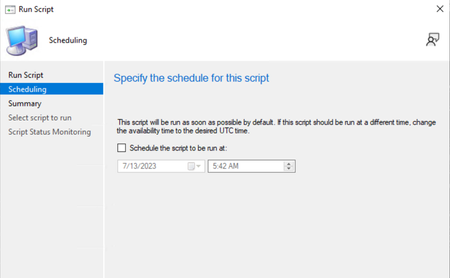
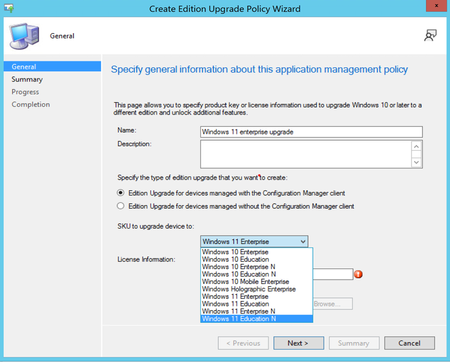
Site infrastructure Introducing SQL ODBC driver support for Configuration Manager Starting with Configuration Manager 2309 release, Configuration Manager requires the installation of the ODBC driver for SQL server 18.1.0 or later as a prerequisite, SQL ODBC Download. This prerequisite is required when you create a new site or update an existing one and on all remote roles. Important Microsoft ODBC Driver for SQL Server 18.1.0 or later needs to be installed on Site Servers and site system roles before upgrading to 2309 version. Do not uninstall SQL native client 11 until we call out in further communications. Configuration Manager doesn't manage the updates for the ODBC driver, ensure that this component is up to date. For more information, see SQL ODBC driver for the site server Option to schedule Scripts execution time Starting in Configuration Manager current branch version 2309, you can now schedule scripts' runtime in UTC. The run Script Wizard now offers a scheduling option that enables administrators to schedule the execution of scripts. It provides a convenient way to automate the running of scripts on managed devices according to specified schedules. For more information, see Schedule scripts' runtime External service notification Run details from Azure Logic application. Starting in Configuration Manager current branch version 2309, when Azure Logic App generates notifications related to specific events, CM can now capture and display these notifications. This integration enables the monitoring of Azure Logic App notifications directly within the MCM console, providing a centralized location for tracking critical events, taking appropriate actions and maintains a high level of operational efficiency. For more information, see External service notification. New Site Maintenance task “Delete Aged Task Execution Status Messages” is now available on primary servers to clean up data older than 30 days or configured number of days Starting in Configuration Manager current branch version 2309, you can now enable this feature by utilizing the Site Maintenance Window or using PowerShell Commandlet. By default, it has been set to run on Saturday and delete the data older than 30 days. It does so by cleaning up [dbo].TaskExecutionStatus Table Example : PowerShell Commandlet: Set-CMSiteMaintenanceTask -Sitecode "XXX" -MaintenanceTaskName "Delete Aged Task Execution Status Messages" -DaysOfWeek Friday For more information, see Delete Aged Task Execution Status Messages. Software updates Update Orchestrator Service (USO) for Windows 11 22H2 or later with windows native reboot experience In Configuration Manager current branch version 2309, when installing software updates from Configuration Manager, administrators can now choose to use the native Windows Update restart experience. To use this feature, client devices must be running Windows build 22H2 or later. From the Computer Restart client device settings, ensure that Windows is selected as the restart experience. Branding information is included in the Windows restart notification for updates that require restart. For more information, see Device restart notifications Maintenance window creation using PS cmdlet We've extended the Offset parameter for Maintenance windows. The cmdlet New-CMMaintenanceWindow is used to create a maintenance window for a collection. Earlier the Offset parameter could be set only between 0 and 4. Now it has been extended between 0 to 7. Example : PowerShell Commandlet: New-CMSchedule -Start (Get-Date) -DayOfWeek Monday -WeekOrder Second -RecurCount 1 -OffSetDay 6 OS deployment OSD preferred MP option for PXE boot scenario Starting in Configuration Manager current branch version 2309, Preferred Management Point (MP) option will now allow PXE clients to communicate to an initial lookup MP and receive the list of MP(s) to be used for further communication. When the option is enabled, it allows an MP to redirect the PXE client to another MP, based on the client location in the site boundaries. For more information, see Install-and-configure-distribution-points Enable Bitlocker through ProvisionTS In Configuration Manager current branch version 2309, Escrowing recovery key to Config Manager Database is now supported using ProvisionTS. ProvisionTS is the task sequence that is executed at the time of provisioning. As a result, device can escrow the key to Config Manager Database instantly. For more information, see Preprovision-BitLocker-in-Windows-PE Windows 11 Edition Upgrade using CM Policy settings Starting in Configuration Manager current branch version 2309, administrator can now create a policy using edition upgrade in Configuration Manager to update the Windows 11 edition. For more information, see Upgrade Windows devices to a new edition Windows 11 Upgrade Readiness Dashboard Starting in Configuration Manager current branch version 2309, administrators can use this dashboard to devise their windows 11 upgrade strategy and discover the devices in the organization, which are ready for Windows 11 Upgrade. This Dashboard also provides a count by installed Feature update version and a view of all Windows devices inside the organization. Administrators can create a collection of Windows 11 ready for upgrading devices and roll out feature updates to them. For more information, see Manage Windows 11 readiness dashboard , For Co-managed devices, see Use Windows compatibility reports for Windows 10 and Windows 11 updates in Intune Cloud-attached management New Cloud Management Gateway (CMG) creation via Console Starting in Configuration Manager current branch version 2309, We have enhanced security of web (server) app for the creation of CMG. For new CMG creation, users can select tenant and the app name using the Azure AD tenant name. After selecting tenant and app name the sign-in button appears, follow rest of the process as per the setup CMG. Note Pre existing CMG customers must update their web server app by navigating to Azure Active Directory Tenants node --> select the tenant --> select the server app --> click on "update application settings". For more information, see Configure Azure Active Directory for CMG New Cloud Management Gateway (CMG) creation via PowerShell You can now create CMG Server app via PowerShell cmdlet, you need to specify TenantID in the argument: PowerShell Commandlet: Set-UpdateServerApplication – 'TenantID' If you try to create the CMG before updating RedirectUrl, you get an error "Your server Application needs to be updated". PowerShell command: Set-UpdateServerApplication to update your App, and then try again to create CMG. Note For new customers, before creating CMG, create Azure AD web server app and execute the new PowerShell commandlet script. Deprecated features Configured resource access policies will block Configuration Manager 2403 upgrade, remove existing policies and move the slider to Intune. Please action before January 2024, read the FAQ. For more information, see Removed and deprecated features for Configuration Manager. For more details and to view the full list of new features in this update, check out our What’s new in version 2309 of Microsoft Configuration Manager documentation. Other updates Patching guidance for MCM customers migrating to Azure Migrating to Azure? Managing your on-prem infrastructure through Microsoft Configuration Manager (MCM) ? Have you figured out how you would patch your infrastructure on Azure? This article provides steps that you can follow to patch your migrated virtual machines on Azure. Note: MCM manages both devices and servers. This blog provides guidance for servers migrating to Azure. For devices, please refer to Microsoft Intune. Azure Migration tool has been helping you to programmatically create Azure virtual machines (VMs) for Configuration Manager and install the different site roles with default settings. Validation of the new roles, followed by removal of the on-premises site system role enables MCM in Azure, provides you all the on-premises capabilities and experiences in Azure. Additionally, you can leverage native Azure Update Manager to manage and govern update compliance for Windows and Linux machines across your deployments in Azure, on-premises, and on the other cloud platforms from a single dashboard, with no operational cost for managing the patching infrastructure. Azure Update Manager shares similarities with the update management component of MCM, designed as a standalone Azure service to provide SaaS experience on Azure to manage hybrid environments. Both MCM in Azure and Azure Update Manager can fulfil your patching requirements and the ultimate choice depends on your specific needs and preferences. MCM in Azure would allow you to continue using existing investments in Microsoft Configuration Manager and familiar processes for maintaining the patch update management cycle for Windows virtual machines. On the other hand, through Azure Update Manager, you can achieve consistent management of VMs and operating system updates across your cloud and hybrid environment. Moreover, you would not need to maintain Azure virtual machines for hosting the different Configuration Manager roles and would not need a MCM license, hence reducing the total cost for maintaining the patch update management cycle for all machines in your environment. For more details, please refer the actual CM on Azure FAQ For assistance with the upgrade process, please post your questions in the Site and Client Deployment forum. Send us your Configuration Manager feedback through Feedback in the Configuration Manager console. Continue to share and vote on ideas about new features in Configuration Manager. Thank you, The Configuration Manager team Additional resources: What’s New in Configuration Manager Documentation for Configuration Manager Microsoft Configuration Manager announcement Microsoft Configuration Manager vision statement Evaluate Configuration Manager in a lab Upgrade to Configuration Manager Configuration Manager Forums Configuration Manager Support Report an issue Provide suggestions29KViews4likes7CommentsConfiguration Manager technical preview version 2307
Windows 11 Edition Upgrade using Configuration Manager policy settings. Administrator can now create a policy using edition upgrade in Configuration Manager to update the Windows 11 edition. Windows 11 Upgrade Readiness Dashboard Administrators can use this dashboard to devise their Windows 11 upgrade strategy and discover the devices in the organization, which are ready for Windows 11 Upgrade. This Dashboard also provides a count by installed Feature update version and a view of all Windows devices inside the organization. Administrators can create a collection of Windows 11 ready for upgrading devices and roll out feature updates to them. Following four charts are offered in this dashboard: Windows Device Information- Shows count of Windows 7, 8, 10 and 11 devices in your organization. Feature Update Version – Shows count of each feature update Version in your organization. Upgrade Experience Indicators – Shows information for each device, which can be in any of these states: Cannot Upgrade (Red Color) devices that cannot be upgraded to windows 11. App Upgrade/Uninstall required (Yellow Color) devices that need an application update or uninstall before upgrading to Windows 11. App/Driver upgrade required (Orange Color) devices that need application upgrade to windows 11. Ready for Upgrade (Green Color) devices that are capable of Windows 11 upgrade. Windows 11 Minimum Hardware Requirement – Showcases the minimum hardware and software requirements needed to support Windows 11. Option to schedule scripts' runtime The Run Script wizard now offers a scheduling option which enables administrators to schedule the future execution time of the scripts. It provides a convenient way to automate the running of scripts on managed devices according to specified schedules. External service notification Run details from Azure Logic application. This integration enables the monitoring and management of Azure Logic App notifications directly within the Configuration Manager console, providing a centralized location for tracking critical events, taking appropriate actions and maintains a high level of operational efficiency. Note To use this feature a valid Azure AD web app is required. Please deploy the Azure services for Administration service management under \Administration\Overview\Cloud Services\Azure Services. If the service is already deployed, admin can use the existing web application to view Run details from Azure logic app. View Status wizard Known issue :- An unexpected error can occur while configuring the Azure service web app for Administration service management which can be ignored as it does not affect the service creation. Maintenance window creation using PS cmdlet. Maintenance windows are recurring periods of time when the Configuration Manager client can run tasks. PowerShell Commandlet: New-CMMaintenanceWindow is used to create a maintenance window for a collection. Earlier the Offset parameter could be set only between 0 and 4. Now it has been extended between 0 to 7. Update Orchestrator Service (USO) for Windows 11 22H2 or later with windows native reboot experience When installing software updates from Configuration Manager, administrators can now choose to use the native Windows Update restart experience. To use this feature, client devices must be running Windows build 22H2 or later. From the Computer Restart client device settings, ensure that Windows is selected as the restart experience. Branding information will be included in the Windows restart notification for updates that require restart. Steps to enable Client settings. Reboot Notification Update 2307 for Technical Preview Branch is available in the Microsoft Configuration Manager Technical Preview console. For new installations, the 2307 baseline version of Microsoft Configuration Manager Technical Preview Branch is available on the link: CM2307TP-Baseline or from Eval center Technical Preview Branch releases give you an opportunity to try out new Configuration Manager features in a test environment before they are made generally available. We would love to hear your thoughts about the latest Technical Preview! Send us feedback directly from the console. Thanks, The Configuration Manager team Configuration Manager Resources: Documentation for Configuration Manager Technical Previews Try the Configuration Manager Technical Preview Branch Documentation for Configuration Manager Configuration Manager Forums Configuration Manager Support10KViews2likes2CommentsMicrosoft Configuration Manager 2309 - Press release
This article provides information about Microsoft Configuration Manager 2309 release. To learn about the Configuration Manager, see Microsoft Configuration Manager FAQ. Microsoft Configuration Manager 2309 release is planned for October 2023. With this release we are bringing in new features and additional enhancements to the existing feature set. Configuration Manager 2305 Technical Preview had new enhancements, likewise, 2307 Technical Preview will bring additional capabilities to customers. Here is the list of features that are being introduced during Configuration Manager 2307 TP and 2309 Current Branch focusing on key customer value/asks and delivering high quality product updates. Some of the key additions are 1) Operating system deployment support for Windows 23H2; 2) Customers can perform Windows 11 edition upgrade like they did for Windows 10 edition upgrade from Professional to Enterprise Operating System; 3) a Windows 11 readiness dashboard for administrators or management to decide on how many devices are ready to upgrade to latest Windows 11 operating system, 4) Script runtime can be scheduled with simple steps, and customers can schedule the scripts to run on a particular time from the Primary Site time zone 5) Unified Service Orchestrator (USO) integration with Configuration Manager provides native windows update reboot experience( pre-release feature), and 6) Improvements in external notifications (Console Connectors). Furthermore we added critical customer asks such as, 1) Operating Systems Deployment (OSD) Preferred MP options which enables IT admins to choose a preferred Management point for PXE boot scenario; 2) Task Execution Status messages can now be deleted from primary servers which are older than 30 days, or any configured number of days; 3) CMG creation using third party app via console or PowerShell instead of the first party app; 4) Attack Surface Reduction (ASR) capability now marks server SKU as compliant only after enforcement is completed successfully; 5) Enable BitLocker through provisionTS task sequence option available on CM console to save the recovery key on CM database; 6) Client certificate state in console (self-signed) will now match state in control panel (PKI) applet; 7) Discrepancy in App Summarization report in console is corrected; 😎 Synchronization of collection memberships to Azure AD groups now optimized to show the entire set of members; 9) Patch downloader log size increased for troubleshooting purposes. We value your feedback on the upcoming functionalities to be released as it will contribute greatly to the enhancement of the product. Thanks, The Configuration Manager team Additional resources: What’s New in Configuration Manager Documentation for Configuration Manager Microsoft Configuration Manager announcement Microsoft Configuration Manager vision statement Evaluate Configuration Manager in a lab Upgrade to Configuration Manager Configuration Manager Forums Configuration Manager Support Report an issue Provide suggestions17KViews5likes6CommentsUnified update platform (UUP) FAQ's
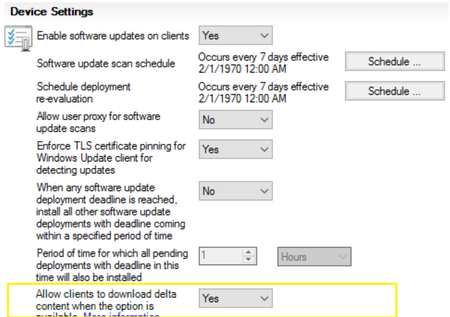
After a month of UUP update release, sharing best practices based on our field and feedback through multiple channels. 1. Will UUP patch work for CB 2111 and below? Our pre-req is Configuration Manager Version 2203 and above as per our release documents. For Configuration Manager Version 2111 (Lesser than this are unsupported now) to patch UUP updates for windows 11 22H2 seamlessly, enable delta download setting using client settings in ConfigMgr. When this option is set, delta download is used for all Windows update installation files, not just express installation files. 2. Please be sure to select the appropriate update classifications in your ADRs. If you have ADRs configured to auto-approve Security Updates, be sure to specify the “Security Updates” classification in your ADR settings. If you would like to take advantage of all the great features of UUP and utilize UUP feature updates to upgrade endpoint clients to Windows 11 22H2, be sure to include the “Upgrades” classification in your ADRs. This will ensure that as endpoint clients go through the OS upgrade they will receive the latest security updates as part of the upgrade and will only need to reboot once. If you do not want to utilize UUP feature updates to upgrade endpoint clients right now, you will want to exclude the “Upgrades” classification from your ADRs. Note: The feature updates will be released every month but there will be sharing of content for the old files and the new content should be only a few hundred MBs between the month releases. See Question 9 for more details on deduplication. 3. ConfigMgr + Adaptiva integrated solutions Adaptiva has released a patch for its customers to support the UUP. The public documentation can be found here: https://adaptiva.com/blog/using-unified-update-platform-with-adaptiva-onesite. Note that Adaptiva has asked customers not to enable delta download from the client settings and this is our recommendation from ConfigMgr 2203+ onwards only (which is our recommended version as well but as mentioned before for UUP to work with ConfigMgr 2111 there is a requirement to enable delta download from client settings.) 4. ConfigMgr console on Windows Server 2012 R2 cannot download the UUP Quality update fails to verify cert signature PatchDownloader.log Verifying file trust C:\Users\admin\AppData\Local\Temp\2\CAB291B.tmp.wim Software Updates Patch Downloader Authentication of file C:\Users\admin\AppData\Local\Temp\2\CAB291B.tmp.wim failed, error 0x800b0004 Software Updates Patch Downloader Attempting to delete 0 byte tmp files from previous downloads Software Updates Patch Downloader ERROR: DownloadUpdateContent() failed with hr=0x80073633 Software Updates Patch Downloader Workaround: Patch the Windows Server 2012 R2 with 2023 4B (April CU) which then fixes this issue. 5. ConfigMgr Patchdownloader component may fail to verify (*.psf files) if the UUP patches were synched before ConfigMgr 2111 version. The issue will persist even if ConfigMgr version is upgraded to ConfigMgr 2111+ if the updates were synched before ConfigMgr was on a lesser version than version 2111. Sample error in PatchDownloader.log Verifying file trust C:\WINDOWS\TEMP\CAB6062.tmp.psf Software Updates Patch Downloader Authentication of file C:\WINDOWS\TEMP\CAB6062.tmp.psf failed, error 0x800b0004 Software Updates Patch Downloader Attempting to delete 0 byte tmp files from previous downloads Software Updates Patch Downloader ERROR: DownloadUpdateContent() failed with hr=0x80073633 Software Updates Patch Downloader The below SQL query will help you identify the issue. -- Sample check for 2023-04 Cumulative Update for Windows 11 Version 22H2 for x64-based Systems (KB5025239). -- Replace the unique update id below if you are searching for a different UUP update IF EXISTS( select all SMS_CIContentFiles.CI_UniqueID,SMS_CIContentFiles.Content_ID,SMS_CIContentFiles.FileName,SMS_CIContentFiles.FileSize, SMS_CIContentFiles.IsSigned,SMS_CIContentFiles.SecuredTypeID,SMS_CIContentFiles.SourceURL from vSMS_CIContentFiles AS SMS_CIContentFiles WHERE SMS_CIContentFiles.CI_UniqueID='3157dbaf-04f5-49fc-baef-300bbd6d121a' AND FileName like '%.psf' and isSigned= 1 ) PRINT 'UUP Updates likely synched before upgrading to 2111. This will need correction, Please call Microsoft support to correct this.' ELSE PRINT 'You are not likely affected by the UUP PSF update signing issue' If you get the output of the above query as 'UUP Updates likely synched before upgrading to 2111. This will need correction, please call Microsoft support to correct this.' then likely you are affected and open a support case with Microsoft to correct the issue. 6. UUP updates installed as a part of OSD TS in "Install Software Updates" step (Fixed 2309 or later) There is a known issue that is currently investigated. The issue is the Delta Download component of CCMEXEC not starting on time and the updates timeout on the first scan, later scans are not impacted. Workaround: Add a restart step in between two install software updates steps. This will allow UUP updates to be successfully downloaded and installed in the second attempt. Resolution: Upgrade to CB 2309 and upgrade the client. This issue is addressed. 7. Does offline servicing work with UUP updates? No. Offline servicing images with UUP QU updates from the ConfigMgr console is not supported. 8. Are Delivery Optimization (DO) and Delta Download (DD) components different ? What is ConfigMgr dependency on DO? Delivery Optimization is a Windows technology to deliver content in a smart way reducing internet bandwidth owned by the Windows team and Delta Download is a component which is an http listener for requests owned by the ConfigMgr team. Delivery Optimization is a peer-to-peer distribution technology available in Windows 11 and Windows 10 that allows devices to share content, such as updates, that the devices have downloaded from Microsoft over the internet. DO is a part of the Windows OS. Delta Download is a http listener and is a component of ConfigMgr. ConfigMgr requires the DO client as it invokes the Delta download listener to download the content (as we configure the alternate content location URL in WUA policy to point to Delta Download Listener URL). The Invocation flow is WUA (Windows Update Agent) -> DO (Delivery Optimization) -> DD (Delta Download). Hence even if we don't enable DO, ConfigMgr would automatically enable DO by setting these two policies. This is visible in the UpdateDOGPO.log SetDOGPOSettings: Set Windows DO group policy to DOGroupId = DeliveryMode = group Customers should not create any GPO settings to disable these policies OR edit the registry to disable the DOSVC service or from services console. 9. Update Supersedence changing to 6 months default for new installs. How does update supersedence affect UUP scenarios? Refer the blog for the announcement details for this change. The default for expiring updates which are superseded will only change for the new installations and the existing ones will not be altered from whatever the current setting is. 10. Does ConfigMgr have deduplication of files at source and distribution points? Deduplication at the source in ConfigMgr : When PatchDownloader component downloads a file it checks if the file exists in the same share and creates a hard link for the already existing file instead of re-downloading it. Scenario 1 If the files/folders for previous UUP update source package are on the same volume but different share name, customers don't go into creating hard link path at all. Scenario 2(a) If the Package path has a common share \\machine\share but different folders inside it (which is the normal case) like \\machine\share\jan and \\machine\share\feb we go to the hard link and create the hard link for the file with the Patchdownloader.log entry Content already downloaded. Created link for ContentID Scenario 2(b) Same scenario as 2(a) but the PatchDownloader here finds the same file present in a different share first apart from being present on the same share. Here the PatchDownloader doesn't go deep and check if the file is also present on the same share and fails to create the hard link. But here it doesn't download from internet again but copies the file from the other share to this share. Log entries fail to create hard link with error 17 (which is it thinks these are different drives). Could not create hard link: \\MachineNetbios\UpdatesPackage\2302_Win11_21H2_UUP\b1e9d019-7dec-4eee-b7e4-9e8eae99d89b.1\19222DDC6156FBE5570C3A6DDF69759662F93AEE_FeatureOnDemand.wim -> \\ MachineNetbios\22-11-UUPWin11\bcb528ff-85c2-4372-8b91-20bd0c7fa1e4\19222DDC6156FBE5570C3A6DDF69759662F93AEE_FeatureOnDemand.wim. LastErr=17 Summary It is recommended to have a single share for all the UUP monthly packages \\machine\UUP and then creating folders inside it for each months. for eg.. \\machine\share\jan and \\machine\share\feb . In this case ConfigMgr will create hard links instead of downloading the actual files again. Note If you actually check the properties of the folder it will still show the size of the actual file and not hard link. Use DU.exe from sysinternals suite to find the actual size of a folder. E:\UpdatesPackage\2302_Win11_21H2_UUP>E:\DU\du.exe . DU v1.62 - Directory disk usage reporter Copyright (C) 2005-2018 Mark Russinovich Sysinternals - www.sysinternals.com Files: 14 Directories: 2 Size: 9,675,198,236 bytes Size on disk: 9,675,227,136 bytes Note To find all the hard link references to a file use the fsutil command. fsutil harlink list <full_file_path> 11. Why does ConfigMgr UUP On-Prem download a 3-5GB wim when I want to install a very small FOD/LP package? This is an issue with the size attribute on the file as we don't download the full file for FOD/LP but only the needed byte ranges. Since we download the needed byte ranges only, the size that gets displayed for the file is the cumulative size of the file till that range. Meaning if the small FOD package is around 3035627519 of the byte range in the file, we will display the size of the file as around 2.82 GB. While in actuality we only downloaded the file ranges between 3034578944-3035627519 for the 1 MB FOD package. To confirm the actual size of the file on disk you can check the properties of the file and verify the "Size on disk". 12. Deduplication at the distribution points in ConfigMgr : Distribution Points in ConfigMgr are already designed to have a SIS (Single instance storage) in the form of Content Library. So we store any file only once no matter how many packages it is present in. More on ConfigMgr Content Library design here . For more details ref the actual windows blog and Configuration blog. Thank you, The Configuration Manager team91KViews3likes38CommentsUpdate 2303 for Microsoft Configuration Manager current branch is now available.
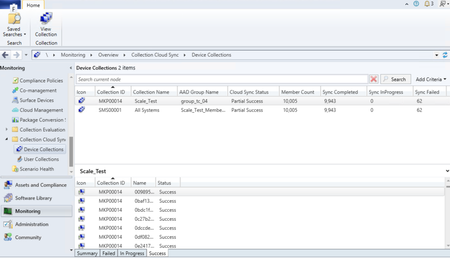
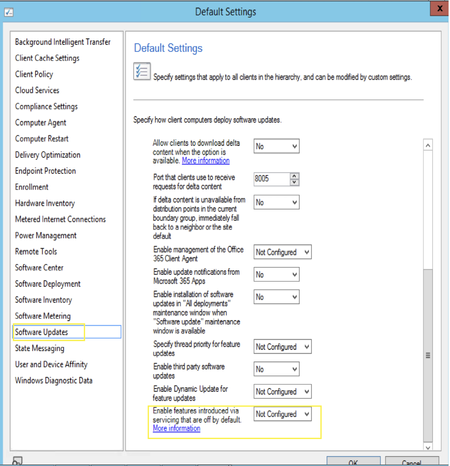
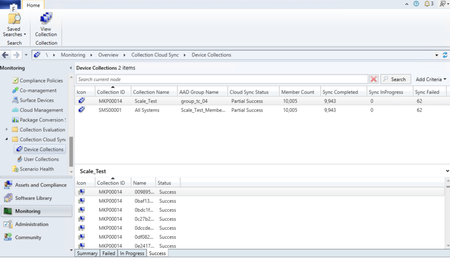
Microsoft Configuration Manager product branding Starting with Configuration Manager version 2303 Microsoft Endpoint Configuration Manager is now Microsoft Configuration Manager. Microsoft Configuration Manager is an integrated solution for managing all your devices. Microsoft brings together Configuration Manager and Intune, without a complex migration, and with simplified licensing. Continue to use your existing Configuration Manager investments, while taking advantage of the power of the Microsoft cloud at your own pace. Cloud-attached management Improvements to Cloud Sync (Collections to Azure Active Directory Group Synchronization) feature Starting with Configuration Manager version 2303 collection member sync status (Success, In Progress, Failed - with reason for failure) is available in the Collection Cloud Sync dashboard for the chosen collection on the bottom pane. Earlier with Configuration Manager version 2211, the scalability of this feature has been improved with better throttling and error handling. Additionally, dedicated dashboards for user collections and device collections are added in Monitoring workspace to show Cloud Sync status. The dashboard displays the Cloud Sync status per collection with the mapped Azure AD group, total member count, synced member count, status (success, failed, in progress) and last sync details. For more information, see Synchronize collections to Azure Active Directory Group. Endpoint Security reports in Intune admin center for Tenant Attached devices Starting with Configuration Manager version 2303, you can now opt for Endpoint Security reports in Intune admin center for tenant attached devices. Once you opt in, Unhealthy endpoints and Active malware operational reports under Endpoint security node in Intune admin center will start showing data from tenant attached devices. Also, Antivirus agent status and Detected malware organizational reports under Microsoft Defender Antivirus in Reports section will show data from tenant attached devices. For more information, see Tenant attach - Create and deploy Antivirus policies from the admin center. Site infrastructure Authorization failure message in admin service now shown in Status message viewer We have introduced audit messages about authorization failure in admin service. You can now view request details and status messages. These messages are shown in “All Status Message” at “Status Message Queries” in “Monitoring” ribbon. Previously these failures were logged in log files. With the new audit messages, we intend to avoid the inconvenience of log files rollback. Details about the user, resource access attempts and the number of attempts for all the authorized requests made by user in a day will now be available. We are also auditing read operations for HTTPS requests and for cloud-initiated operations. This helps admins to scope permission and roles of users while also determining if there are any malicious users. All unauthorized requests are aggregated for 24 hours before being sent to the status message viewer. For more information, see Administration Service documentation. SQL Server 2022 version support added for Configuration Manager Starting with 2303, support is added for SQL server 2022 RTM version. You can use this version of SQL Server for the following sites: A central administration site A primary site A secondary site The following table identifies the recommended compatibility levels for Configuration Manager site databases: SQL Server version Supported compatibility levels Recommended level SQL Server 2022 150, 140, 130, 120, 110 150 For more information, see support-for-sql-server-versions. Software updates Unified update platform (UUP) GA release The Unified Update Platform (UUP) servicing is finally here for all Windows 11, version 22H2 updates delivered via Windows Server Update Services (WSUS) and Configuration Manager! Starting March 28, on-premises Windows 11, version 22H2 devices will receive quality updates via the Unified Update Platform (UUP). For more information, see What’s UUP? New update style!. The Unified Update Platform (UUP) is a single publishing, hosting, scan, and download model for OS quality and feature updates. It offers improved delivery technologies in response to IT admin requests for more seamless updates, more control over installation time, more battery life, and lighter download size. Note: A one-time 10-GB download to distribution points with your first UUP update. UUP is becoming the default and only way to download quality updates. This means that you should plan for an extra 10GB download to distribution points (not endpoint clients) with the March 28th update. That's a one-time 10GB download for updates for Windows 11, version 22H2 per architecture (AMD64 and ARM64). Let's look at the key benefits, version requirements. Quality updates for Windows 11 22H2 and above Quality updates with the UUP continue to be cumulative and include all released Windows quality and security fixes. All of these new capabilities are brought to you by UUP on premises! If interested in learning more about these improvements, read Faster, Smaller. Windows 11, version 22H2 update fundamentals. UUP on premises unlocks some amazing benefits going forward: Up to 30% smaller client downloads for monthly quality updates Cumulative update integration with feature updates (i.e., get current in one reboot) Seamless retention of installed language packs and optional features on demand (FODs) during feature updates Reduced client downloads for feature updates (i.e., inbox app downloads are conditional) Automatic OS healing during the update process1 that requires no action from the enterprise admins End-user acquisition of language packs and FODs Note: To receive quality updates on Windows 11, we recommend that the latest security updates be installed on your devices. Minimally, devices should be updated through Windows 11 22H2. To take advantage of UUP on premises, you must be using a supported platform: Recommended version: 2203 Configuration Manager Current Branch and above Enable Software Update on client’s settings to Yes. For Client Operating Systems that can support delta download (Win 10 Version 10.0.16299 or up), delta download endpoint will always get turned on regardless of the Client Agent Settings, and the port number will be honored even if Delta downloads not enabled. If Delta Download disabled, only UUP update will do delta download, all other updates, regardless of if express or not, will all do full file download. If Delta Download enabled, all updates will go with delta download code path regardless of if express or not, unless the only DP available is cloud DP. Any supported versions of Windows Server Update Services (WSUS) Note If you're a WSUS Standalone admin, please apply the upcoming February and March updates promptly to ensure your readiness! And if you haven't yet, learn about Adding file types for Unified Update Platform on premises . Known issue: On newly installed CM client, Delta Download delays to start on. Patchdownloader.log shows incorrect download percentage. WSUS Servers running on server 2022, 2019 or 2016 likely to break after Feb 2023 LCU if custom mime types are added at a subsite level in IIS. Update to the default value of supersedence age in months for software updates With Unified Update Platform (UUP) general availability release, the feature update and non-feature update supersedence should be greater than 3. For new software update role installations, we're updating this to 6, existing customers can review and update to 6. Update to the default value of supersedence age in months for software updates. Known issue: Update to the default value of supersedence age in months for software updates will not impact existing configurations. Removing SUP role in Admin Console does not reset the supersedence age property in WMI. As a result, while reconfiguring the role, the previously configured value is shown in the configuration window. Enable Windows features introduced via Windows servicing that are off by default The Commercial control for continuous innovation in Windows is now integrated with Configuration Manager 2303 release. Commercial control for continuous innovation (Windows 11) For more information, see client settings in Configuration Manager Configuration Manager console Dark theme extended to delete secondary site wizard The Configuration Manager console now extends the dark theme for the delete secondary site wizard. This wizard will also have a new look for the normal theme. This is part of the ongoing effort to make dark theme and overall admin console experience better. To use the theme, select the arrow from the top left of the ribbon, then choose the Switch console theme. Select Switch console theme again to return to the light theme. For more information, see Dark theme for the console. Deprecated features Removed Community hub service and integration with ConfigMgr Removed Community Hub configuration from Hierarchy settings and Community Hub service integration. Learn about support changes before they're implemented in removed and deprecated items. Other updates Maintenance window schedules Offset for recurring monthly maintenance window schedules. Based upon your feedback, you can now offset monthly maintenance window schedules to better align deployments with the release of monthly security updates. For example, using a maximum offset of seven days after the second Tuesday of the month, sets the maintenance window for next Monday. Removing Microsoft Store for Business and Education new config capability As part of Microsoft Store for Business deprecation, we are making these changes to the customer experience with using this feature: Removing a user's ability to create new Microsoft Store for Business in Configuration Manager. Display a warning message box when user triggers a sync from Microsoft Store for Business. Display a warning in the Create Application Wizard when user attempts to create a new app from Store license information. For more information, see removed and deprecated items. For more details and to view the full list of new features in this update, check out our What’s new in version 2303 of Microsoft Configuration Manager documentation. For assistance with the upgrade process, please post your questions in the Site and Client Deployment forum. Send us your Configuration Manager feedback through Feedback in the Configuration Manager console. Continue to share and vote on ideas about new features in Configuration Manager. Thank you, The Configuration Manager team Additional resources: What’s New in Configuration Manager Documentation for Configuration Manager Microsoft Configuration Manager announcement Microsoft Configuration Manager vision statement Evaluate Configuration Manager in a lab Upgrade to Configuration Manager Configuration Manager Forums Configuration Manager Support Report an issue Provide suggestions32KViews10likes3CommentsConfiguration Manager technical preview version 2302
Enable Windows features introduced via Windows servicing that are off by default To learn more about the settings: “Enable Windows features introduced via Windows servicing that are off by default”, please read this blog. The post describes the Commercial control for continuous innovation in Windows. The setting for this policy is now integrated with the Configuration Manager 2302 Technical Preview. More information on the Commercial control timeline and versions of Windows 11 supported by the setting can be found in the blog. The Windows features that the policy will control will be released in later part of 2023. This ConfigMgr Technical Preview feature is for awareness and not for testing in February 2023. Dark theme extended to delete secondary site wizard The Configuration Manager console now extends the dark theme for the delete secondary site wizard. This wizard will also have a new look for the normal theme. This is part of the ongoing effort to make dark theme and overall admin console experience better. To use the theme, select the arrow from the top left of the ribbon, then choose Switch console theme. Select Switch console theme again to return to the light theme. Known issue. Console restart is required on doing the theme switch, as the node navigation pane might not properly render when you move to a new workspace. For more details and to view the full list of new features in this update, check out our Features in Configuration Manager technical preview version 2302 documentation. Update 2302 for Technical Preview Branch is available in the Microsoft Configuration Manager Technical Preview console. For new installations, the 2302 baseline version of Microsoft Configuration Manager Technical Preview Branch is available on the link: CM2302TP-Baseline or from Eval center Technical Preview Branch releases give you an opportunity to try out new Configuration Manager features in a test environment before they are made generally available. We would love to hear your thoughts about the latest Technical Preview! Send us feedback directly from the console. Thanks, The Configuration Manager team Configuration Manager Resources: Documentation for Configuration Manager Technical Previews Try the Configuration Manager Technical Preview Branch Documentation for Configuration Manager Configuration Manager Forums Configuration Manager Support9.8KViews3likes0CommentsConfiguration Manager technical preview version 2301
Microsoft Configuration Manager product branding. Starting with Configuration Manager version 2301 technical preview Microsoft Endpoint Configuration Manager is now Microsoft Configuration Manager. Microsoft Configuration Manager is an integrated solution for managing all your devices. Microsoft brings together Configuration Manager and Intune, without a complex migration, and with simplified licensing. Continue to leverage your existing Configuration Manager investments, while taking advantage of the power of the Microsoft cloud at your own pace. Improvements to Cloud Sync (Collections to Azure Active Directory Group Synchronization) feature. Starting this technical preview 2301 release user/device-based sync status (success, failure, in-progress, failure reason if any) will be available in the dashboard for the chosen collection. Earlier with Configuration Manager version 2211, the scalability of this feature has been improved with better throttling and error handling. Additionally, dedicated dashboards for user collections and device collections are added in Monitoring workspace to show Cloud Sync status. The dashboard displays the Cloud Sync status per collection with the mapped Azure AD group, total member count, synced member count, status (success, failed, in progress) and last sync details. For more information, see Synchronize collections to Azure Active Directory Group. Update to the default value of supersedence age in months for software updates. With Unified Update Platform (UUP) nearing general availability release, the feature update and non-feature update supersedense should be greater than 3. For new software update role installations, we're updating this to 6, existing customer can review and update to 6 when the feature is released during general availability. Update to the default value of supersedence age in months for software updates. General known issues Update to the default value of supersedence age in months for software updates. Removing SUP role in Admin Console does not reset the supersedence age property in WMI. As a result, while reconfiguring the role, the previously configured value is shown in the configuration window. This property needs to be reset to default value on role removal. Removing Microsoft Store for Business and Education new config capability. As part of Microsoft Store for Business deprecation, we are making these changes to the customer experience with using this feature: -Removing a user's ability to create new Microsoft Store for Business in Configuration Manager. -Display a warning message box when user triggers a sync from Microsoft Store for Business. -Display a warning in the Create Application Wizard when user attempts to create a new app from Store license information. Other Updates Update to Offset for recurring monthly maintenance window schedule. Based upon your feedback, you can now offset monthly maintenance window schedules to better align deployments with the release of monthly security updates. For example, using a maximum offset of seven days after the second Tuesday of the month, sets the maintenance window for next Monday. For more details and to view the full list of new features in this update, check out our Features in Configuration Manager technical preview version 2301 documentation. Update 2210 for Technical Preview Branch is available in the Microsoft Endpoint Configuration Manager Technical Preview console. For new installations, the 2210 baseline version of Microsoft Endpoint Configuration Manager Technical Preview Branch is available on the link: MECM2210TP-Baseline or from Eval center Technical Preview Branch releases give you an opportunity to try out new Configuration Manager features in a test environment before they are made generally available. We would love to hear your thoughts about the latest Technical Preview! Send us feedback directly from the console. Thanks, The Configuration Manager team Configuration Manager Resources: Documentation for Configuration Manager Technical Previews Try the Configuration Manager Technical Preview Branch Documentation for Configuration Manager Configuration Manager Forums Configuration Manager Support12KViews4likes0Comments