software update management
50 TopicsUpdate 2207 for Microsoft Endpoint Configuration Manager current branch is now available
We are delighted to announce Microsoft Endpoint Configuration Manager release 2207. This release includes several feature enhancements and updates, including key enhancements to manage security settings, hybrid workspace, and simplifying the admin persona.193KViews3likes4CommentsManaging Patch Tuesday with Configuration Manager in a remote work world
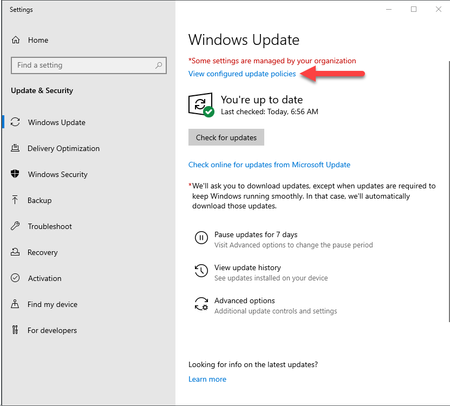
This article is designed to help you successfully deliver patches to your managed PCs that are no longer on-premises and connecting via VPN using home broadband networks. We will take you through a decision tree of options available to your organization when it comes to managing your upcoming patch deployments as we approach the April 2020 security update.151KViews19likes17CommentsExtended Security Updates and Configuration Manager
This article describes software update management and OS deployment using Configuration Manager for clients covered under the ESU program. For those clients covered under the ESU program, the latest released version of Configuration Manager current branch can be used to deploy and install any Windows security updates released under the program.101KViews10likes0CommentsUnified update platform (UUP) FAQ's
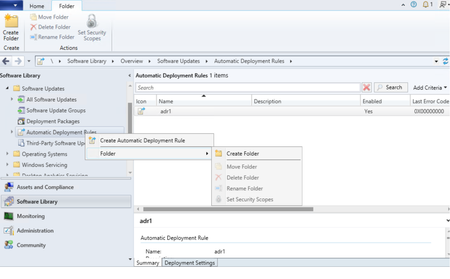
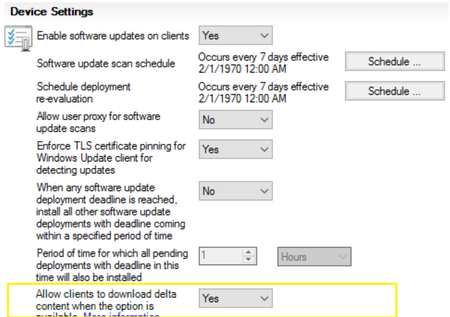
After a month of UUP update release, sharing best practices based on our field and feedback through multiple channels. 1. Will UUP patch work for CB 2111 and below? Our pre-req is Configuration Manager Version 2203 and above as per our release documents. For Configuration Manager Version 2111 (Lesser than this are unsupported now) to patch UUP updates for windows 11 22H2 seamlessly, enable delta download setting using client settings in ConfigMgr. When this option is set, delta download is used for all Windows update installation files, not just express installation files. 2. Please be sure to select the appropriate update classifications in your ADRs. If you have ADRs configured to auto-approve Security Updates, be sure to specify the “Security Updates” classification in your ADR settings. If you would like to take advantage of all the great features of UUP and utilize UUP feature updates to upgrade endpoint clients to Windows 11 22H2, be sure to include the “Upgrades” classification in your ADRs. This will ensure that as endpoint clients go through the OS upgrade they will receive the latest security updates as part of the upgrade and will only need to reboot once. If you do not want to utilize UUP feature updates to upgrade endpoint clients right now, you will want to exclude the “Upgrades” classification from your ADRs. Note: The feature updates will be released every month but there will be sharing of content for the old files and the new content should be only a few hundred MBs between the month releases. See Question 9 for more details on deduplication. 3. ConfigMgr + Adaptiva integrated solutions Adaptiva has released a patch for its customers to support the UUP. The public documentation can be found here: https://adaptiva.com/blog/using-unified-update-platform-with-adaptiva-onesite. Note that Adaptiva has asked customers not to enable delta download from the client settings and this is our recommendation from ConfigMgr 2203+ onwards only (which is our recommended version as well but as mentioned before for UUP to work with ConfigMgr 2111 there is a requirement to enable delta download from client settings.) 4. ConfigMgr console on Windows Server 2012 R2 cannot download the UUP Quality update fails to verify cert signature PatchDownloader.log Verifying file trust C:\Users\admin\AppData\Local\Temp\2\CAB291B.tmp.wim Software Updates Patch Downloader Authentication of file C:\Users\admin\AppData\Local\Temp\2\CAB291B.tmp.wim failed, error 0x800b0004 Software Updates Patch Downloader Attempting to delete 0 byte tmp files from previous downloads Software Updates Patch Downloader ERROR: DownloadUpdateContent() failed with hr=0x80073633 Software Updates Patch Downloader Workaround: Patch the Windows Server 2012 R2 with 2023 4B (April CU) which then fixes this issue. 5. ConfigMgr Patchdownloader component may fail to verify (*.psf files) if the UUP patches were synched before ConfigMgr 2111 version. The issue will persist even if ConfigMgr version is upgraded to ConfigMgr 2111+ if the updates were synched before ConfigMgr was on a lesser version than version 2111. Sample error in PatchDownloader.log Verifying file trust C:\WINDOWS\TEMP\CAB6062.tmp.psf Software Updates Patch Downloader Authentication of file C:\WINDOWS\TEMP\CAB6062.tmp.psf failed, error 0x800b0004 Software Updates Patch Downloader Attempting to delete 0 byte tmp files from previous downloads Software Updates Patch Downloader ERROR: DownloadUpdateContent() failed with hr=0x80073633 Software Updates Patch Downloader The below SQL query will help you identify the issue. -- Sample check for 2023-04 Cumulative Update for Windows 11 Version 22H2 for x64-based Systems (KB5025239). -- Replace the unique update id below if you are searching for a different UUP update IF EXISTS( select all SMS_CIContentFiles.CI_UniqueID,SMS_CIContentFiles.Content_ID,SMS_CIContentFiles.FileName,SMS_CIContentFiles.FileSize, SMS_CIContentFiles.IsSigned,SMS_CIContentFiles.SecuredTypeID,SMS_CIContentFiles.SourceURL from vSMS_CIContentFiles AS SMS_CIContentFiles WHERE SMS_CIContentFiles.CI_UniqueID='3157dbaf-04f5-49fc-baef-300bbd6d121a' AND FileName like '%.psf' and isSigned= 1 ) PRINT 'UUP Updates likely synched before upgrading to 2111. This will need correction, Please call Microsoft support to correct this.' ELSE PRINT 'You are not likely affected by the UUP PSF update signing issue' If you get the output of the above query as 'UUP Updates likely synched before upgrading to 2111. This will need correction, please call Microsoft support to correct this.' then likely you are affected and open a support case with Microsoft to correct the issue. 6. UUP updates installed as a part of OSD TS in "Install Software Updates" step (Fixed 2309 or later) There is a known issue that is currently investigated. The issue is the Delta Download component of CCMEXEC not starting on time and the updates timeout on the first scan, later scans are not impacted. Workaround: Add a restart step in between two install software updates steps. This will allow UUP updates to be successfully downloaded and installed in the second attempt. Resolution: Upgrade to CB 2309 and upgrade the client. This issue is addressed. 7. Does offline servicing work with UUP updates? No. Offline servicing images with UUP QU updates from the ConfigMgr console is not supported. 8. Are Delivery Optimization (DO) and Delta Download (DD) components different ? What is ConfigMgr dependency on DO? Delivery Optimization is a Windows technology to deliver content in a smart way reducing internet bandwidth owned by the Windows team and Delta Download is a component which is an http listener for requests owned by the ConfigMgr team. Delivery Optimization is a peer-to-peer distribution technology available in Windows 11 and Windows 10 that allows devices to share content, such as updates, that the devices have downloaded from Microsoft over the internet. DO is a part of the Windows OS. Delta Download is a http listener and is a component of ConfigMgr. ConfigMgr requires the DO client as it invokes the Delta download listener to download the content (as we configure the alternate content location URL in WUA policy to point to Delta Download Listener URL). The Invocation flow is WUA (Windows Update Agent) -> DO (Delivery Optimization) -> DD (Delta Download). Hence even if we don't enable DO, ConfigMgr would automatically enable DO by setting these two policies. This is visible in the UpdateDOGPO.log SetDOGPOSettings: Set Windows DO group policy to DOGroupId = DeliveryMode = group Customers should not create any GPO settings to disable these policies OR edit the registry to disable the DOSVC service or from services console. 9. Update Supersedence changing to 6 months default for new installs. How does update supersedence affect UUP scenarios? Refer the blog for the announcement details for this change. The default for expiring updates which are superseded will only change for the new installations and the existing ones will not be altered from whatever the current setting is. 10. Does ConfigMgr have deduplication of files at source and distribution points? Deduplication at the source in ConfigMgr : When PatchDownloader component downloads a file it checks if the file exists in the same share and creates a hard link for the already existing file instead of re-downloading it. Scenario 1 If the files/folders for previous UUP update source package are on the same volume but different share name, customers don't go into creating hard link path at all. Scenario 2(a) If the Package path has a common share \\machine\share but different folders inside it (which is the normal case) like \\machine\share\jan and \\machine\share\feb we go to the hard link and create the hard link for the file with the Patchdownloader.log entry Content already downloaded. Created link for ContentID Scenario 2(b) Same scenario as 2(a) but the PatchDownloader here finds the same file present in a different share first apart from being present on the same share. Here the PatchDownloader doesn't go deep and check if the file is also present on the same share and fails to create the hard link. But here it doesn't download from internet again but copies the file from the other share to this share. Log entries fail to create hard link with error 17 (which is it thinks these are different drives). Could not create hard link: \\MachineNetbios\UpdatesPackage\2302_Win11_21H2_UUP\b1e9d019-7dec-4eee-b7e4-9e8eae99d89b.1\19222DDC6156FBE5570C3A6DDF69759662F93AEE_FeatureOnDemand.wim -> \\ MachineNetbios\22-11-UUPWin11\bcb528ff-85c2-4372-8b91-20bd0c7fa1e4\19222DDC6156FBE5570C3A6DDF69759662F93AEE_FeatureOnDemand.wim. LastErr=17 Summary It is recommended to have a single share for all the UUP monthly packages \\machine\UUP and then creating folders inside it for each months. for eg.. \\machine\share\jan and \\machine\share\feb . In this case ConfigMgr will create hard links instead of downloading the actual files again. Note If you actually check the properties of the folder it will still show the size of the actual file and not hard link. Use DU.exe from sysinternals suite to find the actual size of a folder. E:\UpdatesPackage\2302_Win11_21H2_UUP>E:\DU\du.exe . DU v1.62 - Directory disk usage reporter Copyright (C) 2005-2018 Mark Russinovich Sysinternals - www.sysinternals.com Files: 14 Directories: 2 Size: 9,675,198,236 bytes Size on disk: 9,675,227,136 bytes Note To find all the hard link references to a file use the fsutil command. fsutil harlink list <full_file_path> 11. Why does ConfigMgr UUP On-Prem download a 3-5GB wim when I want to install a very small FOD/LP package? This is an issue with the size attribute on the file as we don't download the full file for FOD/LP but only the needed byte ranges. Since we download the needed byte ranges only, the size that gets displayed for the file is the cumulative size of the file till that range. Meaning if the small FOD package is around 3035627519 of the byte range in the file, we will display the size of the file as around 2.82 GB. While in actuality we only downloaded the file ranges between 3034578944-3035627519 for the 1 MB FOD package. To confirm the actual size of the file on disk you can check the properties of the file and verify the "Size on disk". 12. Deduplication at the distribution points in ConfigMgr : Distribution Points in ConfigMgr are already designed to have a SIS (Single instance storage) in the form of Content Library. So we store any file only once no matter how many packages it is present in. More on ConfigMgr Content Library design here . For more details ref the actual windows blog and Configuration blog. Thank you, The Configuration Manager team91KViews3likes38CommentsUpdate 1910 for Microsoft Endpoint Configuration Manager current branch is now available
Update 1910 for Microsoft Endpoint Configuration Manager current branch is now available. As Brad Anderson announced at Ignite, Configuration Manager is now part of Microsoft Endpoint Manager. Microsoft Endpoint Manager is an integrated solution for managing all of your devices. Microsoft brings together Configuration Manager and Intune, without a complex migration, and with simplified licensing.44KViews9likes3CommentsThird-Party Updates and Windows Update for Business
While using Windows Updates for Business (WUfB) is not for everyone, its simplicity and familiar end-user experience make it quite attractive to many organizations. One thing that WUfB does not provide today, though, is updates for third-party products. For that, you need to continue to use an on-premises solution like Microsoft Endpoint Manager Configuration Manager to complement WUfB.35KViews5likes13CommentsUpdate 2107 for Microsoft Endpoint Configuration Manager current branch is now available
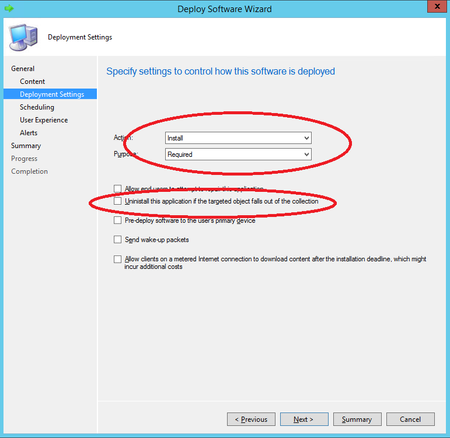
Update 2107 for Microsoft Endpoint Configuration Manager current branch is now available. Starting in this release, you can enable an application deployment to support implicit uninstall. If a device is in a collection, the application installs. Then when you remove the device from the collection, the application uninstalls.33KViews4likes7CommentsUpdate 2111 for Microsoft Endpoint Configuration Manager current branch is now available
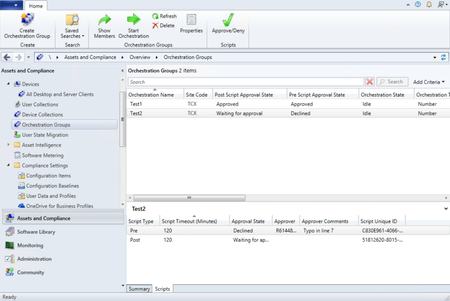
Update 2111 for Microsoft Endpoint Configuration Manager current branch is now available. We are excited to announce that two popular pre-release features, orchestration groups and application groups are now full features in this release.33KViews3likes8CommentsUpdate 2103 for Microsoft Endpoint Configuration Manager current branch is now available
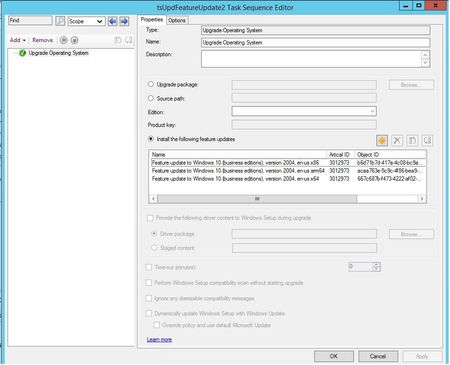
Update 2103 for Microsoft Endpoint Configuration Manager current branch is now available. You can now upgrade a client's Windows OS by using a feature update deployed with a task sequence. This integration combines the simplicity of Windows servicing with the flexibility of task sequences.32KViews1like0CommentsUpdate 2303 for Microsoft Configuration Manager current branch is now available.
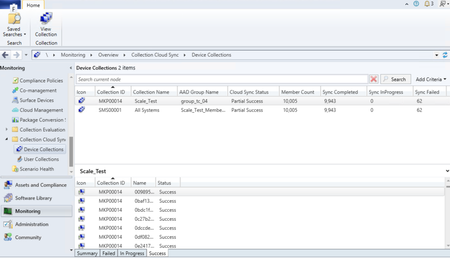
Microsoft Configuration Manager product branding Starting with Configuration Manager version 2303 Microsoft Endpoint Configuration Manager is now Microsoft Configuration Manager. Microsoft Configuration Manager is an integrated solution for managing all your devices. Microsoft brings together Configuration Manager and Intune, without a complex migration, and with simplified licensing. Continue to use your existing Configuration Manager investments, while taking advantage of the power of the Microsoft cloud at your own pace. Cloud-attached management Improvements to Cloud Sync (Collections to Azure Active Directory Group Synchronization) feature Starting with Configuration Manager version 2303 collection member sync status (Success, In Progress, Failed - with reason for failure) is available in the Collection Cloud Sync dashboard for the chosen collection on the bottom pane. Earlier with Configuration Manager version 2211, the scalability of this feature has been improved with better throttling and error handling. Additionally, dedicated dashboards for user collections and device collections are added in Monitoring workspace to show Cloud Sync status. The dashboard displays the Cloud Sync status per collection with the mapped Azure AD group, total member count, synced member count, status (success, failed, in progress) and last sync details. For more information, see Synchronize collections to Azure Active Directory Group. Endpoint Security reports in Intune admin center for Tenant Attached devices Starting with Configuration Manager version 2303, you can now opt for Endpoint Security reports in Intune admin center for tenant attached devices. Once you opt in, Unhealthy endpoints and Active malware operational reports under Endpoint security node in Intune admin center will start showing data from tenant attached devices. Also, Antivirus agent status and Detected malware organizational reports under Microsoft Defender Antivirus in Reports section will show data from tenant attached devices. For more information, see Tenant attach - Create and deploy Antivirus policies from the admin center. Site infrastructure Authorization failure message in admin service now shown in Status message viewer We have introduced audit messages about authorization failure in admin service. You can now view request details and status messages. These messages are shown in “All Status Message” at “Status Message Queries” in “Monitoring” ribbon. Previously these failures were logged in log files. With the new audit messages, we intend to avoid the inconvenience of log files rollback. Details about the user, resource access attempts and the number of attempts for all the authorized requests made by user in a day will now be available. We are also auditing read operations for HTTPS requests and for cloud-initiated operations. This helps admins to scope permission and roles of users while also determining if there are any malicious users. All unauthorized requests are aggregated for 24 hours before being sent to the status message viewer. For more information, see Administration Service documentation. SQL Server 2022 version support added for Configuration Manager Starting with 2303, support is added for SQL server 2022 RTM version. You can use this version of SQL Server for the following sites: A central administration site A primary site A secondary site The following table identifies the recommended compatibility levels for Configuration Manager site databases: SQL Server version Supported compatibility levels Recommended level SQL Server 2022 150, 140, 130, 120, 110 150 For more information, see support-for-sql-server-versions. Software updates Unified update platform (UUP) GA release The Unified Update Platform (UUP) servicing is finally here for all Windows 11, version 22H2 updates delivered via Windows Server Update Services (WSUS) and Configuration Manager! Starting March 28, on-premises Windows 11, version 22H2 devices will receive quality updates via the Unified Update Platform (UUP). For more information, see What’s UUP? New update style!. The Unified Update Platform (UUP) is a single publishing, hosting, scan, and download model for OS quality and feature updates. It offers improved delivery technologies in response to IT admin requests for more seamless updates, more control over installation time, more battery life, and lighter download size. Note: A one-time 10-GB download to distribution points with your first UUP update. UUP is becoming the default and only way to download quality updates. This means that you should plan for an extra 10GB download to distribution points (not endpoint clients) with the March 28th update. That's a one-time 10GB download for updates for Windows 11, version 22H2 per architecture (AMD64 and ARM64). Let's look at the key benefits, version requirements. Quality updates for Windows 11 22H2 and above Quality updates with the UUP continue to be cumulative and include all released Windows quality and security fixes. All of these new capabilities are brought to you by UUP on premises! If interested in learning more about these improvements, read Faster, Smaller. Windows 11, version 22H2 update fundamentals. UUP on premises unlocks some amazing benefits going forward: Up to 30% smaller client downloads for monthly quality updates Cumulative update integration with feature updates (i.e., get current in one reboot) Seamless retention of installed language packs and optional features on demand (FODs) during feature updates Reduced client downloads for feature updates (i.e., inbox app downloads are conditional) Automatic OS healing during the update process1 that requires no action from the enterprise admins End-user acquisition of language packs and FODs Note: To receive quality updates on Windows 11, we recommend that the latest security updates be installed on your devices. Minimally, devices should be updated through Windows 11 22H2. To take advantage of UUP on premises, you must be using a supported platform: Recommended version: 2203 Configuration Manager Current Branch and above Enable Software Update on client’s settings to Yes. For Client Operating Systems that can support delta download (Win 10 Version 10.0.16299 or up), delta download endpoint will always get turned on regardless of the Client Agent Settings, and the port number will be honored even if Delta downloads not enabled. If Delta Download disabled, only UUP update will do delta download, all other updates, regardless of if express or not, will all do full file download. If Delta Download enabled, all updates will go with delta download code path regardless of if express or not, unless the only DP available is cloud DP. Any supported versions of Windows Server Update Services (WSUS) Note If you're a WSUS Standalone admin, please apply the upcoming February and March updates promptly to ensure your readiness! And if you haven't yet, learn about Adding file types for Unified Update Platform on premises . Known issue: On newly installed CM client, Delta Download delays to start on. Patchdownloader.log shows incorrect download percentage. WSUS Servers running on server 2022, 2019 or 2016 likely to break after Feb 2023 LCU if custom mime types are added at a subsite level in IIS. Update to the default value of supersedence age in months for software updates With Unified Update Platform (UUP) general availability release, the feature update and non-feature update supersedence should be greater than 3. For new software update role installations, we're updating this to 6, existing customers can review and update to 6. Update to the default value of supersedence age in months for software updates. Known issue: Update to the default value of supersedence age in months for software updates will not impact existing configurations. Removing SUP role in Admin Console does not reset the supersedence age property in WMI. As a result, while reconfiguring the role, the previously configured value is shown in the configuration window. Enable Windows features introduced via Windows servicing that are off by default The Commercial control for continuous innovation in Windows is now integrated with Configuration Manager 2303 release. Commercial control for continuous innovation (Windows 11) For more information, see client settings in Configuration Manager Configuration Manager console Dark theme extended to delete secondary site wizard The Configuration Manager console now extends the dark theme for the delete secondary site wizard. This wizard will also have a new look for the normal theme. This is part of the ongoing effort to make dark theme and overall admin console experience better. To use the theme, select the arrow from the top left of the ribbon, then choose the Switch console theme. Select Switch console theme again to return to the light theme. For more information, see Dark theme for the console. Deprecated features Removed Community hub service and integration with ConfigMgr Removed Community Hub configuration from Hierarchy settings and Community Hub service integration. Learn about support changes before they're implemented in removed and deprecated items. Other updates Maintenance window schedules Offset for recurring monthly maintenance window schedules. Based upon your feedback, you can now offset monthly maintenance window schedules to better align deployments with the release of monthly security updates. For example, using a maximum offset of seven days after the second Tuesday of the month, sets the maintenance window for next Monday. Removing Microsoft Store for Business and Education new config capability As part of Microsoft Store for Business deprecation, we are making these changes to the customer experience with using this feature: Removing a user's ability to create new Microsoft Store for Business in Configuration Manager. Display a warning message box when user triggers a sync from Microsoft Store for Business. Display a warning in the Create Application Wizard when user attempts to create a new app from Store license information. For more information, see removed and deprecated items. For more details and to view the full list of new features in this update, check out our What’s new in version 2303 of Microsoft Configuration Manager documentation. For assistance with the upgrade process, please post your questions in the Site and Client Deployment forum. Send us your Configuration Manager feedback through Feedback in the Configuration Manager console. Continue to share and vote on ideas about new features in Configuration Manager. Thank you, The Configuration Manager team Additional resources: What’s New in Configuration Manager Documentation for Configuration Manager Microsoft Configuration Manager announcement Microsoft Configuration Manager vision statement Evaluate Configuration Manager in a lab Upgrade to Configuration Manager Configuration Manager Forums Configuration Manager Support Report an issue Provide suggestions31KViews10likes3Comments