software architecture
85 TopicsAzure on the Cheap - Azure Storage Static Website and Azure Front Door
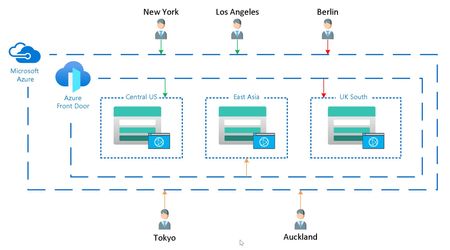
Azure on the Cheap posts focus on the architecture, techniques and technology in Azure that add considerable value without breaking the bank. This value is being measured in both the amount of effort taken to develop, provision, and maintain the resources, as well as the monthly charge for the resource. This Azure on the Cheap post highlights a technique that is gaining in popularity that uses Azure Front Door to globally distribute static websites hosted in Azure Storage.35KViews11likes5CommentsSimplifying Microservice Reliability with Dapr
What is Dapr? Dapr is an open-source runtime developed by Microsoft that is used in building resilient, event-driven, and portable applications. It works using the sidecar pattern, meaning every microservice gets a small companion container — the Dapr sidecar — which handles communication, retries, secrets, state, and more. What is Sidecar ? A sidecar is a helper process that runs beside your app, handling system tasks so your code can focus on business logic. Lets see some offerings from Dapr along with examples. #1 . Bindings Connects your app to external systems (like queues, email, or storage) with zero SDK or protocol handling. Without Dapr ❌ var httpClient = new HttpClient(); await httpClient.PostAsJsonAsync("https://api.sendgrid.com/send", email); * Manage HTTP endpoints & credentials * Change provider → rewrite logic With Dapr ✅ await daprClient.InvokeBindingAsync("send-email", "create", email); * One call, no SDK * Replace SendGrid → SMTP → Twilio just by editing config * No code change, no redeploy How to enable binding in for a Azure Container App Open Azure Portal → go to your Container App Environment. From the left pane, click on Container Apps, and choose your desired app (e.g., orders-api). In the Settings section, select Dapr. Enable Dapr toggle → switch it ON. Provide the basic Dapr settings: App ID: A unique name (e.g., orders-app). App Port: The internal port your API listens on (e.g., 8080). App Protocol: Choose HTTP or gRPC (usually HTTP). Click Save to apply. Now, under the same Container App Environment, go to Dapr Components. Click Create → select Binding → choose the type of binding (e.g., azure.storagequeues). #2 . Configuration Centralizes app settings, allowing live configuration updates without redeploying services. Without Dapr ❌ var featureFlag = Configuration["FeatureX"]; * Requires redeploys for every config change * No centralized versioning or dynamic update With Dapr ✅ var config = await daprClient.GetConfiguration("appconfigstore", new[] { "FeatureX" }); * Use Azure App Config, Consul, or any provider * Centralized updates — no redeploys * Consistent access via Dapr SDK How to enable configuration in for a Azure Container App Open Azure Portal → go to your Container App Environment. From the left pane, click on Container Apps, and choose your desired app (e.g., orders-api). In the Settings section, select Dapr. Enable Dapr toggle → switch it ON. Provide the basic Dapr settings: App ID: A unique name (e.g., orders-app). App Port: The internal port your API listens on (e.g., 8080). App Protocol: Choose HTTP or gRPC (usually HTTP). Click Save to apply. Now, under the same Container App Environment, go to Dapr Components. Click Create → select Configuration→ choose the type of configuration (e.g., configuration.azure.appconfig). #3 . Pub/Sub Enables event-driven communication between microservices without needing to know each other's endpoints. Without Dapr ❌ var client = new ServiceBusClient("<connection-string>"); var sender = client.CreateSender("order-topic"); await sender.SendMessageAsync(new ServiceBusMessage(orderJson)); * Tied to Azure Service Bus * Must manage SDKs, connections, retries * Hard to switch to another broker (Kafka, RabbitMQ) With Dapr ✅ await daprClient.PublishEventAsync("pubsub", "order-created", order); * pubsub component defined in YAML (can be Kafka, Redis Streams, etc.) * No SDK, no broker dependency * Just publish the event — Dapr handles transport & retries How to enable pub/sub in for a Azure Container App Open Azure Portal → go to your Container App Environment. From the left pane, click on Container Apps, and choose your desired app (e.g., orders-api). In the Settings section, select Dapr. Enable Dapr toggle → switch it ON. Provide the basic Dapr settings: App ID: A unique name (e.g., orders-app). App Port: The internal port your API listens on (e.g., 8080). App Protocol: Choose HTTP or gRPC (usually HTTP). Click Save to apply. Now, under the same Container App Environment, go to Dapr Components. Click Create → select Pub/Sub→ choose the type of configuration (e.g., pubsub.azure.servicebus.topics). #4 . Secret Stores Securely retrieves credentials and secrets from vaults, keeping them out of configs and code. Without Dapr ❌ var connString = Configuration["ConnectionStrings:DB"]; * Secrets stored in configs or env vars * Risk of leaks and manual rotation With Dapr ✅ var secret = await daprClient.GetSecretAsync("vault", "dbConnection"); * Fetch directly from Azure Key Vault, AWS Secrets, etc. * No secrets in configs * Secure by default, consistent across services How to enable Secret Stores in for a Azure Container App Open Azure Portal → go to your Container App Environment. From the left pane, click on Container Apps, and choose your desired app (e.g., orders-api). In the Settings section, select Dapr. Enable Dapr toggle → switch it ON. Provide the basic Dapr settings: App ID: A unique name (e.g., orders-app). App Port: The internal port your API listens on (e.g., 8080). App Protocol: Choose HTTP or gRPC (usually HTTP). Click Save to apply. Now, under the same Container App Environment, go to Dapr Components. Click Create → select Secret stores→ choose the type of configuration (e.g., secretstores.azure.keyvault). #5 . State Provides a consistent way to store and retrieve application data across services using a simple API. Without Dapr ❌ var cosmosClient = new CosmosClient(connStr); var container = cosmosClient.GetContainer("db", "state"); await container.UpsertItemAsync(order); * Direct dependency on Cosmos DB * Manual retry logic * Tight coupling to storage type With Dapr ✅ await daprClient.SaveStateAsync("statestore", "order-101", order); var data = await daprClient.GetStateAsync<Order>("statestore", "order-101"); * Plug any backend (Redis, Cosmos, PostgreSQL) * Dapr handles retries and consistency * Same code, different backend — total flexibility How to enable State in for a Azure Container App Open Azure Portal → go to your Container App Environment. From the left pane, click on Container Apps, and choose your desired app (e.g., orders-api). In the Settings section, select Dapr. Enable Dapr toggle → switch it ON. Provide the basic Dapr settings: App ID: A unique name (e.g., orders-app). App Port: The internal port your API listens on (e.g., 8080). App Protocol: Choose HTTP or gRPC (usually HTTP). Click Save to apply. Now, under the same Container App Environment, go to Dapr Components. Click Create → select State → choose the type of configuration (e.g., state.azure.cosmosdb). 🧩 Summary Think of Dapr as your invisible co-pilot for building distributed apps. It abstracts away all the repetitive plumbing — state management, pub/sub messaging, secret handling, and external bindings — letting you focus on writing features that matter. With Dapr, you don’t just write code that runs locally; you write code that just works across clouds, containers, and environments, without having to worry about wiring up retries, event delivery, or service-to-service communication manually. 🧰 Demo Source Code I've prepared complete sample on .Net core that touches all major Dapr features: * State Store * Pub/Sub * Bindings * Configuration * Secret Store You can explore it from Github-Dapr-Api Clone, run locally, and experiment — the project uses in-memory storage to keep things lightweight for testing and learning. 📚 References for Deep Dive Official Dapr Docs Dapr for .NET Developers — Microsoft Learn Dapr .NET SDK GitHubTechNet Guru Winners - February 2020
Enter the minds and explore the depths of knowledge within our community, as you open another month's edition of the TechNet Guru Awards! Discover, digest and discuss some of the biggest topics and latest technologies you need to know. Best consumed with comfy chair, hot beverage and crunchy snack ❤️Essential Microsoft Resources for MVPs & the Tech Community from the AI Tour
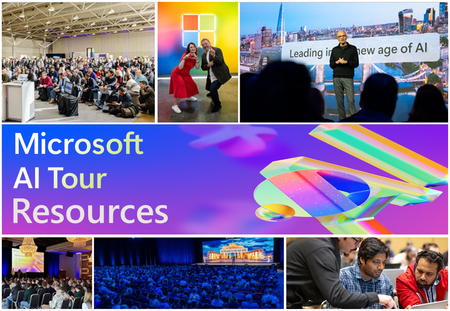
Unlock the power of Microsoft AI with redeliverable technical presentations, hands-on workshops, and open-source curriculum from the Microsoft AI Tour! Whether you’re a Microsoft MVP, Developer, or IT Professional, these expertly crafted resources empower you to teach, train, and lead AI adoption in your community. Explore top breakout sessions covering GitHub Copilot, Azure AI, Generative AI, and security best practices—designed to simplify AI integration and accelerate digital transformation. Dive into interactive workshops that provide real-world applications of AI technologies. Take it a step further with Microsoft’s Open-Source AI Curriculum, offering beginner-friendly courses on AI, Machine Learning, Data Science, Cybersecurity, and GitHub Copilot—perfect for upskilling teams and fostering innovation. Don’t just learn—lead. Access these resources, host impactful training sessions, and drive AI adoption in your organization. Start sharing today! Explore now: Microsoft AI Tour Resources.[Customer Story] SharePoint Online Team leverages DevTest Labs to create Testing Environments
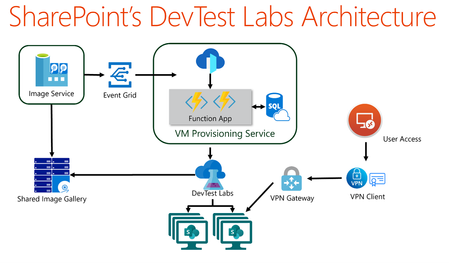
There are several teams within Microsoft which use Azure DevTest Labs (DTL). SharePoint Online (SPO) team at Microsoft has created a solution, built on DTL, to solve the problem of making SPO testing environments readily available to SharePoint engineers – securely, at scale and with high availability – leveraging the strengths of DevTest Labs and Azure. This blog post is the first in a series of posts that highlights key parts of this solution. The series enables anyone to build, configure and run a similar system on DTL. Each post will cover one core aspect of the SharePoint Online solution, with a brief description of the scenarios involved, and the strategies applied to solve them. Each comes equipped with architecture diagrams, walk-throughs and code samples, presented in a generic and reusable way. It is hoped that customers in the Azure community, desiring to solve similar problems for their users, can benefit from the content herein to create their own DTL solutions.