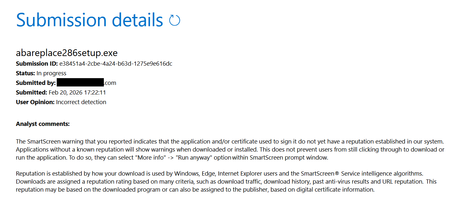
smartscreen warning
2 Topics
SmartScreen false positives
Hello, I'm a developer of https://www.abareplace.com/ Unfortunately, Microsoft SmartScreen blocks https://www.abareplace.com/download/ of my application and multiple attempts to contact Microsoft about this case were in vain. The app is clean on VirusTоtаl, has a valid digital signature, and is published to MS Store. However, users see the SmartScreen warning when trying to run the installer downloaded from my website: Windows protected your PC Windows Defender SmartScreen prevented an unrecognized app from starting. Running this app might put your PC at risk. Other developers report exactly the same problem and it https://www.reddit.com/r/Windows11/comments/1pz8qww/windows_code_signing_is_broken_for_indie/ It has no sense from the security point of view to block something that is already published on Microsoft Store. I submitted a ticket to https://www.microsoft.com/en-us/wdsi/filesubmission?persona=SoftwareDeveloper one month ago. The ticket was "In progress" for many weeks, then was silently closed. I opened a new ticket one week ago and it's still "in progress". I also submitted the file via Report this file as safe > I am the owner or representative of this website and I want to report an incorrect warning about it button in Microsoft Edge several times, but received no confirmation email that you should receive after submitting the form. I know that the times when Steve Ballmer shouted: "Developers! Developers! Developers!" are long gone, but can Microsoft make live at least a bit easier to independent software vendors? Thank you.1KViews1like4Comments
Microsoft Defender SmartScreen Warning on New Site!
Hey, One of our new WordPress sites shows a "Microsoft Defender SmartScreen" warning. Site: https://www.masteraio.com/ It's a completely new site and only genuine plugins installed on it. We tried malware and virus scanning from our end and the hosting provider's side also. We could not found anything!, contacted Microsoft support using the "Report that this site doesn’t contain phishing threats" page. But no use! So at last, we removed the entire WordPress installation, then re-installed the WordPress on this domain. Then also did malware and virus scanning, Contacted Microsft defender through "Report that this site doesn’t contain phishing threats" page. But still, it shows this warning. We hired a cybersecurity professional to fix it, he also can't fix it. Now, I believe only Microsoft people can fix it!. We created this portal as an education platform for entrepreneurs. It's one of my dream projects! stuck due to this Warning. Can you please help me to fix it! Thanks in Advance.1.3KViews1like0Comments