servicing
10 TopicsServer flighting not being offered on 29595 on 3 VMs
Hi, I'm on not getting build 29602 offered as a flight through Windows update on any of my VMs and I can figure out why, it has not been offered in the last couple of builds. Is anyone else experiencing this or have any ideas of how to fix this? Optional diagnostics are on and they are connected to my account under insider setting in Windows update settings. I am just not getting offered the build flight. Thanks Kevin306Views2likes2CommentsCrowdStrike Secure Boot Lifecycle Management Content Pack
CrowdStrike has recently released the Secure Boot Lifecycle Management Content Pack. This new feature helps Falcon for IT module users manage Windows Secure Boot certificate updates ahead of these certificates’ expiration beginning in late June 2026. The dashboard provides an at‑a‑glance view of Secure Boot–enabled devices, showing which systems are already compliant with the updated 2023 Secure Boot certificate, which are in progress, and which are blocked or require opt‑in to a managed rollout. It also highlights certificate update failures that may require investigation. In addition, overall readiness is summarized through a compliance gauge, while a 30‑day trend shows how pass and fail counts change as remediation progresses. Filters by operating system, server edition, hostname, and update status help administrators quickly identify devices that need action to help ensure systems remain secure after the certificates expire. The feature also provides management options to opt devices into Microsoft's managed rollout for gradual, tested deployment, and to block updates on hardware with known compatibility issues to prevent boot failures. Note that this feature is available as part of CrowdStrike's Falcon for IT module. CrowdStrike Endpoint Detection and Response (EDR) customers who are not licensed for this module can enable a free trial from the CrowdStrike Store. To learn more about this feature, please see the content pack tutorial video.383Views1like1CommentThe New Activation Portal Is Partly Broken But It Is a MAJOR Inconvenience For Me & Others.
I Run Windows 7 Ultimate x64 And I need to Activate Windows, I am used to the new aka.ms/aoh replacing the phone line. But I Have Activated Windows XP & Vista Without Any Problems Multiple Times, I Tested It Too, Tried 7, Starter, Home, Pro, Ultimate, Even x32 & x64. Though, No matter what, everything BUT Windows 7 Works. This Is Clearly a Server Sided Issue And I've Had This problem for the past months maybe even about a year. (The Product Key I Am Using Is Not Public on The Internet So It's Not Blocked/Used Publicly By Everyone, it is the same product key that came with the CD) And I Can Say For Certain This is a Server Sided Issue. Please Help. And Thank You For Your Time.301Views0likes0Comments
Proposal: Dedicated Windows “Repair Companion” Device for Automatic Deep System Recovery
I’d like to propose a new hardware‑assisted recovery solution for Windows that would dramatically improve system reliability and reduce catastrophic failures caused by deep OS corruption. Today, Windows can repair many issues on its own, but certain types of corruption — such as servicing stack failures, broken WinSxS manifests, failed migrations, or damaged bootloaders — require offline repair or manual intervention. These situations often force users into time‑consuming troubleshooting or full reinstallations. My proposal is a dedicated, consumer‑friendly “Windows Repair Companion” device that connects to a home network and provides a trusted, isolated environment for deep system repair. This would be similar in concept to enterprise out‑of‑band management, but simplified and designed for everyday users. Key Features: • A small hardware device (similar in size to a Surface Dock or streaming box) that plugs into a router or PC. • Contains a hardened, read‑only repair OS and clean Windows recovery images. • Supports automatic network boot (PXE/UEFI) when a PC detects severe corruption or cannot boot normally. • Performs offline repairs: DISM, SFC, CHKDSK, servicing stack rebuilds, WinSxS restoration, bootloader repair, and update rollback. • Provides a true “push‑button restore” experience without requiring user technical knowledge. • Could leverage existing Surface recovery technology, secure boot chains, and cloud restore infrastructure. • Offers a new potential revenue stream for Microsoft while significantly improving Windows reliability. Benefits: • Makes Windows effectively unbrickable for most users. • Eliminates many catastrophic update failures and servicing issues. • Reduces support costs and frustration for consumers and small businesses. • Provides a clean, consistent recovery path across all OEM hardware. • Bridges the gap between consumer Windows and enterprise‑grade resilience. This device would give users peace of mind and provide Microsoft with a modern, hardware‑assisted recovery model that aligns with the direction of Surface and Windows Core OS technologies. Thank you for considering this idea — I believe it could meaningfully improve the Windows experience for millions of users.134Views0likes0CommentsWindows 10 office hours will be back in 2021!
Our team of Windows, Microsoft Endpoint Manager, public sector, and FastTrack experts will be in the office and ready to help you manage and update your Windows 10 device estate every third Thursday. Learn more about office hours, then save the date! Thursday, January 21st, 9:00-10:00 a.m. Pacific Time - ADD TO CALENDAR Thursday, February 18th, 9:00-10:00 a.m. Pacific Time - ADD TO CALENDAR Thursday, March 18th, 9:00-10:00 a.m. Pacific Time - ADD TO CALENDAR Thursday, April 15th, 9:00-10:00 a.m. Pacific Time - ADD TO CALENDAR Thursday, May 20th, 9:00-10:00 a.m. Pacific Time - ADD TO CALENDAR Thursday, June 17th, 9:00-10:00 a.m. Pacific Time - ADD TO CALENDAR2.1KViews2likes4CommentsOffice hours are closed: December 17, 2020
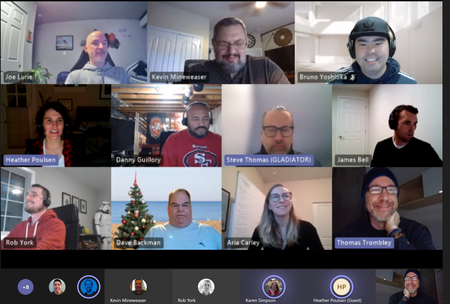
Office hours are now closed. We hope we were able to answer your questions and provide tips and resources to help you more easily manage Windows 10 updates and your Windows device estate. The experts and engineers who supported today's session were: Windows as a service strategies, tactics, best practices: Dave Backman and James Bell Windows 10 deployment: Steve Thomas Cloud-based update management, Windows Update for Business: Aria Carley Microsoft Endpoint Manager: Joe Lurie Microsoft Endpoint Manager (public sector, CMG, etc.): Danny Guillory Configuration Manager: Rob York, Bruno Yoshioka Product feedback: Kevin Mineweaser FastTrack: Sean McLaren Save the date for future events We'll be back in 2021 every third Thursday. Save the date for our next office hours event -- Thursday, January 21st, 9:00-10:00 a.m. Pacific Time -- and see the Windows IT Pro Blog for an up-to-date list of future events. See you next time!1.8KViews2likes0CommentsOffice hours are closed: October 15, 2020
Today's office hours session for IT pros on managing Windows 10 updates, deployments, and devices is now closed. Thanks to our experts and engineers who supported today's session. We'll see you next time! Windows as a service strategies, tactics, best practices: Dave Backman and Karen Simpson Windows lifecycle: Jason Leznek Windows 10 deployment: Steve Thomas Security & browsers: Chris Jackson Cloud-based update management, Windows Update for Business: Aria Carley Windows Autopilot: Heena Macwan Dynamic Update: Steve DiAcetis Microsoft Endpoint Manager: Joe Lurie Microsoft Endpoint Manager (public sector, CMG, etc.): Danny Guillory Configuration Manager: Dune Desormeaux Product feedback: Kevin Mineweaser FastTrack: Sean McLaren Save the date for future events Our next office hours event will take place on Thursday, November 19th, 9:00-10:00 a.m. Pacific Time. Add it to your calendar. For an up-to-date list of future events, see the Windows IT Pro Blog.1.9KViews0likes0CommentsWindows 10 servicing office hours – May 14th
Our next "office hours" session will take place here in the Windows 10 servicing community on Thursday, May 14th from 8:00-9:00 a.m. Pacific Time. Join us to get answers to any questions you may have around managing updates for the remote devices in your organization, help with specific issues, and tips on how to increase update velocity. We'll have members of the Windows and Microsoft Endpoint Manager product and engineering teams on hand, as well as the FastTrack team. Save the date and see the Windows IT Pro Blog for full details.1.6KViews0likes4CommentsWindows to May 2020 update servicing options
What will be the Windows to May 2020 update servicing options? Will it be like before 1909 and just regular feature updates and will it also have the enablement package like we can use for 1903 to 1909? Will we also need a new ADK or not? Thks in advance.Solved1.3KViews0likes1Comment[New Blog Post] Windows 10 Feature Updates – Leveraging SetupDiag for Better Reporting
[New Blog Post] #Windows 10 Feature Updates – Leveraging #SetupDiag for Better Reporting The first in my series on Windows 10 Feature Updates. If you haven't seen it, SetupDiag 1.6 was just released. https://www.asquaredozen.com/2019/08/22/windows-10-feature-updates-leveraging-setupdiag-for-better-reporting/959Views0likes0Comments