sensitivity label
5 Topics
Labeling issue in Outlook
Hello everyone, I implemented labels in Purview and applied labeling policies in Outlook. The policy enforces the labeling of mails. This issue is now that the mails have dynamic signatures that are being applied by a code, the process here is as follows: Mail with the attached code is sent to "CodeTwo" via a connector, the dynamic signature gets applied, the mail comes back via the connector and is being sent out. Since the labels uses encryption, the code also gets encrypted and cannot be read, thus the dynamic signature is not being applied to the mail. Has anyone experienced something similar?300Views0likes2Comments
Label Inheritance in outlook.
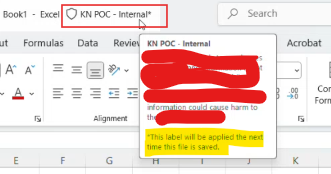
When an attachment with a higher-priority sensitivity label is added, the email initially inherits that label. However, after the attachment is removed, the email reverts to the default label, and if another attachment with a different (higher priority) label is subsequently added, the email does not automatically inherit the new label. Is this correct behavior and any MS doc related to this?444Views0likes1CommentWhen the default sensitivity label is applied, an asterisk (*) appears next to the label.
When I open a Word document and the default sensitivity label (e.g., INTERNAL) is applied, an asterisk appears next to the label along with a message indicating that the file hasn’t been saved yet. Is there any detail Microsoft documentation that explains this behavior? This only occur for default label if I try to remove default label (without saving word file) and apply any other label then * mark is not there.Solved392Views0likes1Comment
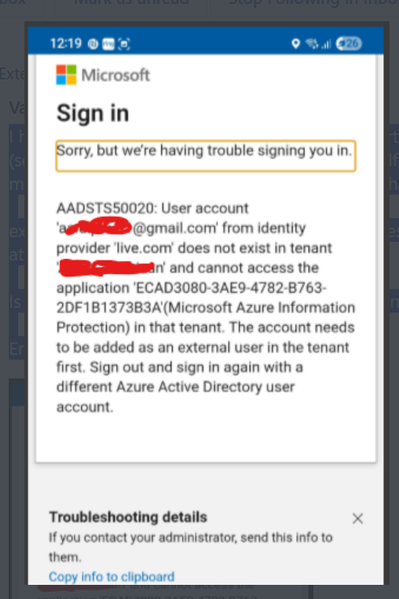
AADSTS50020: protected PDF issue for external users
I have been recently (don't know when it was started) observed getting error from protected PDF (sensitivity label with user defined permission) file while trying to open that pdf via AIP viewer mobile app (Android/iOS) AS external user (who has permission to open/view). No issue with Office file types protected. external (not internal, not guest) user (currently testing with gmail.com account, other O365 tenant user) getting error as attached from AIP view mobile app. We do have AIP excluded at conditional access policy which helped so far to avoid this problem for external users. Is there been any recent change in behavior around user defined protected PDF? Since user having problem is external, have no clue where to look for log and start investigation. Error code: AADSTS50020754Views1like3CommentsRestrict sharing of Power BI Data to limited users
In the Power BI admin center, we have enabled the setting: "Restrict content with protected labels from being shared via link with everyone in your organization". As expected, this prevents users from generating "People in your organization" sharing links for content protected with sensitivity labels. We only have one sensitivity label with protection enabled. However, due to Power BI’s limitations with labels that include "Do Not Forward" or user-defined permissions, this label is not usable in Power BI. Our Power BI team wants to restrict sensitive data from being shared org-wide and instead limit access to specific individuals. One idea was to create another sensitivity label with encryption that works with Power BI and use that to enforce the restriction. However, such a label would also affect other Microsoft 365 apps like Word, Excel, and Outlook — which we want to avoid. I looked into using DLP, but MS documentation mentions below limitations, that makes me unsure if this will meet the requirement. 1. DLP either restricts access to the data owner or to the entire organization. 2. DLP rules apply to workspaces, not individual dashboards or reports. My question: Is there any way to restrict sharing of Power BI (or Fabric) content to specific users within the organization without changing our existing sensitivity label configurations or creating a new encryption-enabled label that could impact other apps?562Views0likes2Comments