securitycopilot
2 TopicsMicrosoft Security Copilot: AI-Driven Security Operations at Greater Scale
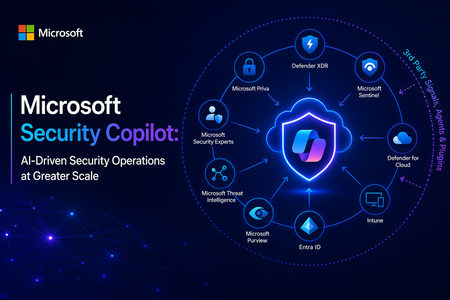
At its core, Security Copilot is built to enhance every facet of security operations at machine speed. It translates a vast array of inputs (Microsoft’s cloud-scale telemetry, threat intelligence feeds, security best practices, and enterprise-specific data) into tailored recommendations and summaries, helping security teams “catch what others miss,” respond faster, and strengthen their expertise. In the sections below, I explore the key security benefits of Security Copilot, its extensibility via third-party plugins and skills, and the value of its deep integration with Microsoft’s security ecosystem. Key Benefits for Security Operations Security Copilot meaningfully improves threat detection, investigation, response, correlation of signals, and analyst productivity. The table below summarizes these core security benefits and capabilities: Security Operations Aspect Benefit with Security Copilot Threat Detection Augmented detection of elusive threats: Security Copilot leverages broad threat intelligence and comprehensive signals to identify subtle threats, anomalies, and attack patterns that might be missed through manual analysis. By reasoning over Microsoft’s vast security graph and global threat telemetry, it helps analysts “catch what others miss,” ensuring unique or stealthy threats are surfaced. Incident Investigation Faster, context-rich investigations: Security Copilot can swiftly summarize and analyze incident data from multiple sources, enhancing incident details with additional context from logs, alerts, and threat intel. It correlates related events and highlights root causes, giving analysts a consolidated understanding of complex incidents in minutes. This enables quicker triage and deeper insights, so investigators know what happened and where to focus next. Response & Remediation Guided response and remediation: Security Copilot not only identifies issues but also provides prescriptive guidance on how to respond. It can suggest remediation steps and mitigation strategies in plain language, helping analysts act decisively. For example, it may outline containment steps or orchestrate automated actions through integrated tools, significantly reducing response time to incidents. Signal Correlation Holistic cross-domain correlation: Because it taps into signals across identities, endpoints, email, cloud workloads, and more, Security Copilot automatically connects the dots among disparate alerts and data streams. It presents unified incident narratives by linking related indicators (e.g., matching an endpoint malware alert with identity login anomalies and cloud logs), eliminating manual cross-tool correlation and uncovering hidden attack paths. Analysts get a single cohesive view of an incident across the kill chain. Analyst Productivity Boosted efficiency & skill elevation: By automating repetitive tasks (like scanning logs, writing KQL queries, or summarizing reports) and supporting natural language interaction, Security Copilot reduces manual workload and accelerates everyday tasks. This lets analysts focus on higher-value activities. In practice, teams using Security Copilot have seen significant productivity gains – a recent study found 23–47% improvement in SecOps task efficiency after adoption. Junior analysts ramp up faster (learning from Copilot’s guidance), while senior analysts can handle more incidents with less fatigue. These improvements translate into measurable security outcomes. Incident response becomes faster and more consistent, with mean time to resolution reduced by 30% on average within a few months of use according to early research. Security Copilot’s ability to accelerate investigations and streamline tasks drives down risk exposure and helps organizations make the most of their security investments. Ultimately, it strengthens an organization’s security posture by augmenting human analysts with AI-driven speed, scale, and intelligence. Seamless Integration with the Microsoft Security Ecosystem Another key strength of Security Copilot is its deep native integration with Microsoft’s security portfolio. From day one, Security Copilot was “designed with integration in mind.” It plugs directly into a broad range of Microsoft security products — including Microsoft 365 Defender (XDR), Microsoft Sentinel (SIEM), Microsoft Entra (ID and access management), Microsoft Intune (endpoint management), Microsoft Purview (compliance), and more. In practice, Security Copilot is available as both a standalone portal and as an embedded side-by-side experience within these Microsoft security tools. This means a security analyst working in Microsoft Sentinel or Defender can access Copilot’s capabilities without switching context: Copilot is right there in the workflow, ready to answer questions or assist with tasks in real time. Because of this close integration, Security Copilot can access data and signals from across all Microsoft security solutions that an organization uses. It operates over a unified security data estate encompassing endpoints, identities, emails, applications, cloud workloads, data repositories, and beyond. The result is truly end-to-end visibility and protection: Copilot can reason across diverse telemetry (e.g., correlating a device malware alert from Defender with cloud logs from Azure, or identity risk signals from Entra) to provide comprehensive insight. This unified approach eliminates silos and tool fragmentation — analysts spend less time pivoting between separate consoles or manually stitching together information because Copilot synthesizes it automatically. Moreover, leveraging the Microsoft ecosystem means Security Copilot can immediately add value without requiring a rip-and-replace of existing tools. It acts as a “force multiplier” across the installed Microsoft Security stack, maximizing the return on those investments by making them more effective and easier to use. For example, Copilot can turn a collection of raw alerts from different Microsoft products into a single, coherent incident storyline with actionable next steps. This synergy leads to significant operational efficiency gains and a more streamlined SOC workflow, as analysts have a central AI assistant coordinating across all defenses on their behalf. By providing unified insights, reducing tool sprawl, and bringing together Microsoft’s best-in-class security technologies, Security Copilot emerges as a valuable asset for modern security teams. It empowers organizations to practice “AI-first” security operations – enabling defenders to work faster and smarter, while fully utilizing an integrated security ecosystem to protect the enterprise from evolving threats. In summary, Microsoft Security Copilot offers a compelling combination of advanced AI capabilities, extensibility, and seamless integration that helps security teams achieve unprecedented speed, breadth, and efficiency in defending their organizations. It enhances human expertise with machine-scale intelligence, improving threat detection and response outcomes and transforming the way security operations centers operate for the better. Open Extensibility with Third-Party Plugins and Skills A standout capability of Security Copilot is its extensible plugin architecture, which allows it to incorporate external data sources and integrate with third-party security tools. Plugins in Security Copilot are modular connectors that bring in specific data or perform defined actions (each plugin encapsulates certain “skills,” such as running a KQL query, calling an API, or searching threat intel). Microsoft provides numerous pre-installed plugins out-of-the-box for common Microsoft security services and workflows, and administrators can easily add or develop custom plugins to connect 3rd-party systems or bespoke data sources. This design ensures that Security Copilot’s capabilities can expand and adapt to different environments. Through both Microsoft-built and third-party plugins, Security Copilot can tap into a wide variety of security data beyond the Microsoft stack. For example, supported third-party plugins let Copilot pull context from external solutions such as IT service management tools (e.g., ServiceNow), vulnerability management platforms, identity providers, network security appliances, and others. Plugins feed additional logs, alerts, and intelligence into Copilot’s analysis, thereby enriching its understanding of incidents with non-Microsoft data and events. This means a SOC can leverage existing investments in third-party security products by having Security Copilot analyze and correlate those systems’ outputs alongside Microsoft’s telemetry. Microsoft and its partners have already created an ecosystem of Security Copilot plugins. For instance, Microsoft announced 15+ new third-party plugins at Ignite 2024, spanning categories like threat intelligence (e.g., integrating feeds from providers like CrowdSec, Cybersixgill, GreyNoise) and device/network/identity management tools (e.g., Red Canary, Netskope, Tanium, CyberArk, etc.). These plugins bring rich external data on threat actors, indicators of compromise, vulnerabilities, device health, user activity, and more, allowing Copilot to provide even more comprehensive analyses and recommendations. Crucially, customers can build their own plugins and skills if needed, using Security Copilot’s developer tools and APIs. This means an enterprise could integrate a proprietary threat feed, custom data store, or even trigger custom response workflows via Copilot, tailoring the AI assistant to their unique security environment. Thanks to secure design and admin controls, organizations maintain full governance over which plugins are enabled and how they consume resources. In summary, Security Copilot’s open, plugin-based extensibility ensures that it can grow with an organization’s needs, incorporating any relevant third-party data or workflow to further enhance threat analysis and incident response. Technical Resources: Security Copilot Main documentation site Security Copilot agents Security Copilot plugins What’s new for Security Copilot Responsible AI in Security Copilot Official Security Copilot GitHub How to operationalize Security Copilot and increase SOC productivityBuild a Local Microsoft Sentinel Triage Agent in VS Code (Copilot + MCP)
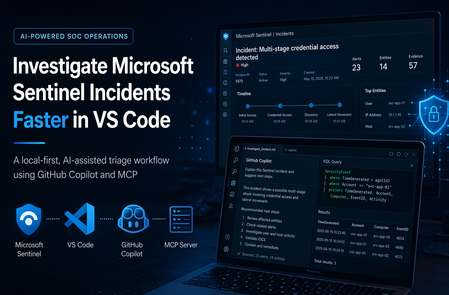
Modern SOC work is not limited by data—it’s limited by the friction of collecting it. This post shows a local-first workflow that lets you investigate Microsoft Sentinel incidents from inside VS Code using GitHub Copilot Chat for reasoning and a small, deterministic MCP toolset for evidence retrieval and (optionally) approval-gated writeback. What you’ll take away: How to structure a Copilot + MCP triage loop that stays grounded in Azure evidence A reliability pattern: fall back to KQL when Sentinel subresource APIs are flaky A safety pattern: draft-first, explicit-approval writeback for incident comments Why This Exists Sentinel triage is powerful but fragmented: you jump between the portal, KQL, entity pivots, and case notes just to answer “what happened?” The goal here is to collapse that into a single, repeatable loop inside the editor. Resolve the incident and pull the underlying alerts/entities Pivot into AzureActivity (and other logs) to identify the actor and outcome Use threat intelligence (TI) for context—not as the decision Generate an evidence-backed narrative and draft comment; write back only on explicit approval Design Principles Evidence first: every claim must be traceable to Sentinel APIs or Log Analytics results Small tool surface: fewer tools, clearer prompting, easier hardening Reliability by design: if one API path fails, pivot to KQL and continue Safety boundary: investigation and writeback are separate, and writeback is approval-gated Architecture & Data Flow A local TypeScript MCP server exposes a handful of triage tools to Copilot Chat in VS Code. Reads come from Sentinel + Log Analytics; writes (incident comments) are optional and require explicit approval. Copilot Chat (VS Code) decides the next step and summarizes outputs MCP server executes allowed tools: incident lookup, alert/entity retrieval, KQL queries, optional comment writeback Evidence sources: Sentinel Incident APIs + Log Analytics tables (SecurityIncident, SecurityAlert, AzureActivity, TI tables) Safety gate: writeback happens only after explicit approval; otherwise you get a draft Tool Surface MCP is useful here because it separates reasoning from execution: Copilot can decide what to do, but only the MCP server can do it—and only through tools you explicitly define and can audit. list_incidents / get_incident (ground the case) get_incident_alerts / get_incident_entities (fast path) run_incident_kql (reliable fallback + pivots) add_incident_comment (draft-first; writes only with approval) The Investigation Loop (3 Steps) Prompt used sentinel-triage-local Investigate Sentinel incident 1478 end to end in workspace Subscription ID/Resource Group/Workspace Name. Resolve the incident ID first, collect underlying alerts and entities, enrich with AzureActivity and TI, determine whether the activity is malicious or benign, and return: 1. Investigation summary 2. Key evidence 3. Entity analysis 4. TI enrichment result 5. Risk assessment 6. Recommended disposition 7. Final incident comment draft Rules: - Use tool output only, no guessing. - If alert/entity subresource APIs fail, pivot to KQL and continue. - Do not submit the comment unless I explicitly say: APPROVE COMMENT. 1) Ground the incident Resolve the human-friendly incident number to the Sentinel incident resource ID, then capture the metadata you need to drive every later pivot. Incident numbers are convenient for analysts, but the actual investigation flow depends on the underlying incident resource ID. Resolving that first gives the workflow a concrete anchor for: Title Severity Owner Status Alert count Analytic rule IDs Incident URL This gives you the stable identifiers (and the URL) needed to retrieve alerts, entities, and supporting logs. 2) Collect alerts and entities (fast path) Pull the alerts behind the incident and the entities they reference. When the incident subresource APIs behave, this is the fastest way to assemble the working set. In the ideal path, the agent can call the incident alert and entity subresources directly. That gives fast access to: Alert IDs Alert names Timestamps Severities Entities Provider metadata 3) Stay reliable: pivot to KQL when APIs fail In real environments, the incident subresource APIs for alerts/entities are not always dependable. When they fail, the workflow switches to Log Analytics and reconstructs the same evidence via KQL—so the investigation continues. SecurityIncident to recover the incident record and alert IDs SecurityAlert to retrieve alert details and entities AzureActivity to determine who or what performed the operation ThreatIntelligenceIndicator and ThreatIntelIndicators for enrichment The High-Signal Pivot: AzureActivity In the incidents I tested, AzureActivity was the fastest way to classify “suspicious deployment” alerts: it tells you who did the action, what operation ran, and whether it succeeded. The evidence showed: The caller was a single Microsoft Entra ID object ID Claims_d.idtyp = "app" Authorization_d.evidence.principalType = "ServicePrincipal" The activity was tied to a policy assignment The operation was MICROSOFT.RESOURCES/DEPLOYMENTS/WRITE The result was BadRequest with InvalidTemplate That pattern typically points to automation (service principal + policy-driven deployment) failing due to a bad template—not an interactive attacker. Threat Intelligence: Use It as Context Enrich observables against TI, but treat it as corroboration: a hit is not proof, and a miss is not a clean bill of health. In my test runs, TI mainly helped refine confidence after AzureActivity and alert evidence established the likely story. Output: An Evidence-Backed Narrative (and a Draft Comment) Once the tools return results, Copilot’s job is synthesis: turn structured evidence into a short narrative an analyst can paste into the case. What happened, who/what triggered it, and whether it succeeded Key supporting evidence (alerts, entities, AzureActivity pivots, TI context) A recommended disposition and a draft incident comment Incident comment written back automatically (after approval) (screenshot): Safety + Reliability: Approval-Gated Writeback The agent can draft a comment automatically, but it cannot change incident state unless the analyst explicitly approves. That boundary is what makes the workflow usable in real operations. After approval, the tool submits the drafted comment directly to the Sentinel incident so the portal reflects the same evidence-backed narrative. Default: return the draft comment only On approval: acquire an ARM token via Azure CLI and submit via curl.exe (hardened with validation + retries) Why This Is Worth Building Less context switching: investigation happens where you already work More consistency: the same loop runs every time, with deterministic tools Better classification: AzureActivity pivots reduce false “user did X” assumptions Safer automation: drafts are automatic; writes are explicit and auditable Conclusion AI is most useful in a SOC when it is constrained: deterministic tools fetch the evidence, the model synthesizes it, and humans keep control of state changes. A local Copilot + MCP workflow hits that sweet spot—faster triage for the SOC analysts.