security
5 TopicsWelcome to the GovTech Community
Nau mai, haere mai. Welcome to our new home. If you've just arrived from our Teams channel, thank you for making the jump. This post is part welcome mat, part explanation of why we've moved, and part invitation to get stuck in. A community with a decade behind it This isn't a new idea — it's a new venue for an old one. For more than ten years, the Microsoft Wellington office has hosted a GovTech community: sessions, briefings, hallway conversations and the kind of "how did you actually solve that?" exchanges that never make it into a formal case study. People have come through this community as graduates and come back as architects. Agencies have found each other here and gone on to share work rather than duplicate it. That history is the point. We're not starting from zero, we're changing the room we meet in. Why Tech Community Teams served us well, but it has limits for a community like ours. Conversations scrolled away. Good answers were buried three weeks deep in a thread. New members arrived to an empty scroll-back with no way to find the thing everyone else already knew. Tech Community fixes most of that. Posts are searchable and permanent. Questions and their answers stay findable for the next person who hits the same wall. Articles have room to breathe. And critically, it's open — colleagues across agencies can join without needing to be added to anything. What we'd love to see here Everything, honestly. But specifically: Questions. Especially the ones you think are too basic to ask. They almost never are, and someone else is quietly wondering the same thing. Articles and write-ups. Migrated something? Piloted something? Abandoned something and learned why? Write it up. The failures are often more useful than the wins, and there's far too little of that shared openly across the sector. Ideas and problems. Half-formed is fine. Some of the best work that's come out of this community started as someone thinking out loud. Events. We'll keep running them, and we'll post them here first — sessions, deep dives, and the informal catch-ups that have always been the backbone of this group. Getting started Introduce yourself in the comments below. Tell us who you are, which agency you're with, and what you're working on or curious about right now. That's it — no formality required. If you have a question waiting, don't sit on it. Post it. A community reads as alive or dead within about a week of launching, and the difference is entirely down to whether people start talking. So please, start talking. Looking forward to seeing what we build here together.14Views0likes0CommentsToken Limit Exceeded? What's Actually Going On and What to Do About It ?
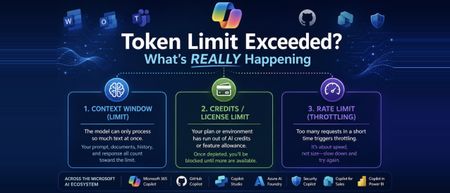
Hi All, Based on some recent experience across the organisation with token limit issues, I wanted to put my thoughts down and actually dig into what's happening under the hood, rather than just chalking it up to "we need a bigger plan." If you work anywhere near the Microsoft ecosystem these days, you're probably touching more AI tools than you realize. Copilot in Word and Excel, GitHub Copilot while you code, Copilot Studio if you're building agents, maybe Security Copilot or Copilot for Sales depending on your role, and increasingly Azure AI Foundry if your team is building anything custom. I work across a good chunk of this stack day to day, and at some point, almost everyone runs into the same wall: "Token limit exceeded." "You've reached your usage limit." "Upgrade to continue." The first instinct is usually to assume you did something wrong wrote too much, uploaded too big a file, or just need a fatter subscription. Sometimes that's the actual story. But honestly, often, that error message is standing in for three completely different problems that all happen to look identical from the outside. One is about how much text a model can physically process at once. One is about your license or credits running dry. And one has nothing to do with size at all it's just about how fast you're sending requests. Once you know which of these three, you're dealing with, the fix becomes obvious. Until then, "upgrade your plan" feels like the only lever you've got even when it isn't. This post walks through what a token is, why Microsoft's various Copilots each handle this differently, and what habits genuinely cut down on these interruptions instead of just throwing money at the problem. Part 1: So What Is a Token, Really? A token isn't a word, and it isn't a character it's somewhere in between. It's the small chunk of text a model's tokenizer breaks your input into before it can do anything with it. Take a word like "unbelievable." A tokenizer might split it into three pieces something like "un," "believ," and "able." Short, everyday words usually come out as a single token. But code, technical jargon, acronyms, and non-English text tend to fragment into a lot more tokens than you'd guess just by looking at the word count. This is why every AI tool has a ceiling on how much it can handle in one go, and that ceiling isn't measured in words or characters it's measured in tokens. Your prompt, any documents or emails it pulls in as context, the back-and-forth history of your conversation, and the response itself all draw from the same pool. Once that pool runs dry, something has to give: the tool truncates, rejects the request outright, or quietly summarizes older context to make room. The part that trips people up: token count doesn't map cleanly to word count. A short, dense paragraph full of code or acronyms can eat up more tokens than a much longer plain-English message. Part 2: Three Different Limits, One Confusing Error Message This isn't always obvious upfront, even to a lot of admins managing these tools: "token limit exceeded" is really a stand-in phrase for three separate limits, and they don't behave the same way. This isn't unique to Microsoft either every major AI platform bundles these same three things behind similarly vague error messages. Microsoft's stack just makes a good case study because so many of us touch multiple pieces of it in the same week. The context window is the ceiling on how much text a specific model can process in a single request everything from your prompt to retrieved documents to chat history. This is tied to the model itself, not your subscription. Swap from one model to another inside the same tool, and this ceiling can move without you doing anything differently. Your license, credits, or feature allowance is a completely separate thing. This is what Microsoft 365 Copilot plans track through AI credits and feature limits, and it's what Copilot Studio measures through Copilot credits at the environment level. A single action summarizing an inbox, generating an agent response, running an analysis deducts from this pool regardless of how small your actual prompt felt. Run out, and you get blocked, even if you're nowhere near any context window limit. The rate limit is about speed, not size. Copilot Studio, for instance, enforces quotas measured in requests per minute or per hour to keep the system stable under load. Send messages too quickly, which happens easily with automations, flows, or bots, and you can get throttled even with a tiny prompt and plenty of credits left. The reason this matters: a plan upgrade only ever fixes the second one. If you're actually running into the model's context window or getting rate-limited, paying for a bigger license won't change anything, and that mismatch is exactly where most of the frustration comes from. Part 3: How This Plays Out Across the Microsoft AI Stack The Microsoft ecosystem isn't one AI tool wearing different outfits it's genuinely several different systems, each handling tokens and limits in its own way. Here's a tour of the ones people run into most. Microsoft 365 Copilot (the one living inside Word, Excel, Outlook, Teams) doesn't work off a single published token number the way a developer tool would. Instead, it dynamically pulls together your prompt, recent chat history, and relevant snippets retrieved from Microsoft Graph your files, emails, and messages and quietly summarizes or drops older material to stay within bounds. Where this usually breaks isn't the context window at all; it's the AI credit and feature-limit system running out, often without much warning until you're mid-task. GitHub Copilot Chat is more like a traditional developer tool. It has a fixed, published token window tied to whichever model you've selected, and that limit applies consistently whether you're in the browser, VS Code, or the CLI. The failure mode here is usually a long conversation or a big multi-file context quietly creeping past that ceiling. Copilot Studio, where a lot of custom agent-building happens, runs on Copilot credits per interaction, plus its own requests-per-minute and requests-per-hour quotas at the environment level. If you're grounding an agent in SharePoint content, there's also a separate file-size ceiling to watch content over a certain size can get silently excluded from generative answers depending on your tenant's licensing. Azure AI Foundry (recently renamed to Microsoft Foundry, in case you've seen both names floating around) is where this gets more directly in your control. If your team is building custom applications on top of Azure OpenAI or other models in the Foundry catalog, which now includes everything from GPT to Phi to Claude to Llama, you're working with explicit, published context windows per model, and you're billed per token rather than per credit. It's a different mental model entirely: less "you hit a wall," more "you're paying by the word, so design accordingly." Security Copilot, if your org uses it for threat analysis and incident response, runs on its own capacity model pooled compute units at the tenant level rather than a simple per-user cap. It's easy to assume this behaves like M365 Copilot license limits; it doesn't. Copilot for Sales, embedded in Outlook and Teams for CRM-connected work, and Copilot in Power BI, which now goes beyond generating summaries to actually helping build and refine semantic models, both draw from their own feature-specific allowances layered on top of whatever base Microsoft 365 or Power Platform license you're on. And then there's the multi-model wrinkle that trips up teams the most: because tools like Copilot Studio and GitHub Copilot let you choose between GPT-based models, Claude, and others, the exact same prompt can have a different effective context window and a different token cost purely based on which model handled it that day. This is a big, underrated reason behind the "it worked fine yesterday, why not now" complaint. Part 4: What Actually Helps ? Some of this is genuinely outside your control, but a fair amount isn't. If you're just using these tools day to day, the single biggest habit shift is not letting conversations run forever. Long threads in Copilot Chat or Copilot Studio keep accumulating history, and that history eats into the same budget as whatever you're asking right now. Starting fresh periodically costs you nothing and buys back a lot of headroom. Large documents are worth splitting up before you feed them in, especially for SharePoint-grounded agents, where oversized files can get quietly excluded rather than cleanly rejected you won't necessarily know it happened unless you're looking for it. And it's worth resisting the urge to default to the heaviest, most capable model for every single task. Lighter models are usually faster, cheaper, and often sit under a more generous limit than the flagship ones, and most everyday tasks genuinely don't need the biggest model available. Before you go asking IT for a license upgrade, it's worth a quick sanity check on which limit you actually hit. If it's a rate limit, waiting a minute and retrying usually solves it outright. If it's a context window problem, trimming your prompt or starting a new session fixes it. An upgrade only helps if you've genuinely run out of credits or feature allowance, and that's worth confirming before you file the request. If you're on the building side Copilot Studio agents, Foundry applications, anything with RAG-style grounding a couple of things pay off quickly. Keep an eye on credit or token consumption proactively rather than discovering it's gone when the agent goes down mid-conversation. Be deliberate about what goes into system prompts and orchestration instructions, since those draw from the same budget as the end user's actual message, often invisibly to whoever's chatting with the agent. And spend real time getting chunk size right for knowledge sources too large and you're burning budget on irrelevant context, too small and the agent loses the thread. Part 5: Quick Checklist Before You Escalate Is this actually a context window problem -prompt, history, and attachments too big for the model in use? Have you genuinely run out of credits or feature allowance on your plan? Could this be a rate limit -too many requests too fast, especially from a flow or automation? Did the underlying model change since last time, quietly shifting the effective window? For Studio or Foundry work, is this a tenant or environment-level limit rather than something tied to you personally? Closing Thoughts Tokenization is one of those things that stays completely invisible right up until it isn't. Across a stack as sprawling as Microsoft's M365 Copilot, GitHub Copilot, Copilot Studio, Foundry, Security Copilot, and everything layered on top "token limit exceeded" almost never means one single thing. It means you've hit one of three very different walls, and each one needs a different response. If your team builds or maintains any of these tools, this is genuinely worth putting in front of people early. Most of the "why did this break" tickets in this space aren't about tokens at all. They're about nobody knowing which limit actually got hit, or where in this increasingly large ecosystem it happened. I'm curious how this shows up for others has your team standardized on one model across these tools, or are you juggling several depending on the task? I'd love to hear what patterns you've run into. Cheers, and happy reading. - By Surya Vennapusa, MCT2KViews3likes2CommentsHow can you stay competitive and relevant in an AI-Driven World?
In a world where AI tools evolve weekly and yesterday's skills can feel obsolete overnight, this blog offers a grounded, human-first guide for cloud and technology professionals who want to stay ahead not by chasing every trend, but by building the right foundations. Across six core themes, the post walks readers through understanding what AI truly changes in the workplace, committing to deliberate and structured learning through platforms like Microsoft Learn, getting hands-on with real Azure AI projects beyond just certifications, and doubling down on the human skills critical thinking, communication, and ethical judgment that AI simply cannot replicate. The blog also makes the case for community and network as a long-term career asset, and closes with a call to develop an AI mindset rooted in curiosity, adaptability, and a willingness to experiment and share openly. Whether you're a cloud architect, a security professional preparing for AZ-500 or SC-200, or simply someone navigating what this AI shift means for your career this post is written for you. Key Takeaways for Readers: Understand AI's real impact · Build a deliberate learning habit · Go hands-on with Azure AI tools · Strengthen human skills · Invest in community · Cultivate an AI-first mindset481Views2likes2CommentsSecuring Productivity with Microsoft 365 Copilot
Join the Greek MVP Community hosting Joanna Vathis for an insightful live session about Copilot in M365, Data Protection, Privacy, and Responsible AI Agenda What is Microsoft 365 Copilot? Data Protection Architecture Privacy & Compliance Commitments Responsible AI Practices Security Features & Risk Mitigation Deployment Best Practices Q&A Join for free !95Views0likes0CommentsResponsible AI and the Evolution of AI Security
Why Responsible AI Matters Responsible AI means designing, developing, and deploying AI systems that are ethical, transparent, and accountable. It's not just about compliance—it's about building trust, protecting users, and ensuring AI benefits everyone. Key Principles of Responsible AI: Fairness: Avoiding biases and discrimination by using diverse datasets and regular audits. Reliability & Safety: Rigorous testing to ensure AI performs as intended, even in unexpected scenarios. Privacy & Security: Protecting user data with robust safeguards. Transparency: Making AI decisions explainable and understandable. Accountability: Establishing governance to address negative impacts. Inclusiveness: Considering diverse user needs and perspectives. Responsible AI reduces bias, increases transparency, and builds user trust—critical as AI systems increasingly impact finance, healthcare, public services, and more. Implementing Responsible AI isn't just about ethical ideals—it's a foundation that demands technical safeguards. For developers, this means translating principles like fairness and transparency into secure code, robust data handling, and model hardening strategies that preempt real-world AI threats. The Evolution of AI Security: From Afterthought to Essential AI security has come a long way—from an afterthought to a central pillar of modern digital defense. In the early days, security was reactive, with threats addressed only after damage occurred. The integration of AI shifted this paradigm, enabling proactive threat detection and behavioral analytics that spot anomalies before they escalate. Key Milestones in AI Security: Pattern Recognition: Early AI focused on detecting unusual patterns, laying the groundwork for threat detection. Expert Systems: Rule-based systems in the 1970s-80s emulated human decision-making for security assessments. Machine Learning: The late 1990s saw the rise of ML algorithms that could analyze vast data and predict threats. Deep Learning: Neural networks now recognize complex threats and adapt to evolving attack methods. Real-Time Defense: Modern AI-driven platforms (like Darktrace) create adaptive, self-learning security environments that anticipate and neutralize threats proactively. Why AI Security Is Now Mandatory With the explosion of AI-powered applications and cloud services, security risks have multiplied. AI attacks are a new frontier in cybersecurity. What Are AI Attacks? AI attacks are malicious activities that target AI systems and models. Data Poisoning: Attackers manipulate training data to corrupt AI outputs. Model Theft: Sensitive models and datasets can be stolen or reverse-engineered. Adversarial Attacks: Malicious inputs can trick AI systems into making wrong decisions. Privacy Breaches: Sensitive user data can leak if not properly protected. Regulatory frameworks and industry standards now require organizations to adopt robust AI security practices to protect users, data, and critical infrastructure. Tools and Techniques for Secure AI Infrastructure and Applications Zero Trust Architecture Adopt a "never trust, always verify" approach. Enforce strict authentication and authorization for every user and device Data Security Protocols Encrypt data at rest, in transit, and during processing. Use tools like Microsoft Purview for data classification, cataloging, and access control Harden AI Models Train models with adversarial examples. Implement input validation, anomaly detection, and regular security assessments Secure API and Endpoint Management Use API gateways, OAuth 2.0, and TLS to secure endpoints. Monitor and rate-limit API access to prevent abuse. Continuous Monitoring and Incident Response Deploy AI-powered Security Information and Event Management (SIEM) systems for real-time threat detection and response Regularly audit logs and security events across your infrastructure. DevSecOps Integration Embed security into every phase of the AI development lifecycle. Automate security testing in CI/CD pipelines. Employee Training and Governance Train teams on AI-specific risks and responsible data handling. Establish clear governance frameworks for AI ethics and compliance Azure-Specific Security Tools Microsoft Defender for Cloud: Monitors and protects Azure resources. Azure Resource Graph Explorer: Maintains inventory of models, data, and assets. Microsoft Purview: Manages data security, privacy, and compliance across Azure services. Microsoft Purview provides a centralized platform for data governance, security, and compliance across your entire data estate. Why Microsoft Purview Matters for Responsible AI Microsoft Purview offers a unified, cloud-native solution for: Data discovery and classification Access management and policy enforcement Compliance monitoring and risk mitigation Data quality and observability Purview's integrated approach ensures that AI systems are built on trusted, well-governed, and secure data, addressing the core principles of responsible AI: fairness, transparency, privacy, and accountability. Conclusion Responsible AI and strong AI security measures are no longer optional; they are essential pillars of modern application development and integration on Azure. By adhering to ethical principles and utilizing cutting-edge security tools and strategies, organizations can drive innovation with confidence while safeguarding users, data, and the broader society.837Views0likes0Comments