security
23 Topics
How do you handle sensitive PDF files in Edge without third-party cloud uploads?
Hi everyone, When working with sensitive PDF documents (like financial or personal files), most online PDF editors require uploading files to third-party cloud servers. This raises obvious privacy and security concerns for many users. The most reliable way to maintain data privacy today is using Client-Side Browser Processing (WebAssembly & JavaScript), where operations run entirely inside the local browser memory without transmitting any data over the internet. Key advantages of pure client-side processing: Total Privacy: Zero file transfers or external server logs. Instant Speed: Processing relies on your local CPU, bypassing slow upload/download waiting times. No Software Installation: Works directly inside browsers like Microsoft Edge. For those looking for a practical example of this architecture, https://pdfdocflow.com is a free tool offering 24 browser-based tools (merging, splitting, compressing, watermarking, and signing) operating 100% locally with zero server uploads. How do you usually handle sensitive PDFs while browsing, and do you prefer client-side web tools over installing dedicated software?153Views0likes0Comments
Lock Edge settings and Enable Internet Explorer mode Permanent
Good morning. We would need to know for a domain user, how to block, configuration changes in Microsoft Edge. (You can not change any data in the configuration) Also the option to activate Internet Explorer mode permanently for certain pages. Currently it has the default value of 30, which if I remember correctly is expandable to 60 or 90. Thank you so much ------ Bloquear configuración Edge y Activar modo Internet Explorer Permanente Buenos Días. Necesitaríamos saber para un usuario de dominio, como bloquear, cambios de configuración en Microsoft Edge. (No pueda cambiar ningún dato en la configuración) También la opción de activar el modo de Internet Explorer de forma permanente para una determinadas páginas. Actualmente tiene el valor por defecto de 30, que si no mal recuerdo es ampliable a 60 o 90. Muchas Gracias1.9KViews0likes1CommentWill Edge always identify as Chrome?
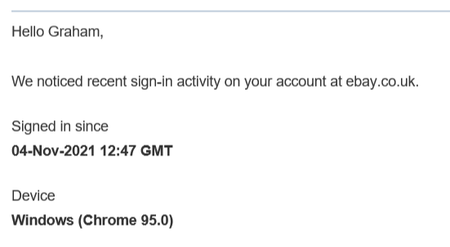
Various websites often confirm new log-in attempts, including Google services, Ebay, and banking sites. I was just wondering if Edge, because it is now based on Chromium, will always identify as Chrome? This seems confusing to me. Example:Solved5.2KViews0likes2CommentsEdge is not suggesting username/password on website
I'm now using Edge as my default browser. The only issue I've run into so far is that it's not suggesting my username/password for a website that I use regularly even though I see the username and password for that website in the passwords list in Edge. Any idea what could be the problem here and how I can get Edge to recognize website and offer the username/password that are already saved in the passwords in Edge?2.8KViews0likes2CommentsNew Feature | Automatic HTTPS switching added to Edge browser
Automatic HTTPS Enables support for Automatic HTTPS, which switches connections to websites from HTTP to HTTPS. The feature can then be turned on/off or further configured at edge://settings/privacy. – Mac, Windows, Linux #edge-automatic-https Microsoft Edge Version 92.0.877.0 (Official build) canary (64-bit) edge://flags/#edge-automatic-https2.5KViews4likes0CommentsIntroducing Project Robin | New Feature
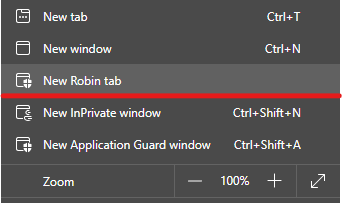
this one is a new flag you can enable: edge://flags/#edge-robin Microsoft Edge Version 91.0.852.0 (Official build) canary (64-bit) I think, Project Robin is a way to show Windows Defender Application Guard windows as tabs, next to other regular tabs. because right now, when you open a new WDAG window, it has its own protected window, backed up by Windows Defender engine. this Project Robin might be a way to bring the 2 environments together in the same window. so far the feature doesn't seem to be fully implemented yet. when I try it, it takes me to https://dev.browse.trafficmanager.net/?header=0&url=https%3A%2F%2Fwww.bing.com%2F&escape=newdomain&titlePrefix=0 and then nothing. it's exciting, waiting for future versions to see more changes.30KViews0likes4CommentsIntroducing Edge Master Password | New feature
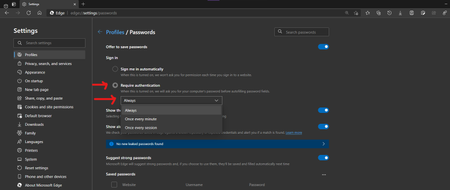
it's this feature: it's controlled feature rollout available in Edge canary, was added few versions ago. this helps your passwords stay safe, by requiring you to enter your Windows Pin/Password when you want to autofill your credentials on a web page. using the same strong authentication method Windows uses to secure your login screen, secure your disks pre-logon etc. next in line is this I'm already seeing some bits of it in Edge canary, but not fully implemented just yet.12KViews3likes2CommentsIdentify network traffic originating from App Guard containers at the proxy level
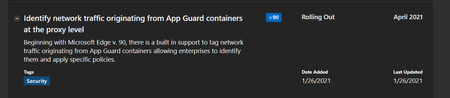
Microsoft Edge Version 91.0.834.0 (Official build) canary (64-bit) The newly added flag for this feature: edge://flags/#edge-wdag-traffic-identification If enabled, Application Guard traffic will be tagged with a X-MS-ApplicationGuard-Initiated header – Windows By the way, if any user or developer is reading this, can you help me understand how exactly we should monitor WDAG connections? There are some difficulties I've been trying to solve in the past few hours.2.1KViews0likes1CommentYou can now sync your favorites with Application Guard Window from Windows Defender
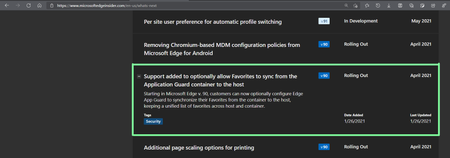
Microsoft Edge version 91.0.831.0 (Official build) canary (64-bit) you need to enable this newly added flag: edge://flags/#edge-wdag-favorites-sync and then when you open a new application guard window, your favorites will be there. Learn more about Windows Defender Application Guard mode (WDAG) and it's security features here: https://docs.microsoft.com/en-us/windows/security/threat-protection/microsoft-defender-application-guard/md-app-guard-overview https://docs.microsoft.com/en-us/deployedge/microsoft-edge-security-windows-defender-application-guard3.6KViews1like1CommentNew improvement on Strong password suggestion feature in Edge
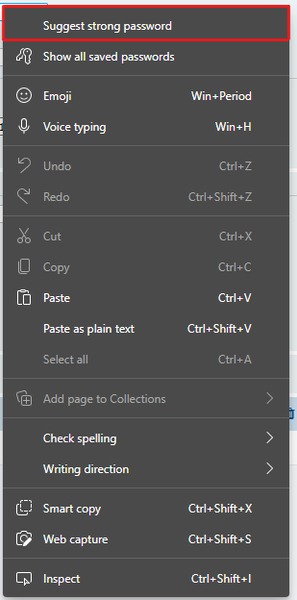
It's a controlled feature rollout, Edge has got a new option in right-click that will let you generate strong password when you right-click on a password field. Edge is already using Machine Learning to automatically suggest strong passwords on sign up pages but this option is there for pages that it doesn't happen on automatically, yet. There is also a form where you can submit web pages where Edge doesn't automatically suggest strong password on. https://forms.office.com/Pages/ResponsePage.aspx?id=v4j5cvGGr0GRqy180BHbR123cdFSKdZItI7mcVwhTx1UM1FNWDRQVk9CTUFMU09DUkVaTjdETzIzNS4u1.9KViews2likes0Comments