security & compliance
163 TopicsUpdated my AZ-500 Study Guide: Microsoft Azure Security Technologies for the latest 2021 version!
Are you preparing for the AZ-500 exam? I just updated my AZ-500 Study Guide: Microsoft Azure Security Technologies for the latest 2021 version! Check it out here: https://www.thomasmaurer.ch/2020/05/az-500-study-guide-microsoft-azure-security-technologies-20212.7KViews5likes0Comments
How to Fix Azure Event Grid Entra Authentication issue for ACS and Dynamics 365 integrated Webhooks
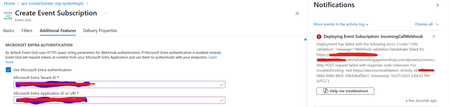
Introduction: Azure Event Grid is a powerful event routing service that enables event-driven architectures in Azure. When delivering events to webhook endpoints, security becomes paramount. Microsoft provides a secure webhook delivery mechanism using Microsoft Entra ID (formerly Azure Active Directory) authentication through the AzureEventGridSecureWebhookSubscriber role. Problem Statement: When integrating Azure Communication Services with Dynamics 365 Contact Center using Microsoft Entra ID-authenticated Event Grid webhooks, the Event Grid subscription deployment fails with an error: "HTTP POST request failed with unknown error code" with empty HTTP status and code. For example: Important Note: Before moving forward, please verify that you have the Owner role assigned on app to create event subscription. Refer to the Microsoft guidelines below to validate the required prerequisites before proceeding: Set up incoming calls, call recording, and SMS services | Microsoft Learn Why This Happens: This happens because AzureEventGridSecureWebhookSubscriber role is NOT properly configured on Microsoft EventGrid SP (Service Principal) and event subscription entra ID or application who is trying to create event grid subscription. What is AzureEventGridSecureWebhookSubscriber Role: The AzureEventGridSecureWebhookSubscriber is an Azure Entra application role that: Enables your application to verify the identity of event senders Allows specific users/applications to create event subscriptions Authorizes Event Grid to deliver events to your webhook How It Works: Role Creation: You create this app role in your destination webhook application's Azure Entra registration Role Assignment: You assign this role to: Microsoft Event Grid service principal (so it can deliver events) Either Entra ID / Entra User or Event subscription creator applications (so they can create event grid subscriptions) Token Validation: When Event Grid delivers events, it includes an Azure Entra token with this role claim Authorization Check: Your webhook validates the token and checks for the role Key Participants: Webhook Application (Your App) Purpose: Receives and processes events App Registration: Created in Azure Entra Contains: The AzureEventGridSecureWebhookSubscriber app role Validates: Incoming tokens from Event Grid Microsoft Event Grid Service Principal Purpose: Delivers events to webhooks App ID: Different per Azure cloud (Public, Government, etc.) Public Azure: 4962773b-9cdb-44cf-a8bf-237846a00ab7 Needs: AzureEventGridSecureWebhookSubscriber role assigned Event Subscription Creator Entra or Application Purpose: Creates event subscriptions Could be: You, Your deployment pipeline, admin tool, or another application Needs: AzureEventGridSecureWebhookSubscriber role assigned Although the full PowerShell script is documented in the below Event Grid documentation, it may be complex to interpret and troubleshoot. Azure PowerShell - Secure WebHook delivery with Microsoft Entra Application in Azure Event Grid - Azure Event Grid | Microsoft Learn To improve accessibility, the following section provides a simplified step-by-step tested solution along with verification steps suitable for all users including non-technical: Steps: STEP 1: Verify/Create Microsoft.EventGrid Service Principal Azure Portal → Microsoft Entra ID → Enterprise applications Change filter to Application type: Microsoft Applications Search for: Microsoft.EventGrid Ideally, your Azure subscription should include this application ID, which is common across all Azure subscriptions: 4962773b-9cdb-44cf-a8bf-237846a00ab7. If this application ID is not present, please contact your Azure Cloud Administrator. STEP 2: Create the App Role "AzureEventGridSecureWebhookSubscriber" Using Azure Portal: Navigate to your Webhook App Registration: Azure Portal → Microsoft Entra ID → App registrations Click All applications Find your app by searching OR use the Object ID you have Click on your app Create the App Role: Display name: AzureEventGridSecureWebhookSubscriber Allowed member types: Both (Users/Groups + Applications) Value: AzureEventGridSecureWebhookSubscriber Description: Azure Event Grid Role Do you want to enable this app role?: Yes In left menu, click App roles Click + Create app role Fill in the form: Click Apply STEP 3: Assign YOUR USER to the Role Using Azure Portal: Switch to Enterprise Application view: Azure Portal → Microsoft Entra ID → Enterprise applications Search for your webhook app (by name) Click on it Assign yourself: In left menu, click Users and groups Click + Add user/group Under Users, click None Selected Search for your user account (use your email) Select yourself Click Select Under Select a role, click None Selected Select AzureEventGridSecureWebhookSubscriber Click Select Click Assign STEP 4: Assign Microsoft.EventGrid Service Principal to the Role This step MUST be done via PowerShell or Azure CLI (Portal doesn't support this directly as we have seen) so PowerShell is recommended You will need to execute this step with the help of your Entra admin. # Connect to Microsoft Graph Connect-MgGraph -Scopes "AppRoleAssignment.ReadWrite.All" # Replace this with your webhook app's Application (client) ID $webhookAppId = "YOUR-WEBHOOK-APP-ID-HERE" #starting with c5 # Get your webhook app's service principal $webhookSP = Get-MgServicePrincipal -Filter "appId eq '$webhookAppId'" Write-Host " Found webhook app: $($webhookSP.DisplayName)" # Get Event Grid service principal $eventGridSP = Get-MgServicePrincipal -Filter "appId eq '4962773b-9cdb-44cf-a8bf-237846a00ab7'" Write-Host " Found Event Grid service principal" # Get the app role $appRole = $webhookSP.AppRoles | Where-Object {$_.Value -eq "AzureEventGridSecureWebhookSubscriber"} Write-Host " Found app role: $($appRole.DisplayName)" # Create the assignment New-MgServicePrincipalAppRoleAssignment ` -ServicePrincipalId $eventGridSP.Id ` -PrincipalId $eventGridSP.Id ` -ResourceId $webhookSP.Id ` -AppRoleId $appRole.Id Write-Host "Successfully assigned Event Grid to your webhook app!" Verification Steps: Verify the App Role was created: Your App Registration → App roles You should see: AzureEventGridSecureWebhookSubscriber Verify your user assignment: Enterprise application (your webhook app) → Users and groups You should see your user with role AzureEventGridSecureWebhookSubscriber Verify Event Grid assignment: Same location → Users and groups You should see Microsoft.EventGrid with role AzureEventGridSecureWebhookSubscriber Sample Flow: Analogy For Simplification: Lets think it similar to the construction site bulding where you are the owner of the building. Building = Azure Entra app (webhook app) Building (Azure Entra App Registration for Webhook) ├─ Building Name: "MyWebhook-App" ├─ Building Address: Application ID ├─ Building Owner: You ├─ Security System: App Roles (the security badges you create) └─ Security Team: Azure Entra and your actual webhook auth code (which validates tokens) like doorman Step 1: Creat the badge (App role) You (the building owner) create a special badge: - Badge name: "AzureEventGridSecureWebhookSubscriber" - Badge color: Let's say it's GOLD - Who can have it: Companies (Applications) and People (Users) This badge is stored in your building's system (Webhook App Registration) Step 2: Give badge to the Event Grid Service: Event Grid: "Hey, I need to deliver messages to your building" You: "Okay, here's a GOLD badge for your SP" Event Grid: *wears the badge* Now Event Grid can: - Show the badge to Azure Entra - Get tokens that say "I have the GOLD badge" - Deliver messages to your webhook Step 3: Give badge to yourself (or your deployment tool) You also need a GOLD badge because: - You want to create event grid event subscriptions - Entra checks: "Does this person have a GOLD badge?" - If yes: You can create subscriptions - If no: "Access denied" Your deployment pipeline also gets a GOLD badge: - So it can automatically set up event subscriptions during CI/CD deployments Disclaimer: The sample scripts provided in this article are provided AS IS without warranty of any kind. The author is not responsible for any issues, damages, or problems that may arise from using these scripts. Users should thoroughly test any implementation in their environment before deploying to production. Azure services and APIs may change over time, which could affect the functionality of the provided scripts. Always refer to the latest Azure documentation for the most up-to-date information. Thanks for reading this blog! I hope you found it helpful and informative for this specific integration use case 😀643Views4likes1Comment
Azure Policy – New Zealand Information Security Manual (NZISM) [Preview]
Whilst working with a number of organizations that needed to have compliance with https://www.nzism.gcsb.govt.nz (amongst other standards and regulations), it was a laborious path to have decent visibility against Azure resources and the NZISM compliance without customization or outside custom automation. The NZISM is measure from the https://www.protectivesecurity.govt.nz/ policy framework. The Azure Security Benchmark and ISO 27001 in https://portal.azure.com/#blade/Microsoft_Azure_Security/SecurityMenuBlade/22 supplied great general visibility towards standardized security compliance in general, but lacked the translation and mapping against NZISM requirements. The only other Azure Policy option available was to create a custom Azure Policy Set (Initiative) to map and show compliance. In-steps the new https://docs.microsoft.com/en-us/azure/governance/policy/samples/new-zealand-ism to save the day! With this being a built-in or out-of-the-box feature it means less overhead compared with the custom route. As with all things, each policy in the policy set should be reviewed prior to application to ensure it fits with expectations. The policy set should also not be used in isolation, i.e. it should be used in conjunction with other policies and features (such as the https://portal.azure.com/#blade/Microsoft_Azure_Expert/AdvisorMenuBlade/overview) to have a well rounded view. The policy set is also available on https://github.com/Azure/azure-policy/blob/master/built-in-policies/policySetDefinitions/Regulatory%20Compliance/nz_ism.json and open to contributions for any improvements or alignments needed towards the NZISM. Periodic reviews for compliance (of the policies themselves and their compliance against your resources) should also be in place as part of due diligence as always. There are a number of methods in which you can look to apply or deploy the policy set; https://docs.microsoft.com/en-us/azure/governance/policy/assign-policy-portal https://docs.microsoft.com/en-us/azure/governance/policy/assign-policy-azurecli (automation) https://docs.microsoft.com/en-us/azure/governance/policy/assign-policy-powershell (automation) https://docs.microsoft.com/en-us/azure/governance/policy/assign-policy-dotnet (automation) https://docs.microsoft.com/en-us/azure/governance/policy/assign-policy-javascript (automation) https://docs.microsoft.com/en-us/azure/governance/policy/assign-policy-python (automation) https://docs.microsoft.com/en-us/azure/governance/policy/assign-policy-rest-api (automation) https://docs.microsoft.com/en-us/azure/governance/policy/assign-policy-template (automation) https://docs.microsoft.com/en-us/azure/governance/policy/assign-policy-terraform (automation) All of the above automation tagged options you can pull into pipelines and automation vehicles (such as https://docs.microsoft.com/en-us/azure/devops/user-guide/services?view=azure-devops) to make life repeatable and easier. Even better is to include this in your Cloud Adoption Framework journey through https://docs.microsoft.com/en-us/azure/cloud-adoption-framework/govern/policy-compliance/. The Policy can also be applied at various levels; Tenant Management Group(s) Subscription(s) Resource Group(s) All that aside, how does it look in the real world? The two options that I ran through were the Azure Portal and PowerShell (AzModule) to test the waters for the policy at a subscription level scope. This is with a view to move towards subscription or management group level ARM deployments via an Azure DevOps pipeline. The application of the policy was reasonably straight forwards. Taking all of the current defaulted values from the policy (post review of each policy) set as-is means the following policy parameters need to be defined when applying: "Allowed locations" listOfAllowedLocations-e56962a6-4747-49cd-b67b-bf8b01975c4c Value = ['australiaeast','australiasoutheast'] "Allowed locations for resource groups" listOfAllowedLocations-e765b5de-1225-4ba3-bd56-1ac6695af988 Value = ['australiaeast','australiasoutheast'] "Audit Windows machines missing any of specified members in the Administrators group" MembersToInclude-30f71ea1-ac77-4f26-9fc5-2d926bbd4ba7 Value = [] "Audit Windows machines that have the specified members in the Administrators group" MembersToExclude-69bf4abd-ca1e-4cf6-8b5a-762d42e61d4f Value = [] Note: If you wish to include the Australia Central regions, these will need to be added into the values above. By default this is limited overall to Australasian and global regions. With the NZISM policy applied to the subscription, it took the usual time for it to evaluate the resources and produce it's compliance statistics. The only defaulted blocking feature of the policyset is the regional resource group and resource creations. Anything outside of the allowed regions or Global will be denied after the policy is applied. All existing resource will be allowed to exist, but show as non-compliant. This can be adjusted by setting the default action of the Policy Enforcement from Enabled (default) to Disabled. There are also optional settings to have configurable non-complaint messages (to display when a policy that is denying is blocking), but the defaulted message and appearance has enough details for the resource blocking, but the resource group blocking looks to be slightly less friendly by default at the moment: Example of Policy in “Deny” effect for disallowed locations for resource creation Example of Policy in “Deny” effect for disallowed locations for resource group creations All in all it is great built-in feature that can be very useful for those needing to comply with NZISM now with a lower amount of effort upfront. Further details are below for the two method of application used. PowerShell Note: Prior authentication and setting context to the appropriate subscription required. ################################################################# ## Register the Azure Policy Insights resource provider [One off against subscription] Register-AzResourceProvider -ProviderNamespace 'Microsoft.PolicyInsights' ###################################################################### # Assign a Policy Set/Initiative $policySetName = "d1a462af-7e6d-4901-98ac-61570b4ed22a" # New Zealand Information Security Manual $policySetAssignmentDisplayName = "New Zealand Information Security Manual" $policySetDefinition = (Get-AzPolicySetDefinition -Name $policySetName) $context=(Get-AzContext) $location='Australia East' # Region for the Managed Identity used for remediation $logAnalyticsWorkspaceId='*ADD_LA_WORKSPACE_RESOURCEID_HERE*' # LA Workspace Resource ID $parameters = [ordered]@{'MembersToInclude-30f71ea1-ac77-4f26-9fc5-2d926bbd4ba7'=('');` 'MembersToExclude-69bf4abd-ca1e-4cf6-8b5a-762d42e61d4f'=('');` 'listOfAllowedLocations-e56962a6-4747-49cd-b67b-bf8b01975c4c'=('australiaeast','australiasoutheast');` 'listOfAllowedLocations-e765b5de-1225-4ba3-bd56-1ac6695af988'=('australiaeast','australiasoutheast');` 'logAnalyticsWorkspaceId-f47b5582-33ec-4c5c-87c0-b010a6b2e917'=(''+$logAnalyticsWorkspaceId+'')} # Assign to subscription scope New-AzPolicyAssignment ` -PolicySetDefinition $policySetDefinition ` -Name $policySetName ` -AssignIdentity ` -Scope ("/subscriptions/"+$context.Subscription.Id) ` -Location $location ` -DisplayName $policySetAssignmentDisplayName ` -PolicyParameterObject $parameters ` -EnforcementMode DoNotEnforce ###################################################################### # Allow Policy System Identity access to remediate against subscription $roleDef=(Get-AzRoleDefinition -Name 'Contributor') $policySetAssignment=(Get-AzPolicyAssignment -Name $policySetName) New-AzRoleAssignment -Scope ("/subscriptions/"+$context.Subscription.Id) -ObjectId $policySetAssignment.Identity.principalId -RoleDefinitionId $roleDef.Id ###################################################################### Azure Portal Initiative/Definition Set Browse to the Azure Policy Initiative/Definition Set for the NZISM built in policy: https://portal.azure.com/#blade/Microsoft_Azure_Policy/PolicyMenuBlade/Definitions Definition ID: /providers/Microsoft.Authorization/policySetDefinitions/d1a462af-7e6d-4901-98ac-61570b4ed22a Go into the Policy by left-clicking on the policy name. Assign the policy to a scope by left-clicking the Assign button. Assign the scope as appropriate and required; Management group(s), Subscription(s), Resource Group(s). Basics Set the assignment Basics information, then left-click Next. Recommendation: Set the Policy enforcement as Disabled initial to review compliance prior to harder restrictions being put in place. Parameters Review and set all parameters for the assignment, then left-click next: Recommendation: Initially set policies to Audit (AuditIfNotExist) to review compliance prior to enforcement. Current values that should be set outside of the defaults are the following allowed locations policies: "Allowed locations" listOfAllowedLocations-e56962a6-4747-49cd-b67b-bf8b01975c4c "value": 'australiaeast','australiasoutheast' "Allowed locations for resource groups" listOfAllowedLocations-e765b5de-1225-4ba3-bd56-1ac6695af988 "value": 'australiaeast','australiasoutheast' Remediation Review and set the appropriate location for the compliance remediation managed identity to be created. Non-compliance messages Review and set either a default non-compliance message, or an individual non-compliance message per policy, then left-click next. Review + create Review the settings on the summary page and if no adjustments are required, left-click Create to set the assignment. After the creation completes, the policy will appear and start the evaluation process. This can take some time to complete. Once completed, the policy compliance can be reviewed to see what remediation is required or if appropriate, what exemptions (time based or permanent) can be approved and put in place. References Microsoft Doc’s References https://docs.microsoft.com/en-us/compliance/regulatory/offering-nz-cc-framework-nz https://docs.microsoft.com/en-us/azure/governance/policy/samples/new-zealand-ism Microsoft Github Initiative Reference https://github.com/Azure/azure-policy/blob/master/built-in-policies/policySetDefinitions/Regulatory%20Compliance/nz_ism.json NZISM https://www.nzism.gcsb.govt.nz/ Protective Security Requirements https://www.protectivesecurity.govt.nz/6.6KViews3likes0CommentsAzure Security Center for IoT Webinar
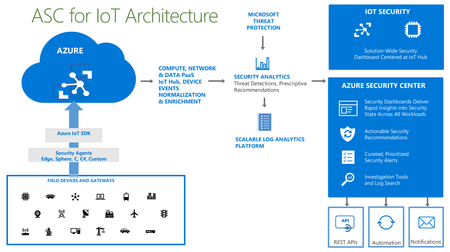
Interested in learning about Azure Security Center for IoT? Check out our upcoming webinar. Details and registration at https://aka.ms/ASCIoTWebinar. Azure Security Center for IoT is a new solution that allows organizations to easily protect their IoT deployments with threat protection driven by Microsoft’s unique threat intelligence. You can find more information about it at https://docs.microsoft.com/en-us/azure/asc-for-iot/overview. The webinar will take place on Monday, August 5, 2019 at 08:00 PT / 11:00 ET / 15:00 GMT. Afterward, the recording will be posted to https://aka.ms/ASCIoTRecordings. We hope you’ll join us!933Views2likes0Comments
🚀 Azure Control, Data, & MGMT Planes: The Backbone of Cloud Efficiency 🌐
Azure operations can be divided into Three categories (Control Plane - Data Plane - Management Plane) This post describes the differences between those three types of operations. Tip : Suppose that the word "plane" means "function" understand this definition like this !! # Control Plane (Function) # @ The Control Plane is responsible for managing and configuring Azure resources. @ It handles administrative tasks such as creating, updating, and deleting resources. @ All requests for control plane operations are sent to the Azure Resource Manager URL For Azure global, the URL is " https://management.azure.comm. " @ Azure Resource Manager handles all control plane requests. It automatically applies the Azure features you implemented to manage your resources, such as: Azure role-based access control (Azure RBAC) - Azure Policy - Management Locks - Activity Logs @ After Azure Resource Manager authenticates the request, it sends the request to the resource provider, which completes the operation. @ The control plane includes two scenarios for handling requests - "green field" and "brown field". @ Green field refers to ---> new resources. Brown field refers to ---> existing resources. # Data Plane (Function) # @ The Data Plane is responsible for interacting with the actual data within Azure resources. @ Once a resource is created, operations like reading, writing, and processing data occur in the Data Plane. @ Requests for data plane operations are sent to an endpoint that's specific to your instance. Ex : "myaccount.blob.core.windows.nett " ---> for storage account @ Operates independently of the Control Plane, meaning even if the Control Plane is unavailable, the Data Plane remains accessible. # Management Plane (Function) # @ The Management Plane oversees monitoring, security, and configuration of Azure services. @ It ensures that resources are operating efficiently and securely. Ex : Azure Monitor: Collecting logs and metrics from resources Ex : Azure Security Center: Managing security policies and compliance. Ex : Azure Automation: Running scheduled tasks for resource management.274Views2likes0CommentsAIP Webinar Series
Want to learn how to deploy Azure Information Protection (AIP)? Our webinar series will walk you through it: https://aka.ms/AIPWebinar Our engineering team is hosting a free webinar series on deploying and configuring AIP. In this 6-part series, we will cover key use cases and deployment best practices to help you discover, classify, protect, and monitor your data using AIP. The webinars will be hosted on Tuesdays (10:00 AM GMT) and Thursdays (12:00 PM PT / 3:00 PM ET) between March 12th and April 18th. The topics covered in this series are: 1) Introduction: AIP basics and latest announcements 2) Discovery: Discover data at rest 3) Classification: Label taxonomy and recommendations 4) Protection: Protect data at rest and in motion 5) Monitoring: Visibility into who is accessing data 6) MIP SDK: How to leverage the SDK We hope you'll join us!744Views2likes0CommentsManaging and Working with Azure Network Security Groups (NSG)
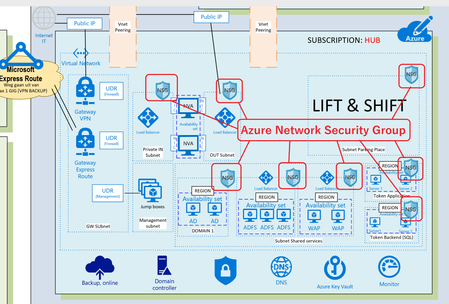
When you are implementing your Microsoft Azure Design like a HUB-Spoke model you have to deal with security of your Azure environment (Virtual Datacenter). One of them are Network Security Groups to protect your Virtual networks and make communication between Azure subnets possible in a Secure Azure Virtual Datacenter. You really have to plan your Azure Virtual networks and implement it by Architectural Design. Now I’m writing about Azure Network Security Groups which is important, but there are more items to deal with like : Naming Conventions in your Azure Virtual Datacenter Azure Subscriptions ( who is Owner, Contributor, or Reader? ) Azure Regions ( Where is my Datacenter in the world? ) Azure VNET and Sub-Nets ( IP-addresses ) Security of your Virtual Networks ( Traffic filtering, Routing ) Azure Connectivity ( VNET Peering between Azure Subscriptions, VPN Gateway ) Permissions (RBAC) Azure Policy ( Working with Blue prints ) How to Manage Microsoft Azure Network Security Groups (NSG) ? Read more on my blog about Infrastructure as Code (IaC) here with Azure DevOps and Visual Studio6.6KViews2likes0CommentsA Beginner's Guide To Role-Based Access Control on Azure.
When creating access to systems, applications and environments it's important to keep security top of mind. Even working at a rapid pace it's important to consider what credentials and access we give to a resource. Examples of this kind of administration of roles could be access to a Windows Server or providing pull access to a Docker image from an Azure Kubernetes Cluster. These types of actions require some form of authentication and authorization in order to provide access. This guide provides you some information on getting started on understanding Azure RBAC with many of the articles you can find on Microsoft Docs and Microsoft Learn. Defining the difference Authorization and Authentication are the cornerstones of security for computing. Before we dig into examples, let's just define the words from Webster's dictionary. Authentication: an act, process, or method of showing something (such as an identity, a piece of art, or a financial transaction) to be real, true, or genuine : the act or process of authenticating something Authorization: The granting of power to perform various acts or duties To think about this in a practical sense, consider the hierarcy of a Wordpress CMS set of user roles. From Wordpress Docs, Summary of Roles Super Admin – somebody with access to the site network administration features and all other features. See the Create a Network article. Administrator – somebody who has access to all the administration features within a single site. Editor – somebody who can publish and manage posts including the posts of other users. Author – somebody who can publish and manage their own posts. Contributor – somebody who can write and manage their own posts but cannot publish them. Subscriber – somebody who can only manage their profile. When a user authenticates into Wordpress, the SQL database where user roles are stored then determines what rights the user will have when logged in. The Administrator user may be responsible for maintenance of plug-ins for the website. The admin would like to avoid users who are not part of the website maintenance plan to be able to install, delete or modify any of the plug-ins. By ensuring all of these users have a role that does not permit these rights, our website remains more reliable due to unplanned maintenance. The contributor role appears to be what's right: Contributor #Contributor delete_posts edit_posts read read Reusable Blocks In this case, the contributor role for someone who may be just posting new content update may make sense due to the specific set of roles the user is authorized to do. RBAC for Azure Role-Based Authentication (RBAC) is an authorization system built on Azure Resource Manager that provides fine-grained access management of Azure resources. Access management via RBAC on Azure allows you to better control the scope of what your users and applications can access along with what they authorized to do. What can I do with RBAC? Here are some examples of what you can do with RBAC: Allow one user to manage virtual machines in a subscription and another user to manage virtual networks Allow a DBA group to manage SQL databases in a subscription Allow a user to manage all resources in a resource group, such as virtual machines, websites, and subnets Allow an application to access all resources in a resource group Fundamentals The way you control access to resources using RBAC is to create role assignments. This is a key concept to understand – it's how permissions are enforced. A role assignment consists of three elements: security principal, role definition, and scope. User - An individual who has a profile in Azure Active Directory. You can also assign roles to users in other tenants. For information about users in other organizations, see Azure Active Directory B2B. Group - A set of users created in Azure Active Directory. When you assign a role to a group, all users within that group have that role. Service principal - A security identity used by applications or services to access specific Azure resources. You can think of it as a user identity (username and password or certificate) for an application. Managed identity - An identity in Azure Active Directory that is automatically managed by Azure. You typically use managed identities when developing cloud applications to manage the credentials for authenticating to Azure services. Azure RBAC roles Azure includes several built-in roles that you can use. The following lists four fundamental built-in roles. The first three apply to all resource types. Owner - Has full access to all resources including the right to delegate access to others. Contributor - Can create and manage all types of Azure resources but can't grant access to others. Reader - Can view existing Azure resources. User Access Administrator - Lets you manage user access to Azure resources. Different Azure resources also have built in roles to ensure secure access. By using RBAC we can ensure our DBA can log just into the development and UAT of our Azure SQL Database managed instances. We can assign them them with a the built in SQL Managed Instance Contributor role. This role permits users to manage SQL servers and databases, but not access to them, and not their security-related policies. How RBAC determines if a user has access to a resource The following are the high-level steps that RBAC uses to determine if you have access to a resource on the management plane. This is helpful to understand if you are trying to troubleshoot an access issue. A user (or service principal) acquires a token for Azure Resource Manager. The token includes the user's group memberships (including transitive group memberships). The user makes a REST API call to Azure Resource Manager with the token attached. Azure Resource Manager retrieves all the role assignments and deny assignments that apply to the resource upon which the action is being taken. Azure Resource Manager narrows the role assignments that apply to this user or their group and determines what roles the user has for this resource. Azure Resource Manager determines if the action in the API call is included in the roles the user has for this resource. If the user doesn't have a role with the action at the requested scope, access is not granted. Otherwise, Azure Resource Manager checks if a deny assignment applies. If a deny assignment applies, access is blocked. Otherwise access is granted. Next Steps You may want to learn more and get started you've got so many resources. Check out these links: What is role-based access control (RBAC) for Azure resources? Create custom roles for Azure resources with role-based access control (RBAC) Get $200 in Azure Credit 25KViews2likes1Comment