sap on azure
45 TopicsMANA support for Existing VM SKUs:Why Now Is the Right Time to Update Linux on your SAP on Azure VMs
Microsoft Azure Network Adapter (MANA) support for existing VM SKUs Microsoft recently announced support for Microsoft Azure Network Adapter (MANA) for existing VM SKUs. You can read the full announcement here . This article provides information about which existing Azure VM SKUs are eligible to run on MANA-capable hardware. This approach enables continued use of familiar VM SKUs, while benefiting from newer underlying platform capabilities. It also provides a transition path rather than forcing immediate infrastructure changes. M-series VMs are a popular choice for many SAP customers. The Mv3 family also runs on MANA capable hardware. Also, recently the Mv2 High Memory family was enabled to run on MANA-capable hardware. Staying Current Matters Many SAP on Azure environments today run on Linux distributions and service packs (SPs) that remain supported by SUSE and RedHat . That said, support status is not the same as optimal readiness for Microsoft Azure Network Adapter (MANA). Updating to the latest patch level for a Linux service pack, categorized by Microsoft as supported for MANA, brings tangible benefits for SAP workloads, including: Improved compatibility with newer Azure platform features, including MANA Access to performance optimizations and networking enhancements Ongoing security and reliability improvements Reduced operational risk as the platform continues to modernize For SAP systems that are expected to run for many years, staying current helps ensure that infrastructure changes remain predictable rather than disruptive. To understand more about the considerations around running existing VM SKUs on MANA capable hardware, review this article: Microsoft Azure Network Adapter (MANA) support for existing VM Sizes. We highly recommend updating VMs, running SAP workloads to a Linux kernel supporting MANA : Linux VMs with the Microsoft Azure Network Adapter. You can see the translation to Linux SPs here: Azure Accelerated Networking Overview and Benefits Use the Opt-Out Period for existing VM SKUs Strategically As part of this transition, customers have access to a temporary opt-out for VM SKUs, as explained in Temporary MANA Exception with LegacyVMNVA. It is important to note the published deadlines for applying the exception tag, as well as the point after which the tag will no longer be honored. Note that this opt-out exception tag is not applicable for M-series VM SKUs. This is not just a safety net – it is a time limited opportunity. We strongly encourage SAP on Azure customers to use this time to: Plan and validate Linux SP upgrades in non‑production systems Align OS updates with existing SAP maintenance windows Reduce future urgency by upgrading on your timeline, not in reaction to a deadline Proactively updating during the opt-out period allows teams to move deliberately, test thoroughly, and minimize risk to Production SAP systems.SAP on Azure Product Announcements Summary – SAP Sapphire 2026
Introduction Today at SAP Sapphire, we announced a new wave of innovations deepening the Microsoft–SAP partnership – advancing RISE with SAP on Azure, our SAP S/4HANA integrations, and our shared AI platform. With more than three decades of co-engineering, Microsoft and SAP continue to help customers modernize their ERP estate and build new value on top of it. Below is a look at the latest product updates, alongside customer evidence of what is possible when SAP and Microsoft come together. Customer Evidence AI: From ERP Data to Intelligence in the Flow of Work KONE is running an AI-driven contract workflow on Power Platform that validates documents against SAP records and auto-creates contracts in SAP — processing 54,000+ contracts per year with a 33% reduction in handling time. To support their 3,000+ citizen developers, KONE developed an agent with Microsoft Copilot Studio that guides makers through building solutions, generating prompts and surfacing existing apps to avoid duplication. "Power Platform is enabling us to integrate highly effective AI models into our automation solutions and that is helping us streamline increasingly complex processes — efficiently and at scale." — Lulu Zhang, Director, Head of Technology & Services, KONE Security: Protecting the SAP Core MAIRE, a global engineering group operating across 50 countries, deployed Microsoft Sentinel for SAP to secure its accounts payable environment — the heartbeat of over 10,000 employees. With 50+ active detection rules and cross-environment event correlation now automated, MAIRE has shifted from reactive incident response to continuous, AI-ready threat intelligence. "SAP generates an impressive amount of logs, and with the Microsoft solution, we are able to detect suspicious events before they can become a problem." — Andrea Sgarlata, Identity Manager, Tecnimont Services, MAIRE Group Cenibra replaced SAP Identity Management with Microsoft Entra ID Governance, integrating 80+ systems and achieving a 46% operational gain — with 60–70% of manual IAM effort projected to be eliminated as automation expands. Running SAP at Scale: Migration as a Strategic Foundation Maersk migrated 500 SAP servers and a petabyte of data to Azure in six months — with near 100% uptime and zero incidents — and is now using Azure OpenAI with SAP to let teams query invoice and shipment data in natural language. "This wasn't just a migration. It was a mindset shift. We needed to move from managing infrastructure to driving engineering innovation." — Roman Kulczykowski, Senior Director, SAP Technology Platform, Maersk We're pleased to share the product updates behind these outcomes: From SAP Joule + Microsoft Copilot to agent-to-agent workflows, SAP and Microsoft are turning SAP processes into reusable AI-powered building blocks. Microsoft Fabric’s SAP footprint just grew: SAP BDC Data Connect, Datasphere replication, certified partners. Microsoft Sentinel for SAP:Expanded SAP detections, richer SAP ETD cross-signal correlation, and upcoming LogServ/ASIM integration bring SAP telemetry natively into your XDR workflows. SAP Deployment Automation Framework expands support for highly available SAP architectures with HANA scale-out and HSR capabilities, enabling GitHub-native deployments and centralized configuration management. SAP Testing Automation Framework advances high availability validation with scale-out HANA testing, backup validation, and integrated configuration checks to enable continuous reliability assurance. Extended the Observability Dashboard with additional infrastructure checks and introduced a reusable AIOps pattern to move from observability insights to governed operational action. Let's dive into the summary of product updates and services. Extend and Innovate Copilot Studio & Power Platform Joule & Microsoft Copilot: Adoption and Enablement The Joule and Microsoft 365 Copilot integration reached general availability in late 2025, and we now see hundreds of customers actively exploring and onboarding the solution. To accelerate adoption, SAP and Microsoft are delivering: Updated onboarding guidance such as the SAP Discovery Center Mission – Integrate Joule and Microsoft 365 Copilot Dedicated SAP services to support customers getting started. First Agent-to-Agent (A2A) Scenarios with Nestlé We are continuing to evolve the integration beyond chat-based experiences toward true agent interoperability. At SAPPHIRE, Nestlé is showcasing early Agent-to-Agent (A2A) scenarios, where: SAP services are exposed via the agent gateway Copilot Studio acts as the orchestration layer, consuming Joule services using an open, vendor-neutral A2A protocol. This marks an important step toward a multi-agent ecosystem across SAP and Microsoft. Easier SAP Integration with Copilot Studio Many SAP customers expose standard and custom APIs using the SAP Business Technology Platform connected via SAP Cloud Connector to their SAP systems like SAP S/4HANA or even older SAP ECC systems. Using SAP API Management customers can already today expose these SAP OData Services and soon also MCP Servers which can be consumed in Copilot Studio. More information about SAP with Microsoft can be found on Microsoft Learn. Microsoft Fabric We continue to deepen the integration between Microsoft Fabric and SAP solutions by evolving our strategy to offer options to leverage their SAP data in Fabric: We are expanding aligned integration options with Mirroring for SAP Datasphere, generally available since March 2026. This technology integrates SAP Datasphere replications flows into the mirroring capabilities of Microsoft Fabric. With these technologies you can seamlessly integrate the data integration tools of SAP with the power of Microsoft Fabric. In addition, we are collaborating closely with SAP to make SAP Business Data Cloud Connect for Microsoft Fabric available for customers in the second half of 2026. This will allow bi-directional, zero-copy sharing between SAP Business Data Cloud and Microsoft Fabric, significantly simplifying many use cases that previously required moving and managing copies of data. Sentinel Solution for SAP Microsoft Sentinel for SAP continues to expand coverage of the SAP core, SAP BTP, SAP LogServ and the broader SAP ecosystem — giving SOC teams broader, deeper, and more contextualized SAP signal inside their existing Microsoft XDR workflows. New SAP detections — catalog of out-of-the-box detection expanded to high profile targets such as Integration Suite, Build WorkZone, and Cloud Identity Services SAP Logserv roadmap — solution will allow re-use of Microsoft’s Advanced Security Information Model (ASIM) and other standard tables so customers and partners can profit from black-box detections apply existing XDR investments directly to their SAP telemetry. SAP ETD correlation with Microsoft XDR — the SAP Enterprise Threat Detection solution now ships email artifacts alongside IP and host, enabling deeper cross-signal correlation across SAP and Microsoft Defender (previously limited to IP and host only) The result: more out-of-the-box coverage, better re-use of existing Microsoft and partner detection investments, and richer correlation between SAP and the rest of the Microsoft Defender estate. Microsoft Entra Microsoft Entra ID and Entra ID Governance extend identity lifecycle and entitlement management into SAP via integration with SAP Cloud Identity Services (SCI), SAP Identity Access Governance (IAG), and SAP Access Control (AC). Microsoft and SAP have significantly deepened their collaboration in identity governance — delivering an end-to-end solution that extends Microsoft Entra into SAP landscapes at enterprise scale. End-to-end integration with SAP Identity Access Governance (IAG) now available in public preview, enabling customers to: o Publish SAP business roles into Entra entitlement catalogs and assign SAP access through Entra access packages o Enforce approval workflows and Separation of Duties (SoD) policies natively o Integration with SAP IAG also supports environments still relying on SAP AC, providing a phased migration path toward cloud-first governance. General availability of the improved SAP Cloud Identity Services Connector in Microsoft Entra featuring SCIM 2.0 support, provisioning of Groups & Group Memberships and OAuth 2.0-based authentication replacing basic authentication Day-zero visibility through account discovery allowing customers to correlate SAP accounts with Entra identities via SAP Cloud Identity Services and get immediate transparency into existing SAP identities. It also accelerates onboarding into governance workflows The result is a modern, cloud-based identity governance platform for SAP, combining Microsoft’s identity lifecycle automation with SAP-native compliance controls, and a clear migration path as SAP IDM approaches end of maintenance. Purview Microsoft Purview allows uniform data governance and compliance across the enterprise including SAP sources. Purview released several notable updates for SAP since the last edition: SAP Calculation View support for metadata scans, relevant for HANA DB and a major customer ask is now generally available. Scoped scanning (configure exactly which metadata to scan) for ECC and S/4HANA is now in Public Preview BW/4HANA connector is also now generally available Modern Authentication for SAP Integrations As the ecosystem evolves away from legacy authentication models, Microsoft and SAP are enabling secure, cloud-native integrations by replacing Basic Authentication with OAuth 2.0-based patterns across key scenarios. These innovations establish best security practices by replacing Basic Authentication with the secure OAuth 2.0 protocol and avoid the use of shared credentials that have an expiration. The outcome: A modern, secure integration layer for SAP, aligned with Zero Trust principles and ready for AI-driven and API-based enterprise architectures. Secure Email Integration: SAP ↔ Exchange Online With the deprecation of Basic Authentication, SAP systems now integrate with Exchange Online using OAuth 2.0 and Microsoft Entra ID for outbound email scenarios. The SAP ABAP systems authenticate using client credentials or certificate-based (JWT) flows. Also communication is secured via SMTP OAuth 2.0, eliminating password-based authentication. This modern approach ensures authentication without the need for password for SAP outbound communication and alignment with SAP and Microsoft. Extending Modern Authentication to SAP SuccessFactors APIs Beyond infrastructure scenarios, modern authentication is also being adopted across SAP SaaS integrations with new integration patterns using OAuth-secured access to SAP SuccessFactors OData APIs the Microsoft Entra ID acts as the central identity provider and token issuer enabling secure, governed API access without credential-based authentication. SAP on Azure Software Products and Services SAP Deployment and Testing Automation Framework The first half of 2026 marks the most significant release cycle for both the SAP Deployment Automation Framework (SDAF) and the SAP Testing Automation Framework (STAF) since their inception. The latest releases deliver broad platform expansion, deeper high-availability coverage, and a matured testing capability that extends well beyond initial scope. Highlights at a glance: SDAF now supports GitHub Actions as a first-class deployment path alongside Azure DevOps and CLI Azure App Configuration integration provides centralized, single-source-of-truth configuration management Deep investment in HANA scale-out with Pacemaker and HSR, including SAPHanaSR-angi support for SLES Platform coverage expanded to RHEL 10, OracleLinux9, and newer SLES release. STAF adds scale-out HSR testing, and Azure Backup Testing integration for SAP HANA Configuration Checks capability, a rewrite of the open-source Quality Checks tool, now ships natively within STAF. Introduced scheduling support for both HA functional tests and configuration checks SAP Deployment Automation Framework (SDAF) SDAF now supports GitHub Actions end-to-end, including automated workflow setup, container-based execution, and built-in secret management; providing deployment experience on GitHub equivalent to Azure DevOps. Azure App Configuration integration centralizes deployment parameters across control planes and workload zones, eliminating parameter configuration drift across environments. High-availability infrastructure coverage has seen its deepest investment to date. HANA scale-out with Pacemaker and HSR now supports SAPHanaSR-angi on SLES, adds conditional resource movement based on instance name and Pacemaker version, and enhances replication stability with improved retry and error-clearing logic. Additional updates include Azure Files NFS encryption in transit, hardened Oracle Data Guard automation with idempotent post-processing and dynamic SID handling, and improved networking logic for both greenfield and brownfield scenarios. SAP Testing Automation Framework (STAF) STAF continues to expand its SAP workload validation coverage and automation capabilities - making it easier to validate high availability designs, schedule tests at scale, and verify backup and restore readiness in Azure. STAF has introduced three major capabilities in the past few months: Expanded high availability validation for SAP HANA with scale-out HANA System Replication (HSR) support (including the SAPHanaSR-ScaleOut provider and updated HA test coverage for scale-out topologies) Test scheduling and run management via REST API and CLI (with containerized deployment improvements to simplify operating the service). Azure Backup validation and functional testing for HANA through a dedicated Ansible module that enables end-to-end backup discovery and restore workflows (including restore monitoring and cross-VM restore scenarios). The Configuration Checks capability, integrated natively into STAF from the open-source Quality Checks tool previewed in November 2025, now includes enhanced telemetry with duration tracking, updated disk performance thresholds, and improved HTML reporting. Azure Center for SAP solutions Tools and Frameworks We continue to enhance our scripts and supporting tools and frameworks outside the core product experience. These updates are designed to help customers and partners bridge the gap between evolving operational needs and available product capabilities. The Observability Dashboard has evolved into a more actionable operational view for Azure workload reviews, bringing security, network, and infrastructure signals into one place to improve visibility, reduce manual follow-ups, and support faster decision-making. o The Security Dashboard now highlights key exposure and hygiene risks such as public inbound access, orphaned public IPs, storage accounts without Private Endpoint, and Basic tier load balancers. o The Network Dashboard now includes VNet peering status, helping teams quickly validate connectivity posture alongside ExpressRoute, gateway, public IP SKU, UDR, subnet, and remote access checks. The Infrastructure Summary Dashboard helps identify configuration gaps such as VMs that support NVMe but are still using SCSI, failed VM extensions, and disabled Accelerated Networking. o The extended dashboard also adds visibility into AFS subnet configuration, giving teams a clearer view of platform readiness and operational consistency across customer environments. Operation Excellence AIOps Custom Agent: As part of our AIOps work, we are exploring how AI can move beyond generic operational insights and help customers think differently about managing complex Azure workloads. The focus is on enabling customer-specific AI agents to use cases that reflect real operational challenges, business priorities, and environment-specific patterns, rather than applying a one-size-fits-all model. By combining observability, automation, Azure resource insights, operational telemetry, and approval-driven actions, customers can identify risks earlier, reduce manual investigation effort, and accelerate decision-making across their estate. This approach creates a practical path for customers to experiment safely, address targeted operational scenarios, and shape AI-enabled operations around the needs of their own workloads, teams, and governance models. For more, see From Observability to Action: Building an AI-Powered AIOps Agent for Customer-Specific Operations To learn more, visit the Microsoft sessions at SAP Sapphire 2026 and check out our SAP on Azure learning page.
Azure delivers the first cloud VM with Intel Xeon 6 and CXL memory - now in Private Preview
Intel released their new Intel Xeon 6 6500/6700 series processor with P-cores this year. Intel Xeon 6 processors provide performance and scalability by delivering outstanding performance for transactional and analytical workloads and provide scale-up capacities of up to 64TB of memory. In addition, Intel Xeon 6 supports the new Compute Express Link (CXL) standard that enables memory expansion to accommodate larger data sets in a cost-effective manner. CXL Flat Memory Mode is a unique Intel Xeon 6 capability that enhances the ability to right-size the compute-to-memory ratio and improve scalability without sacrificing performance. This enhanced ability can help run SAP S/4HANA more efficiently and help enable greater flexibility for configurations so they can better align with business needs and improve the total cost of ownership. In collaboration with SAP and Intel, Microsoft is delighted to announce private preview of CXL technology on Azure M-series family of VMs. We believe that, when combined with advancements in the new Intel Xeon 6 processors, it can tackle the challenges of managing the growing volume of data in SAP software, meet the increased demand for faster compute performance and reduce overall TCO. Stefan Bäuerle, SVP, Head of BTP, HANA & Persistency at SAP noted: “Intel Xeon 6 helps deliver system scalability to support the growing demand for high-performance computing and growing database capacity among SAP customers.” Elyse Ge Hylander, Senior Director, Azure SAP Compute stated: “At Microsoft, we are continually exploring new technological innovations to improve our customer experience. We are thrilled about the potential of Intel’s new Xeon 6 processors with CXL and Flat Memory Mode. This is a big step forward to deliver the next-level performance, reliability, and scalability to meet the growing demands of our customers.” Bill Pearson, Vice President of Data Center and Artificial Intelligence at Intel states: “Intel Xeon 6 represents a significant advancement for Intel, opening up exciting business opportunities to strengthen our collaboration with Microsoft Azure and SAP. The innovative instance architecture featuring CXL Flat Memory Mode is designed to enhance cost efficiency and performance optimization for SAP software and SAP customers.” If you are interested in joining our CXL private preview in Azure, contact Mseries_CXL_Preview@microsoft.com ### Co-author: Phyllis Ng - Senior Director of Hardware Strategic Planning (Memory and Storage) - MicrosoftSAP on Azure Product Announcements Summary – SAP TechEd 2025
Today at SAP TechEd 2025, we are excited to share the next evolution of the Microsoft-SAP partnership. Building on decades of collaboration, we continue to advance RISE with SAP on Azure and deepen integrations with SAP S/4HANA Cloud public edition. Our latest innovations deliver enhanced security for SAP and non-SAP workloads, while unified analytics and AI-driven Copilot experiences empower customers to make smarter decisions. These advancements are designed to help customers accelerate their digital transformation, drive operational excellence, and unlock new business value. Customer Spotlight: Medline Medline’s SAP transformation on Microsoft Azure is fueling new levels of agility and intelligence across its operations with SAP on Azure. The company’s migration boosted system resilience, improved key SAP workload transaction times by more than 80% and enabled real-time collaboration and predictive analytics for clinicians and business users - laying the groundwork to extend these insights through Copilot and Azure AI. “When we partnered on the migration, it ushered in a completely new way in which Microsoft and Medline work together. It became a partnership, with the cloud migration becoming a stepping stone to bigger and brighter, more business-outcome–driven engagements.” — Jason Kaley, SVP, IT Operations & Architecture, Medline Customer Spotlight: Commerz Real Commerz Real, a German financial services firm specializing in real estate, infrastructure, and leasing, modernized its SAP infrastructure by migrating its complete SAP landscape to SAP RISE on Azure. Built to address stringent regulatory, security, and performance demands, the platform delivers high scalability, real-time monitoring, and faster, more stable operations. “The decision to use Microsoft Azure was a deliberate one. In the past, security concerns and strict regulatory requirements kept us from moving SAP to the cloud. Today we say: If you don’t do that, you won’t survive in the market.” — Nadine Felderer, Head of SAP Services, Commerz Real We are pleased to announce additional SAP with Microsoft product updates and details to further help customers innovate on the most trusted cloud for SAP. Bi-directional Agent to Agent communication between Microsoft Copilot and SAP Joule. Enterprise-ready SAP API enablement for AI through MCP in Azure API Management. General Availability of our agentless Sentinel for SAP data connector with significantly simpler onboarding through SAP Integration Suite. Ready for the future. SAP released S/4HANA Cloud public edition for our Sentinel Solution for SAP. Microsoft Entra ID advances SAP identity governance with new OAuth 2.0 support, SAP IAG integration preview, and expanded SAP Access Control migration for unified, secure access. Advanced support for High Availability with SAP ASE (Sybase) database backup on Azure Backup. SAP Deployment Automation Framework now supports highly available scale-out architectures with HANA System Replication for large-scale resilient configurations. SAP Testing Automation Framework enhances high availability testing with offline Pacemaker cluster validation for RHEL/SUSE, and native Linux-based validation tools quality checks Enhanced SAP Inventory and Observability Dashboard to reduce operational risk, and supports production-ready SAP systems, along with a customizable Windows Quality Checks PowerShell template. Let's dive into the summary details of product updates and services. Extend and Innovate and Secure Copilot Studio and SAP Joule Since the release of the Joule and Copilot integration earlier this year, we have seen great interest and adoption with customers and partners. The Joule as a host integration is planned to be released later this year. Integrating Joule with Microsoft 365 Copilot | SAP Help Portal For customers on their journey towards RISE and GROW, we also worked on the Azure API Management team to enable the exposure of SAP OData Services from your SAP Systems as an MCP server which then can be consumed in Copilot using Microsoft Copilot Studio. This enables the interaction of end-users with their SAP system based on any OData services. For more details, check out Expose REST API in API Management as MCP server and Copilot + SAP: Azure API Management, MCP and SAP OData. To simplify the integration and help customers and partners get started faster, we are releasing preconfigured Copilot Studio Agent that can orchestrate over other agents like SAP, Fabric and Microsoft 365. Customers can use these agents out of the box or use them as a foundation to extend and build their own Copilot Agents. Microsoft Security for SAP Security is being reengineered for the AI era - moving beyond static, rule-bound controls and after-the-fact response toward platform-led, machine-speed defense. Attackers think in graphs - Microsoft does too. We are bringing relationship-aware context to Microsoft Security suite - so defenders and AI can see connections, understand the impact of a potential compromise (blast radius), and act faster across pre-breach and post-breach scenarios. SAP S/4HANA Cloud public edition Add-on for Microsoft Sentinel for SAP (preview): Enables deep, native integration of SAP telemetry with Sentinel, bringing advanced threat detection, investigation, and response to SAP workloads running in the cloud. Microsoft Sentinel for SAP Agentless Data Connector: Now generally available, the agentless connector significantly simplifies deployment while delivering secure, high-fidelity ingestion of SAP audit and application logs into Sentinel. Expanded Security Guidance: Enhanced guidance for Microsoft Defender, Ransomware Protection, and Cyber Defense for SAP, helping customers implement best practices for hardening SAP environments and responding to evolving threats. Cost-Efficient Long-Term Log Storage: Organizations can now take advantage of Sentinel Data Lake to retain SAP logs for 12 years at scale for compliance (NIS2, DORA) and forensic use cases - at a fraction of traditional storage costs. Purview shipping most requested features updates for our existing SAP connectors (SNC mode support in preview, CDS view support, and scoped metadata scanning) and a new connector for BW/4HANA. SAP has reiterated end of maintenance for SAP Identity Management (SAP IDM) by end of 2027 and is collaborating with Microsoft so customers can migrate identity scenarios to Microsoft Entra ID as the recommended successor approach. Provisioning backbone in place: Microsoft Entra released new features for the built‑in connector for SAP Cloud Identity Services (CIS) to support authentication with OAuth 2.0, and provisioning of groups to streamline authorization management in downstream SAP targets like SAP S/4HANA and SAP BTP, enabling HR‑driven, end‑to‑end identity lifecycles. Private Preview: Microsoft Entra Integration with SAP IAG: The private preview for Microsoft Entra integration with SAP Identity Access Governance (IAG) is now underway. Selected customers are testing Entra ID Governance access packages that include SAP IAG roles as resources, routing of access approvals through SAP IAG, and provisioning of roles across both systems. Sign-Up here. Enhanced Integration Scope with SAP Access Control (AC): Driven by direct customer feedback, Microsoft and SAP are expanding the migration and integration scope to include SAP Access Control (AC). This enhancement will enable comprehensive access management, risk analysis, and policy enforcement on-premises, leveraging Microsoft Entra’s governance capabilities for improved security and compliance. Together, these innovations give customers end-to-end visibility and protection across SAP landscapes—spanning public cloud, hybrid, and on-premises deployments. SAP on Azure Software Products and Services Azure Backup for SAP We are committed to expanding backup support for additional SAP workloads. Following the general availability of ASE backup, we have further enhanced its capabilities with the introduction of high availability configuration support. This enhancement delivers automatic backup support for SAP systems setup with Replication Server, ensuring seamless protection after failover or failback events without the need for manual intervention. As a result, users benefit from immediate and continuous data protection, along with a simplified restore process using a single backup chain. We have expanded our Snapshot backup capability for SAP HANA by adding Recovery Services Vault support. This will help customers store their snapshot backups with long term retention, while gaining protection from Ransomware attacks. Vault support brings in capabilities like immutability, soft-delete enablement, multi-user-authorization to further safeguard the data. We have also launched the preview for “Scale-out” support configurations for SAP HANA streaming backup, expanding our overall topology support. SAP Deployment Automation Framework We are releasing updates to the SAP Deployment Automation Framework (SDAF) and SAP Testing Automation Framework (STAF) that expand testing coverage, improve reliability, and provide additional deployment flexibility for SAP environments on Azure. SAP Deployment Automation Framework (SDAF) SDAF deployment and configuration scenarios now include scale-out architectures with HANA System Replication (HSR). This enhancement addresses resiliency requirements for large-scale deployments requiring multi-node scale-out configurations with built-in replication capabilities. SDAF now supports GitHub Actions in addition to existing deployment methods including Azure DevOps pipelines, CLI scripts, and the WebApp interface. Organizations using GitHub for source control and infrastructure management can now deploy and manage SAP environments using their existing workflows and tooling preferences. SAP Testing Automation Framework (STAF) STAF now supports offline validation for SAP Pacemaker clusters. This capability enables testing of resource agent failover mechanisms without executing live cluster operations, reducing risk during validation cycles and allowing for pre-deployment verification of high availability configurations. The high availability testing suite has been updated to include SAPHanaSr-ANGI tests, ensuring compatibility with SUSE Linux Enterprise Server 15 and SAP HANA 2.0 SP5 environments. This update addresses the requirements of organizations running current SAP HANA releases on modern SUSE distributions. Configuration checks in preview, represents a rewrite of the open-source Quality Checks tool, now integrated as a native capability within STAF. This tool validates SAP on Azure installations against Microsoft reference architecture and configuration guidance. Azure Center and Azure Monitor for SAP Solutions We are pleased to share that Azure Center for SAP solutions (ACSS) is now available in Italy North, providing end-to-end SAP workload management to more customers across Europe. Additionally, Azure Monitor for SAP solutions (AMS) is now available in Italy North. AMS continues to help SAP customers reliably monitor their mission-critical workloads on Azure with comprehensive insights. Get started: Azure Center for SAP solutions | Microsoft Learn What is Azure Monitor for SAP solutions? | Microsoft Learn Azure Portal Azure Center for SAP solutions Tools and Frameworks We have refreshed our SAP on Azure Well-Architected Framework and the accompanying SAP on Azure Assessment to reflect the latest platform guidance. The update aligns with recent Azure innovations—including VMSS Flex, Premium SSD v2, Capacity Reservation Groups, Mv3-series, and NVMe-based SKUs—so architects and admins can plan and deploy with current best practices. The assessment is also now surfaced on the main Assessments hub for easier access and can be used as a repeatable checkpoint throughout your SAP deployment lifecycle. Quality Checks (PowerShell) for windows: We have published a lightweight, read-only script for customers running SAP on Windows and SQL Server on Microsoft Azure. It performs post-provisioning health checks and outputs a color-coded HTML report plus JSON. Use it as a baseline template—customize the thresholds to your environment, and feel free to contribute enhancements to cover your configuration requirements. Observability Dashboard: Based on customer feedback, we have expanded the dashboard to surface design-impacting signals for running specialized workloads on Azure. It now offers Overview, Security, Networking, and Inventory views, plus extended reports for managers and hands-on engineers. Updates make it easier to review VM redundancy, spot orphaned resources, see Capacity Reservation Groups with their associated VMs in the primary region, and count Public IPs on the Basic SKU—helping you stay on top of infrastructure hygiene and avoid unsupported configurations. SAP + Microsoft Co-Innovations Microsoft and SAP are always working on new solutions to help our customers adapt and grow their businesses in several areas including AI, Business Suite, Data, Cloud ERP, Security, SAP BTP, among others. Recently, we started a new era of Agentic AIOps collaboration between SAP and Microsoft with fully orchestrated multi-agent ecosystem for mission critical workload. Please check out this blog to learn more.SAP Business Data Cloud Now Available on Microsoft Azure
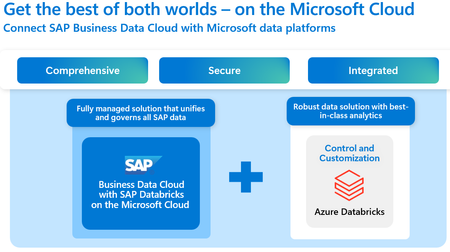
We’re thrilled to announce that SAP Business Data Cloud (SAP BDC) including SAP Databricks is now available on Microsoft Azure marking a major milestone in our strategic partnership with SAP and Databricks and our commitment to empowering customers with cutting-edge Data & AI capabilities. SAP BDC is a fully managed SaaS solution designed to unify, govern, and activate SAP and third-party data for advanced analytics and AI-driven decision-making. Customers can now deploy SAP BDC on Azure in US East, US West and Europe West, with additional regions coming soon, and unlock transformative insights from their enterprise data with the scale, security, and performance of Microsoft’s trusted cloud platform. Why SAP BDC on Azure Is a Game-Changer for Data & AI Deploying SAP BDC on Azure enables organizations to accelerate their Data & AI initiatives by modernizing their SAP Business Warehouse systems and leveraging a modern data architecture that includes SAP HANA Cloud, data lake files and connectivity to Microsoft technology. Whether it’s building AI-powered intelligent applications, enabling semantically rich data products, or driving predictive analytics, SAP BDC on Azure provides the foundation for scalable, secure, and context-rich decision-making. Running SAP BDC workloads on Microsoft Azure unlocks the full potential of enterprise data by integrating SAP systems with non-SAP data using Microsoft’s powerful Data & AI services - enabling customers to build intelligent applications grounded in critical business context. Why Azure is an Ideal Platform for Running SAP BDC Microsoft Azure stands out as a leading cloud platform for hosting SAP solutions, including SAP BDC. Azure’s global infrastructure, high-performance networking, and powerful Data & AI capabilities make it an ideal foundation for large-scale SAP workloads. When organizations face complex data environments and need seamless interoperability across tools, Azure’s resilient backbone and enterprise-grade services provide the scalability and reliability essential for building a robust SAP data architecture. Under the Hood: SAP Databricks in SAP BDC is Powered by Azure Databricks A key differentiator of SAP BDC on Azure is that SAP Databricks, a core component of BDC, runs on Azure Databricks—Microsoft’s first-party service. Azure Databricks is a fully managed first party service making Microsoft Azure the optimal cloud for running Databricks workloads. It uniquely offers: Native integration with Microsoft Entra ID for seamless access control. Optimized performance with Power BI, delivering unmatched analytics speed. Enterprise-grade security and compliance, inherent to Azure’s first-party services. Joint engineering and unified support from Microsoft and Databricks. Zero-copy data sharing between SAP BDC and Azure Databricks, enabling frictionless collaboration across platforms. This deep integration ensures that customers benefit from the full power of Azure’s AI, analytics, and governance capabilities while running SAP workloads. Expanding Global Reach: What’s Next While SAP BDC is now live in three Azure regions US East, US West and Europe - we’re just getting started. Over the next few months, availability will expand to additional Azure regions such as Brazil and Canada. For the remaining regions, a continuously updated roadmap can be found on the SAP Roadmap Explorer website Final Thoughts This launch reinforces Microsoft Azure’s longstanding partnership with SAP, backed by over 30 years of trusted partnership and co-innovation. With SAP BDC now available on Azure, customers can confidently modernize their data estate, unlock AI-driven insights, and drive business transformation at scale. Stay tuned as we continue to expand availability and bring even more Data & AI innovations to our joint customers over the next few months.Announcing Public Preview for Business Process Solutions
In today’s AI powered enterprises, success hinges on access to reliable, unified business information. Whether you are deploying AI-augmented workflows or fully autonomous agentic solutions, one thing is clear: trusted, consistent data is the fuel that drives intelligent outcomes. Yet in many organizations, data remains fragmented across best of breed applications – creating blind spots in cross-functional processes and throwing roadblocks in the path of automation. Microsoft is dedicated to tackle these challenges, delivering a unified data foundation that accelerates AI adoption, simplifies automation and reduces risk – empowering businesses to unlock the full potential of unified data analytics and agentic intelligence. Our new solution offers cross-functional insights across previously siloed environments and includes: Prebuilt data models for enterprise business applications in Microsoft Fabric Source system data mappings and transformations Prebuilt dashboards and reports in Power BI Prebuilt AI Agents in Copilot Studio (coming soon) Integrated Security and Compliance By unifying Microsoft’s Fabric and AI solutions we can rapidly accelerate transformation and derisk AI rollout through repeatable, reliable, prebuilt solutions. Functional Scope Our new solution currently supports a set of business applications and functional areas, enabling organizations to break down silos and drive actionable insights across their core processes. The platform covers key domains such as: Finance: Delivers a comprehensive view of financial performance, integrating data from general ledger, accounts receivable, and accounts payable systems. This enables finance teams to analyze trends, monitor compliance, and optimize cash flow management all from within Power BI. The associated Copilot agent provides not only access to this data via natural language but will also enable financial postings. Sales: Provides a complete perspective on customers’ opportunity to cash journeys, from initial opportunity through invoicing and payment via Power BI reports and dashboards. The associated Copilot agent can help improve revenue forecasting, by connecting structured ERP and CRM data with unstructured data from Microsoft 365, also tracking sales pipeline health and identify bottlenecks. Procurement: Supports strategic procurement and supplier management, consolidating purchase orders, goods receipts, and vendor invoicing data into a complete spend dashboard. This empowers procurement teams to optimize sourcing strategies, manage supplier risk, and control spend. Manufacturing: (coming soon): Will extend coverage to manufacturing and production processes, enabling organizations to optimize resource allocation and monitor production efficiency. Each item within Business Process Solutions is delivered as a complete, business-ready offering. These models are thoughtfully designed to ensure that organizations can move seamlessly from raw data to actionable execution. Key features include: Facts and Dimensions: Each model is structured to capture both transactional details (facts) and contextual information (dimensions), supporting granular analysis and robust reporting across business processes. Transformations: Built-in transformations automatically prepare data for reporting and analytics, making it compatible with Microsoft Fabric. For example, when a business user needs to compare sales results from Europe, Asia, and North America, the solution transformations handle currency conversion behind the scenes. This ensures that results are consistent across regions, making analysis straightforward and reliable—without the need for manual intervention or complex configuration. Insight to Action: Customers will be able to leverage prebuilt Copilot Agents within Business Process Solutions to turn insight into action. These agents are deeply integrated not only with Microsoft Fabric and Microsoft Teams, but also connected source applications, enabling users to take direct, contextual actions across systems based on real-time insights. By connecting unstructured data sources such as emails, chats, and documents from Microsoft 365 apps, the agents can provide a holistic and contextualized view to support smarter decisions. With embedded triggers and intelligent agents, automated responses could be initiated based on new insights -- streamlining decision-making and enabling proactive, data-driven operations. Ultimately, this will empower teams to not just understand what is happening on a wholistic level, but to also take faster and smarter actions, and with greater confidence. Authorizations: Data models are tailored to respect organizational security and access policies, ensuring that sensitive information is protected and only accessible to authorized users. The same user credential principles apply to the Copilot agents when interacting with/updating the source system in the user-context. Behind the scenes, the solution automatically provisions the required objects and infrastructure to build the data warehouse, removing the usual complexity of bringing data together. It guarantees consistency and reliability, so organizations can focus on extracting value from their data rather than managing technical details. This reliable data foundation serves as one of the key informants of the agentic business processes. Accelerated Insights with Prebuilt Analytics Building on these robust data models, Business Process Solutions offer a suite of prebuilt Power BI reports tailored to common business processes. These reports provide immediate access to key metrics and trends, such as financial performance, sales effectiveness, and procurement efficiency. Designed for rapid deployment, they allow organizations to: Start analyzing data from day one, without lengthy setup or customization. Adapt existing reports for your organization’s exact business needs. Demonstrate best practices for leveraging data models in analytics and decision-making. This approach accelerates time-to-value and also empowers users to explore new analytical scenarios and drive continuous improvement. Extensibility and Customization Every organization is unique and our new solution is designed to support this, allowing you to adapt analytics and data models to fit your specific processes and requirements. You can customize scope items, bring in your own tables and views, integrate new data sources as your business evolves, and combine data across Microsoft Fabric for deeper insights. Similarly, the associated agents will be customizable from Copilot Studio to adapt to your specific Enterprise apps configuration. This flexibility ensures that, no matter how your organization operates, Business Process Solutions helps you unlock the full value of your data. Data integration Business Process Solutions uses the same connectivity options as Microsoft Fabric and Copilot Studio but goes further by embedding best practices that make integration simpler and more effective. We recognize that no single pattern can address the diverse needs of all business applications. We also understand that many businesses have already invested in data extraction tools, which is why our solution supports a wide range of options, from native connectivity to third-party options that bring specialized capabilities to the table. With Business Process Solutions we ensure data can be interacted with in a reliable and high-performant way, whether working with massive volumes or complex data structures. Getting started If your organization is ready to unlock the value of unified analytics, getting started is simple. Just send us a request using the form at: https://aka.ms/JoinBusAnalyticsPreview. Our team will guide you through the next steps and help you begin your journey.Backup SAP Oracle Databases Using Azure VM Backup Snapshots
This blog article provides a comprehensive step-by-step guide for backing up SAP Oracle databases using Azure VM backup snapshots, ensuring data safety and integrity. Installation of CIFS Utilities: The process begins with the installation of cifs-utils on Oracle Linux, which is the recommended OS for running Oracle databases in the cloud. Setting Up Environment Variables: Users are instructed to define necessary environment variables for resource group and storage account names. Creating SMB Credentials: The guide explains how to create a folder for SMB credentials and retrieve the storage account key, emphasizing the need for appropriate permissions. Mounting SMB File Share: Instructions are provided for checking the accessibility of the storage account and mounting the SMB file share, which will serve as a backup location for archived logs. Preparing Oracle Database for Backup:Users must place the Oracle database in hot backup mode to ensure a consistent backup while allowing ongoing transactions. Initiating Snapshot Backup: Once the VM backup is configured, users can initiate a snapshot backup to capture the state of the virtual machine, including the Oracle database. Restoration Process: The document outlines the steps for restoring the Oracle database from the backup, including updating IP addresses and starting the database listener. Final Steps and Verification: Users are encouraged to verify the configuration and ensure that all necessary backups are completed successfully, including the SMB file share.
Azure Files NFS Encryption In Transit for SAP on Azure Systems
Azure Files NFS volumes now support encryption in-transit via TLS. With this enhancement, Azure Files NFS v4.1 offers the robust security that modern enterprises require, without compromising performance by ensuring all traffic between clients and servers is fully encrypted. Now Azure Files NFS data can be encrypted end-to-end: at rest, in transit, and across the network. Using Stunnel, an open-source TLS wrapper, Azure Files encrypts the TCP stream between the NFS client and Azure Files with strong encryption using AES-GCM, without needing Kerberos. This ensures data confidentiality while eliminating the need for complex setups or external authentication systems like Active Directory. The AZNFS utility package simplifies encrypted mounts by installing and setting up Stunnel on the client (Azure VMs). The AZNFS mount helper mounts the NFS shares with TLS support. The mount helper initializes dedicated stunnel client process for each storage account’s IP address. The stunnel client process listens on a local port for inbound traffic and then redirects encrypted nfs client traffic to the 2049 port where NFS server is listening on. The AZNFS package runs a background job called aznfswatchdog. It ensures that stunnel processes are running for each storage account and cleans up after all shares from the storage account are unmounted. If for some reason a stunnel process is terminated unexpectedly, the watchdog process restarts it. For more details, refer to the following document: How to encrypt data in transit for NFS shares Availability in Azure Regions All regions that support Azure Premium Files now support encryption in transit. Supported Linux releases For SAP on Azure environment, Azure Files NFS Encryption in Transit (EiT) is available for the following Operating System releases. SLES for SAP 15 SP4 onwards RHEL for SAP 8.6 onwards (EiT is currently not supported for file systems managed by Pacemaker clusters on RHEL.) Refer to SAP Note 1928533 for Operating system supportability for SAP on Azure systems. How to deploy Encryption in Transit (EiT) for Azure Files NFS Shares Refer to the SAP on Azure deployment planning guide about Using Azure Premium Files NFS and SMB for SAP workload As described in the planning guide, for SAP workloads, following are the supported uses of Azure Files NFS shares and EiT can be used for all the scenarios: sapmnt volume for a distributed SAP systems transport directory for SAP landscape /hana/shared for HANA scale-out. Review carefully the considerations for sizing /hana/shared, as appropriately sized /hana/shared volume contributes to system's stability file interface between your SAP landscape and other applications Deploy the Azure File NFS storage account. Refer to the standard documentation for creating the Azure Files storage account, file share and private endpoint. Create an NFS Azure file share Note : We can enforce EiT for all the file shares in the Azure Storage account by enabling ‘secure transfer required’ option. Deploy the mount helper (AZNFS) package on the Linux VM. Follow the instructions for your Linux distribution to install the package. Create the directories to mount the file shares. mkdir -p <full path of the directory> Mount the NFS File share. Refer to the section for mounting the Azure Files NFS EiT file share in Linux VMs. To mount the file share permanently by adding the mount commands in ‘/etc/fstab’. vi /etc/fstab sapnfs.file.core.windows.net:/sapnfsafs/sapnw1/sapmntNW1 /sapmnt/NW1 aznfs noresvport,vers=4,minorversion=1,sec=sys,_netdev 0 0 # Mount the file systems mount -a o File systems mentioned above are an example to explain the mount command syntax. o When adding nfs mount entry to /etc/fstab, the fstype is "nfs". However, to use AZNFS mount helper and EiT, we need to use the fstype as "aznfs" which is not known to the Operating System, so at boot time the server tries to mount these entries before the watchdog is active, and they may fail. Users should always add "_netdev" option to their /etc/fstab entries to make sure shares are mounted on reboot only after the required services (like network) are active. o We can add “notls” option in the mount command, if we don’t want to use the EiT but just want to use AZNFS mount helper to mount the file system. Also , we cannot mix EiT and no-EiT methods for different file systems using Azure Files NFS in the same Azure VM. Mount commands may fail to mount the file systems if EiT and no-EiT methods are used in the same VM o Mount helper supports private-endpoint based connections for Azure Files NFS EiT. o If SAP VM is custom domain joined, then we can use custom DNS FQDN OR short names for file share in the ‘/etc/fstab’ as its defined in the DNS. To verify the hostname resolution, check using ‘nslookup <hostname>’ and ‘getent host <hostname>’ commands. Mount the NFS File share as pacemaker cluster resource for SAP Central Services. In high availability setup of SAP Central Services, we may use file system as a resource in pacemaker cluster and it needs to be mounted using pacemaker cluster command. In the pacemaker commands to setup file system as cluster resource, we need to change the mount type to ‘aznfs’ from ‘nfs’. Also it’s recommended to use ‘_netdev’ in the options parameter. Following are the SAP Central Services setup scenarios in which Azure Files NFS is used as pacemaker resource agent, and we can use Azure Files NFS EiT. Azure VMs high availability for SAP NW on SLES with NFS on Azure Files Azure VMs high availability for SAP NW on RHEL with NFS on Azure Files For SUSE Linux: SUSE 15 SP4 (for SAP) and higher releases recognise the ‘aznfs’ as file system type in the pacemaker resource agent. SUSE recommends using simple mount approach for high availability setup of SAP Central services, in which all file systems are mounted using ‘/etc/fstab’ only. For RHEL Linux: RHEL 8.6 (for SAP) and higher releases will be recognising ‘aznfs’ as file system type in pacemaker resource agent. At the time of writing the blog, ‘aznfs’ as file system type is not yet recognised by the FileSystem resource agent(RS) on RHEL, hence this setup can’t be used at this moment. For SAP HANA scale-out with HSR setup We can use Azure Files NFS EiT for SAP HANA scale-out with HSR setup as described in the below docs. SAP HANA scale-out with HSR and Pacemaker on SLES SAP HANA scale-out with HSR and Pacemaker on RHEL We need to mount ‘/hana/shared’ File system with EiT by defining the filesystem type as ‘aznfs’ in ‘/etc/fstab’. Also it’s recommended to use ‘_netdev’ in the options parameter. For SUSE Linux: In the Create File system resource section with SAP HANA high availability “SAPHanaSR-ScaleOut” package, in which we create a dummy file system cluster resource, which will monitor and report failures for ‘/hana/shared’ file system, we can continue to follow the steps as it is in the above document with ‘fstype=nfs4’. ‘/hana/shared’ file system will still be using EiT as defined in ‘/etc/fstab’. For SAP HANA high availability “SAPHanaSR-angi”, there are no further actions needed to use Azure File NFS EiT. For RHEL Linux: In the Create File system resource section, we can replace the file system type to ‘aznfs’ from ‘nfs’ in the pacemaker resource configuration for ‘/hana/shared’ file systems. Validation of in-transit data Encryption for Azure Files NFS. Refer to Verify that the in-transit data encryption succeeded section to check and confirm if EiT is successfully working. Summary Go ahead with EiT!! Simplified deployment of Encryption in Transit of Azure Files Premium NFS (Locally redundant Storage / Zonal redundant Storage) will strengthen the security footprint of Production and non-Production SAP on Azure environments.