saas
24 TopicsDeploying DNS Private Resolvers and Private DNS Zones for Azure AI Supported Services
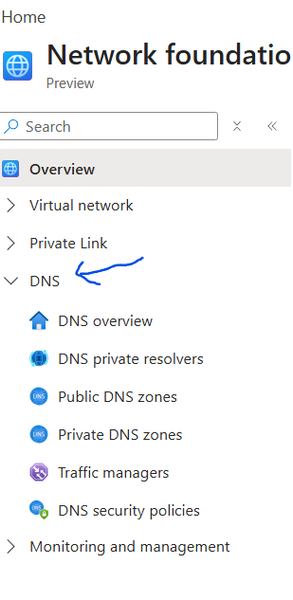
Private Networks: Private DNS Zones: Resolves domain names to private IPs within Azure virtual networks without exposing them to the internet. Private DNS Zones are global, you don’t need to create multiple same private DNS Zones, you can reuse the same zones as it’s global DNS Private Resolvers: Fully managed service that enables DNS resolution between Azure VNets and on-premises networks without custom DNS servers. DNS Private resolvers are regional, which means if you have Azure EAST US and WEST US 2 regions, you need to create DNS Private resolvers in both regions linked to Private DNS Zones, you can adopt centralized or distributed DNS Private resolvers, I will discuss both options later in this article Public Networks: <In this part – not focusing on Public Networks> Public DNS Zones: Resolves internet-facing domain names to publicly accessible IP addresses Traffic Managers: DNS-based traffic load balancer that routes client requests to the best available global endpoint DNS Security Policy: Controls and protects DNS resolution behavior (e.g., filtering, forwarding, and access rules) to secure name resolution and prevent misuse **Note: 1. Follow Prerequisites to deploy resources. 2. A common misconception is that VNet peering enables DNS resolution. In reality, private DNS zones are only accessible to VNets that are explicitly linked to them, peering provides connectivity, but not name resolution. In the following snapshot à Azure Portal à Network Foundations à DNS, lets explore individual DNS Services offered and later in this document, we will interconnect **Credits to Microsoft Azure Portal Design team for creating new grouped views – you can check out for more – like compute infrastructure, Hybrid, Backup Now, let’s delve into scenario 01: I have grabbed the following snapshot from Azure AI Landing Zones and removed non-network Azure resources to focus only on private Network components, **Credits to AI Landing Zone team for the diagram, Original Version: Inbound Zoom in view with End-to-End Flow Hop Summary 1 Client initiates request 2 DNS query sent to on-prem DNS 3 DNS query forwarded to Azure 4 Azure DNS Resolver processes query 5 Private DNS resolves to Private Endpoint IP 6 Traffic routed via VNet peering 7 Traffic hits Private Endpoint 8 Request served by Azure Files *Link Private DNS to DNS resolvers in other regions, Private DNS is GLOBAL and DNS Resolvers are regional Example Snapshot of entire flow: Nslookup from Client machine, Domain – DNS Conditional Forwarder configuration Note 1: Make sure you selected “All DNS Servers in this forest” for replication, otherwise users pointed to some other domain will be unable to resolve Verifying Connectivity with PsPing <credit to Sysinternals team PsPing > PsPing, a tool from Sysinternals, is highly effective for verifying network connectivity from on-premises environments to Azure resources on specific ports. This is particularly useful when you need to ensure connectivity to ports such as 445, 443, 1433, 1521, or any other port required by Azure services you intend to access from either on-premises locations or other cloud environments. By using PsPing, you can test and confirm that the necessary ports are open and accessible, which is crucial for troubleshooting connectivity issues and ensuring smooth communication between your on-premises infrastructure and Azure-hosted resources. Ensure your firewall is set to allow traffic DNS private resolvers – inbound configuration Private DNS Configuration Virtual Network links enable to your private dns Make sure you have peer between hub and spoke Private Endpoint configuration Storage Account configuration “Replace the file share with any supported Azure service that uses Private Endpoints, and follow the same guidance.” 2. Outbound <flow and resources colored with blue> part 2 upcoming soon966Views0likes0CommentsEnd-to-end TLS with AKS, Azure Front Door, Azure Private Link Service, and NGINX Ingress Controller
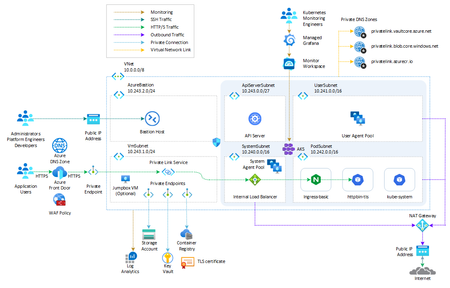
This article shows how Azure Front Door Premium can be set to use a Private Link Service to expose an AKS-hosted workload via NGINX Ingress Controller configured to use a private IP address on the internal load balancer.17KViews4likes4CommentsFastTrack for Azure (FTA) program retiring December 2024
ATTENTION: As of December 31st, 2024, the FastTrack for Azure (FTA) program will be retired. FTA will support any projects currently in motion to ensure successful completion by December 31st, 2024, but will no longer accept new nominations. For more information on available programs and resources, visit: Azure Migrate, Modernize, and Innovate | Microsoft Azure1.6KViews1like0CommentsCreate an Azure OpenAI, LangChain, ChromaDB, and Chainlit chat app in AKS using Terraform
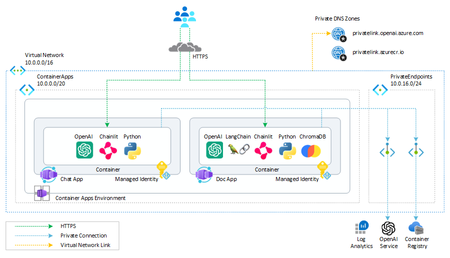
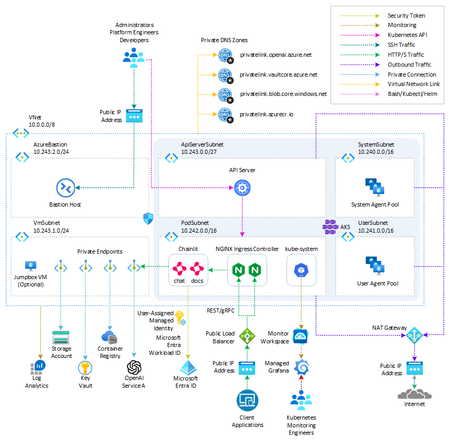
This sample shows how to create two AKS-hosted chat applications that use OpenAI, LangChain, ChromaDB, and Chainlit using Python and deploy them to an AKS environment built in Terraform.29KViews12likes4Comments