route
6 TopicsDiscover the Power of HD Isochrones in Azure Maps Route Range API
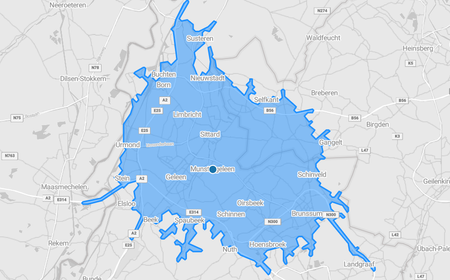
In the ever-evolving world of location-based services (LBS), precision and accuracy are key. Whether you're planning business expansions, optimizing logistics, or enhancing urban mobility, understanding travel times and accessibility is essential. Enter isochrones—a revolutionary way to visualize areas reachable within a given travel time. Azure Maps, Microsoft’s comprehensive geospatial platform, has taken isochrone generation to the next level with its updated Route Range API. Featuring HD isochrone support and specialized truck routing capabilities, this powerful API is set to transform how businesses and planners make data-driven decisions. Why Isochrones Matter Isochrones provide a dynamic alternative to traditional fixed-distance buffers. Instead of simply drawing a circle around a location, isochrones map out the actual area that can be reached within a certain time frame. This approach takes into account real-world factors like road networks, traffic conditions, and different modes of transportation. For example, a retail chain can use isochrones to determine how far customers can travel to a store within 15 minutes, while a logistics company might analyze delivery times for different service areas. This real-time, time-based insight enables more informed decisions across industries. Unlocking Precision with HD Isochrones The new HD isochrone functionality in the Azure Maps Route Range API offers significantly higher resolution and detail. This means you can generate highly precise maps of reachable areas for time intervals ranging from minutes to several hours (up to 10 million seconds!). Picture a city planner evaluating the impact of a new transit line: with HD isochrones, they can visualize how accessibility to key destinations improves over various time periods. Or imagine a franchise business assessing the best location for its next store—now, they can precisely map out the potential trade area based on realistic travel times. Specialized Capabilities for Truck Routing One of the standout features of the updated API is its advanced truck routing support. Unlike standard car-based routing, truck routing considers a host of additional factors: Vehicle dimensions and weight restrictions: Ensures routes comply with height, width, and weight limits. Hazardous materials restrictions: Avoids roads where certain materials are prohibited. Truck-specific road features: Avoiding tunnels or bridges. These capabilities are invaluable for logistics companies managing fleets. By generating truck-specific isochrones, businesses can optimize delivery routes, reduce fuel costs, and improve on-time performance—all while ensuring compliance with local regulations. For example, a distribution center might use truck isochrones to determine how far deliveries can reach within a specified time window, considering truck-specific constraints. This insight can help optimize delivery zones, improve service levels, and even reduce the environmental impact of operations. Transforming Business Decisions with Isochrones The power of HD isochrones extends beyond logistics and retail. Urban planners can leverage them to design more efficient public transportation networks, ensuring that key services like healthcare and education are accessible within reasonable travel times. City governments can simulate the effects of road closures or new infrastructure projects, minimizing disruptions and improving traffic flow. Franchise owners, on the other hand, can use isochrones to better understand customer reach and minimize cannibalization—the overlap between existing and new store locations. By analyzing travel times and customer access, businesses can strategically expand without diluting their market share. Bringing It All Together Imagine a logistics manager planning delivery routes from a central warehouse. Using the Azure Maps Route Range API, they can generate a truck-specific isochrone for a 60-minute delivery window. Here's how it works: Sample Request POST https://atlas.microsoft.com/route/range?api-version=2024-07-01-preview { "type": "Feature", "geometry": { "type": "Point", "coordinates": [ // Warehouse location 5.86605, 50.9745 ] }, "properties": { "timeBudgetInSec": 3600, // 1 hour in seconds "travelMode": "truck", // Truck mode for routing "vehicleSpec": { "height": 4.2, // Height of the vehicle in meters (13.5 feet) "length": 22 , // Length of the vehicle in meters (72 feet) "width": 2.6 // Width of the vehicle in meters (8.5 feet) } } } What Happens Next? The API returns a detailed geoJSON file outlining the area accessible within an hour. This data can be visualized on a map, providing a clear picture of delivery zones. The manager can adjust operations to maximize coverage while ensuring that all regulatory and safety requirements are met. Start Exploring Today With its updated Route Range API, Azure Maps is setting a new standard for geospatial analysis. From precision trade areas to optimized logistics, the possibilities are vast. Whether you're in retail, logistics, urban planning, or beyond, HD isochrones and truck routing can help you make smarter, data-driven decisions. Curious to see how these features can benefit your organization? Explore the official documentation to get started today!1.1KViews3likes2CommentsAzure Maps: Understanding View vs. Routing Coordinates
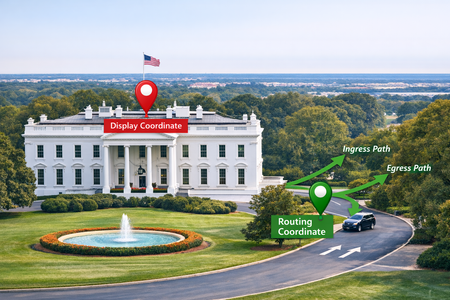
When you work with Azure Maps long enough, you will eventually run into a subtle but important detail: the platform returns two different types of coordinates for the same address. And while they may look interchangeable, they behave very differently once you start routing, calculating travel times, or dropping pins on a map. Let’s break down what each represents and how to use them correctly when building location‑intelligent applications. Why Azure Maps Has More Than One Coordinate for a Place Geocoders, including Azure Maps, are designed to satisfy two competing needs: Show the place in the visually “accurate” spot on a map. Get people or goods to a real, accessible point on the road network. The coordinate that satisfies the first need is rarely the same answer for the second, in fact it can be wildly off. If you have ever visited a National Park or other large location where the entrance is far from where you would display the center of the park, you will note that the difference between these coordinates can be many miles apart and often you can't drive to the exact center, so we would say the View coordinate is not Routable. So Azure Maps provides them separately; one to power the visual map experience, the other to power the routing engine. The View Coordinate: Your Visual Anchor Point Think of the Azure Maps view coordinate as “the place where the map pin should sit.” It may come from an address parcel, a building footprint centroid, or a point-of-interest geometry. Azure Maps will provide whatever option that produces the most natural visual representation of the feature on the map. This is the important part for our topic: a view coordinate is not guaranteed to land on a road or even near one. It might be in the center of a large warehouse, deep inside a shopping mall footprint, or somewhere else that makes sense visually but is effectively unreachable from the road network. View coordinates are great for anything that involves visual context such as placing a point on the map, centering the map on a search result, running spatial clustering on data values, or doing proximity lookups. They’re simply not intended for navigation. The Routing Coordinate: Your Navigable Access Point Routing coordinates serve a very different purpose. Azure Maps generates them to represent an access point. The point where a vehicle, pedestrian, or cyclist can legally and realistically approach or leave the location from the road network. This usually means: The point is snapped to the closest routable road segment. It’s positioned where a driver or pedestrian can actually arrive (e.g., the driveway, street entrance, or legal access point). It includes the orientation and topology needed for the routing engine to produce correct ETAs, distance calculations, and directions. When you're calling Azure Maps Routing APIs—calculateRoute, routeRange, distance matrices, isochrones, multi‑itinerary optimization—you should always feed the routing coordinate into the engine. Feeding a view coordinate instead may cause the service to snap to the wrong part of the network, or worse, find no viable route at all. How Azure Maps Exposes These Coordinates Azure Maps surfaces routing coordinates and view coordinates through structured fields in its search and geocoding responses. The naming varies by API, but you will often see: "usageTypes": [ "Display" ] denotes position or displayPosition → View coordinate "usageTypes": [ "Route" ] denotes routePosition, accessPoint, or entryPoints → Routing coordinate Azure Maps provides both and should your scenario involve travel movement (even indirectly), the routing coordinate is the authoritative choice. What Goes Wrong When You Swap Them If you use a view coordinate for routing, you can be asking for routes that terminate inside a building footprint, on the wrong side of the street, or at an incorrect driveway. You might also see unexpected route endpoints because the routing engine is forced to snap the point to whichever road segment it thinks is closest, which might not be the correct one. On the other hand, if you use a routing coordinate for display, your pins may look "off" because the access point for an address could be far from the building’s center. This is why the distinction matters: one is about realism, the other about navigability. The Upside: Using Them Correctly in Your Applications When building an end‑to‑end Azure Maps experience, a good mental model is: Map UI? Use the view coordinate. Anything involving routing logic? Use the routing coordinate. That includes distance calculations, service‑area modeling, route planning, delivery optimization, pickup/drop-off flows, fleet operations, and anything else where “how the user gets there” matters just as much as “where it is.” With this separation of geocode results, you can trust Azure Maps to keep your visual experience clean while ensuring the routing engine has the precision it needs to get users where they actually need to go. To find out more about Azure Maps Geocoding and our new Azure Maps AutoComplete experience, check out Search for a location using Azure Maps Search services | Microsoft Learn453Views1like0CommentsAdvanced Route Tracking for Transportation Services
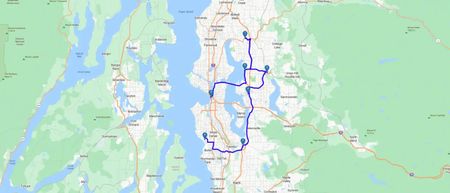
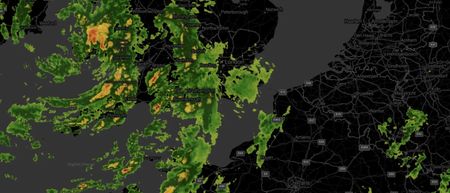
Azure Maps routing services can help ensure that the right professionals use the best route to reach their destination on time. The services can also factor-in variables such as vehicle data, traffic information, weather events, and more to find the best route for a call, while scaling this across an entire department.599Views1like0Comments