retrieval augmented generation
36 TopicsMicrosoft Build 2024: Essential Guide for AI Developers at Startups and Cloud-First Companies
Generative AI is advancing fast, with OpenAI’s GPT-4o leading the way. GPT-4o boasts improved multilingual understanding, faster responses, lower costs, and real-time processing of text, audio, and images. This boosts new Generative AI (GenAI) use cases. Explore cutting-edge solutions like models, frameworks, vector databases, and LLM observability platforms. Born-in-the-cloud companies are at the forefront of this AI revolution. Be part of the future at Microsoft Build 2024!Building Retrieval Augmented Generation on VSCode & AI Toolkit
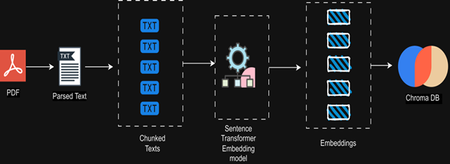
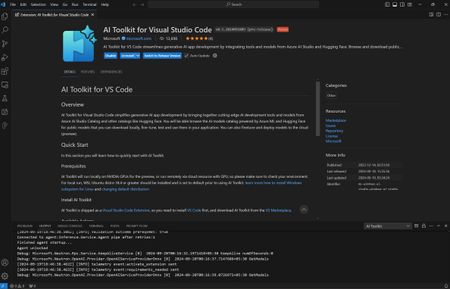
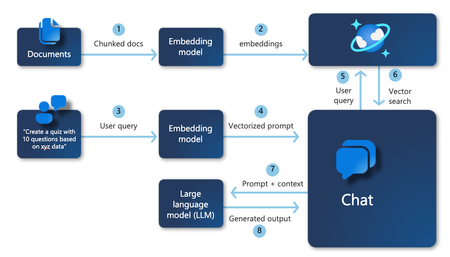
LLMs usually have limited knowledge about specific domains. Retrieval Augmented Generation (RAG) helps LLMs be more accurate and give relevant output to specific domains and datasets. We will see how we can do this for local models using AI Toolkit,Vectorless Reasoning-Based RAG: A New Approach to Retrieval-Augmented Generation
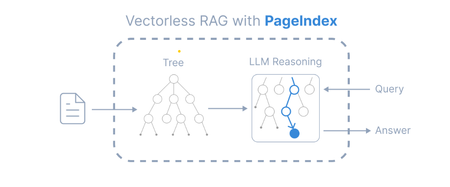
Introduction Retrieval-Augmented Generation (RAG) has become a widely adopted architecture for building AI applications that combine Large Language Models (LLMs) with external knowledge sources. Traditional RAG pipelines rely heavily on vector embeddings and similarity search to retrieve relevant documents. While this works well for many scenarios, it introduces challenges such as: Requires chunking documents into small segments Important context can be split across chunks Embedding generation and vector databases add infrastructure complexity A new paradigm called Vectorless Reasoning-Based RAG is emerging to address these challenges. One framework enabling this approach is PageIndex, an open-source document indexing system that organizes documents into a hierarchical tree structure and allows Large Language Models (LLMs) to perform reasoning-based retrieval over that structure. Vectorless Reasoning-Based RAG Instead of vectors, this approach uses structured document navigation. User Query ->Document Tree Structure ->LLM Reasoning ->Relevant Nodes Retrieved ->LLM Generates Answer This mimics how humans read documents: Look at the table of contents Identify relevant sections Read the relevant content Answer the question Core features No Vector Database: It relies on document structure and LLM reasoning for retrieval. It does not depend on vector similarity search. No Chunking: Documents are not split into artificial chunks. Instead, they are organized using their natural structure, such as pages and sections. Human-like Retrieval: The system mimics how human experts read documents. It navigates through sections and extracts information from relevant parts. Better Explainability and Traceability: Retrieval is based on reasoning. The results can be traced back to specific pages and sections. This makes the process easier to interpret. It avoids opaque and approximate vector search, often called “vibe retrieval.” When to Use Vectorless RAG Vectorless RAG works best when: Data is structured or semi-structured Documents have clear metadata Knowledge sources are well organized Queries require reasoning rather than semantic similarity Examples: enterprise knowledge bases internal documentation systems compliance and policy search healthcare documentation financial reporting Implementing Vectorless RAG with Azure AI Foundry Step 1 : Install Pageindex using pip command, from pageindex import PageIndexClient import pageindex.utils as utils # Get your PageIndex API key from https://dash.pageindex.ai/api-keys PAGEINDEX_API_KEY = "YOUR_PAGEINDEX_API_KEY" pi_client = PageIndexClient(api_key=PAGEINDEX_API_KEY) Step 2 : Set up your LLM Example using Azure OpenAI: from openai import AsyncAzureOpenAI client = AsyncAzureOpenAI( api_key=AZURE_OPENAI_API_KEY, azure_endpoint=AZURE_OPENAI_ENDPOINT, api_version=AZURE_OPENAI_API_VERSION ) async def call_llm(prompt, temperature=0): response = await client.chat.completions.create( model=AZURE_DEPLOYMENT_NAME, messages=[{"role": "user", "content": prompt}], temperature=temperature ) return response.choices[0].message.content.strip() Step 3: Page Tree Generation import os, requests pdf_url = "https://arxiv.org/pdf/2501.12948.pdf" //give the pdf url for tree generation, here given one for example pdf_path = os.path.join("../data", pdf_url.split('/')[-1]) os.makedirs(os.path.dirname(pdf_path), exist_ok=True) response = requests.get(pdf_url) with open(pdf_path, "wb") as f: f.write(response.content) print(f"Downloaded {pdf_url}") doc_id = pi_client.submit_document(pdf_path)["doc_id"] print('Document Submitted:', doc_id) Step 4 : Print the generated pageindex tree structure if pi_client.is_retrieval_ready(doc_id): tree = pi_client.get_tree(doc_id, node_summary=True)['result'] print('Simplified Tree Structure of the Document:') utils.print_tree(tree) else: print("Processing document, please try again later...") Step 5 : Use LLM for tree search and identify nodes that might contain relevant context import json query = "What are the conclusions in this document?" tree_without_text = utils.remove_fields(tree.copy(), fields=['text']) search_prompt = f""" You are given a question and a tree structure of a document. Each node contains a node id, node title, and a corresponding summary. Your task is to find all nodes that are likely to contain the answer to the question. Question: {query} Document tree structure: {json.dumps(tree_without_text, indent=2)} Please reply in the following JSON format: {{ "thinking": "<Your thinking process on which nodes are relevant to the question>", "node_list": ["node_id_1", "node_id_2", ..., "node_id_n"] }} Directly return the final JSON structure. Do not output anything else. """ tree_search_result = await call_llm(search_prompt) Step 6 : Print retrieved nodes and reasoning process node_map = utils.create_node_mapping(tree) tree_search_result_json = json.loads(tree_search_result) print('Reasoning Process:') utils.print_wrapped(tree_search_result_json['thinking']) print('\nRetrieved Nodes:') for node_id in tree_search_result_json["node_list"]: node = node_map[node_id] print(f"Node ID: {node['node_id']}\t Page: {node['page_index']}\t Title: {node['title']}") Step 7: Answer generation node_list = json.loads(tree_search_result)["node_list"] relevant_content = "\n\n".join(node_map[node_id]["text"] for node_id in node_list) print('Retrieved Context:\n') utils.print_wrapped(relevant_content[:1000] + '...') answer_prompt = f""" Answer the question based on the context: Question: {query} Context: {relevant_content} Provide a clear, concise answer based only on the context provided. """ print('Generated Answer:\n') answer = await call_llm(answer_prompt) utils.print_wrapped(answer) When to Use Each Approach Both vector-based RAG and vectorless RAG have their strengths. Choosing the right approach depends on the nature of the documents and the type of retrieval required. When to Use Vector Database–Based RAG Vector-based retrieval works best when dealing with large collections of unrelated or loosely structured documents. In such cases, semantic similarity is often sufficient to identify relevant information quickly. Use vector RAG when: Searching across many independent documents Semantic similarity is sufficient to locate relevant content Real-time retrieval is required over very large datasets Common use cases include: Customer support knowledge bases Conversational chatbots Product and content search systems When to Use Vectorless RAG Vectorless approaches such as PageIndex are better suited for long, structured documents where understanding the logical organization of the content is important. Use vectorless RAG when: Documents contain clear hierarchical structure Logical reasoning across sections is required High retrieval accuracy is critical Typical examples include: Financial filings and regulatory reports Legal documents and contracts Technical manuals and documentation Academic and research papers In these scenarios, navigating the document structure allows the system to identify the exact section that logically contains the answer, rather than relying only on semantic similarity. Conclusion Vector databases significantly advanced RAG architectures by enabling scalable semantic search across large datasets. However, they are not the optimal solution for every type of document. Vectorless approaches such as PageIndex introduce a different philosophy: instead of retrieving text that is merely semantically similar, they retrieve text that is logically relevant by reasoning over the structure of the document. As RAG architectures continue to evolve, the future will likely combine the strengths of both approaches. Hybrid systems that integrate vector search for broad retrieval and reasoning-based navigation for precision may offer the best balance of scalability and accuracy for enterprise AI applications.Generative AI for Beginners - Full Videos Series Released!
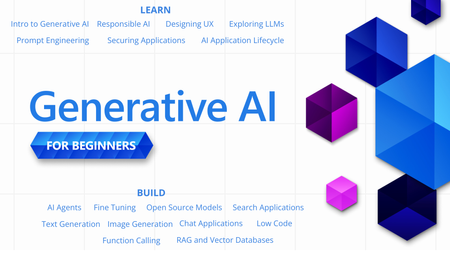
With so many new technologies, tools and terms in the world of Generative AI, it can be hard to know where to start or what to learn next. "Generative AI for Beginners" is designed to help you on your learning journey no matter where you are now. We are happy announce that the "Generative AI for Beginners" course has received a major refresh - 18 new videos for each lesson.
Getting Started with the AI Dev Gallery
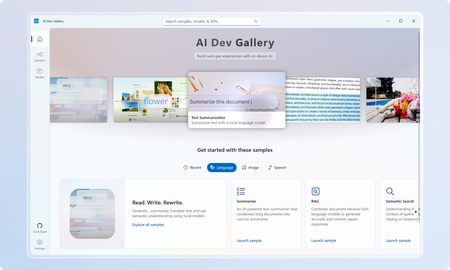
March Update: The Gallery is now available on the Microsoft Store! The AI Dev Gallery is a new open-source project designed to inspire and support developers in integrating on-device AI functionality into their Windows apps. It offers an intuitive UX for exploring and testing interactive AI samples powered by local models. Key features include: Quickly explore and download models from well-known sources on GitHub and HuggingFace. Test different models with interactive samples over 25 different scenarios, including text, image, audio, and video use cases. See all relevant code and library references for every sample. Switch between models that run on CPU and GPU depending on your device capabilities. Quickly get started with your own projects by exporting any sample to a fresh Visual Studio project that references the same model cache, preventing duplicate downloads. Part of the motivation behind the Gallery was exposing developers to the host of benefits that come with on-device AI. Some of these benefits include improved data security and privacy, increased control and parameterization, and no dependence on an internet connection or third-party cloud provider. Requirements Device Requirements Minimum OS Version: Windows 10, version 1809 (10.0; Build 17763) Architecture: x64, ARM64 Memory: At least 16 GB is recommended Disk Space: At least 20GB free space is recommended GPU: 8GB of VRAM is recommended for running samples on the GPU Using the Gallery The AI Dev Gallery has can be navigated in two ways: The Samples View The Models View Navigating Samples In this view, samples are broken up into categories (Text, Code, Image, etc.) and then into more specific samples, like in the Translate Text pictured below: On clicking a sample, you will be prompted to choose a model to download if you haven’t run this sample before: Next to the model you can see the size of the model, whether it will run on CPU or GPU, and the associated license. Pick the model that makes the most sense for your machine. You can also download new models and change the model for a sample later from the sample view. Just click the model drop down at the top of the sample: The last thing you can do from the Sample pane is view the sample code and export the project to Visual Studio. Both buttons are found in the top right corner of the sample, and the code view will look like this: Navigating Models If you would rather navigate by models instead of samples, the Gallery also provides the model view: The model view contains a similar navigation menu on the right to navigate between models based on category. Clicking on a model will allow you to see a description of the model, the versions of it that are available to download, and the samples that use the model. Clicking on a sample will take back over to the samples view where you can see the model in action. Deleting and Managing Models If you need to clear up space or see download details for the models you are using, you can head over the Settings page to manage your downloads: From here, you can easily see every model you have downloaded and how much space on your drive they are taking up. You can clear your entire cache for a fresh start or delete individual models that you are no longer using. Any deleted model can be redownload through either the models or samples view. Next Steps for the Gallery The AI Dev Gallery is still a work in progress, and we plan on adding more samples, models, APIs, and features, and we are evaluating adding support for NPUs to take the experience even further If you have feedback, noticed a bug, or any ideas for features or samples, head over to the issue board and submit an issue. We also have a discussion board for any other topics relevant to the Gallery. The Gallery is an open-source project, and we would love contribution, feedback, and ideation! Happy modeling!7.1KViews5likes3Comments