retrieval augmented generation
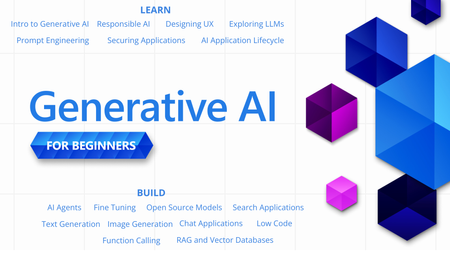
36 TopicsGenerative AI for Beginners - Full Videos Series Released!
With so many new technologies, tools and terms in the world of Generative AI, it can be hard to know where to start or what to learn next. "Generative AI for Beginners" is designed to help you on your learning journey no matter where you are now. We are happy announce that the "Generative AI for Beginners" course has received a major refresh - 18 new videos for each lesson.Essential Microsoft Resources for MVPs & the Tech Community from the AI Tour
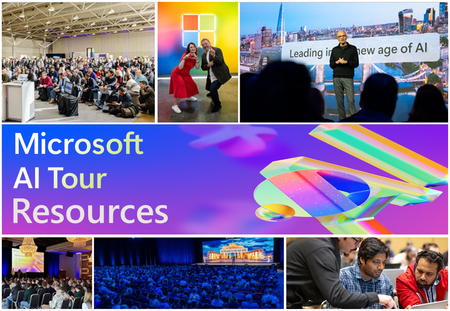
Unlock the power of Microsoft AI with redeliverable technical presentations, hands-on workshops, and open-source curriculum from the Microsoft AI Tour! Whether you’re a Microsoft MVP, Developer, or IT Professional, these expertly crafted resources empower you to teach, train, and lead AI adoption in your community. Explore top breakout sessions covering GitHub Copilot, Azure AI, Generative AI, and security best practices—designed to simplify AI integration and accelerate digital transformation. Dive into interactive workshops that provide real-world applications of AI technologies. Take it a step further with Microsoft’s Open-Source AI Curriculum, offering beginner-friendly courses on AI, Machine Learning, Data Science, Cybersecurity, and GitHub Copilot—perfect for upskilling teams and fostering innovation. Don’t just learn—lead. Access these resources, host impactful training sessions, and drive AI adoption in your organization. Start sharing today! Explore now: Microsoft AI Tour Resources.
Getting Started with the AI Dev Gallery
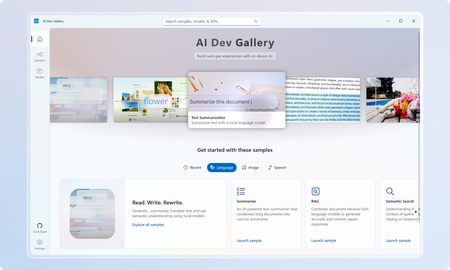
March Update: The Gallery is now available on the Microsoft Store! The AI Dev Gallery is a new open-source project designed to inspire and support developers in integrating on-device AI functionality into their Windows apps. It offers an intuitive UX for exploring and testing interactive AI samples powered by local models. Key features include: Quickly explore and download models from well-known sources on GitHub and HuggingFace. Test different models with interactive samples over 25 different scenarios, including text, image, audio, and video use cases. See all relevant code and library references for every sample. Switch between models that run on CPU and GPU depending on your device capabilities. Quickly get started with your own projects by exporting any sample to a fresh Visual Studio project that references the same model cache, preventing duplicate downloads. Part of the motivation behind the Gallery was exposing developers to the host of benefits that come with on-device AI. Some of these benefits include improved data security and privacy, increased control and parameterization, and no dependence on an internet connection or third-party cloud provider. Requirements Device Requirements Minimum OS Version: Windows 10, version 1809 (10.0; Build 17763) Architecture: x64, ARM64 Memory: At least 16 GB is recommended Disk Space: At least 20GB free space is recommended GPU: 8GB of VRAM is recommended for running samples on the GPU Using the Gallery The AI Dev Gallery has can be navigated in two ways: The Samples View The Models View Navigating Samples In this view, samples are broken up into categories (Text, Code, Image, etc.) and then into more specific samples, like in the Translate Text pictured below: On clicking a sample, you will be prompted to choose a model to download if you haven’t run this sample before: Next to the model you can see the size of the model, whether it will run on CPU or GPU, and the associated license. Pick the model that makes the most sense for your machine. You can also download new models and change the model for a sample later from the sample view. Just click the model drop down at the top of the sample: The last thing you can do from the Sample pane is view the sample code and export the project to Visual Studio. Both buttons are found in the top right corner of the sample, and the code view will look like this: Navigating Models If you would rather navigate by models instead of samples, the Gallery also provides the model view: The model view contains a similar navigation menu on the right to navigate between models based on category. Clicking on a model will allow you to see a description of the model, the versions of it that are available to download, and the samples that use the model. Clicking on a sample will take back over to the samples view where you can see the model in action. Deleting and Managing Models If you need to clear up space or see download details for the models you are using, you can head over the Settings page to manage your downloads: From here, you can easily see every model you have downloaded and how much space on your drive they are taking up. You can clear your entire cache for a fresh start or delete individual models that you are no longer using. Any deleted model can be redownload through either the models or samples view. Next Steps for the Gallery The AI Dev Gallery is still a work in progress, and we plan on adding more samples, models, APIs, and features, and we are evaluating adding support for NPUs to take the experience even further If you have feedback, noticed a bug, or any ideas for features or samples, head over to the issue board and submit an issue. We also have a discussion board for any other topics relevant to the Gallery. The Gallery is an open-source project, and we would love contribution, feedback, and ideation! Happy modeling!7.2KViews5likes3CommentsVectorless Reasoning-Based RAG: A New Approach to Retrieval-Augmented Generation
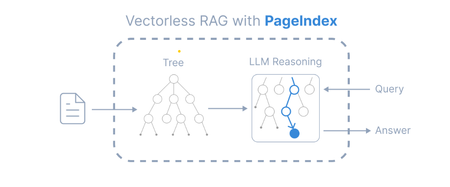
Introduction Retrieval-Augmented Generation (RAG) has become a widely adopted architecture for building AI applications that combine Large Language Models (LLMs) with external knowledge sources. Traditional RAG pipelines rely heavily on vector embeddings and similarity search to retrieve relevant documents. While this works well for many scenarios, it introduces challenges such as: Requires chunking documents into small segments Important context can be split across chunks Embedding generation and vector databases add infrastructure complexity A new paradigm called Vectorless Reasoning-Based RAG is emerging to address these challenges. One framework enabling this approach is PageIndex, an open-source document indexing system that organizes documents into a hierarchical tree structure and allows Large Language Models (LLMs) to perform reasoning-based retrieval over that structure. Vectorless Reasoning-Based RAG Instead of vectors, this approach uses structured document navigation. User Query ->Document Tree Structure ->LLM Reasoning ->Relevant Nodes Retrieved ->LLM Generates Answer This mimics how humans read documents: Look at the table of contents Identify relevant sections Read the relevant content Answer the question Core features No Vector Database: It relies on document structure and LLM reasoning for retrieval. It does not depend on vector similarity search. No Chunking: Documents are not split into artificial chunks. Instead, they are organized using their natural structure, such as pages and sections. Human-like Retrieval: The system mimics how human experts read documents. It navigates through sections and extracts information from relevant parts. Better Explainability and Traceability: Retrieval is based on reasoning. The results can be traced back to specific pages and sections. This makes the process easier to interpret. It avoids opaque and approximate vector search, often called “vibe retrieval.” When to Use Vectorless RAG Vectorless RAG works best when: Data is structured or semi-structured Documents have clear metadata Knowledge sources are well organized Queries require reasoning rather than semantic similarity Examples: enterprise knowledge bases internal documentation systems compliance and policy search healthcare documentation financial reporting Implementing Vectorless RAG with Azure AI Foundry Step 1 : Install Pageindex using pip command, from pageindex import PageIndexClient import pageindex.utils as utils # Get your PageIndex API key from https://dash.pageindex.ai/api-keys PAGEINDEX_API_KEY = "YOUR_PAGEINDEX_API_KEY" pi_client = PageIndexClient(api_key=PAGEINDEX_API_KEY) Step 2 : Set up your LLM Example using Azure OpenAI: from openai import AsyncAzureOpenAI client = AsyncAzureOpenAI( api_key=AZURE_OPENAI_API_KEY, azure_endpoint=AZURE_OPENAI_ENDPOINT, api_version=AZURE_OPENAI_API_VERSION ) async def call_llm(prompt, temperature=0): response = await client.chat.completions.create( model=AZURE_DEPLOYMENT_NAME, messages=[{"role": "user", "content": prompt}], temperature=temperature ) return response.choices[0].message.content.strip() Step 3: Page Tree Generation import os, requests pdf_url = "https://arxiv.org/pdf/2501.12948.pdf" //give the pdf url for tree generation, here given one for example pdf_path = os.path.join("../data", pdf_url.split('/')[-1]) os.makedirs(os.path.dirname(pdf_path), exist_ok=True) response = requests.get(pdf_url) with open(pdf_path, "wb") as f: f.write(response.content) print(f"Downloaded {pdf_url}") doc_id = pi_client.submit_document(pdf_path)["doc_id"] print('Document Submitted:', doc_id) Step 4 : Print the generated pageindex tree structure if pi_client.is_retrieval_ready(doc_id): tree = pi_client.get_tree(doc_id, node_summary=True)['result'] print('Simplified Tree Structure of the Document:') utils.print_tree(tree) else: print("Processing document, please try again later...") Step 5 : Use LLM for tree search and identify nodes that might contain relevant context import json query = "What are the conclusions in this document?" tree_without_text = utils.remove_fields(tree.copy(), fields=['text']) search_prompt = f""" You are given a question and a tree structure of a document. Each node contains a node id, node title, and a corresponding summary. Your task is to find all nodes that are likely to contain the answer to the question. Question: {query} Document tree structure: {json.dumps(tree_without_text, indent=2)} Please reply in the following JSON format: {{ "thinking": "<Your thinking process on which nodes are relevant to the question>", "node_list": ["node_id_1", "node_id_2", ..., "node_id_n"] }} Directly return the final JSON structure. Do not output anything else. """ tree_search_result = await call_llm(search_prompt) Step 6 : Print retrieved nodes and reasoning process node_map = utils.create_node_mapping(tree) tree_search_result_json = json.loads(tree_search_result) print('Reasoning Process:') utils.print_wrapped(tree_search_result_json['thinking']) print('\nRetrieved Nodes:') for node_id in tree_search_result_json["node_list"]: node = node_map[node_id] print(f"Node ID: {node['node_id']}\t Page: {node['page_index']}\t Title: {node['title']}") Step 7: Answer generation node_list = json.loads(tree_search_result)["node_list"] relevant_content = "\n\n".join(node_map[node_id]["text"] for node_id in node_list) print('Retrieved Context:\n') utils.print_wrapped(relevant_content[:1000] + '...') answer_prompt = f""" Answer the question based on the context: Question: {query} Context: {relevant_content} Provide a clear, concise answer based only on the context provided. """ print('Generated Answer:\n') answer = await call_llm(answer_prompt) utils.print_wrapped(answer) When to Use Each Approach Both vector-based RAG and vectorless RAG have their strengths. Choosing the right approach depends on the nature of the documents and the type of retrieval required. When to Use Vector Database–Based RAG Vector-based retrieval works best when dealing with large collections of unrelated or loosely structured documents. In such cases, semantic similarity is often sufficient to identify relevant information quickly. Use vector RAG when: Searching across many independent documents Semantic similarity is sufficient to locate relevant content Real-time retrieval is required over very large datasets Common use cases include: Customer support knowledge bases Conversational chatbots Product and content search systems When to Use Vectorless RAG Vectorless approaches such as PageIndex are better suited for long, structured documents where understanding the logical organization of the content is important. Use vectorless RAG when: Documents contain clear hierarchical structure Logical reasoning across sections is required High retrieval accuracy is critical Typical examples include: Financial filings and regulatory reports Legal documents and contracts Technical manuals and documentation Academic and research papers In these scenarios, navigating the document structure allows the system to identify the exact section that logically contains the answer, rather than relying only on semantic similarity. Conclusion Vector databases significantly advanced RAG architectures by enabling scalable semantic search across large datasets. However, they are not the optimal solution for every type of document. Vectorless approaches such as PageIndex introduce a different philosophy: instead of retrieving text that is merely semantically similar, they retrieve text that is logically relevant by reasoning over the structure of the document. As RAG architectures continue to evolve, the future will likely combine the strengths of both approaches. Hybrid systems that integrate vector search for broad retrieval and reasoning-based navigation for precision may offer the best balance of scalability and accuracy for enterprise AI applications.If You're Building AI on Azure, ECS 2026 is Where You Need to Be
Let me be direct: there's a lot of noise in the conference calendar. Generic cloud events. Vendor showcases dressed up as technical content. Sessions that look great on paper but leave you with nothing you can actually ship on Monday. ECS 2026 isn't that. As someone who will be on stage at Cologne this May, I can tell you the European Collaboration Summit combined with the European AI & Cloud Summit and European Biz Apps Summit is one of the few events I've seen where engineers leave with real, production-applicable knowledge. Three days. Three summits. 3,000+ attendees. One of the largest Microsoft-focused events in Europe, and it keeps getting better. If you're building AI systems on Azure, designing cloud-native architectures, or trying to figure out how to take your AI experiments to production — this is where the conversation is happening. What ECS 2026 Actually Is ECS 2026 runs May 5–7 at Confex in Cologne, Germany. It brings together three co-located summits under one roof: European Collaboration Summit — Microsoft 365, Teams, Copilot, and governance European AI & Cloud Summit — Azure architecture, AI agents, cloud security, responsible AI European BizApps Summit — Power Platform, Microsoft Fabric, Dynamics For Azure engineers and AI developers, the European AI & Cloud Summit is your primary destination. But don't ignore the overlap, some of the most interesting AI conversations happen at the intersection of collaboration tooling and cloud infrastructure. The scale matters here: 3,000+ attendees, 100+ sessions, multiple deep-dive tracks, and a speaker lineup that includes Microsoft executives, Regional Directors, and MVPs who have built, broken, and rebuilt production systems. The Azure + AI Track - What's Actually On the Agenda The AI & Cloud Summit agenda is built around real technical depth. Not "intro to AI" content, actual architecture decisions, patterns that work, and lessons from things that didn't. Here's what you can expect: AI Agents and Agentic Systems This is where the energy is right now, and ECS is leaning in. Expect sessions covering how to design agent workflows, chain reasoning steps, handle memory and state, and integrate with Azure AI services. Marco Casalaina, VP of Products for Azure AI at Microsoft, is speaking if you want to understand the direction of the Azure AI platform from the people building it, this is a direct line. Azure Architecture at Scale Cloud-native patterns, microservices, containers, and the architectural decisions that determine whether your system holds up under real load. These sessions go beyond theory you'll hear from engineers who've shipped these designs at enterprise scale. Observability, DevOps, and Production AI Getting AI to production is harder than the demos suggest. Sessions here cover monitoring AI systems, integrating LLMs into CI/CD pipelines, and building the operational practices that keep AI in production reliable and governable. Cloud Security and Compliance Security isn't optional when you're putting AI in front of users or connecting it to enterprise data. Tracks cover identity, access patterns, responsible AI governance, and how to design systems that satisfy compliance requirements without becoming unmaintainable. Pre-Conference Deep Dives One underrated part of ECS: the pre-conference workshops. These are extended, hands-on sessions typically 3–6 hours that let you go deep on a single topic with an expert. Think of them as intensive short courses where you can actually work through the material, not just watch slides. If you're newer to a particular area of Azure AI, or you want to build fluency in a specific pattern before the main conference sessions, these are worth the early travel. The Speaker Quality Is Different Here The ECS speaker roster includes Microsoft executives, Microsoft MVPs, and Regional Directors, people who have real accountability for the products and patterns they're presenting. You'll hear from over 20 Microsoft speakers: Marco Casalaina — VP of Products, Azure AI at Microsoft Adam Harmetz — VP of Product at Microsoft, Enterprise Agent And dozens of MVPs and Regional Directors who are in the field every day, solving the same problems you are. These aren't keynote-only speakers — they're in the session rooms, at the hallway track, available for real conversations. The Hallway Track Is Not a Cliché I know "networking" sounds like a corporate afterthought. At ECS it genuinely isn't. When you put 3,000 practitioners, engineers, architects, DevOps leads, security specialists in one venue for three days, the conversations between sessions are often more valuable than the sessions themselves. You get candid answers to "how are you actually handling X in production?" that you won't find in documentation. The European Microsoft community is tight-knit and collaborative. ECS is where that community concentrates. Why This Matters Right Now We're in a period where AI development is moving fast but the engineering discipline around it is still maturing. Most teams are figuring out: How to move from AI prototype to production system How to instrument and observe AI behaviour reliably How to design agent systems that don't become unmaintainable How to satisfy security and compliance requirements in AI-integrated architectures ECS 2026 is one of the few places where you can get direct answers to these questions from people who've solved them — not theoretically, but in production, on Azure, in the last 12 months. If you go, you'll come back with practical patterns you can apply immediately. That's the bar I hold events to. ECS consistently clears it. Register and Explore the Agenda Register for ECS 2026: ecs.events Explore the AI & Cloud Summit agenda: cloudsummit.eu/en/agenda Dates: May 5–7, 2026 | Location: Confex, Cologne, Germany Early registration is worth it the pre-conference workshops fill up. And if you're coming, find me, I'll be the one talking too much about AI agents and Azure deployments. See you in Cologne.Is it a bug or a feature? Using Prompty to automatically track and tag issues.
Introduction You’ve probably noticed a theme in my recent posts: tackling challenges with AI-powered solutions. In my latest project, I needed a fast way to classify and categorize GitHub issues using a predefined set of tags. The tag data was there, but the connections between issues and tags weren’t. To bridge that gap, I combined Azure OpenAI Service, Prompty, and a GitHub to automatically extract and assign the right labels. By automating issue tagging, I was able to: Streamline contributor workflows with consistent, on-time labels that simplify triage Improve repository hygiene by keeping issues well-organized, searchable, and easy to navigate Eliminate repetitive maintenance so the team can focus on community growth and developer empowerment Scale effortlessly as the project expands, turning manual chores into intelligent automation Challenge: 46 issues, no tags The Prompty repository currently hosts 46 relevant, but untagged, issues. To automate labeling, I first defined a complete tag taxonomy. Then I built a solution using: Prompty for prompt templating and function calling Azure OpenAI (gpt-4o-mini) to classify each issue Azure AI Search for retrieval-augmented context (RAG) Python to orchestrate the workflow and integrate with GitHub By the end, you’ll have an autonomous agent that fetches open issues, matches them against your custom taxonomy, and applies labels back on GitHub. Prerequisites: An Azure account with Azure AI Search and Azure OpenAI enabled Python and Prompty installed Clone the repo and install dependencies: pip install -r requirements.txt Step 1: Define the prompt template We’ll use Prompty to structure our LLM instructions. If you haven’t yet, install the Prompty VS Code extension and refer to the Prompty docs to get started. Prompty combines: Tooling to configure and deploy models Runtime for executing prompts and function calls Specification (YAML) for defining prompts, inputs, and outputs Our Prompty is set to use gpt-4o-mini and below is our sample input: sample: title: Including Image in System Message tags: ${file:tags.json} description: An error arises in the flow, coming up starting from the "complete" block. It seems like it is caused by placing a static image in the system prompt, since removing it causes the issue to go away. Please let me know if I can provide additional context. The inputs will be the tags file implemented using RAG, then we will fetch the issue title and description from GitHub once a new issue is posted. Next, in our Prompty file, we gave instructions of how the LLLM should work as follows: system: You are an intelligent GitHub issue tagging assistant. Available tags: ${inputs} {% if tags.tags %} ## Available Tags {% for tag in tags.tags %} name: {{tag.name}} description: {{tag.description}} {% endfor %} {% endif %} Guidelines: 1. Only select tags that exactly match the provided list above 2. If no tags apply, return an empty array [] 3. Return ONLY a valid JSON array of strings, nothing else 4. Do not explain your choices or add any other text Use your understanding of the issue and refer to documentation at https://prompty.ai to match appropriate tags. Tags may refer to: - Issue type (e.g., bug, enhancement, documentation) - Tool or component (e.g., tool:cli, tracer:json-tracer) - Technology or integration (e.g., integration:azure, runtime:python) - Conceptual elements (e.g., asset:template-loading) Return only a valid JSON array of the issue title, description and tags. If the issue does not fit in any of the categories, return an empty array with: ["No tags apply to this issue. Please review the issue and try again."] Example: Issue Title: "App crashes when running in Azure CLI" Issue Body: "Running the generated code in Azure CLI throws a Python runtime error." Tag List: ["bug", "tool:cli", "runtime:python", "integration:azure"] Output: ["bug", "tool:cli", "runtime:python", "integration:azure"] user: Issue Title: {{title}} Issue Description: {{description}} Once the Prompty file was ready, I right clicked on the file and converted it to Prompty code, which provided a Python base code to get started from, instead of building from scratch. Step 2: enrich with context using Azure AI Search To be able to generate labels for our issues, I created a sample of tags, around 20, each with a title and a description of what it does. As a starting point, I started with Azure AI Foundry, where I uploaded the data and created an index. This typically takes about 1hr to successfully complete. Next, I implemented a retrieval function: def query_azure_search(query_text): """Query Azure AI Search for relevant documents and tags.""" search_client = SearchClient( endpoint=SEARCH_SERVICE_ENDPOINT, index_name=SEARCH_INDEX_NAME, credential=AzureKeyCredential(SEARCH_API_KEY) ) # Perform the search results = search_client.search( search_text=query_text, query_type=QueryType.SIMPLE, top=5 # Retrieve top 5 results ) # Extract content and tags from results documents = [doc["content"] for doc in results] tags = [doc.get("tags", []) for doc in results] # Assuming "tags" is a field in the index # Flatten and deduplicate tags unique_tags = list(set(tag for tag_list in tags for tag in tag_list)) return documents, unique_tags Step 3: Orchestrate the Workflow In addition, to adding RAG, I added functions in the basic.py file to: fetch_github_issues: calls the GitHub REST API to list open issues and filters out any that already have labels. run_with_rag: on the issues selected, calls the query_azure_search to append any retrieved docs, tags the issues and parses the JSON output from the prompt to a list for the labels label_issue: patches the issue to apply a list of labels. process_issues: this fetches all unlabelled issues, extracts the rag pipeline to generate the tags, and calls the labels_issue tag to apply the tags scheduler loop: this runs every so often to check if there's a new issue and apply a label Step 4: Validate and Run Ensure all .env variables are set (API keys, endpoints, token). Install dependencies and execute using: python basic.py Create a new GitHub issue and watch as your agent assigns tags in real time. Below is a short demo video here to illustrate the workflow. Next Steps Migrate from PATs to a GitHub App for tighter security Create multi-agent application and add an evaluator agent to review tags before publishing Integrate with GitHub Actions or Azure Pipelines for CI/CD Conclusion and Resources By combining Prompty, Azure AI Search, and Azure OpenAI, you can fully automate GitHub issue triage—improving consistency, saving time, and scaling effortlessly. Adapt this pattern to any classification task in your own workflows! You can learn more using the following resources: Prompty documentation to learn more on Prompty Agents for Beginners course to learn how you can build your own agentBuild Intelligent Apps Code-First with Prompty and Azure AI
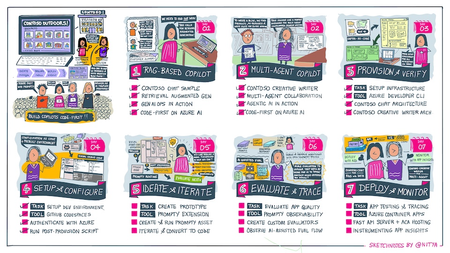
Want to build a custom copilot from scratch? Join us for Azure AI Week on the #30DaysOfIA as we go from prompt to production, building two different application scenarios, code-first with Prompty Assets on the Azure AI platform.3.6KViews2likes1Comment