rdp client
2 Topics
RDP Client - incorrect keyboard shortcut action in German localization
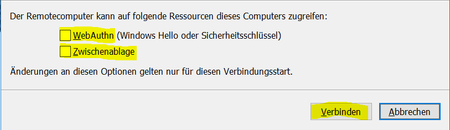
In the above dialog, when any of the checkbox controls has the focus, ALT+V toggles the state of the checkbox. ALT+V obviously should trigger "Verbinden" (Connect) instead. But not when the dialog first appears, i.e. none of the controls has the focus. Then ALT+V does nothing. As long as any chekbox control has the focus, ALT-V toggles its state. If the command button "Abbrechen" has the focus, ALT-V does nothing, i.e. ALT-V never triggers "Verbinden" except the command button "Verbinden" itself has the focus. Steps to reproduce: Start RDP client to connect to a remote machine Press ALT-Z -> "Zwischenablage" will be checked as expected Press ALT-Z again -> "Zwischenablage" will be unchecked as expected After any of the two steps above, press ALT-V -> "Zwischenablage" will be toggled instead of triggering "Verbinden" Same goes for "WebAuthn". Depending on the devices on the local machine an the RDP settings for sharing those, their might be more options with checkbox. I suspect those to behave similarly wrong when pressing ALT-V. The OS doesn't seem to make a difference. I see the same behavior on both Windows 11 and Windows Server 2022. RDP client version:74Views0likes1Comment
Remote Desktop Android client - no permission to local files?
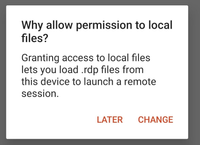
Hello, i have problem with opening .rdp files with RDP on my Android. It asks me for permissions to access the folder, but in the settings there is no option for that, only to set the rights to use the microphone and camera.. Can you fix it by putting the option to add permission to access local files? Thanks, Antonio1.9KViews1like3Comments