ramusage
1 TopicSystem Windows Ram Problem Fix
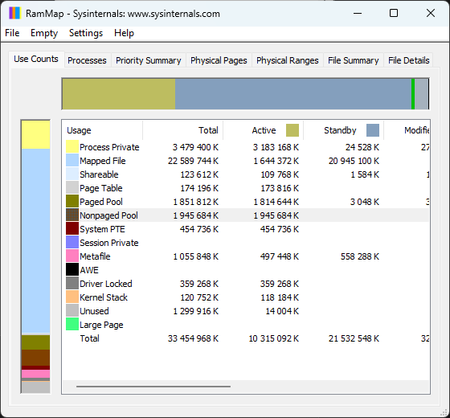
You’ve probably seen this happen — you leave your desktop or laptop running, and after a while the system starts eating a huge chunk of your RAM, even on modern hardware. Today I’m bringing a fix that removes this issue permanently and gives Windows back the speed, stability, and clean behavior it should have. By disabling two legacy predictive mechanisms (SysMain + Prefetch), the system stops aggressively caching applications, idle RAM usage drops significantly, and micro‑lags disappear. The attached screenshots show the system before and after applying the fix. This solution works on both Windows 10 and Windows 11, and it’s safe, reversible, and the improvement is immediate. System Ram Before: System Ram After: Step‑by‑step guide (Windows 10 / 11 RAM issue fix) Note: This is a safe and fully reversible system tweak. You’re simply disabling two legacy predictive mechanisms that no longer make sense on modern hardware. 1️⃣ Disable the SysMain service Press Win + R Type services.msc → press Enter Find SysMain in the list Double‑click it Set Startup type to Disabled Click Stop if the service is running Confirm with Apply and OK 2️⃣ Disable Prefetch in the Registry Press Win + R Type regedit → press Enter Navigate to: HKEY_LOCAL_MACHINE\SYSTEM\CurrentControlSet\Control\Session Manager\Memory Management\PrefetchParameters Find the value EnablePrefetcher Double‑click it and set the value to: 0 Confirm with OK 3️⃣ Restart your system After rebooting, your RAM usage in idle should drop noticeably, and the system will feel cleaner, faster, and more responsive. 4️⃣ How to revert (optional) If you ever want to undo the changes: SysMain: set Startup type back to Automatic and start the service EnablePrefetcher: set the value back to 3 (default) With my regular applications open, RAM usage dropped from 60–70% to just 33%. This is how Windows should have behaved from the beginning. On top of that, overall system responsiveness improved by roughly 50% — even weaker hardware feels noticeably faster almost immediately. This RAM regression has been around since Windows 7. After the kernel overhaul in Windows 8.1 it actually got worse, and it has followed every version of Windows all the way to today. RAM stability after - optimization results: RAM stability after 21 hours uptime – optimization results | Microsoft Community Hub2.6KViews0likes3Comments