provisioning
33 Topics
Microsoft Entra provisioning Agent Error
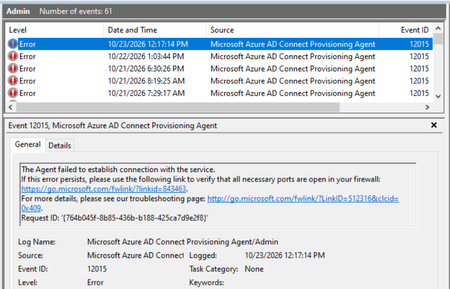
Hello, I have deployed the Microsoft Entra provisioning agent in my organization, with synchronization configured from AD to Microsoft Entra ID. I am encountering an issue on the server where the Cloud Sync agent is installed: when connecting to Microsoft endpoints via a Squid proxy, I receive the error shown in the screenshot. The synchronization itself works perfectly, and the configuration status in the cloud is "Healthy." I frequently see the error shown in the screenshot (error code 12015), and I also occasionally encounter error code 12011. Has anyone experienced a similar issue? Could you please advise on how to resolve it? Thanks.34Views0likes1CommentBulk Enrollment suddently stopped working?
We've been generating BPRT tokens for Entra ID enrollment via provisioning package (WCD) for a long time. This started out of the blue, tried from three different tenants, these two error messages: AADSTS90202: A transient error has occurred. Please try again. AADSTS240001: User is not authorized to register devices in Azure AD I know its not authorization because the same user was working the day before and because I even tired removing the enrollment restriction from the tenant altogether.165Views2likes4CommentsGroup-Based Licensing (E3 → Business Premium): MutuallyExclusiveViolation – Months Unresolved
We operate a Microsoft 365 environment with Entra ID, Intune, and Exchange Online. For months, we have been dealing with a critical issue that remains unresolved to this day — despite an active Microsoft Support ticket. The Technical Problem: During the migration of approximately 87 user accounts from Microsoft 365 E3 to Business Premium (SPB) via group-based licensing in Entra ID, all affected accounts receive a MutuallyExclusiveViolation error. Microsoft's backend treats E3 and Business Premium as mutually exclusive, blocking the SPB assignment — despite sufficient licenses being available. A sequential approach (removing E3 first, then assigning Business Premium) is not an acceptable solution: a test run proved that this causes a complete loss of Exchange Online access. For a rollout across 87 productive user accounts, this is not viable. What is required is a seamless, atomic license swap at the backend level — exclusively via group-based licensing. The Support Problem: Two support engineers assigned — zero technical progress. Instead of a substantive solution, we received standard documentation steps that do not address the actual problem. A false resolution notice was issued — the issue had demonstrably not been resolved. Our own PowerShell tests (Get-MgUser, Get-MgSubscribedSku) and CSV exports from the Entra ID portal disproved this conclusively. Committed updates from the Engineering Team were not delivered. Instead, automatically generated follow-up emails were sent with no substantive relation to the ongoing case. An additional unexplained behavior: a test user appears in the error report of a license group they were never added to — a further backend inconsistency that has not been investigated. Current Status: The ticket has been open for months. 87 user accounts cannot be migrated to Business Premium. An escalation to the Team Manager has been initiated. No resolution is in sight. My Question to the Community: Has anyone experienced a similar issue with MutuallyExclusiveViolation in group-based licensing (E3 → Business Premium)? Is there a known workaround or an official Microsoft statement on this? Ticket Reference: #2604241410000669780Views0likes3Comments
Can the built-in "No account? Create one" link redirect to a custom sign-up page?
I'm using Microsoft Entra External ID with a built-in sign-in/sign-up user flow. On the Microsoft-hosted sign-in page, the "No account? Create one" link always redirects users to the default Entra sign-up page. I already have a custom registration page and would like this built-in link to redirect to my custom URL instead. Is there any supported way to customize the destination of this link in a built-in user flow? If not, could someone confirm whether this behavior is fixed by design? Thanks!493Views0likes2Comments
Introducing the Entra Helpdesk Portal: A Zero-Trust, Dockerized ITSM Interface for Tier 1 Support
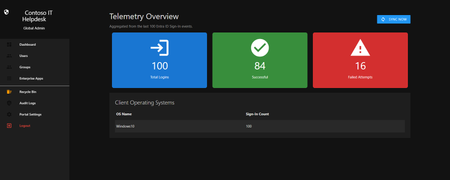
Hello everyone, If you manage identity in Microsoft Entra ID at an enterprise scale, you know the struggle: delegating day-to-day operational tasks (like password resets, session revocations, and MFA management) to Tier 1 and Tier 2 support staff is inherently risky. The native Azure/Entra portal is incredibly powerful, but it’s complex and lacks mandatory ITSM enforcement. Giving a helpdesk technician the "Helpdesk Administrator" role grants them access to a portal where a single misclick can cause a major headache. To solve this, I’ve developed the Entra Helpdesk Portal (Community Edition)—an open-source, containerized application designed to act as an isolated "airlock" between your support team and your Entra ID tenant. Why This Adds Value to Your Tenant Instead of having technicians log into the Azure portal, they log into this clean, Material Design web interface. It leverages a backend Service Principal (using MSAL and the Graph API) to execute commands on their behalf. Strict Zero Trust: Logging in via Microsoft SSO isn’t enough. The app intercepts the token and checks the user’s UPN against a hardcoded ALLOWED_ADMINS whitelist in your Docker environment file. Mandatory ITSM Ticketing: You cannot enforce ticketing in the native Azure Portal. In this app, every write action prompts a modal requiring a valid ticket number (e.g., INC-123456). Local Audit Logging: All actions, along with the actor, timestamp, and ticket number, are written to an immutable local SQLite database (audit.db) inside the container volume. Performance: Heavy Graph API reads are cached in-memory with a Time-To-Live (TTL) and smart invalidation. Searching for users or loading Enterprise Apps takes milliseconds. What Can It Do? Identity Lifecycle: Create users, auto-generate secure 16-character passwords, revoke sign-in sessions, reset passwords, and delete specific MFA methods to force re-registration. Diagnostics: View a user's last 5 sign-in logs, translating Microsoft error codes into plain English. Group Management: Add/remove members to Security and M365 groups. App/SPN Management: Lazy-load raw requiredResourceAccess Graph API payloads to audit app permissions, and instantly rotate client secrets. Universal Restore: Paste the Object ID of any soft-deleted item into the Recycle Bin tab to instantly resurrect it. How Easy Is It to Setup? I wanted this to be universally deployable, so I compiled it as a multi-architecture Docker image (linux/amd64 and linux/arm64). It will run on a massive Windows Server or a simple Raspberry Pi. Setup takes less than 5 minutes: Create an App Registration in Entra ID and grant it the necessary Graph API Application Permissions (e.g., User.ReadWrite.All, AuditLog.Read.All). Create a docker-compose.yml file. Define your feature toggles. You can literally turn off features (like User Deletion) by setting an environment variable to false. version: '3.8' services: helpdesk-portal: image: jahmed22/entra-helpdesk:latest container_name: entra_helpdesk restart: unless-stopped ports: - "8000:8000" environment: # CORE IDENTITY - TENANT_ID=your_tenant_id_here - CLIENT_ID=your_client_id_here - CLIENT_SECRET=your_client_secret_here - BASE_URL=https://entradesk.jahmed.cloud - ALLOWED_ADMINS=email address removed for privacy reasons # CUSTOMIZATION & FEATURE FLAGS - APP_NAME=Entra Help Desk - ENABLE_PASSWORD_RESET=true - ENABLE_MFA_MANAGEMENT=true - ENABLE_USER_DELETION=false - ENABLE_GROUP_MANAGEMENT=true - ENABLE_APP_MANAGEMENT=true volumes: - entra_helpdesk_data:/app/static/uploads - entra_helpdesk_db:/app volumes: entra_helpdesk_data: entra_helpdesk_db: 4.Run docker compose up -d and you are done! I built this to give back to the community and help secure our Tier 1 operations. If you are interested in testing it out in your dev tenants or want to see the full architecture breakdown, you can read the complete documentation on my website here I’d love to hear your thoughts, feedback, or any feature requests you might have!313Views0likes0CommentsJoin Merill Fernando and other guests for our Identity and Network Practitioner Webinar Series!
This October, we’re hosting a three-part webinar series led by expert Merill Fernando for Identity and Network Access practitioners. Join us as we journey from high-level strategy to hands-on implementation, unifying identity and network access every step of the way. Each session builds on the last, helping you move from understanding why a unified approach matters to what are the foundations to get started, and finally to how to configure in practice. The goal is to equip you with actionable skills, expert insights, and resources to secure your organization in a unified, Zero Trust way. Register below: Identity and Network Security Practitioner Webinar Series | Microsoft Community Hub153Views1like0Comments
API-driven provisioning field mapping changes resynchronize all users and groups
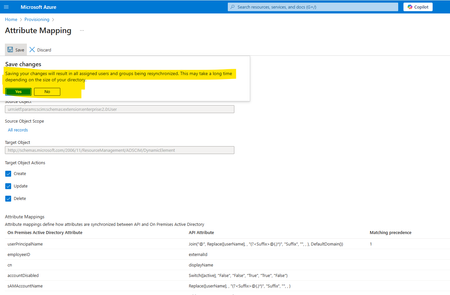
We have configured API-driven provisioning for on-premises Active Directory, along with Azure AD Connect, to synchronize on-premises AD users with Azure Entra ID. As part of the provisioning setup, we have used a separate Organizational Unit (OU) in on-premises AD (designated as the default OU for new users) while configuring API-driven provisioning. We are attempting to make some changes to the API field mapping, specifically the ‘UserPrincipalName’ regular expression (custom domain) and the ‘manager’ field, and saving the configuration. Upon attempting to save, a prompt appears (as highlighted below screenshot), indicating that this action will resynchronize all users and groups. Could you please clarify: Will this resynchronization update any existing users outside the default provisioning Organizational Unit (OU)? Specifically, what does the resynchronization operation update? For instance, will it modify the 'UserPrincipalName' and 'manager' attributes for all users including old users outside of provisioning Organizational Unit (OU)? Screen Shot - While Saving Mapping.Solved560Views0likes2Comments
Cloud-First Attribute Ownership for Synced Users in Entra ID Is Not Supported
📝 Description As an enterprise architect working to modernize identity provisioning, I’ve encountered a major limitation in Microsoft Entra ID’s hybrid identity model. While Microsoft promotes a cloud-first strategy, the current architecture forces reliance on on-premises Active Directory for attribute ownership when users are synced via Entra Connect. Key issues: Directory extension attributes, even when created in the cloud, are read-only for synced users. Custom security attributes are not queryable and cannot be used in dynamic groups or claims. There is no supported mechanism to allow cloud apps (e.g., Workday provisioning) to own or update specific attributes for synced users. Breaking sync to convert users to cloud-only is disruptive and not scalable for large enterprises. This creates a conflict between cloud-first provisioning goals and technical limitations, making it difficult to fully transition away from on-prem AD. ✅ Requested Improvements Attribute-Level Ownership Delegation Allow cloud apps to own and update specific attributes for synced users, even if the user is still managed by AD. Writable Directory Extensions for Synced Users Enable Graph API write access to cloud-created directory extensions for hybrid users. Dynamic Query Support for Custom Security Attributes Make custom security attributes usable in dynamic groups, claims, and app filtering. Clear Guidance and Tooling for Cloud-First Identity Models Provide supported patterns and tools for transitioning identity provisioning and attribute management to the cloud. 🙏 Why This Matters Organizations are actively trying to reduce reliance on legacy infrastructure and embrace cloud-first identity. The current limitations in Entra ID make this transition unnecessarily complex and inconsistent with Microsoft’s cloud-first messaging. ---copiloted response for sure after many days of trying to work a solution that does not create more tech debt...381Views0likes1CommentCross-tenant synchronization and resource access
Hello My company is investigating options pertaining to the separation of a splitting a set of users into a separate Entra ID tenant. This is being driven from a political and governance perspective whereby a portion of the organisation is looking to split away from the conglomerate for their cloud identifies only (not the on-premises AD). They effectively want their users and Entra ID identities to be moved to a new Entra ID tenant however still want to maintain access to the source tenant resources and applications for a period of time (potentially ongoing). For the purpose of my questions, assume that: existing on-premises domain is orga.internal existing EntraID tenant is OrgA.onmicrosoft.com new EntraID tenant is OrgB.onmicrosoft.com Ultimately the goal is to migrate user identities, their M365 license and mailbox to OrgB.onmicrosoft.com whilst still enabling them to access the cloud resources attached to OrgA.onmicrosoft.com. Looking at the capabilities of the cross-tenant synchronisation service to sync users from OrgA.onmicrosoft.com to OrgB.onmicrosoft.com, I'm not sure if this will meet my requirements as it will effectively sync the users from OrgA.onmicrosoft.com to OrgB.onmicrosoft.com as B2B guests. Is that correct? If my understanding is correct what we really need to do is: Migrate EntraId identities and mailboxes to OrgB.onmicrosoft.com, removing the OrgA.onmicrosoft.com account in the process Use cross-tenant synchronisation to sync the new OrgB.onmicrosoft.com identities back to OrgA.onmicrosoft.com as B2B guests whereby access to resources is provided to the guest account. If this is correct then is it technically supported to have multiple instances of Entra ID Cloud Sync synchronsing a subset of the orga.internal users to Entra ID OrgB.onmicrosoft.com whilst another instance of the Cloud Sync continues to sync orga.internal users to the existing OrgA.onmicrosoft.com EntraID tenant? I can't seem to find any reference to this architecture in the MS doco. I can see this scenario references in the legacy Cloud Connect doco but not the newer Cloud Sync agent doco. Any advise is appreciated.697Views0likes1Comment
Generating proxyaddresses during user provisioning
Hi All, we have requirement to generate alias email addresses during user provisioning. we tried to use selectunique function in the proxyaddresses generation and mapping to ad proxyaddresses but we are not able to achieve it. can you please help thanks, shashidhar joliholi602Views1like3Comments