protection & recovery
45 Topics
How to recover global admin access to tenant
I have already tried posting this to the general Microsoft Q&A forums and received no response. We are desperate to figure something out so if this is not the correct line of communication, please direct me to where I should go. My company is in a bit of a bind right now, and I am at my wit's end after almost a week of trying to get in contact with anyone who could help. We have multiple directories in Azure that belong to us, but they are all independent of each other. As such, some directories have multiple global admins (and thus are not an issue); others -- and quite frankly, the most important ones -- only have one global admin, and it was our DevOps person, who is no longer employed with us. We have no way of accessing his account, and thus no way of accessing a global admin account for these directories/tenants. Access to these directories is critical to our operations. We were informed last Friday by someone from the data protection team that they could not give us access to these tenants we pay thousands of dollars a month for because: Our former DevOps person registered all other users as guests/external users, and DPT "can't give external users admin permissions", and To reset the MFA of the current global admin account, the owner of the account (who no longer works for our company) would need to contact them and verify their identity What options do we have here? We have blobs full of user-uploaded files in these tenants. Starting over from scratch is a doomsday scenario we are trying everything we can to avoid. Surely there has to be something that can be done?980Views1like6Comments
🔥The Power of Azure’s Security Arsenal 🔥
◆ Using a Public IP without securing your Azure applications and resources exposes you to security threats. Today, we’ll explore the most powerful security solutions from Azure’s arsenal. ◆ Azure provides a multi-layered approach (more than one layer of protection) to secure your resources when using a Public IP. Organizations can now transform this open gateway into a fortified checkpoint. Here’s how these tools work together to mitigate risks: 🚀 Azure DDoS Protection 🚀 ■ Protects your resources and services from being overwhelmed by malicious traffic. This excellent service is available for Network & IP Protection SKUs. ■ Uses Machine Learning to distinguish between normal traffic patterns and malicious flooding attempts (such as SYN floods or UDP amplification attacks) before they impact your applications and services ensuring availability. 🚀 Azure Web Application Firewall (WAF) 🚀 ■ Adds application-layer protection, intercepting HTTP/HTTPS traffic for inspection. ■ Blocks suspicious attacks like SQL injection or XSS by applying OWASP core rule sets, which define how attacks occur and how to defend against them, with continuous updates. ■ Enhances security for customer-facing services, ensuring trust and protection for your website and users. 🚀 Network Security Groups (NSGs) 🚀 ■ Acts as a virtual firewall at the subnet or network interface level, filtering traffic based on predefined rules. ■ Can allow only trusted HTTPS (port 443) connections while blocking unsolicited RDP or SSH attempts. ■ Implements the critical security principle of reducing attack surface, ensuring only authorized traffic reaches your target resources. 🚀 Azure Private Link 🚀 ■ In some scenarios, avoiding Public IPs altogether is the best security approach. This powerful service allows secure access to Azure SQL Database or Storage via Private Endpoints inside your virtual network. ■ Helps organizations minimize external exposure while maintaining secure, private connections to necessary services. 🚀 Azure Bastion 🚀 ■ Provides secure access to Azure VMs without Public IPs, using RDP/SSH over encrypted TLS 1.2 traffic. ■ Uses a browser-based HTML5 web client to establish RDP/SSH sessions over TLS on port 443, fully compatible with any firewall. ■ Connects to VMs via Private IPs while enforcing NSG rules to allow access only through Azure Bastion. If you found this valuable, consider sharing so more professionals can benefit. Let's keep the conversation growing! 🚀399Views0likes1CommentApplying DevOps Principles on Lean Infrastructure. Lessons From Scaling to 102K Users.
Hi Azure Community, I'm a Microsoft Certified DevOps Engineer, and I want to share an unusual journey. I have been applying DevOps principles on traditional VPS infrastructure to scale to 102,000 users with 99.2% uptime. Why am I posting this in an Azure community? Because I'm planning migration to Azure in 2026, and I want to understand: What mistakes am I already making that will bite me during migration? THE CURRENT SETUP Platform: Social commerce (West Africa) Users: 102,000 active Monthly events: 2 million Uptime: 99.2% Infrastructure: Single VPS Stack: PHP/Laravel, MySQL, Redis Yes - one VPS. No cloud. No Kubernetes. No microservices. WHY I HAVEN'T USED AZURE YET Honest answer: Budget constraints in emerging market startup ecosystem. At our current scale, fully managed Azure services would significantly increase monthly burn before product-market expansion. The funding we raised needs to last through growth milestones. The trade: I manually optimize what Azure would auto-scale. I debug what Application Insights would catch. I do by hand what Azure Functions would automate. DEVOPS PRACTICES THAT KEPT US RUNNING Even on single-server infrastructure, core DevOps principles still apply: CI/CD Pipeline (GitHub Actions) • 3-5 deployments weekly • Zero-downtime deploys • Automated rollback on health check failures • Feature flags for gradual rollouts Monitoring & Observability • Custom monitoring (would love Application Insights) • Real-time alerting • Performance tracking and slow query detection • Resource usage monitoring Automation • Automated backups • Automated database optimization • Automated image compression • Automated security updates Infrastructure as Code • Configs in Git • Deployment scripts • Environment variables • Documented procedures Testing & Quality • Automated test suite • Pre-deployment health checks • Staging environment • Post-deployment verification KEY OPTIMIZATIONS Async Job Processing • Upload endpoint: 8 seconds → 340ms • 4x capacity increase Database Optimization • Feed loading: 6.4 seconds → 280ms • Strategic caching • Batch processing Image Compression • 3-8MB → 180KB (94% reduction) • Critical for mobile users Caching Strategy • Redis for hot data • Query result caching • Smart invalidation Progressive Enhancement • Server-rendered pages • 2-3 second loads on 4G WHAT I'M WORRIED ABOUT FOR AZURE MIGRATION This is where I need your help: Architecture Decisions • App Service vs Functions + managed services? • MySQL vs Azure SQL? • When does cost/benefit flip for managed services? Cost Management • How do startups manage Azure costs during growth? • Reserved instances vs pay-as-you-go? • Which Azure services are worth the premium? Migration Strategy • Lift-and-shift first, or re-architect immediately? • Zero-downtime migration with 102K active users? • Validation approach before full cutover? Monitoring & DevOps • Application Insights - worth it from day one? • Azure DevOps vs GitHub Actions for Azure deployments? • Operational burden reduction with managed services? Development Workflow • Local development against Azure services? • Cost-effective staging environments? • Testing Azure features without constant bills? MY PLANNED MIGRATION PATH Phase 1: Hybrid (Q1 2026) • Azure CDN for static assets • Azure Blob Storage for images • Application Insights trial • Keep compute on VPS Phase 2: Compute Migration (Q2 2026) • App Service for API • Azure Database for MySQL • Azure Cache for Redis • VPS for background jobs Phase 3: Full Azure (Q3 2026) • Azure Functions for processing • Full managed services • Retire VPS QUESTIONS FOR THIS COMMUNITY Question 1: Am I making migration harder by waiting? Should I have started with Azure at higher cost to avoid technical debt? Question 2: What will break when I migrate? What works on VPS but fails in cloud? What assumptions won't hold? Question 3: How do I validate before cutting over? Parallel infrastructure? Gradual traffic shift? Safe patterns? Question 4: Cost optimization from day one? What to optimize immediately vs later? Common cost mistakes? Question 5: DevOps practices that transfer? What stays the same? What needs rethinking for cloud-native? THE BIGGER QUESTION Have you migrated from self-hosted to Azure? What surprised you? I know my setup isn't best practice by Azure standards. But it's working, and I've learned optimization, monitoring, and DevOps fundamentals in practice. Will those lessons transfer? Or am I building habits that cloud will expose as problematic? Looking forward to insights from folks who've made similar migrations. --- About the Author: Microsoft Certified DevOps Engineer and Azure Developer. CTO at social commerce platform scaling in West Africa. Preparing for phased Azure migration in 2026. P.S. I got the Azure certifications to prepare for this migration. Now I need real-world wisdom from people who've actually done it!408Views0likes1Comment
Azure Key Vault Replication: Why Paired Regions Alone Don’t Guarantee Business Continuity
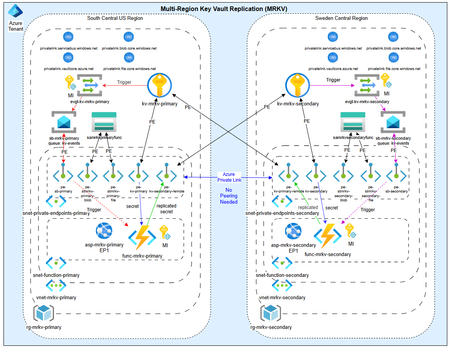
As customers modernize toward multi‑region architectures in Azure, one question comes up repeatedly: “If my region goes down, will Azure Key Vault continue to work without disruption?” The short answer: it depends on what you mean by “work.” Azure Key Vault provides strong durability and availability guarantees, but those guarantees are often misunderstood—especially when customers assume paired‑region replication equals full disaster recovery. In reality, Azure Key Vault replication is designed for survivability, not uninterrupted write access or customer‑controlled failover. This post explains: How Azure Key Vault replication actually works (per Microsoft Learn) Why paired‑region failover does not equal business continuity Two reference architectures that implement true multi‑region Key Vault availability, with Terraform How Azure Key Vault Replication Works (Per Microsoft Learn) Azure Key Vault includes multiple layers of Microsoft‑managed redundancy. In‑Region and Zone Resiliency Vault contents are replicated within the region. In regions that support availability zones, Key Vault is zone‑resilient by default. This protects against localized hardware or zone failures. Paired‑Region Replication If a Key Vault is deployed in a region with an Azure‑defined paired region, its contents are asynchronously replicated to that paired region. This replication is automatic and cannot be configured, observed, or tested by customers. Microsoft‑Managed Regional Failover If Microsoft declares a full regional outage, requests are automatically routed to the paired region. After failover, the vault operates in read‑only mode: ✅ Read secrets, keys, and certificates ✅ Perform cryptographic operations ❌ Create, update, rotate, or delete secrets, keys, or certificates This is a critical distinction. Paired‑region replication preserves access — not operational continuity. Why Paired‑Region Replication Is Not Business Continuity From a reliability and DR perspective, several limitations matter: Failover is Microsoft‑initiated, not customer‑controlled No write operations during regional failover No secret rotation or certificate renewal No way to test DR Accidental deletions replicate No point‑in‑time recovery without backups Microsoft Learn explicitly states that critical workloads may require custom multi‑region strategies beyond built‑in replication. For many customers, this means Azure Key Vault becomes a single‑region dependency in an otherwise multi‑region application design. The Multi‑Region Key Vault Pattern The two GitHub repositories below implement a common architectural shift: Multiple independent Key Vaults deployed in separate regions, with customer‑controlled replication and failover. Instead of relying on invisible platform replication, the vaults become first‑class, region‑scoped resources, aligned with application failover. Solution 1: Private, Locked‑Down Multi‑Region Key Vault Replication Repository: 👉 https://github.com/jclem2000/KeyVault-MultiRegion-Replication-Private Architecture Highlights Independent Key Vault per region Private Endpoints only No public network exposure Terraform‑based deployment Controlled replication using Event Based synchronization What This Enables ✅ Full read/write access during regional outages ✅ Continued secret rotation and certificate renewal ✅ Customer‑defined failover and RTO ✅ DR testing and validation ✅ Strong alignment with zero‑trust and regulated environments Trade‑offs Higher operational complexity Requires automation and application awareness of multiple vaults Solution 2: Low‑Cost Public Multi‑Region Key Vault Replication Repository: 👉 https://github.com/jclem2000/KeyVault-MultiRegion-Replication-Public Architecture Highlights Independent Key Vault per region Public endpoints Minimal networking dependencies Terraform‑based Controlled replication using Event Based synchronization Optimized for simplicity and cost What This Enables ✅ Full read/write availability in any region ✅ Clear and testable DR posture ✅ Lower cost than private endpoint designs ✅ Suitable for many non‑regulated workloads Trade‑offs Public exposure (mitigated via firewall rules, RBAC, and conditional access) Not appropriate for all compliance requirements Requires automation and application awareness of multiple vaults Azure Native Replication vs Customer‑Managed Multi‑Region Vaults Capability Azure Paired Region Multi‑Region Vaults Read access during outage ✅ ✅ Write access during outage ❌ ✅ Secret rotation during outage ❌ ✅ Customer‑controlled failover ❌ ✅ DR testing ❌ ✅ Isolation from accidental deletion ❌ ✅ Predictable RTO ❌ ✅ Azure Key Vault’s native replication optimizes for platform durability. The multi‑region pattern optimizes for application continuity. When to Use Each Approach Paired‑Region Replication Is Often Enough When: Secrets are mostly static Read‑only access during outages is acceptable RTO is flexible You prefer Microsoft‑managed recovery Multi‑Region Vaults Are Recommended When: Secrets or certificates rotate frequently Applications must remain writable during outages Deterministic failover is required DR testing is mandatory Regulatory or operational isolation is needed Closing Thoughts Azure Key Vault behaves exactly as documented on Microsoft Learn—but it’s important to be clear about what those guarantees mean. Paired‑region replication protects your data, not your ability to operate. If your application is designed to survive a regional outage, Key Vault must follow the same multi‑region design principles as the application itself. The reference architectures above show how to extend Azure’s native durability model into true operational resilience, without waiting for a platform‑level failover decision.993Views0likes1CommentMS SQL backup immutability
Hello. What is you experience on enabling immutability for MS SQL backups while running Always on AGs on VM? Backups must locked and not be modifiable after written. I have looked at ~7 different solutions but non of them seems to be ideal. Thanks for you time!313Views0likes3Comments
Mine your Azure backup data, it could save you 💰💡
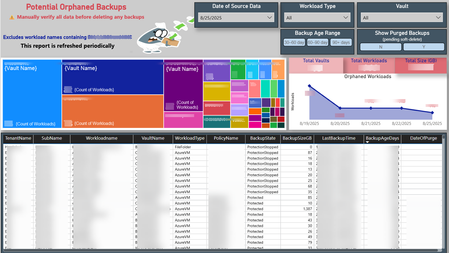
Your data has a story to tell. Mine it, decipher it, and turn it into actionable outcomes. 📊🔍 Azure backups can become orphaned in several ways (I'll dive into that in a future post). But here’s a key point: orphaned doesn’t always mean useless, hence the word “Potential” in the title of my Power BI report. Each workload needs to be assessed individually. If a backup is no longer needed, you might be paying for it - unnecessarily and unknowingly. 🕵️♂️💸 To uncover these hidden costs, I combined data from the Azure Business Continuity Center with a PowerShell script I wrote to extract LastBackupTime and other metadata. This forms the foundation of my report, helping visualize and track backup usage over time. This approach helped me identify forgotten one-time backups, VMs deleted without stopping the backup, workloads excluded due to policy changes, and backups left behind after resource migrations. If you delete unneeded backups and have soft-delete enabled, the backup size drops to zero and Azure stops charging for it. ✅🧹 💡 Do your Azure backups have their own untold story to tell? 📸 Here's a snapshot of my report that helped me uncover these insights 👇228Views0likes0Comments
Scaling Smart with Azure: Architecture That Works
Hi Tech Community! I’m Zainab, currently based in Abu Dhabi and serving as Vice President of Finance & HR at Hoddz Trends LLC a global tech solutions company headquartered in Arkansas, USA. While I lead on strategy, people, and financials, I also roll up my sleeves when it comes to tech innovation. In this discussion, I want to explore the real-world challenges of scaling systems with Microsoft Azure. From choosing the right architecture to optimizing performance and cost, I’ll be sharing insights drawn from experience and I’d love to hear yours too. Whether you're building from scratch, migrating legacy systems, or refining deployments, let’s talk about what actually works.410Views0likes1Comment
Former Employer Abuse
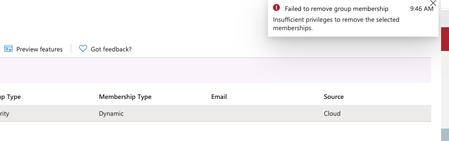
My former employer, Albert Williams, president of American Security Force Inc., keeps adding my outlook accounts, computers and mobile devices to the company's azure cloud even though I left the company more than a year ago. What can I do to remove myself from his grip? Does Microsoft have a solution against abusive employers?173Views0likes0CommentsWindows Updates and Defender Updates on Azure VM
Hi all, We want to build a locked down Azure VM with no public IP address. Is it possible for this VM to still get updates and report without a public IP address. Or is it a case that we really need a public IP address and then a firewall for this to be secure?Solved1.3KViews1like2Comments