project perception
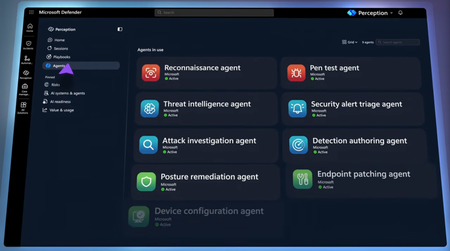
1 TopicFight AI with AI | Multi-Agent Security Defense
Point red, blue, and green AI agent teams at a known threat actor, confirm which vulnerabilities attackers can reach, then deploy KQL detections, harden your posture, and merge a tested code fix in minutes with Microsoft Defender. Stay in control and approve key actions before agents run them. Run Microsoft’s pre-built playbooks or build your own, and manage sessions from the Defender portal or from your terminal with the MCP plug-in. Keep token costs low with MAI Cyber Flash, a purpose-built security model inside MDASH. Dave Weston, CVP Microsoft Security, shares how Microsoft’s threat intelligence and incident response expertise power agents you direct. One prompt. Full adversary emulation. Perception agents mimic a known threat actor against your environment and check in with you before any high-impact action. Watch here. Detections deployed. Posture hardened. Code fix merged. Perception agents turn hours of work across hunters, engineers, and app owners into minutes, while you stay in control. Check it out. Find it, patch it, prove it. MAI Cyber Flash handles the full vulnerability loop inside MDASH and keeps token costs low so any team can afford AI-powered defense. Start here. 👥 Who it’s for: SOC analysts, security engineers, and red and blue teamers evaluating agentic AI for defense, plus AppSec and DevSecOps teams who own vulnerability remediation. ⏱️ Chapters: 00:00 Fight AI-powered attacks with AI agents 00:45 How AI attacks adapt mid-breach 01:39 Jailbroken and abliterated models 02:04 Inside the Project Perception security stack 03:28 Red, blue, and green agent teams 04:07 Playbooks that orchestrate agent workflows 04:43 Ask Perception if you’re protected 06:06 Red team agents emulate a threat actor 06:59 Approve high-impact agent actions 07:26 MDASH findings confirm reachable vulnerabilities 08:22 Blue team agent writes KQL detections 08:54 WAF, auth check, and tested code fix 09:36 Pull request merged into production 10:14 Session reports and MCP terminal plugin 11:02 MAI Cyber Flash keeps token costs low 11:57 Join the Project Perception preview AI helps attackers find, weaponize, and exploit vulnerabilities at a speed and scale no human team can match. Jailbroken and abliterated models generate custom tooling that adapts mid-breach, leaving defenses that hunt for known techniques chasing a target that changes every time. Project Perception answers with a full agentic security stack. It starts with trillions of daily security signals, correlates them in the Microsoft security graph, and uses multiple AI models, including purpose-built ones, to reason over risk and prioritize what matters most. Specialized agents act on that reasoning: red team agents simulate attacks and prove where you’re vulnerable, blue team agents investigate and build detections, and green team agents harden posture and remediate. Playbooks orchestrate them through proven SOC workflows, and codified actuators let agents perform the fix instead of only recommending it. In the demo, one prompt, “Is my organization protected against Onyx Sleet?”, launches threat intelligence, reconnaissance, and pen test agents. They pull MDASH code-scanning findings and confirm an internet-exposed SQL injection. A detection authoring agent writes KQL detections to cover the gap, and the posture remediation agent shields the app with a web application firewall, adds an authorization check, and produces a tested code fix merged through a pull request. Agents stop and ask before any high-impact action, so you stay in control. Every session produces a shareable report with the attack path, remediation plan, and timeline. An MCP tool plugin runs the same work from your terminal, and MAI Cyber Flash, a dedicated cybersecurity model inside MDASH, handles most vulnerability work to keep token costs low. 🔗 Related links: Get started at https://microsoft.com/perception Unfamiliar with Microsoft Mechanics? Microsoft’s Official Video Series for IT — Subscribe https://www.youtube.com/c/MicrosoftMechanicsSeries — Microsoft Tech Community: https://techcommunity.microsoft.com/t5/microsoft-mechanics-blog/bg-p/MicrosoftMechanicsBlog — Podcast: https://microsoftmechanics.libsyn.com/podcast Join us on social: — https://twitter.com/MSFTMechanics — https://www.linkedin.com/company/microsoft-mechanics/ — https://www.instagram.com/msftmechanics/ — https://www.tiktok.com/@msftmechanics Video Transcript: - AI has given attackers better weapons than they’ve ever had to quickly find, analyze, and automate the exploits for vulnerabilities at a speed and scale that isn’t humanly possible. But there is a way to address this imbalance with a new agentic security system called Project Perception, which provides the know-how and skills needed to fight weaponized AI with AI, and at the speed of AI. Now joining me to go deeper is our chief hacker and cybersecurity leader, Dave Weston. Welcome back to Mechanics. - Thanks, super happy to be here. - Last time you were on the show, AI-powered attacks, they weren’t really top of mind like they are now. But today, AI is helping attackers move a lot faster and at greater scale across virtually every single attack vector. So, what are you seeing out there? - Well, it really is a different world now, and that’s just not hype or marketing, it’s truth. AI is good at code, cyber is code, and the attackers are putting AI to work. The automated attacks we’re seeing where AI can adapt and evolve its techniques while moving through your environment are particularly worrying. For example, we saw a recent attack involving multiple hacking attempts on Mexican government organizations. And one of the craziest aspects of the attack was where AI generated bespoke tooling with a massive 17,000 lines of code across 49 different modules, meaning it adapted mid-attack, corrected its own failures, and built new capabilities as it moved through the breach. That’s a problem for traditional defenses. If you’re looking for known techniques, what do you do when the technique changes every time? The rules of cyber have changed, and today, the advantage is with the attacker. - All right, so how are attackers, then, able to use AI to their benefit? Aren’t they just using publicly available models? - They are, but they can easily jailbreak models in real time or permanently obliterate open models, where you’re modifying the LLM to remove any guardrails that stop them from doing bad things. - Right, and then at that point, the model can just do their bidding, whatever that is. - It can do whatever evil command you throw at it. So, really, the answer is to offset and fight AI with AI. If attackers are operating at machine speed, then defenders need to be as well. And that’s why we built a new cybersecurity stack with Project Perception based on Microsoft’s security expertise, threat intelligence, and incident response knowledge. The stack starts with trillions of security signals that Microsoft logs and processes every day. And we take that massive volume of data and transform it into rich, correlated security context with our security graph so it can be easily consumed efficiently without breaking the bank with tokens. We then have multiple AI models, including purpose-built ones that reason over the context to identify risk and prioritize what matters most. Then, we have specialized agents themselves that take model reasoning and can simulate attacks, build detections, author fixes, and even more. And playbooks orchestrate those agents through proven security workflows built from years of real-world security operations. And importantly, to close gaps, we have codified actuators with APIs that allow agents to perform the fix, instead of just telling you how to fix something. - So, it’s a continuously learning security system that’s really identifying risk, adapting to changing conditions, and coordinating investigation and response at scale. - Totally, and I can explain the mechanics of Perception and its components in Defender, starting with the agent team that we built. Here, under Agents, you get a picture of what runs the solution. Red team agents with red icons are designed to simulate attacks on your environment. They find the attack paths, prove where you’re actually vulnerable, and prioritize incidents by severity and exploitability. Then, the blue team agents defend. They conduct investigations, event correlation, accelerate a response, and build automated detections for you. Finally, the green team agents are the fixers. They harden your posture and remediate ahead of the attack. These agents are all specialists on their own, but they need guidance for what to work on or to focus in on. And that’s where playbooks come in. Playbooks are similar to the way people run their SOC today, standardized sets of procedures and operations to reach a known outcome. In this case, though, the work is done by teams of red, blue, and green agents. And the icons in these playbooks show you which agents are involved in which workloads. The playbooks that you’re seeing here are prebuilt by Microsoft for common security tasks, and you can build your own from scratch or after you run an agent session. - So, we know from your examples that the bad guys have agents and automation routines. And now we, or now you, the good guys, also have them, too. So, now we explained how it works. Can we run it? - Yeah, sounds good. So, when the threat actors are trending, the first question you hear is, “Are we protected from this adversary?” Instead of burning all the time and resources to manually figure this out, this is where Perception comes in as a multiplier. I’ve got Perception open in the Defender portal and I’m going to start a new agent session. Here, I can describe a task for my agents to work on, I can see top insights as recommended actions to take, or I can pick a playbook from below. In this case, I know that a threat actor named Onyx Sleet has been targeting a lot of companies in my industry. So, I’ll type in my prompt, “Is my organization protected against Onyx Sleet?” I hit Submit, and the agent team is off to the races. The planning agent works out what needs to happen and picks the right playbook to protect against the threat. This playbook triggers a threat intelligence agent to analyze the threat actor, red team agents for reconnaissance and to mimic the attacker for pen testing, a blue team agent for detections, and green agents for posture remediation with code fixes. Now, I just need to start my session using the details that are already populated. Right away, we see that this starts writing a session report that I’ll show once we’re finished. There’s a set of indicators from the threat intelligence agent on Onyx Sleet with all of the IPs, domains, and hashes. I’ll close that out to keep going. This information gets passed to the red agents, which are your attack simulators. It takes a profile and asks, “If I were Onyx Sleet, how would I breach this environment?” So, the reconnaissance agent takes a look at the indicators, and it spotted an exposed billing application. And it went after it, because Onyx Sleet likes to target web application vulnerabilities. Now, it wants to hand off to a pen test agent that knows how to specifically target this application to evaluate whether the billing app can actually be compromised. And notice, it brings me into the loop to ask my permission first. - Right, now that’s the runbook that we’ve just seen, which kind of harnesses all of your bespoke team of red and blue and green team agents. But you were also brought into the equation effectively to take one action here, in this case. So, how much of the approving do you do manually, versus just letting the agent do its thing and run YOLO? - Yeah, so any time there’s an operation of consequence, the agent will stop and ask. As the human in the loop, I can steer the process, confirm the agent’s reasoning and assumptions, and approve the actions. Governance and trust are the whole ballgame, here. So, I’ll allow this one to analyze the URL endpoints and submit it, and the recon agent will send its findings over to the pen test agent for penetration testing against this web app. The first thing it does is pull some previously discovered vulnerabilities found by MDASH, our multi-model agentic scanning system to detect code vulnerabilities, which also uses teams of agents to do the code scanning. So, we hand its findings to the pen test agent at runtime, and it narrows a big funnel of potential risk to the few that are genuinely reachable from the outside that this actor is likely to target. So, here it’s tested what MDASH flagged and confirmed the SQL injection is real and internet-exposed, alongside stored cross-site scripting vulnerabilities and a couple of identity-related issues. Now, a lot of systems will stop right here. They might be great at finding problems, but what really matters is going from finding to fixing. - So, we saw here in this case that the billing system is likely to be compromised. So, how do we go about actually fixing it so that it’s not vulnerable to attack? - Well, fortunately, with Perception, we don’t just point out problems. First, it’ll kick off to a blue agent, our detection authoring agent, which writes custom detections for each of the vulnerabilities to discover those later. There’s almost always a delay between discovering a vulnerability and actually shipping the fix. Detections buy us coverage during that window so we can see anyone knocking on the specific door related to that vulnerability. It’s authored detections, in this case, and each are coded by agents using KQL, which is great if you’re a security expert, but not a coding expert. These agents will do all that for you. Next, you’ll see that our green team posture remediation agent, as the fixer starts working on how to block the attack surface that the pen test agent exposed earlier in our billing app. In fact, here’s the remediation plan. It suggests shielding the app immediately with a web application firewall to block the SQL injection, and we can switch that to blocking mode and add an authorization check. That’s our second layer of defense. Then, the last step is an actual code fix to parameterize invoice queries. And not only do we get the code change, but we’re also able to run tests to validate the fix before we push it into production. Back in the chat, I’m good with what it recommends, so I’ll allow it. Then, Perception creates the pull requests to fix the SQL injection and merge all those changes into our production code. - And that’s taking what could have been multiple hours, sometimes days with cybersecurity experts, it’s getting that done just in a few minutes. - 100%, in fact, I’ve spent multiple hours and days on this, so that’s hours of manual work across hunters, remediation engineers, and app owners. And here, we discovered the issues, prioritized them, deployed detections, hardened postures, and even produced a code fix. The agents did the work. I just hung back, steered, and authorized specific requests a few times to proceed. And each session creates a report that you can refer back to or share. It explains who the actor was, what they did, their attack path, and it lays out the full remediation plan, along with the steps that were already taken and a detailed timeline. All your sessions can be viewed in one place where you can see what’s in progress and which sessions are awaiting human input to proceed, as well as all the sessions that Perception has completed. And because a lot of people live in the terminal, we also ship an MCP tool plugin so you can kick off and manage the same work from the command line or the tools you already use to stay in sync. - Right, so now instead of agents just triaging your alert queue, they can take action by using your guidance and codifying useful protection. So, with all this, what’s next? - Yeah, as a rule, with Perception, we always want to perform the fix and keep token usage as low as possible so that any organization can use it. And to that aim, we’ve been working with our model team on a dedicated MAI cybersecurity model. It’s called Cyber Flash, and it runs inside MDASH. And it handles roughly 90% of the queries, finding the vulnerability, patching it, and proving the fix is valid, and it defers only the hardest 10% of tasks to a much larger and much more expensive frontier model, which, in turn, keeps costs to a minimum. And it’s actually leading the CyberGym benchmark at around 96%, where most of the market sits considerably lower. So, cost effectiveness is baked into our focus. We want to level the playing field in how you’re able to defend against AI-powered attacks. - So, now we have something that keeps up with attackers to defend against auto-generated, CVE-informed attacks. So, for anyone who’s watching right now looking to get these defenses up and running in their environments, what do you recommend? - This is a rapidly evolving space, but Perception is in preview worldwide now. So, head over to aka.ms/perception to find out more and sign up. - Thanks so much for joining us today. It’s always eye-opening when we have you on the show to show the latest defenses. And thank you for joining us today, and be sure to subscribe to Mechanics if you haven’t already, and we’ll see you again soon.143Views0likes0Comments