privacy and data protection
5 Topics
Microsoft Account 2FA Email Wording
Previously, logging into microsoft accounts via email 2FA would send an email to the recovery inbox worded roughly: Security Code Please use the following security code for your personal account mailto:email address removed for privacy reasons Security code: xxxxxx Recently, the wording has shifted into: Hi mailto:email address removed for privacy reasons We received your request for a single-use code to use with your Microsoft account. Your single-use code is: xxxxxx 2FA emails seem to no longer state the account linked to your recovery email that issued the code. This ambiguous wording makes phishing and social engineering attacks easier. I suggest revert back to using the original emailing 2FA format, or at least stating the account in the email.
Hardware-Level Resilience (RMAU) (Remote Acess Management Update)to mitigate Ring 0 Kernel Outages.
Proposal: Windows RMAU (Remote Access Update) Resilience Architecture Author:CAB4devs Credits:CAB4Devs Unabbreviated name: RAMU (Remote acess management update) Project Name: RAMU the best fix for mass malware attacks and Driver failures! Head of idea: CAB4devs Professions of author: Unofficial IT Computer science Programming (Non of these are degrees) 1. Executive Summary: The "Global Kill-Switch" Problem The 2024 global outage proved that when the Windows Kernel (Ring 0) fails, the OS becomes a "brick." Current recovery requires manual, physical intervention (Safe Mode + BitLocker keys), which is impossible to scale for 8.5 million+ devices. RMAU (Remote Access Update) is a proposed system that allows Microsoft to "tap into" any bricked Windows machine via a secure, hardware-independent "Emergency Hatch." It allows a central Microsoft engineer to perform mass file deletions, registry fixes, or command execution on millions of devices simultaneously, without the local user doing anything. 2. How It Works (The "Zero-OS" Logic) To work without new physical hardware, RMAU leverages the existing UEFI (Firmware) and Windows Recovery Environment (WinRE). The "Heartbeat" Trigger: If Windows fails to boot 3 times, the UEFI triggers the "RMAU Pre-Boot Agent." The "Main Server" Connection: This agent bypasses the broken Windows OS and establishes a tiny, encrypted network tunnel directly to Microsoft’s RMAU Central Command. Zero User Interaction: The user sees a screen saying "System Recovery in Progress – Managed by Microsoft Support." They do not need to type passwords or BitLocker keys; the hardware "handshakes" with the server using the device's unique TPM (Trusted Platform Module) ID. 3. The Microsoft Employee Experience (The Admin UI) When an outage happens, a Level 4 Microsoft Engineer logs into the RMAU Master Console. The Admin UI View: Global Map: A real-time heatmap showing millions of Blue-Screened devices. Mass-Action Command Line: A console where the engineer types: TARGET: ALL_BSOD_DEVICES_WITH_DRIVER("C-00000291*.sys") ACTION: DELETE_FILE("C:\Windows\System32\Drivers\C-00000291*.sys") ACTION: REBOOT Remote Desktop (Individual): For single-user bugs, the employee sees a "Ghost Screen"—a low-latency view of the target PC’s file system and registry, allowing them to type commands as if they were sitting at the desk. 4. Security: The "Nuclear Launch" Protocol Because this system can "do anything," it must be the most secured system on Earth. The Physical Cord (Center-Side): To prevent a hacker from "mass-tapping" into computers from home, the RMAU Master Console is Air-Gapped. The only way to send a global command is to physically plug a "Golden Key" (USB-HSM) into the server inside a Microsoft high-security vault. The Quorum (3-of-5): No one person can fix the world. Five high-ranking officials (CEO, CISO, etc.) must each provide a unique biometric scan (Retina/Fingerprint) and a code from an OOB Android Device to authorize the "Global Delete" command. ID-Locked: Every keystroke an employee makes is recorded and tied to their biometric ID. If an employee tries to "spy" on a user, the system automatically flags them for federal investigation. 5. Real-World Use Case: 2024 Scenario vs. General Bugs Scenario A: The 2024 CrowdStrike Event Without RMAU: IT teams drove to offices for weeks to manually fix PCs. With RMAU: The Microsoft Engineer identifies the bad file C-00000291*.sys. They send a Mass-Tap Command. Within 60 seconds, all 8.5 million computers receive the "Delete" signal at the hardware level. The PCs reboot, and the world is back online in under 5 minutes. Scenario B: The "Random Driver" Bug If a specific brand of laptop (e.g., Dell) starts crashing due to a bad update, the PM can target only those specific Serial Numbers. They can remotely open a CMD Prompt on the bricked device, run sfc /scannow, and repair the system while the user sleeps. 6. Legal & Privacy Compliance To stay legal, RMAU follows the "Emergency-Only" doctrine: Consent by Terms: Users agree to "Emergency Remediation" in the EULA. Strict Limitation: The hardware hatch only opens if the OS is non-functional. It cannot be used to "spy" on a working computer. Immutable Audit: All logs are made available to government regulators to prove Microsoft only deleted the "Bad File" and didn't touch user data. 7. The "No-Hardware" Update (How to Deploy) This doesn't need a new PC. It can be sent as a BIOS/Firmware Update. Code Implementation: Microsoft writes a "RMAU UEFI Extension" and sends it via Windows Update. It installs into the motherboard's firmware. The "Silent Guard": Once installed, it sits dormant. It never turns on unless it detects a Kernel Panic or a Boot Loop, ensuring zero impact on battery or performance. Final Verdict for the Forum: "Microsoft, we need to stop relying on 'Safe Mode.' We need a system that assumes the OS is dead and fixes it from the outside. RMAU is the answer." (Pronunciation: Ram Moo461Views0likes3CommentsPrivyDoc: Building a Zero-Data-Leak AI with Foundry Local & Microsoft's Agent Framework
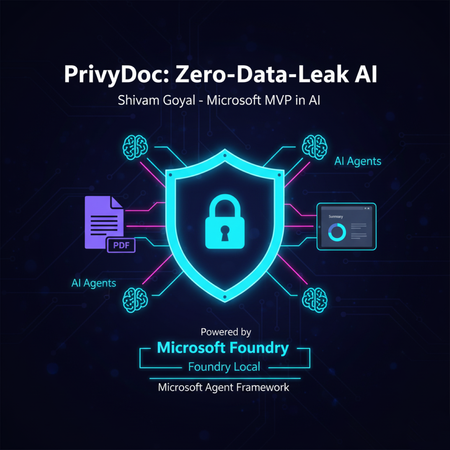
Tired of choosing between powerful AI insights and sacrificing your data's privacy? PrivyDoc offers a groundbreaking solution. In this article, Microsoft MVP in AI, Shivam Goyal, introduces his innovative project that brings robust AI document analysis directly to your local machine, ensuring zero data ever leaves your device. Discover how PrivyDoc leverages two cutting-edge Microsoft technologies: Foundry Local: The secret sauce for 100% on-device AI processing, allowing advanced models to run securely without cloud dependency. Microsoft Agent Framework: The intelligent orchestrator that builds a sophisticated multi-agent pipeline, handling everything from text extraction and entity recognition to summarization and sentiment analysis. Learn about PrivyDoc's intuitive web UI, its multi-format support, and crucial features that make it perfect for sensitive industries like legal, healthcare, and finance. Say goodbye to privacy concerns and hello to AI-powered document intelligence without compromise.670Views3likes0Comments
Protect Time Doesn't Auto Set Recurring Plan Appointments to Private
Location Settings -> Protect Time -> Configure your recurring plan for focus Suggestion Please add a radial select, button, dropdown, etc. to allow for us to set our focus appointments within Viva Insights to "private" automatically. Issue When I configured my recurring plan, it's great. It works as intended and appears to setup a new plan automatically, for two-week increments (the current week and the next week). What it doesn't allow, is for me to set my automatic privacy settings. I personally would like mine set to private due to calendar sharing. I have to go in and manually select each appointment to make them private which is definitely more work than I hoped for. Overall, I love this feature because prior to Viva Insights, I was doing this all manually. Thank you for the innovation!Manager Insights
We uploaded organization data, and we have managers who has 9+ direct reports (uploaded in org data and licenced). However they still can not see some of the people in their teams, in the teams, viva insights application in the direct reports. What can be the problem? Jake_CaddesSolved1.5KViews0likes7Comments