power virtual agents
16 TopicsLoad testing Copilot Studio agents with Locust and Azure Load Testing
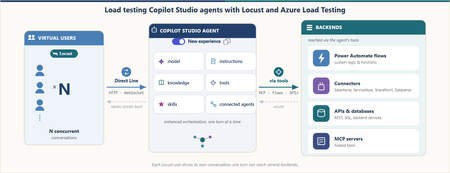
A conversational agent doesn't answer like an API. You send one message. The server returns 200 OK. And then nothing happens. The real answer is still coming, streaming back over a WebSocket as one reply or several. It might take two seconds, or three minutes while the agent thinks, calls a tool, or even builds another agent. So how do you load test an answer that isn't ready when the request says it is? This post builds that test — and one 30-minute run answered it: 253 conversations and 3,212 requests with zero failures, including an agent-creation turn that took 8.68 seconds to reply and 163.71 seconds to finish. Why load test a Copilot Studio agent Conversational agents built with Copilot Studio run on a platform that automatically scales to support increases in demand and load, as documented in Microsoft's performance-testing guidance. That scaling is not infinite. It stays within the environment's capacity, quotas, throttling, and service limits. A turn can also reach custom logic, connectors, and backend services with separate operating limits. Concurrent load can expose latency or failures in either part of the request path. Start by taking a single turn apart. A turn is one user message and everything the agent does to answer it, up to the moment it signals turn.complete. The elapsed time spans several parts of the request path, including the Copilot Studio-managed path and external dependencies. The green zone is the path managed by Copilot Studio: the Direct Line channel that accepts the message, the enhanced orchestration runtime that reasons over the agent's parts (its model, instructions, knowledge, tools, skills, and connected agents), and the reply that streams back one message at a time. The platform automatically scales to support increases in demand and load while coordinating those parts within those same limits. Constraints in this zone can also contribute latency or failures. The amber zone covers everything a turn reaches beyond that managed path. From inside the green zone, the agent's tools call out to these dependencies: custom logic and Power Automate flows; connectors to systems like Salesforce, ServiceNow, SharePoint, and Dataverse; backend APIs and databases; and hosted MCP servers. (A2A connections to remote agents on other platforms existed only for classic agents at the time of this test, so they're out of scope here.) Each dependency has its own configuration and limits. Under load, any part of either zone can add latency or fail; full-agent timings alone do not identify the source. Test each component in isolation Component-level tests help isolate constraints before a full-agent run. Apply representative load directly to the cloud flow, connector, backend API, and MCP server one at a time. The results can show the request rate at which latency rises, throttling appears, or requests begin to fail for that dependency. An isolated run turns a vague "the agent felt slow" into measured component behavior. A full-agent run can then be compared with those results without assuming in advance which part caused the delay. Why test the complete agent under load Testing each component helps find its limit. But users experience the complete conversation, not one component at a time. The agent may take a different path for each message. It may return one reply or several replies. Some steps may also take much longer than others. This is true even when the agent does not call an external system. A load test shows how the complete agent behaves when many users are active. The results help set realistic expectations for response time and reliability: More users can mean slower replies. An agent may respond quickly for one tester but slow down when many conversations run at the same time. Different conversations take different paths. Some work starts only after a user makes a certain choice. A one-message test may never reach that work. The full answer takes longer than the send request. Sending a message is only the start. The response time ends when the agent has returned its last reply for the turn. Real results support better targets. Measured response times and error rates provide a clear baseline for production planning. What this post does This post shows how to build a Python load test for a conversational agent built with Copilot Studio using Locust, a Python load-testing framework that simulates concurrent users. The test communicates with the agent through the Direct Line API, the channel used by the tested client application to exchange messages with the published agent. Direct Line uses HTTP requests to get a token, start a conversation, and send a message. Replies arrive over a WebSocket connection. Each Locust virtual user follows this same path, sends a series of messages, and measures the time until the agent completes each turn. The same Python workload file runs locally and in Azure Load Testing without code changes. Environment-specific settings come from locust.conf locally and locust.azure.conf in Azure. The local validation below uses four virtual users for 15 minutes. The cloud run uses the same two user classes with 16 virtual users for 30 minutes, including text conversations, attachment intake, and selective agent creation. In this post, I: Explain how a conversation works over Direct Line and WebSockets. Build the Locust client one step at a time. Handle complete turns, errors, and file uploads. Run both conversation paths under load: users describing requirements in chat and users submitting requirements as file attachments. Run the same test locally and in Azure Load Testing. The agent under test. The examples use Automatic Agent Creator, a demonstration Copilot Studio agent that reads a business request, asks follow-up questions, and either recommends an integration approach or creates and publishes a new agent. The Direct Line flow can be adapted to other published agents, but conversation behavior, events, and response shapes must be validated for each agent, client, channel configuration, and product version. How a Copilot Studio agent talks over Direct Line The tested agent and client used this shape: open a session, exchange messages while it is alive, and read replies until the agent signals that the turn is done. This load test reproduces that flow end to end so its timings include the reply path, not only the message-send request. Direct Line can deliver replies through a WebSocket stream or HTTP GET polling. Microsoft's performance-testing guidance says to use WebSockets when the client-facing application uses them; HTTP GET remains available when it does not. The tested client used WebSockets, so this harness does too. The base host in every request below is a Direct Line regional endpoint. Get a token Before a client can start a conversation, it needs a conversation token. A Direct Line secret is sent to the token endpoint to request one. Direct Line returns a token for one conversation and an expires_in value that gives the number of seconds until it expires. The client uses this token for the conversation requests that follow. POST {host}/v3/directline/tokens/generate Authorization: Bearer «Direct Line secret» → 200 { "conversationId": "…", "token": "eyJhbGci…", "expires_in": «seconds until expiry» } The tested conversations completed before their returned token expiry. A longer-lived client must use the returned expires_in value and refresh the token before it expires. Start a conversation and open the socket To start a conversation, the client sends the token to Direct Line in an HTTP request. Direct Line returns two important values: a conversationId, which identifies the conversation, and a streamUrl, which is the WebSocket address used to receive replies. The client opens the WebSocket and keeps it open until the conversation ends. POST {host}/v3/directline/conversations Authorization: Bearer «token» → 201 { "conversationId": "…", "streamUrl": "wss://…/stream", "token": "eyJhbGci…" } WS CONNECT wss://…/stream → socket open (HTTP 101) Send a message With the conversation started and the WebSocket open, the client can send the first user message. In Direct Line, a message is represented as an activity. The client sends this activity through an HTTP POST, while the agent's replies return through the open WebSocket. POST {host}/v3/directline/conversations/{id}/activities Authorization: Bearer «token» { "type": "message", "from": { "id": "user-…" }, "text": "…", "locale": "en-US" } → 200 { "id": "…" } The 200 response contains the ID assigned to the activity. It confirms that Direct Line accepted the message, but it does not contain the agent's answer or mean that the agent has finished processing the message. The answer arrives separately through the WebSocket connection. Receive replies until turn.complete After Direct Line accepts the message activity, the agent's replies arrive through the open WebSocket. A turn may contain one agent message or several. When the agent finishes the turn, the stream sends an event named turn.complete. The client ends the read for the current turn when this event arrives. The WebSocket remains open for the next message. Two measurements describe the response time. Although TTFB usually means time to first byte, this harness uses the label for the time to the first complete agent message: TTFB is the time from the start of the send request to the first agent message. ResponseTime is the time from the start of the send request to the last agent message. Note. In this post, TTFB means the time to the first complete agent message, not the first network byte. Typing activities and the turn.complete event are not used as timing endpoints. The first and last agent messages set the measurements. For a turn with one agent message, TTFB and ResponseTime are equal. When the agent first sends an acknowledgment and later sends the completed result, ResponseTime is longer than TTFB. In the Azure run reported later, the agent-creation turn averaged 8.68 seconds to the first message and 163.71 seconds to completion. Note. Direct Line does not provide a general "last message" marker. The standard performance-testing guidance uses replyToId to match replies to the sent message and an inactivity timeout to decide when the response has ended. The new agent experience adds turn.complete as an explicit end-of-turn signal. This client uses that event as the normal stopping point, keeps an overall deadline as a safety check, and uses sender ID because from.role may be missing. Implement one virtual-user conversation One virtual user repeats a small cycle: open a Direct Line conversation, send a turn, receive the replies, record the timing, pause, and close. The excerpts below implement that cycle before Locust adds concurrency. Note. These focused excerpts omit some hardening, debug logging, transcript details, and upload internals. The complete client contains them. The important imports are shown once and reused below: import json # Python standard library: decode WebSocket frames import time # Python standard library: measure turn duration import websocket # websocket-client: open and read the WebSocket from locust import FastHttpUser, between from locust.exception import StopUser json and time come from Python. websocket comes from websocket-client. Locust supplies FastHttpUser, between, and StopUser. Uppercase names such as REPLY_DEADLINE are constants in new_chat_client.py. Open the session: connect() At the top of every task, connect() gives the virtual user a unique id, gets a token, starts a conversation, and opens the WebSocket. The unique id matters later: it's how the client tells the agent's replies apart from its own echoed message. def connect(self): """Get a token, start a conversation, and open the WebSocket.""" self._user_id = "user-" + str(id(self)) self._turn = 0 self._token = self._get_token() if not self._token: raise StopUser() started = self._start_conversation() if not started: raise StopUser() self.conversation_id, stream_url = started self._ws = websocket.create_connection(stream_url, timeout=WS_CONNECT_TIMEOUT) self._ws.settimeout(WS_RECV_TIMEOUT) # each recv() polls for at most a second The token and start calls are ordinary HTTP, wrapped so Locust records each one and marks a bad status as a failure. def _get_token(self): url = self.directline + "/v3/directline/tokens/generate" headers = {"Authorization": "Bearer " + self.direct_line_secret} with self.client.post(url, headers=headers, name=self.label + " token", catch_response=True) as response: if response.status_code != 200: response.failure("token HTTP " + str(response.status_code)) return None body = parse_json(response) if not body or not body.get("token"): response.failure("token response missing 'token'") return None return body["token"] def _start_conversation(self): url = self.directline + "/v3/directline/conversations" with self.client.post(url, headers=self._auth_header(), name=self.label + " start", catch_response=True) as response: if response.status_code not in (200, 201): response.failure("start HTTP " + str(response.status_code)) return None body = parse_json(response) or {} conversation_id = body.get("conversationId") stream_url = body.get("streamUrl") if not conversation_id or not stream_url: response.failure("start response missing conversationId or streamUrl") return None if body.get("token"): self._token = body["token"] return conversation_id, stream_url One turn: say() say() owns one turn: start the clock, send the activity, receive replies, record both timings, and return the last non-empty agent message. metric_name labels the Locust rows, deadline limits the whole turn, and attach selects the upload path. def say(self, text, metric_name=None, deadline=REPLY_DEADLINE, attach=None): """Send one message, wait for the reply, and return the reply text.""" self._turn += 1 start = time.perf_counter() posted_id = self._send(text, attach) if posted_id is None: self._record(start, None, None, metric_name, "", "send failed") raise StopUser() result = self._receive(start, deadline) self._record(start, result.t_first, result.t_final, metric_name, result.text, result.error) if result.error: raise StopUser() return result.text Earlier replies still set the timing boundaries, but result.text contains only the last non-empty message. _send() posts a normal message unless attach selects the upload path explained later. def _send(self, text, attach=None): if attach: return self._send_file(text, attach) # explained in the attachment section activity = {"type": "message", "from": {"id": self._user_id}, "text": text, "locale": "en-US"} url = (self.directline + "/v3/directline/conversations/" + self.conversation_id + "/activities") with self.client.post(url, json=activity, headers=self._auth_header(), name=self.label + " send", catch_response=True) as response: if response.status_code != 200: response.failure("send HTTP " + str(response.status_code)) return None body = parse_json(response) if not body or not body.get("id"): response.failure("send response missing activity id") return None return body["id"] The returned activity ID confirms acceptance, not an answer. The answer arrives on the WebSocket, while Locust records the POST as a separate send row. Read WebSocket frames until the turn ends _receive() reads JSON frames from the open socket. TurnResult keeps the latest text, the first and final message times, and any error: class TurnResult: def __init__(self): self.text = "" # last non-empty agent message self.t_first = None # first agent-message time self.t_final = None # latest agent-message time self.error = "" # non-empty when the turn fails The one-second socket timeout keeps each read responsive; the overall deadline limits the complete turn, including the HTTP send. def _receive(self, start, max_wait=REPLY_DEADLINE): """Read frames until the agent signals 'turn.complete' or the deadline passes.""" result = TurnResult() deadline = start + max_wait while time.perf_counter() < deadline: try: frame = self._ws.recv() except websocket.WebSocketTimeoutException: continue # no data this second; keep waiting if not frame or not frame.strip(): continue payload = json.loads(frame) for activity in payload.get("activities", []): if self._handle_activity(activity, result): return self._finish(result) # saw turn.complete if result.t_final is None and not result.error: result.error = "no final reply (timeout)" return self._finish(result) Each activity has one job: Activity Client action User message echo Ignore it because it came from the virtual user typing Ignore it for response-time measurements Agent message Set the first and latest message times; keep the latest non-empty text trace with an ErrorCode Store the structured turn error event named turn.complete End the read for this turn; keep the WebSocket open _handle_activity() applies the table. _is_bot_reply() filters the user echo and is explained next. def _handle_activity(self, activity, result): activity_type = activity.get("type") if activity_type == "message" and self._is_bot_reply(activity): now = time.perf_counter() if result.t_first is None: result.t_first = now # first reply -> TTFB result.t_final = now # every reply -> ResponseTime result.text = activity.get("text") or result.text return False if activity_type == "trace": code = self._error_code(activity) if code and not result.error: result.error = "bot error: " + describe_error_code(code) return False if activity_type == "event" and activity.get("name") == "turn.complete": return True return False Normally turn.complete ends the read. The deadline is the fallback; a turn with no agent message fails. Record the latency _record() emits TTFB and ResponseTime for a successful turn. A failed turn emits one failed ResponseTime entry instead of a latency value. def _record(self, start, t_first, t_final, metric_name, text, error): name = self.label + " " + (metric_name or ("t" + str(self._turn))) fire = self.environment.events.request.fire if error: fire(request_type="CHAT", name=name + " [ResponseTime]", response_time=None, response_length=0, exception=Exception(error), context={}) return fire(request_type="CHAT", name=name + " [TTFB]", response_time=((t_first or t_final) - start) * 1000, response_length=0, exception=None, context={}) fire(request_type="CHAT", name=name + " [ResponseTime]", response_time=(t_final - start) * 1000, response_length=len(text), exception=None, context={}) Pause between turns and close the conversation The scenario pauses between messages and closes the WebSocket in finally, even when a turn fails. try: self.connect() self.say(requirement, "T01 requirement") self.think(20, 30) self.say("ok", "T02 confirm") finally: self.close() That completes one conversation. Note. This is a trimmed two-turn illustration (T01 requirement then T02 confirm). The demo text scenario reported later runs five turns: T01 requirement, T02 source, T03 target, T04 action (only some conversations reach this branch), and T05 confirm. Assemble the reusable Locust user In new_chat_client.py, the methods above belong to WebSocketChatClient. The class extends FastHttpUser and holds their shared configuration: class WebSocketChatClient(FastHttpUser): """Direct Line WebSocket load client for a new-experience Copilot Studio agent.""" abstract = True host = DIRECTLINE wait_time = between(2, 6) directline = DIRECTLINE direct_line_secret = None # secret mode label = "ws" abstract = True prevents Locust from running the base directly. A scenario subclass supplies the secret, metric label, and messages. wait_time pauses between complete scenario runs, while explicit think() calls pause between turns. Locust can then create many scenario instances that reuse the same conversation methods. Handling the new experience Three behaviors of the new agent experience would quietly break a naive client. Each is a few lines in the methods above. Preview notice. As of July 13, 2026, the Copilot Studio new agent experience is a production-ready preview. Microsoft identifies its documentation as prerelease and subject to change, and states that production-ready previews are subject to the Supplemental Terms of Use for Microsoft Azure Previews. Replies may omit a role In the classic channel, an agent message carries from.role = "bot". In the new experience some replies arrive with only from.id and no role at all. Keying off role == "bot" would drop those messages and report "no reply." The fix treats any message that isn't the client's own echo as a reply: def _is_bot_reply(self, activity): """True if the message is from the agent (role may be missing), not the client's echo.""" sender = activity.get("from") or {} role = sender.get("role") if role == "bot": return True if role == "user": return False return sender.get("id") != self._user_id # role missing -> not the echo -> a reply turn.complete is an explicit end-of-turn event Reading it (rather than waiting out a timeout) is what lets a fast turn finish in a couple of seconds instead of idling. It's the event branch in _handle_activity() above. Errors come back as a structured code When something goes wrong, the agent can send a trace activity carrying a locale-independent ErrorCode. The client maps it against the official code list so a run reports why it failed, not just that a reply never came: def _error_code(self, activity): if activity.get("valueType") != "ErrorCode": return None value = activity.get("value") if isinstance(value, dict) and value.get("ErrorCode"): return value["ErrorCode"] return "error" Attach files with a multipart upload A file-reading turn exercises work that a text-only turn does not. This harness sends one or more files through the Direct Line /upload endpoint as multipart/form-data, with an optional message activity in the same request. The multipart request The request contains one activity part and one file part per attachment: POST {host}/v3/directline/conversations/{id}/upload?userId={from.id} Authorization: Bearer «token» Content-Type: multipart/form-data; boundary=----loadtest-«random» ------loadtest-«random» Content-Disposition: form-data; name="activity" Content-Type: application/vnd.microsoft.activity { "type": "message", "from": { "id": "user-…" }, "text": "" } ------loadtest-«random» Content-Disposition: form-data; name="file"; filename="requirement.csv" Content-Type: text/csv «raw file bytes» ------loadtest-«random»-- → 200 { "id": "…" } (same shape as a normal send) The required userId query parameter identifies the sender. The harness uses the same per-instance ID in userId and activity.from.id, so the echoed activity has the sender ID expected by the reply filter. The activity JSON contains no attachments array. Direct Line adds the separate file parts as attachments to that activity before sending it to the agent. A successful upload returns the same { "id": "…" } shape as a text send, so the existing WebSocket receive and timing path remains unchanged. Building the body by hand Locust's FastHttpUser has no explicit requests-style files= helper. The client therefore assembles the multipart body as bytes. A fresh UUID-based boundary is used for each request, every file is read before the POST begins, and each attachment gets its own file part. The implementation uses four additional standard-library modules: import mimetypes import os import urllib.parse import uuid def _send_file(self, text, attach): """Upload one or more files (optionally with a message) via Direct Line /upload.""" paths = attach if isinstance(attach, list) else [attach] files = [] # read every file first for path in paths: with open(path, "rb") as handle: data = handle.read() name = os.path.basename(path) extension = os.path.splitext(path)[1].lower() mime = UPLOAD_MIME.get(extension) or mimetypes.guess_type(path)[0] or "application/octet-stream" files.append((name, mime, data)) activity = json.dumps({"type": "message", "from": {"id": self._user_id}, "text": text or ""}) boundary = "----loadtest-" + uuid.uuid4().hex # fresh boundary per request dash = ("--" + boundary).encode("utf-8") parts = [ dash + b"\r\n", b'Content-Disposition: form-data; name="activity"\r\n', b"Content-Type: application/vnd.microsoft.activity\r\n\r\n", activity.encode("utf-8") + b"\r\n", ] for name, mime, data in files: # one part per file disposition = _content_disposition("file", name) parts.append(dash + b"\r\n") parts.append(("Content-Disposition: " + disposition + "\r\n").encode("utf-8")) parts.append(("Content-Type: " + mime + "\r\n\r\n").encode("utf-8")) parts.append(data + b"\r\n") parts.append(dash + b"--\r\n") url = (self.directline + "/v3/directline/conversations/" + self.conversation_id + "/upload?userId=" + self._user_id) headers = self._auth_header() headers["Content-Type"] = "multipart/form-data; boundary=" + boundary with self.client.post(url, data=b"".join(parts), headers=headers, name=self.label + " upload", catch_response=True) as response: if response.status_code != 200: response.failure("upload HTTP " + str(response.status_code)) return None posted = parse_json(response) if not posted or not posted.get("id"): response.failure("upload response missing activity id") return None return posted["id"] The media type comes from a small known-types table, then Python's mimetypes, then application/octet-stream. This labels unknown extensions without claiming that every file type or size can be processed by the agent. The client sends the basename in the multipart header; exact preservation of non-ASCII filenames is not assumed. Use the same turn API Scenarios continue to call say(...). _send() chooses the ordinary message endpoint or multipart /upload: def _send(self, text, attach=None): if attach: return self._send_file(text, attach) # multipart /upload # … otherwise the ordinary text Send Activity from earlier Text only — the ordinary Send Activity. Text and a file — a message plus one attachment. A file with no message — pass text="" with an attachment. Several files — pass a list, and each becomes its own file part in one upload. Because /upload returns the same activity-ID shape as a text send, an upload turn is received and timed by the same say() path: # A conversation that hands the agent a requirements file instead of typing it self.say("Here is my requirement", "T01 requirement", attach="requirement_intake.csv") Validate the workload locally first Before running the larger test in Azure, the workload ran locally in one Python process with locust.conf: four virtual users for 15 minutes, starting one user every 30 seconds. This verified both conversation paths, file uploads, pacing, transaction names, and diagnostics. Azure Load Testing then used the same Python workload with locust.azure.conf, increasing the profile to 16 virtual users for 30 minutes and omitting local result paths. The Python environment used three dependencies beyond the standard library: python -m pip install "locust==2.42.6" "python-dotenv>=1.0,<2.0" "websocket-client==1.9.0" The Direct Line secret came from an environment variable in a local .env file, which kept it out of source control: DL_IA_SECRET=<Direct Line secret> The local run-time included the ramp period. The complete profile lived in locust.conf: locustfile = locustfile_discovery_demo.py headless = true users = 4 spawn-rate = 0.0333333333 run-time = 15m stop-timeout = 1200 only-summary = true csv = results/local-15m html = results/local-15m.html The local launch was then two lines: New-Item -ItemType Directory -Force results | Out-Null python -m locust --config locust.conf The 1,200-second stop timeout was an upper bound, not a fixed extension. When the 15-minute window closed, Locust allowed an in-flight conversation to complete instead of interrupting a turn. This mattered because the optional agent-creation turn had a 300-second reply deadline. Each completed conversation wrote a readable transcript under transcripts/; frame-level JSONL was written under transcripts/directline-debug/ because DL_DEBUG_LOG was enabled. Locust reported the token, conversation-start, send, and upload HTTP calls alongside the [TTFB] and [ResponseTime] chat measurements. Transaction names described logical steps rather than individual system combinations, which kept route variants in the same result rows. The local validation completed successfully. Both conversation paths, file uploads, and optional agent creation finished with zero failures or exceptions. Scale the test in Azure Load Testing The Azure test used one engine to run 16 virtual users for 30 minutes. Eight users followed the text conversation scenario and eight followed the file-attachment scenario. Locust started one user every 30 seconds and kept the configured 20–30 second pause between messages. Upload the test files to an Azure Load Testing resource. The YAML disables client-generated transcripts and JSONL files because Azure Load Testing publishes only its supported artifacts: engine logs, raw result CSV, and a dashboard report. version: v0.1 testId: copilot-studio-directline-load displayName: Copilot Studio Direct Line load test description: Load test with text and file conversation scenarios testPlan: locustfile_discovery_demo.py testType: Locust engineInstances: 1 configurationFiles: - new_chat_client.py - requirements.txt - test_attachment/high_route_requirement.docx - test_attachment/high_route_requirement.pdf - test_attachment/high_route_requirement.png properties: userPropertyFile: locust.azure.conf env: - { name: LOCUST_USERS, value: "16" } - { name: LOCUST_SPAWN_RATE, value: "0.0333333333" } - { name: LOCUST_RUN_TIME, value: "1800" } - { name: LOCUST_STOP_TIMEOUT, value: "1200" } - { name: TEXT_USERS, value: "8" } - { name: FILE_USERS, value: "8" } - { name: ATTACHMENT_DIR, value: "." } - { name: DL_TRANSCRIPT, value: "0" } - { name: DL_DEBUG_LOG, value: "0" } failureCriteria: - percentage(error) > 0 Before creating the test, store the Direct Line secret in Azure Key Vault, enable the Azure Load Testing resource's system-assigned managed identity, and grant that identity permission to read the secret. The Azure Load Testing secret guidance covers the identity and Key Vault access steps. In the current Azure CLI, the literal value null (not an omitted or empty argument) tells --keyvault-reference-id to use the load-testing resource's own system-assigned identity. Azure CLI preview. The az load test and az load test-run commands need the load extension and Azure CLI 2.66.0 or later (currently in preview). Check the current Azure CLI load test reference before running them. Create the test definition from the YAML and set that Key Vault reference identity: az load test create ` --load-test-resource "<load-test-resource>" ` --resource-group "<resource-group>" ` --test-id copilot-studio-directline-load ` --load-test-config-file azure-loadtest.yaml ` --keyvault-reference-id null For a new run, pass the Key Vault secret identifier through Azure Load Testing's dedicated --secret parameter. Locust receives a configured secret as an environment variable with the same name, so the Python workload can continue to read DL_IA_SECRET without code changes: $runId = "copilot-azure-$(Get-Date -Format 'yyyyMMdd-HHmmss')" $directLineSecretUri = "https://<key-vault-name>.vault.azure.net/secrets/<secret-name>" $runEnv = @( "LOCUST_USERS=16" "LOCUST_SPAWN_RATE=0.0333333333" "LOCUST_RUN_TIME=1800" "LOCUST_STOP_TIMEOUT=1200" "TEXT_USERS=8" "FILE_USERS=8" "ATTACHMENT_DIR=." "DL_TRANSCRIPT=0" "DL_DEBUG_LOG=0" ) $runSecrets = @("DL_IA_SECRET=$directLineSecretUri") az load test-run create ` --load-test-resource "<load-test-resource>" ` --resource-group "<resource-group>" ` --test-id copilot-studio-directline-load ` --test-run-id $runId ` --env $runEnv ` --secret $runSecrets ` --only-show-errors ` --output none Azure's test-run debug mode was deliberately left off. Debug-mode runs are capped at 10 minutes regardless of the configured Locust duration. After the run command completes, download the engine logs, raw results, and dashboard report: az load test-run download-files ` --load-test-resource "<load-test-resource>" ` --resource-group "<resource-group>" ` --test-run-id $runId ` --path "results/azure/$runId" ` --log --result --report --force The download command creates logs.zip, csv.zip, and reports.zip in the target directory. Security note. The command passes a Key Vault secret identifier, not the Direct Line secret value. Azure Load Testing stores the identifier, retrieves the secret with the configured managed identity for each run, and exposes it to the Locust process as DL_IA_SECRET. Keep --env for non-sensitive settings only. The 2026-07-12 Demo Run passed the secret through --env, which can expose it in run metadata; the recommended command above avoids that. In CI/CD, the Azure Load Testing task or action can instead receive the value through its secrets input from the pipeline's secret store. What the 30-minute Demo Run produced The completed Azure execution is referred to below as the Demo Run. It ran on 2026-07-12 using a single Azure Load Testing engine, with 16 virtual users split evenly between the text and file paths. Treat the Demo Run as a baseline at this load, not a capacity ceiling. The Demo Run completed with a PASSED verdict and no service error details. The Locust engine ran its configured 30-minute window, then allowed in-flight conversations to finish. It reached all 16 users after 7 minutes 30 seconds, then held exactly 16 for the rest of the run. It hit the run-time limit at 10:23:22Z, a steady window of about 22 minutes 30 seconds, and exited cleanly about 1 minute 50 seconds later. Measure Result Virtual users 16: 8 text and 8 file Locust run-time window 30 minutes Full-load window About 22 minutes 30 seconds Completed conversations 253 Text conversations 98 File conversations 155 Recorded request samples 3,212 Failed samples 0 Completed agent-creation turns 5 The 3,212 samples include Direct Line HTTP calls plus the custom [TTFB] and [ResponseTime] entries emitted for chat turns. Every text conversation that started reached T05 confirm, and every file conversation reached T03 confirm. Path Conversations Recorded samples Failures Text discovery 98 1,507 0 File attachment 155 1,705 0 Total 253 3,212 0 Azure Load Testing packages an offline dashboard with per-minute charts, sampler statistics, and error details. The download command in the previous section saves it as reports.zip. Extract the archive and open reports/index.html. For the Locust-based Demo Run, the downloaded dashboard is also published as the Demo Run report and can be viewed directly. The two cards below summarize latency for the text and file scenarios. Teal shows average TTFB, blue shows average ResponseTime, and orange extends from the average ResponseTime to p90. Text conversation latency re within a section, not across sections. Observation. The regular text path peaked at 18.93 seconds p90 for the requirement turn, while agent creation returned its first message in 8.68 seconds on average but needed 163.71 seconds on average, and 202.37 seconds at p90, to complete. File conversation latency Observation. Attachment processing was the slowest file turn at 22.19 seconds average and 27.80 seconds p90; token, conversation-start, send, and upload calls remained at or below 220 milliseconds p90. What the numbers suggest Agent work dominated the measured latency During the Demo Run, Direct Line token, conversation-start, send, and upload operations all stayed below 220 milliseconds p90. Complete chat turns took seconds, while the agent-creation branch took minutes. This shows that most of the measured end-to-end time accumulated after Direct Line accepted the message. The results do not separate orchestration, model, tool, or downstream-service time. TTFB did not describe the complete answer Some turns returned one message, so TTFB and ResponseTime were equal. Others acknowledged the request and kept working. The target turn averaged 3.08 seconds to first reply and 6.62 seconds to completion. The conditional action turn averaged 3.29 seconds to first reply and 9.46 seconds to completion. Agent creation widened that gap to more than two and a half minutes on average. Measuring only the first reply would hide the expensive part of those turns. Equal users did not produce equal conversation totals The user allocation was eight and eight, but the file path completed 155 conversations while the text path completed 98. That difference is consistent with the longer multi-turn text flow and its occasional agent-creation branch. Virtual-user allocation describes concurrency; completed iterations also depend on scenario duration. Assumptions and guardrails A few deliberate choices bound what these numbers mean: Baseline scale, on purpose. The four-user local validation and 16-user Azure profile generate baselines, not a stress test. The guidance warns that load exceeding real user behavior can trigger message-consumption overage and environment throttling, so the Demo Run stayed within confirmed traffic and quota boundaries. WebSocket transport with secret auth. The client uses Direct Line over WebSockets to match the tested client application and exchanges a Direct Line secret for a token. A test for a client that receives activities through HTTP GET should reproduce that transport instead. One agent, one region. The numbers describe a single agent on one Direct Line regional endpoint; a different agent, model, or region will have its own signature. New-experience behavior observed in this run. The client relies on the turn.complete event and role-optional replies observed during the test. Both the product status and response shapes can change while the experience remains in preview. Capacity confirmed first. A larger run requires prior confirmation that the agent, environment, and connected services support the peak throughput, with a limit increase requested when estimates exceed defaults. Limitations Single Azure engine, light load. Sixteen virtual users provide a baseline, not a capacity ceiling. Characterizing saturation needs higher concurrency and multiple Azure Load Testing engines. One Demo Run. The results describe this 30-minute window and should be compared with repeated runs before setting a service-level target. Chat turns only. The harness measures the message turn. It doesn't exercise sign-in cards, adaptive-card submits, or streamed token-by-token rendering. No Azure transcripts. The cloud profile intentionally disabled readable transcripts and client JSONL, so the five agent-creation turns prove completed responses but not an independent resource inventory. One operational note Operational note. Confirm the Copilot Studio environment's quotas and the capacity of every connected dependency before increasing users or engine count. The workload should model expected traffic rather than use production systems as an unrestricted stress target. Wrap-up For the tested Copilot Studio new-experience agent and WebSocket client, a small reusable Locust client captured the observed Direct Line flow. It matched the client's WebSocket transport, treated non-echo messages as replies, stopped on the turn.complete event emitted by the tested product build, and recorded both first-reply and last-reply times so a multi-message turn did not hide behind its acknowledgment. The same Python workload runs unchanged from a laptop and from Azure Load Testing engines. Local settings come from locust.conf; Azure settings come from locust.azure.conf and the test YAML. The Direct Line secret is supplied at run time, and a failureCriteria gate can support a release pipeline. The four-user local run validated the scripts and diagnostics; the Demo Run then held its full steady concurrency with 3,212 samples and zero failures. Further tests can add repeated baselines, more users and engines for saturation, additional attachment types, and a longer soak. Learn more Plan and create a conversational agent performance test — the planning method, workload model, and test-plan structure this post follows. Best practices for improving conversational agent performance — quotas, and the agent-side levers for cutting latency. Agents overview (new experience) — the orchestration model, instructions, knowledge, tools, and connected agents. Locust documentation — the load-testing framework this harness builds on. Azure Load Testing documentation — the managed load-testing service. Get the code The complete runnable example is available in kroy92/copilot-studio-load-testing. The repository contains new_chat_client.py, the two-class locustfile_discovery_demo.py workload, three attachment fixtures, local and Azure Locust configuration files, requirements.txt, and azure-loadtest.yaml. The Direct Line secret stays in the ignored .env file locally. For new Azure Load Testing runs, the recommended command retrieves it from Azure Key Vault through the dedicated secret parameter. The same Python workload runs in both environments, with locust.conf used locally and locust.azure.conf used in Azure.895Views2likes1CommentCreate Your Own Copilot Using Copilot Studio
Hello everyone, I am Suniti, Beta MLSA pursuing my graduation in the field of Data Science. Today, we're diving into creating our very own copilot to guide students towards ‘becoming MLSAs’. But first thing first, let's explore Copilot Studio!19KViews4likes2CommentsStep-by-Step: Creating Customized Applications with Power Virtual Agent to Empower Your Business
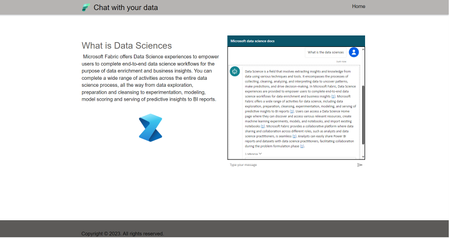
In this blog, you will learn how to use the Power platform to create engaging and interactive applications with your own data. You will see how to build a Power Virtual agent that can chat with your own data. You will also discover how to integrate your agent with Power Apps and Power Pages, so you can publish your app to the web and reach a wider audience.12KViews3likes0CommentsRevolutionize Customer Engagement: Empowering Your Business with Power Virtual Agents
In today's fast-paced digital landscape, the success of your startup or business hinges on effective customer engagement. Discover the game-changing potential of Power Virtual Agents (PVA), a revolutionary conversational AI tool that empowers entrepreneurs. Learn how PVA can transform your customer support, increase responsiveness, and boost engagement, all without the need for coding expertise.6.3KViews3likes0Comments
Step-by-Step: Building an Automated ID Card Generation System using Microsoft Power Virtual Agent
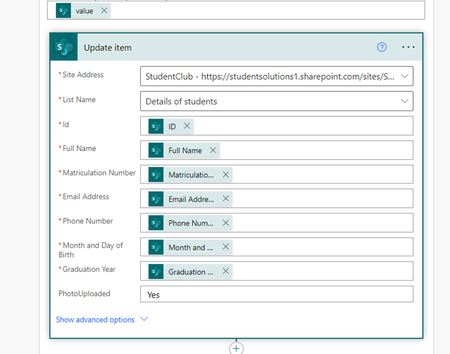
Universities, student clubs and organizations are currently facing challenges in efficiently managing the process of issuing identification cards (ID Card) to their members. We want to help make things better.8.3KViews2likes0CommentsBuild Your Own Chatbot in Minutes with Power Virtual Agents: No Coding Required!
Learn how to build a chatbot without coding using Power Virtual Agent, a platform by Microsoft. Automate tasks, reduce costs, and improve efficiency with AI-powered chatbots. No programming knowledge required! Discover how Power Virtual Agents work, guiding you through information like a digital librarian. Create your first chatbot by signing up on the Power Virtual Agents website and accessing your dashboard. Customize your bot's name, language, and even enable voice capabilities. Add relevant online content to enhance your bot's responses. Test and publish your bot with just a few clicks. Experience the functionality of your chatbot on the demo website. Explore more resources about Power Virtual Agent and reach out for assistance. Start building chatbots effortlessly today!31KViews2likes1CommentThe Durable Functions SDK for PowerShell is now in the PowerShell Gallery
We have just published the Durable Functions for PowerShell SDK in the PowerShell Gallery. This package contains several reliability, correctness, and performance improvements, and it will allow us to iterate faster on feedback and feature requests. Try it out by installing AzureFunctions.PowerShell.Durable.SDK from the PowerShell Gallery. This is a breaking change release, so make sure to read the “breaking changes” section before upgrading.3.6KViews0likes0CommentsMS Federal Business Apps Webinar: How to build a Virtual Agent chat Bot and Extend it with Azure
Bots are everywhere, in this session we will talk about the proliferation of bots in the Federal Government and show how bot technologies can be extended with Azure and Cognitive services to improve customer support or internal teams. This session will enable you to leave with ideas on how your organization can scale and support your constituents by utilizing advanced bot concepts and implementations.3.6KViews1like2CommentsA Guided Path to Low Code Development at the Game of Learners Power Platform Clinics
The Game of Learners Power Platform Clinics is a 5-week upskill initiative for aspiring developers with no coding backgrounds to learn the diverse ways of building and deploying tech solutions using Low Code/ No Code. Join Us!17KViews5likes20Comments