platform sso
2 Topics
Intune macOS ADE: support for minimum macOS version enforcement before Platform SSO registration
Hi everyone, I would like to ask whether Microsoft Intune has any supported method, roadmap, or recommended workaround for enforcing a minimum or target macOS version during Automated Device Enrollment before Setup Assistant continues. The scenario is macOS zero-touch deployment with Intune, Automated Device Enrollment, Setup Assistant with modern authentication, Await final configuration, and Platform SSO registration during ADE. Platform SSO registration during Setup Assistant depends on newer macOS capabilities. In addition, some macOS deployment scenarios, such as Platform SSO password sync and macOS LAPS, may require or strongly benefit from a specific macOS version being installed before the user completes enrollment. Today, Intune can manage macOS software updates after enrollment using Declarative Device Management software update policies. However, that does not fully solve the issue where the Mac starts ADE on an older macOS version. In that case, the device may begin Setup Assistant and Platform SSO registration before the required macOS version is installed. What I am looking for is an Intune-native equivalent of enforcing a minimum or target macOS version during ADE, before Setup Assistant continues. Ideally, the macOS ADE enrollment profile in Intune would support options such as: - Minimum required macOS version - Target specific macOS version - Target specific build, if supported - Latest eligible macOS version for the device - Apply the OS update before Platform SSO registration and final configuration - Reporting in Intune showing whether the ADE OS update was required, started, completed, skipped, or failed Without this capability, organizations using Intune-only macOS deployment may still need manual IT staging or macOS restore/update before handing devices to users. This weakens the zero-touch deployment model, especially when adopting Platform SSO registration during Automated Device Enrollment. 1. Is there currently any supported way in Intune to enforce a minimum or target macOS version during ADE before Setup Assistant continues? 2. Is this capability on the Intune roadmap? 3. Are there any recommended workarounds for organizations deploying Platform SSO registration during ADE where a specific macOS version is required? Thanks in advance for any guidance from the Intune team or the community.301Views0likes1CommentPlatform SSO for macOS not working
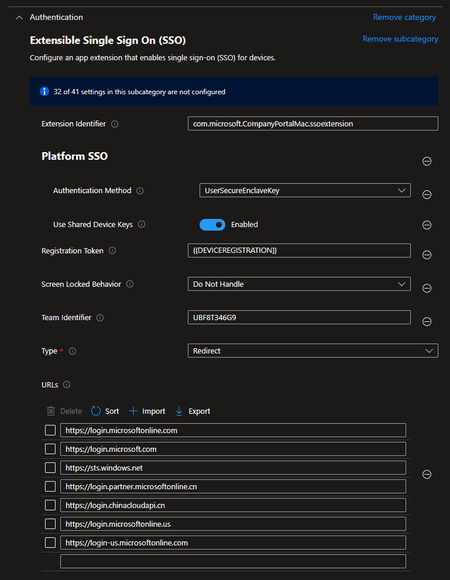
(Update after long troubleshooting: the two main issues until now were: Leading and/or trailing spaces in the configs > They lead to visible and unvisible errors! When using in europe you need to remove some URLs (detailed information in this thread)) Hi folks, i'm working hard on implementing Platform SSO for macOS (MSlearn) (2nd Link: Join a Mac device with Microsoft Entra ID during the out of box experience with macOS PSSO (preview) for ourselves and our customers. I worked all the way through the Microsoft Learn Articles as well as 3rd Party blog posts or reddit discussions. (MS Intune Support think they need to forward my ticket to the Azure Support. I don't get it :D) The issue is: The Platform SSO Profile in Intune is always on error code 100001. I tested this with different tenants, in every single one the issue is the same. The config profile is configured as followed: When looking at the device this is what should appear: But this doesn't happen on the device. What i'm also wondering about: When signin in on a mac device enrolled via ADE, after i log in to the company portal app (current version), it states that it is unable to register the device. Is this an expected behaviour? I don't think so, isn't it? It would be so great to come into contact with others of you having the same issue or, even better, that solved this issues. 🙂 Thank you very much in advance Regards Patrick Ps.: Maybe some of the mslearn article contributors have any idea? Mandi Ohlinger, arnabbiswas ? 🙂21KViews0likes39Comments