pki
26 TopicsSecuring Your Certification Authorities (Practical PKI Part 4)
Maintaining a secure Public Key Infrastructure (PKI) requires careful management and protection of Certification Authorities (CAs), focusing on best practices to prevent exploitation and ensure longevity. This guide highlights key strategies for securing root and enterprise CAs, proper rights management, and specific configuration recommendations to defend against known vulnerabilities.Secure Configuration and Hardening of Active Directory Certificate Services
This blog provides a detailed guide on securing and hardening Active Directory Certificate Services (ADCS), emphasizing best practices based on extensive Microsoft customer engagements. It covers four critical focus areas: maintaining an offline root certificate authority (CA), auditing certificate services correctly, applying role separation, and cleaning up certificate templates and their permissionsPurpose For Your PKI (Practical PKI Part 3)
Discussing the importance of understanding the purpose behind implementing and managing a Public Key Infrastructure (PKI), emphasizing the need for clear technical outcomes, experienced personnel, and realistic organizational capabilities to ensure security and efficiency, illustrated by a case study of an overextended PKI deployment.CRL & AIA Publishing Guidance (Practical PKI Part 2)
My name is Ron Arestia, and I am a Security Researcher with Microsoft’s Detection and Response Team (DART). We respond to customer cybersecurity incidents to assist with containment and recovery from threat actors. In this blog post, we will be covering CRL and AIA publishing guidance with a focus on the Active Directory Certificate Services (ADCS) offline root Certificate Authority (CA). This is part 2 of a series on practical PKI implementation based around my experience with customer interactions working as a Microsoft engineer. Feel free to catch up on previous blog posts or jump right into this one: Secure Configuration and Hardening of Active Directory Certificate Services Implementing and Managing an ADCS Offline Root Certificate Authority (Part 1) In Part 2 of our series, we will focus on the certificate revocation list (CRL) and authority information access (AIA) extensions with an example of manual maintenance on an offline root certificate authority (CA). The Certificate Revocation List Delta Certificate Revocation Lists The Authority Information Access Extension Publishing Considerations The Certificate Revocation List The IETF RFC 5280 defines a Certificate Revocation List (CRL) as “a time-stamped list identifying revoked certificates that is signed by a CA or CRL issuer and made freely available in a public repository.” Since there are a number of nuances for both scope and application, this section will cover a standard two-tier public key infrastructure (PKI) where the root CA manages revocation for subordinate certificates, and the issuing CA manages revocation for issued endpoint certificates. It is important to note that CRLs and their repositories can be scoped for specific purposes, but we are focused on PKI basics in this blog and will cover custom implementations at a later time. In this section we will not address the Online Certificate Status Protocol (OCSP). This concept will be covered later. Everything about your PKI relies on proper maintenance of and access to the CRL. If the CRL is not available due to expiration or an outage of the endpoint hosting it, certificate revocation checking fails which means end users will receive a programmatic error from a web browser or the operating system itself. For instance, Figure 1 below shows that the CA in my lab is offline. Figure 1 When I try to start the issuing CA, I receive the error shown in Figure 2. Figure 2 The CRYPT_E_REVOCATION_OFFLINE error indicates that a revocation lookup failed somewhere in the process of starting the issuing CA. If we open PKIView.msc (Figure 3), we can check the overall health of our PKI to determine what, if anything, is not functioning. Figure 3 Here you see that the CRL for my root CA expired back in August 2025 (Figure 4). This would cause the issuing CA to not start up properly, supporting the idea that the CRL is important for the functionality of your PKI. Figure 4 To resolve this issue, we need to go to our offline root CA, generate a new CRL, and publish it to the location specified in the CA extension for proper lookup. My lab root CA is hosted on a Hyper-V server without connectivity to any network (Figure 5). Figure 5 Notice that there are no network adapters for this Hyper-V VM. I can only access it from the host itself using the local console. Once logged in, note that I can see the root CA did, in fact, issue a CRL (Figure 6) the last time it was online (5 November 2025), but since the root CA is offline, and I did not manually copy the CRL from the machine, it did not update for the PKI globally, which is expected behavior. Figure 6 To remedy this, I am going to manually publish an updated CRL from the root CA (Figures 7 & 8) and copy it to the issuing CA for publishing. Figure 7 Figure 8 Once complete, we can view the CRL in the OS to verify the new timestamp (Figure 9) Figure 9 Finally, we change the local administrator password on the offline root CA and shut it down. Since this is a virtual machine, we can browse on the Hyper-V host to the VM hard drive, mount it, and pull the CRL off of the disk (Figure 10). Figure 10 Note: as per our last blog post, this is not considered secure since anyone with access to the file system of the Hyper-V host, including a threat actor, could perform the exact same action but with the root CA private key, effectively compromising your entire PKI. For the purposes of this blog series and in a non-production lab environment, this practice is overriding security in lieu of convenience. If, however, you have a proper Tier 0 virtualization host and are using an HSM, this could be functional for a production environment with adherence to cybersecurity best practices. Now we can drop the CRL on the issuing CA and copy it over to the web publishing endpoint (Figure 11). Figure 11 This resolves the broken revocation check during startup of the issuing CA and brings the PKI back into the green in PKIView.msc (Figure 12). Figure 12 In this section, we showed one of the common issues arising from an expired CRL and illustrated the importance of maintaining a healthy CRL publishing environment. We also walked through how to resolve this issue by issuing and publishing a new CRL from the root CA. Delta Certificate Revocation Lists IETF RFC 5280 defines a delta certificate revocation list as a CRL that “only lists those certificates, within its scope, whose revocation status has changed since the issuance of a referenced complete [base] CRL.” Delta CRLs are supplemental to the base CRL and allow for a “fresher” certificate revocation list without having to re-publish the base CRL every time a certificate is revoked. Delta CRLs can also help to reduce revocation lookup delays in an environment with particularly large base CRLs, but delta CRLs are functionally rolled up into the base CRL at the next base CRL publishing interval, so they do not provide any advantage over base CRLs with regards to overall size long term. Delta CRLs are especially useful in high-revocation environments where revocation needs to be respected quickly, as they are published at a more rapid interval than the base CRL. It is important to note, however, that delta CRL publishing intervals are not instantaneous, so a priority revocation such as for a compromised certificate would still require manually re-publishing either the base or delta CRL. It is critical to understand that delta CRLs are accepted and functional for Windows, but delta CRLs may not be respected by non-Windows systems. Some enterprise distributions of Linux do accept delta CRLs, but you may need to work with your distribution vendor to allow them otherwise. In the case of a CRL lookup by a system without delta CRL support, any certificates in the delta CRL would be overlooked during a CRL lookup in lieu of using the base CRL. By default, delta CRLs are configured for use in ADCS. When guiding customers, I make the case that unless they anticipate a high revocation load, using delta CRLs is unnecessary. Additionally, if the customer is leveraging non-Windows systems in their environment, I urge caution around delta CRLs to prevent a false sense of security around revocation. There is nothing inherently wrong with using delta CRLs out of the box but understanding their main purpose (faster revocation publishing out-of-band from the base CRL publishing) is important to drive outcomes. Delta CRLs have a place and are an accepted extension in PKI discussions, but deciding in advance if you will truly leverage their utility goes a long way to reduce administrative overhead of the PKI long term. If you do not anticipate doing regular revocation, they are an additional administrative touchpoint that will not serve your immediate or long-term needs. If, however, you are concerned about rapid response for revocation or having to manually issue out-of-band CRLs, then delta CRLs can help. The Authority Information Access Extension IETF RFC 3280 defines the Authority Information Access (AIA) extension as “how to access CA information and services for the issuer of the certificate in which the extension appears.” This is an extension, similar to the CRL, that is not critical but recommended for the functionality of your PKI. This location, stamped on every certificate issued by a CA, is used to help end entities construct a valid certificate chain in the event there are any missing or outdated certificates. Without this extension, all certificates in an end entity chain would need to be trusted in advance by the system using the certificate. The publishing of the AIA location is separate from the CRL, but most PKI implementations use the same publishing endpoint for both. However, it is not necessary to publish to the same location. The AIA location will contain a copy of the public certificate for the root, policy, and issuing CAs in a PKI. You should never publish private keys to this location. The certificates are necessarily accessible by any system. The private key is exactly that: private. It should only exist on the CA itself or, preferably, on an HSM. The AIA publishing location is part of the CA extension configuration on every ADCS CA (Figure 13) and can also be added to the Online Certificate Status Protocol (OCSP) extension, if desired. Figure 13 Note the limited options for this configuration. This is by design. You are simply providing a web-based (or LDAP) endpoint to which an endpoint can refer to download additional certificates to build a trust chain. Publishing certificates to this endpoint is usually a manual process since CA certificate updates are a less frequent operation. It is possible to automate this using something like DFS-R or a scripted process, but that also increases your risk footprint. It is also important to note that the certificate file name in the publishing location must match exactly the name input into the extension. Any characters, including spaces, beyond what it explicitly declared in the extension will cause the AIA lookup to fail. A lack of a proper certificate in the AIA location will not generally cause a problem unless an endpoint needs a certificate from the chain. Unlike the CRL, missing AIA information will not cause a CA to not start, and end users will not be warned about missing the CA certificate unless it is necessary to build a chain which might otherwise present as a trust issue vs. a critical error. If the certificate chain is present in the local system or application trust store, the AIA location is not parsed. In summary, the AIA location is used to build certificate trust chains. They are often published to the same location as the CRLs and are simply copies of the public certificate for the root, policy, and/or issuing CA servers. This is a non-critical extension, but best practice is to make these available to consumers of your certificates. Publishing Considerations The most common question I have heard around CRL and AIA publishing is “what’s the best publishing interval?” The answer depends on your organization’s use of certificates and how aggressive you are with revocation. Our standard guidance provided to customers with low revocation and light usage is approximately one (1) year for a base CRL from the root CA. In the event you have to revoke a subordinate CA or policy CA certificate, you will be manually publishing a new CRL along with a new certificate for their replacements, so one (1) year provides a decent window for operation without completely forgetting the root CA exists. This helps to keep processes around root CA maintenance fresh for your administrative teams. Since issuing CAs are online and can be configured to write the CRL directly to publishing endpoints, a more rapid publishing cadence can be used. I normally recommend anywhere from one (1) week to one (1) month, depending on your anticipated revocation needs. For AIA publishing, we haven’t discussed CA certificate lifetimes yet, but given a standard two-tier PKI validity period of ten (10) years for the root CA and five (5) years for the issuing CA(s), the certificates published to the AIA location will usually be approximately five (5) years and two-and-a-half (2.5) years old, at most, respectively. (More on CA certificate lifetimes in a future blog post.) As a result, AIA publishing will be a manual process (but can be automated, if desired). Another common question is what protocols to use for publishing. Technically IETF RFC 5280 Section 3.4 defines LDAP, HTTP, FTP, and X.500 for distribution. Out of the box, ADCS, when configured as an enterprise deployment, will define an HTTP and LDAP endpoint for CRL and AIA publishing. For the purposes of modern security best practice, I advise customers to stick to HTTP for a few reasons: HTTP is platform agnostic and acceptable for any network-based platform (Windows, Linux, Mac, mobile devices, network devices, etc.) HTTP presents little network overhead compared to LDAP Port 80 connectivity is much more palatable to a network security team than allowing communications broadly to port 389 In 15 years of working with ADCS, I have never come across an implementation using FTP. While it is supported as per the specifications, FTP presents a big target for threat actors and should be avoided. I have never seen a pure X.500 distribution configuration. If you are working in a majority Windows enterprise where everything is domain joined, it could be argued that LDAP is sufficient. LDAP is fault tolerant across all of your AD domain controllers, easily configured from PKIView.msc, endpoints easily managed by group policy, and when configured properly, secure. However, I do not advise relying solely on LDAP for CRL/AIA distribution, as non-Windows systems in your organization (i.e., network, storage, and virtualization platforms) will likely rely on your PKI and may or may not support LDAP calls for lookups. Additionally, as stated previously, LDAP calls are “expensive” compared to simple HTTP. When you have a conversation with your network security team about accessibility, you are likely to run into opposition to blanket TCP 389 access for your entire organization. Most enterprises with whom I have worked try to lock down port 389 as much as possible, and if you have a proper tier 0 or network segmentation, opening 389 globally introduces a level of risk I would not advise any organization to endeavor. If you or your team are insistent on relying on LDAP, I recommend using HTTP as your second option for fault tolerance and platform accessibility. HTTP is the best route for CRL and AIA publishing. It is fast, reliable, easily extensible using load balancers, and, in an IIS/Windows implementation, it is possible to configure ADCS to write the CRL directly to the file system of a web server(s) for publishing. It is also natively more secure to just open port 80 to serve up what amount to basic text files vs. opening port 389 to your entire AD infrastructure, allowing access to more than just the published files. Finally, it is critical to understand that your HTTP publishing endpoint must use port 80. We get the question from time to time about whether or not you can put a certificate in front of the HTTP endpoint to “make it secure.” The problem with that is how are endpoints going to check for revocation of the certificate protecting that web endpoint if the web endpoint uses a certificate with a CRL published to the same location? You will create a loop condition, and the CRL lookup will fail. Can you put a certificate in front of it? Technically you could, but it would have to be a certificate with a CRL serviced from a different endpoint, likely publicly accessible, which means you are spending money and administrative cycles to maintain a certificate outside of your own PKI which, in my opinion, defeats the purpose of standing up the PKI in the first place. There is nothing inherently risky about having port 80 open to the specific endpoint, and you can implement security measures on the web server to ensure that a threat actor cannot abuse the web server. All you are serving from that endpoint are some plain text files with information that is necessarily public. There is not anything inherently sensitive in the CRL or AIA that would necessitate protecting the connection with SSL/TLS. As with many points discussed in this blog, your outcomes may vary. You may have different revocation needs or perhaps you just do not want to deal with booting your root CA annually to do CRL maintenance. For a basic enterprise PKI, the numbers called out in this blog post for publishing intervals should be sufficient to keep things functional without casting aside the need to keep your root CA top-of-mind for your administrative team. Take the time to discuss your needs with your larger organization and set expectations for regular maintenance of your PKI to ensure it remains functional and secure. That is all for part 2 of our ADCS blog. In part 3, we are going to start shifting away from the root CA as the primary focus to discuss PKI purpose and common hierarchies.Implementing and Managing an ADCS Offline Root Certificate Authority (Practical PKI Part 1)
My name is Ron Arestia, and I am a Security Researcher with Microsoft’s Detection and Response Team (DART). We respond to customer cybersecurity incidents to assist with containment and recovery from threat actors. In this blog post, we will be covering the basics of implementing an Active Directory Certificate Services (ADCS) offline root Certificate Authority (CA) and how to manage it securely. This is the first in a series of follow up posts to my original article reviewing Secure Configuration and Hardening of Active Directory Certificate Services. In Part 1 of our series, we will focus on some high-level security discussions around your offline root certificate authority before you even begin installing the operating system. Secure Source, Secure Start Confidence in your PKI begins with a secure source Are you familiar with the concept of a “secure source?” The term itself might seem a bit nebulous, so let’s unpack the concept contextually with general understanding and expand to Public Key Infrastructure (PKI). In the larger context of “zero trust,” think of secure source as generally meaning a trusted publisher of some set of data such as software. Microsoft publishes the Windows operating system, and the binaries for those operating systems are available from locations such as the Volume Licensing portal or Visual Studio Enterprise. Each download is published with a corresponding SHA hash. Why? If you use a tool like Get-FileHash in PowerShell against the downloaded binary, it will output a hash of the file that is unique to the data therein. The software publisher, Microsoft in this case, has gone through this same process prior to publishing to verify that the data in the binary has not changed. You can use any hashing tool to check your file integrity the same way: This file is identical to the file published by Microsoft, and it can be considered a true source as published. If the source file was manipulated in transit or after download, the hashes would not be the same. Using more complex hashing algorithms, such as SHA256, provides greater confidence that the file has not been manipulated, and thus, you can trust that this is the operating system published by Microsoft. This is a secure source file. Using this source ISO ensures that you are using a true copy of the Windows operating system as provided by Microsoft. This can be extended to any modern operating system available for download (e.g., Linux). Now that you have a secure source file, take a look at your hardware. Are you going to use a physical server to house your root certificate authority (CA)? Or are you going to install the root CA as a virtual machine (VM) on an existing hypervisor? If you’re using a physical server, is the platform brand new from a trusted distributor, or are you piecing together a platform from spare parts? In the interest of secure source, I’d recommend you defer to the former, but if you’re confident in your spare parts inventory, you can use a previous platform with the caveat that you update all of the applicable firmware on either the new platform or the old. Why? Physical servers by major distributors such as Cisco, Dell, and HP are a complex set of hardware platforms including power management, remote access controllers, disk controllers, and mainboards. Since the physical server isn’t currently in use, it’s the best time to update all of the firmware and prepare all of the most up-to-date software drivers for your installation to ensure common platform security issues are patched to current. A truly offline CA likely won’t suffer a catastrophic security compromise but taking pains to update your architecture prior to its implementation is the best strategy to ensure you aren’t scrambling to secure your platforms under duress in the future. As with the operating system, make sure you are comparing hashes for all of your firmware and software updates and documenting those hashes for future security or compliance audits. If you are planning to implement an offline root CA on a virtualization platform, you are necessarily expanding your risk footprint unless you are installing the root CA virtual machine (VM) on a tier 0 hypervisor with strict access controls. Why? As discussed in my first post in this series, and as we will discuss later, the private key of your root CA is the most important logical piece of information for your public key infrastructure (PKI). Protection of the private key is tantamount to every other operation for your PKI. If your private key lives on the local disk of your server, who has access to that hard drive? In a virtual environment, you’re sharing physical disks with other servers. Are your VM infrastructure engineers trusted? If a threat actor compromises the account of one of those engineers, they could easily exfiltrate the VMDK or VHDX of your offline root and have their way with the private key for your root CA. Consider it best practice, when virtualizing your root CA, that the virtual machine live on a dedicated tier 0 hypervisor with limited, controlled access. If you have a dedicated platform for your other tier 0 assets, your root CA can live therein with the proper controls in place. If you don’t have a tier 0 hypervisor, you still have options. On a trusted workstation such as a secure/privileged access workstation (SAW or PAW) running Windows, you can install the Hyper-V role and setup a VM to run the offline root CA. In my experience, you still want to secure and segregate the disk, so installing a dedicated disk using a USB disk controller or even just a thumb drive to house your root CA installation is preferred. This also gives you the ability to lock the physical disk in a fire safe to control physical access to the private key. It’s also possible to take a physical desktop or laptop slated for decommissioning giving it a new life as your root CA. This physical system can be locked in a secure location for safekeeping the same as the hard drive in the previous example albeit requiring more physical space which is why we usually see customers using a USB drive on a trusted system to run the root CA. The length of time required for this system to be setup, perform the required signing operations, and shutdown for safekeeping should be less than a day. All of these ideas are tangential to the conversation of secure source, but it’s important to note that the secure source mentality should extend to the hardware you choose to use for your offline root CA. For instance, you would never use a laptop that was previously removed from inventory under suspicion of housing malware. Even if you completely wiped the disk, replaced the RAM, updated the UEFI/BIOS, there’s still a non-zero chance that the platform isn’t safe. Security of your offline root CA platform should be top-of-mind in every decision made. Finally, your root CA installation and setup should follow a clean source/clean keyboard mentality all the way through to go live. The system should never be attached to a network in any way. (This introduces some complications in a virtualization environment even if you never connect a virtual adapter to the VM; the hypervisor itself is connected to some network, introducing some risk even on a sanitized tier 0 platform.) If you’re not leveraging a hardware security module (HSM) for the private key, the disk should be completely sequestered from any environment where any untrusted identity could access it or any of its ephemeral existence (i.e., backups, checkpoints, snapshots). And you want to ensure that you have dedicated but secure access to console to manipulate the operating system during setup and for future use. This should include a strategy to move certificate signing requests (CSRs), certificate revocation lists (CRLs), and authority information access (AIA) data such as the root and issuing CA certificates to and from the new root CA. The Private Key (Why You Should Be Using HSM) The most important logical piece of your PKI should not be on disk I want to impress upon our customers the importance of the idea that the root certificate authority (CA) private key is the most important logical piece of information for your public key infrastructure (PKI). What does this mean? Think of the private key for your root CA as the key to the front door of your home. If you own your home, you are the sole responsible party for the safety of that key. If you purchased a brand-new home, you’re likely the only person who has that key. You will be very prescriptive with whom you share that key. Your spouse or significant other, responsible members of your immediate family, maybe even close friends or neighbors will have a copy of that key to help you maintain or watch over your home while you’re away or for your safety if you live alone. If you purchase a pre-owned home, you will likely prioritize changing the locks of your new home, because you don’t know the people who might have a copy of that old key, and you will distribute that new key to individuals named previously. You should feel safe and secure in your own home. Similar to the key to your home, the private key of your root CA should be safeguarded with the same zeal. If the private key of your root CA is in the hands of an individual or entity outside of your knowledge or control, the ability to sign certificates and certificate revocation lists (CRLs) is not exclusively under your control. If you’re not scrutinizing who is in your enterprise environment, anyone with a copy of that key could stand up a root CA, grab a copy of your root CA certificate, and use those two pieces of data to create certificates that look and act the same as certificates issued by your legitimate, known root CA. They can also generate CRLs that could be accepted as legitimate by your existing PKI sans certificates that you might have revoked for any reason. If every system in your enterprise trusts a single root CA, and that single root CA now exists as a rogue system in your environment, there’s nothing to prevent a threat actor from masquerading as a legitimate purveyor of certificates in your environment: server authentication certificates, user authentication/smart card certificates, and even code signing or trusted publisher certificates. The private key is the single most important logical piece of data for your PKI. This data is stored by default on the system drive in your Windows Active Directory Certificate Services (ADCS) CA. A simple Internet search will reveal common locations for this key, so I will not publish that through this forum in deference to security. Using certutil, however, you can backup the private key of your root CA, and it will exist on the local hard disk available to anyone with access to that system programmatically or physically through ownership of the disk or partition. (This includes via access to a virtual disk under virtual infrastructure.) Keeping the private key on the local hard disk of your root CA is akin to leaving your house key under your door mat. Is it safe there? Maybe, but there’s a non-zero chance that an untrusted person could simply lift the mat and gain access to your home. Keeping your root CA truly offline is arguably a better strategy and critical if you do not plan to implement a hardware security module (HSM). To continue with the house key analogy: it’s merely a clever way to obfuscate the key like one of those hide-a-key decorative rocks or placing the key in a more obscure location like under a sprinkler donut. So why should you invest in a hardware security module (HSM)? The most common reason to not use HSM is cost, but several retail companies provide USB HSM devices for under US$1,000 which makes the availability much more financially viable for small businesses. For larger businesses, I would recommend enterprise-class hardware usually in the form of a tamper-resistant rackmount device with some sort of authorization to access the data thereon, ideally through the use of multifactor authentication (MFA). Cloud providers such as Microsoft are also providing HSM-as-a-service (HSMaaS) with comprehensive integration capabilities you should also investigate if you are a cloud-only enterprise or looking to reduce your on-premises datacenter footprint. The HSM is a standalone platform dedicated to performing complex cryptographic operations such as random number generation, key generation, encryption and decryption, signing, and hashing. By offloading these operations to a dedicated platform, you are reducing the need to perform them on individual servers, possibly saving you processor time on individual servers and centralizing cryptographic operations on a secure platform that is physically and logically hardened against attackers. A driver and application programming interface (API) are used by the dependent system, such as your certificate or registration authorities, to perform key generation and access without exposing the key information. In the case of your offline root CA, this means that the generation of your private key and signing of certificate signing requests (CSRs) and certificate revocation lists (CRLs) with that key are not performed by the CA itself but through an interface to the HSM whereupon those operations are performed safely and the generated outputs passed to the CA for further operations. Since the private key never exists on the root CA in any form, the ability for a threat actor to gain access to this critical data is impossible. Note: HSMs are cryptographic devices subject to export controls. It’s possible that your country has strict regulations for these devices. Please familiarize yourself with your state or national laws concerning these devices and make choices appropriate for your enterprise. Without the private key of your root CA or any of your registration authorities (RA) or subordinate/issuing CAs, even the most advanced persistent threats would find it impractical to even try to masquerade as the same or perform any trusted cryptographic operations in your environment. They would move on to other high value targets in your environment not otherwise entangled with your PKI. One last important note: implementing HSMs in your environment does not negate the need for your root CA to be truly offline nor does it abrogate any of your administrative responsibilities to best practice adherence. They are advanced tools designed to provide a high level of assurance for your organization’s cryptographic operations, and as with any tool, there are avenues for misuse, misconfiguration, and abuse without proper training and diligence. Consult your Microsoft and HSM professionals for guidance on how to integrate HSM into your organization. Whether you’re starting fresh with PKI or you have a mature implementation, HSM should be considered universally for any security practitioner. That’s going to conclude Part 1 of our series on securing your ADCS offline root CA. In Part 2 we will discuss guidelines for CRL and AIA publishing.Firewall Rules for Active Directory Certificate Services
First published on TECHNET on Jun 25, 2010 Below is a list of ports that need to be opened on Active Directory Certificate Services servers to enable HTTP and DCOM based enrollment The information was developed by Microsoft Consultant Services during one of our customer engagementsProtocolPortFromToActionCommentsKerberos464Certificate Enrollment Web Services Domain Controllers (DC)AllowSource Certificate Enrollment Web ServicesDestination: DCService: Kerberos (network port tcp/464)LDAP389Certificate Enrollment Web Services Domain Controllers (DC)AllowSource Certificate Enrollment Web ServicesDestination: DCService: LDAP (network port tcp/389)LDAP636Certificate Enrollment Web Services Domain Controllers (DC)AllowSource Certificate Enrollment Web ServicesDestination: DCService: LDAP (network port tcp/636)DCOM/RPCRandom port above port 1023· Certificate Enrollment Web Services· All XP clients requesting certs CAAllowPlease see for details on RPC/DCOM configuration: http://support.Setting up NDES using a Group Managed Service Account (gMSA)
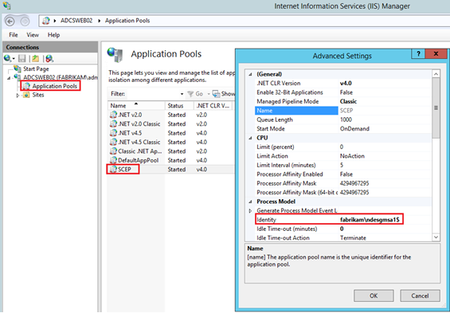
First published on TECHNET on Apr 26, 2015 Setting up NDES using a Group Managed Service Account (gMSA)Hallo everybody, this is Andy and Dagmar from Austrian Premier Field Engineering (PFE) describing how to implement NDES using a gMSA (instead of a normal domain user account).