pgbouncer
8 TopicsPgBouncer Best Practices in Azure Database for PostgreSQL – Part 1
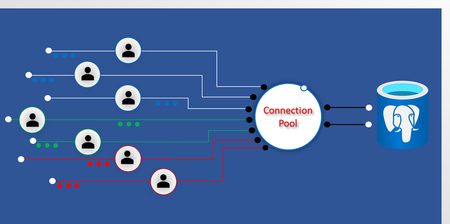
Introduction Connection pooling is critical for scaling PostgreSQL workloads efficiently, especially in managed environments like Azure Database for PostgreSQL. PgBouncer, a lightweight connection pooler, helps manage thousands of client connections without overwhelming the database. Connection pooling is very important when managing multiple concurrent database requests, as PostgreSQL uses a process-per-connection model, which means too many active connections can: Increase context switching overhead Consume excessive CPU/memory Degrade performance under load PgBouncer addresses this by limiting active server connections and queuing the additional client requests. However, misconfiguring key settings such as default_pool_size can still lead to CPU/memory pressure, connection bottlenecks, and degraded performance. Careful planning and tuning are essential to avoid these pitfalls. Understanding connection pools Before diving into tuning, it’s important to understand how PgBouncer organizes connections: PgBouncer creates a separate pool for each unique (database, user) combination. For example: If you have 2 application roles/users connecting to 2 databases. In this scenario, PgBouncer will allocate 4 pools. Each pool maintains its own number of connections, determined by default_pool_size. So, the total number of potential server connections is: number_of_pools × default_pool_size This is why sizing default_pool_size correctly is critical. Azure PgBouncer defaults Azure Database for PostgreSQL comes with preconfigured PgBouncer settings optimized for most workloads. Understanding these defaults is essential before making any tuning changes: pool_mode: TRANSACTION (default in Azure; best for most workloads) default_pool_size: 50 (range: 1–4950) max_client_conn: 5000 (range: 1–50000) Transaction mode support for prepared statements PgBouncer now enables support for PostgreSQL PREPARED STATEMENTS when combined together with TRANSACTION mode pooling. Previously, in transaction mode cached plans were difficult to manage, as there was no way for PgBouncer to confirm whether a new connection allocated from the pool would benefit from any cached plans generated from prior PREPARED STATEMENT operations. To work around this scenario, PgBouncer now provides a parameter which controls how many globally cached plan statements remain in memory for any pooled connection to leverage. max_prepared_statements: 200 (range: 0-5000) PostgreSQL connection limits For large tiers (e.g., 96 vCores), the default max_connections is 5000, with 15 reserved for system use. That means 4985 user connections are available. For more details, see maximum connection. Sizing best practices Proper sizing ensures optimal performance and resource utilization. Here’s how to approach it: 1. Use transaction pooling Start by confirming that pool_mode = TRANSACTION is enabled. This is already the Azure default and provides the best pooling efficiency for most web applications. If your application is using prepared statements, ensure you configure max_prepared_statements accordingly. 2. Determine your maximum active concurrent database operations (max_concurrent_ops) Next, you need to estimate how many total concurrent active PostgreSQL backends your instance can maintain: For CPU-bound OLTP workloads: keep max_concurrent_ops near 1.5x -2x the number of CPU vCores. For I/O-heavy workloads: stay slightly higher than vCore count. Rule of thumb for 96 vCores: max_concurrent_ops ≈ 144–192. 3. Divide across pools Once you’ve estimated your max_concurrent_ops value, the next step is to distribute your capacity across all connection pools. default_pool_size ≈ max_concurrent_ops / number_of_pools Example: max_concurrent_ops = 144 number_of_pools = 4 default_pool_size = 144 / 4 = 36 Sample configuration To illustrate how these calculations translate into real-world settings, here’s a sample PgBouncer configuration tuned for a scenario with four pools and an Active_Backend_Target of 144. pool_mode = transaction default_pool_size = 36 ; tuned for 4 pools max_client_conn = 5000 Quick reference table For quick planning, the following table provides starting recommendations based on common Azure Database for PostgreSQL SKU sizes. Use these as a baseline and adjust according to your workload metrics. SKU Size Memory Default max_connections Pools Suggested max_concurrent_ops Starting default_pool_size 8 vCores 32 GiB 3437 2 12–16 6–12 16 vCores 64 GiB 5000 2 24–32 12–20 32 vCores 128 GiB 5000 2 48–64 30–40 48 vCores 192 GiB 5000 2 72–92 40–60 64 vCores 256 GiB 5000 2 96–128 50–70 96 vCores 384–672 GiB 5000 2 144–192 60–80 For all tiers ≥16 vCores, max_connections is capped at 5000 (with 15 reserved for system use). Notes: default_pool_size = max_concurrent_ops / number_of_pools These values are starting recommendations. You should validate them against actual workload metrics and adjust gradually. Always ensure: (number_of_pools × default_pool_size) < max_connections − 15 (reserved system slots) Monitoring and tuning After applying your configuration, continuous monitoring is key. Here’s how: Use PgBouncer metrics in Azure Monitor to track active, idle, and waiting connections. Run SHOW POOLS; for real-time stats; watch cl_waiting vs sv_idle. For detailed monitoring and management, visit the Admin Console. Recommended Alerts: Alert if waiting client connections > 0 while idle server connections = 0 (indicates pool exhaustion—consider increasing default_pool_size). Alert if active server connections approach the configured default_pool_size (may indicate need for tuning). Alert if max_client_conn utilization exceeds 80% (risk of client-side connection errors). Tip: If waiting client connections grow while idle server connections are zero, increase default_pool_size cautiously. Review performance regularly and adjust gradually. Common pitfalls Avoid these mistakes when configuring PgBouncer: Changing pool mode to SESSION by default: transaction pooling is better for most apps. Session mode will not release connections until the session is ended. Ignoring pool count: multiplying a large default_pool_size by many pools can exhaust connections. Confusing max_client_conn with Postgres capacity: PgBouncer can accept many more clients than the server concurrent processes can support, any client connections not being processed will be waiting for resources. Tuning without data: always review metrics before changes. Conclusion Choosing the right default_pool_size in Azure Database for PostgreSQL with PgBouncer is about balancing performance and resource efficiency. With built-in PgBouncer in Flexible Server, you can enable connection pooling with a single parameter making it easy to get started quickly. The default settings are optimized for most workloads, and as your requirements grow, you can further tune parameters like default_pool_size and max_connections to suit your needs. By understanding your workload, estimating an active concurrent operations, dividing it across pools while respecting PostgreSQL limits, and continuously monitoring and adjusting based on real data, you can achieve a stable, scalable, and cost-effective environment. Further reading For more in-depth guidance and real-world scenarios on PgBouncer configuration and tuning in Azure Database for PostgreSQL, explore the following resources: Leverage built-in PgBouncer in Flexible Server Monitoring PgBouncer in Azure PostgreSQL Flexible Server Identify and solve connection performance in Azure Postgres Not all Postgres connection pooling is equal Connection handling best practice with PostgreSQLOctober 2025 Recap: Azure Database for PostgreSQL
Hello Azure Community, We are excited to bring October 2025 recap blog for Azure Database for PostgreSQL! This blog focuses on key announcements around the General Availability of the REST API for 2025, maintenance payload visibility and several new features aimed at improving performance and a guide on minimizing downtime for MVU operation with logical replication. Stay tuned as we dive deeper into each of these feature updates. Get Ready for Ignite 2025! Before we get into the feature breakdown, Ignite is just around the corner! It’s packed with major announcements for Azure Database for PostgreSQL. We’ve prepared a comprehensive guide to all the sessions we have lined up, don’t miss out! Follow this link to explore the Ignite session guide. Feature Highlights Stable REST API release for 2025 – Generally Available Maintenance payload visibility – Generally Available Achieving Zonal resiliency for High-Availability workloads - Preview Japan West now supports zone-redundant HA PgBouncer 1.23.1 version upgrade Perform Major Version upgrade (MVU) with logical replication PgConf EU 2025 – Key Takeaways and Sessions Stable REST API release for 2025 – Generally Available We’ve released the stable REST API version 2025-08-01! This update adds support for PostgreSQL 17 so you can adopt new versions without changing your automation patterns. We also introduced the ability to set the default database name for Elastic Clusters. To improve developer experience, we have renamed operation IDs for clearer navigation and corrected HTTP response codes so scripts and retries behave as expected. Security guidance gets a boost with a new CMK encryption example that demonstrates automatic key version updates. Finally, we have cleaned up the specification itself by renaming files for accuracy, reorganizing the structure for easier browsing and diffs, and enhancing local definition metadata, delivering a clearer, safer, and more capable API for your 2025 roadmaps. Learn how to call or use Azure Database for PostgreSQL REST APIs. Learn about the operations available in our latest GA REST API. Repository for all Released GA APIs. Maintenance payload visibility – Generally Available The Azure Database for PostgreSQL maintenance experience has been enhanced to increase transparency and control. With this update, customers will receive Azure Service Health notifications that include a direct link to the detailed maintenance payload for each patch. This means you’ll know exactly what’s changing – helping you plan ahead, reduce surprises, and maintain confidence in your operations. Additionally, all maintenance payloads are now published in the dedicated Maintenance Release Notes section of our documentation. This enhancement provides greater visibility into upcoming updates and empowers you with the information needed to align maintenance schedules with your business priorities. Achieving Zonal resiliency for High-Availability workloads - Preview High Availability is important to ensure that you have your primary and standby servers deployed with same-zone or zone-redundant HA option. Zonal resiliency helps you protect your workloads against zonal outage. With the latest update, Azure Portal introduces a Zonal Resiliency setting under the High Availability section. This setting can be toggled Enabled or Disabled: Enabled: The system attempts to create the standby server in a different availability zone, activating zone-redundant HA mode. If the selected region does not support zone-redundant HA, you can select the fallback checkbox (shown in the image) to use same-zone HA instead. If you don’t select the checkbox and zonal capacity is unavailable, HA enablement fails. This design enforces zone-redundant HA as the default while providing a controlled fallback to same-zone HA, ensuring workloads achieve resiliency even in regions without multi-zone capacity. The feature offers flexibility while maintaining strong high availability across supported regions. To know more about how to configure high availability follow our documentation link. Japan West now supports zone-redundant HA Azure Database for PostgreSQL now offers Availability Zone support in Japan West, enabling deployment of zone-redundant high availability (HA) configurations in this region. This enhancement empowers customers to achieve greater resiliency and business continuity through robust zone-redundant architecture. We’re committed to bringing Azure PostgreSQL closer to where you build and run your apps, while ensuring robust disaster recovery options. For the full list of regions visit: Azure Database for PostgreSQL Regions. PgBouncer 1.23.1 version upgrade PgBouncer 1.23.1 is now available in Azure Database for PostgreSQL. As a Built-In connection pooling feature, PgBouncer helps you scale thousands of connections with low overhead by efficiently managing idle and short-lived connections. With this update, you benefit from the latest community improvements, including enhanced protocol handling and important stability fixes, giving you a more reliable and resilient connection pooling experience. Because PgBouncer is integrated into Azure Postgres, you don’t need to install or maintain it separately - simply enable it on port 6432 and start reducing connection overhead in your applications. This release keeps your PostgreSQL servers aligned with the community while providing the reliability of a managed Azure service. Learn More - PgBouncer in Azure Database for PostgreSQL. Perform Major Version upgrade (MVU) with logical replication Our Major Version Upgrade feature ensures you always have access to the latest and most powerful capabilities included in each PostgreSQL release. We’ve published a new blog that explains how to minimize downtime during major version upgrades by leveraging logical replication and virtual endpoints. The blog highlights two approaches: Using logical replication and virtual endpoints on a Point-in-Time Restore (PITR) instance Using logical replication and virtual endpoints on a server running different PostgreSQL versions, restored via pg_dump and pg_restore Follow this guide to get started and make your upgrade process smoother: Upgrade Azure Database for PostgreSQL with Minimal Downtime Using Logical Replication PgConf EU 2025 – key takeaways and sessions The Azure Database for PostgreSQL team participated in PGConf EU 2025, delivering insightful sessions on key PostgreSQL advancements. If you missed the highlights, here are a few topics we covered: AIO in PG 18 and beyond, by Andres Freund of Microsoft [Link to slides] Improved Freezing in Postgres Vacuum: From Idea to Commit, by Melanie Plageman of Microsoft [Link to slides] Behind Postgres 18: The People, the Code, & the Invisible Work [Link to Slides] Read the PGConf EU summary blog here. Azure Postgres Learning Bytes 🎓 Handling “Cannot Execute in a Read-Only Transaction” after High Availability (HA) Failover After a High Availability (HA) failover, some applications may see this error: ERROR: cannot execute <command> in a read-only transaction This happens when the application continues connecting to the old primary instance, which becomes read-only after failover. The usual cause is connecting via a static-IP or a private DNS record that doesn’t refresh automatically. Resolution Steps Use FQDN - Always connect using FQDN i.e. “<servername>.postgres.database.azure.com” instead of a hardcoded IP. Validate DNS - Run “nslookup yourservername.postgres.database.azure.com” to confirm resolution to the current primary. Private DNS - Update or automate the A-record refresh after failover. Best Practices Always use FQDN for app database connectivity. Add retry logic for transient failovers. Periodically validate DNS resolution for HA-enabled servers. For more details, refer to this detailed blog post from CSS team. Conclusion We’ll be back soon with more exciting announcements and key feature enhancements for Azure Database for PostgreSQL, so stay tuned! Your feedback is important to us, have suggestions, ideas, or questions? We’d love to hear from you: https://aka.ms/pgfeedback. Follow us here for the latest announcements, feature releases, and best practices: Microsoft Blog for PostgreSQL.940Views2likes0Comments