patch & change management
25 TopicsApplying DevOps Principles on Lean Infrastructure. Lessons From Scaling to 102K Users.
Hi Azure Community, I'm a Microsoft Certified DevOps Engineer, and I want to share an unusual journey. I have been applying DevOps principles on traditional VPS infrastructure to scale to 102,000 users with 99.2% uptime. Why am I posting this in an Azure community? Because I'm planning migration to Azure in 2026, and I want to understand: What mistakes am I already making that will bite me during migration? THE CURRENT SETUP Platform: Social commerce (West Africa) Users: 102,000 active Monthly events: 2 million Uptime: 99.2% Infrastructure: Single VPS Stack: PHP/Laravel, MySQL, Redis Yes - one VPS. No cloud. No Kubernetes. No microservices. WHY I HAVEN'T USED AZURE YET Honest answer: Budget constraints in emerging market startup ecosystem. At our current scale, fully managed Azure services would significantly increase monthly burn before product-market expansion. The funding we raised needs to last through growth milestones. The trade: I manually optimize what Azure would auto-scale. I debug what Application Insights would catch. I do by hand what Azure Functions would automate. DEVOPS PRACTICES THAT KEPT US RUNNING Even on single-server infrastructure, core DevOps principles still apply: CI/CD Pipeline (GitHub Actions) • 3-5 deployments weekly • Zero-downtime deploys • Automated rollback on health check failures • Feature flags for gradual rollouts Monitoring & Observability • Custom monitoring (would love Application Insights) • Real-time alerting • Performance tracking and slow query detection • Resource usage monitoring Automation • Automated backups • Automated database optimization • Automated image compression • Automated security updates Infrastructure as Code • Configs in Git • Deployment scripts • Environment variables • Documented procedures Testing & Quality • Automated test suite • Pre-deployment health checks • Staging environment • Post-deployment verification KEY OPTIMIZATIONS Async Job Processing • Upload endpoint: 8 seconds → 340ms • 4x capacity increase Database Optimization • Feed loading: 6.4 seconds → 280ms • Strategic caching • Batch processing Image Compression • 3-8MB → 180KB (94% reduction) • Critical for mobile users Caching Strategy • Redis for hot data • Query result caching • Smart invalidation Progressive Enhancement • Server-rendered pages • 2-3 second loads on 4G WHAT I'M WORRIED ABOUT FOR AZURE MIGRATION This is where I need your help: Architecture Decisions • App Service vs Functions + managed services? • MySQL vs Azure SQL? • When does cost/benefit flip for managed services? Cost Management • How do startups manage Azure costs during growth? • Reserved instances vs pay-as-you-go? • Which Azure services are worth the premium? Migration Strategy • Lift-and-shift first, or re-architect immediately? • Zero-downtime migration with 102K active users? • Validation approach before full cutover? Monitoring & DevOps • Application Insights - worth it from day one? • Azure DevOps vs GitHub Actions for Azure deployments? • Operational burden reduction with managed services? Development Workflow • Local development against Azure services? • Cost-effective staging environments? • Testing Azure features without constant bills? MY PLANNED MIGRATION PATH Phase 1: Hybrid (Q1 2026) • Azure CDN for static assets • Azure Blob Storage for images • Application Insights trial • Keep compute on VPS Phase 2: Compute Migration (Q2 2026) • App Service for API • Azure Database for MySQL • Azure Cache for Redis • VPS for background jobs Phase 3: Full Azure (Q3 2026) • Azure Functions for processing • Full managed services • Retire VPS QUESTIONS FOR THIS COMMUNITY Question 1: Am I making migration harder by waiting? Should I have started with Azure at higher cost to avoid technical debt? Question 2: What will break when I migrate? What works on VPS but fails in cloud? What assumptions won't hold? Question 3: How do I validate before cutting over? Parallel infrastructure? Gradual traffic shift? Safe patterns? Question 4: Cost optimization from day one? What to optimize immediately vs later? Common cost mistakes? Question 5: DevOps practices that transfer? What stays the same? What needs rethinking for cloud-native? THE BIGGER QUESTION Have you migrated from self-hosted to Azure? What surprised you? I know my setup isn't best practice by Azure standards. But it's working, and I've learned optimization, monitoring, and DevOps fundamentals in practice. Will those lessons transfer? Or am I building habits that cloud will expose as problematic? Looking forward to insights from folks who've made similar migrations. --- About the Author: Microsoft Certified DevOps Engineer and Azure Developer. CTO at social commerce platform scaling in West Africa. Preparing for phased Azure migration in 2026. P.S. I got the Azure certifications to prepare for this migration. Now I need real-world wisdom from people who've actually done it!409Views0likes1Comment
RHEL In-place upgrades and Azure Update Manager
Following the process in this article will cause a disconnection between the data plane and the control plane of the virtual machine (VM). Azure capabilities such as Auto guest patching, Auto OS image upgrades, Hotpatching, and Azure Update Manager won't be available. To utilize these features, it's recommended to create a new VM using your preferred operating system instead of performing an in-place upgrade. According to https://learn.microsoft.com/en-us/azure/virtual-machines/workloads/redhat/redhat-in-place-upgrade, Azure Update Manager will break if any RHEL in-place upgrades are performed due to data/control plane disconnect. As a Microsoft product, this dilemma seems to defeat the benefits of AUM if you're someone like me who uses Redhat 'pet' VMs (as opposed to 'cattle' VMs) for work, and would frankly like to centralize all operations within the lifecycle of a Linux box inside the Azure tenant (patching, upgrading, rollback, any possible automation/application deployment etc). Unfortunately it would seem that this issue is largely something outside of the Azure customer's control. So, to anyone with esoteric Azure knowledge: what gives? Why and how is there a data disconnect between the control planes? What does the process look like from a bird's eye view? Given that the issue exists in the first place I would imagine that there is some kind of developmental contradiction, otherwise a feature like this probably would have been figured out a while ago (or that it is, as I suspect, simply not high priority enough despite a solution which may already exist in development). Furthermore, for those who may have more intimate info on the matter, does any sort of discussion or planning of a solution for this issue exist? With kindness, MadDogOfShimano640Views0likes2Comments
Scaling Smart with Azure: Architecture That Works
Hi Tech Community! I’m Zainab, currently based in Abu Dhabi and serving as Vice President of Finance & HR at Hoddz Trends LLC a global tech solutions company headquartered in Arkansas, USA. While I lead on strategy, people, and financials, I also roll up my sleeves when it comes to tech innovation. In this discussion, I want to explore the real-world challenges of scaling systems with Microsoft Azure. From choosing the right architecture to optimizing performance and cost, I’ll be sharing insights drawn from experience and I’d love to hear yours too. Whether you're building from scratch, migrating legacy systems, or refining deployments, let’s talk about what actually works.415Views0likes1Comment
Former Employer Abuse
My former employer, Albert Williams, president of American Security Force Inc., keeps adding my outlook accounts, computers and mobile devices to the company's azure cloud even though I left the company more than a year ago. What can I do to remove myself from his grip? Does Microsoft have a solution against abusive employers?174Views0likes0Comments
Conditional access policy or User risk policy set to force password at high risk doesnt work
Hi all, When setting Conditional access policy or User risk policy set to force password at high risk doesn't work instead I get a blocked windows on users. I have set SSPR too and I think this is a requirement What am I doing wrong?724Views0likes0CommentsAzure: How to create Standard Load Balancer without public IP address?
I want to run my application with AKS cluster(version - 1.18.14) with the dependency of standard load balancer to create multiple node pools. But, the standard load balancer is creating public IP address. which is not suitable for my application. Because my application is private not public. Is there any way to "create Standard load balancer without public IP address in Azure?" Thanks.11KViews0likes5Comments
Azure Update management - error HRESULT: 0x80072F8F
Azure Update management not working Environment: Azure Windows based VM Forced Tunnelling Onpremise Firewall supports only IP Addresses Update management error: AssessmentError Exception from HRESULT: 0x80072F8F AssessmentErrorStackTrace System.Runtime.InteropServices.COMException (0x80072F8F): Exception from HRESULT: 0x80072F8F at Microsoft.EnterpriseManagement.Mom.Modules.ChangeTracking.WUA.IUpdateSearcher2.EndSearch(ISearchJob searchJob) at Microsoft.EnterpriseManagement.Advisor.PatchManagement.WindowsUpdateHelper.GetUpdateSnapshot(TimeSpan timeout, Boolean onlineSearch, DateTime lastTimeUpdateApplied, IAutomaticUpdates2 automaticUpdates, UpdateModuleState state) Troubleshooting: Due to Forced Tunnelling the traffic has to go to the onpremise FW. Unfortunately the onpremise FW allows only IP Addresses and as per the following article: https://docs.microsoft.com/en-us/azure/automation/automation-network-configuration#update-management-and-change-tracking-and-inventory It suggest to allow port 443 for url: Azure Public *.ods.opinsights.azure.com *.oms.opinsights.azure.com *.blob.core.windows.net *.azure-automation.net & *.oms.opinsights.azure.com Though, no IP address that I can NSlookup for *.azure-automation.net” Therefore, trying the alternate approach: Tried enabling service Tags via Azure Firewall, but as the traffic still goes to Onpremise FW we either need the IP Address for the URL to be allowed Else, use User Defined Route (UDR) to direct the Traffic for Service TAGS: “Azure Monitor” & “GuestAndHybridManagement“ via UDR and allowed the same using CLI, still no good. Checking for suggestions. Thanks in advance to reading through.6.3KViews0likes0CommentsAzure Pricing Rearrange Services
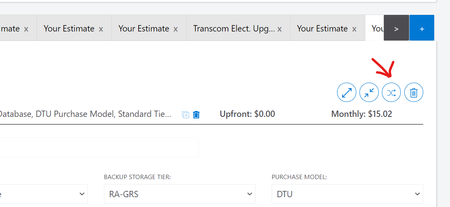
Isn’t it cool? I do appreciate this change. Now you can able to rearrange your service even if you want to serialize. GoTo Azure Pricing portal — -> Add Services. https://azure.microsoft.com/en-us/pricing/calculator/ Click that Rearrange button & Serialize Give a try!!!!1.1KViews0likes0Comments