password protection
22 Topics
Entra ID 53003: How to identify primary authentication when Authentication Details are empty?
We are investigating repeated interactive Microsoft Entra ID sign-ins with the following pattern: - ErrorCode: 53003 (BlockedByConditionalAccess) - isInteractive: true - AppDisplayName: OfficeHome - Authentication requirement: Multifactor authentication Conditional Access correctly blocks these requests because they originate outside our trusted locations. We have already confirmed through controlled testing that the authentication flow can reach 53003 after the correct credentials are provided. Our current problem is different: We need to determine what mechanism satisfied the primary/first authentication factor for the observed 53003 events. For these events, Authentication Details are empty: - Authentication method: empty - Authentication method detail: empty - Result detail: empty Therefore, we cannot determine whether primary authentication was performed using a password, an existing token/session claim, PHS, PTA, federation, Seamless SSO, or another mechanism. Our questions are: 1. Is there any tenant-visible telemetry that can identify the primary authentication mechanism when AuthenticationDetails is empty? 2. Can fields such as AuthenticationProcessingDetails, AuthenticationProtocol, IncomingTokenType, OriginalTransferMethod, or AuthenticationMethodsUsed reliably distinguish between password validation and reuse of an existing authentication/token? 3. If additional authentication infrastructure is used: - can PTA Authentication Agent logs be correlated using RequestId or CorrelationId? - should Seamless SSO generate a corresponding Kerberos 4769 event for AZUREADSSOACC$? - should federated authentication be traceable in AD FS logs? 4. For Password Hash Synchronization, is there any tenant-visible telemetry confirming that Entra ID actually validated the password for a specific sign-in request? 5. If this information is not exposed to the tenant, can Microsoft Support retrieve backend authentication telemetry for a specific Sign-in ID / RequestId / CorrelationId and determine how primary authentication was satisfied? Our goal is not to determine why Conditional Access generated 53003 — that part is already understood. We specifically need to identify what satisfied primary authentication before the Conditional Access evaluation.28Views0likes0Comments
Introducing the Entra Helpdesk Portal: A Zero-Trust, Dockerized ITSM Interface for Tier 1 Support
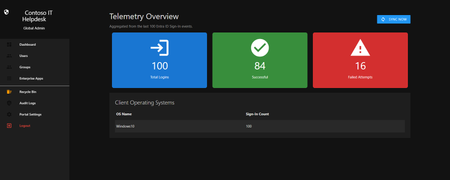
Hello everyone, If you manage identity in Microsoft Entra ID at an enterprise scale, you know the struggle: delegating day-to-day operational tasks (like password resets, session revocations, and MFA management) to Tier 1 and Tier 2 support staff is inherently risky. The native Azure/Entra portal is incredibly powerful, but it’s complex and lacks mandatory ITSM enforcement. Giving a helpdesk technician the "Helpdesk Administrator" role grants them access to a portal where a single misclick can cause a major headache. To solve this, I’ve developed the Entra Helpdesk Portal (Community Edition)—an open-source, containerized application designed to act as an isolated "airlock" between your support team and your Entra ID tenant. Why This Adds Value to Your Tenant Instead of having technicians log into the Azure portal, they log into this clean, Material Design web interface. It leverages a backend Service Principal (using MSAL and the Graph API) to execute commands on their behalf. Strict Zero Trust: Logging in via Microsoft SSO isn’t enough. The app intercepts the token and checks the user’s UPN against a hardcoded ALLOWED_ADMINS whitelist in your Docker environment file. Mandatory ITSM Ticketing: You cannot enforce ticketing in the native Azure Portal. In this app, every write action prompts a modal requiring a valid ticket number (e.g., INC-123456). Local Audit Logging: All actions, along with the actor, timestamp, and ticket number, are written to an immutable local SQLite database (audit.db) inside the container volume. Performance: Heavy Graph API reads are cached in-memory with a Time-To-Live (TTL) and smart invalidation. Searching for users or loading Enterprise Apps takes milliseconds. What Can It Do? Identity Lifecycle: Create users, auto-generate secure 16-character passwords, revoke sign-in sessions, reset passwords, and delete specific MFA methods to force re-registration. Diagnostics: View a user's last 5 sign-in logs, translating Microsoft error codes into plain English. Group Management: Add/remove members to Security and M365 groups. App/SPN Management: Lazy-load raw requiredResourceAccess Graph API payloads to audit app permissions, and instantly rotate client secrets. Universal Restore: Paste the Object ID of any soft-deleted item into the Recycle Bin tab to instantly resurrect it. How Easy Is It to Setup? I wanted this to be universally deployable, so I compiled it as a multi-architecture Docker image (linux/amd64 and linux/arm64). It will run on a massive Windows Server or a simple Raspberry Pi. Setup takes less than 5 minutes: Create an App Registration in Entra ID and grant it the necessary Graph API Application Permissions (e.g., User.ReadWrite.All, AuditLog.Read.All). Create a docker-compose.yml file. Define your feature toggles. You can literally turn off features (like User Deletion) by setting an environment variable to false. version: '3.8' services: helpdesk-portal: image: jahmed22/entra-helpdesk:latest container_name: entra_helpdesk restart: unless-stopped ports: - "8000:8000" environment: # CORE IDENTITY - TENANT_ID=your_tenant_id_here - CLIENT_ID=your_client_id_here - CLIENT_SECRET=your_client_secret_here - BASE_URL=https://entradesk.jahmed.cloud - ALLOWED_ADMINS=email address removed for privacy reasons # CUSTOMIZATION & FEATURE FLAGS - APP_NAME=Entra Help Desk - ENABLE_PASSWORD_RESET=true - ENABLE_MFA_MANAGEMENT=true - ENABLE_USER_DELETION=false - ENABLE_GROUP_MANAGEMENT=true - ENABLE_APP_MANAGEMENT=true volumes: - entra_helpdesk_data:/app/static/uploads - entra_helpdesk_db:/app volumes: entra_helpdesk_data: entra_helpdesk_db: 4.Run docker compose up -d and you are done! I built this to give back to the community and help secure our Tier 1 operations. If you are interested in testing it out in your dev tenants or want to see the full architecture breakdown, you can read the complete documentation on my website here I’d love to hear your thoughts, feedback, or any feature requests you might have!259Views0likes0Comments
Force user to reset password in hybrid
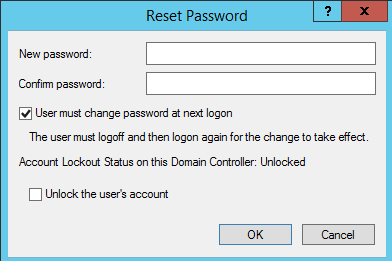
Hi, we work in a hybrid environment at the moment, and it has been discovered that if you are using classic AD and reset a user's password and leave the tick-box saying user must change password at next logon, the password reset works! But, if you were to select the tick-box with the intention to make the user change their password, the password does not get reset and the user never gets asked to reset their password? Also, if you try and reset the user's password on AAD, you get the following error message: Because we cannot force the user to reset their password by AD or AAD, we have to tell the user to do it themselves by the classic Ctrl-Alt-Del method or set their personal password for them over the phone. So, what my question is, is why can I not force the user to change their password from either AD or AAD?Solved717Views0likes2CommentsSecurity Best Practices for Bookings Page's Mailbox Objects in Entra ID
Hi, are there any recommendations / best practices for hardening the user objects that are created in Entra ID when I create a new Microsoft Bookings page? Unlike regular shared mailboxes, the sign-in is enabled by default, I can simply reset the password, sign in via Outlook Web and see the Microsoft Bookings calendar. Bad actors could brute force this sign-in, register the MFA authentication method of their choice and gather data of the customers that used my public bookings page. What is the recommeded way to handle these objects in Entra ID? Conditional Access settings? Azure Monitoring alerts for sign-ins? Defender alerts for when an inbox rule is created? Kind regards, YaseminSolved1.6KViews0likes4Comments
Kid finds a way into my account using an old PIN
I have set up parental controls. Somehow my sone managed to find the password logged in the Microsoft Familly app and changed the settings at will. I have changed my password in the meantime but he found an easy way around it as he selects use other methods to sign in and then selects PIN, inputs my old PIN and he is back in. How is this possible? I have changed the password, I have changed the PIN, turned on 2FA and reset Windows Hello and he just goes around all this in one go by introducing my old PIN. Is there a fix for this ?226Views0likes1Comment
Enable MFA method
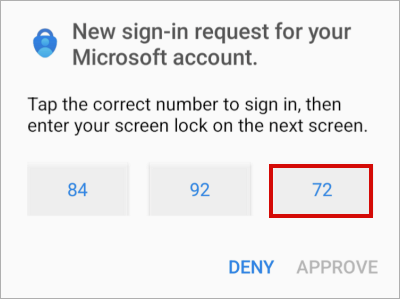
Dear, Currently in our company, the authentication methods policy > Microsoft Authenticator defaults to “any”. Either “passwordless” or “Push”. It is possible to enable the following authentication method through a conditional access policy, currently it is enabled for some users. Desired authentication method: The current method is as follows: Can it be enabled for professional accounts or is it only focused on personal accounts? Thanks in advance.367Views0likes1Comment
New Blog | Evolve your CIAM strategy with External ID
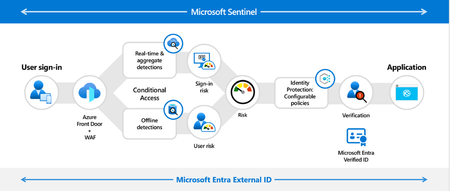
By Ankur Patel Last month we announced the general availability of our next generation customer identity and access management solution, Microsoft Entra External ID. External ID makes Customer Identity & Access Management (CIAM) secure and simple by enabling you to: Secure all external identities: Managing several disparate solutions can overcomplicate your security strategy. By adopting External ID as your CIAM solution, you can secure all identity types within your Microsoft Entra admin center, safeguarding all external identities with industry-leading security, including our own conditional access engine, verifiable credentials, and built-in identity governance. Create frictionless user experiences: The rise of fraud, GenAI, and identity attacks has increased end-user fear when it comes to security risks online. With External ID, you can build frictionless, branded, user centric interfaces into your web and mobile applications to increase brand awareness, build user trust and drive user engagement. Check out an example in the WoodGrove Groceries demo! Streamline secure collaboration: Collaborating with external users and ensuring they have the right access at the right time is complex. Simplify collaboration by inviting business guests with External ID and defining what internal resources they can access across SharePoint, Teams, and OneDrive. Accelerate the development of secure applications: Integrating robust and extensive user flows into apps can take developers months. Shorten development time to minutes by leveraging External ID’s rich set of APIs, SDKs, and integrations with developer tools, such as Visual Studio Code, to build secure and branded identity experiences into external-facing web and mobile apps. Best in class value at scale: Managing several security stacks can be costly. External ID brings innovative CIAM features at a cost-effective value for any growing customer without compromising on scalable, end-to-end security. For example, this approach helps us bring best-in-class identity verification like Face Check with Verified ID to reduce help desk costs for combatting fraud. Learn more about External ID pricing here. Our goal is to provide best in class protection from bot attacks, sign in and signup fraud and ability to audit every step of external user’s journeys Read the full post here: Evolve your CIAM strategy with External ID579Views0likes0CommentsNew Blog | How to break the token theft cyber-attack chain
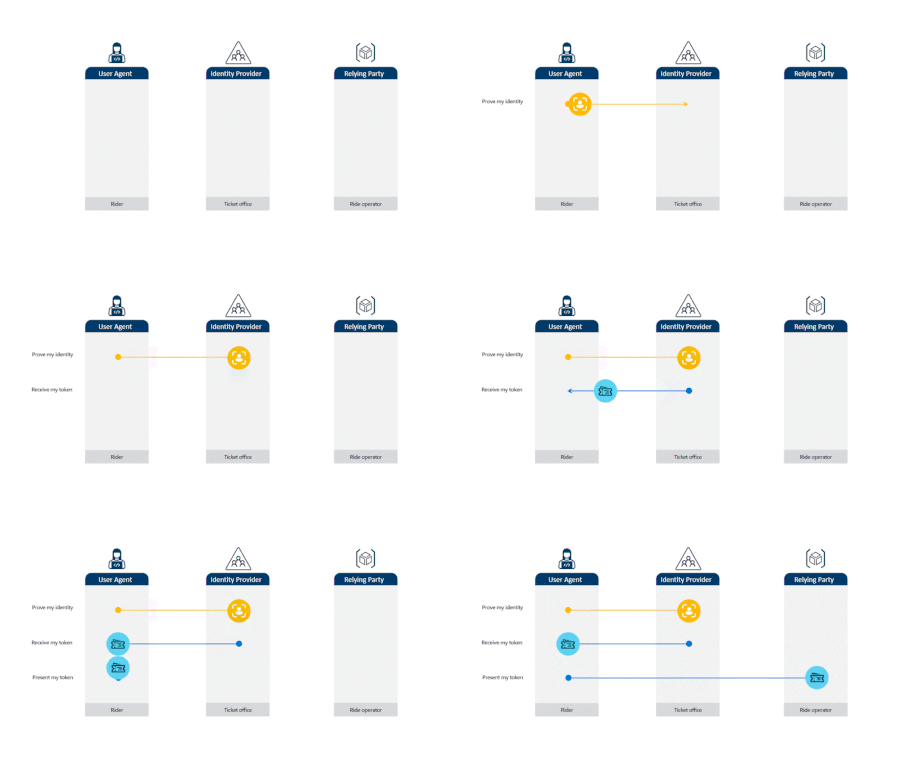
By Alex Weinert We’ve written a lot about how attackers try to break passwords. The solution to password attacks—still the most common attack vector for compromising identities—is to turn on multifactor authentication (MFA). But as more customers do the right thing with MFA, actors are going beyond password-only attacks. So, we’re going to publish a series of articles on how to defeat more advanced attacks, starting with token theft. In this article, we’ll start with some basics on how tokens work, describe a token theft attack, and then explain what you can do to prevent and mitigate token theft now. Tokens 101 Before we get too deep into the token theft conversation, let’s quickly review the mechanics of tokens. A token is an authentication artifact that grants you access to resources. You get a token by signing into an identity provider (IDP), such as Microsoft Entra ID, using a set of credentials. The IDP responds to a successful sign-in by issuing a token that describes who you are and what you have permission to do. When you want to access an application or service (we’ll just say app from here), you get permission to talk to that resource by presenting a token that’s correctly signed by an issuer it trusts. The software on the client device you’re using takes care of all token handling behind the scenes. Read the full post here: How to break the token theft cyber-attack chain2.6KViews0likes0CommentsNew Blog | Securing access to any resource, anywhere
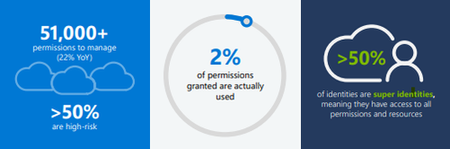
By Joseph Dadzie Zero Trust has become the industry standard for safeguarding your entire digital estate. Central to Zero Trust is securing identity and access, which is essential for protecting resources, enforcing security policies, and ensuring compliance in today’s dynamic digital landscape. With Microsoft Entra, we help our customers create a trust fabric that securely connects any trustworthy identity with anything, anywhere. Driven by the adoption of multicloud strategies in the era of AI, customers are encountering more challenges in securing access, not just across multiple public and private clouds, but also for business apps and on-premises resources. Unlike securing access for humans or within a single environment, where customers have established methods to address challenges, securing access anywhere is more complicated due to the dynamic nature of today’s digital estate and tools to address emerging challenges need further development. To support our customers, we unveiled our vision for securing access in any cloud at this year’s RSA conference. Today, we're excited to dive deeper into our future investment aimed at securing access to cloud resources from any identity across diverse cloud environments. Managing multicloud complexity in a rapidly evolving digital environment Organizations are grappling with substantial challenges in navigating cloud access complexities, often citing issues like fragmented role-based access control (RBAC) systems, and compliance violations. These challenges are compounded by the growing use of cloud services from various cloud service providers. There have been links to several notable breaches attributed to over-permissioned identities. Our customer engagements reveal that organizations are currently using 7 to 8 products, including privileged access management (PAM) and identity governance and administration (IGA) solutions to tackle multicloud access challenges. Despite their efforts, such as toggling across multiple solutions and increasing their workforce, many organizations still struggle to achieve full visibility into their cloud access. Our 2024 State of Multicloud Security Risk Report underscores these ongoing challenges arising from over-permissioned human and workload identities. Analysis of past year usage data from Microsoft Entra Permissions Management confirms that the complexities in multicloud environments primarily stem from rapid identity growth and over-provisioned permissions (learn more), including: Over 51,000 permissions that can be granted to identities – 50% of which are identified as high-risk permissions. Only 2% of those 51,000 permissions were used. Of the 209M identities discovered, more than 50% are identified as super identities that have all permissions to access all resources. Figure 1: 2024 State of Multicloud Security Risk key findings Read the full post here: Securing access to any resource, anywhere487Views0likes0CommentsNew Blog | Microsoft Entra announcements and demos at RSAC 2024
By Irina Nechaeva The Microsoft Entra team is looking forward to connecting with you next week at RSA Conference 2024 (RSAC) from May 6 to 9, 2024, in San Francisco! As we enter the age of AI and there are more identities and access points to protect, identity security has never been more paramount. From protecting workforce and external identities to non-human identities—that outnumber human identities 10 to 1—the task of securing access and the interactions between them requires taking a more comprehensive approach. To help customers protect every identity and every access point, I’d like to highlight recent innovations that we’ll be showcasing at this upcoming event: Expanded passkey support for Microsoft Entra ID Microsoft Entra ID external authentication methods Microsoft Entra External ID general availability Microsoft Entra Permissions Management and Microsoft Defender for Cloud integration general availability Our vision for cloud access management to strengthen multicloud security We will be demonstrating these new innovations and sharing more about how to take a holistic approach to identity and access at RSA Conference 2024 (see the table at the end of this blog for more information). Now, let’s take a closer look at Microsoft Entra innovations that we’ll be showcasing at RSAC. Expanded passkey support for Microsoft Entra ID In addition to supporting sign-ins via a passkey hosted on a hardware security key, Microsoft Entra ID now includes additional support for device-bound passkeys in the Microsoft Authenticator app on iOS and Android. This will bring strong and convenient authentication to mobile devices for customers with the strictest security requirements. A passkey is a strong, phishing-resistant authentication method you can use to sign in to any internet resource that supports the W3C WebAuthN standard. Passkeys represent the continuing evolution of the FIDO2 standard aimed at creating a secure and user friendly passwordless experience for everyone. To learn more about using passkeys in the Microsoft Authenticator app, check out this blog. Read the full post here: Microsoft Entra announcements and demos at RSAC 2024550Views0likes0Comments