pamela fox
22 TopicsExplore the latest in MCP: All recordings from MCP Live!
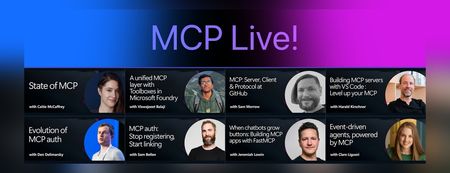
We recently hosted MCP Live!, a free half-day event featuring the people building the Model Context Protocol and putting it into practice. The Model Context Protocol (MCP) is the open standard for connecting AI models to tools and data. MCP servers let agents work with external data sources and capabilities across clients such as VS Code, GitHub Copilot, Claude, and other AI applications. Across the event, speakers explored: The state of MCP, the latest specification updates, and the protocol roadmap MCP server and client development at GitHub and in Visual Studio Code Enterprise-ready tools, authentication, governance, and security Interactive MCP Apps built with FastMCP Event-driven agents powered by MCP triggers and events Watch the complete MCP Live playlist, or browse the individual session recordings below along with links to related documentation, code, and resources. State of MCP 📺 Watch YouTube recording Join Caitie McCaffrey for a look at the state of the Model Context Protocol and the major changes introduced in the latest 2026-07-28 MCP specification release. Learn about the protocol's updated roadmap and emerging protocol priorities, including Agentic Messaging Primitives, and how they enable new patterns for agent-to-agent communication. Get a preview of where the protocol is headed and what these changes mean for developers building the next generation of AI agents. View the slides Follow Caitie on: LinkedIn | X MCP specification 2026-07-28 release MCP conformance tests MCP Server Cards working group A unified MCP layer with Toolboxes in Microsoft Foundry 📺 Watch YouTube recording Viswajeeet Balaji shows how Toolboxes in Microsoft Foundry make MCP enterprise-ready. It supports runtime tool search, MCP skill extensions, and the latest MCP 07-28 specification—while letting teams bring OpenAPI tools and A2A agents, expose them through MCP, and reuse the same unified configuration across agents. A centralized governance layer adds consistent authentication and guardrails without requiring every agent to rebuild its integrations. View the slides Follow Viswajeeet on: LinkedIn Documentation: Toolboxes in Microsoft Foundry Blog post: Building agents that act on your behalf with Toolboxes MCP: Server, Client & Protocol at GitHub 📺 Watch YouTube recording Sam Morrow is a co-creator of GitHub's MCP, an MCP Spec Maintainer, and Copilot client developer. Find out the latest MCP features his team is shipping on both the server and client side, as well as the parts of the spec that he's most excited about. Learn about some of the recent challenges, future plans, and insights from working across the MCP stack, and get a sneak peek at what's coming next. GitHub MCP Server Follow Sam on: LinkedIn | X Building MCP servers with VS Code — Level up your MCP 📺 Watch YouTube recording Harald Kirschner shows how MCP servers have evolved beyond local tool calls into richer, production-ready agent capabilities. Through a live VS Code demo, he builds an agentic achievement tracker that uses tools, elicitation, progress notifications, an interactive MCP App, stateless HTTP, and Agent Plugins—showing how to design, debug, and distribute modern MCP integrations. View the slides Follow Harald on: LinkedIn | X Documentation: MCP servers in VS Code Official MCP Registry MCP Registry repository Evolution of MCP auth 📺 Watch YouTube recording Den Delimarsky, Lead Maintainer of MCP and Member of Technical Staff at Anthropic, discusses how MCP authorization reached its current state: the original OAuth profile, protected resource metadata, the shift in client registration with servers, and enterprise-managed authorization. He also covers what the maintainers are working on next, including agent identity. View the slides Follow Den on: LinkedIn MCP auth: Stop registering, Start linking 📺 Watch YouTube recording Sam Bellen explains how Dynamic Client Registration made every MCP client mint a fresh client_id with every server it met, a per-server credential tax that quietly breaks down once clients start connecting to servers opportunistically. He shows how Client ID Metadata Documents flip the model: your client_id becomes a URL the server fetches on demand, giving you one durable identity that works everywhere, with a live demo of the flow end to end. View the slides Follow Sam on: LinkedIn DCR vs. CIMD demo with xmcp and Auth0 When chatbots grow buttons: Building MCP apps with FastMCP 📺 Watch YouTube recording Chat is great, but sometimes the answer is a button, a chart, or a form. MCP Apps let servers render interactive interfaces directly inside AI clients. Jeremiah Lowin, creator of FastMCP, shows how to build them in Python with FastMCP and Prefab, from simple components to dynamically generated interfaces. Follow Jeremiah on: LinkedIn FastMCP FastMCP authentication Event-driven agents, powered by MCP 📺 Watch YouTube recording Clare Liguori discusses the MCP Triggers & Events experimental extension, which lets agents poll MCP servers for events and get webhook triggers. She explores the new agent architectures the extension enables and presents a live demo. View the slides Follow Clare on: LinkedIn | X MCP Triggers & Events Working Group MCP events serverless earthquake agent demoJoin us for our MCP Live! — A free livestream covering all things MCP
The Model Context Protocol (MCP) is the open standard for connecting AI models to tools and data. It was first introduced to the world by Anthropic in November 2024, and is now the most widely adopted standard in the world of Generative AI. You can now use MCP servers to connect agents to your data sources across multiple clients: VS Code, Claude Desktop, Codex, Copilot App, Goose, and many more. Plus, MCP is the most common way to build your own agents that connect to internal enterprise tools, like when using Microsoft agent-framework or Langchain. To celebrate the success of MCP and its rich ecosystem, we are hosting MCP Live! on September 9th, from 9AM to 1PM PT. We'll hear both from the teams at Microsoft that are implementing MCP, but also from core MCP maintainers and the global community of MCP developers. Register here: https://aka.ms/MCPLive/99/b Here's our current planned agenda: Time Topic Speakers 9 AM PT Welcome to MCP Live! Liam Hampton and Pamela Fox (Microsoft/GitHub), MCP advocates 9:05 AM State of MCP Caitie McCaffrey (Microsoft), MCP core maintainer 9:40 AM MCP: Server, Client & Protocol at GitHub Sam Morrow (GitHub), GitHub MCP server maintainer 10:05 AM A unified MCP layer with Toolboxes in Microsoft Foundry Viswajeeet Balaji (Microsoft), Principal Software Engineer 10:30 AM Building MCP servers in VS Code Harald Kirschner (Microsoft), VS Code Principal PM 11:15 AM MCP Authorization: DCR, EMA, and more! Den Delimarsky (Anthropic), Sam Bellen (Okta) 12:05 AM Building MCP apps with FastMCP Jeremiah Lowin (Prefect), FastMCP maintainer 12:30 AM MCP Tasks, Events, Triggers Clare Liguori (Amazon), MCP core maintainer 12:45 AM Event-driven agents, powered by MCP Liam Hampton and Pamela Fox (Microsoft/GitHub), MCP advocates We're very excited to bring together so many folks working on both the MCP specification and on production MCP servers, so we can all learn about the latest MCP features and best practices together. Learn more MCP Brand new to MCP? We still want you to join! If you want, you can learn MCP fundamentals from our free resources: MCP-for-beginners : A step-by-step written tutorial covering all the MCP features Python + MCP series : Recordings of a 3-part livestream series focusing on building MCP servers with Python Meet the MCP community Want to meet the MCP community in person? We're also planning several IRL events: San Francisco (14 Sep 2026) Bengaluru (26 Sep 2026) Hope to see you in the live chat on September 9th!1.2KViews0likes0CommentsLearn how to use the four IQs: Web IQ, Work IQ, Fabric IQ, Foundry IQ
We just concluded Microsoft IQ Deep Dive with Python, a three-part livestream series all about Microsoft IQ. We showed how to use the four IQs to ground your AI applications and agents: Work IQ: user-specific retrieval of M365 data, like Teams chats, emails, and calendar events. Fabric IQ: retrieval of data stored in OneLake, via Fabric ontologies, graphs, and data agents. Web IQ: real-time web results with super low latency Foundry IQ: multi-source agentic retrieval on search indexes plus remote sources (including Web IQ, Work IQ, and Fabric IQ) The four IQs are all exposed as MCP endpoints, so you can easily integrate into your own agents, or add to your Foundry agents via the Foundry Toolbox. Check out our code samples for Python notebooks and agents that use each of the MCP servers and APIs. All of the materials from our series are available for you to keep learning from, and linked below: Video recordings of each stream PowerPoint slides that you can use for reviewing or even teaching the material to your own community An annotated write-up of each presentation, so you can quickly read through 🙋🏽♂️ Have follow up questions? Join the weekly Python+AI office hours on Foundry Discord. Microsoft IQ Deep Dive with Python: Foundry IQ 📺 Watch YouTube recording In the first session, we dived into Foundry IQ (Azure AI Search), exploring how it helps agents and applications work with curated knowledge and organizational context. We built knowledge bases in Python and connected them to multiple knowledge sources, including file knowledge sources, search indexes built from ingested data, and the Web IQ MCP server. Then we performed multi-source agentic retrieval on those knowledge bases, which executes queries in parallel and merges the results with state-of-the-art ranking models. Finally, we built agents in Python using Microsoft Agent Framework and grounded their responses in Foundry IQ results three different ways: a custom tool calling the knowledge base API, the knowledge base MCP endpoint, and a Foundry Toolbox. We deployed those agents to Foundry Agent Service as hosted agents and published one to Teams. 🖼️ Slides for this session 📝 Write-up for this session 💻 Code repository with examples: iqdeepdive Microsoft IQ Deep Dive with Python: Work IQ 📺 Watch YouTube recording In the second session, we focused on Work IQ and how it brings workplace context into AI-powered experiences. We compared Work IQ to Microsoft Graph, then explored all three protocols it speaks — A2A, MCP, and REST — with runnable Python notebooks for each. We walked through the 10 generic tools that Work IQ exposes over MCP, including ask, which calls Microsoft 365 Copilot directly, and do_action, the only write path. We also connected Work IQ to a Foundry IQ knowledge base as a knowledge source, so a single query returns a blended answer across indexed HR documents and live work context. Then we wired Work IQ into a Microsoft Agent Framework agent as an MCP tool, and finished with Agent 365 autopilots — agents that get their own Microsoft 365 identity, mailbox, and place in the org chart, and act as themselves rather than on behalf of you. A live demo showed the Work Mate autopilot reading its own mailbox in Teams and emailing a customer directly. 🖼️ Slides for this session 📝 Write-up for this session 💻 Code repository with examples: iqdeepdive Microsoft IQ Deep Dive with Python: Fabric IQ 📺 Watch YouTube recording In the final session, we explored Fabric IQ and how it connects AI experiences to structured business data stored in Microsoft Fabric's OneLake. We introduced the key components of Fabric IQ — ontologies, graphs, semantic models, and data agents — and showed how each one helps describe, organize, and reason over operational data. Ontologies provide a shared business vocabulary that maps entity types, properties, and relationships to actual OneLake data. Graphs offer dedicated graph database capabilities for queries requiring extensive relationship traversal. Semantic models expose Power BI analytics through DAX measures on star-schema tables. Data agents combine all of these behind a single conversational interface that selects the right source and query language automatically. For each component, we demonstrated the Ontology MCP server and Data Agent MCP server for agent integration, and showed how to add each as a knowledge source to Foundry IQ knowledge bases for multi-source retrieval. 🖼️ Slides for this session 📝 Write-up for this session 💻 Code repository with examples: iqdeepdive1.9KViews2likes0CommentsJoin our free livestream series on using Microsoft IQ with Python
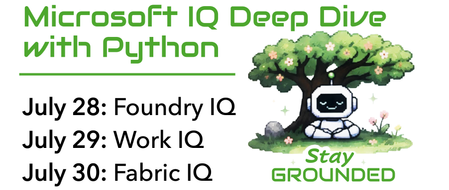
Join us for a new 3-part livestream series where we take a deep technical look at Microsoft IQ, the knowledge layer for the next generation of AI experiences. You'll learn how Foundry IQ, Work IQ, and Fabric IQ can be used to ground AI systems in organizational knowledge, workplace context, and structured business data. Our series will cover: Foundry IQ for multi-source agentic retrieval on search indexes, SharePoint, websites, and more Work IQ for user-specific retrieval of M365 data, like Teams chats, emails, and calendar events Fabric IQ for retrieval of data stored in OneLake, via Fabric ontologies and data agents Building agents with Microsoft Agent Framework to connect to Foundry IQ, Fabric IQ, and Work IQ Throughout the series, we’ll use Python for all examples and share full code so you can run everything yourself in your own Foundry projects. 👉 Register for the full series. In addition to the live streams, you can also join the Microsoft Foundry Discord to ask follow-up questions after each stream. If you are new to generative AI with Python, start with our 9-part Python + AI series, which covers topics such as LLMs, embeddings, RAG, tool calling, MCP, and agents. If you are new to Microsoft Agent Framework, watch our 6-part Python + Agent series which dives deep into agents and workflows. To learn more about each live stream or register for individual sessions, scroll down: Day 1: Foundry IQ 28 July, 2026 | 5:00 PM - 6:00 PM (UTC) Coordinated Universal Time Register for the stream on Reactor In the first session of our Microsoft IQ Deep Dive with Python series, we’ll kick things off with an introduction to the Microsoft IQ family: Foundry IQ, Work IQ, Fabric IQ, and Web IQ. We’ll then take a deeper look at Foundry IQ (Azure AI Search), exploring how it helps agents and applications work with curated knowledge and organizational context. We'll build a knowledge base and connect it to multiple knowledge sources, including the new IQs, MCP servers, and search indexes built from ingested data. Then we'll perform multi-source agentic retrieval on the knowledge base, which executes queries in parallel and merges the results with state-of-the-art ranking models. Finally, we will build an agent in Python using Microsoft Agent Framework and ground the agent's responses in results from the Foundry IQ knowledge base. All code demos will use Python and will be available in an open-source repository for you to deploy yourself. After the stream, join office hours in the Microsoft Foundry Discord to ask follow-up questions. Day 2: Work IQ 29 July, 2026 | 5:00 PM - 6:00 PM (UTC) Coordinated Universal Time Register for the stream on Reactor In the second session of our Microsoft IQ Deep Dive with Python series, we’ll focus on Work IQ and how it brings workplace context into AI-powered experiences. We’ll explore how developers can use Work IQ through APIs, A2A patterns, MCP integration, and tool-based workflows. We’ll look at two practical tool examples, then show how Work IQ can be used from Copilot and from a Microsoft Agent Framework agent. All code demos will use Python and will be available in an open-source repository for you to deploy yourself. After the stream, join office hours in the Microsoft Foundry Discord to ask follow-up questions. Day 3: Fabric IQ 30 July, 2026 | 5:00 PM - 6:00 PM (UTC) Coordinated Universal Time Register for the stream on Reactor In the final session of our Microsoft IQ Deep Dive with Python series, we’ll explore Fabric IQ and how it connects AI experiences to structured business data. We’ll introduce the key concepts behind Fabric IQ, including ontologies and data agents, and show how they help describe, organize, and reason over operational data stored in OneLake. We’ll use the Microsoft Fabric API SDK in Python to connect to Fabric IQ, so that we can programmatically configure ontologies and answer questions about our data. All code demos will use Python and will be available in an open-source repository for you to deploy yourself. After the stream, join office hours in the Microsoft Foundry Discord to ask follow-up questions.Learn how to host your agents on Microsoft Foundry
We just concluded Host your agents on Foundry, a three-part livestream series where we explored how to deploy and host Python AI agents on Microsoft Foundry: Deploying Python agents to Foundry Hosted agents using the Azure Developer CLI Building hosted agents with Microsoft Agent Framework, including Foundry IQ integration and multi-agent workflows Building hosted agents with LangChain + LangGraph, including built-in tools like Bing Web Search Running quality and safety evaluations: bulk, scheduled, and continuous evals, guardrails, and red-teaming All of the materials from our series are available for you to keep learning from, and linked below: Video recordings of each stream PowerPoint slides that you can use for reviewing or even teaching the material to your own community Open-source code samples you can run yourself in your own Microsoft Foundry project Spanish speaker? Check out the Spanish version of the series. 🙋🏽♂️ Have follow up questions? Join the weekly Python+AI office hours on Foundry Discord. Host your agents on Foundry: Microsoft Agent Framework 📺 Watch YouTube recording In our first session, we deploy agents built with Microsoft Agent Framework (the successor of Autogen and Semantic Kernel). Starting with a simple agent, we add Foundry tools like Code Interpreter, ground the agent in enterprise data with Foundry IQ, and finally deploy multi-agent workflows. Along the way, we use the Foundry UI to interact with the hosted agent, testing it out in the playground and observing the traces from the reasoning and tool calls. 🖼️ Slides for this session 💻 Code repository with examples: foundry-hosted-agentframework-demos 📝 Write-up for this session Host your agents on Foundry: LangChain + LangGraph 📺 Watch YouTube recording In our second session, we deploy agents built with the popular open-source libraries LangChain and LangGraph. Starting with a simple agent, we add Foundry tools like Bing Web Search, ground the agent in Foundry IQ, then deploy more complex agents using the LangGraph orchestration framework. Along the way, we use the Foundry UI to interact with the hosted agent, testing it out in the playground and observing the traces from the reasoning and tool calls. 🖼️ Slides for this session 💻 Code repository with examples: foundry-hosted-langchain-demos 📝 Write-up for this session Host your agents on Foundry: Quality & safety evaluations 📺 Watch YouTube recording In our third session, we ensure that our AI agents are producing high-quality outputs and operating safely and responsibly. First we explore what it means for agent outputs to be high quality, using built-in evaluators to check overall task adherence and then building custom evaluators for domain-specific checks. With Foundry hosted agents, we run bulk evaluations on demand, set up scheduled evaluations, and even enable continuous evaluation on a subset of live agent traces. Next we discuss safety systems that can be layered on top of agents and audit agents for potential safety risks. To improve compliance with an organization's goals, we configure custom policies and guardrails that can be shared across agents. Finally, we ensure that adversarial inputs can't produce unsafe outputs by running automated red-teaming scans on agents, and even schedule those to run regularly as well. 🖼️ Slides for this session 💻 Code repository with examples: foundry-hosted-agentframework-demos 📝 Write-up for this sessionStop Experimenting, Start Building: AI Apps & Agents Dev Days Has You Covered
The AI landscape has shifted. The question is no longer “Can we build AI applications?” it’s “Can we build AI applications that actually work in production?” Demos are easy. Reliable, scalable, resilient AI systems that handle real-world complexity? That’s where most teams struggle. If you’re an AI developer, software engineer, or solution architect who’s ready to move beyond prototypes and into production-grade AI, there’s a series built specifically for you. What Is AI Apps & Agents Dev Days? AI Apps & Agents Dev Days is a monthly technical series from Microsoft Reactor, delivered in partnership with Microsoft and NVIDIA. You can explore the full series at https://developer.microsoft.com/en-us/reactor/series/s-1590/ This isn’t a slide deck marathon. The series tagline says it best: “It’s not about slides, it’s about building.” Each session tackles real-world challenges, shares patterns that actually work, and digs into what’s next in AI-driven app and agent design. You bring your curiosity, your code, and your questions. You leave with something you can ship. The sessions are led by experienced engineers and advocates from both Microsoft and NVIDIA, people like Pamela Fox, Bruno Capuano, Anthony Shaw, Gwyneth Peña-Siguenza, and solutions architects from NVIDIA’s Cloud AI team. These aren’t theorists; they’re practitioners who build and ship the tools you use every day. What You’ll Learn The series covers the full spectrum of building AI applications and agent-based systems. Here are the key themes: Building AI Applications with Azure, GitHub, and Modern Tooling Sessions walk through how to wire up AI capabilities using Azure services, GitHub workflows, and the latest SDKs. The focus is always on code-first learning, you’ll see real implementations, not abstract architecture diagrams. Designing and Orchestrating AI Agents Agent development is one of the series’ strongest threads. Sessions cover how to build agents that orchestrate long-running workflows, persist state automatically, recover from failures, and pause for human-in-the-loop input, without losing progress. For example, the session “AI Agents That Don’t Break Under Pressure” demonstrates building durable, production-ready AI agents using the Microsoft Agent Framework, running on Azure Container Apps with NVIDIA serverless GPUs. Scaling LLM Inference and Deploying to Production Moving from a working prototype to a production deployment means grappling with inference performance, GPU infrastructure, and cost management. The series covers how to leverage NVIDIA GPU infrastructure alongside Azure services to scale inference effectively, including patterns for serverless GPU compute. Real-World Architecture Patterns Expect sessions on container-based deployments, distributed agent systems, and enterprise-grade architectures. You’ll learn how to use services like Azure Container Apps to host resilient AI workloads, how Foundry IQ fits into agent architectures as a trusted knowledge source, and how to make architectural decisions that balance performance, cost, and scalability. Why This Matters for Your Day Job There’s a critical gap between what most AI tutorials teach and what production systems actually require. This series bridges that gap: Production-ready patterns, not demos. Every session focuses on code and architecture you can take directly into your projects. You’ll learn patterns for state persistence, failure recovery, and durable execution — the things that break at 2 AM. Enterprise applicability. The scenarios covered — travel planning agents, multi-step workflows, GPU-accelerated inference — map directly to enterprise use cases. Whether you’re building internal tooling or customer-facing AI features, the patterns transfer. Honest trade-off discussions. The speakers don’t shy away from the hard questions: When do you need serverless GPUs versus dedicated compute? How do you handle agent failures gracefully? What does it actually cost to run these systems at scale? Watch On-Demand, Build at Your Own Pace Every session is available on-demand. You can watch, pause, and build along at your own pace, no need to rearrange your schedule. The full playlist is available at This is particularly valuable for technical content. Pause a session while you replicate the architecture in your own environment. Rewind when you need to catch a configuration detail. Build alongside the presenters rather than just watching passively. What You’ll Walk Away Wit After working through the series, you’ll have: Practical agent development skills — how to design, orchestrate, and deploy AI agents that handle real-world complexity, including state management, failure recovery, and human-in-the-loop patterns Production architecture patterns — battle-tested approaches for deploying AI workloads on Azure Container Apps, leveraging NVIDIA GPU infrastructure, and building resilient distributed systems Infrastructure decision-making confidence — a clearer understanding of when to use serverless GPUs, how to optimise inference costs, and how to choose the right compute strategy for your workload Working code and reference implementations — the sessions are built around live coding and sample applications (like the Travel Planner agent demo), giving you starting points you can adapt immediately A framework for continuous learning — with new sessions each month, you’ll stay current as the AI platform evolves and new capabilities emerge Start Building The AI applications that will matter most aren’t the ones with the flashiest demos — they’re the ones that work reliably, scale gracefully, and solve real problems. That’s exactly what this series helps you build. Whether you’re designing your first AI agent system or hardening an existing one for production, the AI Apps & Agents Dev Days sessions give you the patterns, tools, and practical knowledge to move forward with confidence. Explore the series at https://developer.microsoft.com/en-us/reactor/series/s-1590/ and start watching the on-demand sessions at the link above. The best time to level up your AI engineering skills was yesterday. The second-best time is right now and these sessions make it easy to start.Join our free livestream series on hosting agents in Microsoft Foundry
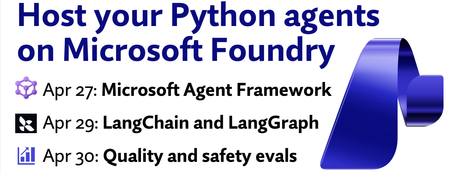
Join us for a new 3‑part livestream series where we deploy AI agents on Microsoft Foundry using Microsoft Agent Framework and LangChain/LangGraph, then level them up with tools, observability, and evals. You'll learn how to: Deploy Python agents to Foundry Hosted agents using the Azure Developer CLI Build hosted agents with Microsoft Agent Framework, including Foundry IQ integration Build hosted agents with LangChain + LangGraph, including built-in tools like Web Search Run quality and safety evaluations: continuous evals, scheduled evals, guardrails, and red-teaming Throughout the series, we’ll use Python for all examples and share full code so you can run everything yourself in your own Foundry projects. 👉 Register for the full series. Spanish speaker? ¡Tendremos una serie para hispanohablantes! Regístrese aquí In addition to the live streams, you can also join Join the Microsoft Foundry Discord to ask follow-up questions after each stream. If you are new to generative AI with Python, start with our 9-part Python + AI series, which covers topics such as LLMs, embeddings, RAG, tool calling, MCP, and agents. If you are new to Microsoft Agent Framework, watch our 6-part Python + Agent series which dives deep into agents and workflows. To learn more about each live stream or register for individual sessions, scroll down: Host your agents on Foundry: Microsoft Agent Framework 27 April, 2026 | 5:00 PM - 6:00 PM (UTC) Coordinated Universal Time Register for the stream on Reactor In our first session, we'll deploy agents built with Microsoft Agent Framework (the successor of Autogen and Semantic Kernel). Starting with a simple agent, we'll add Foundry tools like Code Interpreter, ground the agent in enterprise data with Foundry IQ, and finally deploy multi-agent workflows. Along the way, we'll use the Foundry UI to interact with the hosted agent, testing it out in the playground and observing the traces from the reasoning and tool calls. Host your agents on Foundry: LangChain + LangGraph 29 April, 2026 | 5:00 PM - 6:00 PM (UTC) Coordinated Universal Time Register for the stream on Reactor In our second session, we'll deploy agents built with the popular open-source libraries LangChain and LangGraph. Starting with a simple agent, we'll add Foundry tools like Bing Web Search, ground the agent in Foundry IQ, then deploy more complex agents using the LangGraph orchestration framework. Along the way, we'll use the Foundry UI to interact with the hosted agent, testing it out in the playground and observing the traces from the reasoning and tool calls. Host your agents on Foundry: Quality & safety evaluations 30 April, 2026 | 5:00 PM - 6:00 PM (UTC) Coordinated Universal Time Register for the stream on Reactor In our third session, we'll ensure that our AI agents are producing high-quality outputs and operating safely and responsibly. First we'll explore what it means for agent outputs to be high quality, using built-in evaluators to check overall task adherence and then building custom evaluators for domain-specific checks. With Foundry hosted agents, we can run bulk evaluations on demand, set up scheduled evaluations, and even enable continuous evaluation on a subset of live agent traces. Next we'll discuss safety systems that can be layered on top of agents and audit agents for potential safety risks. To improve compliance with an organization's goals, we can configure custom policies and guardrails that can be shared across agents. Finally, we can ensure that adversarial inputs can't produce unsafe outputs by running automated red-teaming scans on agents, and even schedule those to run regularly as well. With all of these evaluation and compliance features available in Foundry, you can have more confidence hosting your agents in production.Building MCP servers with Entra ID and pre-authorized clients
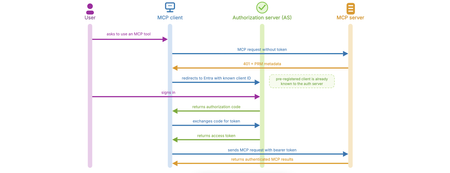
The Model Context Protocol (MCP) gives AI agents a standard way to call external tools, but things get more complicated when those tools need to know who the user is. In this post, I’ll show how to build an MCP server with the Python FastMCP package that authenticates users with Microsoft Entra ID when they connect from a pre-authorized client such as VS Code. If you need to build a server that works with any MCP clients, read my previous blog post. With Microsoft Entra as the authorization server, supporting arbitrary clients currently requires adding an OAuth proxy in front, which increases security risk. This post focuses on the simpler pre-authorized-client path instead. MCP auth Let’s start by digging into the MCP auth spec, since that explains both the shape of the flow and the constraints we run into with Entra. The MCP specification includes an authorization protocol based on OAuth 2.1, so an MCP client can send a request that includes a Bearer token from an authorization server, and the MCP server can validate that token. In OAuth 2.1 terms, the MCP client is acting as the OAuth client, the MCP server is the resource server, the signed-in user is the resource owner, and the authorization server issues an access token. In this case, Entra will be our authorization server. We can't necessarily use any OAuth-compatible authorization servers, as MCP auth requires more than just the core OAuth 2.1 functionality. In OAuth, the authorization server needs a relationship with the client. MCP auth describes three options: Pre-registration: the auth server has a pre-existing relationship and has the client ID in its database already CIMD (Client Identity Metadata Document): the MCP client sends the URL of its CIMD, a JSON document that describes its attributes, and the auth server bases its interactions on that information. DCR (Dynamic Client Registration): when the auth server sees a new client, it explicitly registers it and stores the client information in its own data. DCR is now considered a "legacy" path, as the hope is for CIMD to be the supported path in the future. For each MCP scenario - each combination of MCP server, MCP client, and authorization server - we need to determine which of those options are viable and optimal. Here's one way of thinking through it: VS Code supports all of MCP auth, so its MCP client includes both CIMD and DCR support. However, the Microsoft Entra authorization server does not support CIMD or DCR. That leaves us with only one official option: pre-registration. If we desperately need support for arbitrary clients, it is possible to put a CIMD/DCR proxy in front of Entra, as discussed in my previous blog post, but the Entra team discourages that approach due to increased security risks. When using pre-registration, the auth flow is relatively simple (but still complex, because hey, this is OAuth!): User asks to use auth-restricted MCP server MCP client makes a request to MCP server without a bearer token MCP server responds with an HTTP 401 and a pointer to its PRM (Protected Resource Metadata) document MCP client reads PRM to discover the authorization server and options MCP client redirects to authorization server, including its client ID User signs into authorization server Authorization server returns authorization code MCP client exchanges authorization code for access token Authorization server returns access token MCP client re-tries original request, but now with bearer token included MCP server validates bearer token and returns successfully Here's what that looks like: Now let's dig into the code for implementing MCP auth with the pre-registered VS Code client. Registering the MCP server with Entra Before the server can use Entra to authorize users, we need to register the server with Entra via an app registration. We can do registration using the Azure Portal, Azure CLI, Microsoft Graph SDK, or even Bicep. In this case, I use the Python MS Graph SDK as it allows me to specify everything programmatically. First, I create the Entra app registration, specifying the sign-in audience (single-tenant) and configuring the MCP server as a protected resource: scope_id = str(uuid.uuid4()) Application( display_name="Entra App for MCP server", sign_in_audience="AzureADMyOrg", api=ApiApplication( requested_access_token_version=2, oauth2_permission_scopes=[ PermissionScope( admin_consent_description="Allows access to the MCP server as the signed-in user.", admin_consent_display_name="Access MCP Server", id=scope_id, is_enabled=True, type="User", user_consent_description="Allow access to the MCP server on your behalf.", user_consent_display_name="Access MCP Server", value="user_impersonation") ], pre_authorized_applications=[ PreAuthorizedApplication( app_id=VSCODE_CLIENT_ID, delegated_permission_ids=[scope_id], )])) The api parameter is doing the heavy lifting, ensuring that other applications (like VS Code) can request permission to access the server on behalf of a user. Here's what each parameter does: requested_access_token_version=2: Entra ID has two token formats (v1.0 and v2.0). We need v2.0 because that's what FastMCP's token validator expects. oauth2_permission_scopes: This defines a permission called user_impersonation that MCP clients can request when connecting to your server. It's the server saying: "I accept tokens that let an MCP client act on behalf of a signed-in user." Without at least one scope defined, no MCP client can obtain a token for your server — Entra wouldn't know what permission to grant. The name user_impersonation is a convention (we could call it anything), but it clearly signals that the MCP client is accessing your server as the user, not as itself. pre_authorized_applications: This list tells Entra which client applications are pre-approved to request tokens for this server’s API without showing an extra consent prompt to the user. In this case, I list VS Code’s application ID and tie it to the user_impersonation scope, so VS Code can request a token for the MCP server as the signed-in user. Thanks to that configuration, when VS Code requests a token, it will request a token with the scope "api://{app_id}/user_impersonation" , and the FastMCP server will validate that incoming tokens contain that scope. Next, I create a Service Principal for that Entra app registration, which represents the Entra app in my tenant request_principal = ServicePrincipal(app_id=app.app_id, display_name=app.display_name) await graph_client.service_principals.post(request_principal) Securing credentials for Entra app registrations I also need a way for the server to prove that it can use that Entra app registration. There are three options: Client secret: Easiest to set up, but since it's a secret, it must be stored securely, protected carefully, and rotated regularly. Certificate: Stronger than a client secret and generally better suited for production, but it still requires certificate storage, renewal, and lifecycle management. Managed identity as Federated Identity Credential (MI-as-FIC): No stored secret, no certificate to manage, and usually the best choice when your app is hosted on Azure. No support for local development however. I wanted the best of both worlds: easy local development on my machine, but the most secure production story for deployment on Azure Container Apps. So I actually created two Entra app registrations, one for local with client secret, and one for production with managed identity. Here's how I set up the password for the local Entra app: password_credential = await graph_client.applications.by_application_id(app.id).add_password.post( AddPasswordPostRequestBody( password_credential=PasswordCredential(display_name="FastMCPSecret"))) It's a bit trickier to set up the MI-as-FIC, since we first need to provision the managed identity and associate that with our Azure Container Apps resource. I set all of that up in Bicep, and then after provisioning completes, I run this code to configure a FIC using the managed identity: fic = FederatedIdentityCredential( name="miAsFic", issuer=f"https://login.microsoftonline.com/{tenant_id}/v2.0", subject=managed_identity_principal_id, audiences=["api://AzureADTokenExchange"], ) await graph_client.applications.by_application_id( prod_app_id ).federated_identity_credentials.post(fic) Since I now have two Entra app registrations, I make sure that the environment variables in my local .env point to the secret-secured local Entra app registration, and the environment variables on my Azure Container App point to the FIC-secured prod Entra app registration. Granting admin consent This next step is only necessary if the MCP server uses the on-behalf-of (OBO) flow to exchange the incoming access token for a token to a downstream API, such as Microsoft Graph. In this case, my demo server uses OBO so it can query Microsoft Graph to check the signed-in user's group membership. The earlier code added VS Code as a pre-authorized application, but that only allows VS Code to obtain a token for the MCP server itself; it does not grant the MCP server permission to call Microsoft Graph on the user's behalf. Because the MCP sign-in flow in VS Code does not include a separate consent step for those downstream Graph scopes, I grant admin consent up front so the OBO exchange can succeed. This code grants the admin consent to the associated service principal for the Graph API resource and scopes: server_principal = await graph_client.service_principals_with_app_id(app.app_id).get() graph_principal = await graph_client.service_principals_with_app_id( "00000003-0000-0000-c000-000000000000" # Graph API ).get() await graph_client.oauth2_permission_grants.post( OAuth2PermissionGrant( client_id=server_principal.id, consent_type="AllPrincipals", resource_id=graph_principal.id, scope="User.Read email offline_access openid profile", ) ) If our MCP server needed to use an OBO flow with another resource server, we could request additional grants for those resources and scopes. Our Entra app registration is now ready for the MCP server, so let's move on to see the server code. Using FastMCP servers with Entra In our MCP server code, we configure FastMCP's RemoteAuthProvider based on the details from the Entra app registration process: from fastmcp.server.auth import RemoteAuthProvider from fastmcp.server.auth.providers.azure import AzureJWTVerifier verifier = AzureJWTVerifier( client_id=ENTRA_CLIENT_ID, tenant_id=AZURE_TENANT_ID, required_scopes=["user_impersonation"], ) auth = RemoteAuthProvider( token_verifier=verifier, authorization_servers=[f"https://login.microsoftonline.com/{AZURE_TENANT_ID}/v2.0"], base_url=base_url, ) Notice that we do not need to pass in a client secret at this point, even when using the local Entra app registration. FastMCP validates the tokens using Entra's public keys - no Entra app credentials needed. To make it easy for our MCP tools to access an identifier for the currently logged in user, we define a middleware that inspects the claims of the current token using FastMCP's get_access_token() and sets the "oid" (Entra object identifier) in the state: class UserAuthMiddleware(Middleware): def _get_user_id(self): token = get_access_token() if not (token and hasattr(token, "claims")): return None return token.claims.get("oid") async def on_call_tool(self, context: MiddlewareContext, call_next): user_id = self._get_user_id() if context.fastmcp_context is not None: await context.fastmcp_context.set_state("user_id", user_id) return await call_next(context) async def on_read_resource(self, context: MiddlewareContext, call_next): user_id = self._get_user_id() if context.fastmcp_context is not None: await context.fastmcp_context.set_state("user_id", user_id) return await call_next(context) When we initialize the FastMCP server, we set the auth provider and include that middleware: mcp = FastMCP("Expenses Tracker", auth=auth, middleware=[UserAuthMiddleware()]) Now, every request made to the MCP server will require authentication. The server will return a 401 if a valid token isn't provided, and that 401 will prompt the VS Code MCP client to kick off the MCP authorization flow. Inside each tool, we can grab the user id from the state, and use that to customize the response for the user, like to store or query items in a database. PleaseChooseNewDisplayName.tool async def add_user_expense( date: Annotated[date, "Date of the expense in YYYY-MM-DD format"], amount: Annotated[float, "Positive numeric amount of the expense"], description: Annotated[str, "Human-readable description of the expense"], ctx: Context, ): """Add a new expense to Cosmos DB.""" user_id = await ctx.get_state("user_id") if not user_id: return "Error: Authentication required (no user_id present)" expense_item = { "id": str(uuid.uuid4()), "user_id": user_id, "date": date.isoformat(), "amount": amount, "description": description } await cosmos_container.create_item(body=expense_item) Using OBO flow in FastMCP server Remember when we granted admin consent for the Entra app registration earlier? That means we can use an OBO flow inside the MCP server, to make calls to the Graph API on behalf of the signed-in user. To make it easier to exchange and validate tokens, we use the Python MSAL SDK and configure a ConfidentialClientApplication . When using the local secret-secured Entra app registration, this is all we need to set it up: from msal import ConfidentialClientApplication confidential_client = ConfidentialClientApplication( client_id=entra_client_id, client_credential=os.environ["ENTRA_DEV_CLIENT_SECRET"], authority=f"https://login.microsoftonline.com/{os.environ['AZURE_TENANT_ID']}", token_cache=TokenCache(), ) When using the production FIC-secured Entra app registration, we need a function that returns tokens for the managed identity: from msal import ManagedIdentityClient, TokenCache, UserAssignedManagedIdentity mi_client = ManagedIdentityClient( UserAssignedManagedIdentity(client_id=os.environ["AZURE_CLIENT_ID"]), http_client=requests.Session(), token_cache=TokenCache()) def _get_mi_assertion(): result = mi_client.acquire_token_for_client(resource="api://AzureADTokenExchange") if "access_token" not in result: raise RuntimeError(f"Failed to get MI assertion: {result.get('error_description', 'unknown error')}") return result["access_token"] confidential_client = ConfidentialClientApplication( client_id=entra_client_id, client_credential={"client_assertion": _get_mi_assertion}, authority=f"https://login.microsoftonline.com/{os.environ['AZURE_TENANT_ID']}", token_cache=TokenCache()) Inside any code that requires OBO, we ask MSAL to exchange the MCP access token for a Graph API access token: graph_resource_access_token = confidential_client.acquire_token_on_behalf_of( user_assertion=access_token.token, scopes=["https://graph.microsoft.com/.default"] ) graph_token = graph_resource_access_token["access_token"] Once we successfully acquire the token, we can use that token with the Graph API, for any operations permitted by the scopes in the admin consent granted earlier. For this example, we call the Graph API to check whether the logged in user is a member of a particular Entra group: client = httpx.AsyncClient() url = ("https://graph.microsoft.com/v1.0/me/transitiveMemberOf/microsoft.graph.group" f"?$filter=id eq '{group_id}'&$count=true") response = await client.get( url, headers={ "Authorization": f"Bearer {graph_token}", "ConsistencyLevel": "eventual", }) data = response.json() membership_count = data.get("@odata.count", 0) is_admin = membership_count > 0 FastMCP 3.0 now provides a way to restrict tool visibility based on authorization checks, so I wrapped the above code in a function and set it as the auth constraint for the admin tool: async def require_admin_group(ctx: AuthContext) -> bool: graph_token = exchange_for_graph_token(ctx.token.token) return await check_user_in_group(graph_token, admin_group_id) @mcp.tool(auth=require_admin_group) async def get_expense_stats(ctx: Context): """Get expense statistics. Only accessible to admins.""" ... FastMCP will run that function both when an MCP client requests the list of tools, to determine which tools can be seen by the current user, and again when a user tries to use that tool, for an added just-in-time security check. This is just one way to use an OBO flow however. You can use it directly inside tools, like to query for more details from the Graph API, upload documents to OneDrive/SharePoint/Notes, send emails, etc. All together now For the full code, check out the open source azure-cosmosdb-identity-aware-mcp-server repository. The most relevant files for the Entra authentication setup are: auth_init.py: Creates the Entra app registrations for production and local development, defines the delegated user_impersonation scope, pre-authorizes VS Code, creates the service principal, and grants admin consent for the Microsoft Graph scopes used in the OBO flow. auth_postprovision.py: Adds the federated identity credential (FIC) after deployment so the container app's managed identity can act as the production Entra app without storing a client secret. main.py: Implements the MCP server using FastMCP's RemoteAuthProvider and AzureJWTVerifier for direct Entra authentication, plus OBO-based Microsoft Graph calls for admin group membership checks. As always, please let me know if you have further questions or ideas for other Entra integrations. Acknowledgements: Thank you to Matt Gotteiner for his guidance in implementing the OBO flow and review of the blog post.Learn how to build agents and workflows in Python
We just concluded Python + Agents, a six-part livestream series where we explored the foundational concepts behind building AI agents in Python using the Microsoft Agent Framework: Using agents with tools, MCP servers, and subagents Adding context to agents with database calls and long-term memory with Redis or Mem0 Monitoring using OpenTelemetry and evaluating quality with the Azure AI Evaluation SDK AI-driven workflows with conditional branching, structured outputs, and multi-agent orchestration Adding human-in-the-loop with tool approval and checkpoints All of the materials from our series are available for you to keep learning from, and linked below: Video recordings of each stream Powerpoint slides that you can use for reviewing or even teaching the material to your own community Open-source code samples you can run yourself using frontier LLMs from GitHub Models or Microsoft Foundry Models Spanish speaker? Check out the Spanish version of the series. 🙋🏽♂️ Have follow up questions? Join the weekly Python+AI office hours on Foundry Discord or the weekly Agent Framework office hours. Building your first agent in Python 📺 Watch YouTube recording In the first session of our Python + Agents series, we'll kick things off with the fundamentals: what AI agents are, how they work, and how to build your first one using the Microsoft Agent Framework. We'll start with the core anatomy of an agent, then walk through how tool calling works in practice—beginning with a single tool, expanding to multiple tools, and finally connecting to tools exposed through local MCP servers. We'll conclude with the supervisor agent pattern, where a single supervisor agent coordinates subtasks across multiple subagents, by treating each agent as a tool. Along the way, we'll share tips for debugging and inspecting agents, like using the DevUI interface from Microsoft Agent Framework for interacting with agent prototypes. 🖼️ Slides for this session 💻 Code repository with examples: python-agentframework-demos 📝 Write-up for this session Adding context and memory to agents 📺 Watch YouTube recording In the second session of our Python + Agents series, we'll extend agents built with the Microsoft Agent Framework by adding two essential capabilities: context and memory. We'll begin with context, commonly known as Retrieval‑Augmented Generation (RAG), and show how agents can ground their responses using knowledge retrieved from local data sources such as SQLite or PostgreSQL. This enables agents to provide accurate, domain‑specific answers based on real information rather than model hallucination. Next, we'll explore memory—both short‑term, thread‑level context and long‑term, persistent memory. You'll see how agents can store and recall information using solutions like Redis or open‑source libraries such as Mem0, enabling them to remember previous interactions, user preferences, and evolving tasks across sessions. By the end, you'll understand how to build agents that are not only capable but context‑aware and memory‑efficient, resulting in richer, more personalized user experiences. 🖼️ Slides for this session 💻 Code repository with examples: python-agentframework-demos 📝 Write-up for this session Monitoring and evaluating agents 📺 Watch YouTube recording In the third session of our Python + Agents series, we'll focus on two essential components of building reliable agents: observability and evaluation. We'll begin with observability, using OpenTelemetry to capture traces, metrics, and logs from agent actions. You'll learn how to instrument your agents and use a local Aspire dashboard to identify slowdowns and failures. From there, we'll explore how to evaluate agent behavior using the Azure AI Evaluation SDK. You'll see how to define evaluation criteria, run automated assessments over a set of tasks, and analyze the results to measure accuracy, helpfulness, and task success. By the end of the session, you'll have practical tools and workflows for monitoring, measuring, and improving your agents—so they're not just functional, but dependable and verifiably effective. 🖼️ Slides for this session 💻 Code repository with examples: python-agentframework-demos 📝 Write-up for this session Building your first AI-driven workflows 📺 Watch YouTube recording In Session 4 of our Python + Agents series, we'll explore the foundations of building AI‑driven workflows using the Microsoft Agent Framework: defining workflow steps, connecting them, passing data between them, and introducing simple ways to guide the path a workflow takes. We'll begin with a conceptual overview of workflows and walk through their core components: executors, edges, and events. You'll learn how workflows can be composed of simple Python functions or powered by full AI agents when a step requires model‑driven behavior. From there, we'll dig into conditional branching, showing how workflows can follow different paths depending on model outputs, intermediate results, or lightweight decision functions. We'll introduce structured outputs as a way to make branching more reliable and easier to maintain—avoiding vague string checks and ensuring that workflow decisions are based on clear, typed data. We'll discover how the DevUI interface makes it easier to develop workflows by visualizing the workflow graph and surfacing the streaming events during a workflow's execution. Finally, we'll dive into an E2E demo application that uses workflows inside a user-facing application with a frontend and backend. 🖼️ Slides for this session 💻 Code repository with examples: python-agentframework-demos 📝 Write-up for this session Orchestrating advanced multi-agent workflows 📺 Watch YouTube recording In Session 5 of our Python + Agents series, we'll go beyond workflow fundamentals and explore how to orchestrate advanced, multi‑agent workflows using the Microsoft Agent Framework. This session focuses on patterns that coordinate multiple steps or multiple agents at once, enabling more powerful and flexible AI‑driven systems. We'll begin by comparing sequential vs. concurrent execution, then dive into techniques for running workflow steps in parallel. You'll learn how fan‑out and fan‑in edges enable multiple branches to run at the same time, how to aggregate their results, and how concurrency allows workflows to scale across tasks efficiently. From there, we'll introduce two multi‑agent orchestration approaches that are built into the framework. We'll start with handoff, where control moves entirely from one agent to another based on workflow logic, which is useful for routing tasks to the right agent as the workflow progresses. We'll then look at Magentic, a planning‑oriented supervisor that generates a high‑level plan for completing a task and delegates portions of that plan to other agents. Finally, we'll wrap up with a demo of an E2E application that showcases a concurrent multi-agent workflow in action. 🖼️ Slides for this session 💻 Code repository with examples: python-agentframework-demos 📝 Write-up for this session Adding a human in the loop to agentic workflows 📺 Watch YouTube recording In the final session of our Python + Agents series, we'll explore how to incorporate human‑in‑the‑loop (HITL) interactions into agentic workflows using the Microsoft Agent Framework. This session focuses on adding points where a workflow can pause, request input or approval from a user, and then resume once the human has responded. HITL is especially important because LLMs can produce uncertain or inconsistent outputs, and human checkpoints provide an added layer of accuracy and oversight. We'll begin with the framework's requests‑and‑responses model, which provides a structured way for workflows to ask questions, collect human input, and continue execution with that data. We'll move onto tool approval, one of the most frequent reasons an agent requests input from a human, and see how workflows can surface pending tool calls for approval or rejection. Next, we'll cover checkpoints and resuming, which allow workflows to pause and be restarted later. This is especially important for HITL scenarios where the human may not be available immediately. We'll walk through examples that demonstrate how checkpoints store progress, how resuming picks up the workflow state, and how this mechanism supports longer‑running or multi‑step review cycles. This session brings together everything from the series—agents, workflows, branching, orchestration—and shows how to integrate humans thoughtfully into AI‑driven processes, especially when reliability and judgment matter most. 🖼️ Slides for this session 💻 Code repository with examples: python-agentframework-demos 📝 Write-up for this session4.9KViews2likes0CommentsUsing on-behalf-of flow for Entra-based MCP servers
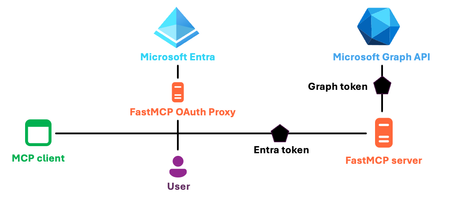
In December, we presented a series about MCP, culminating in a session about adding authentication to MCP servers. I demoed a Python MCP server that uses Microsoft Entra for authentication, requiring users to first login to the Microsoft tenant before they could use a tool. Many developers asked how they could take the Entra integration further, like to check the user's group membership or query their OneDrive. That requires using an "on-behalf-of" flow, where the MCP server uses the user's Entra identity to call another API, like the Microsoft Graph API. In this blog post, I will explain how to use Entra with OBO flow in a Python FastMCP server. How MCP servers can use Entra authentication The MCP authorization specification is based on OAuth2, with some additional features tacked on top. Every MCP client is actually an OAuth2 client, and each MCP server is an OAuth2 resource server: MCP auth adds these features to help clients determine how to authorize a server: Protected resource metadata (PRM): Implemented on the MCP server, provides details about the authorization server and method Authorization server metadata: Implemented on the authorization server, gives URLs for OAuth2 endpoints Additionally, to allow MCP servers to work with arbitrary MCP clients, MCP auth supports either of these client registration methods: Dynamic Client Registration (DCR): Implemented on the authorization server, it can register new MCP clients as OAuth2 clients, even if it hasn't seen them before. Client ID Metadata Documents (CIMD): An alternative to DCR, this requires both the MCP client to make a CIMD document available on a server, and requires the authorization server to fetch the CIMD document for details about the client. Microsoft Entra does support authorization server metadata, but it does not support either DCR or CIMD. That's actually fine if you are building an MCP server that's only going to be used with pre-authorized clients, like if the server will only be used with VS Code or with a specific internal MCP client. But, if you are building an MCP server that can be used with arbitrary MCP clients, then either DCR or CIMD is required. So what do we do? Fortunately, the FastMCP SDK implements DCR on top of Entra using an OAuth proxy pattern. FastMCP acts as the authorization server, intercepting requests and forwarding to Entra when needed, and storing OAuth client information in a designated database (like in-memory or Cosmos DB). ⚠️ Warning: This proxy approach is intended only for development and testing scenarios. For production deployments, Microsoft recommends using pre‑registered client applications where client identifiers and permissions are explicitly created, reviewed, and approved on a per-app basis. Let's walk through the steps to set that up. Registering the server with Entra Before the server can use Entra to authorize users, we need to register the server with Entra via an app registration. We can do registration using the Azure Portal, Azure CLI, Microsoft Graph SDK, or even Bicep. In this demo, I use the Python MS Graph SDK as it allows me to specify everything programmatically. First, I create the Entra app registration, specifying the sign-in audience (single-tenant), redirect URIs (including local MCP server, deployed MCP server, and VS Code redirect URIs), and the scopes for the exposed API. request_app = Application( display_name="FastMCP Server App", sign_in_audience="AzureADMyOrg", # Single tenant web=WebApplication( redirect_uris=[ "http://localhost:8000/auth/callback", "https://vscode.dev/redirect", "http://127.0.0.1:33418", "https://deployedurl.com/auth/callback" ], ), api=ApiApplication( oauth2_permission_scopes=[ PermissionScope( id=uuid.UUID("{" + str(uuid.uuid4()) + "}"), admin_consent_display_name="Access FastMCP Server", admin_consent_description="Allows access to the FastMCP server as the signed-in user.", user_consent_display_name="Access FastMCP Server", user_consent_description="Allow access to the FastMCP server on your behalf", is_enabled=True, value="mcp-access", type="User", )], requested_access_token_version=2, # Required by FastMCP ) ) app = await graph_client.applications.post(request_app) await graph_client.applications.by_application_id(app.id).patch( Application(identifier_uris=[f"api://{app.app_id}"])) Thanks to that configuration, when an MCP client like VS Code requests an OAuth2 token, it will request a token with the scope "api://{app.app_id}/mcp-access", and the FastMCP server will validate that incoming tokens contain that scope. Next, I create a Service Principal for that Entra app registration, which represents the Entra app in my tenant request_principal = ServicePrincipal(app_id=app.app_id, display_name=app.display_name) await graph_client.service_principals.post(request_principal) I need a way for the server to prove that it can use that Entra app registration, so I register a secret: password_credential = await graph_client.applications.by_application_id(app.id).add_password.post( AddPasswordPostRequestBody( password_credential=PasswordCredential(display_name="FastMCPSecret"))) Ideally, I would like to move away from secrets, as Entra now has support for using federated identity credentials for Entra app registrations instead, but that form of credential isn't supported yet in the FastMCP SDK. If you choose to use a secret, make sure that you store the secret securely. Granting admin consent This next step is only necessary when our MCP server wants to use an OBO flow to exchange access tokens for other resource server tokens (Graph API tokens, in this case). For the OBO flow to work, the Entra app registration needs permission to call the Graph API on behalf of users. If we controlled the client, we could force it to request the required scopes as part of the initial login dialog. However, since we are configuring this server to work with arbitrary MCP clients, we don't have that option. Instead, we grant admin consent to the Entra app for the necessary scopes, such that no Graph API consent dialog is needed. This code grants admin consent to the associated service principal for the Graph API resource and scopes: server_principal = await graph_client.service_principals_with_app_id(app.app_id).get() grant = GrantDefinition( principal_id=server_principal.id, resource_app_id="00000003-0000-0000-c000-000000000000", # Graph API scopes=["User.Read", "email", "offline_access", "openid", "profile"], target_label="server application") resource_principal = await graph_client.service_principals_with_app_id(grant.resource_app_id).get() desired_scope = grant.scope_string() await graph_client.oauth2_permission_grants.post( OAuth2PermissionGrant( client_id=grant.principal_id, consent_type="AllPrincipals", resource_id=resource_principal.id, scope=desired_scope)) If our MCP server needed to use an OBO flow with another resource server, we could request additional grants for those resources and scopes. Our Entra app registration is now ready for the MCP server, so let's move on to see the server code. Using FastMCP servers with Entra In our MCP server code, we configure FastMCP's built in AzureProvider based off the details from the Entra app registration process: auth = AzureProvider( client_id=os.environ["ENTRA_PROXY_AZURE_CLIENT_ID"], client_secret=os.environ["ENTRA_PROXY_AZURE_CLIENT_SECRET"], tenant_id=os.environ["AZURE_TENANT_ID"], base_url=entra_base_url, # MCP server URL required_scopes=["mcp-access"], client_storage=oauth_client_store, # in-memory or Cosmos DB ) To make it easy for our MCP tools to access an identifier for the currently logged in user, we define a middleware that inspects the claims of the current token using FastMCP's get_access_token() and sets the "oid" (Entra object identifier) in the state: class UserAuthMiddleware(Middleware): def _get_user_id(self): token = get_access_token() if not (token and hasattr(token, "claims")): return None return token.claims.get("oid") async def on_call_tool(self, context: MiddlewareContext, call_next): user_id = self._get_user_id() if context.fastmcp_context is not None: context.fastmcp_context.set_state("user_id", user_id) return await call_next(context) async def on_read_resource(self, context: MiddlewareContext, call_next): user_id = self._get_user_id() if context.fastmcp_context is not None: context.fastmcp_context.set_state("user_id", user_id) return await call_next(context) When we initialize the FastMCP server, we set the auth provider and include that middleware: mcp = FastMCP("Expenses Tracker", auth=auth, middleware=[UserAuthMiddleware()]) Now, every request made to the MCP server will require authentication. The server will return a 401 if a valid token isn't provided, and that 401 will prompt the MCP client to kick off the MCP authorization flow. Inside each tool, we can grab the user id from the state, and use that to customize the response for the user, like to store or query items in a database. .tool async def add_user_expense( date: Annotated[date, "Date of the expense in YYYY-MM-DD format"], amount: Annotated[float, "Positive numeric amount of the expense"], description: Annotated[str, "Human-readable description of the expense"], ctx: Context, ): """Add a new expense to Cosmos DB.""" user_id = ctx.get_state("user_id") if not user_id: return "Error: Authentication required (no user_id present)" expense_item = { "id": str(uuid.uuid4()), "user_id": user_id, "date": date.isoformat(), "amount": amount, "description": description } await cosmos_container.create_item(body=expense_item) Using OBO flow in FastMCP server Now we can move on to using an OBO flow inside an MCP tool, to access the Graph API on behalf of the user. To make it easy to exchange Entra tokens for Graph tokens, we use the Python MSAL SDK, configuring a ConfidentialClientApplication based on our Entra app registration details: confidential_client = ConfidentialClientApplication( client_id=os.environ["ENTRA_PROXY_AZURE_CLIENT_ID"], client_credential=os.environ["ENTRA_PROXY_AZURE_CLIENT_SECRET"], authority=f"https://login.microsoftonline.com/{os.environ['AZURE_TENANT_ID']}", token_cache=TokenCache(), ) Inside the tool that requires OBO, we ask MSAL to exchange the MCP access token for a Graph API access token: access_token = get_access_token() graph_resource_access_token = confidential_client.acquire_token_on_behalf_of( user_assertion=access_token.token, scopes=["https://graph.microsoft.com/.default"] ) graph_token = graph_resource_access_token["access_token"] Once we successfully acquire the token, we can use that token with the Graph API, for any operations permitted by the scopes in the admin consent granted earlier. For this example, we call the Graph API to check whether the logged in user is a member of a particular Entra group, and restrict tool usage if not: async with httpx.AsyncClient() as client: url = ("https://graph.microsoft.com/v1.0/me/transitiveMemberOf/microsoft.graph.group" f"?$filter=id eq '{group_id}'&$count=true") response = await client.get( url, headers={ "Authorization": f"Bearer {graph_token}", "ConsistencyLevel": "eventual", }) data = response.json() membership_count = data.get("@odata.count", 0) You could imagine many other ways to use an OBO flow however, like to query for more details from the Graph API, upload documents to OneDrive/SharePoint/Notes, send emails, and more! All together now For the full code, check out the open source python-mcp-demos repository, and follow the deployment steps for Entra. The most relevant code files are: auth_init.py: Creates the Entra app registration, service principal, client secret, and grants admin consent for OBO flow. auth_update.py: Updates the app registration's redirect URIs after deployment, adding the deployed server URL. auth_entra_mcp.py: The MCP server itself, configured with FastMCP's AzureProvider and tools that use OBO for group membership checks. I want to reiterate once more that the OAuth proxy approach is intended only for development and testing scenarios. For production deployments, Microsoft recommends using pre‑registered client applications where client identifiers and permissions are explicitly created, reviewed, and approved on a per-app basis. I hope that in the future, Entra will formally support MCP authorization via the CIMD protocol, so that we can build MCP servers with Entra auth that work with MCP clients in a fully secure and production-ready way. As always, please let us know if you have further questions or ideas for other Entra integrations. Acknowledgements: Thank you to Matt Gotteiner for his guidance in implementing the OBO flow and review of the blog post.