overview and features
7 TopicsIn Case You Missed It: Frontier Transformation and Wave 3 of Microsoft 365 Copilot Announcements
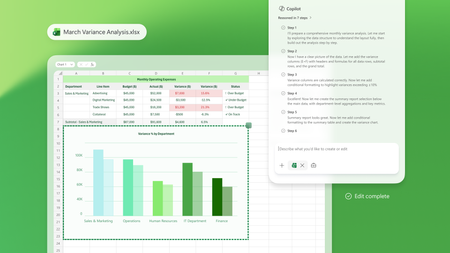
March brought a major set of Frontier Transformation and wave 3 of Microsoft 365 Copilot announcements across Microsoft 365 Copilot, Copilot Chat, and agents—all focused on helping people move faster from intent to action and helping organizations scale AI responsibly. If you missed any of the updates, here’s a quick recap of what’s new and why it matters. Copilot Transforms Knowledge Work These updates deepen how Copilot shows up inside the flow of work—grounded in your content, context, and tools. Word, Excel, and PowerPoint Agents From Copilot Chat, users can ask Word, Excel, or PowerPoint agents to create content, take next steps, or execute tasks, helping them move from intent to action without copying and pasting or switching contexts. 👉 Learn more Edit with Copilot in Word, Excel, and PowerPoint Copilot now creates, edits, and refines content directly inside Word, Excel, and PowerPoint, grounded in the context of a user’s work through Work IQ, so people can iterate and improve content without leaving the app they’re working in. 👉 Learn more Sequences shortened for demonstration purposes. Copilot Chat in Outlook Copilot Chat in Outlook enables users to draft and refine emails, manage calendars and RSVPs, and use the Outlook email widget to take action directly from chat, streamlining everyday communication and scheduling tasks. 👉 Learn more Outlook customer calendar instructions & proactive RSVPs Copilot finds available meeting times, sends invites, and keeps calendars up to date based on custom instructions, notifying users of changes directly in chat to reduce manual coordination. 👉 Learn more Copilot Cowork Built with Anthropic, Copilot Cowork brings a multimodel approach to Microsoft 365 Copilot—so your work isn’t tied to a single model. Cowork moves Copilot beyond prompts into long‑running, multi‑step work. With full awareness of your work context through Work IQ, it lets you delegate meaningful work and stay informed as it progresses. 👉 Learn more Claude Sonnet available in Copilot Chat Users can select Claude models directly in Copilot Chat, alongside next‑generation OpenAI models, bringing leading models from multiple providers into a single Copilot experience. 👉 Learn more Dataverse in Work IQ Work IQ connects signals from Microsoft 365—including documents, meetings, email, and chat—and will soon access operational data in Dataverse through Copilot in Dynamics 365 and Power Apps, bringing work context and business data closer together. 👉 Learn more Work IQ Memory (Chat History) Work IQ Memory enables more relevant, personalized Copilot responses shaped by a user’s work and Copilot chat history over time. 👉 Learn more Extensibility: Work IQ API / MCP Work IQ APIs provide access to production‑ready AI capabilities that work directly with enterprise work context, enabling extensibility through APIs and MCP. 👉 Learn more Launch Demo Copilot in Dynamics 365 & Power Apps Microsoft 365 Copilot is accessible directly within Dynamics 365 Sales, Customer Service, and Power Apps, extending Copilot experiences into business applications where operational work happens. 👉 Learn more Agents That Help Run the Business These announcements focus on building, deploying, and scaling agents across the enterprise. Apps SDK The Apps SDK provides tools to build ChatGPT apps based on the MCP Apps standard, with additional ChatGPT functionality to support agent and Copilot experiences. 👉 Learn more Model Context Protocol (MCP) Apps MCP Apps turn Copilot from a text interface into a governed, interactive execution layer by surfacing interactive app experiences directly in Copilot Chat. 👉 Learn more Apps in Agents: Outlook, Dynamics 365, and Power Apps Agents can bring Outlook, Dynamics 365, and Power Apps directly into chat, allowing users to review information and take action without leaving the conversation. 👉 Learn more Agent Recommendations in Microsoft 365 Copilot When users prompt Microsoft 365 Copilot, the system analyzes intent and recommends an installed, IT‑approved agent directly in the flow of work, making agents easier to discover and use at scale. 👉 Learn more Evaluate agents in Copilot Studio Copilot Studio provides structured, repeatable testing to help catch issues early, reduce the risk of bad answers, and maintain agent quality as agents evolve. 👉 Learn more Visibility, Governance, and Control at Scale As agent usage grows, these updates help organizations move from experimentation to enterprise readiness. Agent 365 Agent 365 serves as the control plane for agents, helping organizations move from experimentation to enterprise‑scale operations by enabling them to observe, govern, and secure agents. 👉 Learn more Microsoft 365 E7: The Frontier Suite Microsoft 365 E7 unifies Microsoft 365 E5, Microsoft 365 Copilot and Agent 365 into a single solution powered by Work IQ and integrated with the productivity apps and security stack customers already rely on. It includes Microsoft Entra Suite and advanced Defender, Intune and Purview security capabilities, delivering comprehensive protection across agents and employees. 👉 Learn more To explore what’s available now—and what’s coming next—visit the Microsoft 365 roadmap and related announcement blogs. 👉 Explore the roadmap8.2KViews3likes1CommentRevolutionizing IT administration for small and medium sized businesses
At Ignite 2024, we announced the upcoming general availability of Copilot in the Microsoft 365 admin centers, a set of groundbreaking Copilot features that revolutionizes IT administration by leveraging generative AI to streamline and enhance the Microsoft 365 management experience. Designed to help IT access real-time, contextually-relevant information and enhance productivity and decision-making, we’ve begun by rolling out Copilot to the Microsoft 365 admin center, with Copilot in the specialized admin centers like Teams and SharePoint being added in the coming months. Empowering IT Admins in SMBs generative AI IT administration can pose numerous challenges for small and medium-sized businesses (SMBs). One of the primary hurdles is the need to manage a wide variety of tasks. With limited resources and smaller teams, IT admins often find themselves juggling multiple responsibilities, from ensuring cybersecurity and managing user access to maintaining hardware and software systems, and staying updated on the latest technological advancements. Microsoft 365 Copilot is already having an incredible impact boosting the productivity of employees in businesses of all sizes, and we’re excited to expand those capabilities to those who also have IT management responsibilities. If your organization has purchased 1 license of Microsoft 365 Copilot, anyone with access to the Microsoft 365 admin center can take advantage of these new AI-powered capabilities, without needing a Microsoft 365 Copilot license assigned to their account. You can access Copilot in the Microsoft 365 admin center by selecting the Copilot icon on the top ribbon. Copilot respects Role-based Access Controls (RBACs), only surfacing information that the user has access to, upholding privacy and security. Here are some of the most powerful ways you can use Microsoft 365 Copilot in the Microsoft 365 admin centers today! Focus on what’s most important in your tenant Microsoft 365 Copilot can quickly get a personalized and concise summary of key insights and trends across all admin areas, such as Service Health, Message Center, Experience Insights, and more all in one place so you can save time jumping from one report to another. Simply ask Copilot to “Recap relevant info from across the admin center”. Copilot checks your tenant status against current service advisories and quickly lets you know whether any of them affect your tenant. It also reviews all the updates from the message center and identifies messages that are most relevant to your tenant so you can immediately focus on what’s most important. Lastly, Copilot surfaces relevant information about your user groups and suggests action items based on recommended actions so you can ensure continuity through the lifecycle of the group and reduce risk of data access loss. Find relevant solutions in an instant Microsoft 365 Copilot taps into the wealth of support and technical articles that have been published to surface support and guidance for IT admins to quickly get help when needed. Following the example above, Copilot can identify service incidents that might be affecting your organization and even provide solutions to guide you on how to take action. For example, you can ask Copilot “How do I restore a deleted user?” or “How do I setup Multi-factor authentication?”. Copilot not only provides you with the steps, but surfacing links to the appropriate setting so you can take action, saving you time navigating the admin center. Optimize your admin workflow Copilot can help create more efficiency in your workflow by providing end-to-end guidance for tasks like deploying Microsoft 365 Copilot to your users by providing steps and guidance, including links to specific configurations where appropriate. Ask Copilot to “Review Copilot user readiness” and Copilot can check that the user has the appropriate device configuration and whether tenant policies are appropriately configured. It surfaces links to the configuration page, saving you time navigating, and also suggests recommended actions that help drive more adoption with your users. Try it out now Copilot in the Microsoft 365 admin center is simply the start. We continue to invest in delivering new skills for Copilot to help admins, and to more surfaces including the specialist admin centers. We invite you to try out these prompts and explore how Copilot can transform your IT administration workflow. Your feedback is invaluable, as it helps us refine and enhance these tools to better meet your needs so we encourage you to use the thumbs up/down button as you explore the feature. For more detailed guidance and to discover additional ways to leverage Copilot in the Microsoft 365 admin centers, please refer to this article.2.2KViews3likes4Comments