optimize resources
39 TopicsMicrosoft FinOps News - September 2026
We've scoured product announcements, blogs, videos and more to bring you a monthly wrap-up of news related to FinOps and cost management, including AI - across all of our Microsoft products. Did we miss something? Let us know in the comments! Microsoft Foundry and Azure OpenAI Microsoft Foundry Model Deployment Pricing Updates: Starting September 1, 2026, Microsoft Foundry is updating pricing for EU Data Zone, Regional deployments outside the US, and launching a new APAC Data Zone. https://techcommunity.microsoft.com/blog/azure-ai-foundry-blog/microsoft-foundry-model-deployment-pricing-update/4535385 Microsoft Foundry GPT-5.6 now available: See pricing for Sol, Terra and Luna. https://azure.microsoft.com/blog/gpt-5-6-now-available-in-microsoft-foundry/ GPT-6.1 Sol now in Microsoft Foundry: Announcement blog including pricing. https://techcommunity.microsoft.com/blog/azure-ai-foundry-blog/introducing-gpt-6-1-sol-in-microsoft-foundry-advanced-intelligence-optimized-for/4560811 Model card: https://ai.azure.com/catalog/models/gpt-6.1-sol Azure OpenAI Service pricing: https://aka.ms/AzureOAIpricing Region availability for Foundry Models sold by Azure: https://learn.microsoft.com/azure/foundry/foundry-models/concepts/models-sold-directly-by-azure-region-availability New Microsoft AI models in Microsoft Foundry: MAI Transcribe 2 Streaming, MAI Voice 2.1, and MAI Voice 2.1 Flash. https://techcommunity.microsoft.com/blog/azure-ai-foundry-blog/build-expressive-voice-experiences-with-new-mai-models-in-microsoft-foundry/4524637 Routines in Microsoft Foundry are now Generally Available: A managed way to run agents on a schedule, at a specific time, or in response to an external event. https://devblogs.microsoft.com/foundry/from-chatbots-to-automated-assistants-routines-in-microsoft-foundry-are-now-generally-available Flex processing now in Public Preview: 50% lower cost for latency-flexible Azure OpenAI workloads. https://learn.microsoft.com/en-us/azure/foundry/openai/how-to/flex-processing Microsoft Foundry Toolboxes: Find the right tool at the right time to save tokens while preserving retrieval quality. https://commandline.microsoft.com/tool-search-toolboxes-foundry Microsoft Foundry - One model deployment to route them all: Meet the Microsoft Foundry Model Router. https://www.youtube.com/watch?v=cify-SUpqz4 Microsoft Foundry - Stop guessing which model your agent needs: How to choose the right model. https://www.youtube.com/watch?v=iTiKeH3FDoQ Pushing the quality-cost frontier with MAI-Image-2.6: https://microsoft.ai/news/pushing-the-quality-cost-frontier-with-mai-image-2-6 Microsoft Copilot, Agent 365 and Copilot Studio Microsoft Copilot Cowork introduces new controls for effort level and cost: Balance quality, speed and usage with credit estimates, credit limit remaining, usage data export from Copilot and Agent 365, and GitHub Copilot AI credit usage in the consumption dashboard. https://techcommunity.microsoft.com/blog/microsoft-copilot-blog/what%E2%80%99s-new-in-microsoft-copilot--august-2026/4551960 Anthropic Claude Fable 5.1 available in Microsoft Copilot: https://techcommunity.microsoft.com/blog/microsoft-copilot-blog/available-today-anthropic-claude-fable-5-1-in-microsoft-copilot/4551974 View the AI at Work Roadmap: Track announcements, coming soon, and roadmap items. https://www.microsoft.com/en-au/microsoft-365/roadmap Governance is becoming agentic too: How enterprises can operate AI at scale with Copilot Studio. https://techcommunity.microsoft.com/blog/copilot-studio-blog/governance-is-becoming-agentic-too-how-enterprises-can-operate-ai-at-scale/4556820 New Copilot capabilities: Autopilot, Code, Home, Office and Today. https://www.linkedin.com/posts/satyanadella_were-building-copilot-as-a-new-os-for-work-ugcPost-7509227009487564800-Po_3 New FinOps for AI capabilities in Agent 365, Insights and Microsoft Copilot: Control spend, measure value, and optimize for impact. https://techcommunity.microsoft.com/blog/ai-finops-blog/new-finops-for-ai-capabilities-control-spend-measure-value-and-optimize-for-impa/4559660 GitHub Copilot Project HydraFusion in GitHub Copilot: Handles model routing and cost-aware AI orchestration behind the scenes. https://github.blog/ai-and-ml/github-copilot/project-hydrafusion-frontier-quality-via-multi-model-orchestration/ Add VS Code Agents to GitHub Copilot usage metrics: https://github.blog/changelog/2026-09-11-add-vs-code-agents-to-copilot-usage-metrics How we make AI coding more cost efficient without sacrificing task quality: https://github.blog/ai-and-ml/github-copilot/how-we-make-ai-coding-more-cost-efficient-without-sacrificing-task-quality/ Grok 4.7 now in GitHub Copilot: https://github.blog/changelog/2026-09-21-grok-4-7-is-now-available-in-github-copilot Claude Opus 5.5 now in GitHub Copilot: https://github.blog/changelog/2026-09-22-claude-opus-5-5-is-now-available-in-github-copilot GPT-6 Sol and GPT-6 Luna now in GitHub Copilot: https://github.blog/changelog/2026-09-22-openais-gpt-6-sol-and-gpt-6-luna-now-available GitHub Copilot Models and Pricing: https://docs.github.com/en/copilot/reference/copilot-billing/models-and-pricing OpenTelemetry in the GitHub Copilot app: Understand how Copilot agents perform and interact with models and tools. https://github.blog/changelog/2026-09-22-opentelemetry-in-the-github-copilot-app Local sandboxing in the GitHub Copilot app: https://github.blog/changelog/2026-09-23-local-sandboxing-in-the-github-copilot-app GitHub Copilot impact dashboard: Shows how many active users engaged with each included feature on at least two days in the last 28-day period. https://github.blog/changelog/2026-09-17-copilot-impact-dashboard-now-shows-feature-engagement Configure cost and quality in GitHub Copilot auto model selection: https://github.blog/changelog/2026-09-14-configure-cost-and-quality-in-copilot-auto-model-selection GitHub Copilot budget increase requests are now generally available: https://github.blog/changelog/2026-09-16-copilot-budget-increase-requests-are-generally-available Microsoft Azure CSP price list August update: The August 2026 CSP price list was republished on Aug 13 2026 after an internal delay meant the original August list did not include Windows Server 2026 ESU pricing. If you don't see Windows Server 2016 ESU pricing, please download the updated CSP price list. Azure SRE Agent 30-day trial: Customers new to Azure SRE Agent can create up to 3 agents with no “always on” charges for 30 days. Azure Agent Units are still billed when agents perform work. https://developer.microsoft.com/blog/try-azure-sre-agent-with-no-always-on-charges/ Management Group-Scoped Savings Plan and Reservation Recommendations in Azure are now available: Evaluate and act on savings plan and reservation opportunities across an entire organizational hierarchy in a single, unified view. If you manage cost and commitments across a multi-subscription estate, this is another way to maximize both your savings plan and reservation commitment coverage with confidence. https://techcommunity.microsoft.com/blog/FinOpsBlog/now-available-management-group%E2%80%93scoped-savings-plan-and-reservation-recommendatio/4560869 AI Transformation What we've learned from Microsoft's own AI transformation: https://blogs.microsoft.com/blog/2026/09/17/what-weve-learned-from-microsofts-own-ai-transformation/ Becoming a Frontier Firm: Frontier Playbook for frameworks, transformation recipes, and lessons from Microsoft’s Customer Zero journey. https://aka.ms/MicrosoftFrontierPlaybook Prioritizing AI transformation opportunities in Microsoft Finance: Learn from Microsoft Finance’s own AI adoption. https://www.microsoft.com/insidetrack/blog/prioritizing-ai-transformation-opportunities-in-microsoft-finance The economics of agent optimization - Context engineering for enterprise AI agents: https://azure.microsoft.com/en-us/blog/the-economics-of-agent-optimization-context-engineering-for-enterprise-ai-agents/ The economics of agent optimization - How AI agent governance controls cost and proves ROI: https://azure.microsoft.com/en-us/blog/the-economics-of-agent-optimization-how-ai-agent-governance-controls-cost-and-proves-roi/ Designing agent-first platforms: What changes when agents do the work. https://azure.microsoft.com/blog/designing-agent-first-platforms-what-changes-when-agents-do-the-work1.2KViews0likes0Comments
You Get One Exchange Left: Rethinking Azure Commitments Before February 2027
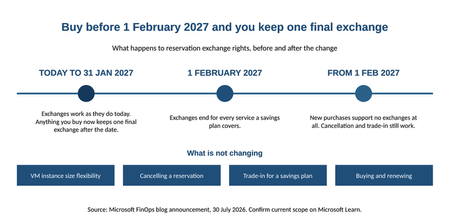
Azure gives you two main ways to pay less by committing up front. A reservation gets you the deepest discount, but you are locking in a specific SKU in a specific region. A savings plan gives up some of that discount in exchange for freedom: you are only committing to spend a certain amount per hour on compute and database services, and it does not care which region you spend it in. Until now, a reservation could move with you. If your infrastructure or database environment changed, or a workload had to move to a new region, you exchanged the reservation for one that matched where things had landed. That flexibility is why teams could commit early and adjust as the environment evolved. That flexibility is changing. From February 1, 2027, you can no longer exchange a reservation for any service that a savings plan covers. Neither product is changing. What is changing is how much room you have to adjust a commitment after your environment shifts, which means the order you make these decisions in matters a lot more than it used to. What's changing Here is what is affected as of the announcement. Compute: Azure Virtual Machines (including swapping between non-premium and premium storage), Azure Dedicated Host, and Azure App Service. Databases: Azure Database for PostgreSQL, Azure Database for MySQL, Azure DocumentDB, Azure Cosmos DB, Azure SQL Database, and Azure SQL Managed Instance. That list will grow. As savings plans start covering more services, reservations for those services automatically fall under the same rule. Products that are being retired are excluded, and so are clouds where savings plans are not offered. Two details really matter. If you own a reservation for one of these services and you bought it before February 1, 2027, you get one final exchange after that date. Just one. Buy on or after that date and you get none. Full details, including the FAQ, are in the official announcement: "Reservation exchanges for Azure services covered by savings plans end starting Feb. 1, 2027". What's staying exactly the same This is worth spelling out, because it is easy to read more into the announcement than is actually there. All of this still works. VM instance size flexibility is untouched. Cancelling a reservation is untouched. Trading a reservation in for a savings plan is still there. Buying and renewing reservations is still available, and still the right call for steady workloads. Reservations are not going anywhere. The only thing changing is your ability to swap one for another when your environment moves underneath it. The part most teams get backwards You cannot think clearly about timing without this, and it is the thing people most often have wrong: reservations and savings plans are not a choice between two options. You can use both. They stack, and they apply in a set order every hour. Reservations go first, on anything they match. The savings plan picks up what is left, up to your hourly commitment. Whatever is still uncovered bills at pay-as-you-go, using your negotiated rate. Here is one hour, made concrete. Say you have reservations covering $10 an hour of matching VMs, plus a savings plan committed at $5 an hour. In an hour where you use $18 of eligible compute, $10 gets reservation pricing, $5 gets savings plan pricing, and the last $3 bills pay-as-you-go. The savings plan did not fight the reservation for that spend. It caught the overflow. Two things people assume that are not true. The terms do not have to match: a three-year reservation and a one-year savings plan work fine side by side. And you do not tag or assign anything. Once you buy a savings plan, it looks across whatever scope you bought it at and applies itself wherever it finds a fit. That flexibility is the whole point. A savings plan ties you to an hourly amount, not to a SKU or a region. A reservation ties you to both. Before February 2027 that difference was mostly about how big a discount you got. After, it also decides how easily your commitment can follow the environment as it changes. Three rules for buying from here on Lean on savings plans while things are still moving Before you commit to anything, ask what is going to change in the next ninety days. If a team is midway through centralizing their networking and is about to delete every per-subscription VPN gateway, any recommendation you generate this week will be wrong next month. Azure Advisor rescans every day and rewrites its recommendations as your environment shifts. If a workload is mid-migration, mid-consolidation, or mid-anything, a savings plan gets you a similar discount without locking you in. Move it to a reservation once it is genuinely settled. A domain controller running around the clock in one region is the textbook reservation. Something still being actively built is not. Start short, and know why that matters now Three years gets you the best rate. Starting with one year and extending as you get more confident was always the sensible approach. Now it carries more weight, because a reservation can no longer be exchanged when your environment moves. If one stops matching, your options are to cancel it under the existing policy, or trade it in for a savings plan. That is the whole list. Buy at the business-unit level, not the tenant level Buy everything centrally and you take away each team's ability to pick what suits their own workloads. Then, when a team wants more coverage than the central purchase gives them, they go and buy their own at subscription level, and now you are paying for the same thing twice. Buying per business unit also makes chargeback far easier, because the discount ends up sitting where the spending happens. Clean up before you commit There is a step that comes before all of this, and it is not new advice. Azure Advisor already flags unattached disks, idle virtual network gateways, and VMs that should be resized or switched off. If you have not done that sweep, "Identify your savings potential in Azure" walks through the tools properly. What is new is what happens if you skip it. Leftover and idle resources do not just eat into your savings. They inflate the number you size your commitment against. Commit against a messy environment and you have just locked in one to three years of spend on resources that should not be running. Up to now, an exchange gave you a way to adjust that later. Cleaning up used to be good housekeeping. Once you cannot exchange out of a reservation, it is genuinely about limiting risk. The same goes for the workloads you are keeping. Switch off VMs outside business hours before you buy a reservation, not after. Reservations only pay off on workloads that run constantly, and once you have bought one you owe the money whether the VM is running or deallocated. Scaling up and never scaling back down is the same problem wearing a different hat. How to check it actually worked Your reservation and savings plan discounts show up on the invoice under amortized cost. Three columns tell the story. Pay-as-you-go price is the list price. Unit price is your negotiated discount, before reservations are applied. Effective price is what you genuinely paid once reservations and savings plans were counted. There is no neat query for this. You read it off the invoice. It is the clunkiest part of the whole process and it is the first thing your finance partner will ask about, so get it into your reporting now rather than during your first chargeback cycle. What to do in the next ninety days List every active reservation you hold for an affected service. Work out which ones no longer match the workload. Those are your candidates for that one remaining exchange. Decide deliberately where that one exchange does the most good. Clean up orphaned disks, idle gateways, over-replicated storage, and scale-ups nobody scaled back down. Re-baseline your commitment sizing against the tidied-up environment. Buy at business-unit level, leaning toward savings plans anywhere the workload is still changing. The takeaway Reservations and savings plans both still work, and both still save you real money. What changes on February 1, 2027 is that a reservation can no longer be exchanged when your environment moves, so the decision has to be right at the point you make it rather than adjusted afterwards. That puts the weight on sequence: clean up first, size the commitment against what is actually running, use savings plans while a workload is still settling, and move to a reservation once it has stopped moving. The deadline is not something to panic about. It is a good excuse to finally do the bit most cost programs skip.1KViews0likes0Comments
Reservation exchanges for Azure services covered by savings plans end starting Feb. 1, 2027
Starting February 1, 2027, Azure reservation exchanges will no longer be available for services covered by savings plans. This change aligns reservation exchange policy with the flexibility already offered by savings plans, and it gives you a clear, predictable framework for choosing the right commitment-based discount for each workload. This post walks through what's changing, who's affected, what stays the same, and the actions you can take today to plan ahead. What's changing If a service supports Azure savings plans, the corresponding reservation for that service will no longer support exchanges as of February 1, 2027. This change excludes products or services that are deprecated and approaching end of life, as well as cloud environments that don't currently support savings plans. The policy is forward-looking, as savings plan coverage expands, reservations for those services will follow the same policy and will not support exchanges. Affected services At the time of this announcement, the change applies to reservations for the following services: Compute services Azure Virtual Machines — including exchanges between non-premium and premium storage Azure Dedicated Host Azure App Service Database services Azure Database for PostgreSQL Azure Database for MySQL Azure DocumentDB Azure Cosmos DB Azure SQL Database Azure SQL Managed Instance Important details to plan around One final exchange. Each active reservation for an impacted service, purchased before February 1, 2027, will retain the right to one final exchange after that date. Plan how and when you want to use it. New purchases. Reservations for impacted services purchased on or after February 1, 2027, will not support exchanges. Expanding scope. As savings plan eligibility grows, additional services will automatically fall under this policy. What's not changing Reservations remain the right choice for predictable, stable workloads, and you can continue to purchase them. Specifically: Instance size flexibility for virtual machines is not impacted by this change. The reservation cancellation policy is not impacted by this change. Recommended action If you need flexibility across services and regions, consider evaluating savings plans as a discount option for dynamic and evolving workloads. Savings plans can help provide cost savings on consistent spend across compute and database services, regardless of region. You can also trade in your existing reservations for a savings plan. Alternatively, reservations remain the appropriate option for predictable, stable workloads, and you can continue to purchase them. To compare your options, see decide between a savings plan and a reservation. Frequently Asked Questions What is changing? Starting February 1, 2027, Azure reservation exchanges will no longer be available for services covered by Azure savings plans. Reservations for these services will continue to be available for purchase and renewal. Which services are affected? At the time of this announcement, the policy applies to reservations for: Compute services Azure Virtual Machines (including exchanges between non-premium and premium storage) Azure Dedicated Host Azure App Service Database services Azure Database for PostgreSQL Azure Database for MySQL Azure DocumentDB Azure Cosmos DB Azure SQL Database Azure SQL Managed Instance As Azure savings plan coverage expands, additional savings plan-eligible services may become subject to this policy. Does this apply to all Azure cloud environments? No. This change applies only to cloud environments where Azure savings plans are available. Can I still exchange reservations before February 1, 2027? Yes. Reservation exchanges will continue to be available under the current policy until February 1, 2027. Does this affect reservations I already own? Active reservations for impacted services purchased before February 1, 2027, will retain the right to one final exchange after that date. What happens after I use my final exchange? Once the final exchange is used, the resulting reservation cannot be exchanged again. Can I still purchase or renew reservations? Yes. Reservations remain available and continue to be a valuable option for stable, predictable workloads. Is Azure retiring reservations? No. Reservations remain an important commitment-based discount offering. This change affects exchangeability only. What is not changing? The following capabilities remain available: VM instance size flexibility Reservation cancellations under existing policies Reservation-to-savings-plan trade-in Reservation purchases and renewals When should I choose a savings plan instead of a reservation? Review our guidance on how to decide between a savings plan and a reservation. What should I do before February 1, 2027? Review your reservation portfolio, evaluate future flexibility needs, consider Azure savings plans where appropriate, and plan how you want to use the one final exchange available to eligible active reservations. Where can I learn more? For more information, see: Changes to the Azure reservation exchange policy Exchanges and refunds for Azure reservations Trade in reservations for a savings plan Azure savings plans Decide between a savings plan and a reservation. Policy details are subject to change and may vary based on service eligibility and contractual terms.3.9KViews0likes0CommentsCap it with GitHub, make it count with Azure: governing GitHub Copilot spend
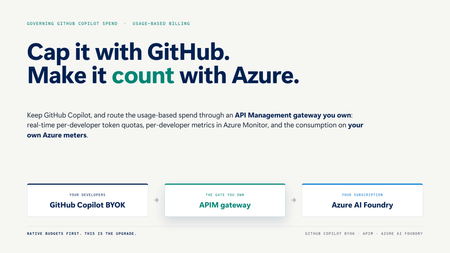
GitHub Copilot is now usage-based. Here is a working, one-command pattern to govern the spend: route Copilot BYOK through an Azure API Management gateway in front of Azure AI Foundry for real-time per-developer token quotas, per-developer metrics, and consumption on your own Azure meters.1.9KViews3likes3CommentsRight‑sizing Azure Savings Plans, one hour at a time
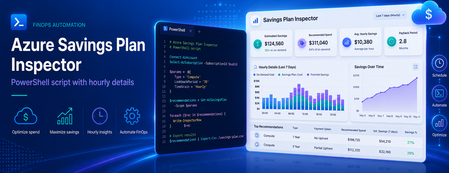
Most of us have, at some point, sized a commitment the same way we order food for a team offsite: estimate, round up, and hope nobody complains. It works for pizza. It is a less robust strategy for a three‑year Savings Plan. Azure Cost Management already produces commitment recommendations for you, and they are a great starting point. But the headline dollar figure on the portal hides the most useful signal a FinOps team can get its hands on: the hourly Pay‑As‑You‑Go (PAYG) usage that the recommendation engine actually looked at. Once you have that signal in a spreadsheet, "right‑sized" stops being a vibe and starts being a number you can defend in a steering meeting. This post walks through how to pull that data out of the Cost Management REST API, and shares a small companion PowerShell script that does the heavy lifting and produces analyst‑friendly CSV and Markdown outputs. Why a single recommended number isn't enough A Savings Plan recommendation is, at its core, an optimisation against a distribution of hourly compute spend over a lookback window. The portal typically surfaces the single commitment level that maximises savings under a "reasonable utilisation" assumption. That's a sensible default, but it answers only one question. The questions FinOps practitioners also want to answer include: What does my PAYG demand actually look like hour‑by‑hour? Smooth and predictable, or spiky and seasonal? How does coverage and savings change if I commit a bit less, or a bit more? Will the recommended commitment leave me with wastage on weekends or overnight? Can I correlate the hourly profile with maintenance windows, batch jobs, or business hours? You cannot answer those questions with a single dollar figure. You can answer all of them with the hourly series and the alternative commitment levels — and the API exposes both. What the Benefit Recommendations API gives you The endpoint is the Benefit Recommendations - List operation (api-version=2025-03-01). Pointed at any of the supported scopes — Billing Account (EA), Billing Profile (MCA), Subscription, or Resource Group — it returns one or more recommendations for the chosen lookBackPeriod (Last7Days, Last30Days, Last60Days) and term (P1Y, P3Y). The two $expand options are where the magic lives: $expand=properties/allRecommendationDetails returns an array of alternative commitment levels (AllSavingsBenefitDetails). Each entry includes commitmentAmount, coveragePercentage, benefitCost, overageCost, savingsAmount, savingsPercentage, wastageCost, and averageUtilizationPercentage. $expand=properties/usage returns the hourly PAYG charge series (usage.charges) that the engine used. Combined with properties.firstConsumptionDate and properties.lastConsumptionDate, you get a complete time‑aligned view of demand. Both expansions are cheap and worth requesting every time. They turn a single recommendation into a small, complete data product. Meet the script: Export-BenefitRecommendations.ps1 To make this useful in five minutes rather than an afternoon, there is a PowerShell script on GitHub that wraps the API call and produces ready‑to‑use artifacts. It is interactive, so there is nothing to memorise: === Azure Benefit Recommendations Export === Select billing scope kind: * [1] Billing Account (EA) [2] Billing Profile (MCA) [3] Subscription [4] Resource Group Enter choice 1-4 (default 1): 1 Billing Account ID: <your-EA-billing-account-id> Select lookback period: [1] Last7Days * [2] Last30Days [3] Last60Days Enter choice 1-3 (default 2): 3 Select term: * [1] P1Y [2] P3Y Enter choice 1-2 (default 1): 2 ... Retrieved 1 recommendation(s). It authenticates via the Az.Accounts module, always requests both $expand options, follows nextLink pagination, verifies API access up front (translating 401/403/404 into actionable hints), and writes four files using a predictable name pattern: yyyy-MM-dd-<scope>-<lookback>-<term>-AllRecommendationDetails.csv — one row per commitment alternative, ready for pivot tables. yyyy-MM-dd-<scope>-<lookback>-<term>-TopRecommendation.md — a Markdown brief on the top recommendation, including the recommended commitment row and the full alternatives table. yyyy-MM-dd-<scope>-<lookback>-<term>-HourlyUsage.csv — hour‑by‑hour PAYG usage for the top recommendation, aligned to the API's actual data window (no padding, no trailing blanks). yyyy-MM-dd-<scope>-<lookback>-<term>-Raw.json — optional full response dump, for archival or downstream tooling. The naming convention is intentional: paste a folder of these into Power BI and the dates, scopes, and terms are already in the filename. A worked example Here is a real shape from a sample Last60Days / P3Y export against an EA billing account. The AllRecommendationDetails CSV gives us four commitment alternatives: averageUtilizationPercentage,coveragePercentage,commitmentAmount,overageCost,benefitCost,savingsAmount,savingsPercentage,totalCost,wastageCost 100.000,28.868,4.124,30914.280,5889.072,6656.889,15.317,36803.352,0.000 100.000,39.168,5.848,26437.791,8350.944,8671.506,19.953,34788.735,0.000 9.984,97.883,16.359,919.948,23360.652,19179.641,44.131,24280.600,3.767 98.684,98.900,16.806,477.956,23998.968,18983.317,43.680,24476.924,315.907 Read those rows like an interactive lever: Commit $4.124/hr → 28.9% coverage, 15.3% savings, zero wastage. Safe, but most of your spend is still PAYG. Commit $5.848/hr → 39.2% coverage, 19.9% savings. Still safe, still conservative. Commit $16.359/hr → 97.9% coverage, 44.1% savings, ~$3.77 of wastage. This is the sweet spot the engine flags as recommended. Commit $16.806/hr → 98.9% coverage, 43.7% savings, but wastage jumps to $315.9 over the window. You bought more coverage and the engine charged you for it. The hourly CSV is what makes the recommendation defensible. It contains 1,428 rows — one per hour from 2026-04-11T00:00 through 2026-06-09T11:00 (the API's reported data range, not "now minus 60 days"): DateTime,HourlyPayGoUsage 2026-04-11T00:00,29.5350191832771 2026-04-11T01:00,29.566694701744 ... 2026-06-09T11:00,32.7312920192344 Drop that into Excel or Power BI, lay a horizontal line at the recommended commitmentAmount ($16.359/hr), and you immediately see how often demand sits above the line (covered by PAYG overage) versus below it (where the commitment is technically idle but, given the savings rate, still net‑positive). You can also slice by hour‑of‑day to spot weekend troughs or batch‑job spikes that change how you interpret "average utilisation." Try it yourself The script and full documentation live at github.com/DirkBrinkmann/azure-savingsplan-insights. Quickstart: git clone https://github.com/DirkBrinkmann/azure-savingsplan-insights.git cd azure-savingsplan-insights Install-Module Az.Accounts -Scope CurrentUser # if you don't already have it #Connect to Azure Connect-AzAccount #Run the script .\Export-BenefitRecommendations.ps1 You will need read permission on the scope you target — Cost Management Reader on a subscription, or Billing Reader at the billing account / billing profile level, is enough. Give it a spin against your own scope and tell us how it goes. The repo at github.com/DirkBrinkmann/azure-savingsplan-insights has Issues and Discussions enabled — bug reports, edge cases ("my response shape looks different"), feature ideas, and "I plotted this in Power BI and learned X" stories are all welcome. The script will only get better with real‑world data behind it, and yours is the kind we want to hear about. Closing nudge In FinOps terms, this is squarely an Inform phase activity: turning a black‑box recommendation into a transparent dataset your team can challenge, chart, and align on. The API has had this data all along; the script just makes it boring to extract — which is exactly what you want a FinOps tool to be. Pull a Last60Days / P3Y export for your top‑spending scope, plot the hourly line, and decide your next Savings Plan with a number you can point to. Your future self (and your finance partner) will thank you.1.3KViews2likes2CommentsAnnouncing savings plan for databases: flexible savings for modern, evolving workloads
As organizations modernize their data platforms, database environments are constantly changing. Teams migrate between services, scale across regions, and evolve architectures to support new applications and AI driven workloads. But optimizing costs in these environments can be challenging, especially when savings options require locking into specific services, regions, or configurations. To help with these challenges, we’re introducing savings plan for databases, a new way to save on eligible database services while maintaining the flexibility needed to modernize and grow your business. Savings plan for databases helps IT, engineering, and FinOps teams reduce database costs with a simple, spend based commitment—without slowing down architectural change. New: Choose a 3-year term for longer-term planning Savings plan for databases now gives you more choice in how you plan for your database investments, with 1-year and 3-year commitment options. Both terms provide the same discounted pricing, so the choice is less about finding a different discount and more about selecting the commitment period that best aligns with your business plans, workload lifecycle, and cloud strategy. The 3-year option can be a strong fit for organizations with longer-term database migration, modernization, or optimization initiatives. It provides a longer planning horizon for organizations that want predictable savings aligned to a multi-year database roadmap, while reducing the need to make a new commitment decision each year. If your database needs are changing more quickly or you prefer to reassess your commitments annually, the 1-year option may be a better fit. Choose the commitment term that matches your planning horizon: 1 year: Greater flexibility to reassess your database strategy and commitments annually. 3 years: Greater continuity for longer-term database strategies, migration and modernization programs, and multi-year planning. Whichever term you choose, savings plan for databases continues to give you the flexibility to save as your eligible database usage evolves. What is savings plan for databases? Savings plan for databases is a spend based pricing model that enables customers to save on eligible database services by committing to a fixed hourly spend for one year. In return, customers receive lower prices—up to 35% compared to pay-as-you go pricing on select services*. Instead of committing to a specific database service, region, or configuration, customers commit to an hourly dollar amount (for example, $5 per hour). The plan automatically applies savings to eligible database usage each hour, prioritizing the usage that delivers the greatest savings first—across services and regions—until the hourly commitment is met. Any usage beyond the commitment continues at pay-as-you go rates, ensuring flexibility as needs change. Pricing is for illustrative purposes only. Benefits designed for modern database workloads Flexibility as environments evolve Savings plan for databases is designed for change. Savings continue to apply as workloads modernize or move across regions—without requiring customers to repurchase or reconfigure commitments. This makes it well suited for dynamic environments where architectures are expected to evolve over time. Automatic cost optimization With a single hourly commitment, customers unlock discounted prices on eligible database usage. Savings are applied automatically each hour, ensuring customers get the most value from their commitment without manual management or constant tuning. Predictable budgeting and forecasting A fixed hourly spend replaces variable pay-as-you-go costs with a predictable commitment, making it easier for FinOps and IT finance teams to forecast spend, plan budgets, and manage cloud investments with confidence. What services that are covered with the savings plan for databases: Savings plan for databases pricing How to purchase a savings plan for databases Getting started is simple: Review personalized recommendations in the Azure portal based on recent database usage. Choose an hourly commitment and scope it into a subscription, resource group, management group, or entire account. Select a payment option—pay monthly or upfront at no additional cost—and optionally enable auto‑renewal. Once purchased, savings are applied automatically to eligible database usage every hour. Learn more here on how to purchase a savings plans here. Example: saving while modernizing Consider a team running a global application that uses Azure SQL Database and Azure Database for PostgreSQL today, with plans to expand into additional regions over the next year. Instead of purchasing individual reservations tied to specific services or regions, the team purchases a 1‑year savings plan for databases with a $5/hour commitment. As usage shifts across database services and regions, Azure automatically applies discounted prices to eligible usage up to the hourly commitment. The team continues modernizing without disruption—while benefiting from predictable savings. Summary Savings plan for databases provides a new way to optimize database costs —without locking into fixed architectures. With hourly commitments, automatic optimization, and predictable costs, it’s designed to support modernization today and continued growth tomorrow. Get started You can begin saving today: View your recommendation in Azure Advisor Purchase a plan in Azure portal Visit the Savings plan homepage Review the Microsoft Documentation Watch demo videos at the Azure Essentials Show *Customers may see savings estimated to be between 0% and 35%. The 35% savings estimate is based on one Azure SQL Database serverless running for 12 months at a pay-as-you-go rate vs. a reduced rate for a 1-year savings plan. Based on Azure pricing as of March 2026. Prices are subject to change. Actual savings may vary based on location, database service, and/or usage. ** Note that savings plan for databases will also be consumed by SQL Server on Azure Virtual Machines and SQL Server enabled by Azure Arc hourly license at the normal pay-go price.9.7KViews2likes0CommentsMicrosoft Agent Pre-Purchase Plan: One Unified Path to Scale AI Agents
AI is now essential, and at Microsoft Ignite 2025, we introduced a new foundation for intelligent agents: Work IQ, Fabric IQ, and Foundry IQ. These three IQs represent the intelligence layer that gives agents deep context; understanding how people work, connecting to enterprise data, and orchestrating knowledge across platforms. Together with the launch of Microsoft Agent Factory, organizations now have a unified program to build, deploy, and manage agents powered by these IQs. Microsoft Agent Pre-Purchase Plan (P3) is designed to for organizations looking to confidently invest in AI agent development with a single, predictable budget. It empowers businesses to experiment, build, and scale sophisticated AI agents without the friction of fragmented licensing or unexpected costs. By unifying access to agentic services across Microsoft Foundry, Microsoft Copilot Studio*, Microsoft Fabric, and GitHub, Microsoft Agent P3 empowers organizations to harness the full potential of the IQ layer thus removing barriers and unlocking the value of truly intelligent, context-driven agents. What is Microsoft Agent Pre-Purchase Plan and how to does it work? Microsoft Agent P3 is a one-year pay-upfront option. Customers commit upfront to a lump-sum pool of Agent Commit Units (ACU) that can be used at any time during the one-year term. Every time you consume eligible services across Microsoft Foundry, Microsoft Copilot Studio*, Microsoft Fabric, and GitHub, the ACUs are automatically drawn down from your P3 balance. If you use up your balance before the year ends, you can add another P3 plan or switch to pay-as-you-go. If you don’t use all your credits by the end of the year, the remaining balance expires. Pricing* *Pricing as of November 2025, subject to change. **Example if Microsoft Copilot Studio generates a retail cost of $100 based on Copilot Credit and Microsoft Foundry usage, then 100 Agent CUs (ACUs) are consumed. What is covered by the Microsoft Agent Pre-Purchase Plan? * List as of February 2026, subject to change ** Currently in Private Preview *** Covers Copilot Credits enabled agentic services: Microsoft Copilot Studio, Dynamics 365 first-party agents, and Copilot. Microsoft reserves the right to update Copilot Credit eligible products. Customer Example Suppose a customer expects to consume 1,500,000 Copilot Credit with custom agents created in Microsoft Copilot Studio. Assuming the pay-as-you-go rate for Copilot Credit to be $0.01, then at the pay-as-you-go rate, this will cost $15,000. In addition, if they are using 5000 Microsoft Foundry Provisioned Throughput Units (PTU) and assuming the pay-as-you-go rate for PTU to be $1, then at the pay-as-you-go rate, this will cost $5,000. By purchasing Tier 1 (20,000 ACUs) Microsoft Agent P3 at the cost of $19,000, it will give a 5% saving compared to the pay-as-you-go rate for the same usage. How to purchase a Microsoft Agent Pre-Purchase Plan? Sign in to the Azure portal →Reservations → + Add → Microsoft Agent Pre-Purchase Plan. Select your subscription and scope Choose your tier and complete payment. What sets Microsoft Agent Pre-Purchase Plan apart? At the heart of Microsoft Agent Pre-Purchase Plan are four pillars that redefine how organizations consume AI services: One Plan: A single offer that spans Microsoft Foundry, Microsoft Copilot Studio*, Microsoft Fabric, and GitHub. No more siloed credits or SKU-level complexity, just one pool for all your AI workloads. Breadth of Services: Access to 30+ services, from Azure AI Search and Cognitive Services to orchestration tools and Copilot-enabled experiences. One Governance Path: Simplifies procurement and budget management. Procurement teams gain visibility and control without sacrificing agility. Predictable Savings: Get discounts and avoid surprises when you choose this plan. Conclusion The Microsoft Agent Pre-Purchase Plan is designed to make your AI journey simpler, smarter, and more cost-effective. By combining the strengths of Microsoft Foundry, Microsoft Copilot Studio*, Microsoft Fabric, and GitHub into a single, unified offer, the plan eliminates the need to choose one platform or manage multiple contracts. Organizations benefit from predictable budgeting, streamlined procurement, and the flexibility to innovate across more than 30+ agentic services—all with one pool of funds. Whether you’re just starting with AI or scaling enterprise-wide adoption, the Microsoft Agent Pre-Purchase Plan empowers you to unlock the full value of Microsoft’s agentic platform—driving innovation, efficiency, and business impact. And with support for agents built on Work IQ, Fabric IQ, and Foundry IQ, customers can be confident their solutions are grounded in the latest intelligence announced at Ignite. What’s next Read the Microsoft Agent P3 Offer MS Learn Doc Purchase Microsoft Agent P3 in your Azure Portal * Covers Copilot Credits enabled agentic services: Microsoft Copilot Studio, Dynamics 365 first-party agents, and Copilot. Microsoft reserves the right to update Copilot Credit eligible products9.8KViews0likes0CommentsStreamline Analytics Spend on Microsoft Fabric with Azure Reservations
Introduction As organizations accelerate their cloud adoption, optimizing spend while maintaining performance and scalability is a top priority. Microsoft Fabric, our all-in-one, software-as-a-service data platform, is designed to help teams accomplish any data project. But how can you ensure your investment delivers maximum value? In this post, we’ll explore how Azure reservations for Microsoft Fabric can help you optimize costs, simplify purchasing, and streamline your data analytics spend. What Is Microsoft Fabric? Microsoft Fabric is an end-to-end data platform that brings together data orchestration, transformation, machine learning, real-time event processing, reporting, and databases in a single SaaS experience. It’s designed for data engineers, scientists, analysts, and business users, offering role-specific workloads and integrated AI experiences, all backed by a unified data lake—OneLake. Unlike traditional services that require managing different pricing and capacities for each workload, Fabric simplifies this with a single capacity model. You purchase Fabric Capacity Units (CUs), which power all workloads, and jobs consume CUs at different rates depending on your compute needs. How Azure reservations Work with Fabric Azure reservation is a pricing model that helps you save when you commit to a specific resource, region, and term - ideal for stable, predictable workloads. Reservations don’t affect capacity or runtime; they simply provide discount benefits. Azure analyzes your usage and recommends reservation options, and tools like Azure Advisor guide you toward the right purchase. You may be familiar with how reservations work with virtual machines, but Azure reservations can also apply to other services such as Microsoft Fabric. When purchasing Fabric, you can choose a pay-as-you-go model for flexible usage or save substantially with Azure reservations for consistent workloads. For example, if you deploy an F64 SKU in Fabric for ongoing reporting and analytics, buying an Azure reservation for this SKU ensures you pay the discounted rate for your consistent usage. How to Purchase a Reservation for Microsoft Fabric Let’s look at how you can purchase a reservation for Microsoft Fabric. Follow these steps below or watch this video: 1. Start in the Microsoft Marketplace or Azure Portal: Visit the Microsoft Marketplace and look up Microsoft Fabric. Click “Get it now” and it will take you to the Azure Portal. 2. Create Fabric Capacity: Select Configuration: In Azure Portal, on the Create Fabric Capacity page, select your subscription and resource group, name your capacity, and select your region. Select Size: Use the Fabric SKU estimator to determine the right capacity for your workloads, or start with a free trial and monitor usage with the capacity metrics app. You can always upgrade or create multiple capacities as needed. Organize with Tags: Use Azure tags to track costs and automate management across environments. 3. Buy Fabric Reservations: In the Azure portal, search for and select “Reservations.” On the Reservations page, click “Add” and select Microsoft Fabric. Choose your scope and subscription, select Fabric Capacity with upfront or monthly payments, and adjust the quantity as needed. Best Practices for Maximizing Savings To get the most value from your reservations, follow these best practices: Estimate Carefully: Avoid over-committing (which leads to wasted resources) or under-committing (which leads to higher costs). Understand your resource needs and usage and use Azure Advisor recommendations to make informed decisions. Enable Auto-Renew: Ensure your reservations automatically renew so you don’t lose the discount but adjust your reservation needs as workloads change. Monitor Usage: Use Azure Cost Management to continuously track reservation usage. Choose the Right Scope: Align reservation benefits with your organizational structure to maximize savings. Conclusion: Microsoft Fabric and Azure reservations empower organizations to streamline analytics spend, simplify purchasing, and unlock significant savings without sacrificing performance or scalability. Following best practices and leveraging the right tools ensures your cloud investments deliver maximum value. Get started today by visiting the Microsoft Marketplace and Azure Portal to purchase Fabric Capacity units and reservations or read Save costs with Microsoft Fabric Capacity reservations - Microsoft Cost Management | Microsoft Learn to learn more.563Views2likes0CommentsSmarter Cloud, Smarter Spend: How Azure Powers Cost-Efficient Innovation
In today’s dynamic business environment, organizations are under pressure to innovate rapidly while managing costs effectively. The cloud, especially with AI at the forefront, is driving transformation across industries. But with rising cloud spend and economic uncertainty, cost efficiency has become a top priority. To help customers navigate this challenge, Microsoft commissioned Forrester Consulting to conduct a Total Economic Impact™ (TEI) study. The study reveals how organizations can unlock significant financial and operational benefits by leveraging Microsoft Azure’s tools and strategic pricing offers, especially when migrating to the cloud and adopting AI. Cloud Migration: Accelerating Modernization with Azure Migrating to the cloud is a foundational step for digital transformation. But many organizations initially struggled with cost overruns, lack of visibility, and inefficient resource usage. The TEI study shows how Azure’s native tools and strategic pricing offers helped overcome these challenges. Key Enablers of Cost-Efficient Migration: Azure Hybrid Benefit: Allows organizations to optimize savings in their migration journey by giving a discount on server licenses and subscriptions and granting hosting and outsourcing benefits Azure reservations: A commitment model that enables customers to save on their spend when they commit to a specific resource, in a region, and for a specific term. Azure savings plan for compute: A flexible pricing model that enables customers to save on their cost when they commit to a spend a fixed hourly amount for a specific term. Microsoft Cost Management & Azure Advisor: Provide real-time insights and optimization recommendations. Azure Pricing Calculator: Accurately estimate migration costs and forecast budgets. “Azure reservations and Azure Hybrid Benefit facilitate moving to the cloud. With these offers and better cost management, we are saving 30% to 35%. Managing our costs without these tools would be an unpredictable nightmare.” — Senior IT Director, Manufacturing Quantified Impact*: 25% reduction in cloud spending in Year 1 using Microsoft tools. $4.9M in direct savings over three years from tool-based optimization. $3.8M in additional savings from strategic pricing offers. AI Adoption: Driving Innovation with Cost-Efficient Azure Solutions Once migrated, organizations are increasingly turning to AI to drive innovation and competitive advantage. Azure doesn’t just support AI workloads, it makes them more cost-effective and scalable. Key Enablers of AI Adoption: Azure AI Foundry Provisioned Throughput reservations: Get cost savings compared to provisioned throughput (PTU) hourly pricing. Microsoft Cost Management & Azure Advisor: Help forecast and optimize AI-related cloud spend. Strategic Pricing Offers: Enable predictable budgeting and reinvestment into AI initiatives. “Leveraging Microsoft tools and strategic pricing offers is not only increasing profitability but also putting those savings into more interesting projects like AI with fraud prevention work and the customer experience.” — VP of Analytics Engineering, Financial Services “Azure reservations for AI projects using PTUs has helped our AI initiatives. It has helped better predict costs.” — CIO, Healthcare Unquantified Benefits: Increased cloud insights and visibility. Improved governance and accountability. Enhanced productivity (24% by Year 3). The Bottom Line: Unified Transformation with Azure The TEI study concludes that Azure delivers a unified approach to cloud computing, enabling organizations to: Migrate to the cloud efficiently with cost control Adopt AI rapidly by reinvesting savings into innovation Achieve a net present value (NPV) of $8.7 million over three years Realize a 35% reduction in cloud spending in Year 1 “With Microsoft tools, we can focus on higher value projects. Instead of reviewing reports and conducting cost audits, we can build new tools and build with genAI. We can innovate faster.” — Vice President of Analytics Engineering, Financial Services Ready to Dive Deeper? This blog is just the beginning. The full Forrester TEI study is packed with insights, customer stories, and financial modeling to help you build your business case for Azure. Read the full study here *To understand benefits, costs, and risks, Forrester interviewed eight decision-makers with experience using the evaluated Azure solutions. For the purposes of this study, Forrester aggregated the results from these decision-makers into a single composite organization.866Views2likes0CommentsUnlock Savings with Copilot Credit Pre-Purchase Plan
Introduction As organizations scale their use of Microsoft Copilot Studio from building custom agents to integrating with Dynamics 365, cost predictability and optimization becomes critical. To help you plan confidently and save more, we’re introducing Copilot Credit Pre-Purchase Plan (P3)*, a simple, one‑year plan that delivers volume discounts and automatic billing, so your team can focus on outcomes, not invoices. What is Copilot Credit Pre-Purchase Plan? The P3 is a one‑year, pay‑up‑front option for Copilot Credits. You purchase Copilot Credit Commit Units (CCCU) and your usage automatically draws from this pool. Higher tiers unlock progressive discounts enabling more growth. See pricing here. How it works You pre-purchase a pool of Copilot Credits Commit Unit (CCCUs) for one year. Every time you use Copilot Credits for Microsoft Copilot Studio, Dynamics 365 first-party agents, or Copilot Chat*, the CCCUs are automatically drawn down from your P3 balance. If you use up your balance before the year ends, you can add another P3 plan or switch to pay-as-you-go. If you don’t use all your credits by the end of the year, the remaining balance expires. Example: A retail company runs 15 custom Copilot Studio agents to handle inventory checks, store operations, and customer service. They expect seasonal spike (holiday campaigns, back-to-school, and clearance events) but want predictable costs. Without P3: On the pay-as-you-go model their total cost can vary and spike as their usage goes up and down. During peak months, usage surges, and so does the bill make budgeting tough. With P3: Based on forecasting they expect to use 1,500,000 Copilot Credits over 12 months. Because they know how many Copilot Credits they plan on consuming, the retail company buys P3: Purchase P3 Tier 2: 15,000 CCCUs (this covers 1,500,000 Copilot Credits) P3 Upfront cost: $14,100 P3 discount: 6% vs PAYG Now, every time their agents run, CCCUs are automatically deducted from the P3 balance. P3 Tiers: Pricing as of October 2025, subject to change. See pricing here. Key Benefits Cost savings: Up to 20% discount at highest tier**. Budget predictability: One‑year term with upfront payment and no surprise bills. Flexibility: Add more P3 anytime; works alongside capacity packs and PAYG. No redeployment: Applies automatically to eligible usage. Defined Scope: Decide where the P3 applies based on your business needs. It can be applied at the resource group, subscription, management group, or shared level. How to Purchase Copilot Studio Pre-purchase plan Sign in to the Azure portal → Reservations → + Add → Copilot Credit Pre‑purchase Plan. Select your subscription and scope Choose your tier and complete payment. Link your subscription to Copilot Studio in Power Platform Admin Center. Best Practices Estimate accurately: Use historical usage or Copilot consumption estimator. Deploy first: Ensure environments are PAYG‑enabled before buying. Monitor utilization: Set alerts to avoid unexpected PAYG charges. Plan for renewal: Auto‑renew is on by default; adjust as needed. Conclusion If you’re scaling fast or managing multiple environments, P3 gives you predictable costs and meaningful savings without sacrificing flexibility. It’s ideal for customers with variable or growing usage who want to optimize spend and simplify billing. Copilot Credit Pre-Purchase Plan makes it easier to innovate without worrying about unpredictable costs. By committing upfront, you unlock discounts, streamline billing, and gain confidence in your budget. Ready to start? Visit the Azure portal to purchase your plan today or read the Copilot Credits Pre-purchase Plans documents to learn more. Resources: Read how to confidently scale AI agent deployments with Copilot Studio Learn more about Microsoft Copilot Studio See Microsoft Copilot Studio Licensing Guide *Copilot Credit covers Microsoft Copilot Studio, Dynamics 365 first-party agents, and Copilot Chat. Microsoft reserves the right to update Copilot Credit eligible products. ** The actual realized cost per Copilot Credit for P3 and the MCS license will depend on the utilization rate. As such customers should take into account their expected usage pattern as P3 Commit Units expire annually while the Copilot Credit capacity packs expire monthly.6.9KViews2likes0Comments