ops
3 TopicsFrom Alert to Resolved: Building a Self-Healing Azure Platform with SRE Agent
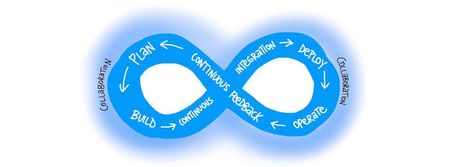
Hello Folks! It’s 3 a.m. Your phone lights up. A critical workload that spans multiple clouds is on fire, ownership is fuzzy, the alert routed to the wrong team first, and now it’s your problem. You sit up in bed, cold and groggy, and start the ritual. Open the runbook. Pull logs from one place. Pull metrics from another. Stare at three dashboards. None of them tell the whole story. So you build a theory. The theory is wrong. The clock keeps ticking. The customer impact keeps climbing. Every wrong turn costs you time, context, and confidence. That is the scene Lee Oommen opened with at MAIS14, and it is the reason Azure SRE Agent exists. In this session, Lee walks through the four classic SRE pain points and shows how an agentic operations platform compresses MTTR from hours to minutes. I am going to unpack what he showed, why it matters for IT pros, and how to get your hands on it. Why IT Pros Should Care If you carry a pager, write runbooks, or get pulled into post-mortems, this one is for you. The clock is the enemy, not the incident. Lee said it plainly: there is almost always an expert who can fix the problem. The real damage comes from the minutes spent finding that expert and reconstructing context. Dashboards lie in both directions. False positives create alert fatigue. False negatives let the customer call you before your monitors do. Neither outcome is acceptable. RCAs take weeks because the answer never lives in one layer. Infrastructure, network, deployments, dependencies, databases, app code. You need someone, or something, that can correlate across all of them in one pass. You did not become an SRE to be a dashboard watcher. Toil is the work that holds back the people who should be designing reliability into the next generation of services. What is the SRE Agent Let’s start with what it is not. It is not a dashboard. It is not a monitoring tool. It is not a chatbot. Azure SRE Agent is an end-to-end agentic operations platform. Think of it as a senior SRE who sits inside your team, works 24 by 7, never gets tired, never misses a signal, and is fluent in your stack. Reasons over telemetry, not just text. It pulls metrics, logs, traces, deployment history, and activity logs, then correlates across them. Takes governed actions. Every action runs inside the permission boundary you define. You decide whether the agent proposes a fix, asks for approval, or acts autonomously. Authors RCAs in minutes, not weeks. It traces the root cause in a single flow across the entire stack and produces the report immediately after remediation. Remembers. It captures organizational memory from every incident, every chat, and every scheduled task, then applies it to the next investigation. Lee called it the operations half of DevOps, and that framing stuck with me. We have automated build and deploy. The operations side has been stuck in toil. SRE Agent closes that loop. From Alert to Resolved (the workflow) Lee demonstrated the full loop live. Here is what it looks like end to end. Detect. The agent integrates with Azure Monitor, PagerDuty, or ServiceNow. When an alert fires, the agent acknowledges it within seconds. The human does not have to wake up cold. Investigate. The agent runs diagnostics in parallel across the connected resources. It queries Log Analytics, App Insights, Azure Monitor metrics, and any third-party observability tools you wired in through MCP connectors. Correlate. It uses distributed tracing, cross-workspace KQL queries, and time-based signal alignment to connect dots across services that do not even share trace IDs. It also checks past incidents in memory to see if this looks familiar. Diagnose. It produces a root cause analysis with the relevant evidence linked inline. No more reconstruction exercise across multiple teams. Propose or Act. Based on your run mode and the permissions granted, the agent either proposes a fix and waits for approval, or executes the remediation autonomously. Lee demonstrated both. He set up a bad slot swap on Azure App Service, generated HTTP 500 errors, watched the agent acknowledge the alert, investigate, identify the bad slot, ask for permission, and then perform the slot swap to restore the service. Close the loop. The agent files a GitHub or Azure DevOps issue with full context, opens a pull request with proposed code changes when appropriate, and writes a session insights summary you can review. Three modes to interact with it: Interactive. Chat with the agent like a copilot. Most customers start here to build trust. Reactive. Event-driven. The agent reacts to incidents from Azure Monitor, PagerDuty, or ServiceNow. One agent per incident platform. Proactive. Scheduled tasks that run every five minutes, every hour, daily, or weekly. Certificate health audits, well-architected framework assessments, cost optimization sweeps, compliance checks. Lee showed a scheduled task that flagged a certificate expiring in 50 days before it could ever fire an alert. Real-World Value This is where the conversation gets practical. A few things from Lee’s demo and the live Q&A that I want to call out. Multi-cloud reality. SRE Agent lives in Azure but is not limited to Azure. Custom runbooks, Python execution, MCP servers, and connectors let it orchestrate across AWS, GCP, and on-premises. Treat it as the central SRE brain. Your data stays yours. Each agent gets a dedicated data store in your subscription and resource group. Memory, knowledge, threads, and session insights live in your chosen region. Nothing is used to train the model provider. Encryption at rest, TLS 1.2 in transit, Azure RBAC, managed identity, customer-managed keys all apply. Identity boundary you already know. The agent uses standard Azure managed identity. Grant the identity RBAC on any cross-subscription resource it needs to reach. Least privilege still applies. Region availability. At session time, agents can be deployed in EastUS2, Sweden Central, and Australia East. The list is updating roughly monthly. Canada is coming. An agent in one region can act on resources globally, but if you have data residency rules, deploy the agent inside the same jurisdiction. Private endpoints today. If your Log Analytics Workspace or databases are fully locked down behind private endpoints with public access disabled, the agent currently needs a VNet-integrated Azure Function as a proxy. Microsoft is actively working on injecting agents directly into private networks. Memory is the multiplier. A principal engineer is more valuable than a junior engineer because of pattern recognition. SRE Agent captures that pattern recognition for the whole team, every time it investigates. Getting Started The pattern is simple, and Lee summarized it cleanly: you teach the tool, you make the connections, and it works for you. Provision the agent. Go to sre.azure.com or the Azure portal, pick a subscription and resource group, pick a region, and stand it up. Takes a few minutes. Onboard it like a new engineer. Tell it about your team, your workloads, and your procedures. Upload runbooks, troubleshooting guides, wikis, and architecture docs to the knowledge base. If you do not have these documents, ask the agent to draft them for you. Connect your observability stack. Azure Monitor, Log Analytics, App Insights are wired in by default. Add third-party tools through MCP connectors. Wire in your incident platform. Azure Monitor, PagerDuty, or ServiceNow. One agent per platform. Grant code access. Connect your GitHub or Azure DevOps repositories so the agent can reason over application code, propose fixes, and open pull requests. Pick your run mode. Start in interactive mode while you build trust. Move to approval-gated reactive mode. Graduate to autonomous mode on safe operations once you have the audit trail you trust. Resources Azure SRE Agent documentation on Microsoft Learn Azure SRE Agent product docs Get Started guide Automate incident response Official Microsoft SRE Agent GitHub repository (issues, labs, resources) Watch the Rest of the Summit If you found this useful, the rest of the Azure Infra Summit 2026 is packed with sessions on identity, AKS, deployment, storage, networking, and resiliency. Grab the full playlist here and binge what is relevant to your stack:Microsoft Azure Infra Summit 2026 Big thanks to Lee Oommen for walking us through this. The 3 a.m. pager scenario is something every one of us has lived, and seeing an agent take the first hour of that incident off your plate is a tangible win. Cheers! Pierre Roman527Views1like0CommentsAzure Cloud Shell Tips for SysAdmins: Part II - Using the Cloud Shell tools to Migrate
In my last blog post Azure Cloud Shell Tips for SysAdmins (bash) I discussed some of the tools that the Azure Cloud Shell for bash already has built into it. This time I will go a bit deeper and show you how to utilize a combination of the tools to create an UbuntuLTS Linux server. Once the server is provisioned, I will demonstrate how to use Ansible to deploy Node.js from the nodesource binary repository.9.5KViews0likes2CommentsJoin us at #MSCreate: DevOps on @LearnTV October 21, 2021
Microsoft’s Donovan Brown defines DevOps as, “the union of people, process, and products to enable continuous delivery of value to our end users.” Microsoft Create is back again and by popular demand, we are going to talk about everything DevOps. Join us at “Create: DevOps” as we discuss automation, cloud-native, infrastructure as code, and security. When: Thursday, October 21, 2021 9 AM PT – 12 PM PT Where: Microsoft LearnTV How: Register here for free DevOps Community Experts I’ll be hosting “Create: DevOps” on Microsoft Learn TV on October 21. 2021 at 9 AM PT. I’ll be joined by Steven Murawski as we welcome presentations from some amazing speakers from across DevOps. We’ll have expert community leaders like Donovan Brown, Martin Woodward, Quintessence Anx, April Edwards, Alex Hidalgo, and Kat Cosgrove speaking about subjects that make up five key pillars of DevOps. We’ll cover subjects such as culture shift, implementation of automation, cloud native applications, security, and a panel on observability. Together with our community speakers, we share with you how to break down the silos of development and operations teams with the tools and processes that set them up for success. DevOps is more than just CI/CD, it’s about cultural shifts within your organization. DevOps: A Cultural Shift DevOps looks to bring people together in IT organizations through shared goals, increased collaboration, and focus on improvement. While technology plays a key role in DevOps by implementing tools for automation, time management, and communication, ultimately a cultural shift within organizations is critical for success. DevOps is a strategy that’s been proven to work. As per the 2019 DevOps Research and Assessment report, high-performing teams using DevOps see 208x more frequent deployments, 106x faster from commit to deploy, 7x lower change failure rate, and a much faster incident recovery. This all leads to greater reliability of our systems. You’ll also get a chance to take part in a hands-on lab that provides an introductory look at some of the tools that give teams ways to automate and deploy their applications and infrastructure. Our team will be showing you how to deploy an Azure Kubernetes Cluster with the help of Infrastructure as Code tool Bicep and GitHub Actions. We’ll also explain how to create a more secure environment in sharing sensitive information by utilizing Azure Key Vault. This workshop is geared toward those just getting started with DevOps tooling. Steven Murawski, Marcus Felling, and I will demonstrate how to implement a fully automated deployment using CI/CD methodology powered by GitHub Actions. Let’s reduce our manual work and automate all the things! Get even more from this Create: DevOps event! Earn an Azure Hero Builder Badge Both Bicep and GitHub actions are great tools to help automate your infrastructure deployments on Azure. Be sure to stay with us till the end of the Workshop and learn how to automate deploying a Bicep file to Azure to earn an Azure Hero Builder Badge. We are always working to empower technical practitioners of all backgrounds. Microsoft created Azure Heroes to inspire developers to learn, coach, and build on Azure and promote a healthy, inclusive community. Earn yours while at Create: DevOps and show the world how much you’d like to give to the community. Plant a tree when you join Create: DevOps and complete a Learn Module Create cultural shifts through DevOps while impacting the planet with Ecosia. When you join Create: DevOps and complete one of the Microsoft Learn modules, we will plant a tree on your behalf. Our goal through this event is to plant over 1,440 new trees. Help restore the environment and communities all around the world. Learn more about our initiative here. Certificates will be issued after completion of Learn Module. Microsoft Learn is one of the best places to get free technical and conceptual training on subjects related to DevOps. You’ll be able to educate yourself on the latest Azure products, methods of implementation, and even have a little fun by earning experience points. Be a level ten wizard! Challenge your friends! Start your certification journey to become a DevOps Engineer with Microsoft Learn. See you there I really hope you join us for this great opportunity to hear about DevOps culture, tools, and cloud native implementation. We look forward to you being part of this very special event. When: Thursday, October 21, 2021 9 AM PT – 12 PM PT Where: Microsoft LearnTV How: Register here for free828Views0likes0Comments